Page 116 of 502
Black plate (58,1)Cadillac SRX Owner Manual (Include Mex) - 2012
3-58 Seats and Restraints
You will be using the lap-shoulder
belt to secure the child restraint in
this position. Follow the instructions
that came with the child restraint.
1. Move the seat as far back as itwill go before securing the
forward-facing child restraint.
When the passenger sensing
system has turned off the right
front passenger frontal airbag
and seat‐mounted side impact
airbag, the off indicator on
the passenger airbag status
indicator should light and stay
lit when you start the vehicle.
See Passenger Airbag Status
Indicator on page 5‑17.
2. Put the child restraint on the seat.
3. Pick up the latch plate, and run the lap and shoulder portions of
the vehicle's safety belt through
or around the restraint. The child
restraint instructions will show
you how.
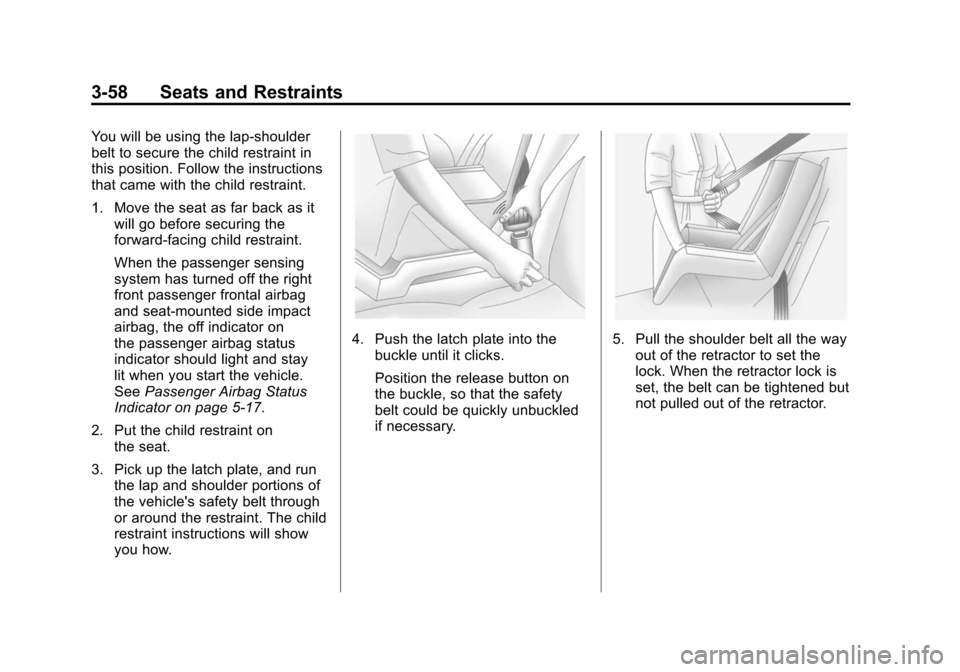
4. Push the latch plate into thebuckle until it clicks.
Position the release button on
the buckle, so that the safety
belt could be quickly unbuckled
if necessary.5. Pull the shoulder belt all the wayout of the retractor to set the
lock. When the retractor lock is
set, the belt can be tightened but
not pulled out of the retractor.
Page 117 of 502

Black plate (59,1)Cadillac SRX Owner Manual (Include Mex) - 2012
Seats and Restraints 3-59
6. To tighten the belt, push downon the child restraint, pull the
shoulder portion of the belt to
tighten the lap portion of the belt,
and feed the shoulder belt back
into the retractor. When installing
a forward-facing child restraint, it
may be helpful to use your knee
to push down on the child
restraint as you tighten the belt. Try to pull the belt out of the
retractor to make sure the
retractor is locked. If the
retractor is not locked, repeat
Steps 5 and 6.
If the vehicle does not have a
rear seat and the child restraint
has a top tether, follow the child
restraint manufacturer's
instructions regarding the use of
the top tether. See
Lower
Anchors and Tethers for
Children (LATCH System) on
page 3‑45 for more information.
7. Before placing a child in the child restraint, make sure it is
securely held in place. To check,
grasp the child restraint at the
safety belt path and attempt to
move it side to side and back
and forth. When the child
restraint is properly installed,
there should be no more than
2.5 cm (1 in) of movement. If the airbags are off, the off
indicator in the passenger airbag
status indicator will come on and
stay on when the vehicle is started.
If a child restraint has been installed
and the on indicator is lit, see
“If the
On Indicator is Lit for a Child
Restraint” underPassenger Sensing
System on page 3‑30 for more
information.
To remove the child restraint,
unbuckle the vehicle safety belt and
let it return to the stowed position.
Page 122 of 502
Black plate (4,1)Cadillac SRX Owner Manual (Include Mex) - 2012
4-4 Storage
Remove the Cargo Cover
1. Remove the cover from thechannels and carefully roll it
back up.
2. Slide the button on the top torelease the cartridge.
3. Pull up to remove the cartridge from the pins.
{WARNING
An improperly stored cargo cover
could be thrown about the vehicle
during a collision or sudden
maneuver. Someone could be
injured. If the cover is removed,
always store it in the proper
storage location. When it is
replaced, always be sure that it is
securely reattached.
Cargo Tie-Downs
For vehicles equipped with cargo
tie‐downs, the four tie-downs are
located in the rear compartment of
the vehicle. Use the tie-downs to
secure small loads.
Cargo Management
System
To open the cargo management
system, press the handle to unlatch
and then lift up.
Page 123 of 502

Black plate (5,1)Cadillac SRX Owner Manual (Include Mex) - 2012
Storage 4-5
A prop rod locks to hold the cover
up when opened.
Four hooks are located on the
inside cover and can be used for
storing items.
There may be additional storage
compartments on each side of the
cargo management system. Lift the
panel up to open.Press the red button on the prop rod
to close the cover.
Rear Storage Area
{WARNING
An improperly latched and closed
cargo cover, or cargo cover left in
the open position, could be
thrown about the vehicle during a
crash or sudden maneuver.
Someone could be injured.(Continued)
WARNING (Continued)
Be sure to return the cover to the
closed position and latch before
driving. If the cover is removed,
always store it outside of the
vehicle. When it is replaced,
always be sure that it is
securely reattached.
To access the rear storage areas of
the cargo management system, and
the tire sealant and compressor kit:
1. Remove the cargo cover, if equipped.
2. Open the cargo management system cover.
Page 124 of 502
Black plate (6,1)Cadillac SRX Owner Manual (Include Mex) - 2012
4-6 Storage
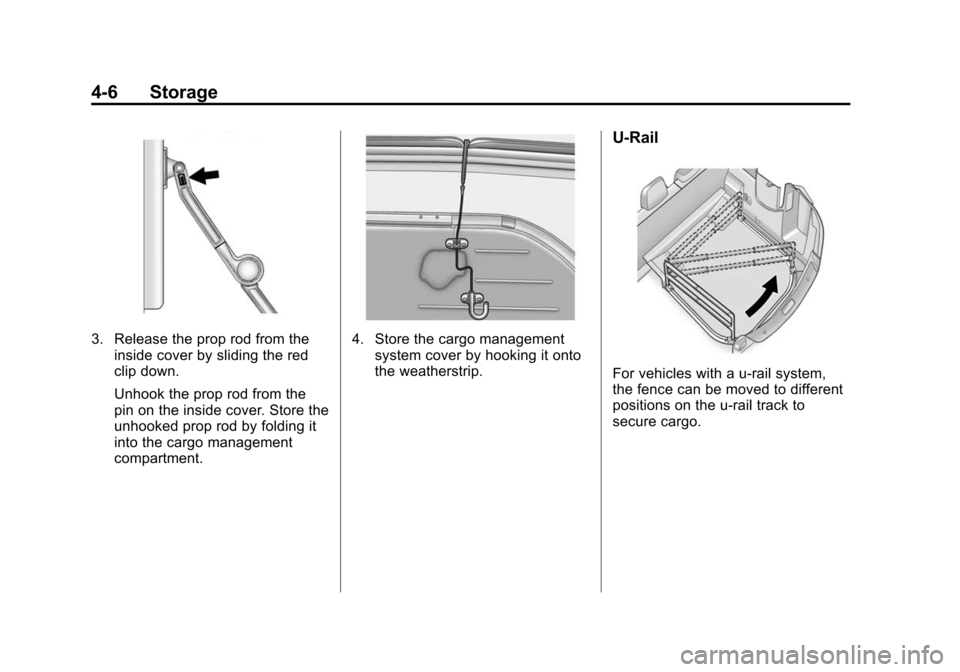
3. Release the prop rod from theinside cover by sliding the red
clip down.
Unhook the prop rod from the
pin on the inside cover. Store the
unhooked prop rod by folding it
into the cargo management
compartment.4. Store the cargo managementsystem cover by hooking it onto
the weatherstrip.
U-Rail
For vehicles with a u-rail system,
the fence can be moved to different
positions on the u-rail track to
secure cargo.
Page 125 of 502
Black plate (7,1)Cadillac SRX Owner Manual (Include Mex) - 2012
Storage 4-7
Push both adapter buttons to move
the adapters (B) on the straight part
of the u-rail.
To move the fence around the u-rail,
disconnect one side:
1. Unlock by turning the latch (A) toalign
Kwith the arrow on the
adapter (B).
2. Push the adapter button to move the adapters (B) to the desired
position. 3. Reinstall the fence and lock both
latches (A) by turning to align
Q
with the arrow on the
adapter (B).
Use the fence to secure items in
place.
Removing the Fence
Unlock by turning both latches (A) to
align
Kwith the arrow on the
adapter (B). Lift and remove
the fence. Installing the Fence
Insert the fence into the adapters
and lock both latches (A) by turning
to align
Qwith the arrow on the
adapter (B).
Storing the Fence
1. Lift the cargo management system cover.
2. Release the cover from the prop rod as described in the
previous steps.
Page 127 of 502

Black plate (9,1)Cadillac SRX Owner Manual (Include Mex) - 2012
Storage 4-9
Cargo Net
{WARNING
Do not stack items higher than
the upper end of the cargo net or
hang anything from the net. Avoid
items that have sharp edges or
that apply excessive force to the
net. If items are not properly
stored, damage to the net could
occur and items can be thrown
about the vehicle. You or others
could be injured. Always store
items behind the net.
For vehicles equipped with a cargo
net, it can be used to store light
loads, keeping them from falling
over or being thrown into the cabin
during heavy braking.
The net should not be overloaded or
used to store heavy loads. There are four openings in the
headliner: two located behind the
front seats and two behind the
rear seats.
1. Insert the top corners of the
cargo net into the large opening
in the headliner and secure by
sliding them into the small
opening.
2. The rear seatbacks should be folded down when the net is
installed in the headliner
opening located behind the
front seats.
3. Mount the cargo net to therear seat tethers located on the
back of the folded down rear
seats and pull on the straps to
tighten the net.
4. When the net is installed in the headliner opening located
behind the rear seats, the rear
seatbacks should be upright.
Page 129 of 502

Black plate (11,1)Cadillac SRX Owner Manual (Include Mex) - 2012
Storage 4-11
Roof Rack System
{WARNING
If something is carried on top of
the vehicle that is longer or wider
than the roof rack—like paneling,
plywood, or a mattress —the
wind can catch it while the vehicle
is being driven. The item being
carried could be violently torn off,
and this could cause a collision
and damage the vehicle. Never
carry something longer or wider
than the roof rack on top of the
vehicle unless using a GM
certified accessory carrier.
For vehicles with a roof rack, the
rack can be used to load items.
For roof racks that do not have
crossrails included, GM Certified
crossrails can be purchased as an
accessory. See your dealer for
additional information. Notice:
Loading cargo on the
roof rack that weighs more than
100 kg (220 lbs) or hangs over the
rear or sides of the vehicle may
damage the vehicle. Load cargo
onto the roof rack so that it rests
evenly between the siderails,
making sure to fasten cargo
securely.
To prevent damage or loss of cargo
when driving, check to make sure
crossrails and cargo are securely
fastened. Loading cargo on the roof
rack will make the vehicle’ s center
of gravity higher. Avoid high speeds, sudden starts,
sharp turns, sudden braking,
or abrupt maneuvers; otherwise it
may result in loss of control.
If driving for a long distance, on
rough roads, or at high speeds,
occasionally stop the vehicle to
make sure the cargo remains in its
place. Do not exceed the maximum
vehicle capacity when loading the
vehicle. For more information on
vehicle capacity and loading, see
Vehicle Load Limits on page 9‑12.