2012 CADILLAC SRX run
[x] Cancel search: runPage 183 of 502

Black plate (3,1)Cadillac SRX Owner Manual (Include Mex) - 2012
Lighting 6-3
Daytime Running
Lamps (DRL)
Daytime Running Lamps (DRL) can
make it easier for others to see the
front of your vehicle during the day.
Fully functional daytime running
lamps are required on all vehicles
first sold in Canada.
A light sensor on top of the
instrument panel makes the DRL
work, so be sure it is not covered.
The DRL system makes the
low‐beam headlamps come on at a
reduced brightness or for vehicles
with High Intensity Discharge (HID)
headlamps, the DRL lights will come
on when the following conditions
are met:
.The ignition is in the
ON/RUN mode.
.The exterior lamps control is
in AUTO.
.The engine is running.When the DRL are on, only the
low‐beam headlamps, at a reduced
level of brightness, will be on. The
high‐beam headlamps, taillamps,
sidemarker, instrument panel lamps,
and other lamps will not be on.
The headlamps automatically
change from DRL to the regular
headlamps depending on the
darkness of the surroundings.
The other lamps that come on with
the headlamps will also come on.
When it is bright enough outside,
the headlamps go off and the DRL
come on.
To turn the DRL lamps off or on
again, turn the exterior lamps
control to the off position and then
release. For vehicles first sold in
Canada, the DRL cannot be
turned off.
Adaptive Forward
Lighting (AFL)
For vehicles with uplevel
headlamps, the Adaptive Forward
Lighting System (AFL) adjusts the
headlamps to provide greater road
illumination in various driving
conditions.
To enable AFL, set the exterior
lamp control to the AUTO position.
Moving the control out of the AUTO
position will deactivate the system.
AFL will operate when the vehicle
speed is greater than 3 km/h
(2 mph). AFL will not operate when
the transmission is in R (Reverse).
AFL is not immediately operable
after starting the vehicle; driving a
short distance is required to
calibrate the AFL. See
Exterior
Lamp Controls on page 6‑1.
Page 184 of 502

Black plate (4,1)Cadillac SRX Owner Manual (Include Mex) - 2012
6-4 Lighting
Curve Lighting
The light beam pivots based on the
steering wheel position and vehicle
speed of at least 10 km/h (6 mph).
The headlamps shine at an angle of
up to 15 degrees to the right or left
of the direction of travel.
Highway Lighting
If the vehicle is traveling straight
continuously at high speeds, the
light beam automatically raises
slightly to increase the headlamp
range.
City Lighting
If the vehicle speed is less than
50 km/h (31 mph), the headlamp
range is automatically reduced.Twilight Sentinel
This feature automatically turns the
lamps on and off. A light sensor on
top of the instrument panel makes
the Twilight Sentinel
®work, so be
sure it is not covered. With Twilight Sentinel the following
will happen:
.When it is dark enough outside,
and the exterior lamp control is
in the AUTO position, the
Daytime Running Lamps (DRL)
go off, and the headlamps and
parking lamps come on. The
other lamps that come on with
the headlamps also come on.
.When it is bright enough outside,
the headlamps go off, and the
DRL come on, as long as the
exterior lamp control is in the
AUTO position. See
Exterior
Lamp Controls on page 6‑1.
Page 233 of 502
Black plate (43,1)Cadillac SRX Owner Manual (Include Mex) - 2012
Infotainment System 7-43
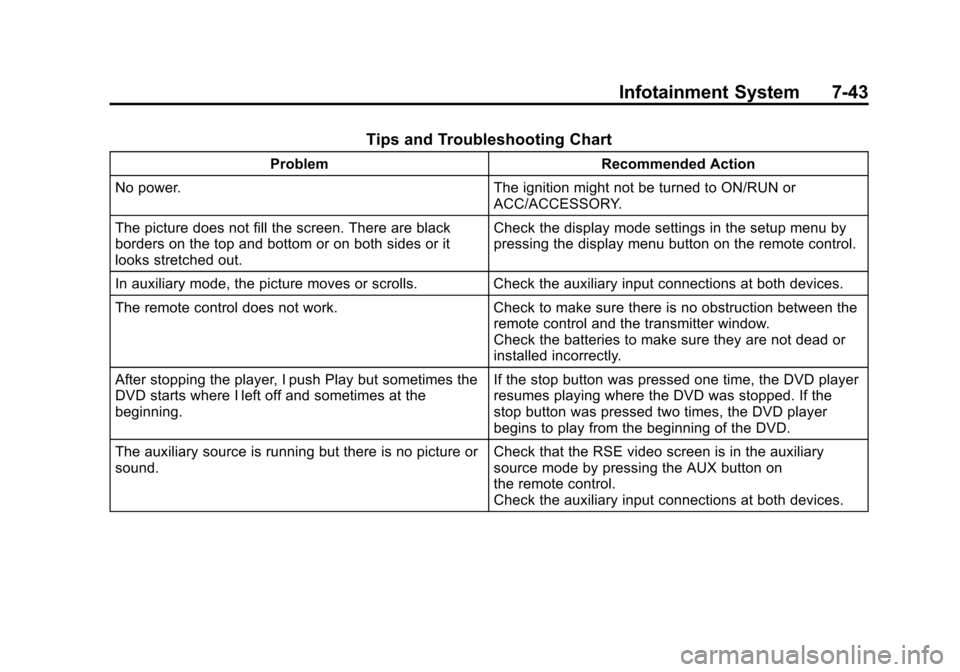
Tips and Troubleshooting Chart
ProblemRecommended Action
No power. The ignition might not be turned to ON/RUN or
ACC/ACCESSORY.
The picture does not fill the screen. There are black
borders on the top and bottom or on both sides or it
looks stretched out. Check the display mode settings in the setup menu by
pressing the display menu button on the remote control.
In auxiliary mode, the picture moves or scrolls. Check the auxiliary input connections at both devices.
The remote control does not work. Check to make sure there is no obstruction between the
remote control and the transmitter window.
Check the batteries to make sure they are not dead or
installed incorrectly.
After stopping the player, I push Play but sometimes the
DVD starts where I left off and sometimes at the
beginning. If the stop button was pressed one time, the DVD player
resumes playing where the DVD was stopped. If the
stop button was pressed two times, the DVD player
begins to play from the beginning of the DVD.
The auxiliary source is running but there is no picture or
sound. Check that the RSE video screen is in the auxiliary
source mode by pressing the AUX button on
the remote control.
Check the auxiliary input connections at both devices.
Page 237 of 502

Black plate (47,1)Cadillac SRX Owner Manual (Include Mex) - 2012
Infotainment System 7-47
Phone
Bluetooth (Overview)
For vehicles equipped with
Bluetooth capability, the system can
interact with many cell phones,
allowing:
.Placement and receipt of calls in
a hands-free mode.
.Sharing of the cell phone’s
address book or contact list with
the vehicle.
To minimize driver distraction,
before driving, and with the
vehicle parked:
.Become familiar with the
features of the cell phone.
Organize the phone book and
contact lists clearly and delete
duplicate or rarely used entries.
If possible, program speed dial
or other shortcuts.
.Review the controls and
operation of the infotainment
system.
.Pair cell phone(s) to the vehicle.
The system may not work with
all cell phones. See “Pairing”in
this section for more information.
.If the cell phone has voice
dialing capability, learn to use
that feature to access the
address book or contact list. See
“Voice Pass-Thru” in this section
for more information.
.See “Storing and Deleting Phone
Numbers” in this section for
more information.
{WARNING
When using a cell phone, it can
be distracting to look too long or
too often at the screen of the
phone or the infotainment
(navigation) system.
(Continued)
WARNING (Continued)
Taking your eyes off the road too
long or too often could cause a
crash resulting in injury or death.
Focus your attention on driving.
Vehicles with a Bluetooth system
can use a Bluetooth‐capable cell
phone with a Hands‐Free Profile to
make and receive phone calls.
The infotainment system and voice
recognition are used to control the
system. The system can be used
while in ON/RUN or ACC/
ACCESSORY. The range of the
Bluetooth system can be up to
9.1 m (30 ft). Not all phones support
all functions and not all phones work
with the Bluetooth system. See
www.gm.com/bluetooth for more
information about compatible
phones.
Page 248 of 502

Black plate (58,1)Cadillac SRX Owner Manual (Include Mex) - 2012
7-58 Infotainment System
Transferring a Call
Audio can be transferred between
the Bluetooth system and the
cell phone.
The cell phone must be paired and
connected with the Bluetooth
system before a call can be
transferred. The connection process
can take up to two minutes after the
ignition is turned to ON/RUN.
To Transfer Audio from the
Bluetooth System to a Cell Phone
During a call with the audio in the
vehicle:
1. Press
b/g.
2. Say “Transfer Call.”
To Transfer Audio to the Bluetooth
System from a Cell Phone
During a call with the audio on the
cell phone, press
b/g. The audio
transfers to the vehicle. If the audio
does not transfer to the vehicle, use
the audio transfer feature on the cell phone. See your cell phone
manufacturer's user guide for more
information.
Voice Pass-Thru
Voice pass‐thru allows access to the
voice recognition commands on the
cell phone. See your cell phone
manufacturer's user guide to see if
the cell phone supports this feature.
To access contacts stored in the cell
phone:
1. Press
b/g. The system
responds “Ready,”followed by
a tone.
2. Say “Bluetooth.” This command
can be skipped.
3. Say “Voice.” The system
responds “OK, accessing
The cell phone's normal prompt
messages will go through their cycle
according to the phone's operating
instructions.
Dual Tone Multi-Frequency
(DTMF) Tones
The Bluetooth system can send
numbers and the numbers stored as
name tags during a call. You can
use this feature when calling a
menu‐driven phone system.
Account numbers can also be
stored for use.
Sending a Number or Name Tag
During a Call
1. Press
b/g. The system
responds “Ready,”followed by
a tone.
2. Say “Dial.”
3. Say the number or name tag to send.
Page 249 of 502

Black plate (59,1)Cadillac SRX Owner Manual (Include Mex) - 2012
Infotainment System 7-59
Clearing the System
Unless information is deleted out of
the in‐vehicle Bluetooth system, it
will be retained indefinitely. This
includes all saved name tags in the
phone book and phone pairing
information. For information on how
to delete this information, see the
previous sections on“Deleting a
Paired Phone” and“Deleting
Name Tags.”
Bluetooth
(UHP Mexico Only)
General Information
Vehicles with a Universal
Hands‐free Phone (UHP) system
can use a Bluetooth
®capable
mobile phone with a Hands-Free
Profile to make and receive phone
calls. The infotainment system and
voice control are used to control the
system. The system can be used
while the ignition is in ON/RUN or
ACC/ACCESSORY. The range of the UHP system can
be up to 10 m (33 ft). Not all phones
support all functions and not all
phones work with the UHP system.
Other Information
The Bluetooth word mark and logos
are owned by the Bluetooth®SIG,
Inc. and any use of such marks by
General Motors is under license.
Other trademarks and trade names
are those of their respective owners.
UHP Controls
Use the buttons located on the
infotainment system and the
steering wheel to operate the UHP
system.
Steering Wheel Controls
Steering wheel controls can be
used to:
.Answer incoming calls
.Confirm system information
.Start voice recognition
.End a call
.Reject a call
.Cancel an operation
.Make outgoing calls using the
call list
b/g(Push To Talk) : Press to
answer incoming calls, to confirm
system information, and to start
voice control. Press and hold for two
to three seconds to access the
call list.
$/i(End call/Mute) : Press to
end a call, reject a call, or to cancel
an operation.
To make outgoing calls using the
call list.
1. Press the
b/gbutton.
2. Highlight the phone number by toggling the SRC switch up
or down.
3. Dial the highlighted number by pressing the
b/gbutton.
Page 267 of 502

Black plate (3,1)Cadillac SRX Owner Manual (Include Mex) - 2012
Climate Controls 8-3
8(Upper):Air is directed to the
windshield outlets.
7(Hi-Level): Air is divided
between the windshield and
instrument panel outlets.
0(Defrost): Clears the
windshield of fog or frost more
quickly. Air is directed to the
windshield.
#(Air Conditioning): Press to
turn the automatic air conditioning
on or off. If the fan is turned off or
the outside temperature falls below
freezing, the air conditioner will
not run.
Press AUTO to return to automatic
operation and the air conditioner
runs as needed. When the indicator
light is on, the air conditioner runs
automatically to cool the air inside
the vehicle or to dry the air needed
to defog the windshield faster.
h(Recirculation): Press to turn
on recirculation. An indicator light
comes on. Air is recirculated to
quickly cool the inside of the vehicle
or prevent outside air and odors
from entering.
Automatic Air Recirculation:
When the AUTO indicator light is
on, the air is automatically
recirculated as needed to help
quickly cool the inside of the
vehicle.
The climate control system may
have a sensor to detect air pollution.
In auto recirculation control, the Air
Quality Control system may operate.
To adjust the sensitivity of the Air
Quality Control, see “Climate and
Air Quality” underVehicle
Personalization on page 5‑40. Auto Defog:
The climate control
system may have a sensor to
automatically detect high humidity
inside the vehicle. When high
humidity is detected, the climate
control system may adjust to
outside air supply and turn on the
air conditioner. If the climate control
system does not detect possible
window fogging, it returns to normal
operation. To turn Auto Defog off or
on, see “Climate and Air Quality”
under Vehicle Personalization on
page 5‑40.
%(Outside Air): Press to turn
on outside air. An indicator light
comes on. Outside air is circulated
through the vehicle.
Page 268 of 502

Black plate (4,1)Cadillac SRX Owner Manual (Include Mex) - 2012
8-4 Climate Controls
Rear Window Defogger
=(Rear Window Defogger):
Press to turn the rear window
defogger on or off.
The rear window defogger
turns off automatically after about
10 minutes. If turned on again it
runs for about five minutes before
turning off. At higher speeds, the
rear window defogger may stay
on continuously.
The rear window defogger can
be set to automatic operation.
See “Climate and Air Quality”
under Vehicle Personalization on
page 5‑40. When Auto Rear Defog
is selected, the rear window
defogger turns on automatically
when the interior temperature is cold
and the outside temperature is
about 40°F and below. The auto
rear defogger turns off automatically
after about 10 minutes. At higher
speeds, the rear window defogger
may stay on continuously. The heated outside rearview mirrors
turn on when the rear window
defogger button is on and help to
clear fog or frost from the surface of
the mirrors. See
Heated Mirrors on
page 2‑21.
Notice: Do not try to clear frost
or other material from the inside
of the front windshield and rear
window with a razor blade or
anything else that is sharp. This
may damage the rear window
defogger grid and affect your
radio's ability to pick up stations
clearly. The repairs would not be
covered by your warranty.
Heated and Ventilated Seats:
Press to heat or ventilate the seat.
See Heated and Ventilated Front
Seats on page 3‑10. Remote Start Climate Control
Operation:
For vehicles with the
remote vehicle start feature, the
climate control system may run
when the vehicle is started remotely.
The system uses the driver's
previous settings to heat or cool the
inside of the vehicle. See Remote
Vehicle Start on page 2‑9.
The rear window defogger turns on
if it is cold outside.
Sensors
The solar sensor, located on top
of the instrument panel near the
windshield, monitors the solar heat.
The climate control system uses
the sensor information to adjust
the temperature, fan speed,
recirculation, and air delivery mode
for best comfort.
If the sensor is covered, the
automatic climate control system
may not work properly.