2012 CADILLAC ESCALADE service
[x] Cancel search: servicePage 201 of 538

Black plate (17,1)Cadillac Escalade/Escalade ESV Owner Manual - 2012
Infotainment System 7-17
Radio Reception
Frequency interference and static
can occur during normal radio
reception if items such as cell phone
chargers, vehicle convenience
accessories, and external electronic
devices are plugged into the
accessory power outlet. If there is
interference or static, unplug the
item from the accessory power
outlet.
AM
The range for most AM stations is
greater than for FM, especially at
night. The longer range can cause
station frequencies to interfere
with each other. For better radio
reception, most AM radio stations
boost the power levels during the
day, and then reduce these levels
during the night. Static can also
occur when things like storms and
power lines interfere with radio
reception. When this happens, try
reducing the treble on the radio.
FM Stereo
FM signals only reach about
16 to 65 km (10 to 40 mi). Although
the radio has a built-in electronic
circuit that automatically works to
reduce interference, some static
can occur, especially around tall
buildings or hills, causing the sound
to fade in and out.
XM™Satellite Radio Service
XM Satellite Radio Service gives
digital radio reception from coast to
coast in the 48 contiguous United
States, and in Canada. Just as
with FM, tall buildings or hills can
interfere with satellite radio signals,
causing the sound to fade in and
out. In addition, traveling or standing
under heavy foliage, bridges,
garages, or tunnels may cause loss
of the XM signal for a period of time.
Cellular Phone Usage
Cellular phone usage may cause
interference with the vehicle's radio.
This interference may occur when
making or receiving phone calls,
charging the phone's battery,
or simply having the phone on.
This interference causes an
increased level of static while
listening to the radio. If static is
received while listening to the radio,
unplug the cellular phone and turn
it off.
Rear Side Window
Antenna
The AM-FM antenna is located in
the passenger rear side windows.
Make sure the inside surfaces of the
rear side windows are not scratched
and that the lines on the glass are
not damaged. If the inside surfaces
are damaged, they could interfere
with radio reception.
Page 244 of 538

Black plate (60,1)Cadillac Escalade/Escalade ESV Owner Manual - 2012
7-60 Infotainment System
Maps
This section includes basic
information that you need to
know about the map database.
The maps are stored on a compact
flash drive that is built into the
navigation system.
Detailed Areas
Road network attributes are
contained in the map database for
detailed areas. Attributes include
information such as street names,
street address, turn restrictions, etc.
A detailed area includes all major
highways, service roads, and
residential roads. The detailed areas
include points of interest (POI) such
as: restaurants, airports, banks,
hospitals, police stations, gas
stations, tourist attractions, historical
monuments, etc. The map database
may not include data for newly
constructed areas or map database
corrections that are completed after
the production of the compact flashdrive. The navigation system
provides full route guidance in
the detailed map areas.
Limited Guidance Areas
Any area that is not classified as
detailed, is a limited guidance
area. Limited guidance streets are
displayed on the map but route
guidance may not be given on these
streets. Some POI categories, such
as the city center POI category, and
some street addresses are included
in the limited guidance areas.
The navigation system informs
through voice prompts when you are
traveling into a limited guidance
area where route guidance is not
available. The street maps and the
directional arrow displayed on the
navigation system can then be used
to determine the remaining route to
your destination.
Map Adjustments
The system lets you adjust the scale
of view on the map. Also, as you
drive, the map scrolls automatically
based on the direction of travel.
Map Scales
+ /
−(Zoom In/Zoom Out): Press
the zoom in or out screen buttons or
the scale on the bar to change the
level of map detail. The scale
appears on the screen once the
zoom in or zoom out screen buttons
are selected. The system adjusts
the map accordingly. The scale of a
map can range from 1/32 mi (50 m)
to 256 mi (400 km). To change
English or metric, see Driver
Information Center (DIC) on
page 5‑24 for more information.
Page 259 of 538

Black plate (75,1)Cadillac Escalade/Escalade ESV Owner Manual - 2012
Infotainment System 7-75
Low Fuel Warning
When the fuel in the vehicle
becomes low, a pop-up displays
“Fuel is low. Search for nearby Gas
station?”
1. Press OK to show a list ofnearby gas stations.
2. Press GO next to the desired gas station for location
information.
3. Press Cancel if the list of Near Gas Station is not needed.
For more information, see Driver
Information Center (DIC) on
page 5‑24.
OnStar®Destination Download
(US and Canada)
OnStar Destination Download
(if equipped) is a service available
for OnStar subscribers that makes
operating your navigation system
much simpler. It allows subscribers
to request and receive navigation
assistance on-the-go.
Using OnStar®Destination
Download (US and Canada)
Press the blue OnStar button
and an Advisor can locate a
point-of-interest or an address and
download the necessary information
or coordinates to your navigation
system. Once the destination is
downloaded, the navigation system
will search for the address in the
mapping disc's database. When the
address is found, it will be shown on
your navigation system's screen
along with the buttons described
below.OnStar Destination Download
Screen
.Press GO, the navigation system
calculates route(s). Select a
route (i.e. Shortest Route), and
Start Guidance.
.Press Map, the navigation
system displays the Destination
Map Screen.
Page 269 of 538
Black plate (85,1)Cadillac Escalade/Escalade ESV Owner Manual - 2012
Infotainment System 7-85
XM NavTraffic (USA and
Canada)
Vehicles with the navigation system
have an XM NavTraffic receiver. XM
NavTraffic is a subscription service
provided via XM Satellite Radio. XM
NavTraffic provides real-time traffic
information fully integrated to the
navigation system to display current
traffic conditions for a driver’s
chosen route. XM NavTraffic allows
drivers to make the most informed,
timesaving routing decisions.
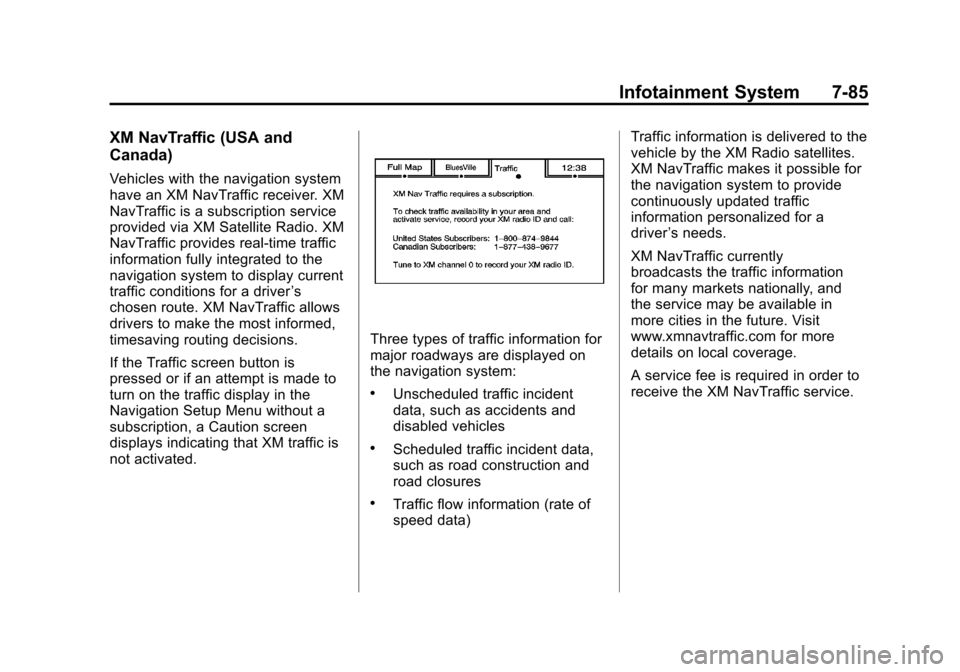
If the Traffic screen button is
pressed or if an attempt is made to
turn on the traffic display in the
Navigation Setup Menu without a
subscription, a Caution screen
displays indicating that XM traffic is
not activated.
Three types of traffic information for
major roadways are displayed on
the navigation system:
.Unscheduled traffic incident
data, such as accidents and
disabled vehicles
.Scheduled traffic incident data,
such as road construction and
road closures
.Traffic flow information (rate of
speed data) Traffic information is delivered to the
vehicle by the XM Radio satellites.
XM NavTraffic makes it possible for
the navigation system to provide
continuously updated traffic
information personalized for a
driver
’s needs.
XM NavTraffic currently
broadcasts the traffic information
for many markets nationally, and
the service may be available in
more cities in the future. Visit
www.xmnavtraffic.com for more
details on local coverage.
A service fee is required in order to
receive the XM NavTraffic service.
Page 280 of 538

Black plate (96,1)Cadillac Escalade/Escalade ESV Owner Manual - 2012
7-96 Infotainment System
.It may take a long time to
operate automatic rerouting
during high-speed driving.
.Automatic rerouting may display
a route returning to the set
stopover if you are heading for
a destination without passing
through a set stopover.
.The route prohibits the entry of a
vehicle due to a regulation by
time or season or any other
regulation which may be given.
.Some routes may not be
searched.
.The route to the destination may
not be shown if there are new
roads, if roads have recently
changed, or if certain roads are
not listed on the map DVD.
SeeDatabase Coverage
Explanations on page 7‑97
To recalibrate the vehicle's position
on the map, see your dealer.
If the System Needs
Service
If the navigation system needs
service and the steps listed here
have been followed but there are
still problems, see your dealer for
assistance.
Map Data Updates
The navigation map database is
stored on a compact flash card. It is
usable only in this type of navigation
system, and will not function in other
electronic devices.
The map in the vehicle was installed
by the factory and is the most
up-to-date information available
as the vehicle was produced. This
map may have to be updated
periodically, provided that the map
information has changed. See your
dealer for service.
Ordering Map Data Updates
The map database in the vehicle is
the most up-to-date information
available when the vehicle was
produced. The map database is
updated periodically, provided that
the map information has changed.
United States and Canada
For any questions about the
system or the update process,
contact the GM Nav Disc
Center toll-free phone number,
1-877-NAV-DISC (1-877-628-3472)
or go to the center's website,
www.gmnavdisc.com. For any
updates or replacements, call the
GM Nav Disc Center or order the
new database online. Have the
Vehicle Identification Number (VIN)
available when ordering to ensure
the correct and most up-to-date map
database for the vehicle is sent.
See “Vehicle Identification Number
(VIN)” in the index of the vehicle
owner manual for more information.
Page 289 of 538

Black plate (105,1)Cadillac Escalade/Escalade ESV Owner Manual - 2012
Infotainment System 7-105
Using the“Dial”or“Call”
Command
1. Press and hold
b/gfor
two seconds.
2. Say “Dial”or“Call.”
3. Say the entire number without pausing, or say the name tag.
Once connected, the person called
will be heard through the audio
speakers.
Using the “Digit Dial” Command
The digit dial command allows a
phone number to be dialed by
entering the digits one at a time.
After each digit is entered, the
system repeats back the digit it
heard followed by a tone.
If an unwanted number is
recognized by the system, say
“Clear” at any time to clear the last
number. To hear all of the numbers
recognized by the system, say
“Verify”
at any time.
1. Press and hold
b/gfor
two seconds.
2. Say “Digit Dial.”
3. Say each digit, one at a time, that you want to dial. After each
digit is entered, the system
repeats back the digit it heard
followed by a tone. After the
last digit has been entered,
say “Dial.”
Once connected, the person called
will be heard through the audio
speakers.
Using the “Re‐dial”Command
1. Press and hold
b/gfor
two seconds.
2. After the tone, say “Re‐dial.”
Once connected, the person called
will be heard through the audio
speakers.
Receiving a Call
When an incoming call is received,
the audio system mutes and a ring
tone is heard in the vehicle.
.Pressb/gto answer the call.
.Pressc/xto ignore a call.
Call Waiting
Call waiting must be supported on
the cell phone and enabled by the
wireless service carrier.
.Pressb/gto answer an
incoming call when another call
is active. The original call is
placed on hold.
.Pressb/gagain to return to
the original call.
.To ignore the incoming call, no
action is required.
.Pressc/xto disconnect the
current call and switch to the call
on hold.
Page 290 of 538

Black plate (106,1)Cadillac Escalade/Escalade ESV Owner Manual - 2012
7-106 Infotainment System
Three‐Way Calling
Three‐way calling must be
supported on the cell phone and
enabled by the wireless service
carrier.
1. While on a call, press
b/g.
2. Say “Three‐way call.”
3. Use the dial or call command to dial the number of the third party
to be called.
4. Once the call is connected, press
b/gto link all callers
together.
Ending a Call
Pressc/xto end a call.
Muting a Call
During a call, all sounds from inside
the vehicle can be muted so that the
person on the other end of the call
cannot hear them.
.To mute a call, pressb/g, and
then say “Mute call.”
.To cancel mute, pressb/g,
and then say “Un‐mute call.”
Transferring a Call
Audio can be transferred between
the Bluetooth system and the cell
phone.
The cell phone must be paired
and connected with the Bluetooth
system before a call can be
transferred. The connection process
can take up to two minutes after the
ignition is turned to ON/RUN. Transferring Audio from the
Bluetooth System to a Cell Phone
During a call with the audio in the
vehicle:
1. Press
b/g.
2. Say “Transfer Call.”
Transferring Audio to the
Bluetooth System from a Cell
Phone
During a call with the audio on the
cell phone, press
b/g. The audio
transfers to the vehicle. If the audio
does not transfer to the vehicle,
use the audio transfer feature on
the cell phone. See your cell phone
manufacturer's user guide for more
information.
Page 306 of 538

Black plate (6,1)Cadillac Escalade/Escalade ESV Owner Manual - 2012
9-6 Driving and Operating
.Try to avoid sudden steering,
acceleration, or braking,
including reducing vehicle
speed by shifting to a lower
gear. Any sudden changes
could cause the tires to slide.
Remember: Antilock brakes help
avoid only the braking skid.
Off-Road Driving
All-wheel-drive vehicles can be
used for off-road driving. Vehicles
without all-wheel drive and vehicles
not equipped with All Terrain (AT) or
On-Off Road (OOR) tires must not
be driven off-road except on a level,
solid surface. To contact the tire
manufacturer for more information
about the original equipment tires,
see the Limited Warranty and
Owner Assistance Information
manual.
Controlling the vehicle is the key to
successful off-road driving. One of
the best ways to control the vehicle
is to control the speed.
{WARNING
When driving off-road, bouncing
and quick changes in direction
can easily throw you out of
position. This could cause you to
lose control and crash. You and
your passengers should always
wear safety belts.
Before Driving Off-Road
.Have all necessary maintenance
and service work completed.
.Fuel the vehicle, fill fluid levels,
and check inflation pressure in
all tires, including the spare,
if equipped.
.Read all the information about
all-wheel-drive vehicles in this
manual.
.Make sure all underbody
shields, if equipped, are properly
attached.
.Know the local laws that apply to
off-road driving. To gain more ground clearance if
needed, it may be necessary to
remove the front fascia lower
air dam.
Notice:
Operating the vehicle for
extended periods without the
front fascia lower air dam
installed can cause improper air
flow to the engine. Re‐attach the
front fascia air dam after off-road
driving.
Loading the Vehicle for
Off-Road Driving
{WARNING
.Unsecured cargo on the
load floor can be tossed
about when driving over
rough terrain. You or your
passengers can be struck by
flying objects. Secure the
cargo properly.
(Continued)