2012 CADILLAC ESCALADE center console
[x] Cancel search: center consolePage 121 of 538

Black plate (3,1)Cadillac Escalade/Escalade ESV Owner Manual - 2012
Storage 4-3
Center Console Storage
A console compartment is located
between the bucket seats.
The console has both an upper and
lower storage bin accessed by lifting
up on the latches located at the
front of the console lid.
The console may have an
accessory power outlet inside.
SeePower Outlets on page 5‑8.
The rear of the console also has a
cupholder that swings down for the
rear seat passengers to use.
Roof Rack System
{WARNING
If something is carried on top of
the vehicle that is longer or wider
than the roof rack —like paneling,
plywood, or a mattress —the
wind can catch it while the vehicle
is being driven. The item being
carried could be violently torn off,
and this could cause a collision
and damage the vehicle. Never
carry something longer or wider
than the roof rack on top of the
vehicle unless using a GM
certified accessory carrier.
For vehicles with a roof rack, the
rack can be used to load items.
For roof racks that do not have
crossrails included, GM Certified
crossrails can be purchased as an
accessory. See your dealer for
additional information. For vehicles with crossrails, they
can be moved back and forth to
help secure cargo. To adjust them,
turn the knob located at each end of
the crossrail counterclockwise until
the crossrail can move freely. To
secure the crossrail, turn the knob
located at each end of the crossrail
clockwise until tightened. Tie the
load to the siderails or siderail
supports.
Notice:
Loading cargo on the
roof rack that weighs more than
91 kg (200 lbs) or hangs over the
rear or sides of the vehicle may
damage the vehicle. Load cargo
so that it rests evenly between
the crossrails, making sure to
fasten cargo securely.
To prevent damage or loss of
cargo when driving, check to make
sure crossrails and cargo are
securely fastened. Loading cargo
on the roof rack will make the
vehicle’s center of gravity higher.
Page 131 of 538
Black plate (9,1)Cadillac Escalade/Escalade ESV Owner Manual - 2012
Instruments and Controls 5-9
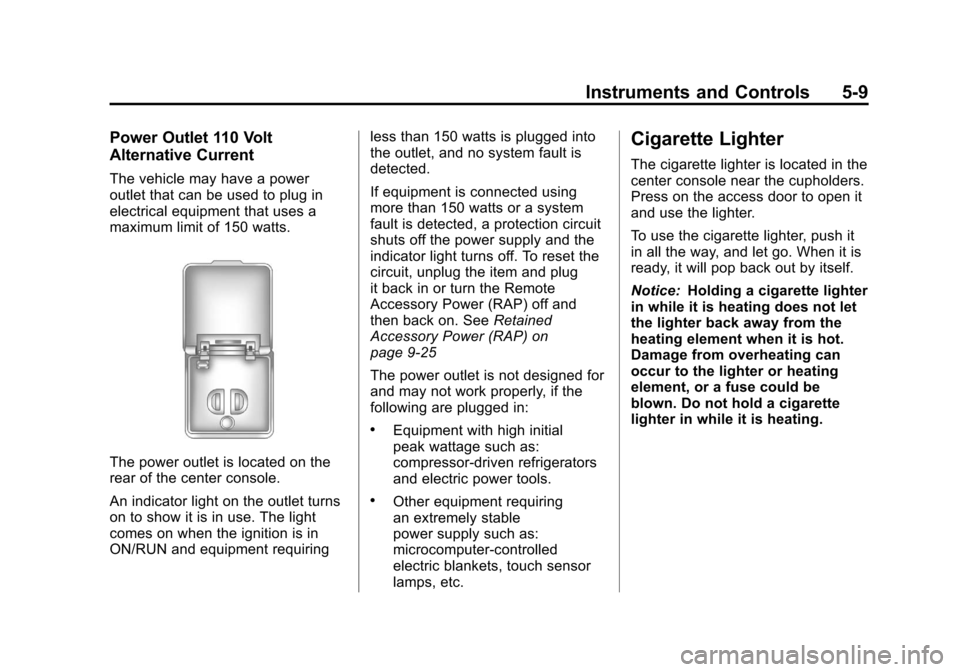
Power Outlet 110 Volt
Alternative Current
The vehicle may have a power
outlet that can be used to plug in
electrical equipment that uses a
maximum limit of 150 watts.
The power outlet is located on the
rear of the center console.
An indicator light on the outlet turns
on to show it is in use. The light
comes on when the ignition is in
ON/RUN and equipment requiringless than 150 watts is plugged into
the outlet, and no system fault is
detected.
If equipment is connected using
more than 150 watts or a system
fault is detected, a protection circuit
shuts off the power supply and the
indicator light turns off. To reset the
circuit, unplug the item and plug
it back in or turn the Remote
Accessory Power (RAP) off and
then back on. See
Retained
Accessory Power (RAP) on
page 9‑25
The power outlet is not designed for
and may not work properly, if the
following are plugged in:
.Equipment with high initial
peak wattage such as:
compressor-driven refrigerators
and electric power tools.
.Other equipment requiring
an extremely stable
power supply such as:
microcomputer-controlled
electric blankets, touch sensor
lamps, etc.
Cigarette Lighter
The cigarette lighter is located in the
center console near the cupholders.
Press on the access door to open it
and use the lighter.
To use the cigarette lighter, push it
in all the way, and let go. When it is
ready, it will pop back out by itself.
Notice: Holding a cigarette lighter
in while it is heating does not let
the lighter back away from the
heating element when it is hot.
Damage from overheating can
occur to the lighter or heating
element, or a fuse could be
blown. Do not hold a cigarette
lighter in while it is heating.
Page 132 of 538

Black plate (10,1)Cadillac Escalade/Escalade ESV Owner Manual - 2012
5-10 Instruments and Controls
Ashtrays
The front ashtray is located in the
center console near the cupholders.
Press on the access door to open it
and use the ashtray.
Notice:If papers, pins, or other
flammable items are put in the
ashtray, hot cigarettes or other
smoking materials could ignite
them and possibly damage the
vehicle. Never put flammable
items in the ashtray.
To remove the ashtray, pull it from
the center console. Slide it back in
and push down to be sure it is
secure.
Warning Lights,
Gauges, and
Indicators
Warning lights and gauges can
signal that something is wrong
before it becomes serious enough
to cause an expensive repair or
replacement. Paying attention to the
warning lights and gauges could
prevent injury.
Warning lights come on when there
could be a problem with a vehicle
function. Some warning lights come
on briefly when the engine is started
to indicate they are working. Gauges can indicate when there
could be a problem with a vehicle
function. Often gauges and warning
lights work together to indicate a
problem with the vehicle.
When one of the warning lights
comes on and stays on while
driving, or when one of the gauges
shows there may be a problem,
check the section that explains what
to do. Follow this manual's advice.
Waiting to do repairs can be costly
and even dangerous.
Page 136 of 538

Black plate (14,1)Cadillac Escalade/Escalade ESV Owner Manual - 2012
5-14 Instruments and Controls
If the front passenger safety belt is
buckled, neither the chime nor the
light comes on.
The front passenger safety belt
reminder light and chime may turn
on if an object is put on the seat
such as a briefcase, handbag,
grocery bag, laptop, or other
electronic device. To turn off the
reminder light and/or chime, remove
the object from the seat or buckle
the safety belt.
Airbag Readiness Light
The system checks the airbag's
electrical system for possible
malfunctions. If the light stays on it
indicates there is an electrical
problem. The system check includes
the airbag sensor(s), passenger
sensing system, the pretensioners,
the airbag modules, the wiring, and
the crash sensing and diagnostic
module. For more information on the
airbag system, seeAirbag System
on page 3‑27.
The airbag readiness light comes on
solid for a few seconds when the
engine is started. If the light does
not come on then, have it fixed
immediately.
{WARNING
If the airbag readiness light stays
on after the vehicle is started or
comes on while driving, it means
the airbag system might not be
working properly. The airbags in
the vehicle might not inflate in a
crash, or they could even inflate
without a crash. To help avoid
injury, have the vehicle serviced
right away. If there is a problem with the airbag
system, a Driver Information Center
(DIC) message can also come on.
See
Airbag System Messages on
page 5‑36 for more information.
Passenger Airbag Status
Indicator
If the vehicle has the airbag status
indicator pictured in the following
illustration, then the vehicle has a
passenger sensing system for the
right front passenger position. The
passenger airbag status indicator is
on the overhead console. See
Passenger Sensing System on
page 3‑35for important safety
information.
In addition, if the vehicle has a
passenger sensing system for the
right front passenger position, the
label on the vehicle's sun visors
refers to “ADVANCED AIRBAGS.”
Page 209 of 538

Black plate (25,1)Cadillac Escalade/Escalade ESV Owner Manual - 2012
Infotainment System 7-25
CD/DVD Messages
If Disc Read Error appears on the
display and/or the CD/DVD comes
out, it could be for one of the
following reasons:
.If a CD was inserted with an
invalid or unknown format.
.If a DVD is not from a correct
region.
.It is very hot. When the
temperature returns to normal,
the CD should play.
.You are driving on a very rough
road. When the road becomes
smoother, the CD/DVD
should play.
.The CD/DVD is dirty, scratched,
wet, or upside down.
.The air is very humid. If so, wait
about an hour and try again.
.There may have been a problem
while burning the CD/DVD.
.The label may be caught in the
CD/DVD player.
If the CD/DVD is not playing
correctly, for any other reason,
try a known good CD/DVD.
If any error occurs repeatedly or if
an error cannot be corrected,
contact your dealer.
Connecting a USB Storage
Device or iPod®
The USB Port, located on the
instrument panel and in the center
console, can be used to control an
iPod or a USB storage device.
To avoid connection problems,
extension cords are not
recommended. Use only the
cable that came with the device. To connect a USB storage device,
connect the device to the USB port
located on the instrument panel and
in the center console.
To connect an iPod, connect one
end of the USB cable that came
with the iPod to the iPod’s dock
connector and connect the other
end to the USB port. If the vehicle is
on and the USB connection works,
“OK to disconnect”
and a GM logo
may appear on the iPod and iPod
appears on the radio's display. The
iPod music appears on the radio’s
display and begins playing.
The iPod charges while it is
connected to the vehicle if the
vehicle is in the ACC/ACCESSORY
or ON/RUN position. When the
vehicle is turned off, the iPod
automatically powers off and will
not charge or draw power from the
vehicle's battery.
Page 214 of 538

Black plate (30,1)Cadillac Escalade/Escalade ESV Owner Manual - 2012
7-30 Infotainment System
Random:
1. Press to hear the tracks inrandom, rather than sequential,
order.
2. Press Random again to turn off random play.
r(Rewind):
1. Press and hold to rewind quickly through a track selection. You
will hear sound at a reduced
volume.
2. Release to stop rewinding. The display will show the elapsed
time of the track.
[(Forward):
1. Press and hold to fast forward quickly through a track selection.
You will hear sound at a reduced
volume.
2. Release to stop fast forwarding. The display shows the elapsed
time of the track.
q r(Folder/Artist/Album):
1. Select the left or right arrow to go to the previous or next folder,
artist, or album on the disc.
2. Press the middle screen button, with the folder, artist, or album
name, to sort the MP3 by folder,
artist, or album. It may take a
few minutes for the system to
sort the MP3.
y/©or¨/z(Seek/Scan):
1. To seek tracks, press the up arrow to go to the next track.
2. Press the down arrow to go to the start of the current track,
if more than eight seconds have
played.
3. If either arrow is pressed more than once, the player continues
moving backward or forward
through the CD. The sound
mutes while seeking.
w(Tuning Knob):
1. Turn counterclockwise one notch to go to the start of the current
track, turn it again to go to the
previous track.
2. Turn clockwise to go to the next track.
When playing an MP3 the rear seat
operator can power on the RSE
video screen and use the remote
control to navigate through the MP3.
Auxiliary Devices
Using the Auxiliary Input Jack
The navigation system has an
auxiliary input jack located on the
faceplate and in the center console.
This is not an audio output; do not
plug the headphone set into the
front auxiliary input jack. An external
audio device such as an iPod,
laptop computer, MP3 player, CD
player, or cassette tape player, etc.
can be connected to the auxiliary
input jack for use as another audio
source.
Page 298 of 538

Black plate (6,1)Cadillac Escalade/Escalade ESV Owner Manual - 2012
8-6 Climate Controls
Rear Climate Control System (Rear Climate with Rear
Seat Audio)
For vehicles with the rear heat and air conditioning controls, they are
integrated with the rear seat audio controls located in the center console.
The system can be controlled from the front controls as well as the rear
controls.
Rear Climate Control with Rear Seat Audio Controls
A. Fan Control
B. Air Delivery Mode Control
C. Temperature Control REAR:
Press the REAR button on
the front climate control system to
turn the rear climate control system
on or off. An indicator comes on
when the rear system is on. The rear climate control system can
also be turned off by pressing and
holding the
Cbutton. To turn the
system on from the rear seats,
press any rear climate control
button, except the
Cbutton.
Mimic Mode: This mode matches
the rear climate control to the front
climate control airflow settings.
It comes on when REAR is pressed
the first time.
Independent Mode: This mode
directs rear seating airflow
according to the settings of the rear
controls.
To turn the system on from the rear,
press any rear climate control
button, except the
Cbutton.
Page 321 of 538

Black plate (21,1)Cadillac Escalade/Escalade ESV Owner Manual - 2012
Driving and Operating 9-21
Starting and
Operating
New Vehicle Break-In
Notice:The vehicle does not
need an elaborate break-in. But it
will perform better in the long run
if you follow these guidelines:
.Keep the vehicle speed at
88 km/h (55 mph) or less for
the first 805 km (500 miles).
.Do not drive at any one
constant speed, fast or
slow, for the first 805 km
(500 miles). Do not make
full-throttle starts. Avoid
downshifting to brake or
slow the vehicle.
.Avoid making hard stops for
the first 322 km (200 miles) or
so. During this time the new
brake linings are not yet
broken in. Hard stops with
new linings can mean premature wear and earlier
replacement. Follow this
breaking-in guideline every
time you get new brake
linings.
.Do not tow a trailer during
break-in. See
Trailer Towing
on page 9‑61 for the trailer
towing capabilities of the
vehicle and more
information.
Following break‐in, engine speed
and load can be gradually
increased.
Adjustable Throttle and
Brake Pedal
The vehicle has adjustable throttle
and brake pedals that allow you to
change their positions.
The feature will not operate when
the vehicle is in R (Reverse) or
while using the cruise control.
The switch used to adjust the
pedals is located on the center
console below the climate control
system.
Press the right and left arrows to
move the pedals either closer or
further from your body.
Before you start driving, fully
press the brake pedal to confirm
the adjustment is right for you.
While driving, make only small
adjustments.
The vehicle has a memory function
which allows the pedal positions to
be saved and recalled. See Memory
Seats on page 3‑5.