2012 CADILLAC ESCALADE EXT automatic
[x] Cancel search: automaticPage 1 of 494

Black plate (1,1)Cadillac Escalade EXT Owner Manual - 2012
2012 Cadillac Escalade EXT Owner ManualM
In Brief. . . . . . . . . . . . . . . . . . . . . . . . 1-1
Instrument Panel . . . . . . . . . . . . . . 1-2
Initial Drive Information . . . . . . . . 1-4
Vehicle Features . . . . . . . . . . . . . 1-15
Performance and Maintenance . . . . . . . . . . . . . . . . 1-19
Keys, Doors, and Windows . . . . . . . . . . . . . . . . . . . . 2-1
Keys and Locks . . . . . . . . . . . . . . . 2-2
Doors . . . . . . . . . . . . . . . . . . . . . . . . . . 2-9
Vehicle Security . . . . . . . . . . . . . . 2-16
Exterior Mirrors . . . . . . . . . . . . . . . 2-19
Interior Mirrors . . . . . . . . . . . . . . . . 2-21
Windows . . . . . . . . . . . . . . . . . . . . . 2-22
Roof . . . . . . . . . . . . . . . . . . . . . . . . . . 2-25
Seats and Restraints . . . . . . . . . 3-1
Head Restraints . . . . . . . . . . . . . . . 3-2
Front Seats . . . . . . . . . . . . . . . . . . . . 3-3
Rear Seats . . . . . . . . . . . . . . . . . . . . 3-8
Safety Belts . . . . . . . . . . . . . . . . . . 3-10
Airbag System . . . . . . . . . . . . . . . . 3-19
Child Restraints . . . . . . . . . . . . . . 3-33 Storage
. . . . . . . . . . . . . . . . . . . . . . . 4-1
Storage Compartments . . . . . . . . 4-1
Luggage/Load Locations . . . . . . . 4-2
Additional Storage Features . . . 4-5
Roof Rack System . . . . . . . . . . . 4-12
Instruments and Controls . . . . 5-1
Controls . . . . . . . . . . . . . . . . . . . . . . . 5-2
Warning Lights, Gauges, and Indicators . . . . . . . . . . . . . . . . . . . . 5-9
Information Displays . . . . . . . . . . 5-23
Vehicle Messages . . . . . . . . . . . . 5-28
Vehicle Personalization . . . . . . . 5-36
Universal Remote System . . . . 5-44
Lighting . . . . . . . . . . . . . . . . . . . . . . . 6-1
Exterior Lighting . . . . . . . . . . . . . . . 6-1
Interior Lighting . . . . . . . . . . . . . . . . 6-9
Lighting Features . . . . . . . . . . . . . 6-10
Infotainment System . . . . . . . . . 7-1
Introduction . . . . . . . . . . . . . . . . . . . . 7-1
Radio . . . . . . . . . . . . . . . . . . . . . . . . . . 7-9
Audio Players . . . . . . . . . . . . . . . . 7-18 Rear Seat Infotainment . . . . . . . 7-31
Navigation . . . . . . . . . . . . . . . . . . . . 7-42
Voice Recognition . . . . . . . . . . . . 7-79
Phone . . . . . . . . . . . . . . . . . . . . . . . . 7-81
Climate Controls . . . . . . . . . . . . . 8-1
Climate Control Systems . . . . . . 8-1
Air Vents . . . . . . . . . . . . . . . . . . . . . . . 8-6
Driving and Operating . . . . . . . . 9-1
Driving Information . . . . . . . . . . . . . 9-2
Starting and Operating . . . . . . . 9-23
Engine Exhaust . . . . . . . . . . . . . . 9-30
Automatic Transmission . . . . . . 9-31
Drive Systems . . . . . . . . . . . . . . . . 9-36
Brakes . . . . . . . . . . . . . . . . . . . . . . . 9-36
Ride Control Systems . . . . . . . . 9-39
Cruise Control . . . . . . . . . . . . . . . . 9-43
Object Detection Systems . . . . 9-45
Fuel . . . . . . . . . . . . . . . . . . . . . . . . . . 9-50
Towing . . . . . . . . . . . . . . . . . . . . . . . 9-57
Conversions and Add-Ons . . . 9-67
Page 9 of 494

Black plate (3,1)Cadillac Escalade EXT Owner Manual - 2012
In Brief 1-3
A.Air Vents on page 8‑6.
B. Turn and Lane-Change Signals
on page 6‑7.
Windshield Wiper/Washer on
page 5‑4.
C. Hazard Warning Flashers on
page 6‑7.
D. Instrument Cluster on
page 5‑10.
E. Shift Lever/Tow/Haul Selector Button. See Automatic
Transmission on page 9‑31 and
Tow/Haul Mode on page 9‑35.
F. Clock on page 5‑7.
G. Infotainment on page 7‑1. H.
Exterior Lamp Controls on
page 6‑1.
I. Dome Lamp Override. See Dome Lamps on page 6‑9.
J. Data Link Connector (DLC) (Out of View). See Malfunction
Indicator Lamp on page 5‑15.
K. Cruise Control on page 9‑43.
L. Steering Wheel Adjustment on
page 5‑2.
M. Horn on page 5‑4.
N. Steering Wheel Controls on
page 5‑2.
O. Driver Information Center (DIC) Buttons. See Driver Information
Center (DIC) on page 5‑23. P. Pedal Adjust Button. See
Adjustable Throttle and Brake
Pedal on page 9‑23.
Power Running Boards Disable
Button (If Equipped). See
Power Assist Steps on
page 2‑15.
Q. Dual Automatic Climate Control
System on page 8‑1.
Heated and Ventilated Front
Seats on page 3‑7
(If Equipped).
R. StabiliTrak
®System on
page 9‑39.
Ultrasonic Parking Assist on
page 9‑45.
Page 17 of 494

Black plate (11,1)Cadillac Escalade EXT Owner Manual - 2012
In Brief 1-11
Power Foldaway Mirrors
To fold the mirrors:
1. Press (C) to fold the mirrors outto the driving position.
2. Press (D) to fold the mirrors in to the folded position.
See Power Mirrors on page 2‑19.
Interior Mirror
The automatic dimming rearview
mirror reduces the glare of lights
from behind the vehicle. The
dimming feature comes on and the
indicator light illuminates each time
the vehicle is started.
O:Press to turn the dimming
feature on or off.
See Automatic Dimming Rearview
Mirror on page 2‑21 for more
information.
Steering Wheel
Adjustment
Push the control up or down to tilt
the steering wheel up or down.
To set the memory position, see
Vehicle Personalization on
page 5‑36.
Throttle and Brake Pedal
Adjustment
The vehicle has adjustable throttle
and brake pedals that allow you to
change their positions.
The switch used to adjust the
pedals is located on the center
console below the climate control
system.
Press the right and left arrows to
move the pedals either closer or
further from your body.
See Adjustable Throttle and Brake
Pedal on page 9‑23.
Page 19 of 494

Black plate (13,1)Cadillac Escalade EXT Owner Manual - 2012
In Brief 1-13
P:Turns off the automatic
headlamps and Daytime Running
Lamps (DRL). Turning the headlamp
control to the off position again will
turn the automatic headlamps and
DRL back on.
For vehicles first sold in Canada,
the off position only works when the
vehicle is shifted into the P (Park)
position.
AUTO: Automatically turns on the
headlamps at normal brightness,
along with the parking lamps,
instrument panel lights, license plate
lamps, and taillamps.
;: Turns on the parking lamps,
along with the instrument panel
lights, license plate lamps, and
taillamps.
5: Turns on the headlamps,
parking lamps, instrument panel
lights, license plate lamps, and
taillamps. For more information, see:
.Exterior Lamp Controls on
page 6‑1.
.Daytime Running Lamps (DRL)
on page 6‑5.
.Fog Lamps on page 6‑8.
Windshield Wiper/Washer
The front wiper control is located on
the turn and lane‐change lever.
The windshield wipers are controlled
by turning the band with
zon it.
8:
For a single wipe, turn to8,
then release. For several wipes,
hold the band on
8longer.
6: Turn the band up for more
frequent wipes or down for less
frequent wipes.
6: Slow wipes.
1: Fast wipes.
9:Turns the windshield
wipers off.
L: Push the paddle at the top of
the lever, to spray washer fluid on
the windshield.
See Windshield Wiper/Washer on
page 5‑4.
Page 20 of 494
Black plate (14,1)Cadillac Escalade EXT Owner Manual - 2012
1-14 In Brief
Climate Controls
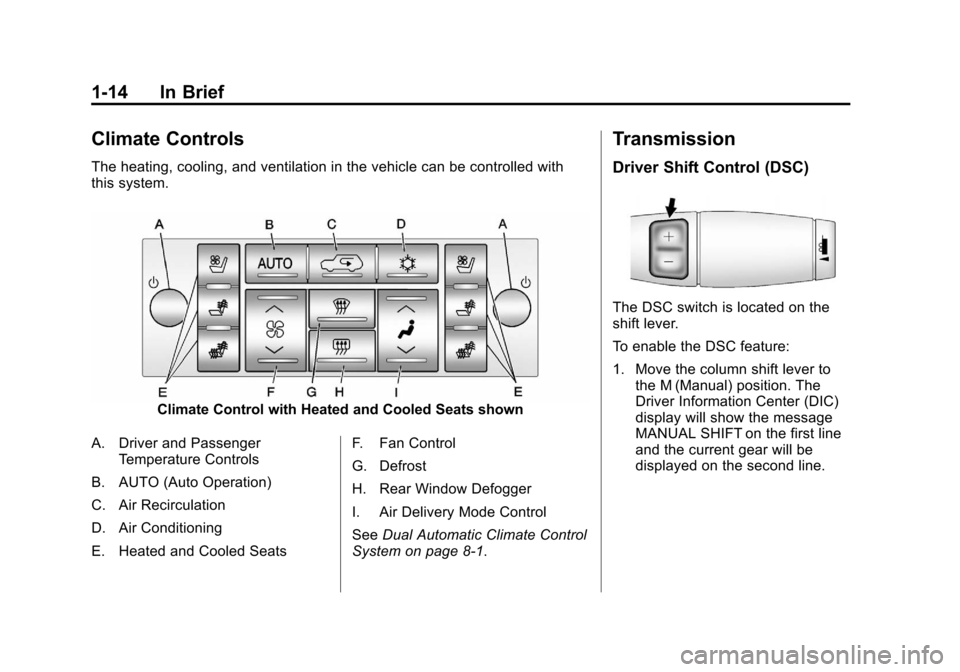
The heating, cooling, and ventilation in the vehicle can be controlled with
this system.
Climate Control with Heated and Cooled Seats shown
A. Driver and Passenger Temperature Controls
B. AUTO (Auto Operation)
C. Air Recirculation
D. Air Conditioning
E. Heated and Cooled Seats F. Fan Control
G. Defrost
H. Rear Window Defogger
I. Air Delivery Mode Control
See
Dual Automatic Climate Control
System on page 8‑1.
Transmission
Driver Shift Control (DSC)
The DSC switch is located on the
shift lever.
To enable the DSC feature:
1. Move the column shift lever to the M (Manual) position. The
Driver Information Center (DIC)
display will show the message
MANUAL SHIFT on the first line
and the current gear will be
displayed on the second line.
Page 25 of 494

Black plate (19,1)Cadillac Escalade EXT Owner Manual - 2012
In Brief 1-19
Power Outlets
Accessory power outlets can be
used to plug in electrical equipment,
such as a cell phone or MP3 player.
One accessory power outlet is
located inside the center floor
console. Lift up on the lower latch
located at the front of the console lid
to access the accessory power
outlet.
There may also be an accessory
power outlet located on the rear of
the center floor console above the
cupholder.
The accessory power outlets are
powered, even when the ignition is
in LOCK/OFF. Continuing to use
power outlets while the ignition is in
LOCK/OFF may cause the vehicle's
battery to run down.
SeePower Outlets on page 5‑7.
Universal Remote System
Vehicles with the Universal Remote
System will have these buttons
located in the headliner.
This system provides a way to
replace up to three remote control
transmitters used to activate
devices such as garage door
openers, security systems, and
home automation devices.
Read the instructions completely
before attempting to program the
transmitter. Because of the steps
involved, it may be helpful to have
another person assist with
programming the transmitter.
SeeUniversal Remote System on
page 5‑44.
Performance and
Maintenance
StabiliTrak®System
The vehicle has a traction control
system that limits wheel spin and
the StabiliTrak system that assists
with directional control of the vehicle
in difficult driving conditions. Both
systems turn on automatically every
time the vehicle is started.
.To turn off traction control, press
and release
gon the instrument
panel. The appropriate DIC
message displays. See Ride
Control System Messages on
page 5‑32.
.To turn off both traction control
and StabiliTrak, press and hold
guntilgilluminates and the
appropriate DIC message
displays. See Ride Control
System Messages on page 5‑32.
Page 27 of 494

Black plate (21,1)Cadillac Escalade EXT Owner Manual - 2012
In Brief 1-21
Driving for Better Fuel
Economy
Driving habits can affect fuel
mileage. Here are some driving tips
to get the best fuel economy
possible.
.Avoid fast starts and accelerate
smoothly.
.Brake gradually and avoid
abrupt stops.
.Avoid idling the engine for long
periods of time.
.When road and weather
conditions are appropriate, use
cruise control.
.Always follow posted speed
limits or drive more slowly when
conditions require.
.Keep vehicle tires properly
inflated.
.Combine several trips into a
single trip.
.Replace the vehicle's tires with
the same TPC Spec number
molded into the tire's sidewall
near the size.
.Follow recommended scheduled
maintenance.
Roadside Service
U.S. or Canada:1-800-882-1112
TTY Users (U.S. or Canada):
1-888-889-2438
Mexico: 01-800-466-0805
As the owner of a new Cadillac, you
are automatically enrolled in the
Roadside Service program.
See Roadside Service (U.S. and
Canada) on page 13‑7 orRoadside
Service (Mexico) on page 13‑9 for
more information.
Roadside Service and OnStar
(U.S. and Canada)
If you have an active OnStar
subscription, press the
Qbutton
and the current GPS location will be sent to an OnStar advisor who will
assess your problem, contact
Roadside Service, and relay your
exact location to get the help
you need.
Online Owner Center
(U.S. and Canada)
The Online Owner Center is a
complimentary service that includes
online service reminders, vehicle
maintenance tips, online owner
manual, special privileges,
and more.
Sign up today at:
www.cadillacownercenter.com
(U.S.) or
www.gm.ca (Canada).
OnStar®
If equipped, this vehicle has a
comprehensive, in-vehicle system
that can connect to a live Advisor
for Emergency, Security, Navigation,
Connection, and Diagnostic
Services. See OnStar Overview on
page 14‑1 for more information.
Page 29 of 494
Black plate (1,1)Cadillac Escalade EXT Owner Manual - 2012
Keys, Doors, and Windows 2-1
Keys, Doors, and
Windows
Keys and Locks
Keys . . . . . . . . . . . . . . . . . . . . . . . . . . 2-2
Remote Keyless Entry (RKE)System . . . . . . . . . . . . . . . . . . . . . . 2-2
Remote Keyless Entry (RKE) System Operation . . . . . . . . . . . 2-3
Remote Vehicle Start . . . . . . . . . 2-5
Door Locks . . . . . . . . . . . . . . . . . . . 2-7
Power Door Locks . . . . . . . . . . . . 2-7
Delayed Locking . . . . . . . . . . . . . . 2-8
Automatic Door Locks . . . . . . . . . 2-8
Lockout Protection . . . . . . . . . . . . 2-8
Safety Locks . . . . . . . . . . . . . . . . . . 2-8
Doors
Midgate®. . . . . . . . . . . . . . . . . . . . . . 2-9
Tailgate . . . . . . . . . . . . . . . . . . . . . . 2-15
Power Assist Steps . . . . . . . . . . 2-15
Vehicle Security
Vehicle Security . . . . . . . . . . . . . . 2-16
Anti-theft Alarm System . . . . . . 2-16
Immobilizer . . . . . . . . . . . . . . . . . . 2-17
Immobilizer Operation . . . . . . . 2-17
Exterior Mirrors
Convex Mirrors . . . . . . . . . . . . . . 2-19
Power Mirrors . . . . . . . . . . . . . . . . 2-19
Heated Mirrors . . . . . . . . . . . . . . . 2-20
Automatic Dimming Mirror . . . 2-20
Park Tilt Mirrors . . . . . . . . . . . . . . 2-21
Interior Mirrors
Automatic Dimming Rearview Mirror . . . . . . . . . . . . . . . . . . . . . . . 2-21
Windows
Windows . . . . . . . . . . . . . . . . . . . . . 2-22
Power Windows . . . . . . . . . . . . . 2-22
Sun Visors . . . . . . . . . . . . . . . . . . . 2-25
Roof
Sunroof . . . . . . . . . . . . . . . . . . . . . . 2-25