2012 CADILLAC ESCALADE EXT instrument panel
[x] Cancel search: instrument panelPage 176 of 494
Black plate (6,1)Cadillac Escalade EXT Owner Manual - 2012
6-6 Lighting
To turn off the DRL lamps, turn the
exterior lamps control to the OFF
position and then release. For
vehicles first sold in Canada, the
transmission must be in the P (Park)
position before the DRL lamps can
be turned off.
Automatic Headlamp
System
When it is dark enough outside and
the headlamp switch is in AUTO,
the automatic headlamp system
turns on the headlamps along with
other lamps such as the taillamps,
sidemarker, parking lamps, roof
marker lamps, and the instrument
panel lights. The radio lights will
also be dim.
To turn off the automatic headlamp
system, turn the exterior lamps
switch to the off position and then
release. For vehicles first sold in
Canada, the transmission must bein the P (Park) position, before the
automatic headlamp system can be
turned off.
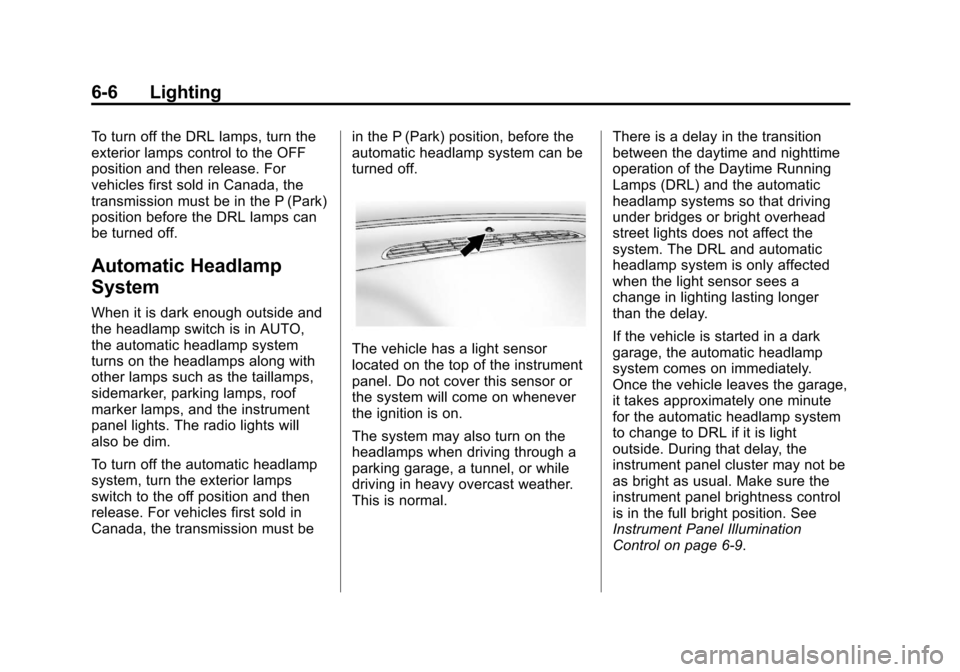
The vehicle has a light sensor
located on the top of the instrument
panel. Do not cover this sensor or
the system will come on whenever
the ignition is on.
The system may also turn on the
headlamps when driving through a
parking garage, a tunnel, or while
driving in heavy overcast weather.
This is normal.
There is a delay in the transition
between the daytime and nighttime
operation of the Daytime Running
Lamps (DRL) and the automatic
headlamp systems so that driving
under bridges or bright overhead
street lights does not affect the
system. The DRL and automatic
headlamp system is only affected
when the light sensor sees a
change in lighting lasting longer
than the delay.
If the vehicle is started in a dark
garage, the automatic headlamp
system comes on immediately.
Once the vehicle leaves the garage,
it takes approximately one minute
for the automatic headlamp system
to change to DRL if it is light
outside. During that delay, the
instrument panel cluster may not be
as bright as usual. Make sure the
instrument panel brightness control
is in the full bright position. See
Instrument Panel Illumination
Control on page 6‑9.
Page 177 of 494

Black plate (7,1)Cadillac Escalade EXT Owner Manual - 2012
Lighting 6-7
Hazard Warning Flashers
|(Hazard Warning Flashers):
Press this button located on top of
the steering column, to make the
front and rear turn signal lamps
flash on and off. This warns others
that you are having trouble. Press
again to turn the flashers off.
When the hazard warning flashers
are on, the vehicle's turn signals will
not work.
Turn and Lane-Change
Signals
An arrow on the instrument panel
cluster flashes in the direction of the
turn or lane change.
Move the turn signal lever all the
way up or down to signal a turn.
Raise or lower the lever until the
arrow starts to flash to signal a lane
change. The turn signals
automatically flash three times.
It will flash six times if the tow-haul
mode is active. Holding the turn
signal lever for more than
one second causes the turn signals
to flash until the lever is released. The lever returns to its starting
position when it is released.
If after signaling a turn or a lane
change the arrows flash rapidly or
do not come on, a signal bulb may
be burned out.
Have the bulbs replaced. If the bulb
is not burned out, check the fuse.
See
Instrument Panel Fuse Block
on page 10‑41 andEngine
Compartment Fuse Block on
page 10‑36.
Turn Signal On Chime
If the turn signal is left on for more
than 1.2 km (0.75 mi), a chime
sounds at each flash of the turn
signal and the message TURN
SIGNAL ON also appears in the
DIC. See Lamp Messages on
page 5‑32. To turn the chime and
message off, move the turn signal
lever to the off position.
Page 178 of 494

Black plate (8,1)Cadillac Escalade EXT Owner Manual - 2012
6-8 Lighting
Fog Lamps
For vehicles with fog lamps, they
can be used for better vision in
foggy or misty conditions. The
parking lamps and/or low-beam
headlamps must be on for the fog
lamps to work.
The fog lamp button is located on
the left side of the instrument panel.
#(Fog Lamps):Press to turn the
fog lamps on or off. An indicator
light comes on in the instrument
panel cluster to show that the fog
lamps are on. Remember, fog lamps alone will not
give off as much light as the
headlamps. Never use the fog
lamps in the dark without turning on
the headlamps.
The fog lamps will go off whenever
the high-beam headlamps come on.
When the high beams go off, the fog
lamps will come on again.
The fog lamps will be cancelled
after the ignition is turned off. To use
the fog lamps after restarting the
vehicle, press the fog lamp button
again.
Some localities have laws that
require the headlamps to be on
along with the fog lamps.
Exterior Cargo Lamps
The cargo lamp can be used if more
light is needed in the cargo area of
the vehicle or in the top-box storage
units. Some vehicles will only have
a cargo lamp in the driver side
top box.
The cargo lamps come on by
turning on the interior dome lamps.
Page 179 of 494

Black plate (9,1)Cadillac Escalade EXT Owner Manual - 2012
Lighting 6-9
Interior Lighting
Instrument Panel
Illumination Control
D(Instrument Panel
Brightness): This feature controls
the brightness of the instrument
panel lights and is located next to
the exterior lamps control.
Push the knob to extend out and
then it can be turned.
Turn the knob clockwise or
counterclockwise to brighten or dim
the instrument panel lights. Turning
the knob to the farthest clockwise
position turns on the dome lamps.
Dome Lamps
The dome lamps are located in the
overhead console.
They come on when any door is
opened and turn off after all the
doors are closed.
Turn the instrument panel
brightness knob located below the
dome lamp override button,
clockwise to the farthest position to
manually turn on the dome lamps.
The dome lamps remain on until the
knob is turned counterclockwise.
Dome Lamp Override
The dome lamp override button is
located next to the exterior lamps
control.
k(Dome Off): Press the button
in and the dome lamps remain off
when a door is opened. Press the
button again to return it to the
extended position so that the dome
lamps come on when a door is
opened.
Reading Lamps
For vehicles with front reading
lamps in the overhead console,
press the button located next to the
lamp to turn it on or off.
The vehicle may also have reading
lamps in other locations. The lamps
cannot be adjusted.
Page 205 of 494

Black plate (25,1)Cadillac Escalade EXT Owner Manual - 2012
Infotainment System 7-25
.There may have been a problem
while burning the CD/DVD.
.The label may be caught in the
CD/DVD player.
If the CD/DVD is not playing
correctly, for any other reason, try a
known good CD/DVD.
If any error occurs repeatedly or if
an error cannot be corrected,
contact your dealer.
Connecting a USB Storage
Device or iPod®
The USB Port, located on the
instrument panel and in the center
console, can be used to control an
iPod or a USB storage device.
To avoid connection problems,
extension cords are not
recommended. Use only the cable
that came with the device. To connect a USB storage device,
connect the device to the USB port
located on the instrument panel and
in the center console.
To connect an iPod, connect one
end of the USB cable that came
with the iPod to the iPod’s dock
connector and connect the other
end to the USB port. If the vehicle is
on and the USB connection works,
“OK to disconnect”
and a GM logo
may appear on the iPod and iPod
appears on the radio's display. The
iPod music appears on the radio’s
display and begins playing.
The iPod charges while it is
connected to the vehicle if the
vehicle is in the ACC/ACCESSORY
or ON/RUN position. When the
vehicle is turned off, the iPod
automatically powers off and will not
charge or draw power from the
vehicle's battery. USB Supported File and Folder
Structure
The guidelines that must be met
while using USB supported files and
folders are:
.Up to 700 folders.
.Up to 8 folders in depth.
.Up to 65,535 files.
.Folder and file names up to
64 bytes.
.Files with an .mp3 or .wma file
extension.
.AAC files stored on an iPod.
.FAT16
.FAT32
Page 271 of 494

Black plate (3,1)Cadillac Escalade EXT Owner Manual - 2012
Climate Controls 8-3
2. Set the driver and passengertemperature.
To find your comfort setting, start
with a 23°C (74°F) temperature
setting and allow about
20 minutes for the system to
regulate. Use the driver or
passenger temperature buttons
to adjust the temperature setting
as necessary. If a temperature
setting of 15°C (60°F) is chosen,
the system remains at the
maximum cooling setting. If a
temperature setting of 32°C
(90°F) is chosen, the system
remains at the maximum
heat setting. Choosing either
maximum setting will not cause
the vehicle to heat or cool any
faster.
Do not to cover the sensor located
on the top of the instrument panel
near the windshield. This sensor
regulates air temperature based on
sun load and also turns on the
headlamps. To avoid blowing cold air in cold
weather, the system will delay
turning on the fan until warm air is
available. The length of delay
depends on the engine coolant
temperature. Pressing the fan
switch will override this delay and
change the fan to a selected speed.
Manual Operation
You may manually adjust the air
delivery mode or fan speed.
y 9 z(Fan Control):
Press the
up or down arrows to increase or
decrease the fan speed
Pressing this button when the
system is off will turn the system on.
Pressing either arrow while using
automatic operation will place the
fan in manual operation. The fan
setting will display and the AUTO
light will turn off. The air delivery will
remain in automatic operation.
y Nz(Air Delivery Mode
Control): Press to change the
direction of the airflow in the vehicle.
Repeatedly press the button until
the desired mode appears on the
display.
When the system is turned off, the
display goes blank after displaying
the current status of the system.
H(Vent): Air is directed to the
instrument panel outlets.
)(Bi-Level): Air is divided
between the instrument panel and
floor outlets. Some air is directed
towards the windshield and side
window outlets. Cooler air is
directed to the upper vents and
warmer air to the floor vents.
6(Floor): Air is directed to the
floor outlets, with some to the
windshield, side window outlets, and
second row floor outlets. In this
mode, the system automatically
selects outside air.
Page 274 of 494

Black plate (6,1)Cadillac Escalade EXT Owner Manual - 2012
8-6 Climate Controls
Air Vents
Use the air outlets located in the
center and on the side of the
instrument panel to adjust the
direction and amount of airflow
inside the vehicle. There are also
air outlets on the rear of the center
console for rear seat
passenger use.
Move the louvers up or down.
Use the thumbwheels next to or
underneath the outlet to close the
louvers.Operation Tips.Keep the hood and front air
inlets free of ice, snow, or any
other obstruction, such as
leaves. The heater and defroster
will work far better, reducing the
chance of fogging the inside of
your windows.
.Keep the air path under the front
seats clear of objects. This helps
air to circulate throughout your
vehicle.
.Adding outside equipment to the
front of your vehicle, such as
hood-air deflectors, etc., may
affect the performance of the
heating and air conditioning
system. Check with your dealer
before adding equipment to the
outside of your vehicle.
Page 288 of 494

Black plate (14,1)Cadillac Escalade EXT Owner Manual - 2012
9-14 Driving and Operating
Blizzard Conditions
Being stuck in snow can be a
serious situation. Stay with the
vehicle unless there is help nearby.
If possible, use theRoadside
Service (U.S. and Canada) on
page 13‑7 orRoadside Service
(Mexico) on page 13‑9. To get help
and keep everyone in the
vehicle safe:
.Turn on the hazard warning
flashers.
.Tie a red cloth to an outside
mirror.
{WARNING
Snow can trap engine exhaust
under the vehicle. This may
cause exhaust gases to get
inside. Engine exhaust contains
carbon monoxide (CO) which
cannot be seen or smelled. It can
cause unconsciousness and even
death.
(Continued)
WARNING (Continued)
If the vehicle is stuck in the snow:
.Clear away snow from around
the base of your vehicle,
especially any that is blocking
the exhaust pipe.
.Check again from time to
time to be sure snow does
not collect there.
.Open a window about 5 cm
(2 in) on the side of the
vehicle that is away from the
wind to bring in fresh air.
.Fully open the air outlets on
or under the instrument
panel.
.Adjust the climate control
system to a setting that
circulates the air inside the
vehicle and set the fan speed
to the highest setting. See
“Climate Control Systems” in
the Index.
(Continued)
WARNING (Continued)
For more information about
carbon monoxide, see Engine
Exhaust on page 9‑30.
Run the engine for short periods
only as needed to keep warm, but
be careful.
To save fuel, run the engine for only
short periods as needed to warm
the vehicle and then shut the engine
off and close the window most of
the way to save heat. Repeat this
until help arrives but only when you
feel really uncomfortable from the
cold. Moving about to keep warm
also helps.
If it takes some time for help to
arrive, now and then when you run
the engine, push the accelerator
pedal slightly so the engine runs
faster than the idle speed. This
keeps the battery charged to restart
the vehicle and to signal for help
with the headlamps. Do this as little
as possible to save fuel.