2012 BUICK LACROSSE lock
[x] Cancel search: lockPage 164 of 512

Black plate (46,1)Buick LaCrosse Owner Manual - 2012
5-46 Instruments and Controls
This allows you to turn the park tilt
mirrors feature on or off.
Press SELECT when Park Tilt
Mirrors is highlighted. Turn the
Menu knob to select Driver &
Passenger or Off. Press SELECT to
confirm the selection. Press
/BACK to move to the last menu.
Collision/Detection Systems
Select the Collision/Detection
Systems menu and the following will
be displayed:
.Side Blind Zone Alert System
Side Blind Zone Alert System
If equipped, this feature allows the
Side Blind Zone Alert System
feature to be turned on or off.
Press SELECT when Side Blind
Zone Alert System is highlighted.
Turn the Menu knob to select On or
Off. Press SELECT to confirm the
selection. Press
/BACK to move to
the last menu.
Language
Select the Language menu and the
following will be displayed:
.English
.French
.Spanish
Turn the Menu knob to select the
language. Press SELECT to confirm
the selection. Press
/BACK to
move to the last menu.
Lighting
Select the Lighting menu and the
following will be displayed:
.Exit Lighting
.Vehicle Locator Lights
Exit Lighting
This allows selection of how long
the exterior lamps stay on when
leaving the vehicle and it is dark
outside. Press SELECT when Exit Lighting is
highlighted. Turn the Menu knob to
select Off, 30 Seconds, 1 Minute,
or 2 Minutes. Press SELECT to
confirm the selection. Press
/BACK to move to the last menu.
Vehicle Locator Lights
This allows the vehicle locator lights
to be turned on or off. The vehicle
locator lights come on when
unlocking the vehicle with the RKE
transmitter.
Press SELECT when Vehicle
Locator Lights is highlighted. Turn
the Menu knob to select On or Off.
Press SELECT to confirm the
selection. Press
/BACK to move to
the last menu.
Page 165 of 512

Black plate (47,1)Buick LaCrosse Owner Manual - 2012
Instruments and Controls 5-47
Power Door Locks
Select Power Door Locks and the
following will be displayed:
.Unlocked Door Anti Lock Out
.Delayed Door Lock
.Auto Door Unlock
Unlocked Door Anti Lock Out
When on, this feature will keep the
driver door from locking when the
door is open. If off is selected, the
Unlocked Door Anti Lock Out menu
will be available and the door will
lock as programmed through
this menu.
Press SELECT when Unlocked
Door Anti Lock Out is highlighted.
Turn the Menu knob to select On or
Off. Press SELECT to confirm the
selection. Press
/BACK to move to
the last menu. Delayed Door Lock
When on, this feature will delay the
locking of the doors until
five seconds after the last door is
closed. You will hear three chimes
to signal delayed locking is in use.
Pressing either the power lock
button or
Qon the RKE transmitter
twice will override the delayed
locking feature and immediately lock
all of the doors.
Press SELECT when Delayed Door
Lock is highlighted. Turn the Menu
knob to select On or Off. Press
SELECT to confirm the selection.
Press
/BACK to move to the
last menu.
Auto Door Unlock
This allows selection of which of the
doors will automatically unlock when
the vehicle is shifted into P (Park).
Press SELECT when Auto Door
Unlock is highlighted. Turn the
Menu knob to select All Doors, Driver Door, or Off. Press SELECT
to confirm the selection. Press
/BACK to move to the last menu.
Remote Lock/Unlock/Start
Select Remote Lock/Unlock/Start
and the following will be displayed:
.Unlock Feedback (Lights)
.Locking Feedback
.Door Unlock Options
.Remote Recall
.Passive Entry
.Remote Left In Vehicle
Unlock Feedback (Lights)
When on, the exterior lamps will
flash when unlocking the vehicle
with the RKE transmitter.
Press SELECT when Unlock
Feedback (Lights) is highlighted.
Turn the Menu knob to select On or
Off. Press SELECT to confirm the
selection. Press
/BACK to move to
the last menu.
Page 166 of 512

Black plate (48,1)Buick LaCrosse Owner Manual - 2012
5-48 Instruments and Controls
Locking Feedback
This allows selection of what type of
feedback is given when locking the
vehicle with the RKE transmitter.
Press SELECT when Locking
Feedback is highlighted. Turn the
Menu knob to select Lights and
Horn, Lights Only, Horn Only, or Off.
Press SELECT to confirm the
selection. Press
/BACK to move to
the last menu.
Door Unlock Options
This allows selection of which doors
will unlock when pressing
Kon the
RKE transmitter.
Press SELECT when Door Unlock
Options is highlighted. Turn the
Menu knob to select All Doors or
Driver Door Only. When set to
Driver Door Only, the driver door will
unlock the first time the unlock
button is pressed and all doors will
unlock when the button is pressed a
second time. When set to All Doors,
all of the doors will unlock at the first press of
K. Press SELECT to
confirm the selection. Press
/BACK to move to the last menu.
Remote Recall
When on, this feature will recall the
current driver's last seat and outside
mirror positions upon unlocking the
driver door with the RKE, and
opening that door. The current driver
is identified when the RKE is used
to unlock the driver door. If keyless
access equipped, the recall will
occur upon opening the driver door.
See “Memory Remote Recall” under
Power Seat Adjustment on page 3‑5
for more information.
This allows the Remote Recall
feature to be turned on or off.
Remote Recall is when the
memorized settings will be recalled
as you unlock and enter the vehicle.
Press SELECT when Remote Recall
is highlighted. Turn the Menu knob
to select On or Off. Press SELECT
to confirm the selection. Press
/BACK to move to the last menu. Passive Entry
This allows the Passive Entry
feature to be turned on or off.
Press SELECT when Passive Entry
is highlighted. Turn the Menu knob
to select On or Off. Press SELECT
to confirm the selection. Press
/BACK to move to the last menu.
Remote Left In Vehicle
This allows the Remote Left In
Vehicle reminder feature to be
turned on or off. If on, the horn will
chirp if a remote is left in the
vehicle.
Press SELECT when Remote Left In
Vehicle is highlighted. Turn the
Menu knob to select On or Off.
Press SELECT to confirm the
selection. Press
/BACK to move to
the last menu.
Page 184 of 512
Black plate (4,1)Buick LaCrosse Owner Manual - 2012
7-4 Infotainment System
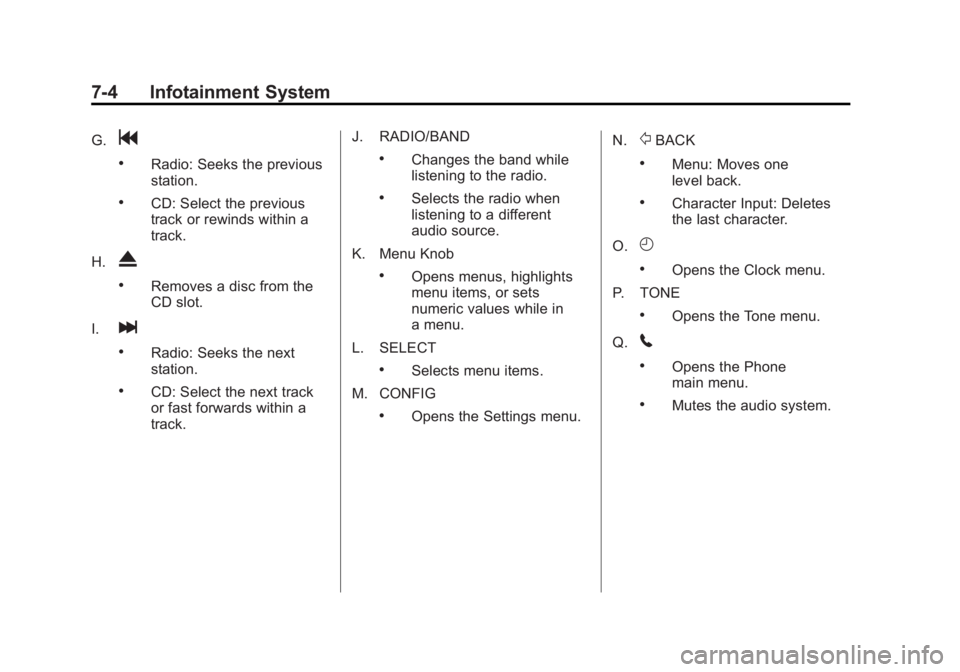
G.g
.Radio: Seeks the previous
station.
.CD: Select the previous
track or rewinds within a
track.
H.
X
.Removes a disc from the
CD slot.
I.
l
.Radio: Seeks the next
station.
.CD: Select the next track
or fast forwards within a
track. J. RADIO/BAND
.Changes the band while
listening to the radio.
.Selects the radio when
listening to a different
audio source.
K. Menu Knob
.Opens menus, highlights
menu items, or sets
numeric values while in
a menu.
L. SELECT
.Selects menu items.
M. CONFIG
.Opens the Settings menu. N.
/BACK
.Menu: Moves one
level back.
.Character Input: Deletes
the last character.
O.
H
.Opens the Clock menu.
P. TONE
.Opens the Tone menu.
Q.
5
.Opens the Phone
main menu.
.Mutes the audio system.
Page 186 of 512

Black plate (6,1)Buick LaCrosse Owner Manual - 2012
7-6 Infotainment System
E. TUNE/k
.Manually selects radio
stations and pauses time
shifted content.
.CD/DVD: Select tracks,
pauses playback, and
stops playback.
.MEM: Select tracks and
pauses playback.
F. RADIO/BAND
.Changes the band while
listening to the radio.
.Selects the radio when
listening to a different
audio source.
G.
g
.Radio: Seeks the previous
station.
.CD: Selects the previous
track or rewinds within a
track.
.MEM: Selects the previous
track or rewinds within a
track. H.
X
.Removes a disc from the
CD/DVD slot.
I. REC
O
.AUX: Records content
from audio CDs, MP3/
WMA CDs, and USB mass
storage devices.
J. DEL
.MEM: Deletes the current
track from MEM.
K.
l
.Radio: Seeks the next
station.
.CD: Selects the next track
or fast forwards within a
track.
.MEM: Selects the next
track or fast forwards
within a track. L. SELECT
.Selects menu items.
M. Menu Knob
.Opens menus, highlights
menu items, or sets
numeric values while in
a menu.
N.
/BACK
.Menu: Moves one
level back.
.Character Input: Deletes
the last character.
O. TONE
.Opens the Tone menu.
P.
H
.Opens the Clock menu.
Q. CONFIG
.Opens the Settings menu.
Page 188 of 512
Black plate (8,1)Buick LaCrosse Owner Manual - 2012
7-8 Infotainment System
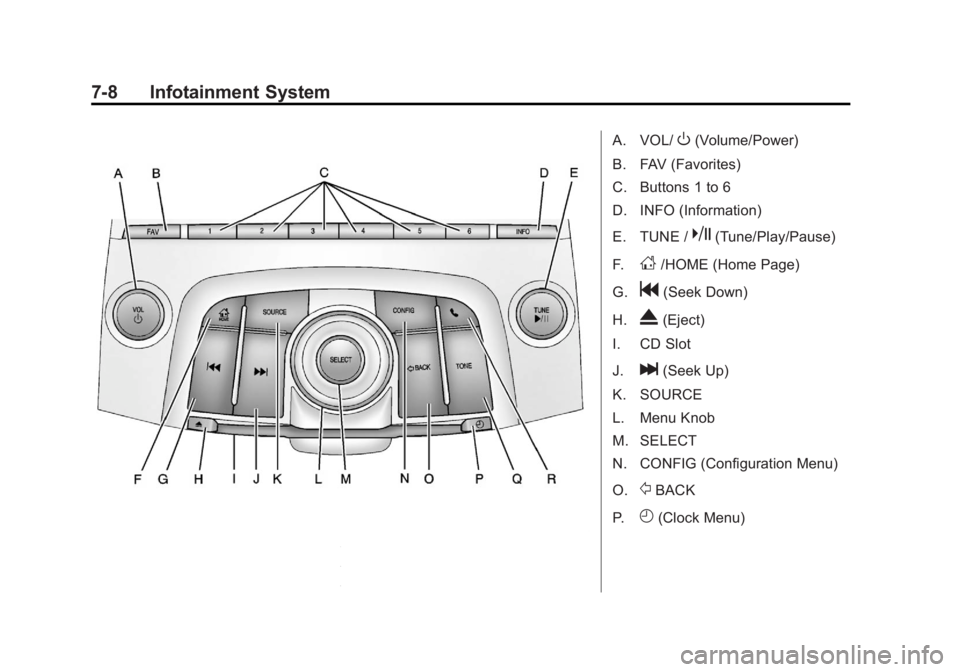
A. VOL/O(Volume/Power)
B. FAV (Favorites)
C. Buttons 1 to 6
D. INFO (Information)
E. TUNE /
k(Tune/Play/Pause)
F.
D/HOME (Home Page)
G.
g(Seek Down)
H.
X(Eject)
I. CD Slot
J.
l(Seek Up)
K. SOURCE
L. Menu Knob
M. SELECT
N. CONFIG (Configuration Menu)
O.
/BACK
P.
H(Clock Menu)
Page 190 of 512

Black plate (10,1)Buick LaCrosse Owner Manual - 2012
7-10 Infotainment System
3. Press and hold to quicklyreverse through a track. Release
the button to return to playing
speed. See CD Player on
page 7‑28 andMP3 on
page 7‑33 for more information.
4. For AM, FM, or XM (if equipped), press to seek to the next strong
station.
Preset Buttons (1-6): The preset
buttons numbered one through six
can be used to select stored AM,
FM, and XM (if equipped) stations.
H(Clock Menu): Press to set
the time.
X(Eject): Press to eject a disc
from the CD player. See CD Player
on page 7‑28.
Touch Screen Buttons
Touch screen buttons are on the
screen and highlighted when a
feature is available. Some toggle
screen buttons highlight when active
and gray out when inactive.
Home Page
The infotainment system displays a
home page that makes accessing
many of the features an easy
process.
Back: If on page two of the Home
Page, press Back to return to page
one of the Home Page. If on page
one, Back serves no function.
Home: While navigating through
other menus, press to go back to
the Home Page to start a different
feature.
FAV: Press to display a page of
stored (favorite) AM, FM, or XM
(if equipped) stations. Keep
pressing FAV to scroll through the
favorite pages.
The Home Page Menu lists the
options Customize Home Page and
Restore Home Page Defaults.
Out of all available Home Page
icons, up to eight icons can be
selected and sorted for the first
Home Page screen.
Home Page Features
Various functions are disabled when
the vehicle is moving.
Press the Now Playing screen
button to display the active source
page. The sources available are
AM, FM, XM (if equipped), CD,
USB/iPod, and AUX.
See AM-FM Radio (Radio with CD/
DVD/MEM) on page 7‑18 orAM-FM
Radio (Radio with CD and
Touchscreen) on page 7‑21,
Satellite Radio on page 7‑24, and
CD Player on page 7‑28.
Press the Phone screen button to
display the Phone main page. See
Bluetooth (Overview) on page 7‑57
or Bluetooth (Infotainment Controls)
on page 7‑59 orBluetooth (Voice
Recognition) on page 7‑63 or
Bluetooth (UHP Mexico Only) on
page 7‑69.
Page 191 of 512

Black plate (11,1)Buick LaCrosse Owner Manual - 2012
Infotainment System 7-11
Press the Config screen button to
display the Config main page. From
this display, you can adjust features
such as time and date, radio,
phone, vehicle, and display.
Press the Tone screen button to
display the Tone main page. Adjust
the tone and speakers by pressing
the screen buttons to change the
levels of sound for treble, midrange,
bass, fade, and balance. See
AM-FM Radio (Radio with CD/DVD/
MEM) on page 7‑18orAM-FM
Radio (Radio with CD and
Touchscreen) on page 7‑21. Press the FM screen button to
display the FM main page and play
the current or last tuned FM station.
See
AM-FM Radio (Radio with CD/
DVD/MEM) on page 7‑18 orAM-FM
Radio (Radio with CD and
Touchscreen) on page 7‑21.
Press the AM screen button to
display the AM main page and play
the current or last tuned AM station.
See AM-FM Radio (Radio with CD/
DVD/MEM) on page 7‑18 orAM-FM
Radio (Radio with CD and
Touchscreen) on page 7‑21.
Press the XM screen button
(if equipped) to display the XM main
page and play the current or last
tuned XM channel. See AM-FM
Radio (Radio with CD/DVD/MEM)
on page 7‑18 orAM-FM Radio
(Radio with CD and Touchscreen)
on page 7‑21 andSatellite Radio on
page 7‑24. Press the CD screen button to
display the CD main page and play
the current or last CD track
selected. See
CD Player on
page 7‑28.
Press the USB screen button to
display the USB main page and play
the current or last track selected.
See Auxiliary Devices (Radio with
CD and Touchscreen) on page 7‑39.
Press the AUX screen button to
access any connected auxiliary
device. See Auxiliary Devices
(Radio with CD and Touchscreen)
on page 7‑39.
Time and Date Settings
From the Time & Date Settings
screen button, press to display the
Time & Date Settings menu.
Set Time: Press the up or down
arrows to increase or decrease the
Hours and Minutes displayed on the
clock.
Set Date: Press the up or down
arrows to increase or decrease
the day.