Page 144 of 512
Black plate (26,1)Buick LaCrosse Owner Manual - 2012
5-26 Instruments and Controls
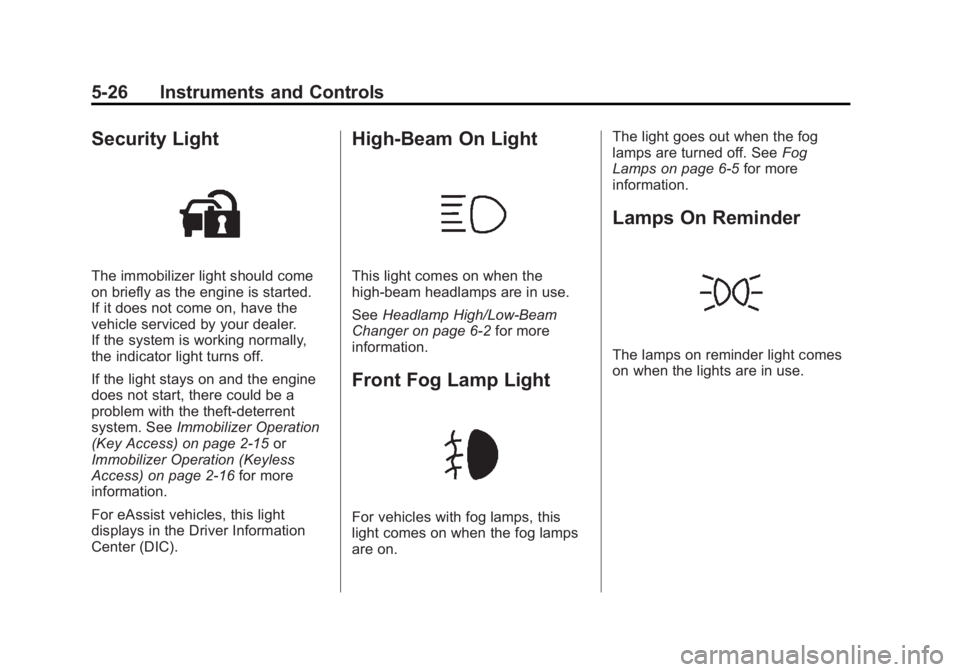
Security Light
The immobilizer light should come
on briefly as the engine is started.
If it does not come on, have the
vehicle serviced by your dealer.
If the system is working normally,
the indicator light turns off.
If the light stays on and the engine
does not start, there could be a
problem with the theft-deterrent
system. SeeImmobilizer Operation
(Key Access) on page 2‑15 or
Immobilizer Operation (Keyless
Access) on page 2‑16 for more
information.
For eAssist vehicles, this light
displays in the Driver Information
Center (DIC).
High-Beam On Light
This light comes on when the
high-beam headlamps are in use.
See Headlamp High/Low-Beam
Changer on page 6‑2 for more
information.
Front Fog Lamp Light
For vehicles with fog lamps, this
light comes on when the fog lamps
are on. The light goes out when the fog
lamps are turned off. See
Fog
Lamps on page 6‑5 for more
information.
Lamps On Reminder
The lamps on reminder light comes
on when the lights are in use.
Page 145 of 512
Black plate (27,1)Buick LaCrosse Owner Manual - 2012
Instruments and Controls 5-27
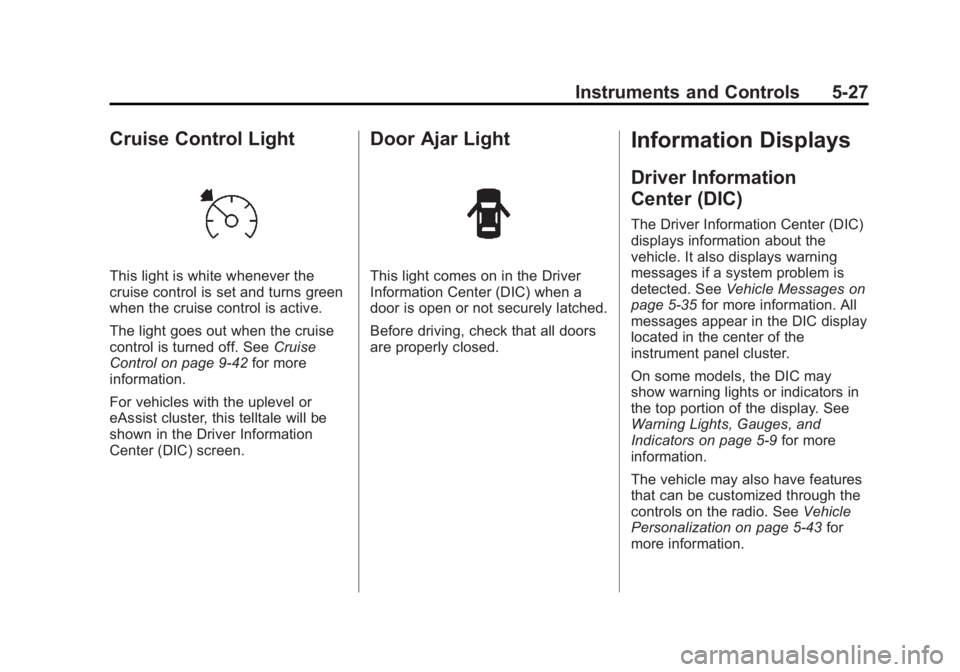
Cruise Control Light
This light is white whenever the
cruise control is set and turns green
when the cruise control is active.
The light goes out when the cruise
control is turned off. SeeCruise
Control on page 9‑42 for more
information.
For vehicles with the uplevel or
eAssist cluster, this telltale will be
shown in the Driver Information
Center (DIC) screen.
Door Ajar Light
This light comes on in the Driver
Information Center (DIC) when a
door is open or not securely latched.
Before driving, check that all doors
are properly closed.
Information Displays
Driver Information
Center (DIC)
The Driver Information Center (DIC)
displays information about the
vehicle. It also displays warning
messages if a system problem is
detected. See Vehicle Messages on
page 5‑35 for more information. All
messages appear in the DIC display
located in the center of the
instrument panel cluster.
On some models, the DIC may
show warning lights or indicators in
the top portion of the display. See
Warning Lights, Gauges, and
Indicators on page 5‑9 for more
information.
The vehicle may also have features
that can be customized through the
controls on the radio. See Vehicle
Personalization on page 5‑43 for
more information.
Page 146 of 512

Black plate (28,1)Buick LaCrosse Owner Manual - 2012
5-28 Instruments and Controls
DIC Operation and Displays
The DIC has different displays
which can be accessed by using the
DIC buttons on the turn signal lever
to the left of the steering wheel. The
DIC displays trip, fuel, vehicle
system information, and warning
messages if a system problem is
detected.
The bottom of the DIC display
shows what position the shift lever
is in, the odometer, and the direction
the vehicle is driving.
In cold weather the DIC display may
change slowly. This is normal and
will move more quickly as the
vehicle's interior temperature rises.DIC Buttons
A.
SET/CLR: Press to set or clear
the menu item when it is
displayed.
B.
w/x(Thumbwheel): Use to
scroll through the items in each
menu. A small marker will move
across the bottom of the page
as you scroll through the items.
This shows where each page is
in the menu.
C. MENU: Press to get to the Trip/
Fuel Menu and the Vehicle
Information Menu.
Trip/Fuel Menu Items
Press MENU on the turn signal
lever until Trip/Fuel Information
Menu is displayed. Use
w/xto
scroll through the following menu
items:
.Digital Speedometer
.Trip 1
.Trip 2
.Power Flow Gauge
(eAssist Only)
.Fuel Range
.Average Fuel Economy/
Instantaneous Fuel Economy
.Average Vehicle Speed
.Timer
.Navigation
Page 147 of 512

Black plate (29,1)Buick LaCrosse Owner Manual - 2012
Instruments and Controls 5-29
Digital Speedometer
The speedometer shows how fast
the vehicle is moving in either
kilometers per hour (km/h) or miles
per hour (mph). The speedometer
cannot be reset.
Trip 1 and Trip 2
This display shows the current
distance traveled, in either
kilometers (km) or miles (mi), since
the last reset for the trip odometer.
The trip odometer can be reset to
zero by pressing SET/CLR while the
trip odometer display is showing.
Power Flow Gauge (eAssist Only)
This display shows the operating
mode of the eAssist system and the
high voltage battery charge level.
The animation indicates the
direction of energy flow.Fuel Range
This display shows the approximate
distance the vehicle can be driven
without refueling. The fuel range
estimate is based on an average of
the vehicle's fuel economy over
recent driving history and the
amount of fuel remaining in the fuel
tank. Fuel range cannot be reset.
Average Fuel Economy/
Instantaneous Fuel Economy
On some models, this display
shows Average Fuel Economy. On
other models, this display shows
both Average Fuel Economy and
Instantaneous Fuel Economy.
The Average Fuel Economy display
shows the approximate average
liters per 100 kilometers (L/100 km)
or miles per gallon (mpg). This
number is calculated based on the
number of L/100 km (mpg) recorded
since the last time this menu item
was reset. The fuel economy can be
reset by pressing SET/CLR while
the Average Fuel Economy display
is showing.The Instantaneous Fuel Economy
display shows the current fuel
economy in liters per 100 kilometers
(L/100 km) or miles per gallon
(mpg). This number reflects only the
fuel economy that the vehicle has
right now and changes frequently as
driving conditions change. Unlike
average economy, this display
cannot be reset.
Average Vehicle Speed
This display shows the average
speed of the vehicle in miles per
hour (mph) or kilometers per
hour (km/h). This average is
calculated based on the various
vehicle speeds recorded since the
last reset of this value. The average
speed can be reset by pressing
SET/CLR while the Average Vehicle
Speed display is showing.
Page 148 of 512

Black plate (30,1)Buick LaCrosse Owner Manual - 2012
5-30 Instruments and Controls
Timer
This display can be used as a timer.
To start the timer, press SET/CLR
while Timer is displayed. The
display will show the amount of time
that has passed since the timer was
last reset, not including time the
ignition is off. Time will continue to
be counted as long as the ignition is
on, even if another display is being
shown on the DIC. The timer will
record up to 99 hours, 59 minutes,
and 59 seconds (99:59:59) after
which the display will return to zero.
To stop the timer, press SET/CLR
briefly while Timer is displayed. To
reset the timer to zero, press and
hold SET/CLR.
Navigation
This display is used for the OnStar
or Navigation System Turn-by-Turn
guidance. SeeOnStar Overview on
page 14‑1 or the navigation manual,
if the vehicle has navigation, for
more information.Vehicle Information Menu
Items
Press MENU on the turn signal
lever until Vehicle Information Menu
is displayed. Use
w/xto scroll
through the following menu items:
.Unit
.Tire Pressure
.Jump Start (eAssist Only)
.Remaining Oil Life
.Battery Voltage
Unit
Move
w/xto switch between
metric or US when the Unit display
is active. Press SET/CLR to confirm
the setting. This will change the
displays on the cluster and DIC to
either metric or English (US)
measurements. Tire Pressure
The display will show a vehicle with
the approximate pressures of all
four tires. Tire pressure is displayed
in either kilopascal (kPa) or pounds
per square inch (psi). See
Tire
Pressure Monitor System on
page 10‑56 andTire Pressure
Monitor Operation on page 10‑57 for
more information.
Jump Start (eAssist Only)
This display allows for on-board
jump starting of the vehicle. See
“Jump Starting (On-board with
eAssist Only)” for more information.
Remaining Oil Life
This display shows an estimate of
the oil's remaining useful life.
If REMAINING OIL LIFE 99% is
displayed, that means 99% of the
current oil life remains.
Page 159 of 512

Black plate (41,1)Buick LaCrosse Owner Manual - 2012
Instruments and Controls 5-41
SPORT MODE ON
This message displays when using
the selective ride control. See
Selective Ride Control on page 9‑41
for more information.
TRACTION CONTROL OFF
This message displays when the
Traction Control System (TCS) is
turned off. Adjust your driving
accordingly.
Anti-theft Alarm System
Messages
THEFT ATTEMPTED
This message displays if the vehicle
detects a tamper condition.
Starting the Vehicle
Messages
JUMP START ACTIVE WAIT TO
START
This message displays while
performing an on-board jump start
of the vehicle. See“Jump Starting
(On-board with eAssist Only)” for
more information.
JUMP START COMPLETE
ATTEMPT START
This message displays while
performing an on-board jump start
of the vehicle. See “Jump Starting
(On-board with eAssist Only)” for
more information.
JUMP START DISABLED SEE
OWNERS MANUAL
This message displays if there is a
problem with the on-board jump
start system. Take the vehicle to
your dealer for service.
Tire Messages
TIRE PRESSURE LOW ADD
AIR TO TIRE
On vehicles with the Tire Pressure
Monitor System (TPMS), this
message displays when the
pressure in one or more of the
vehicle's tires is low.
The low tire pressure warning light
will also come on. See Tire
Pressure Light on page 5‑24.
If a tire pressure message appears
on the DIC, stop as soon as you
can. Inflate the tires by adding air
until the tire pressure is equal to the
values shown on the Tire and
Loading Information label. See Tires
on page 10‑47, Vehicle Load Limits
on page 9‑12, and Tire Pressure on
page 10‑54.
Page 267 of 512
Black plate (5,1)Buick LaCrosse Owner Manual - 2012
Climate Controls 8-5
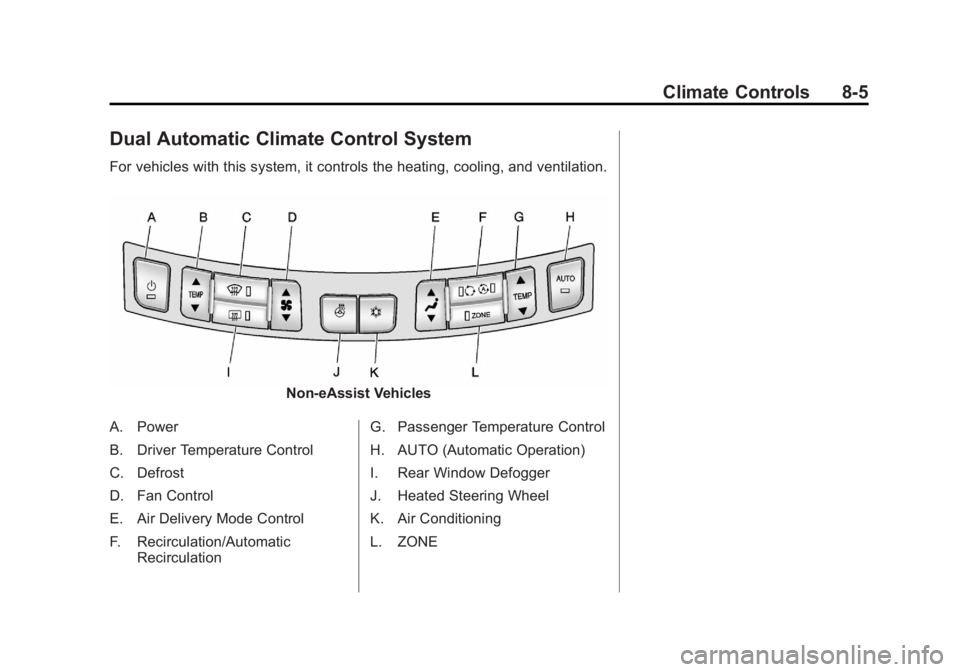
Dual Automatic Climate Control System
For vehicles with this system, it controls the heating, cooling, and ventilation.
Non-eAssist Vehicles
A. Power
B. Driver Temperature Control
C. Defrost
D. Fan Control
E. Air Delivery Mode Control
F. Recirculation/Automatic Recirculation G. Passenger Temperature Control
H. AUTO (Automatic Operation)
I. Rear Window Defogger
J. Heated Steering Wheel
K. Air Conditioning
L. ZONE
Page 268 of 512
Black plate (6,1)Buick LaCrosse Owner Manual - 2012
8-6 Climate Controls
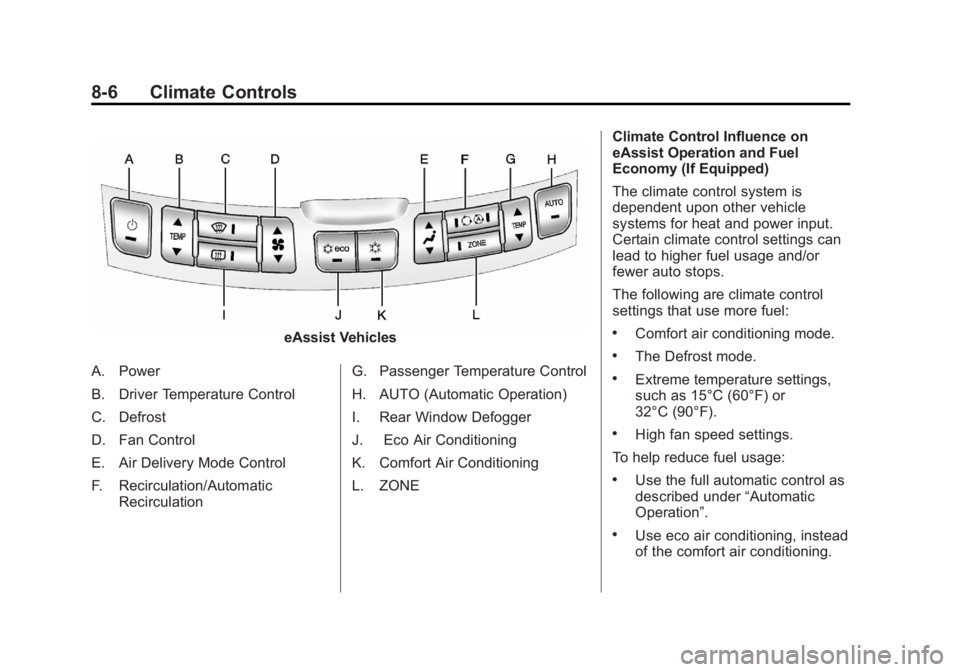
eAssist Vehicles
A. Power
B. Driver Temperature Control
C. Defrost
D. Fan Control
E. Air Delivery Mode Control
F. Recirculation/Automatic Recirculation G. Passenger Temperature Control
H. AUTO (Automatic Operation)
I. Rear Window Defogger
J. Eco Air Conditioning
K. Comfort Air Conditioning
L. ZONE Climate Control Influence on
eAssist Operation and Fuel
Economy (If Equipped)
The climate control system is
dependent upon other vehicle
systems for heat and power input.
Certain climate control settings can
lead to higher fuel usage and/or
fewer auto stops.
The following are climate control
settings that use more fuel:.Comfort air conditioning mode.
.The Defrost mode.
.Extreme temperature settings,
such as 15°C (60°F) or
32°C (90°F).
.High fan speed settings.
To help reduce fuel usage:
.Use the full automatic control as
described under “Automatic
Operation”.
.Use eco air conditioning, instead
of the comfort air conditioning.