2012 BUICK LACROSSE air condition
[x] Cancel search: air conditionPage 113 of 512
Black plate (55,1)Buick LaCrosse Owner Manual - 2012
Seats and Restraints 3-55
and Tethers for Children (LATCH
System) on page 3‑44for additional
information on installing the head
restraint properly.
Securing Child Restraints
(Front Passenger Seat)
This vehicle has airbags. A rear
seat is a safer place to secure a
forward-facing child restraint. See
Where to Put the Restraint on
page 3‑43.
In addition, the vehicle has a
passenger sensing system which is
designed to turn off the right front
passenger frontal airbag and
seat‐mounted side impact airbag
under certain conditions. See
Passenger Sensing System on
page 3‑29 andPassenger Airbag
Status Indicator on page 5‑16 for
more information, including
important safety information. A label on the sun visor says,
“Never put a rear-facing child seat in
the front.”
This is because the risk to
the rear-facing child is so great if the
airbag deploys.
{WARNING
A child in a rear-facing child
restraint can be seriously injured
or killed if the right front
passenger airbag inflates. This is
because the back of the
rear-facing child restraint would
be very close to the inflating
airbag. A child in a forward-facing
child restraint can be seriously
injured or killed if the right front
passenger airbag inflates and the
passenger seat is in a forward
position.
Even if the passenger sensing
system has turned off the right
front passenger frontal airbag, no
system is fail-safe. No one can
guarantee that an airbag will not
(Continued)
WARNING (Continued)
deploy under some unusual
circumstance, even though it is
turned off.
Secure rear-facing child restraints
in a rear seat, even if the airbag
is off. If you secure a
forward-facing child restraint in
the right front seat, always move
the front passenger seat as far
back as it will go. It is better to
secure the child restraint in a
rear seat.
SeePassenger Sensing System
on page 3‑29 for additional
information.
If the child restraint has the LATCH
system, see Lower Anchors and
Tethers for Children (LATCH
System) on page 3‑44 for how and
where to install the child restraint
using LATCH. If a child restraint is
secured using a safety belt and it
Page 135 of 512

Black plate (17,1)Buick LaCrosse Owner Manual - 2012
Instruments and Controls 5-17
If the word OFF is lit on the airbag
status indicator, it means that the
passenger sensing system has
turned off the front outboard
passenger frontal airbag.
If, after several seconds, both status
indicator lights remain on, or if there
are no lights at all, there may be a
problem with the lights or the
passenger sensing system. See
your dealer for service.
{WARNING
If the airbag readiness light ever
comes on and stays on, it means
that something may be wrong
with the airbag system. To help
avoid injury to yourself or others,
have the vehicle serviced right
away. SeeAirbag Readiness
Light on page 5‑16 for more
information, including important
safety information.
Charging System Light
The charging system light comes on
briefly when the ignition is turned
on, but the engine is not running, as
a check to show the light is working.
The light turns off when the engine
is started. If it does not, have the
vehicle serviced by your dealer.
If the light stays on, or comes on
while driving, there could be a
problem with the electrical charging
system. Have it checked by your
dealer. Driving while this light is on
could drain the battery.
If a short distance must be driven
with the light on, be sure to turn off
all accessories, such as the radio
and air conditioner.
Malfunction
Indicator Lamp
A computer system called OBD II
(On-Board Diagnostics-Second
Generation) monitors the operation
of the vehicle to ensure emissions
are at acceptable levels, to produce
a cleaner environment.
This light comes on when the
vehicle is placed in ON/RUN for key
access or Service Only Mode for
keyless access, as a check to show
it is working. If it does not, have the
vehicle serviced by your dealer. See
Ignition Positions (Key Access) on
page 9‑18 orIgnition Positions
(Keyless Access) on page 9‑20 for
more information.
Page 136 of 512
Black plate (18,1)Buick LaCrosse Owner Manual - 2012
5-18 Instruments and Controls
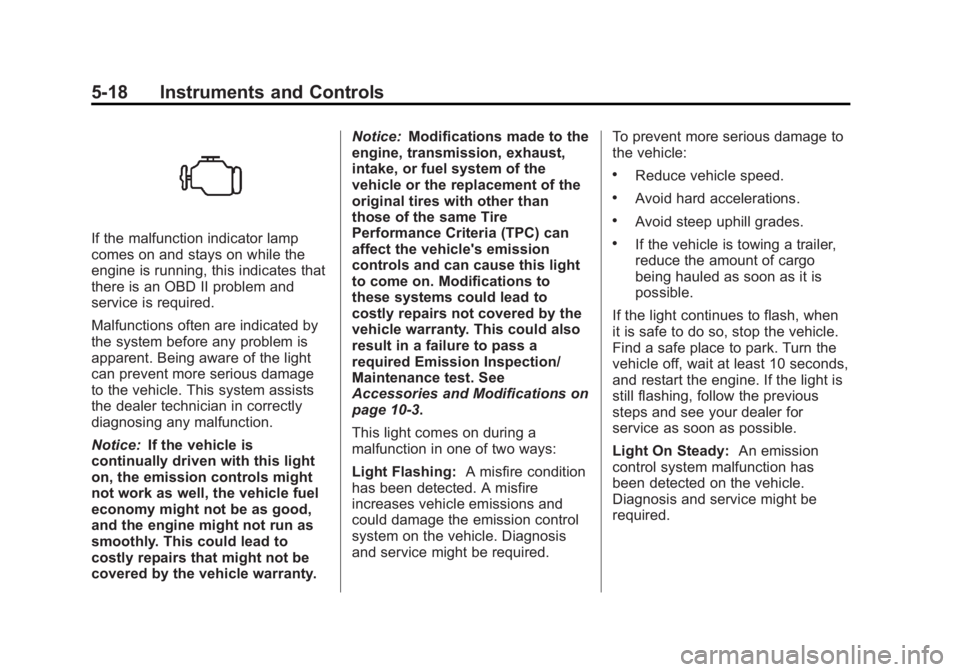
If the malfunction indicator lamp
comes on and stays on while the
engine is running, this indicates that
there is an OBD II problem and
service is required.
Malfunctions often are indicated by
the system before any problem is
apparent. Being aware of the light
can prevent more serious damage
to the vehicle. This system assists
the dealer technician in correctly
diagnosing any malfunction.
Notice:If the vehicle is
continually driven with this light
on, the emission controls might
not work as well, the vehicle fuel
economy might not be as good,
and the engine might not run as
smoothly. This could lead to
costly repairs that might not be
covered by the vehicle warranty. Notice:
Modifications made to the
engine, transmission, exhaust,
intake, or fuel system of the
vehicle or the replacement of the
original tires with other than
those of the same Tire
Performance Criteria (TPC) can
affect the vehicle's emission
controls and can cause this light
to come on. Modifications to
these systems could lead to
costly repairs not covered by the
vehicle warranty. This could also
result in a failure to pass a
required Emission Inspection/
Maintenance test. See
Accessories and Modifications on
page 10‑3.
This light comes on during a
malfunction in one of two ways:
Light Flashing: A misfire condition
has been detected. A misfire
increases vehicle emissions and
could damage the emission control
system on the vehicle. Diagnosis
and service might be required. To prevent more serious damage to
the vehicle:
.Reduce vehicle speed.
.Avoid hard accelerations.
.Avoid steep uphill grades.
.If the vehicle is towing a trailer,
reduce the amount of cargo
being hauled as soon as it is
possible.
If the light continues to flash, when
it is safe to do so, stop the vehicle.
Find a safe place to park. Turn the
vehicle off, wait at least 10 seconds,
and restart the engine. If the light is
still flashing, follow the previous
steps and see your dealer for
service as soon as possible.
Light On Steady: An emission
control system malfunction has
been detected on the vehicle.
Diagnosis and service might be
required.
Page 155 of 512

Black plate (37,1)Buick LaCrosse Owner Manual - 2012
Instruments and Controls 5-37
Door Ajar Messages
DRIVER DOOR OPEN
This message will display when the
driver door is open. Close the door
completely.
HOOD OPEN
This message will display when the
hood is open. Close the hood
completely.
LEFT REAR DOOR OPEN
This message will display when the
driver side rear door is open. Close
the door completely.
PASSENGER DOOR OPEN
This message will display when the
front passenger door is open. Close
the door completely.
RIGHT REAR DOOR OPEN
This message will display when the
passenger side rear door is open.
Close the door completely.
TRUNK OPEN
This message will display when the
trunk is open. Close the trunk
completely.
Engine Cooling System
Messages
A/C OFF DUE TO HIGH
ENGINE TEMP
This message displays when the
engine coolant becomes hotter than
the normal operating temperature.
To avoid added strain on a hot
engine, the air conditioning
compressor automatically turns off.
When the coolant temperature
returns to normal, the air
conditioning compressor turns back
on. You can continue to drive the
vehicle.
If this message continues to appear,
have the system repaired by your
dealer as soon as possible to avoid
damage to the engine.
COOLANT LEVEL LOW ADD
COOLANT
This message will display if the
coolant is low. SeeEngine Coolant
on page 10‑16.
ENGINE
OVERHEATED —IDLE
ENGINE
This message displays when the
engine coolant temperature is too
hot. Stop and allow the vehicle to
idle until it cools down.
ENGINE
OVERHEATED —STOP
ENGINE
This message displays and a
continuous chime sounds if the
engine cooling system reaches
unsafe temperatures for operation.
Stop and turn off the vehicle as
soon as it is safe to do so to avoid
severe damage. This message
clears when the engine has cooled
to a safe operating temperature.
Page 159 of 512

Black plate (41,1)Buick LaCrosse Owner Manual - 2012
Instruments and Controls 5-41
SPORT MODE ON
This message displays when using
the selective ride control. See
Selective Ride Control on page 9‑41
for more information.
TRACTION CONTROL OFF
This message displays when the
Traction Control System (TCS) is
turned off. Adjust your driving
accordingly.
Anti-theft Alarm System
Messages
THEFT ATTEMPTED
This message displays if the vehicle
detects a tamper condition.
Starting the Vehicle
Messages
JUMP START ACTIVE WAIT TO
START
This message displays while
performing an on-board jump start
of the vehicle. See“Jump Starting
(On-board with eAssist Only)” for
more information.
JUMP START COMPLETE
ATTEMPT START
This message displays while
performing an on-board jump start
of the vehicle. See “Jump Starting
(On-board with eAssist Only)” for
more information.
JUMP START DISABLED SEE
OWNERS MANUAL
This message displays if there is a
problem with the on-board jump
start system. Take the vehicle to
your dealer for service.
Tire Messages
TIRE PRESSURE LOW ADD
AIR TO TIRE
On vehicles with the Tire Pressure
Monitor System (TPMS), this
message displays when the
pressure in one or more of the
vehicle's tires is low.
The low tire pressure warning light
will also come on. See Tire
Pressure Light on page 5‑24.
If a tire pressure message appears
on the DIC, stop as soon as you
can. Inflate the tires by adding air
until the tire pressure is equal to the
values shown on the Tire and
Loading Information label. See Tires
on page 10‑47, Vehicle Load Limits
on page 9‑12, and Tire Pressure on
page 10‑54.
Page 161 of 512

Black plate (43,1)Buick LaCrosse Owner Manual - 2012
Instruments and Controls 5-43
Vehicle
Personalization
The audio system controls are used
to access the personalization
menus for customizing vehicle
features.
CONFIG (Configuration):Press to
access the Configuration
Settings menu.
Menu Knob: Turn to scroll through
the menus.
SELECT: Press to enter the menus
and select menu items.
/BACK: Press to exit or move
backward in a menu. Entering the Personalization
Menus
1. Press CONFIG to access the
Configuration Settings menu.
2. Turn the Menu knob to highlight Vehicle Settings.
3. Press SELECT to select the Vehicle Settings menu.
The following list of menu items may
be available:
.Climate and Air Quality
.Comfort and Convenience
.Collision/Detection Systems
.Language
.Lighting
.Power Door Locks
.Remote Lock/Unlock/Start
.Return to Factory Settings
Turn the Menu knob to highlight the
menu. Press SELECT to select it.
Each of the menus is detailed in the
following information.
Climate and Air Quality
Select the Climate and Air Quality
menu and the following may be
displayed:
.Auto Fan Speed
.Air Quality Sensor
.Auto Heated Seats
.Air Conditioning Mode
.Remote Start Auto Heated Seats
.Remote Start Cooled Seats
.Auto Defog
.Auto Rear Defog
Auto Fan Speed
This will allow you to select the
automatic fan speed. It can be
adjusted to run lower or higher than
normal.
Press SELECT when Auto Fan
Speed is highlighted to open the
menu. Turn the Menu knob to
highlight High, Medium, or Low.
Page 162 of 512

Black plate (44,1)Buick LaCrosse Owner Manual - 2012
5-44 Instruments and Controls
Press SELECT to confirm the
selection. Press
/BACK to move to
the last menu.
Air Quality Sensor
This will allow you to select whether
the system will operate at high or
low sensitivity. Only vehicles with
the dual zone climate control will
have this option.
Press SELECT when Air Quality
Sensor is highlighted to open the
menu. Turn the Menu knob to
highlight High or Low. Press
SELECT to confirm the selection.
Press
/BACK to move to the
last menu.
Auto Heated Seats
If equipped and turned on, this
feature will automatically activate
heated seats at the level required by
the interior temperature. The auto
heated seats can be turned off by
using the heated seat buttons on
the climate control panel. Press SELECT when Auto Heated
Seats is highlighted to open the
menu. Turn the Menu knob to
highlight On or Off. Press SELECT
to confirm the selection. Press
/BACK to move to the last menu.
Air Conditioning Mode
This allows selection of automatic
start of the air conditioning upon
vehicle start. Selecting On indicates
the air conditioning will be on when
the vehicle is started. Selecting Off
turns the air conditioning off each
time the vehicle is started. Last
Setting will resume the last setting
when the vehicle was shut off.
Press SELECT when Air
Conditioning Mode is highlighted to
open the menu. Turn the Menu knob
to highlight Off, On, or Last Setting.
Press SELECT to confirm the
selection. Press
/BACK to move to
the last menu. Remote Start Auto Heated Seats
If equipped and turned on, this
feature will turn the heated seats on
when using remote start on
cold days.
Press SELECT when Remote Start
Auto Heated Seats is highlighted.
Turn the Menu knob to select On or
Off. Press SELECT to confirm the
selection. Press
/BACK to move to
the last menu.
Remote Start Cooled Seats
If equipped and turned on, this
feature will turn the cooled seats on
when using remote start on
warm days.
Press SELECT when Remote Start
Cooled Seats is highlighted. Turn
the Menu knob to select On or Off.
Press SELECT to confirm the
selection. Press
/BACK to move to
the last menu.
Page 263 of 512
Black plate (1,1)Buick LaCrosse Owner Manual - 2012
Climate Controls 8-1
Climate Controls
Climate Control Systems
Automatic Climate ControlSystem . . . . . . . . . . . . . . . . . . . . . . 8-1
Dual Automatic Climate Control System . . . . . . . . . . . . . . . . . . . . . . 8-5
Air Vents
Air Vents . . . . . . . . . . . . . . . . . . . . . 8-10
Maintenance
Air Intake . . . . . . . . . . . . . . . . . . . . 8-11
Passenger Compartment AirFilter . . . . . . . . . . . . . . . . . . . . . . . . 8-11
Climate Control Systems
Automatic Climate Control System
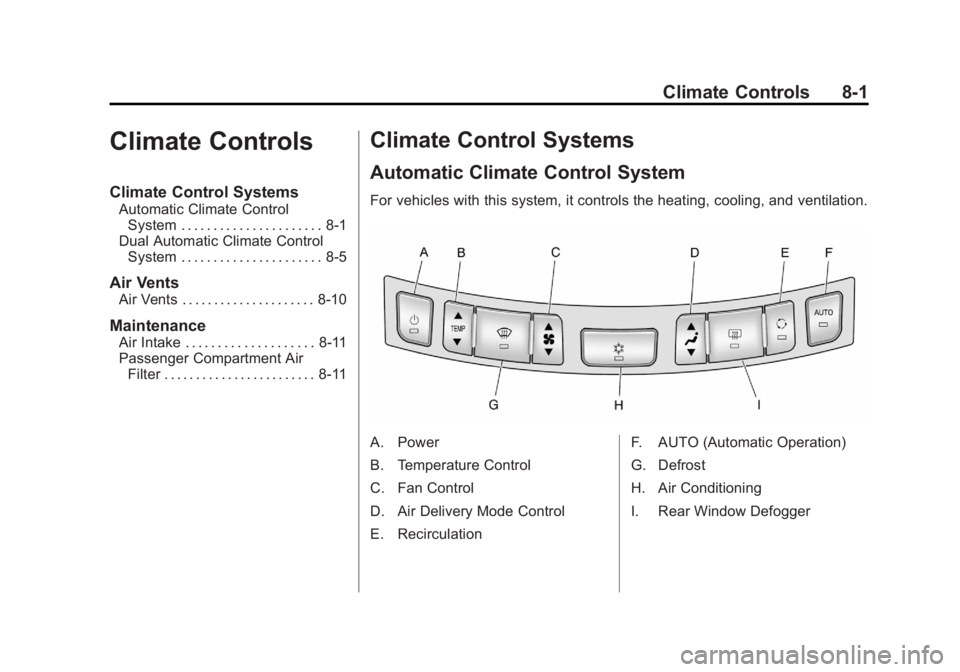
For vehicles with this system, it controls the heating, cooling, and ventilation.
A. Power
B. Temperature Control
C. Fan Control
D. Air Delivery Mode Control
E. Recirculation F. AUTO (Automatic Operation)
G. Defrost
H. Air Conditioning
I. Rear Window Defogger