2012 BMW Z4 SDRIVE35I light
[x] Cancel search: lightPage 40 of 220
Comfort function1.Open the driver's door or switch on the radio
ready state, refer to page 45.2.Briefly press the desired memory but‐
ton 1 or 2.
The seat is automatically moved to the stored
position.
The procedure stops when a switch for adjust‐
ing the seat or one of the buttons is pressed.
Safety mode
1.Close the driver's door and switch the igni‐
tion on or off, refer to page 45.2.Press and hold the desired button 1 or 2 until
the adjustment procedure is completed.
Mirrors
Exterior mirrors
General information
The mirror on the passenger side is more curved
than the driver's mirror.
Estimating distances correctly
Objects reflected in the mirror are closer
than they appear. Do not estimate the distance
to the traffic behind you based on what you see
in the mirror, as this will increase your risk of an
accident.◀
The setting for the exterior mirrors is stored for
the remote control currently in use. The stored
position is called up automatically when the ve‐
hicle is unlocked.
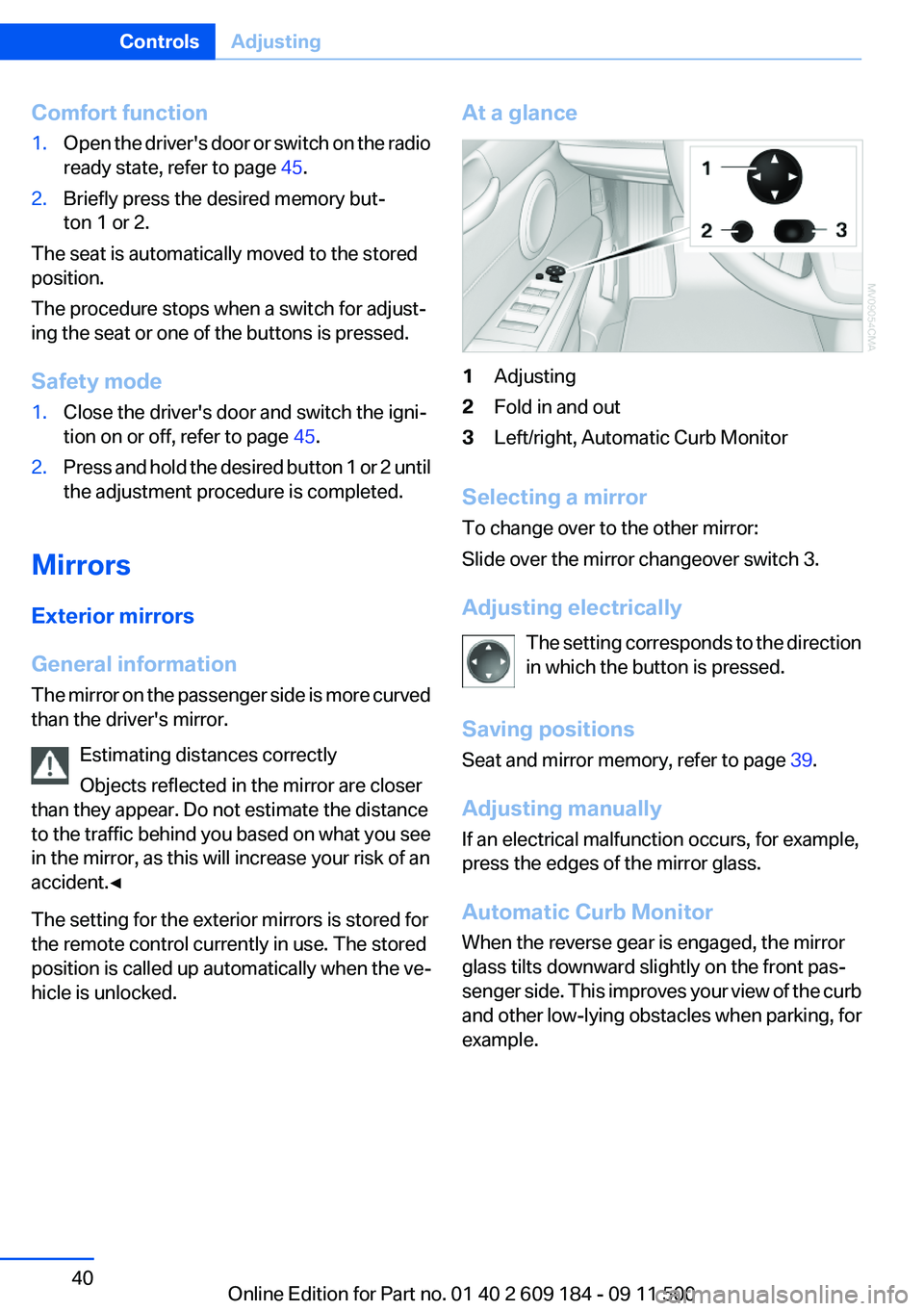
At a glance1Adjusting2Fold in and out3Left/right, Automatic Curb Monitor
Selecting a mirror
To change over to the other mirror:
Slide over the mirror changeover switch 3.
Adjusting electrically The setting corresponds to the direction
in which the button is pressed.
Saving positions
Seat and mirror memory, refer to page 39.
Adjusting manually
If an electrical malfunction occurs, for example,
press the edges of the mirror glass.
Automatic Curb Monitor
When the reverse gear is engaged, the mirror
glass tilts downward slightly on the front pas‐
senger side. This improves your view of the curb
and other low-lying obstacles when parking, for
example.
Seite 40ControlsAdjusting40
Online Edition for Part no. 01 40 2 609 184 - 09 11 500
Page 42 of 220
Steering wheel
General information Do not adjust while driving
Do not adjust the steering wheel while
driving; otherwise, an unexpected movement
could result in an accident.◀
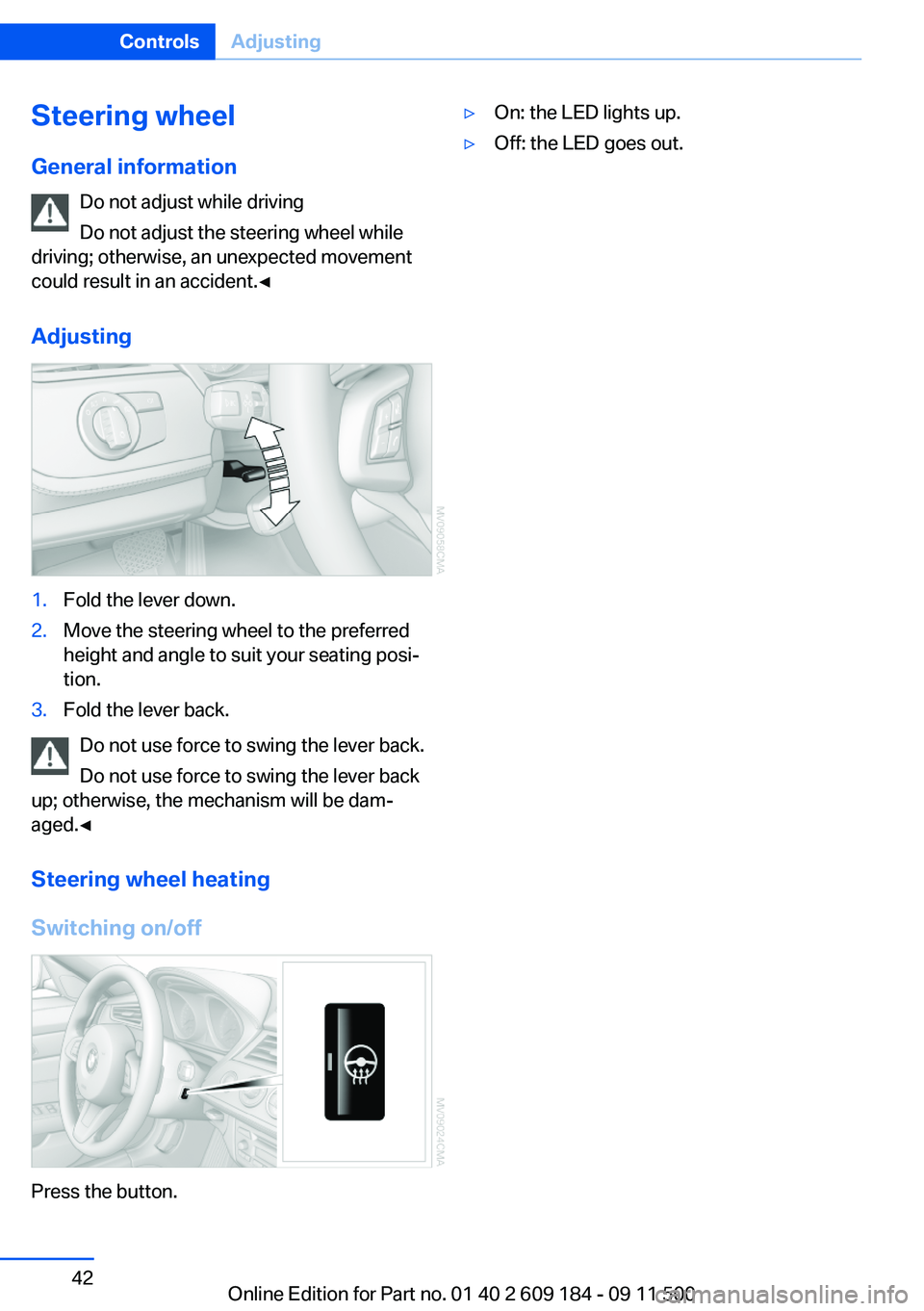
Adjusting1.Fold the lever down.2.Move the steering wheel to the preferred
height and angle to suit your seating posi‐
tion.3.Fold the lever back.
Do not use force to swing the lever back.
Do not use force to swing the lever back
up; otherwise, the mechanism will be dam‐
aged.◀
Steering wheel heating
Switching on/off
Press the button.
▷On: the LED lights up.▷Off: the LED goes out.Seite 42ControlsAdjusting42
Online Edition for Part no. 01 40 2 609 184 - 09 11 500
Page 47 of 220

Set the parking brake and further secure
the vehicle as required
Set the parking brake firmly when parking; oth‐
erwise, the vehicle could roll. On steep upward
and downward inclines, further secure the vehi‐
cle, for example, by turning the steering wheel in
the direction of the curb.◀
Manual transmission1.With the vehicle at a standstill, press the
Start/Stop button.2.Shift into first gear or reverse.3.Set the parking brake.4.Remove the remote control from the ignition
lock, refer to page 45.
Sport automatic transmission
1.With the vehicle at a standstill, press the
Start/Stop button.2.Set the parking brake.3.Remove the remote control from the ignition
lock, refer to page 45.
Automatic Engine Start/Stop
Function
The concept
The Automatic Engine Start/Stop Function
helps save fuel and lower emissions. The sys‐
tem automatically switches off the engine dur‐
ing a stop, e.g., in a traffic congestion or at traffic
lights. The ignition remains switched on. The
engine starts again automatically when the
clutch is pressed.
Automatic operation
The automatic engine start/stop function is op‐
erational after each engine start. It is activated
whenever you drive forward faster than 3 mph/
5 km/h.
Automatic engine stop
The engine is switched off automatically during
a stop under the following conditions:▷Neutral gear is engaged and the clutch pedal
is not depressed.▷The driver's safety belt is fastened or the
driver's door is closed.
When the engine is switched off, the air volume
of the air conditioner or automatic climate con‐
trol is reduced.
Indicator lamp in the instrument cluster The indicator lamp lights up when the
Auto Start/Stop function is ready to
start the engine automatically.
More information, refer to page 186.
Note
The engine is not switched off automatically in
the following situations:
▷External temperatures below approx. 37 ℉/
+3 ℃.▷High external temperature and operation of
the automatic climate control.▷The interior is not yet heated or cooled as
much as desired.▷The engine is not yet at operating tempera‐
ture.▷Sharp steering angle or the steering wheel
is being turned.▷After driving in reverse.▷Fogging of the windows when the automatic
climate control is switched on.▷Vehicle battery charge is very low.▷Hood is unlocked.Seite 47DrivingControls47
Online Edition for Part no. 01 40 2 609 184 - 09 11 500
Page 48 of 220

Parking the vehicle during an
automatic engine stop
The vehicle can be parked safely during an au‐
tomatic engine stop, such as when you wish to
leave the vehicle.1.Press the Start/Stop button. The ignition is
switched off. The Auto Start/Stop function
is deactivated.2.Set the parking brake.
Start the engine as usual using the Start/Stop
button.
Automatic engine start
To drive away, the engine starts automatically as
soon as the clutch pedal is depressed.
After the engine starts, accelerate as usual.
Safety mode
The engine does not start by itself after it is
switched off automatically if any of the following
conditions are fulfilled:
▷The driver's safety belt is unfastened or the
driver's door is open.▷Hood was unlocked.
The indicator lamp lights up.
The engine can only be started via the
Start/Stop button.
More information, refer to page 186.
Note
Even if you do not wish to drive away, the stop‐
ped engine still starts automatically in the fol‐
lowing situations:
▷The interior has heated up strongly with the
cooling function switched on.▷The steering wheel is turned.▷The vehicle begins to roll.▷Fogging of the windows when the automatic
climate control is switched on.▷Vehicle battery charge is very low.▷The interior has cooled down strongly with
the heating switched on.▷Low braking pressure, such as from de‐
pressing the brake pedal a number of times
consecutively.
Activating/deactivating the system
manually
Press the button.
▷LED on the button lights up: the Auto Start/
Stop function is deactivated.
The engine is started during an automatic
engine stop.
The engine can only be stopped or started
via the Start/Stop button.▷LED goes out: the Auto Start/Stop function
is activated.
Automatic deactivation
In certain situations, the Auto Start/Stop func‐
tion is deactivated automatically in the interest
of safety, for example if the driver's absence is
detected.
Malfunction The automatic engine start/stop func‐
tion no longer switches of the engine
automatically. The indicator lamp
lights up. It is possible to continue driving. Have
the system checked.
More information, refer to page 186.
Seite 48ControlsDriving48
Online Edition for Part no. 01 40 2 609 184 - 09 11 500
Page 49 of 220
Parking brake
The concept
Your vehicle is equipped with an electrome‐
chanical parking brake that can be set and re‐
leased by using a button.
The parking brake is primarily used to prevent
the vehicle from rolling when it is parked.
When the vehicle is stationary, the parking brake
acts on the rear wheels via an electromechanical
mechanism. When the vehicle is rolling or being
driven, the parking brake acts on the disc brakes
of the front and rear wheels via the hydraulic
brake system.
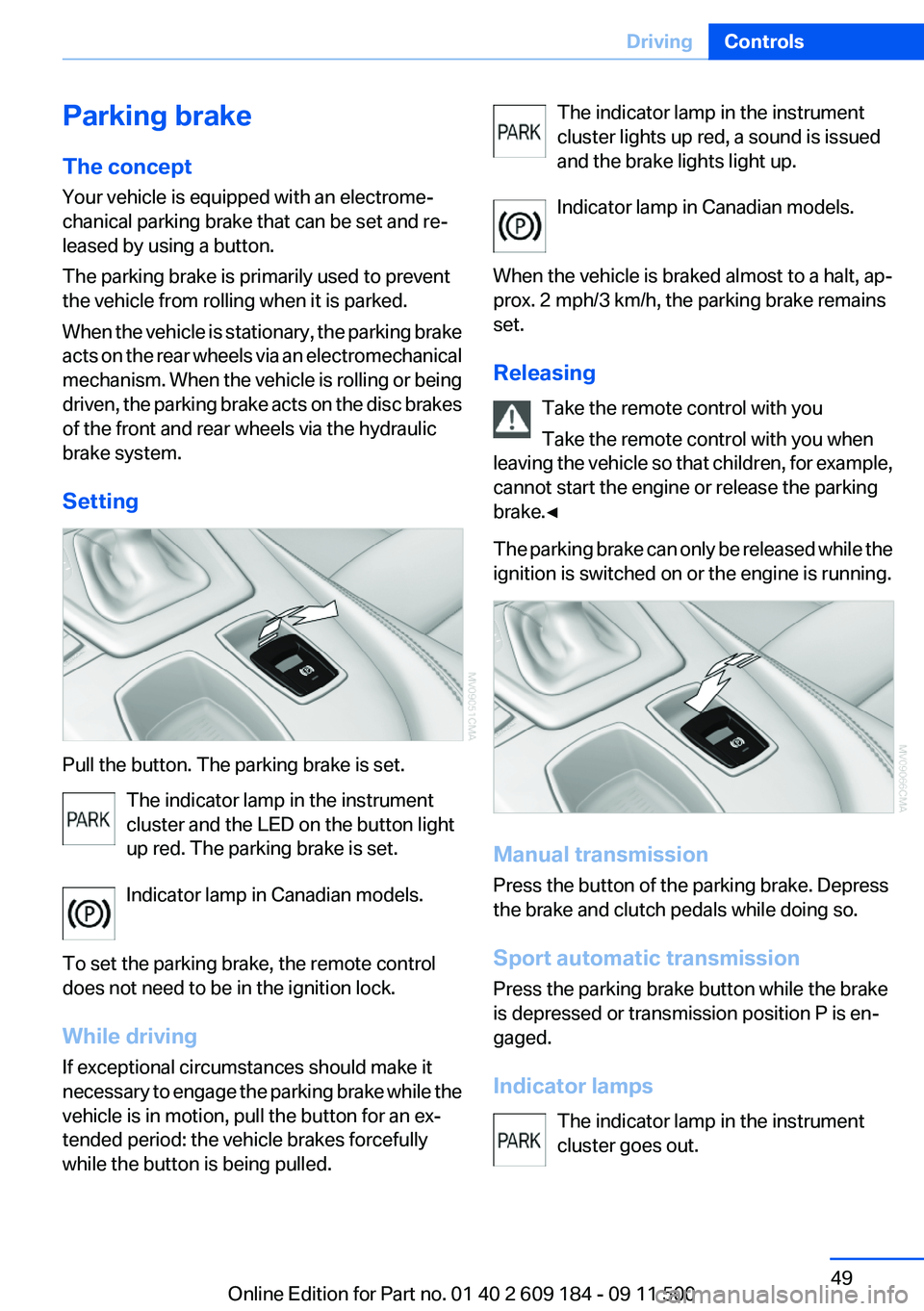
Setting
Pull the button. The parking brake is set. The indicator lamp in the instrument
cluster and the LED on the button light
up red. The parking brake is set.
Indicator lamp in Canadian models.
To set the parking brake, the remote control
does not need to be in the ignition lock.
While driving
If exceptional circumstances should make it
necessary to engage the parking brake while the
vehicle is in motion, pull the button for an ex‐
tended period: the vehicle brakes forcefully
while the button is being pulled.
The indicator lamp in the instrument
cluster lights up red, a sound is issued
and the brake lights light up.
Indicator lamp in Canadian models.
When the vehicle is braked almost to a halt, ap‐
prox. 2 mph/3 km/h, the parking brake remains
set.
Releasing Take the remote control with you
Take the remote control with you when
leaving the vehicle so that children, for example,
cannot start the engine or release the parking
brake.◀
The parking brake can only be released while the
ignition is switched on or the engine is running.
Manual transmission
Press the button of the parking brake. Depress
the brake and clutch pedals while doing so.
Sport automatic transmission
Press the parking brake button while the brake
is depressed or transmission position P is en‐
gaged.
Indicator lamps The indicator lamp in the instrument
cluster goes out.
Seite 49DrivingControls49
Online Edition for Part no. 01 40 2 609 184 - 09 11 500
Page 50 of 220
Indicator lamp in Canadian models.
Malfunction
In the event of a failure or malfunction of the
parking brake, secure the vehicle against rolling
using a wheel chock, for example, if you leave
the vehicle.
Turn signals/
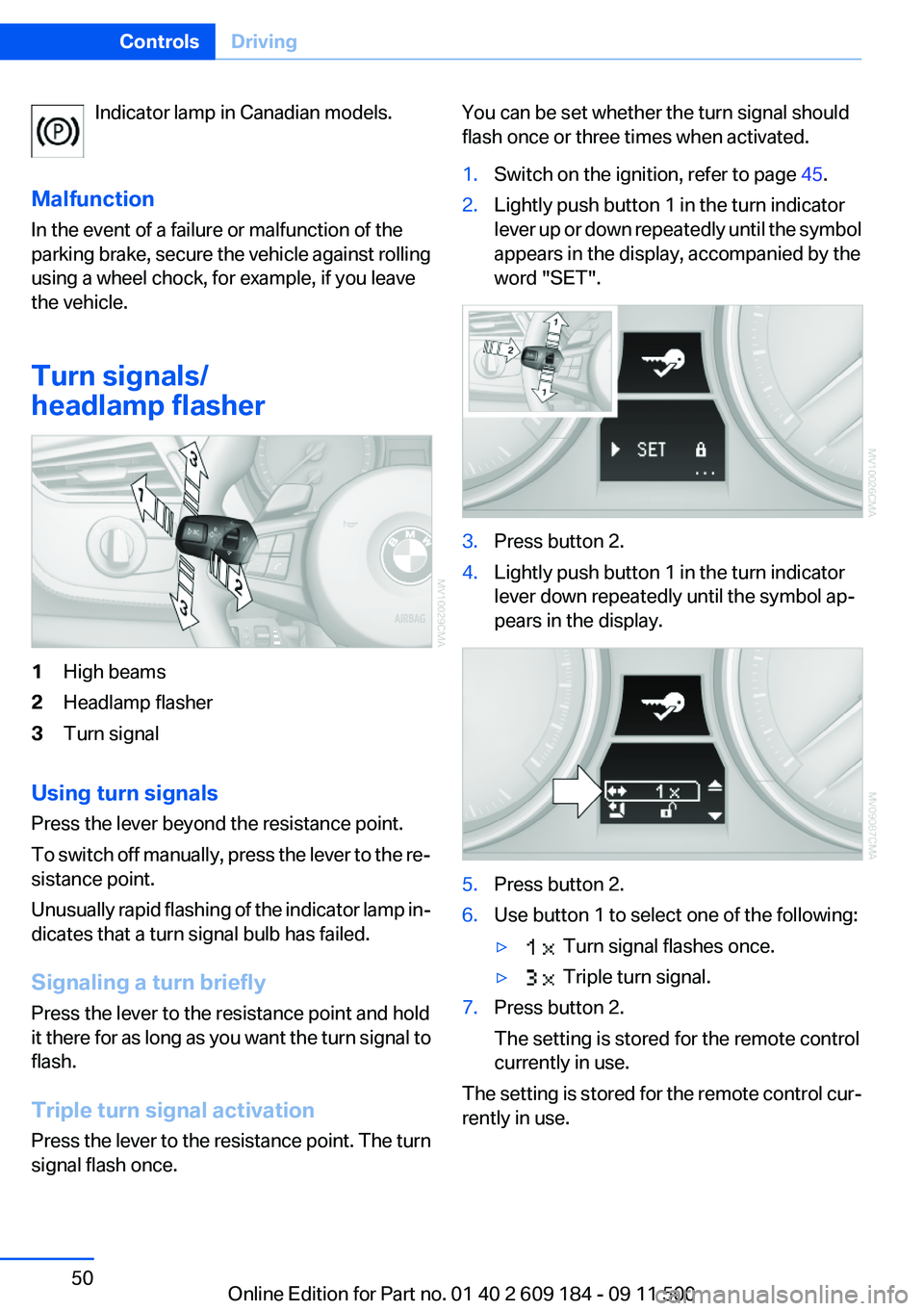
headlamp flasher1High beams2Headlamp flasher3Turn signal
Using turn signals
Press the lever beyond the resistance point.
To switch off manually, press the lever to the re‐
sistance point.
Unusually rapid flashing of the indicator lamp in‐
dicates that a turn signal bulb has failed.
Signaling a turn briefly
Press the lever to the resistance point and hold
it there for as long as you want the turn signal to
flash.
Triple turn signal activation
Press the lever to the resistance point. The turn
signal flash once.
You can be set whether the turn signal should
flash once or three times when activated.1.Switch on the ignition, refer to page 45.2.Lightly push button 1 in the turn indicator
lever up or down repeatedly until the symbol
appears in the display, accompanied by the
word "SET".3.Press button 2.4.Lightly push button 1 in the turn indicator
lever down repeatedly until the symbol ap‐
pears in the display.5.Press button 2.6.Use button 1 to select one of the following:▷ Turn signal flashes once.▷ Triple turn signal.7.Press button 2.
The setting is stored for the remote control
currently in use.
The setting is stored for the remote control cur‐
rently in use.
Seite 50ControlsDriving50
Online Edition for Part no. 01 40 2 609 184 - 09 11 500
Page 51 of 220

Washer/wiper system1Switching on wipers2Switching off wipers or brief wipe3Activating/deactivating intermittent wipe or
the rain sensor4Cleaning the windshield and headlamps5Setting speed for intermittent wipe or sen‐
sitivity of the rain sensor
Switching on wipers
Press the lever upward, arrow 1.
The lever automatically returns to its initial po‐
sition when released.
Normal wiper speed
Press once.
The system switches to operation in the inter‐
mittent mode when the vehicle is stationary.
Fast wiper speed
Press twice or press beyond the resistance
point.
The system switches to normal speed when the
vehicle is stationary.
Intermittent wipe or rain sensor
If the car is not equipped with a rain sensor, the
intermittent-wipe time is a preset.
If the car is equipped with a rain sensor, the time
between wipes is controlled automatically and
depends on the intensity of the rainfall. The rain
sensor is mounted on the windshield, directly in
front of the interior rearview mirror.
Activating intermittent wipe or rain
sensor
Press the button, arrow 3. The LED in the button
lights up.
Setting speed for intermittent wipe or
sensitivity of the rain sensor
Turn thumbwheel 5 up or down.
Deactivating intermittent wipe or rain
sensor
Press the button again, arrow 3. The LED in the
button goes out.
Deactivate the rain sensor in car washes
Deactivate the rain sensor when passing
through an automatic car wash; otherwise, dam‐
age could be caused by undesired wiper activa‐
tion.◀
Cleaning the windshield and
headlamps
Pull the lever, arrow 4.
The system sprays washer fluid on the wind‐
shield and activates the wipers briefly.
When the vehicle lighting system is switched on,
the headlamps are cleaned at regular and ap‐
propriate intervals.
Do not use the washer system at freezing
temperatures
Do not use the washers if there is any danger
that the fluid will freeze on the windshield; oth‐
erwise, your vision could be obscured. For this
reason, use antifreeze.
Seite 51DrivingControls51
Online Edition for Part no. 01 40 2 609 184 - 09 11 500
Page 52 of 220
Avoid using the washer when the reservoir is
empty; otherwise, you could damage the
pump.◀
Windshield washer nozzles
The windshield washer nozzles are heated au‐
tomatically while the engine is running or the ig‐
nition is switched on.
Washer fluid
General information Antifreeze for washer fluid
Antifreeze is flammable. Therefore, keep
it away from sources of ignition.
Only keep it in the closed original container and
inaccessible to children.
Follow the instructions on the container.◀
Washer fluid reservoir Adding washer fluid
Only add washer fluid when the engine is
cool, and then close the cover completely to
avoid contact between the washer fluid and hot
engine parts.
Otherwise, there is the danger of fire and a risk
to personal safety if the fluid is spilled.◀
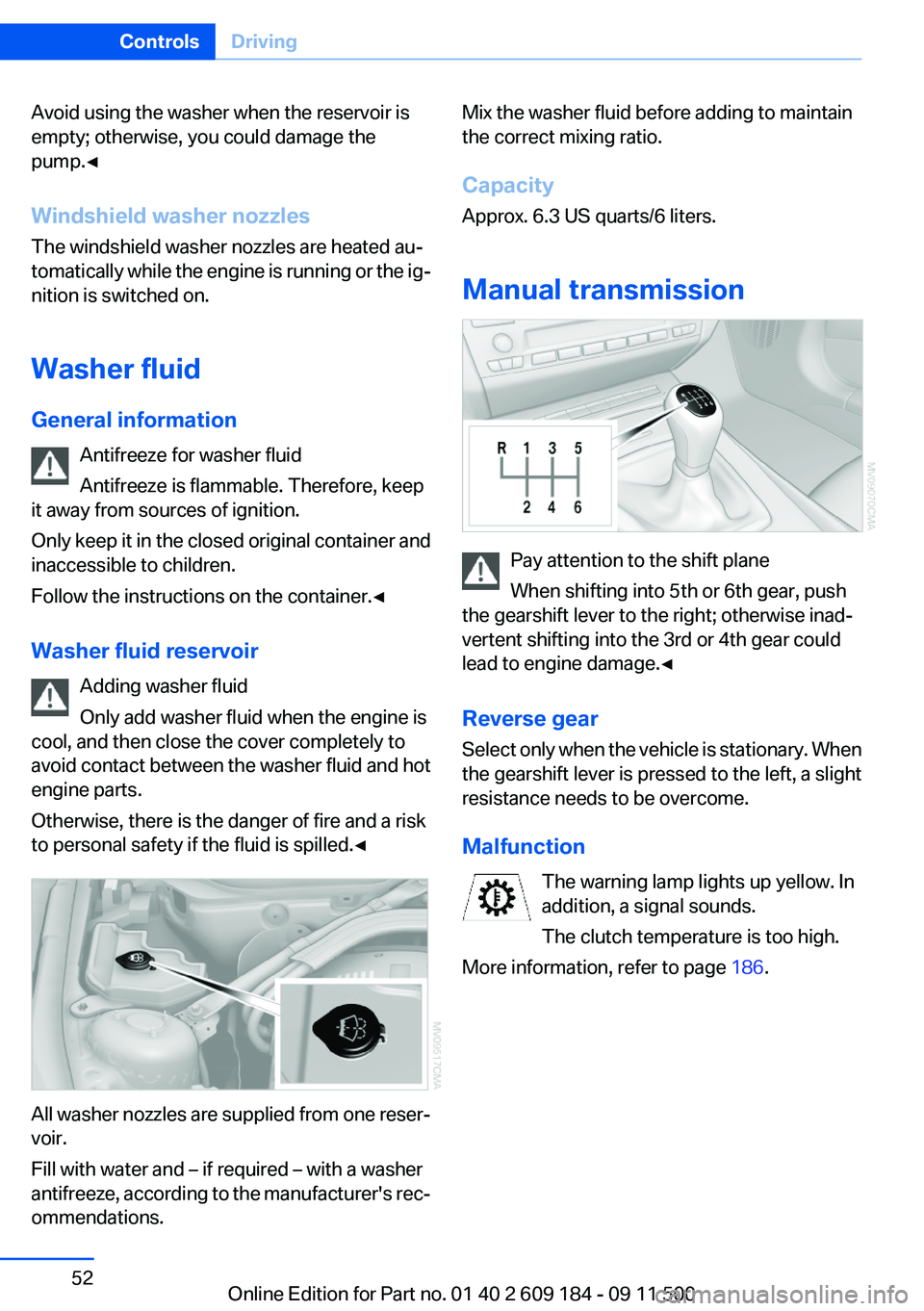
All washer nozzles are supplied from one reser‐
voir.
Fill with water and – if required – with a washer
antifreeze, according to the manufacturer's rec‐
ommendations.
Mix the washer fluid before adding to maintain
the correct mixing ratio.
Capacity
Approx. 6.3 US quarts/6 liters.
Manual transmission
Pay attention to the shift plane
When shifting into 5th or 6th gear, push
the gearshift lever to the right; otherwise inad‐
vertent shifting into the 3rd or 4th gear could
lead to engine damage.◀
Reverse gear
Select only when the vehicle is stationary. When
the gearshift lever is pressed to the left, a slight
resistance needs to be overcome.
Malfunction The warning lamp lights up yellow. In
addition, a signal sounds.
The clutch temperature is too high.
More information, refer to page 186.
Seite 52ControlsDriving52
Online Edition for Part no. 01 40 2 609 184 - 09 11 500