2012 BMW ACTIVEHYBRID 5 fuel consumption
[x] Cancel search: fuel consumptionPage 27 of 319

BMW ActiveHybridVehicle equipment
All standard, country-specific and optional
equipment that is offered in the model series is
described in this chapter. Therefore, equipment
is also described that is not available in a vehicle,
e. g., because of the selected optional equip‐
ment or country variant. This also applies for
safety-related functions and systems.
Hybrid system
At a glance1Combustion engine2Electric motor3Control-system electronics, electric motor4High-voltage cables (orange)5High-voltage battery6Auxiliary battery, combustion engine7Starter battery, combustion engine
The concept
The hybrid system makes it possible to optimize
fuel consumption and driving characteristics.
An electric motor assists the combustion en‐
gine. The vehicle can therefore be driven in cer‐
tain driving situations using only electric power,
which reduces fuel consumption.
In addition to this, the electric motor acts like an
alternator: during braking, it converts the vehi‐
cle's kinetic energy into electricity. The current
is stored in the high-voltage battery and is used
to drive the electric motor.
The hybrid system combines the following func‐
tions:▷Acceleration boost.▷Electric driving.▷Energy recovery: conversion and storage of
kinetic energy as electric current.▷Auto Start/Stop function: automatic stop‐
ping and starting the combustion engine
when coasting, breaking and while stopped.▷Electric operation of the automatic climate
control.
Functions
Acceleration boost: ASSIST and
eBOOST
Driving off and accelerating require a lot of en‐
ergy. To reduce fuel consumption during high
acceleration and to optimize acceleration, the
electric motor supports the combustion engine.
For this purpose, the electric motor is supplied
by the high-voltage battery.
Electric driving: eDRIVE
Under certain conditions, refer to page 67, the
vehicle is powered only by the electric motor.
Driving with the combustion engine:
DRIVE
The combustion engine provides the drive
power to move the vehicle. The high-voltage
battery is charged at the same time.
The hybrid system always starts the combus‐
tion engine automatically.
Seite 27BMW ActiveHybridAt a glance27
Online Edition for Part no. 01 40 2 900 579 - 03 12 490
Page 81 of 319

Displays of the hybrid system
Displays in the instrument cluster
The concept
The display depends on the system's operating
condition. The following functions of the hybrid
system are shown in the instrument cluster.▷High-voltage battery charge indicator.▷Electric driving: eDRIVE.▷Acceleration boost: ASSIST and eBOOST.▷Energy recovery: CHARGE.▷Auto Start/Stop function: READY.
High-voltage battery charge indicator
Displays the state of the high-
voltage battery's charge on a
scale from 0 to 1 when drive read‐
iness is active. If the scale indi‐
cates 1, the high-voltage battery
is fully charged.
During normal vehicle operation, the high-volt‐
age battery is charged up to approx. 80 %. This
ensures optimum energy recovery when decel‐
erating or driving downhill.
Even when the scale indicates 0, the hybrid sys‐
tem is always still under high voltage.
Electric driving: eDRIVE When driving with electric power,
the power output of the electric
motor is indicated by arrows.
Depending on the position of the
accelerator pedal, up to four ar‐
rows are displayed simultaneously. The tach‐
ometer pointer stays on 0 rpm.
If all four arrows are already displayed and addi‐
tional power is required, such as for accelera‐
tion, the combustion engine switches on.
Acceleration boost: ASSIST and
eBOOST
ASSIST: the electric motor as‐
sists the combustion engine.
This is indicated by arrows in the
instrument cluster.
eBOOST: all four arrows are dis‐
played when the electric motor reaches maxi‐
mum power output.
Energy recovery: CHARGE The energy recovered is dis‐
played in the tachometer as an
arrow with the symbol +. The
high-voltage battery is charging.
Auto Start/Stop function: READY The READY display indicates
that the vehicle is ready for driv‐
ing.
Indications on the Control Display
Displaying fuel consumption history1."Vehicle Info"2."Hybrid"3. "Consumption history"
Fuel consumption history
The gray bars show the fuel consumption by the
combustion engine, arrow 1. The blue bars show
Seite 81DisplaysControls81
Online Edition for Part no. 01 40 2 900 579 - 03 12 490
Page 82 of 319
the percentages in which the functions of the
hybrid system have been used, arrow 2.
One bar stands for one minute. The background
color in the upper bar display shows the driving
mode during the particular period of time.
In addition, the combustion engine's average
fuel consumption is indicated by a line above the
bar display and as a value on the right next to the
graph.
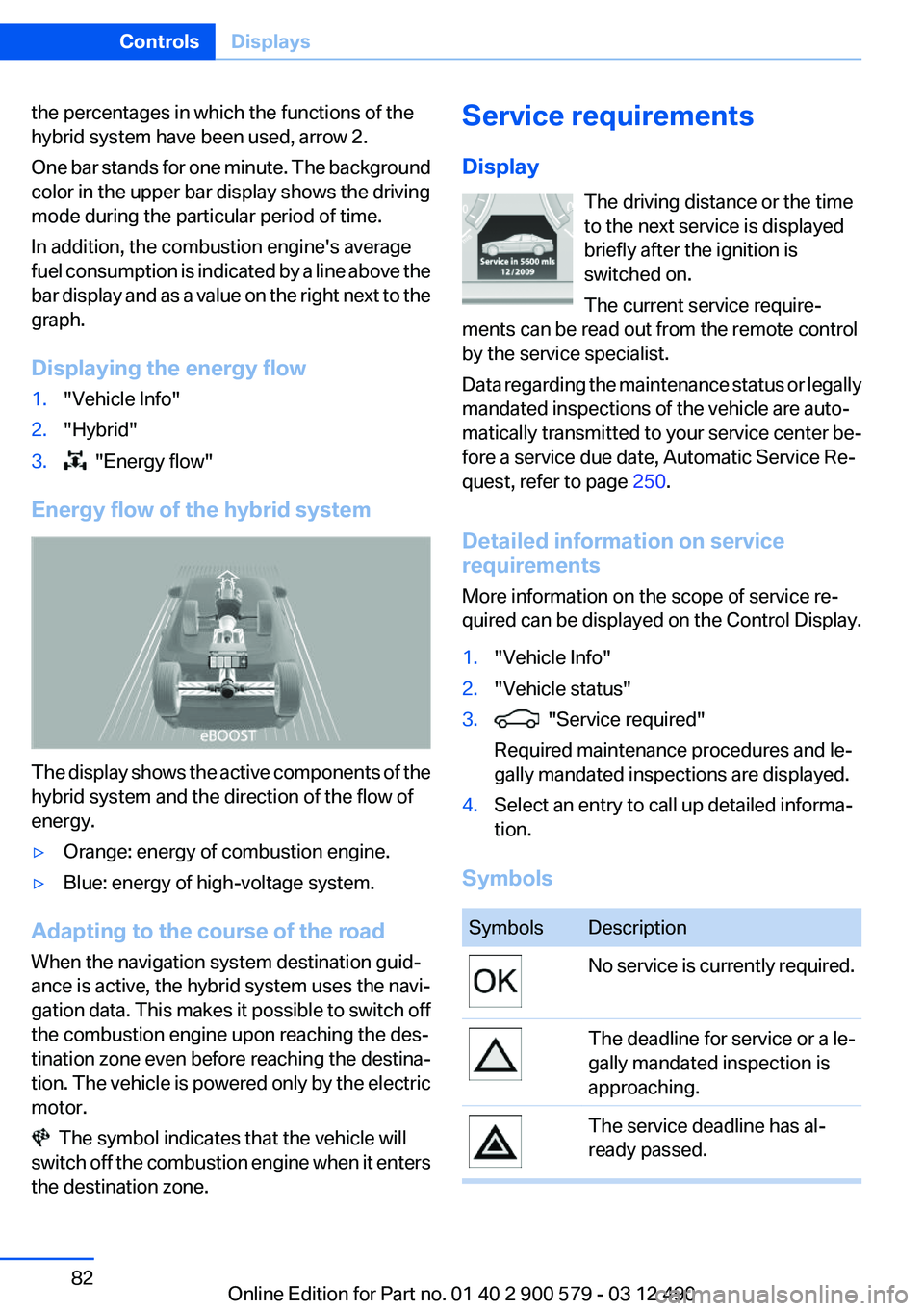
Displaying the energy flow1."Vehicle Info"2."Hybrid"3. "Energy flow"
Energy flow of the hybrid system
The display shows the active components of the
hybrid system and the direction of the flow of
energy.
▷Orange: energy of combustion engine.▷Blue: energy of high-voltage system.
Adapting to the course of the road
When the navigation system destination guid‐
ance is active, the hybrid system uses the navi‐
gation data. This makes it possible to switch off
the combustion engine upon reaching the des‐
tination zone even before reaching the destina‐
tion. The vehicle is powered only by the electric
motor.
The symbol indicates that the vehicle will
switch off the combustion engine when it enters
the destination zone.
Service requirements
Display The driving distance or the time
to the next service is displayed
briefly after the ignition is
switched on.
The current service require‐
ments can be read out from the remote control
by the service specialist.
Data regarding the maintenance status or legally
mandated inspections of the vehicle are auto‐
matically transmitted to your service center be‐
fore a service due date, Automatic Service Re‐
quest, refer to page 250.
Detailed information on service
requirements
More information on the scope of service re‐
quired can be displayed on the Control Display.1."Vehicle Info"2."Vehicle status"3. "Service required"
Required maintenance procedures and le‐
gally mandated inspections are displayed.4.Select an entry to call up detailed informa‐
tion.
Symbols
SymbolsDescriptionNo service is currently required.The deadline for service or a le‐
gally mandated inspection is
approaching.The service deadline has al‐
ready passed.Seite 82ControlsDisplays82
Online Edition for Part no. 01 40 2 900 579 - 03 12 490
Page 84 of 319

Computer
Indication in the info display The information from the on‐
board computer is shown in the
info display in the instrument
cluster.
Calling up information on the info
display
Press the onboard computer button on the turn
signal lever.
Information is displayed on the info display of the
instrument cluster.
Information at a glance
Repeatedly pressing the button on the turn sig‐
nal lever calls up the following information on the
info display:
▷Range.▷Average fuel consumption.▷Average speed.▷Date.▷Time of arrival.
When destination guidance is activated in
the navigation system.▷Distance to destination.
When destination guidance is activated in
the navigation system.▷Arrow view of navigation system.When destination guidance is activated in
the navigation system.
When the arrow view in the Head-up Display
is inactive.▷ECO PRO bonus range.
Adjusting the info display
You can select what information from the on‐
board computer is to be displayed on the info
display of the instrument cluster.
1."Settings"2."Info display"3.Select the desired displays.
Information in detail
Range
Displays the estimated cruising range available
with the remaining fuel.
It is calculated based on your driving style over
the last 20 miles/30 km.
If there is only enough fuel left for less than
45 miles/80 km, the color of the display changes.
Average fuel consumption
This is calculated for the period during which the
engine is running.
The average fuel consumption is calculated on
the basis of various distances.
Average speed
Periods in which the vehicle is parked with the
engine manually stopped do not enter into the
calculation of the average speed.
Resetting average values
Press and hold the computer button on the turn
signal lever.
Seite 84ControlsDisplays84
Online Edition for Part no. 01 40 2 900 579 - 03 12 490
Page 86 of 319

Display on the Control Display
Display the computer or trip computer on the
Control Display.1."Vehicle Info"2."Onboard info" or "Trip computer"
Resetting the fuel consumption or
speed
1."Vehicle Info"2."Onboard info"3."Cons." or "Speed"4."Yes"
Settings on the Control
Display
Time
Setting the time zone
1."Settings"2."Time/Date"3."Time zone"4.Select the desired time zone.
The time zone is stored.
Setting the time
1."Settings"2."Time/Date"3."Time:"4.Turn the controller until the desired hours
are displayed.5.Press the controller.6.Turn the controller until the desired minutes
are displayed.7.Press the controller.
The time is stored.
Setting the time format
1."Settings"2."Time/Date"3."Format:"4.Select the desired format.
The time format is stored.
Date
Setting the date
1."Settings"2."Time/Date"3."Date:"4.Turn the controller until the desired day is
displayed.5.Press the controller.6.Make the necessary settings for the month
and year.
The date is stored.
Seite 86ControlsDisplays86
Online Edition for Part no. 01 40 2 900 579 - 03 12 490
Page 87 of 319

Setting the date format1."Settings"2."Time/Date"3."Format:"4.Select the desired format.
The date format is stored.
Language
Setting the language
To set the language on the Control Display:
1."Settings"2."Language/Units"3."Language:"4.Select the desired language.
The setting is stored for the remote control cur‐
rently in use.
Setting the voice dialog
Voice dialog for the voice activation system, re‐
fer to page 23.
Units of measure
Setting the units of measure
To set the units for fuel consumption, route/dis‐
tance and temperature:1."Settings"2."Language/Units"3.Select the desired menu item.4.Select the desired unit.
The setting is stored for the remote control cur‐
rently in use.
Brightness
Setting the brightness
To set the brightness of the Control Display:
1."Settings"2."Control display"3."Brightness"4.Turn the controller until the desired bright‐
ness is set.5.Press the controller.Seite 87DisplaysControls87
Online Edition for Part no. 01 40 2 900 579 - 03 12 490
Page 110 of 319

The program can be configured to individual
specifications.
The configuration is stored for the remote con‐
trol currently in use.
Activating SPORT Press the button repeatedly until
SPORT appears in the tachometer.
Configuring SPORT
If the display on the Control Display, refer to
page 111,is activated, the sport program can be
set to individual specifications.
After the sport program is activated, select
" Configure SPORT" on the displayed panel and
configure the program.
Optionally, the sport program can be configured
before it is activated:1."Settings"2."SPORT mode" or: "Driving mode"3.Configure the program.
This configuration is retrieved when the sport
program is activated.
COMFORT
For a balanced tuning with maximum driving sta‐
bilization.
Activating COMFORT Press the button repeatedly until the
program display in the tachometer
goes out.
In certain situations, the system automatically
changes to the NORMAL program, automatic
program change, refer to page 109.
COMFORT+
Comfort-oriented tuning of the shock absorbers
for optimal traveling comfort with maximum
driving stabilization.
Activating COMFORT+
Press the button repeatedly until COM‐
FORT+ appears in the tachometer.
ECO PRO
ECO PRO, refer to page 162, provides consis‐
tent tuning to minimize fuel consumption for
maximum range with maximum driving stabili‐
zation.
Comfort functions and the engine controller are
adjusted.
Hybrid operation makes it possible to drive with
more electrical power.
The program can be configured to individual
specifications.
Activating ECO PRO Press button repeatedly until ECO PRO
is displayed in the instrument cluster.
Configuring ECO PRO1.Activate ECO PRO.2."Configure ECO PRO"
Make the desired settings.
Displays in the instrument cluster
Selected program The selected program is dis‐
played in the tachometer.
Seite 110ControlsDriving stability control systems110
Online Edition for Part no. 01 40 2 900 579 - 03 12 490
Page 161 of 319

Saving fuelVehicle equipment
All standard, country-specific and optional
equipment that is offered in the model series is
described in this chapter. Therefore, equipment
is also described that is not available in a vehicle,
e. g., because of the selected optional equip‐
ment or country variant. This also applies for
safety-related functions and systems.
General information
Your vehicle contains advanced technology for
the reduction of fuel consumption and emis‐
sions.
Fuel consumption depends on a number of dif‐
ferent factors.
The implementation of certain measures, driv‐
ing style and regular maintenance can have an
influence on fuel consumption and on the envi‐
ronmental impact.
Remove unnecessary cargo
Additional weight increases fuel consumption.
Remove attached parts
following use
Remove auxiliary mirrors, roof or rear luggage
racks which are no longer required following
use.
Attached parts on the vehicle impair the aero‐
dynamics and increase the fuel consumption.Close the windows and glass
sunroof
Driving with the glass sunroof and windows
open results in increased air resistance and
raises fuel consumption.
Check the tire inflation
pressure regularly
Check and, if necessary, correct the tire inflation
pressure at least twice a month and before start‐
ing on a long trip.
Low tire inflation pressure increases rolling re‐
sistance and thus raises fuel consumption and
tire wear.
Drive away without delay
Do not wait for the engine to warm up while the
vehicle remains stationary. Start driving right
away, but at moderate engine speeds.
This is the fastest way for the cold engine to
reach its operating temperature.
Look well ahead when driving
Avoid unnecessary acceleration and braking.
By maintaining a suitable distance to the vehicle
driving ahead of you.
Driving smoothly and looking ahead reduces
fuel consumption.
Use coasting conditions
When approaching a red light, take your foot off
the accelerator and let the vehicle coast to a halt.
On a downhill gradient, take your foot off the ac‐
celerator and let the vehicle roll.Seite 161Saving fuelDriving tips161
Online Edition for Part no. 01 40 2 900 579 - 03 12 490