2012 AUDI R8 SPYDER warning
[x] Cancel search: warningPage 77 of 236

You can also increase your speed by pressing
the accelerator pedal. After you release the
accelerator peda l, the system automat ically
adjusts back down to the speed you previously
set .
However, if you exceed this speed by 5 mph
(10 km/h) for longer than 5 m inutes, the stor
ed speed will be deleted. You will have to re
save it.
Briefly p ressing lever
The desired speed is increased by about 2 mph
(2 km/h) by briefly pressing the lever upwards
towards
c:::> page 74, fig. 84 0 -
The desired speed is decreased by about 2
mph (2 km/h) by briefly pressing the lever
downwards towards
c:::> page 7 4, fig. 84 0-
Switching control mode off temporarily
.. Step on the brake pedal, or
.. Depress the clutch pedal all the way, or
.. Press the lever towards @ (not latched)
c::>page 74, fig . 84 .
When the system is turned off temporarily,
the speed stored at the time is retained.
To resume the stored speed, release the brake
or clutch pedal and pull the lever to pos ition
(D .
If no desired speed was stored when the sys
tem was temporari ly switched off, you can
store a new desired speed as follows: Drive at
the desired speed and briefly press button
c::> page 74, fig. 84@ (SET) .
A WARNING
You should only return to the saved speed
if it is not too fast for the current traffic
conditions -risk of an accident!
Deactivating
.. Press lever into position @(latched)
c::>page 74, fig. 84.
On the road 75
The saved speed value is de leted when the ig
nition is switched off.
a) Tips
Sw itch the cruise control system off com
pletely at the end of each trip. When you
start the next trip, the desired speed can
be set simply from the basic setting
c::>page 74.
Audi magnetic ride
Damping can be adjusted to the driver's pref
erence and it adapts automatically to the cur
rent driving situation .
Fig. 85 Center console: Switch for Aud i magnetic ride
.. To turn sport setting on/off, press the
switch
c:::> fig. 85.
Audi magnet ic r ide is an elect ronically con
trolled damping system. This chassis system
ass ists the driver by adapting to the particular
situation through imperceptible control proc
esses. The damping provides individual modu
lation of damp ing forces . For examp le, with
damping characteristics set to provide greater
comfort, damping is set somewhat harder for
a brief period on ly as required, when rounding
a curve and when braking.
Standard setting
Select the standard setting if you prefer a sus
pension setting emphasizing comfort .
Sport setting
Select the sport sett ing if you prefer a spo rty
suspension setting. The LED in the button[!]
comes on to indicate sport setting .
Page 78 of 236

76 On the road
(D Tips
The warning/indicator light Bin the instru
ment cluster comes on in the event of a malfunct ion. Dr ive to the closest author
ized Audi dealer as soon as possible and
have the malfunction repaired.
Page 79 of 236

Transmission Manual transmission
Gearshift lever
App lies to vehicles: with manual transmission
The clutch pedal must be depressed all the
way before you can start the engine.
T he manual transmission in your Audi is
equipped with an
interlock-feature.
• Depress the clutch pedal all the way.
• Start the engine with the gearshift lever in
Neutral and the clutch pedal depressed.
(D Note
Always depress the clutch pedal fully when
changing gears . Do not hold the vehicle on
a hill with the clutch pedal partially de
pressed. This may cause premature clutch
wear or damage .
@ Tips
- Resting your hand on the gearshift lever
knob while driving will cause premature
wear in the transmission.
- The back-up lights go on when you sh ift
into Reverse w ith the ignition on.
Gearshift pattern (6-speed manual
transmission)
Applies to vehicles: with 6-speed manual transmission
Fig. 86 Gearshift pattern : 6 -speed manual tran smi s
sio n
Drive in 6th gear for optim um fuel economy
when cruising . However, if more acceleration
is required (when passing, for example), shift
down.
Transmission 77
Engaging reverse gear (R)
• Move the shift lever all the way to the left,
press it down, then push it backward.
Especially after driving forward, stop the vehi
cle completely, sh ift into
Neutral and rest the
shift lever br iefly in Neutra l before shift ing in
to
Reverse .
Launch Control Program
Applies to vehicles: with VlO eng ine and manual t ra ns·
miss ion
The Launch Control Program enables maxi
mum acceleration .
Requirement: The engine must be at operat
ing temperature and the steering wheel must
not be turned .
• With the engine running, press the button
Im one time. The ESC indicator light 1B in the
Driver Informat ion System display illumi
nates and the message
ESP sport - Warn
ing! Restricted stability
appears.
• Press the clutch and hold it down.
• Engage the first gear.
• Press the accelerator pedal all the way
down until the engine speed remains steady
at 6500 RPM .
• Release the clutch carefu lly <=> .& ..
A WARNING
- Always adapt your dr iving to the traffic
flow.
- Only use Launch Control when road and
traffic conditions allow it and other dr iv
ers will not be endangered or annoyed by
your driving and the vehicle's accelera
tion.
- Please note that the driving wheels can
spin and the vehicle can break away
when ESC is switched off, especially
when the road is slippery.
- Once you have accelerated, you sho uld
sw itch the ESC back on by pressing the
button
[fil .
Page 80 of 236
78 Transmission
@ Tips
-When accelerating using the Launch
Control program, all vehicle parts are
subject to heavy loads. This can result in
increased wear.
- The Launch Control Program only func tions when the parking brake is released
and the vehicle speed is less than 3 mph
(5 km/h).
R tronic
Description
Applies to vehicles: with R tro nic
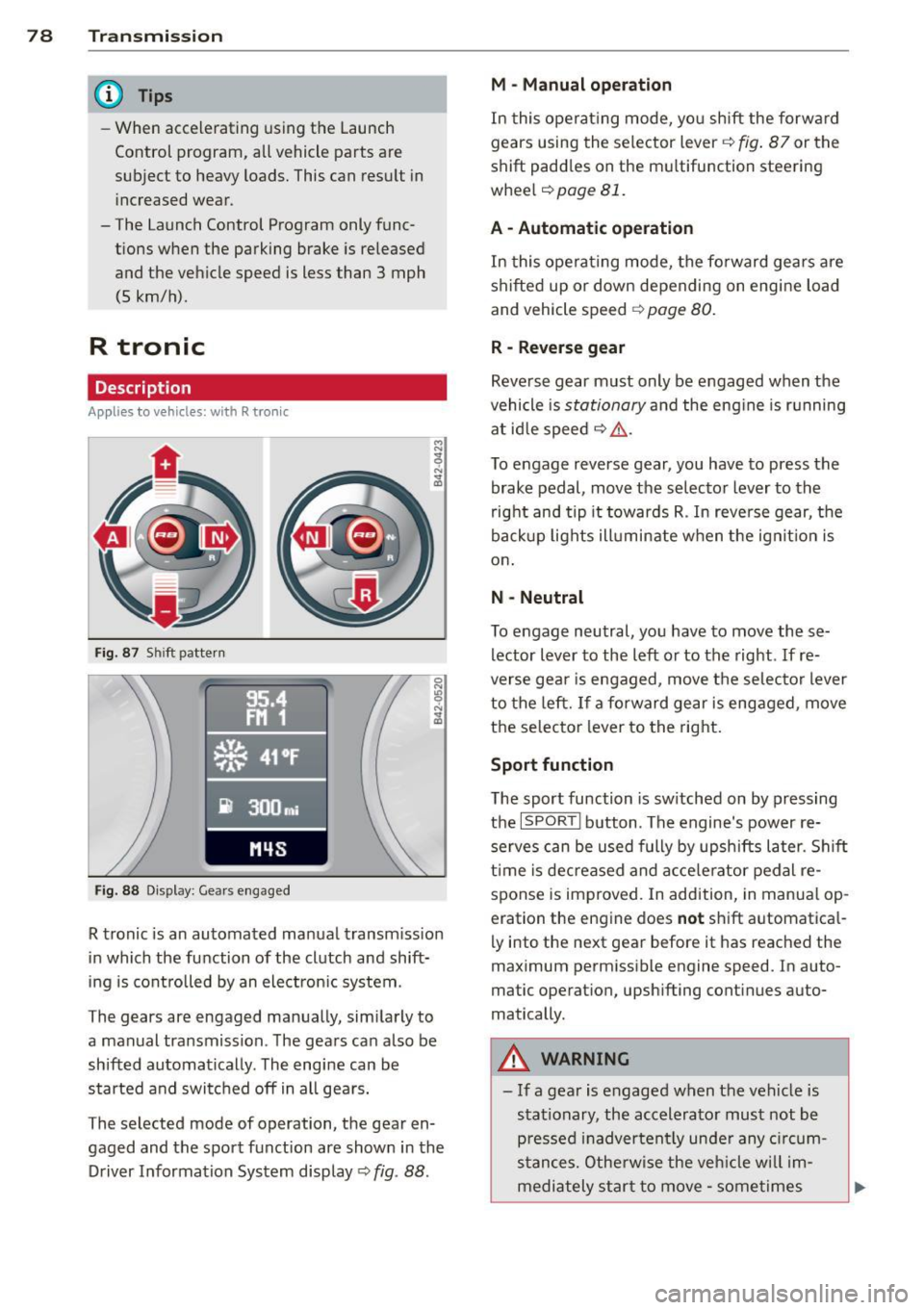
Fig. 87 Shi ft pattern
Fig. 88 Disp lay: Gea rs engaged
R tronic is an automated manual transmission
in which the function of the clutch and shift
ing is controlled by an electron ic system .
The gears are engaged manually, sim ilarly to
a manual transmission . The gears can also be
shifted automatically . The engine can be
started and switched off in all gears.
The selected mode of operation, the gear en
gaged and the sport function are shown in the
Driver Information System display
Q fig . 88 .
M -Manual operation
In this operat ing mode, you shift the forward
gears using the selector lever
Q fig. 87 or the
shift paddles on the mu ltifunction steering
whee l
Q page 81.
A - Automatic operation
In this opera ting mode, the forward gears are
shifted up or down depending on engine load
and vehicle speed
Q page 80.
R -Reverse gear
Reverse gear must only be engaged when the
vehicle is
stationary and the eng ine is running
at idle speed
¢ ,&. .
To engage reverse gear, you have to press the
brake pedal,
move the selector lever to the
right and tip it to wards R . In reverse gear, the
backup lights illuminate when the ignit ion is
on .
N -Neutral
To engage neutral, you have to move these
lector lever to the left or to the right.
If re
verse gear is engaged,
move the selector lever
to the left.
If a forward gear is engaged , move
the selector lever to the right.
Sport function
The sport function is sw itched on by pressing
the
I SPOR T I button. The engine's power re
serves can be used fully by upshifts later. Shift
time is decreased and accelerator pedal re
sponse is improved. In addition, in manual op
eration the engine does
not shift automatica l
ly into the next gear before it has reached the
maximum permissible engine speed. In auto
matic operation, upsh ifting cont inues auto
matically.
A WARNING
-- If a gear is engaged when the vehicle is
stationary, the accelerato r must not be
p ressed inadvertently under any circum
stances. Otherwise the vehicle w ill im
mediately star t to
move -sometimes
Page 81 of 236

even if the parking brake is firmly ap
plied.
- Before you or other persons open the en
gine compartment lid and work on a r un
ning eng ine, se lect neutral position
N
and firmly apply the handbrake. Follow
the warning notes .
(D Tips
If you accidentally sh ifted into N whi le
driving, you can engage a gear in the nor
mal way using the selector lever.
Manual operation
App lies to vehicles: with R tron ic
R tronic allows the driver to shift gears man
ually.
Starting from a stop
.. Press and ho ld the brake pedal.
.. Move the selector lever to the left.
.. Tap the se lector lever forward
0 -
.. Re lease the brake pedal and acce lerate
c> _& .
Shifting
.. To shift up, tap the selector lever fo rward
0 -
.. To shift down, tap the selector lever to the
rear
0 .
Stopp ing temporarily
.,. Prevent the ve hicl e from mov ing by using
the foot brake, e.g. at t raffic signa ls.
.. Do not accelerate.
If you do not press either
the brake peda l or the acce lerator pedal for
some time when stat ionary, neutral position
N is engaged automatically and a ch ime
sounds.
P a rking
.. Press and ho ld the brake pedal¢_& .
.. Apply the hand brake f irm ly.
.. Engage a gear.
.. Switc h the ignition
off .
Tran sm iss ion 79
Stopping on an incline
.. Always keep t he veh icle s tat io nary using
the foot brake to prevent it from "rolling
back" ¢_& . D o
not try to p revent the vehi
cle from "rolling back" when a gear is en
gaged by increasing engine speed.
.. App ly the hand brake firmly.
Sta rting on a hill
.. With a gear engaged, remove your foot
from the brake, acce lerate and slowly re
lease the hand brake .
When accelera ting, R tronic shifts into the
next gear i n gea rs 1, 2, 3, 4 and 5 short ly be
fore the maxim um permissible engine speed
is reached. Exception: You have activated the
sport funct ion ¢
page 78.
If you have se lected a lower gear tha n the c ur
rent one, R tro nic wi ll shift down only when
the engine will not be over-revved .
You can swi tch to a utomat ic operation at any
time
c> page 80 .
_& WARNING
- Never leave your vehicle with the engine
r u nning while in gear . If you must leave
your veh icle w ith the engine r unning, set
the park ing brake fi rm ly and engage neu
tral N.
- With the engine r unning and a gear en
gaged, you have to hold the ve hicle w ith
the foot brake .
- Do not accelerate when you s hift gears
wit h the vehicle stationary and the en
g ine runni ng .
- Before dr iving dow n a steep slope, re
duce your sp eed and shift i nto a lowe r
gea r with R tronic.
- Do not ride the brakes or apply the bra ke
pedal too ofte n or too long . Constant
b ra ki ng c auses the brakes to ove rheat
a nd substantially redu ce s bra king per
form ance, in cre ases br aking d ist ance or
causes complete fa il ur e of the brake sys
tem .
Page 82 of 236

80 Transmi ssion
(0 Note
If you must stop on an incline, always hold
the vehicle in place w ith the foot brake to
prevent it from roll ing back. Never hold
the vehicle on an incline w ith a slipping
clutch. The clutch was overloaded if
Clutch
overheat ing! If possib le pl ea se st op ve hi
cle appears in the Driver Information Sys
t em disp lay.
Automatic operation
Ap plies to ve hicles : wit h R tro nic
The forward gears are shifted up or down au
tomatically.
Startin g from a stop
11-Press and ho ld the brake pedal.
11-Tap the se lector lever towards A .
... Re lease the brake pedal and acce lerate
¢ ,& in Manual operation on page 79 .
Under certain circumstances (driving in the
mounta ins for example), it can be beneficia l
to switch tempo rarily to the manual shift pro
g ram ¢
page 79in order to adjust th e gear ra
tios to driv ing cond itions
manually.
Kick-down
A ppl ies to vehicles : wit h R tro nic
When you depress the accelera to r pedal be
yond the resistance po int, R tron ic downsh ifts
into a lower gear, depending on vehicle speed
and engine rpm. The ups hift into the next
h igher gear takes place once the max imum
specified engine speed is reached. Exception:
You have activated the sport funct ion .
A WARNING
Please note that the drive wheels can spin
if kick-down is used on a smooth slippery
road -there is a risk of skidding.
Launch Control Program
App lies to veh icles : w it h R tro nic
The Launch Control Program enables maxi
mum acceleration .
Requirement: The engine must be at operat
ing temperature and the steering wheel must
not be turned .
... With the engine running, press the
I!! but
ton one time. The ESC ind icator light
I in
the Driver Information System d isplay illu
m inates and the message
ESP sport - Warn
ing! R estr icted stability
appears .
... Press the b rake pedal w it h your l eft foot
and hold i t down.
11-Eng age a gear.
11-Press the I SPORT I button on the selector
lever cover .
... Press the accelerator peda l wit h your right
foot sim ultaneously until the engine has
reached a constant speed .
... Remove your left foot from the brake¢,& .
A WARNING ,-
-Always adapt your dr iving to the traffic
f low.
- Onl y use Launch Control when road and
traffic cond itions allow it and ot her dr iv
ers will not be endange red o r annoyed by
your driving and the vehicle's ac celera
t ion .
- Please note that t he d riving wheels ca n
sp in and the vehicle can br eak away
when ESC is swi tched off, especially
when the roa d is s lippery.
- Once the s tarting procedure is comple te,
you sho uld sw itch ESC on again by press
i n g the
I!] switch.
(D Tips
When a ccele rat ing using the Lau nch Con
t rol program, all vehicle parts are s ubje ct
to heavy loads . This can result in increase d
wear .
-
Page 85 of 236

Rear vi ew camer a coverage area
The rearview camera shows you the a rea be
hind your vehicle in the navigation system dis
p lay. This area roughly corresponds to the
area in¢
fig . 92 and (!) ¢fig. 93 . Orientation
lines and colored surfaces are projected in the
area shown, which can help you with parking
and maneuvering. Objects that are located in
an area that is not captured by the camera @
¢
fig. 93 and that are closer to the bumper
will not appear on the nav igation system dis
p lay.
We recommend that you practice park ing with
the rearview camera in a traffic-free location
or pa rking lot to become familiar w ith the sys
tem, the o rientation l ines, and their function.
There should be sufficient light and good
weather conditions when doing so.
I n the nav igat io n system disp lay, objects or
veh icles appear closer or fu rther away if:
Objects or vehicles appear closer or farther
away in the navigation system if:
- you are driving in reverse gear from a level
surface onto an incline, or a downward
slope,
- you are driving in reverse gear toward pro-
truding objects.
The accuracy of the orientation lines and blue
surfaces dimin ishes if:
- the rearview camera does not provide a reli able image, for examp le, in poor visibility
cond itions or if the lens is dirty,
- the image on the screen is not visible due to
sun g lare and reflect ion .
Caring f or the re arvi ew cam era len s
The rearview camera is located i n the center
of the vehicle above the rear license plate bra cket. In o rder for the rearview camera to
f u nction properly, the came ra lens must be
kept clean and free of snow and ice .
- Dampen the lens with a househo ld alcoho l
based glass cleane r, and clean the lens with
a dry cloth.
Par king system 83
- Remove snow with a hand br ush and ice
preferably with a de-icing spray ¢(D .
A WARNING
-The parking system cannot replace the
driver's attention. The driver alone is re
sponsib le for parking and similar driving
maneuvers.
- Sensors have blind spots in wh ich objects
can not be detected. Pay spec ia l attent ion
to small children and an imals because
the sensors cannot always detect them.
- Always keep your eyes on the vehicle's
sur ro undings, us ing the rearv iew mirro r
as well.
- Do not allow yourself to be distracted from traffic by the rearv iew camera pic
tures in the navigat ion system display.
- If the position and the installation angle
of the camera has changed, for example,
after a rear end collision, do not conti nue
to use the system for safety reasons.
Have it checked by an au thori zed A ud i
dea ler or other q ualified workshop .
(D Note
-Low obstacles a lready s ignaled by a
wa rni ng can disappear from the system's
detect ion range as they are app roached
and wi ll not continue to be signaled. Ob
jects such as barrier chains, trailer d raw
bars, narrow painted vertica l poles or
fences may not be detected by the sys tem, posing risk of damage.
- Never use warm or hot water to remove snow or ice from the rearv iew camera
lens because the lens could crack.
- Never use products that are abrasive when clean ing the lens.
-
Page 86 of 236

84 Parking sy stem
Switching on /off
Appl ies to vehicles: with park ing system advanced
Fig. 9 4 Section of the center console: Pa rk assist
switch
F ig. 95 Nav igatio n system disp lay: visual distance dis
play
Switching on
• Switch the navigation system and the navi
gation system display on.
• Engage the reverse gear, or
• Press the
l"" I switch in the cente r console
¢ fig. 94. A short confirmation tone sounds
and the indica tor light in the swi tch lights
u p.
Switching betwe en the rear v iew camera
and vi sual display
• Press the Graphic con trol button
¢ page 85, fig. 96 to see the visua l dis
play.
• Press the
Rear view contro l button to see
the rear view camera image
¢ fig. 95.
Switching off
• Drive faster than 6 mph (10 km/h), or
• Press the
l"" I switch, or
• Switch off the ignition .
Segments in the vi sual display
T he red segmen ts in front o f and behind the
vehicle ¢
fig. 95 help you to determine the
distance between you and an obstacle. As
your vehicle comes closer to the obstacle, the
segments move closer to the vehicle. The col
lis ion area has been reached when the next to
last segment is displayed. Do not continue
driv ing farther ¢
Ii::.. in General Information
on page 83!
A WARNING
- The navigation system d isp lay cannot
show, or c an not adequately show, cer
tain objec ts (s uch a s sma ll posts o r gra
ting), recesses in the ground and p ro
trud ing parts on another car.
- Only use t he rearv iew came ra to assist
you if it shows a good, clear picture. For examp le, the image may be affected by
the sun shining into the lens, d irt on the
lens or if there is a defect.
(D Tips
- The sensors m ust be kept clean and free
of snow and ice for the park assist to op
erate.
- Yo u can change the volume and pitch of
the s ignals ¢
page 86 .
-What appea rs in the disp lay is time -de
layed.
-