2012 AUDI A5 COUPE instrument cluster
[x] Cancel search: instrument clusterPage 24 of 316

22 Driver information display
Calling up the service schedules
If or when an oil change or inspection is due,
can be shown in the radio or MMI* display by
selecting the service interval display in the car menu. Select
ICARI > Service interval display.
Resetting the service interval display
Your authorized Audi dealer w ill reset the cor
responding service schedule after performing
the appropriate service on your vehicle. You
a lso have the possibility to reset the oil
change schedule after having performed an
oil change according to Audi specifications.
Select
I CAR I > Service interval dis play > Reset
oil change interval.
(D Note
If you disconnect the battery terminals, no
calculations can be made for the service
interval display during this t ime and no
service rem inder w ill appear . Remember
that observ ing the proper serv ice intervals
is vital ly important to extend ing the life of
your veh icle, part icular ly the engine, and
maintaining its va lue. Even if the mileage
driven is low, the maximum period of one
year from one service to the next must not be exceeded.
@ Tips
- Do not reset the display between oil
changes, otherw ise the display will be in
correct.
- The information in the Service Reminder
remains stored even when the vehicle
battery is disconnected.
Trip computer
Introduction
The trip computer gives you information on
current and average fuel mileage, average
speed, fuel range and driving time.
Fig. 16 Trip computer display: Average fue l mi leage
T he following information is con tinuously
evaluated by the trip computer and can be dis
played sequentially in the instrument cluster
display:
Fuel range
The estimated cruising range in miles (km)
appea rs in the display. This tells you how far
your vehicle will be ab le to travel on the cur
rent tank of fuel and with the same driving
style. The display changes in increments of 6
miles (10 km).
T he cruising range is calculated based on the
fuel consumption for the last 18 miles
(30 km). If you drive conservatively, the cruis
ing range will increase.
Average fuel mileage
T he average fuel economy in MPG (l/100 km)
since you last cleared the memory appears in
this display. You can use this display to adjust
your driving technique to achieve a desired
mileage.
Current fuel mileage
T he instantaneous fuel consumption in m iles
per gallon ( l/100 km) is shown in this display.
You can use this display to adjust your driving
technique to achieve a desired m ileage .
Ill-
Page 26 of 316
24 Driver in formation d isplay
• To disp lay trip information within a memory
l ev el, pr ess the top or bottom part of the
function selection switch
@ .
The trip computer wi ll not operate unless the
ignition is on. When you turn on the ignition,
the function that was in us e when you last
tu rned the ignition off will be disp layed.
I n addition to information on the trip comput
er (trip computer 1 and 2 and the efficiency program*), the digital speedometer and infor
mation regarding the navigation system* can
also be displayed. To switc h the display be
tween the different information, tap the
I RES ET I button @ briefly .
Setting v alu es to ze ro
To delete on e current value from the trip com
puter, select the desired function and press
the
I R ES ET I button @for at least one second.
The follow ing values can be set to zero
indi
vi dually :
- Average fuel mileage
- Average speed
-Elapsed time
- Distance
All currently displayed values are deleted in
the efficiency program* .
In addition,
all the values in the s ingle-trip or
the total-trip memory can be deleted simulta neously ¢
page 24 .
(Di Tips
All stored values will be lost if the vehicle
battery is disconnected .
Basic Settings for the trip computer
The radio or MMI* operating unit is used for
set ting the trip computer's basic settings.
• Se lect: F unction button ICARI > Instrument
cluster
> On-boa rd compute r 1 or On- boa rd
computer 2 .
The values in the single-trip or the total-trip
memory can a ll be reset to zero at the same
time under
Reset in the menu . In addition, you can determine what
informa
tion from the trip computer should be shown in the instrument cluster d isp lay. If one of the
pieces of driver information is turned
Off , that
driver information will not be shown in the
display . The information w ill continue to be
calculated by the tr ip compute r and can be
turned back
On at any t ime .
(D Tips
The dr iving information in the efficiency
program* is also reset to zero w ith the s in
gle-tr ip memory.
Efficiency program
Description
Applies to vehicles: with trip compute r with efficiency
prog ram
Fi g. 19 D isp lay: eff iciency prog ram
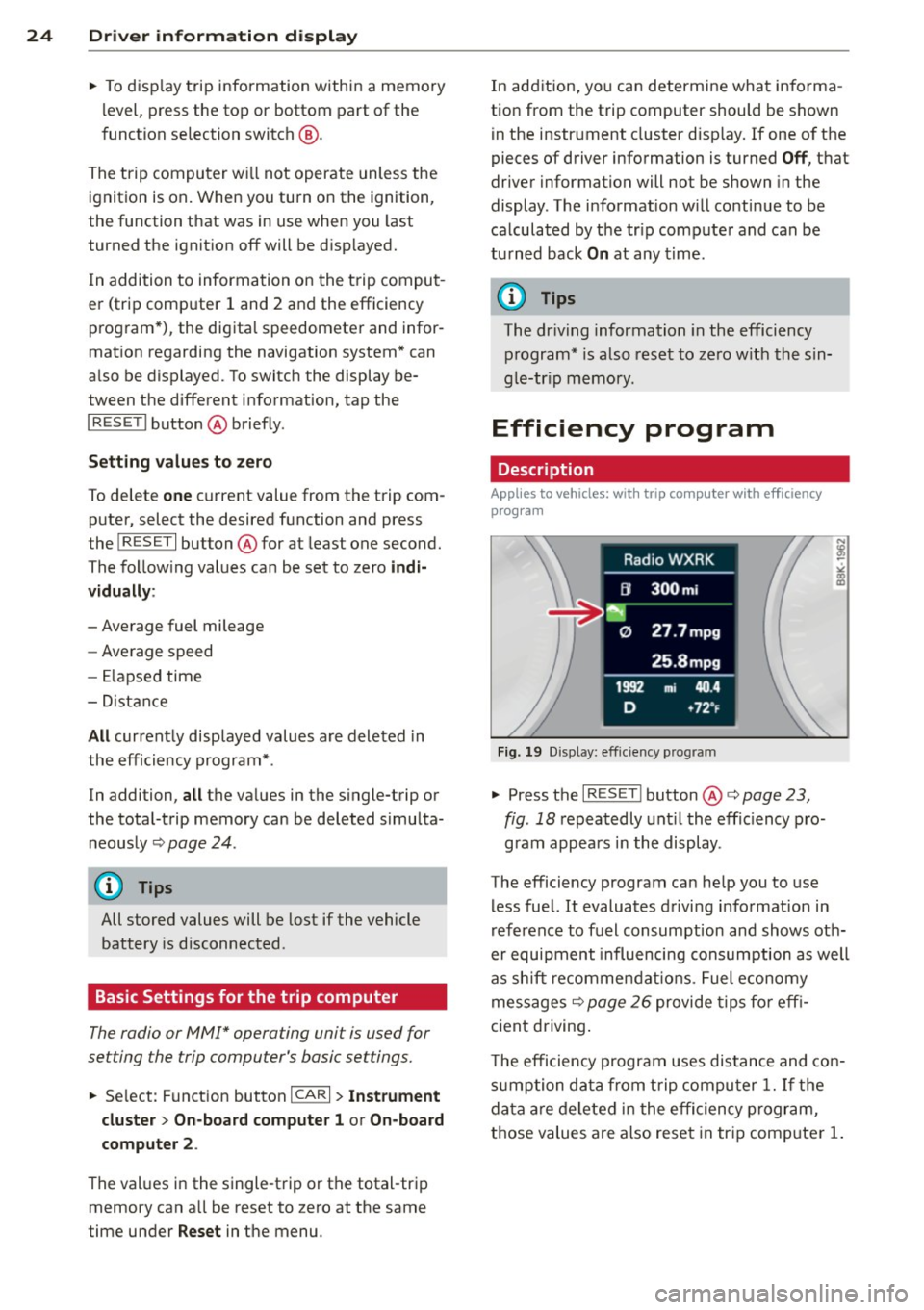
• Press the I RES ET I button @¢ page 23 ,
fig . 18
repeatedly unt il the effic iency p ro
gram appears i n the display.
The efficiency program can he lp you to use
less fuel. It evaluates d riving informat ion in
reference to fuel consumption and shows oth
er equipment influencing consumption as well
as sh ift recommendat ions . Fuel economy
messages ¢
page 26 provide tips fo r eff i
c ient driving .
T he efficiency program uses distance and con
s u mption data from t rip compu ter
1. If the
da ta are deleted in the effi cien cy program,
those values are also reset in tr ip comp uter
1.
Page 30 of 316

28 Driver information d isplay
watch the speedomete r to make sure you
are not drivi ng faster tha n the speed lim it .
Speed warning 1: setting a speed limit
Warning threshold 1 i s set by the ISE T! but
ton .
Fig . 24 SE T butto n in th e in str ume nt cluste r
Storing the maximum speed
.. Drive at the desired max imum speed .
.. Press the
ISET ! button in the instrument
panel display ¢
fig. 24 for 1 second.
Resetting the maximum speed
.. Drive the vehicle at a s peed of at least
3 mph (5 km/h)
.. Press the
!SET ! button for more than 2 sec-
onds.
The . (USA mode ls) . (Canada mode ls)
speed warning symbol will appear briefly in
the display when you release t he
!SET! button
to indicate that t he maximum speed has been
stored successfully .
The maximum speed remains stored unt il it is
changed by pressing the
! SE T! button again
brief ly or until it is de leted by a lengthy push
on the button .
Speed warning 2: setting a speed limit
The radio or MMI* control unit is used to set ,
change or delete warning threshold 2 .
.. Se lect : Funct ion button IC AR! > Instrument
cluster > Speed warn ing .
Warning th resho ld 2 can be set in the speed
range starting from 20 mph to 150 mph (30 k
m/ h to 2 40 km/h) . Sett ings can each be ad
ju ste d in interva ls of 6 mph ( 10 km/h) .
Auto Check Control
Introduction
The Au to-Check contro l mon itors th e funct ion
of cer ta in vehicle feat ures an d co mpo nen ts.
It
simp ly m ake s su re these fe atures an d compo
nents are working prope rly. The Auto -Check
control works as long a s the ig nition is o n, as
well as whenever the vehicle is drive n.
If a component is mal funct io ni ng o r if the
need f or an urge nt repa ir ha s been de te cted,
t hi s w ill ap pea r in the i nstr ument cluster d is
play . You w ill also hear an a udible warning
tone. The displays are color coded in e ither
red or yellow depend ing on their leve l of p rior
ity .
A red symbol means Danger , a yellow symbo l
indicates
Warn ing . In certain situat ions, in
format ion message for the driver appear in
addition to the red and ye llow symbols .
Function test: automat ic transmis sion*
The Auto- Check Contro l w ill automatically
perfo rm a test each t ime yo u sw itch on t he ig
nition. With the selecto r leve r in
P or N , the
follow ing message appears in the d isplay:
When stationary apply foot brake while se
lecting gear.
When yo u a selec t a differen t ge ar (for ex am
ple:
R , D , etc .), the message will disa ppear
and the A uto -Check f unctio n is displayed .
If there is a mal fun ct ion, then the ma lfu nc
ti on me ssa ge will appear abou t 15 se co nds a f
te r yo u st art the vehi cle. A t the same time you
will hear a warning tone.
Page 31 of 316

Driver information messages
Driver information messages are shown in the
instrument cluster display in addition to sym
bols.
Fig. 25 Instrument cluster: SE T butto n
For example, if the transmission selector lever
is not in the
P position when the engine is
turned
off, the following message appears:
Shift to P, otherwise vehicle can roll away.
Doors do not lock
if lever is not in P.
The ignition key can on ly be removed with the
selector in this position. This and other mes
sages are brought up if a function cannot be
carried out.
Driver messages and red symbols
If a red symbol appears in the display, a dr iver
message is a lso displayed automatica lly.
For example, the. symbol for a problem
with engine oil pressure appears in the dis
play . The message :
Switch off engine and check oil level
The driver message in the display goes out af
ter about
5 seconds . The driver message can
be disp layed again by brief ly pressing the
ISETI button i=> fig. 25.
Driver messages and yellow symbols
If a ye llow symbo l appears in the disp lay, a
driver message is also displayed automatica l
l y.
F or example,
thi- 1-1 symbol appears in the
disp lay, ind icating low windshield washer flu
id level. The following message also appears:
Please top up washer fluid
Driver information display 29
The driver message disappears after a few
seconds. The driver message can be displayed
again by br iefly press ing the
ISE TI button.
Red symbols
A red symbol means DANGER.
Fig. 26 D isp lay: Da nge r sy mb ol
.,. Pull off the road .
.,. Stop the vehicle .
.,. Turn
off the engine .
.,. Check the malfunctioning system. Contact
your authorized Audi dealer or a qualified
workshop for assistance.
Red symbols indicate a prior ity 1 malfunction
- Danger!
With a priority
1 malfunction, a red symbol
appears in the uppe r center area of the dis
play c>
fig. 26 . A driver message appears as
well to explain the ma lfunction in more de
tail. When this symbol appears,
three warning
tones sound in succession . Th e symbol contin
ues to flas h until the fault has been corrected.
If
several priority 1 malfunct ions are present,
the symbols appear in succession and remain
for about
2 seconds.
The driver wa rning goes out after about
5 sec
onds, but it can be brought up again at any
time by pressing the
ISE TI button. c> page 29
Alternator failure
i=>page 30
USA models:
Brake system malfunction
i=>page 30
Page 32 of 316

30 Driver in formation d isplay
Canada m odel s:
Bra ke system malfunction
c:>page30
Engine coolant level too low/en
gine coolant temperature too
high
c:>page 31
Engine oi l pressure too low
c:>page 31
Refill engine oil now
c:>page32
Steering malfunction
c:>page 32
Ignition lock malfunction
c:>page32
0 Alternator malfunction
If the . symbol in the instrument panel dis
p lay flashes, the n there is a malfunc tion in the
a lt ernator or the vehicle electron ics. A warn
ing to the driver will appear, too. The driver
warning goes out after about 5 seconds, but it
can be brought up at any time by pressing the
ISETI button again.
Usually, you can still drive to the next dea ler
ship. T urn off all b ut the most necessary elec
tr ica l cons umers, since these dra in the veh i
cle's battery.
(J;) Note
If the . war ning symbol (coolant system
malfunction) also lights up on the instru
ment panel during the trip
c:> page 31,
then you have to stop immediately and
turn off the eng ine. The coolant pump is
not working anymore--danger of damage
to the eng ine!
BRAKE/
A malfunction in the brake system must be
repaired as soon as possible .
If the warn ing /indicator light-(USA
models)/ . (Canada models) in the instru- me
nt cluster flashes, there is a brake system
malfunction. A driver message appears as
we ll to exp la in the ma lfunction in more de
ta il. The dr iver warning goes out after about S
seconds, but it can be brought up at any time by press ing the
ISE TI button again .
Stop the Vehicle and Check the Brake
Fluid
.,. Stop the vehicle .
.,. Check t he brake fluid level
c:> page 246 .
.,. Seek professional assistance if necessary .
Warning ! Fault in br ake system . Contact
workshop
.,. Drive ca refully to the nearest authorized
Aud i dea le r or other q ualified workshop and
have the malfu nction corrected
c:> &_ .
Parking b ra ke Plea se get to a repair shop
.,. If this symbol appears when the vehicle is
stat ionary or after the ignition is t urned on,
check to see if the par king brake can be re
leased. Dr ive to a n author ized Audi dealer or
other qualified workshop as soon as possi
b le and have the malfunc tion cor re ct ed. If
t he par king b rake cannot be opened, t hen
take it to an expe rt at an authorized A udi
dea ler .
.,. If the symbo l appea rs whi le yo u are d riving,
it is possible that the traction contro l or the
emergency brake has malfunctioned. It is
possible that the parking brake cannot be
app lied. It is also possible that the parking
brake cannot be released after it has been
app lied. Drive to an autho rized Aud i deale r
or other qualified workshop to have t he mal
fu nction corrected.
If the ABS system malfu nctions, the ABS
warning/indicator light illuminates togethe r
with the brake system ma lfunction w arning/
i ndica to r li ght
c:> .&..
A WARNING
-A lways observe t he warn ings in
c:> page 230, Engine compartment, be
fore open ing the hood and check ing the
brake fluid.
Page 37 of 316

-If the El war ning light and the -
warning light
l ) w ith the message Br ake
pads !
comes on in the instrument cluster
display, immediately contact your au
thorized Aud i dealer o r qualified work
shop to have a ll brake pads checked or
replaced if necessary.
~ Defective light bulb warning
Applies to vehicles: with defective light bulb warning
The defective light bulb warning monitors the
function of the light bulbs in the vehicle.
The defective l ight bulb warning monitors the
function of the light bulbs . If a defect ive lig ht
bu lb is detected, or if a light bulb has burned
out, the
I symbol appears as well as a notifi
cation that shows wh ic h light bulb is defe c
tive.
A WARNING
- Ligh t bul bs are under pressure and can
exp lode when bulbs a re replaced -risk o f
injury.
- W it h gas -discharge lamps* (xenon head
lights), the high-voltage component
must be handled approp riately. Doing
otherwise poses a risk of death!
(D Tips
Have an author ized Audi dealer or other
qua lified workshop perform the rep lace
ment or the repai r.
c:> Windshield washer fluid level too
low
f-4 "lease refill washer fluid
-
If the symbo l illuminates, add windshield
washer fluid to the washer system and also to
the head light washer system*
c::> page 251 .
1) - : USA mod els on ly
Dri ver information di spla y 35
Ehl Fuel supply too low
When the 11)1 symbol illum inates, t his means
th ere are abo ut 2.1 gallons (8 lite rs) of fuel
l eft in the fue l tank . Time to re fuel!
<=:> page 233.
If the symbol lights up, even when there is
amp le fue l in the t ank, and the text
TANK
SYSTEM MALFUNCTION
! CONTACT WORK
SHOP
appears in the disp lay, there is a fa ult in
the system . Contact a qualified works hop to
have the fa ult rectif ied .
0 Battery voltage
App lies to vehicles : with battery voltage warn ing
If battery power drops into the range where it
can limit the ability of the engi ne to start, this
thP
(•i symbol appears i n the instrumen t
cluster d isp lay with the fo llow ing drive r mes
sage
batter y charge low : Indicates charging
by being driven .
While this d river notification is d isp layed, you
have to be prepa red fo r limited starting capa
bility.
Driver message appears and goes out
again
If this drive r message appea rs after the ign i
t ion is tu rned on or while dr iv in g and it goes
o ut again afte r a while, t he battery has been
adequate ly re charged.
Driver message appears and does not go
out again
If this d rive r notifi cation appea rs after the ig
ni tion is t urne d on o r wh ile dr iving and does
not go out again, the ba tte ry's state of charge
is not in the optima l range . Starting capab ility
is restricted . Have the battery checked at an
authorized Aud i dea ler or other q ualified
wor kshop as soon as possib le.
Page 38 of 316

36 Driver in formation d isplay
'l:"::71 , Check engine oil
II Add o il, ma x x qt (l). You may c ontinu e
drivin g
If the ll!I symbol lights up d isplay ing th is
driver message, then add a maximum of
I li
ter at you r earliest oppo rtunity
c:> page 242.
'l:":?J. Engine oil level
II Please c heck oil l evel
When the symbol illuminates, check the en
g ine oil level as soo n as poss ible
c:> page 242.
Top off the oil at yo ur earliest oppo rtunity
c:> page 2 42.
'IY ..,. Engine oil sensor defective
II Oil le vel! Sen sor defecti ve
If the symbol illum inates, contact your au
thor ized Audi dealer and have the o il sensor
inspected . Until you have th is done, check the
oil leve l each time you refuel just to be on the
safe side
¢ page 242.
! ?) Engine speed limitation
Applies to vehicles : with engine speed limi tation
IP,I Do not e xceed ma x. engine spee d of XXXX
rpm
The II! symbo l illuminates when there is an
engine contro l malfunction. The
(m indicator
light in the instrument cluster also illumi
nates. The engine speed is limited to the
speed displayed in the driver information sys
tem . Keep in mind that the eng ine speed will
not exceed the va lue disp layed in the driver in
formation system, fo r example when down
shifting.
Please go to an authorized Aud i dealer or oth
er qualified workshop to have the ma lfunction
repaired.
~(D Headlight range control defective
II Headlight range control d efe cti ve !
If the fl symbo l ill uminates , the dynamic
headlight range contro l is no longer working
properly . Have the system checked and re
paired at your authori zed Audi dealer.
§0 Adaptive light defective
Applies to vehicles: with adaptive light
l/ll adapt ive Light defecti ve
When the l/ll symbol illuminates, it means
that adaptive light is defective. Go to an au
thorized Audi dealer to have the headlights or
the control un it for the adaptive light re
paired .
~ Ignition lock malfunction
I!! Ignition lock def ectiv e
If the I!! symbol in the display comes on,
there is a malfunction in the e lectronic igni
tion lock . Please go to an author ized Audi
dealer or other qualified workshop to have the
malfu nction repa ired.
Q Adaptive dampers
Applies to vehicles: with Audi drive select
E Adapti ve damper s: syste m malfunc tion
If the E symbol in the d isplay comes on, there
is a ma lfunction in the adaptive dampers.
Please go to an authori zed A udi dealer or oth
er qualified workshop to have the mal funct ion
repaired .
~ Windshield wipers faulty
ti Windscreen wipe r defective!
When the fw,j symbol illum inates, it means
that the elect ronics for the winds hield wipers
are defective . Please go to an authorized A udi
dealer or qualified workshop to have the
windshield wiper system repaired.
Page 47 of 316

-To help prevent poisonous exhaust gas
from being drawn into the vehicle, al
ways keep the rear lid closed while driv
ing. Never transport objects larger than
those which fit completely into the lug
gage area, because then the rear lid can
not be fully closed.
- Never leave your vehicle unattended es
pecially with the rear lid left open. A
child could crawl into the ca r through the
luggage compa rtment and pull the lid
shut, becoming trapped and unab le to
get out. To reduce the risk of persona l in
jury, never let children play in or around
your vehicle. A lways keep the rear lid as
well as the vehicle doors closed when not
in use.
- Always ensure that no one is within
range of the rear lid when it is moving, in
particu lar close to the h inges -fingers or
hands can be pinched.
(D Tips
- When the vehicle is locked, the rear lid
can be opened separately by pressing the
button
a on the master key. When you
close the rear lid again, it locks automat
i ca lly.
- If the rear lid is open or not properly
closed when the ignition is turned on,
the door and rear lid warn ing
9 page 21
appears in the instrument cluster dis
play.
Op enin g an d clos ing 45
Trunk escape handle
In case of an emergency, the luggage com
partment lid can be opened from the inside
using the trunk escape handle.
Fig. 43 Trunk escape handle: view from inside the
closed trunk
To open lu ggag e compa rtm ent lid
.,. Pull the handle down towards the bumper
9 fig. 43 .
The trunk escape handle inside the l uggage
compartment lid is made of fluorescent mate
rial to glow in the dark.
.8_ WARNING ~
The trunk escape handle is to be used only in an emergency.
@ Tips
The emergency release lever should never
be used as a handle for closing the lug
gage compartment lid.