Page 165 of 650

�µ
�Î
CONT INUED
See pages f or important saf etyinf ormation and warnings about how toproperly position the seats and seat-backs.
Driver’s seat only:
1513
The passenger seat has the same
adjustments as the driver’s seat but
without any lumbar adjustment.
Raises or lowers the seat.Moves the whole seat up
and f orward, or down
and backward. The front
of the seat also tilts up or
down at the same time.
Adjusts the seat-back
angle f orward or
backward.
The controls f or the power
adjustable front seats are on the
outside edge of each seat bottom.
You can adjust the seats with the
ignition switch in any position.
Make all seat adjustments bef ore
you start driving.
Moves the seat forward
and backward.
Moves the f ront of the
seat up or down.Increases or decreases
the lumbar support.
Seats
Front Seat Power A djustments
Inst rument s and Cont rols
161
Driver’s seat
11/01/14 18:21:42 31TK4630_166
�Î
Models equipped with the keyless access
system have an engine start/stop button instead of
an ignition switch. VEHICLE OFF (LOCK) Mode
is the equivalent of LOCK (0), ACCESSORY Mode
is the equivalent of ACCESSORY (I), and ON
Mode is the equivalent of ON (II). For more
information, see pages
:
184 and 187.
2012 TL
Page 166 of 650
They are most ef f ective when you
adjust them so the center of the back
of the occupant’s head rests against
the center of the restraint.
Your vehicle is equipped with head
restraints in all seating positions to
help protect you and your
passengers f rom the likelihood of
whiplash and other injuries. The driver’s seat includes a memory
f eature. Two seat positions can be
stored in separate memories. You
canthenselectamemorizedposition
by pushing the appropriate memory
button. Ref er to page f or how to
memorize and select the seat
positions. 170
See page f or important saf ety
inf ormation and a warning aboutimproperly positioning head restraints. 15
Seats
Head Restraints
162
Passenger’s seat
11/01/14 18:21:51 31TK4630_167
Inst rument s and Cont rols
2012 TL
Page 167 of 650
CONT INUED
The head restraints adjust f or height.
You need both hands to adjust the
restraint. Do not attempt to adjust it
while driving. To raise a f ront or rear
center head restraint, pull upward.
To lower the restraint, push the
release button sideways, and push
the restraint down.Tolowereitherrearouterhead
restraint f or better visibility, press
the tilt button on the side of the head
restraint. It f olds down backward. To
raise the rear outer head restraint,
pull it up f rom behind by hand. Make
sure the head restraint locks in
position when you lower or raise it.
Seats
A djust ing t he Head Rest raint
Inst rument s and Cont rols
163
Front
LEGS
SEAT-
BACK
CUSHION
RELEASE BUTTON Rear Center
SEAT-BACK RELEASE
BUTTON
LEGS TILT BUTTON
Rear Outer
CUSHION
11/01/14 18:22:00 31TK4630_168
2012 TL
Page 168 of 650
To remove a f ront or rear center
head restraint f or cleaning or repair,
pull it up as f ar as it will go. Push the
release button, then pull the restraint
out of the seat-back.To remove either rear outer head
restraint, push the tilt button, then
f old the head restraint backward.
Push the release button, then pull
the restraint out of the seat-back.Make sure the head restraint locks
in position when you reinstall it. When reinstalling a head restraint,
put the legs back in place. Then
adjust it to the appropriate height
while pressing the release button.
Seats
Removing t he Head Rest raint
164
Rear Outer
TILT BUTTON
RELEASE BUTTON
Failure to reinstall, or correctly
reinstall, the head restraints can
result in severe injury during a
crash.
Always replace the head
restraints before driving.
11/01/14 18:22:08 31TK4630_169
Inst rument s and Cont rols
2012 TL
Page 169 of 650

The driver’s and f ront passenger’s
seats have active head restraints. If
the vehicle is struck severely f rom
the rear, the occupant properly
secured with the seat belt will be
pushed against the seat-back and the
head restraint will automatically
move forward.For a head restraint system to work
properly:
Do not hang any items on the head
restraints, or f rom the restraint
legs.
Do not place any object between
an occupant and the seat-back.
Install each restraint in its proper
location.
Only use genuine Acura
replacement head restraints.
This reduces the distance between
the restraint and the occupant’s head.
It also helps protect the occupants
against the likelihood of whiplash
and injuries to the neck and upper
spine.
Af ter a collision, the activated
restraint should return to its normal
position.
If the restraints do not return to their
normal position, or in the event of a
severe collision, have the vehicle
inspected by an Acura dealer.
A ct ive Head Rest raint s
Seats
Inst rument s and Cont rols
165
11/01/14 18:22:20 31TK4630_170
2012 TL
Page 171 of 650
Make sure all items in the trunk and
those extending through the pass-
through are secured.Keeptheinsideandoutsidemirrors
clean and adjusted f or best visibility.
Be sure to adjust the mirrors bef ore
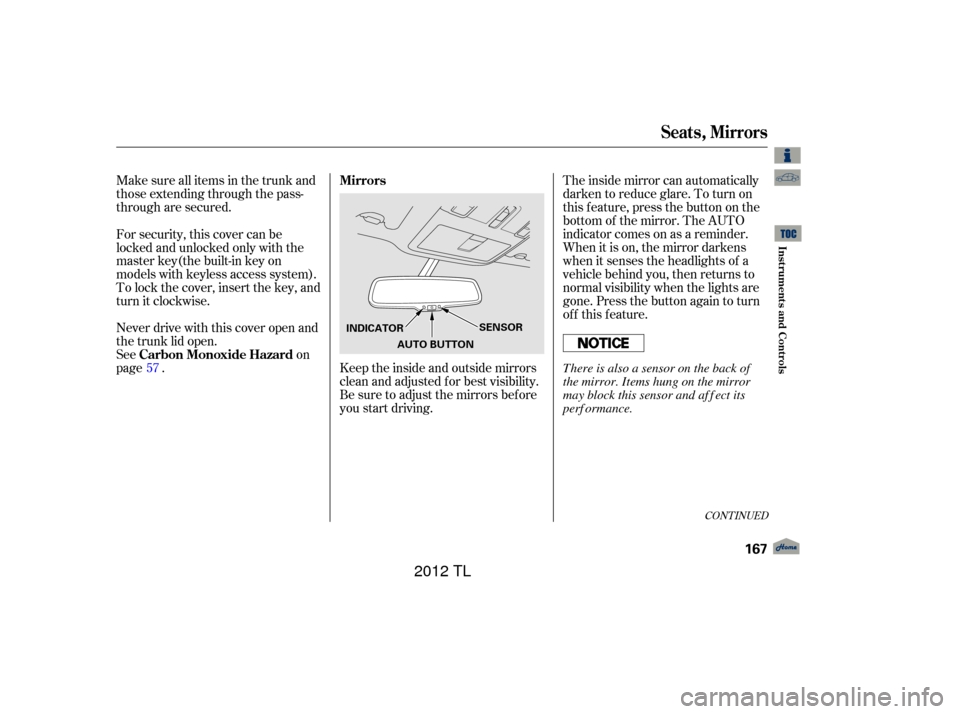
you start driving.Theinsidemirrorcanautomatically
darken to reduce glare. To turn on
this feature, press the button on the
bottom of the mirror. The AUTO
indicator comes on as a reminder.
When it is on, the mirror darkens
when it senses the headlights of a
vehicle behind you, then returns to
normal visibility when the lights are
gone. Press the button again to turn
of f this f eature.
For security, this cover can be
locked and unlocked only with the
master key(the built-in key on
models with keyless access system).
To lock the cover, insert the key, and
turn it clockwise.
Never drive with this cover open and
the trunk lid open.
See
on
page . 57
CONT INUED
Mirrors
Carbon Monoxide Hazard
Seats, Mirrors
Inst rument s and Cont rols
167
AUTO BUTTON SENSOR
INDICATOR
There is also a sensor on the back of
the mirror. Items hung on the mirror
may block this sensor and af f ect its
perf ormance.
11/01/14 18:22:41 31TK4630_172
2012 TL
Page 182 of 650
When you close the trunk with all
doors locked, the trunk will lock.
When you unlock all the doors with
the remote, built-in key or power
door lock master switch, the trunk
will unlock.The remote is too close to the
trunk lid.
The trunk cannot be locked if :
Theremoteisontheinteriorrear
panel.
The remote is too close to the
seat-back of the rear seat or the
seat cushion. Youcanopenthetrunkinanyof
these ways: Pushthetrunkreleaseswitch
when carrying the remote (if the
doors are locked).
Press the trunk release button
inside the vehicle.
Press the trunk button on the
remote. To close the trunk, use the inner
handle to lower the lid, then press
down on the back edge.
Pushthetrunkreleaseswitch
when the doors are unlocked.
L ocking and Unlocking the T runk Opening and Closing the T runk
K eyless A ccess System
178
TRUNK RELEASE SWITCH
INNER HANDLE
11/01/14 18:25:04 31TK4630_183
Inst rument s and Cont rols
2012 TL
Page 206 of 650

�Î
Push the right side of the switch, HI,
to rapidly heat up the seat. Af ter the
seat reaches a comfortable
temperature, select LO by pushing
the lef t side of the switch. This will
keep the seat warm.
The ignition switch must be in the
ON (II) position to use the heaters. Both f ront seats are equipped with
seat heaters. Because of the sensors
f or the side airbag cutof f system,
there is no heater in the passenger’s
seat-back.TL and TL with Technology Package models
SH-AWD and SH-AWD with TechnologyPackage models
Seat Heaters
202
SEAT HEATER SWITCHES
HEATERS
Passenger’s Seat
Driver’s Seat
11/01/14 18:29:20 31TK4630_207
Inst rument s and Cont rols
�ÎModels equipped with the keyless access
system have an engine start/stop button
instead of an ignition switch. ON Mode
is the equivalent of ON (II). For more
information, see page s 184 and 187.
:
In the HI setting, the heater turns off
when the seat gets warm, and turns
back on after the seat’s temperature
drops.
In the LO setting, the heater runs
continuously. It does not cycle with
temperature changes.
2012 TL


