Page 144 of 650

�µ�µ
The automatic lighting
f eature turns on the headlights and
all other exterior lights when it
senses low ambient light.
To turn on automatic lighting, turn
the light switch to AUTO. The lights
will come on automatically when the
outside light level becomes low (at
dusk, f or example). The lights on
indicator comes on as a reminder.
The lights and indicator will turn of f
automatically when the system
senses high ambient light. Push the lef t lever
f orward until you hear a click. The
blue high beam indicator will come
on (see page ). Pull the lever back
to return to the low beams.
To f lash the high beams, pull the
lever back lightly, then release it.
The high beams will stay on as long
as you hold the lever back. The lights will remain on when you
turn of f the ignition switch. They will
turn of f automatically when you
remove the key and open the driver’s
door. To turn them on again, either
turn the ignition switch to the ON
(II) position or turn the light switch
to the position.Even with the automatic lighting
feature turned on, we recommend
that you turn on the lights
manually when driving at night or
in a dense fog, or when you enter
dark areas such as long tunnels or
parking facilities.
The lights will remain on when you
set the power mode to VEHICLE
OFF (LOCK). They will turn of f
automatically when you open the
driver’s door and take the remote
with you. To turn them on again,
either set the power mode to ON or
turn the light switch to the position. To change the ‘‘AUTO LIGHT
SENSITIVITY’’ setting, see
.
Do not leave the light switch in
AUTO if you will not be driving the
vehicle f or an extended period (a
weekormore).Youshouldalsoturn
of f the lights if you plan to leave the
engine idling or of f f or a long time.
71
On all models
On models without keyless access
system
On models with keyless access system
AUTO High Beams
Headlights
140
11/01/14 18:17:46 31TK4630_145
page 123
Inst rument s and Cont rols
2012 TL
Page 145 of 650

�Î�Î
The automatic lighting f eature is
controlledbyasensorlocatedontop
of the dashboard. Do not cover this
sensor or spill liquids on it.The automatic lighting of f f eature
turns off the headlights, all other
exterior lights, and the instrument
panel lights within 15 seconds af ter
youremovethekeyandclosethe
driver’s door, or on models with
keyless access system, set the power
mode to VEHICLE OFF (LOCK),
take the remote with you, and close
the driver’s door.
If you remove the key (or the vehicle
is in VEHICLE OFF mode on models
with keyless access system), and the
driver’s door is opened and closed,
the automatic lighting of f f eature
activates with the headlight switch in
the ‘‘ ’’ or ‘‘ ’’ position, or
the lights turned on by setting the
switch in the ‘‘AUTO’’ position.
To change the ‘‘HEADLIGHT AUTO
OFF TIMER’’ setting, see page . If you turn the ignition switch to the
LOCK (0) position with the
headlight switch on, but do not open
the door and get out, the lights turn
of f af ter 10 minutes (3 minutes, if
the switch is in the ‘‘AUTO’’
position).
122
CONT INUED
Automatic Lighting Of f Feature
Headlights
Inst rument s and Cont rols
141
LIGHT SENSOR
11/01/14 18:17:57 31TK4630_146
�Î
Models equipped with the keyless access
system have an engine start/stop button
instead of an ignition switch. VEHICLE OFF
(LOCK) Mode is the equivalent of LOCK (0).
For more information, see pages 184 and 187.
:
�Î
Your vehicle has the engine start/stop
button instead of an ignition switch.
For more information on how to select
the power mode, see page .
:
184
On models with keyless access system
2012 TL
Page 146 of 650

�Î
If you see a ‘‘CHECK DRL
SYSTEM’’ message on the multi-
inf ormation display, there is a
problem with the daytime running
light system. Take your vehicle to a
dealer to have it checked.
The headlights revert to normal
operation when you turn them on
with the switch. With the headlight switch of f or in
the position, the high beam
headlights and the high beam
indicator come on with reduced
brightness when you turn the
ignition switch to the ON (II)
position and release the parking
brake. They remain on until you turn
the ignition switch of f , even if you
set the parking brake.
The lights will turn on again when
you unlock or open the driver’s door.
If you unlock the door, but do not
open it within 15 seconds, the lights
will go off. With the driver’s door
open, you will hear a lights on
reminder beeper.
Headlights
Daytime Running L ights
142
11/01/14 18:18:07 31TK4630_147
�Î
Models equipped with the keyless access
system have an engine start/stop button
instead of an ignition switch. ON Mode
is the equivalent of ON (II). For more
information, see
page s 184 and 187.
:
Inst rument s and Cont rols
2012 TL
Page 147 of 650
�´
�µ
�´ �µ
�Î
Turn the f og lights on and of f by
turning the switch next to the
headlight switch.
You can use the f og lights only when
the headlights are on low beam.
With the light switch in the AUTO
position, you can also use the f og
lights when the headlights turn on
automatically. They will go of f when
the headlights turn of f . Adjust the brightness of the
instrument panel by pressing the
or button with the ignition
switch in the ON (II) position. Press
the button to increase the
brightness and the button to
decrease it.
CONT INUED
Fog L ights
Instrument Panel Brightness
Fog L ights, Instrument Panel Brightness
Inst rument s and Cont rols
143
FOG LIGHT SWITCH
ADJUSTMENT BUTTONS
11/01/14 18:18:18 31TK4630_148
�ÎModels equipped with the keyless access
system have an engine start/stop button
instead of an ignition switch. ON Mode
is the equivalent of ON (II). For more
information, see page s 184 and 187.
:
2012 TL
Page 148 of 650
�´
To reduce glare at night, the
instrument panel illumination dims
when you turn the light switch to
or . To cancel the glare
reduction f unction, set the
brightness to the highest level, then
press the button. You will hear a
beep when it is canceled.
When the brightness reaches the
maximum level, ‘‘BRIGHTNESS
MAXIMUM LEVEL’’ appears on the
display.
The level of brightness is shown on
the multi-information display while
you adjust it. It goes out 5 seconds
af ter you f inish adjusting. If your vehicle is equipped with the
navigation system, the navigation
system screen will also go to f ull
brightness. This can be helpf ul when
using the headlights during daylight
hours.
Instrument Panel Brightness
144
U.S. model is shown.
11/01/14 18:18:24 31TK4630_149
Inst rument s and Cont rols
2012 TL
Page 149 of 650

Push the button between the center
vents to turn on the hazard warning
lights (f our-way f lashers). This
causes all f our outside turn signals
and both indicators in the instrument
panel to f lash. Use the hazard
warning lights if you need to park in
a dangerous area near heavy traffic,
or if your vehicle is disabled.The rear window def ogger clears f og,
frost,andthinicefromthewindow.
Push the def ogger button to turn it
onandoff.Theindicatorinthe
button comes on to show the
def ogger is on. If you do not turn it
of f , the def ogger will shut itself of f
withinabout10to30minutes
according to the outside temperature.
It also shuts of f when you turn of f
the ignition switch, or set the power
mode to VEHICLE OFF (LOCK) onmodels with keyless access system.
You have to turn it on again when
you restart the vehicle.
Make sure the rear window is clear
and you have good visibility bef ore
starting to drive.
The def ogger wires on the inside of
the rear window can be accidentally
damaged. When cleaning the glass,
always wipe side-to-side.
Pushing this button also turns the
mirror heaters on or of f . For more
inf ormation, see page .
169
Hazard Warning Button
Rear Window Def ogger
Hazard Warning Button, Rear Window Def ogger
Inst rument s and Cont rols
145
HAZARD WARNING BUTTON
U.S. model is shown.
11/01/14 18:18:35 31TK4630_150
2012 TL
Page 161 of 650
�µ
�µ
CONT INUED
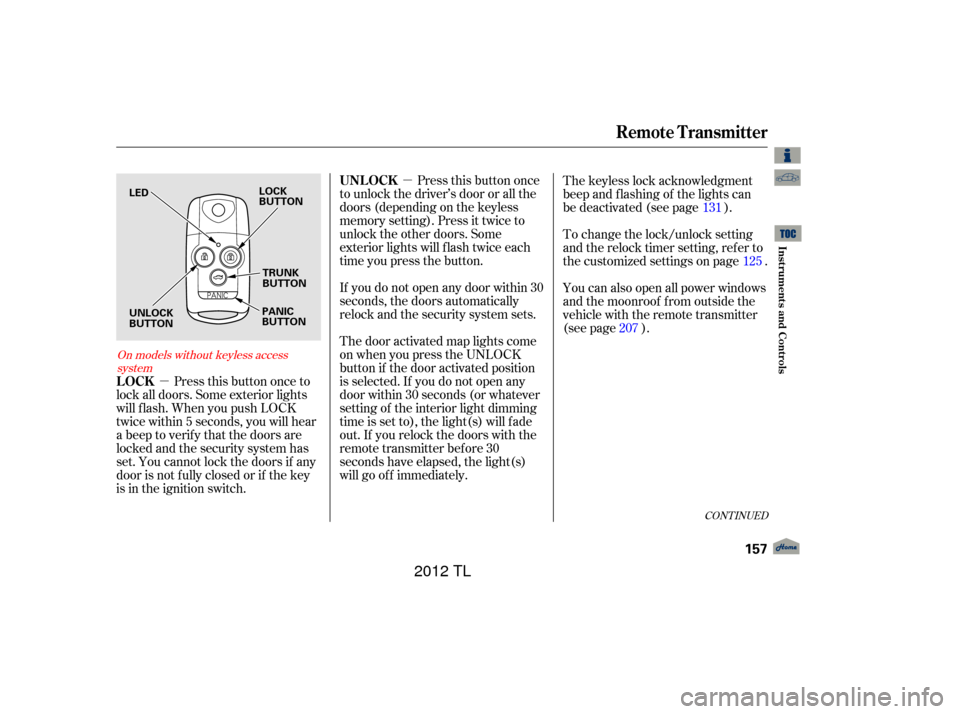
Press this button once
to unlock the driver’s door or all the
doors (depending on the keyless
memory setting). Press it twice to
unlock the other doors. Some
exterior lights will f lash twice each
time you press the button.
Press this button once to
lock all doors. Some exterior lights
will f lash. When you push LOCK
twice within 5 seconds, you will hear
a beep to verify that the doors are
locked and the security system has
set. You cannot lock the doors if any
door is not f ully closed or if the key
is in the ignition switch. If you do not open any door within 30
seconds, the doors automatically
relock and the security system sets.
The keyless lock acknowledgment
beep and f lashing of the lights can
be deactivated (see page ).
The door activated map lights come
on when you press the UNLOCK
button if the door activated position
is selected. If you do not open any
door within 30 seconds (or whatever
setting of the interior light dimming
time is set to), the light(s) will f ade
out. If you relock the doors with the
remote transmitter before 30
seconds have elapsed, the light(s)
will go of f immediately. To change the lock/unlock setting
and the relock timer setting, refer to
the customized settings on page .
You can also open all power windows
and the moonroof f rom outside the
vehicle with the remote transmitter
(see page ).
125
131
207
On models without keyless access system
Remote Transmitter
UNL OCK
LOCK
Inst rument s and Cont rols
157
LOCK
BUTTON PANIC
BUTTONTRUNK
BUTTON
LED
UNLOCK
BUTTON
11/01/14 18:20:46 31TK4630_162
2012 TL
Page 162 of 650

�µ
�µ
Be caref ul when removing
this screw as the head of the screw
can strip out.
Separate the keypad from the
transmitter by pushing any button
f rom outside.
If it takes several pushes on the
button to lock or unlock the doors,
replace the battery as soon as
possible.
Battery type: CR1616
On models with keyless access
system, see page f or how to
replace the battery on the keyless
access remote.
To replace the battery:
Remove the screw at the base of
the transmitter with a small
Phillips-head screwdriver.
Press and hold this
button f or about 1 second to open
the trunk. You cannot open the trunk
if the key is in the ignition switch.
If you lose a transmitter, the
replacement needs to be
reprogrammed by your dealer. Do not immerse the transmitter in
any liquid. Protect the transmitter from
extreme temperatures. Avoid dropping or throwing the
transmitter. Pressthisbuttonfor
about 2 seconds to attract attention:
the horn will sound, and the exterior
lights will f lash f or about 30 seconds.
To cancel panic mode, press any
other button on the remote
transmitter, or turn the ignition
switch to the ON (II) position.
1.2.
181
Remote Transmitter
Replacing the Transmitter
Battery
TRUNK
PA NIC
Remote Transmitter Care
158
NOTE:
KEYPAD
SCREW
11/01/14 18:21:02 31TK4630_163
Inst rument s and Cont rols
2012 TL

