Page 391 of 621
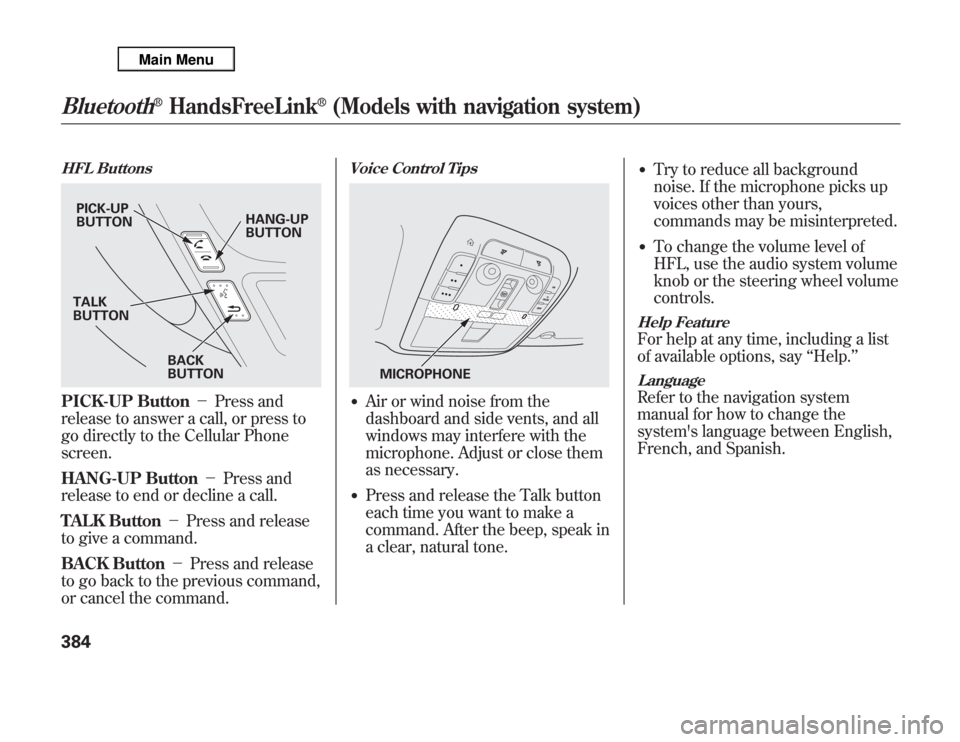
HFL ButtonsPICK-UP Button-Press and
release to answer a call, or press to
go directly to the Cellular Phone
screen.
HANG-UP Button-Press and
release to end or decline a call.
TALK Button-Press and release
to give a command.
BACK Button-Press and release
to go back to the previous command,
or cancel the command.
Voice Control Tips●
Air or wind noise from the
dashboard and side vents, and all
windows may interfere with the
microphone. Adjust or close them
as necessary.
●
Press and release the Talk button
each time you want to make a
command. After the beep, speak in
a clear, natural tone.
●
Try to reduce all background
noise. If the microphone picks up
voices other than yours,
commands may be misinterpreted.
●
To change the volume level of
HFL, use the audio system volume
knob or the steering wheel volume
controls.
Help FeatureFor help at any time, including a list
of available options, say‘‘Help.’’LanguageRefer to the navigation system
manual for how to change the
system's language between English,
French, and Spanish.
PICK-UP
BUTTONHANG-UP
BUTTON
BACK
BUTTON TALK
BUTTON
MICROPHONE
Bluetooth
®
HandsFreeLink
®
(Models with navigation system)
384
Page 392 of 621
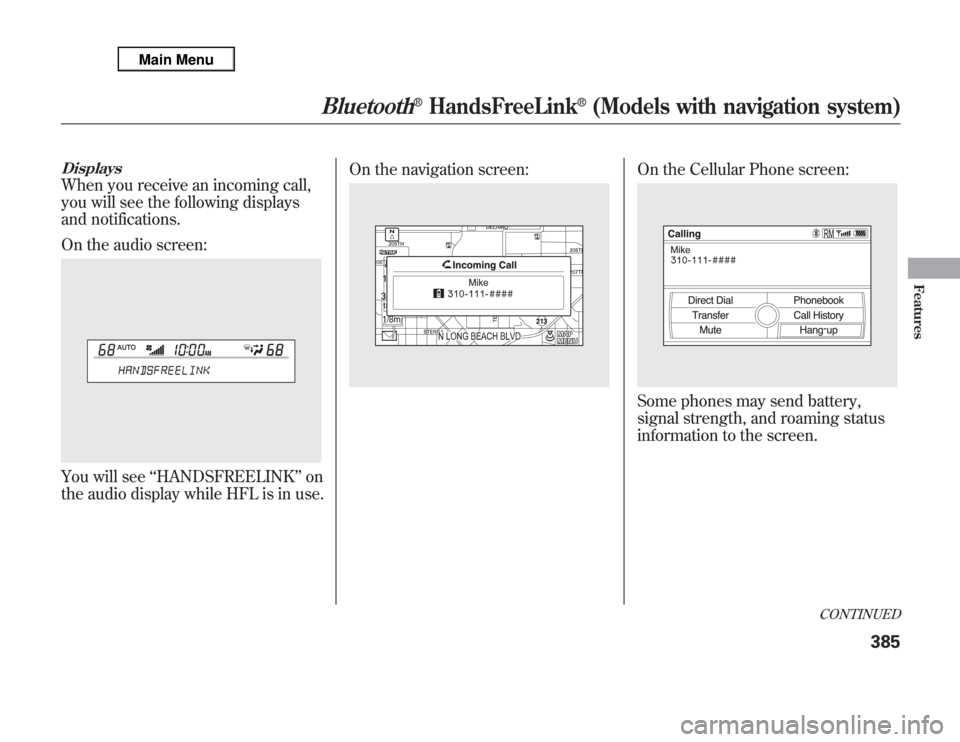
DisplaysWhen you receive an incoming call,
you will see the following displays
and notifications.
On the audio screen:You will see‘‘HANDSFREELINK’’on
the audio display while HFL is in use.On the navigation screen:
On the Cellular Phone screen:Some phones may send battery,
signal strength, and roaming status
information to the screen.
CONTINUED
Bluetooth
®
HandsFreeLink
®
(Models with navigation system)
385
Features
Page 409 of 621

AcuraLink
®(U.S. models only)
On models with navigation systemAcuraLink enhances your ownership
experience by providing a direct
communication link between your
vehicle and the Acura Server.
Working through the XM radio
satellite, AcuraLink works in
conjunction with the navigation
system,
Bluetooth
®HandsFreeLink
®
(HFL), and audio system in your
vehicle. It displays and receives
several kinds of messages, including:
●
Operating tips and information on
your vehicle's features.
●
Important recall and safety
information.
●
Maintenance information to keep
your vehicle in top condition.
●
Diagnostic information to provide
information about any problems
with your vehicle.
Interface Dial
Most AcuraLink functions are
controlled by the interface dial. The
interface dial has two parts, a knob
and a selector.
The knob turns left and right. Use it
to make selections or adjustments to
a list or menu on the screen.
The selector can be pushed left,
right, up, down, and in. Use the
selector to scroll through lists, to
select menus, and to highlight menu
items. When you make a selection,
push the center of the selector
(ENTER) to go to that selection.
KNOB ENTER
SELECTOR
AcuraLink
®
(U.S. models only)
402
Page 438 of 621

Modifying your vehicle, or installing
non-Acura accessories, may make
your vehicle unsafe. Before you
make any modifications or add any
accessories, be sure to read the
following information.
Accessories
Your dealer has Acura accessories
that allow you to personalize your
vehicle. These accessories have been
designed and approved for your
vehicle, and are covered by warranty.
Although non-Acura accessories may
fit on your vehicle, they may not
meet factory specifications, and could
adversely affect your vehicle's
handling, stability, and reliability.
Improper accessories or
modifications can affect your
vehicle's handling, stability, and
performance, and cause a
crash in which you can be hurt
or killed.
Follow all instructions in this
owner's manual regarding
accessories and modifications.
When properly installed, cellular
phones, alarms, two-way radios, and
low-powered audio systems should
not interfere with your vehicle's
computer controlled systems, such
as your airbags, anti-lock brakes, and
tire pressure monitoring system.Before installing any accessory:
●
Make sure the accessory does not
obscure any lights, or interfere
with proper vehicle operation or
performance.
●
Be sure electronic accessories do
not overload electrical circuits (see
page 566) or interfere with proper
operation of your vehicle.
●
Do not install accessories on the
side pillars or across the rear
windows. Accessories installed in
these areas may interfere with
proper operation of the side
curtain airbags.
●
Before installing any electronic
accessory, have the installer
contact your dealer for assistance.
If possible, have your dealer
inspect the final installation.
CONTINUED
Accessories and Modifications
431
Before Driving
Page 473 of 621
Distance between vehicles
CMBS
The radar sensor
detects a vehicleE-pretensionerAudio & Visual
WARNINGSBraking
Stage oneThere is a risk of a
collision with the
vehicle ahead of you.
—
‘‘BRAKE’’flashes
on the multi-
information
display.
—
A beep sounds
and‘‘BRAKE’’
flashes on the
multi-information
display. Stage twoThe risk of a collision
has increased, time to
respond is reduced.Retracts the driver's
seat belt gently a few
times, providing a
physical warning.
Lightly
applied
Stage three
ᤳ
The CMBS determines
that a collision is
unavoidable.Forcefully tightens
driver and front
passenger seat belts.
Forcefully
applied
ᤳ: Depending on the circumstances, CMBS may not go through all of the alert stages before initiating the last stage.
YOUR
VEHICLEVEHICLE
AHEAD
YOUR
VEHICLEVEHICLE
AHEAD
YOUR
VEHICLEVEHICLE
AHEAD
Collision Mitigation Braking System™(CMBS™)466
Page 554 of 621

The sensor on the negative terminal
monitors your vehicles battery
condition.
If there is a problem with the sensor,
you will see a‘‘CHECK BATTERY
SENSOR’’message on the
multiinformation display. Have the
vehicle checked by your dealer.
Check the terminals for corrosion (a
white or yellowish powder). To
remove it, cover the terminals with a
solution of baking soda and water. It
will bubble up and turn brown. When
this stops, wash it off with plain
water. Dry off the battery with a cloth
or paper towel. Coat the terminals
with grease to help prevent further
corrosion.If additional battery maintenance is
needed, see your dealer or a
qualified technician.
WARNING:Battery posts,
terminals, and related accessories
contain lead and lead compounds.
Wash your hands after handling.
If you need to connect the battery to
a charger, disconnect both cables to
prevent damaging your vehicle's
electrical system. Always disconnect
the negative (-) cable first, and
reconnect it last.
The battery gives off explosive
hydrogen gas during normal
operation.
A spark or flame can cause the
battery to explode with enough
force to kill or seriously hurt
you.
Wear protective clothing and a
face shield, or have a skilled
technician do the battery
maintenance.
If the radio fuse is removed, the
audio system will disable itself. The
next time you turn on the radio you
will see‘‘ENTER CODE’’in the
frequency display. Use the preset
buttons to enter the digit code (see
page 308).
Checking the Battery
547
Maintenance
Page 565 of 621

●
Are you using the proper starting
procedure? Refer toStarting the
Engineon page 442.
●
Do you have fuel? Check the fuel
gauge; the warning indicator may
not be working.
●
There may be an electrical
problem, such as no power to the
fuel pump. Check all the fuses (see
page 566).
If you find nothing wrong, you will
need a qualified technician to find the
problem. SeeEmergency Towingon
page 572.Jump Starting
Although this seems like a simple
procedure, you should take several
precautions.
A battery can explode if you do
not follow the correct
procedure, seriously injuring
anyone nearby.
Keep all sparks, open flames,
and smoking materials away
from the battery.
You cannot start your vehicle by
pushing or pulling it.
To Jump Start Your Vehicle:1. Open the hood, and check the
physical condition of the battery.
In very cold weather, check the
condition of the electrolyte. If it
seems slushy or frozen, do not try
jump starting until it thaws.If a battery sits in extreme cold, the
electrolyte inside can freeze. Attempting
to jump start with a frozen battery can
cause it to rupture.
2. Turn off all the electrical
accessories: heater, A/C, climate
control, audio system, lights, etc.
Put the transmission in neutral or
Park, and set the parking brake.
If the Engine Won't Start, Jump Starting558
Page 576 of 621

PRIMARY UNDER-HOOD FUSE BOX
No. Amps. Circuits Protected
1 120 A Main fuse
-Not Used
2-1 30 A ADS
ᤳ2
2-2 30 A SH-AWD
2-3 30 A Rear Blower Motor
2-4 40 A ABS VSA
2-5 40 A Trailer Main
2-6 40 A Power Seats, Driver's Position
Memory System, Subwoofer,
Telescopic Steering Wheel
2-7 40 A Front Heated Seat, TPMS,
Moonroof, Driver's Lumbar
Support
2-8--
3-1 60 A Fog Lights, Front Blower
Motor, Interior Light
3-2 40 A Headlights, Daytime Running
Lights
3-3 60 A Cooling Fan, Condenser Fan,
MG Clutch, Headlight
Washer
ᤳ1
3-4 50 A Ignition Switch Main
ᤳ1: Canadian model
ᤳ2: If equippedNo. Amps. Circuits Protected
3-5 50 A Power Window
3-6 60 A Power Tailgate Opener/Closer,
Rear ACC Socket, Interior
Light,
Rear Defroster
3-7 30 A ECU (PCM)
3-8 30 A TECH
4 40 A Audio, Door Lock, Interior
Lights, Front ACC Socket
5 30 A EPT-L
ᤳ2
6 30 A EPT-R
ᤳ2
7 30 A FI ECU
8 30 A Audio Amplifier
9 7.5 A Battery Sensor
10 15 A Hazard
11 15 A Horn, Stop
12 20 A ABS VSA
13 20 A Trailer (Brake)
14 20 A Rear Heated Seat
ᤳ2
15 20 A A/C Inverter
CONTINUED
Fuse Locations
569
Taking Care of the Unexpected