Page 297 of 388

07 Wheels and tyres
Tyre pressure monitoring (TPMS)*
07
��
* Option/accessory, for more information, see Introduction.297 General
TPMS (Tyre Pressure Monitoring System)*
warns the driver when the pressure is too low
in one or more of the car's tyres. It uses sensors
located inside the air valve in each wheel.
When the car is driven at about 40 km/h the
system detects the tyre pressure. If the pres-
sure is too low then a warning lamp
on the
instrument panel illuminates and a message is
shown on the display.
Always check the system after changing a
wheel in order to ensure that replacement
wheels work with the system.
For information on correct tyre pressures, see
page 358.
The system does not replace normal tyre main-
tenance.
IMPORTANT
If a fault should arise in the tyre pressure
system a warning lamp on the instru-
ment panel will illuminate and a message
will be shown. This can be for various rea-
sons, e.g. fitting a wheel not equipped with
a sensor adapted for Volvo's tyre pressure
monitoring system.
Adjusting tyre pressure monitoringTyre pressure monitoring can be adjusted in
order to follow Volvo's tyre pressure recom-
mendations, when driving with a heavy load for
example.
NOTE
The engine must not be running when the
tyres are calibrated.
The settings are made with the control in the
centre console, see page 142.
1. Inflate the tyres to the required pressure
and select key position I or II.
2.
Select the menu system MY CAR to open
the menus to Settings
Tyre pressure
3.
Select
Calibrate tyre pressure.
4.
Press OK.
5. Start the car and drive at least at 40 km/h
for a total of at least 1 minute and check
that the message disappears.
> Calibration is complete.
Rectifying low tyre pressureIf a message for low tyre pressure is shown in
the display:
1. Check the tyre pressure in all four tyres.2. Inflate the tyre(s) to the correct pressure.
3. Drive at least at 40 km/h for a total of at
least 1 minute and check that the message
disappears.
Deactivating/activating tyre pressure
monitoring
NOTE
The engine must not be running when tyre
pressure monitoring is activated/deacti-
vated.
The settings are made with the control in the
centre console, see page 142.
1.
Select key position I or II.
2.
Select the system MY CAR to open the
menus to Car settings
Tyre pressure
3.
Select
Tyre pressure system and press
OK.
>
A
X is shown in the display if the system
is activated, the option disappears if the
system is deactivated.
RecommendationsOnly factory fitted wheels are equipped with
TPMS sensors in the valves.
•If wheels without TPMS sensors are used
then Tyre press. syst Service required
ProCarManuals.com
Page 309 of 388

08 Maintenance and service
Engine compartment
08
��
309
3. Re-insert the dipstick.
4. Pull it out and check the level.
5.
If the level is close to MIN then 0.5 litres
should be added. If the level is significantly
below, then an additional amount is
required.
6. If required, check the level again, do it after
driving a short distance. Then repeat steps
1 - 4.
WARNING
Never fill above the MAX mark. The level
should never be above MAX or below MIN
as this could lead to engine damage.
WARNING
Do not spill oil onto the hot exhaust manifold
due to the risk of fire.
Engine with electronic oil level sensor3
Filler pipe.4
You do not need to take action with respect to
the engine oil level before a message is shown
in the display, see the illustration below.
Message and graph in the display.
Message
Engine oil level
WARNING
If the message Oil service required is
shown, visit a workshop. The oil level may
be too high.
IMPORTANT
In the event of the message Engine oil
level Fill with 0.5 l oil, only fill with 0.5 litres.
3Only applies to 5-cyl. diesel.4Engines with electronic oil level sensor have no dipstick (5-cyl. diesel).
ProCarManuals.com
Page 310 of 388

08 Maintenance and service
Engine compartment
08
310
NOTE
The oil level is only detected by the system
during driving. The system cannot directly
detect changes when the oil is filled or
drained. The car must be driven
about 30 km before the oil level display is
correct.
WARNING
Do not fill more oil if filling level (3) or (4)
appears as shown in the illustration below.
The level must never be above MAX or
below MIN, as this could lead to engine
damage.
WARNING
Do not spill oil onto the hot exhaust manifold
due to the risk of fire.
Measuring the oil levelIf the oil level needs to be checked then it
should be carried out in accordance with the
sequence below.
1.
Activate key position II, see page 81.
2. Rotate the thumbwheel on the left-hand
stalk switch to position
Engine oil level
Wait....> You will then see information displayed
about the engine oil level.
The figures 1-4 represent filling level. Do not fill
more oil if filling level (3) or (4) is shown. Recom-
mended filling level is 4.
Coolant
Checking the level and topping up
When topping up the coolant, follow the
instructions on the packaging. It is important
that the mixture of coolant concentrate and
water is correct for the prevailing weather con-
ditions. Never top up with water only. The risk
of freezing increases with both too little and too
much coolant concentrate. For capacities, see
page 352.
ProCarManuals.com
Page 331 of 388

08 Maintenance and service
Fuses
08
��
* Option/accessory, for more information, see Introduction.331
Box
AFunctionA
Power seat passenger
side*20
Folding head restraint*15
Infotainment control mod-
ule5
Audio control module*,
TV*
Satellite radio*, Digital
radio*10
Audio15
Phone*5
--
Sun roof*, Interior lighting
roof, Climate sensor5
12 V socket, tunnel con-
sole15
Seat heating (passenger
side)15
Seat heating (driver's side)15
Box
AFunctionA
--
Seat heating, rear passen-
ger side right*15
Seat heating, rear passen-
ger side left*15
Parking assistance*, Park-
ing camera*, Towbar con-
trol module *
BLIS*5
AWD control module*10
Active chassis Four-C*10
Box
BFunctionA
Rear window wiper15
--
Box
BFunctionA
Interior lighting, Driver's
door control panel, power
windows, Power seats,
front*, Remote controlled
garage door opener*7.5
Information display (DIM)5
Adaptive cruise control,
ACC*, collision warning
system*10
Interior lighting, Rain sen-
sor7.5
Steering wheel module7.5
Central locking system
rear, Central locking sys-
tem fuel filler flap10
Rear window washer15
Windscreen washers15
Opening tailgate10
--
Fuel pump20
ProCarManuals.com
Page 342 of 388

342
Type designations................................................................................. 344
Dimensions and weights....................................................................... 346
Engine specifications............................................................................ 349
Engine oil............................................................................................... 350
Fluids and lubricants............................................................................. 352
Fuel....................................................................................................... 354
Wheel and tyres, dimensions and pressure ......................................... 357
Electrical system................................................................................... 360
Type approval....................................................................................... 361
Symbols in the display.......................................................................... 373
ProCarManuals.com
Page 373 of 388

09 Specifications
Symbols in the display09
��
* Option/accessory, for more information, see Introduction.373 General
There are a variety of different symbols in the
display in the car. The symbols are divided into
warning, indicator and information symbols.
Shown below are the most common symbols
with their meanings and a reference to where
in the manual further information can be found.
For more information on symbols and text
messages, see pages 76, 77 and 140.
The red warning symbol
illuminates
when a fault has been indicated which could
affect the safety and/or driveability of the car.
At the same time an explanatory text is dis-
played in the information display.
The yellow information symbol
illumi-
nates, in combination with text in the informa-
tion display, when a deviation in any of the car's
systems has occurred. The yellow symbol
information can also illuminate in combination
with other symbols.
Symbols in the display
Indicator and warning symbols in the
combined instrument panel
SymbolMeaningPage
Low oil pres-
sure77
Parking
brake77, 131, 132
Airbags -
SRS21, 77
Seatbelt
reminder18, 77
Alternator
not charging77
Fault in the
brake system77, 130
Warning,
safety mode21, 32, 77, 79,
120
Indicator and information symbols in the
combined instrument panel
SymbolMeaningPage
Fault in the ABL
system*76, 90
Emissions sys-
tem76
Fault in the ABS
system76, 130
Rear fog lamp on76, 91
Stability system,
DSTC, Trailer
stability assist76, 165, 283
Engine pre-
heater (diesel)76
Low level in fuel
tank76, 159
Information,
read display text76
Main beam on76, 90
ProCarManuals.com
Page 374 of 388

09 Specifications
Symbols in the display 09
374* Option/accessory, for more information, see Introduction.
SymbolMeaningPage
Left-hand direc-
tion indicators76
Right-hand
direction indica-
tors76
Other information symbols in the
combined instrument panel
SymbolMeaningPage
Adaptive cruise
control*167, 173,
179
Adaptive cruise
control*179
Adaptive cruise
control*, Distance
Alert*179, 182
Adaptive cruise
control*, Distance
Alert*179, 182
Adaptive cruise
control*179
SymbolMeaningPage
Adaptive cruise
control*, Distance
Alert*174, 181
Adaptive cruise
control*, Distance
Alert*174, 181
Adaptive cruise
control*173
Radar sensor*179,
182193
Adaptive cruise
control*179
Speed limiter169
Camera sensor*,
Laser sensor*187, 193,
196, 199
Auto Brake*, Dis-
tance Alert*, City
Safety
TM, Collision
warning system*
182, 187,
193
SymbolMeaningPage
G02510
2
Fuel-driven engine
block heater and
passenger com-
partment heater*159
ABL system*90
Fuel filler flap,
right-hand side269
Low battery159
Parking brake132
Rain sensor*98
Driver Alert Sys-
tem*196
Driver Alert Sys-
tem*, Lane Depar-
ture Warning*196, 199
ProCarManuals.com
Page 375 of 388
09 Specifications
Symbols in the display09
* Option/accessory, for more information, see Introduction.375
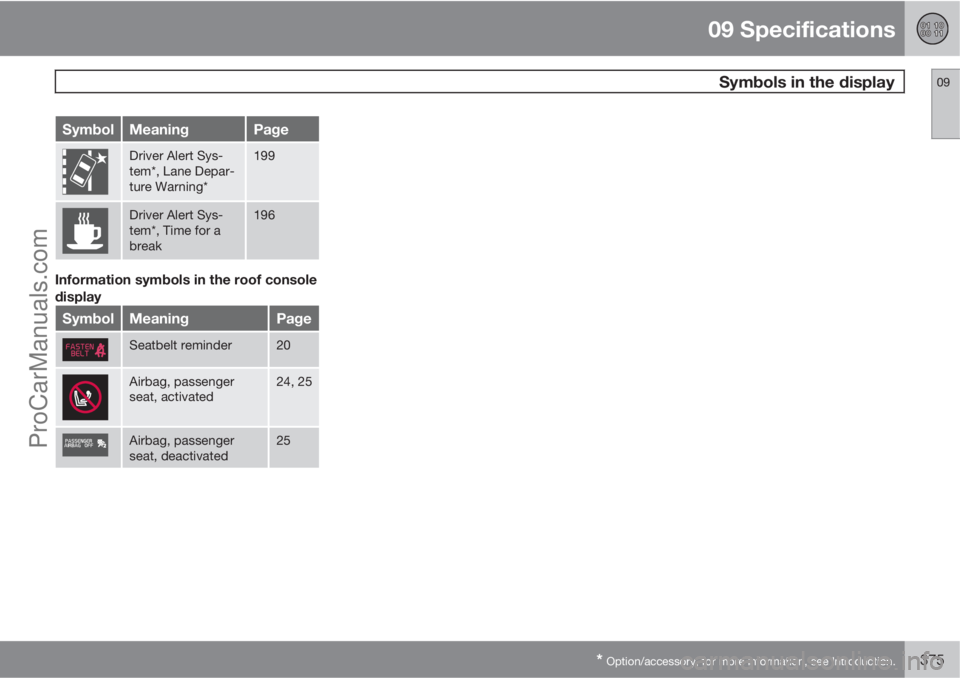
SymbolMeaningPage
Driver Alert Sys-
tem*, Lane Depar-
ture Warning*199
Driver Alert Sys-
tem*, Time for a
break196
Information symbols in the roof console
display
SymbolMeaningPage
Seatbelt reminder20
Airbag, passenger
seat, activated24, 25
Airbag, passenger
seat, deactivated25
ProCarManuals.com