2011 VOLVO S60 wheel
[x] Cancel search: wheelPage 96 of 342

03 Your driving environment
Wipers and washers
03
96* Option/accessory, for more information, see Introduction.
Windshield wipers/washers
Windshield wipers and washers
Rain sensor* on/off
Thumb wheel sensitivity/frequency
CAUTION
•Use ample washer fluid when washing
the windshield. The windshield should
be thoroughly wet when the wipers are
in operation.
•Before using the wipers, ice and snow
should be removed from the wind-
shield/rear window. Be sure the wiper
blades are not frozen in place.
Windshield wipers offMove the lever to position 0 to switch
off the windshield wipers.
Single sweepMove the lever upward from position
0 to sweep the windshield one stroke
at a time for as long as the lever is held up.
Intermittent wipingWith the lever in this position, you can
set the wiper interval by twisting the
thumb wheel upward to increase wiper speed
or downward to decrease the speed.
Continuous wipingThe wipers operate at normal speed.
The wipers operate at high speed.
Windshield wiper service positionThe windshield wipers must be in the service
position before the wiper blades can be
cleaned or replaced. See page 300 for addi-
tional information.
Rain sensor*The rain sensor automatically regulates wiper
speed according to the amount of water on the
windshield. The sensitivity of the rain sensor
can be adjusted moving the thumb wheel up(the wipers will sweep the windshield more fre-
quently) or down (the wipers will sweep the
windshield less frequently).
NOTE
The wipers will make an extra sweep each
time the thumb wheel is adjusted upward.
When the rain sensor is activated, the symbol
will illuminate in the instrument panel.
Activating and setting the sensitivityWhen activating the rain sensor, the vehicle
must be running or in ignition mode II and the
windshield wiper lever must be in position 0 or
in the single sweep position.
Activate the rain sensor by pressing the button
. The windshield wipers will make one
sweep.
Press the lever up for the wipers to make an
extra sweep. The rain sensor returns to active
mode when the stalk is released back to posi-
tion 0.
DeactivatingDeactivate the rain sensor by pressing the but-
ton
or press the lever down to another
wiper position.
Page 97 of 342
03 Your driving environment
Wipers and washers
03
* Option/accessory, for more information, see Introduction.97
The rain sensor is automatically deactivated
when the key is removed from the ignition slot
or five minutes after the ignition has been
switched off.
CAUTION
The rain sensor should be deactivated when
washing the car in an automatic car wash,
etc. If the rain sensor function is left on, the
wipers will start inadvertently in the car
wash and could be damaged.
Windshield washing
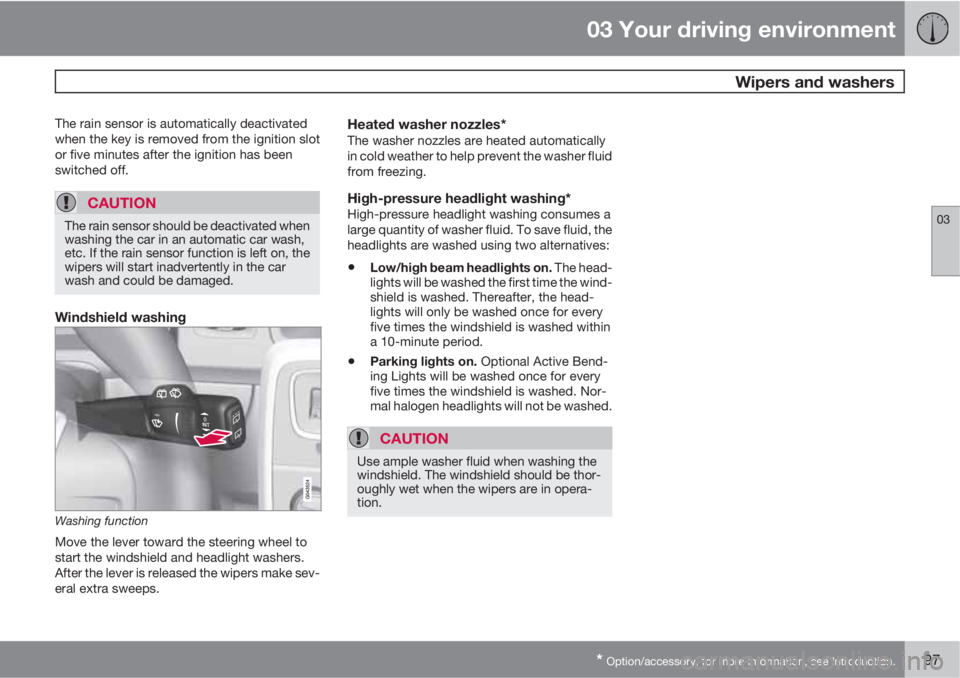
Washing function
Move the lever toward the steering wheel to
start the windshield and headlight washers.
After the lever is released the wipers make sev-
eral extra sweeps.
Heated washer nozzles*The washer nozzles are heated automatically
in cold weather to help prevent the washer fluid
from freezing.
High-pressure headlight washing*High-pressure headlight washing consumes a
large quantity of washer fluid. To save fluid, the
headlights are washed using two alternatives:
•Low/high beam headlights on. The head-
lights will be washed the first time the wind-
shield is washed. Thereafter, the head-
lights will only be washed once for every
five times the windshield is washed within
a 10-minute period.
•Parking lights on. Optional Active Bend-
ing Lights will be washed once for every
five times the windshield is washed. Nor-
mal halogen headlights will not be washed.
CAUTION
Use ample washer fluid when washing the
windshield. The windshield should be thor-
oughly wet when the wipers are in opera-
tion.
Page 108 of 342

03 Your driving environment
Starting the engine
03
108* Option/accessory, for more information, see Introduction.
Start
Ignition switch with remote key inserted ( see
page 81 for more information on ignition modes)
WARNING
Before starting the engine:
•Fasten the seat belt.
•Check that the seat, steering wheel and
mirrors are adjusted properly.
•Make sure the brake pedal can be
depressed completely. Adjust the seat
if necessary.
1. Press the remote key into the ignition slot
as far as possible, with the metallic key
blade pointing outward (not inserted into
the slot)
1.
2.
Depress the brake pedal
2.
3.
Press and release the START/STOP
ENGINE button. The autostart function will
operate the starter motor until the engine
starts.
The starter motor operates for a maximum
of 10 seconds. If the engine has not
started, repeat the procedure.
NOTE
Keyless drive*
To start a vehicle equipped with the keyless
drive feature, one of the remote keys must
be in the passenger compartment. Follow
the instructions in step 3 to start the vehicle.
WARNING
An extra mat on the driver's floor can cause
the accelerator and/or brake pedal to catch.
Check that the movement of these pedals is
not impeded. Not more than one protective
floor covering may be used at one time.
WARNING
•Always remove the remote key from the
ignition slot when leaving the vehicle,
especially if there are children in the
vehicle.
•Never remove the remote key from the
ignition slot while driving or when the
vehicle is being towed. The steering
lock could otherwise be activated, mak-
ing it impossible to steer the vehicle. On
vehicles with the optional keyless drive,
never remove the remote key from the
vehicle while driving or during towing.
•Always place the gear selector in Park
and apply the parking brake before
leaving the vehicle. Never leave the
vehicle unattended with the engine run-
ning.
•Always open garage doors fully before
starting the engine inside a garage to
ensure adequate ventilation. The
exhaust gases contain carbon monox-
ide, which is invisible and odorless but
very poisonous.
1On vehicles with the optional keyless drive, it is only necessary to have a remote key in the passenger’s compartment.2If the vehicle is moving, it is only necessary to press the START/STOP ENGINE button to start the vehicle.
Page 113 of 342

03 Your driving environment
Transmission
03
113
Please be aware that overriding the shiftlock
system does not release the steering wheel
lock.
All Wheel Drive – AWD3
Your Volvo can be equipped with permanent
All Wheel Drive, which means that power is
distributed automatically between the front
and rear wheels. Under normal driving condi-
tions, most of the engine's power is directed to
the front wheels. However, if there is any ten-
dency for the front wheels to spin, an electron-
ically controlled coupling distributes power to
the wheels that have the best traction.
NOTE
The message AWD disabled Service
required will be appear in the information
display if an electrical fault should occur in
the AWD system. A warning light will also
illuminate in the instrument panel. If this
occurs, have the system checked by a
trained and qualified Volvo service techni-
cian.
3Standard on certain models.
Page 116 of 342

03 Your driving environment
Parking brake
03
116
Electric parking brake
An electric parking brake has the same func-
tion as a manual parking brake.
NOTE
•A faint sound from the parking brake's
electric motor can be heard when the
parking brake is being applied. This
sound can also be heard during the
automatic function check of the parking
brake.
•The brake pedal will move slightly when
the electric parking brake is applied or
released.
Low battery voltageIf the battery voltage is too low, the parking
brake cannot be applied or released. Connect
an auxiliary battery if the battery voltage is too
low, see page 109.
Applying the electric parking brake
Parking brake control
1. Press firmly on the brake pedal.
2. Push the control.
3. Release the brake pedal and ensure that
the vehicle is at a standstill.
4. When the vehicle is parked, the gear selec-
tor must be in position P.
The
symbol in the instrument panel
flashes while the parking bake is being applied,
and glows steadily when the parking brake has
been fully applied.
NOTE
•In an emergency the parking brake can
be applied when the vehicle is moving
by holding in the control. Braking will be
interrupted when the accelerator pedal
is depressed or the control is released.
•An audible signal will sound during this
procedure if the vehicle is moving at
speeds above 6 mph (10 km/h).
Parking on a hill
•If the vehicle is pointing uphill, turn the front
wheels so that they point away from the
curb.
•If the vehicle is pointing downhill, turn the
front wheels so that they point toward the
curb.
The parking brake should also be applied.
Page 118 of 342

03 Your driving environment
Parking brake
03
118
drive off with this error message showing, a
warning signal sounds.
Parking brake not applied – A fault is pre-
venting the parking brake from being applied.
Try to apply and release. Contact a Volvo work-
shop if the message remains.
Parking brake Service required – A fault has
occurred. Contact a Volvo workshop if the fault
remains.
WARNING
If the vehicle must be parked before the fault
has been corrected, always put the gear
selector in P and turn the wheels so that
they point away from the curb if the vehicle
is pointing uphill or toward the curb if it is
pointing downhill.
Page 122 of 342
04 Comfort and driving pleasure
Menus and messages
04
122* Option/accessory, for more information, see Introduction.
Main instrument panel
G022908
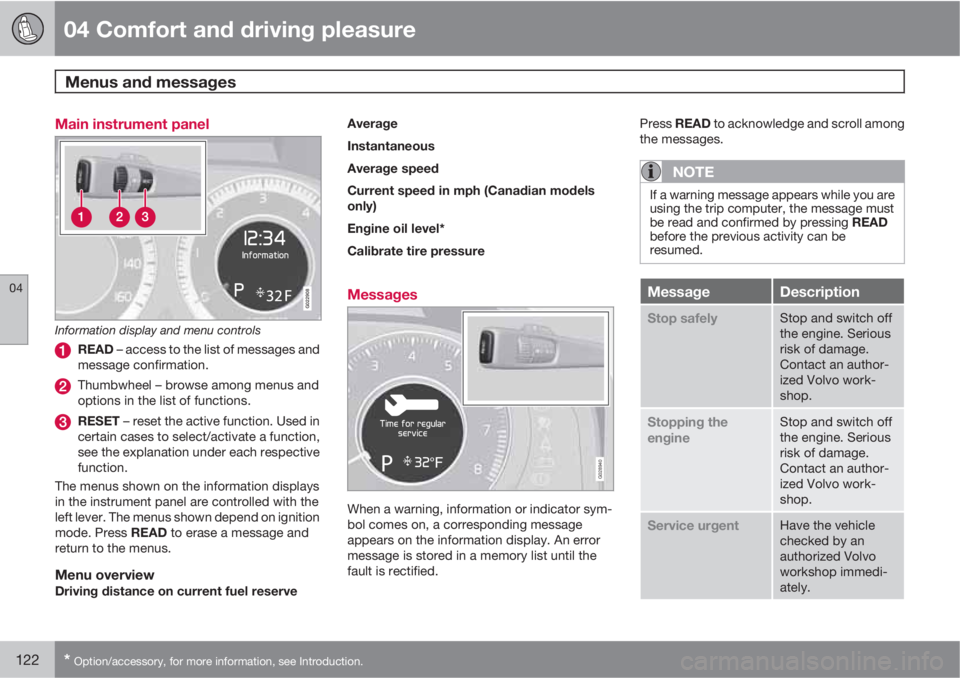
Information display and menu controls
READ – access to the list of messages and
message confirmation.
Thumbwheel – browse among menus and
options in the list of functions.
RESET – reset the active function. Used in
certain cases to select/activate a function,
see the explanation under each respective
function.
The menus shown on the information displays
in the instrument panel are controlled with the
left lever. The menus shown depend on ignition
mode. Press READ to erase a message and
return to the menus.
Menu overviewDriving distance on current fuel reserveAverage
Instantaneous
Average speed
Current speed in mph (Canadian models
only)
Engine oil level*
Calibrate tire pressure
Messages
G028940
When a warning, information or indicator sym-
bol comes on, a corresponding message
appears on the information display. An error
message is stored in a memory list until the
fault is rectified.Press READ to acknowledge and scroll among
the messages.
NOTE
If a warning message appears while you are
using the trip computer, the message must
be read and confirmed by pressing READ
before the previous activity can be
resumed.
MessageDescription
Stop safelyStop and switch off
the engine. Serious
risk of damage.
Contact an author-
ized Volvo work-
shop.
Stopping the
engineStop and switch off
the engine. Serious
risk of damage.
Contact an author-
ized Volvo work-
shop.
Service urgentHave the vehicle
checked by an
authorized Volvo
workshop immedi-
ately.
Page 124 of 342
04 Comfort and driving pleasure
My Car
04
124
Introduction
The MY CAR feature provides access to
menus for controlling many of the vehicle's
functions.
Navigating among the menu selections is done
with several buttons in the center console or on
the steering wheel keypad.
Since it must be possible to control some of
these functions while driving, they have their
own direct buttons in the center console con-
trol panel. A maximum of 20 buttons are avail-
able.
Operation
Center console controls
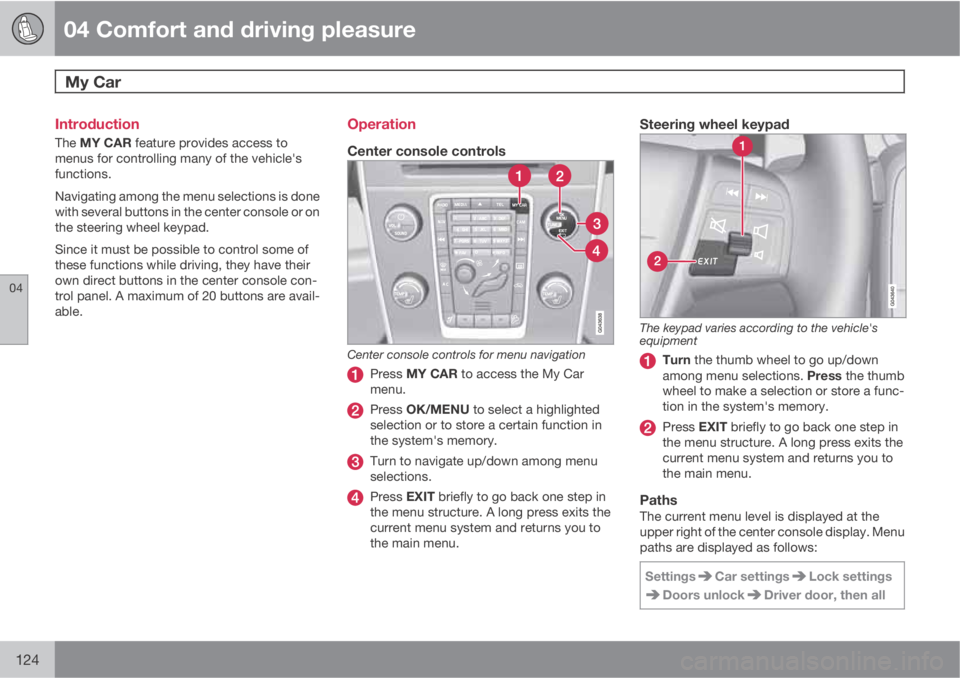
Center console controls for menu navigation
Press MY CAR to access the My Car
menu.
Press OK/MENU to select a highlighted
selection or to store a certain function in
the system's memory.
Turn to navigate up/down among menu
selections.
Press EXIT briefly to go back one step in
the menu structure. A long press exits the
current menu system and returns you to
the main menu.
Steering wheel keypad
The keypad varies according to the vehicle's
equipment
Turn the thumb wheel to go up/down
among menu selections. Press the thumb
wheel to make a selection or store a func-
tion in the system's memory.
Press EXIT briefly to go back one step in
the menu structure. A long press exits the
current menu system and returns you to
the main menu.
PathsThe current menu level is displayed at the
upper right of the center console display. Menu
paths are displayed as follows:
Settings
Car settingsLock settings
Doors unlockDriver door, then all