Page 195 of 406
183
3-2. Using the audio system
3
Interior features
n
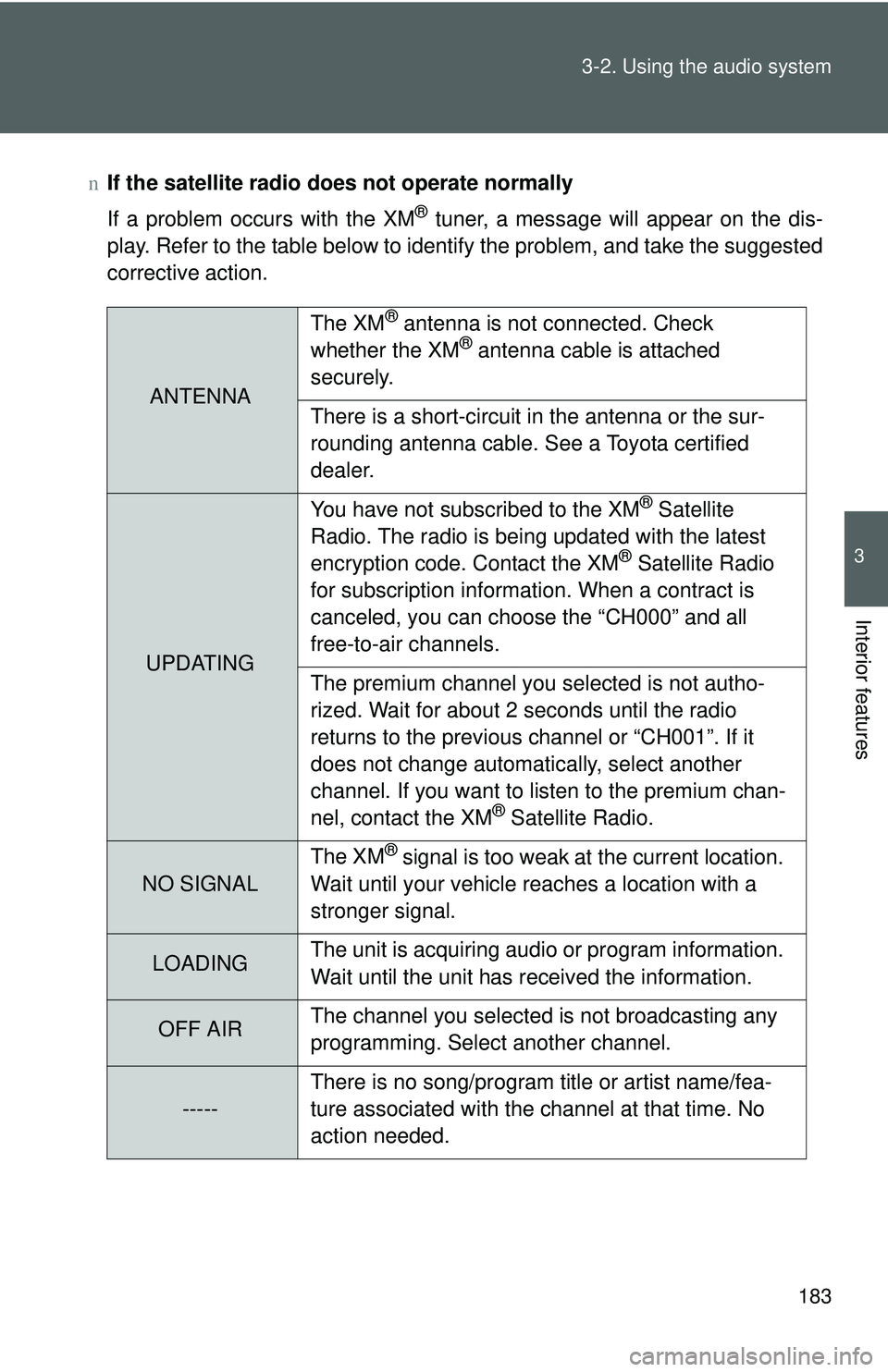
If the satellite radio does not operate normally
If a problem occurs with the XM
® tuner, a message will appear on the dis-
play. Refer to the table below to identify the problem, and take the suggested
corrective action.
ANTENNA The XM
® antenna is not connected. Check
whether the XM® antenna cable is attached
securely.
There is a short-circuit in the antenna or the sur-
rounding antenna cable. See a Toyota certified
dealer.
UPDATING You have not subscribed to the XM
® Satellite
Radio. The radio is being updated with the latest
encryption code. Contact the XM
® Satellite Radio
for subscription information. When a contract is
canceled, you can choose the “CH000” and all
free-to-air channels.
The premium channel you selected is not autho-
rized. Wait for about 2 seconds until the radio
returns to the previous channel or “CH001”. If it
does not change automatically, select another
channel. If you want to listen to the premium chan-
nel, contact the XM
® Satellite Radio.
NO SIGNAL The XM
® signal is too weak at the current location.
Wait until your vehicle reaches a location with a
stronger signal.
LOADING The unit is acquiring audio or program information.
Wait until the unit has received the information.
OFF AIRThe channel you selected is not broadcasting any
programming. Select another channel.
-----There is no song/program title or artist name/fea-
ture associated with the channel at that time. No
action needed.
Page 284 of 406
273
4-3. Do-it-yourself maintenance
4
Maintenance and care
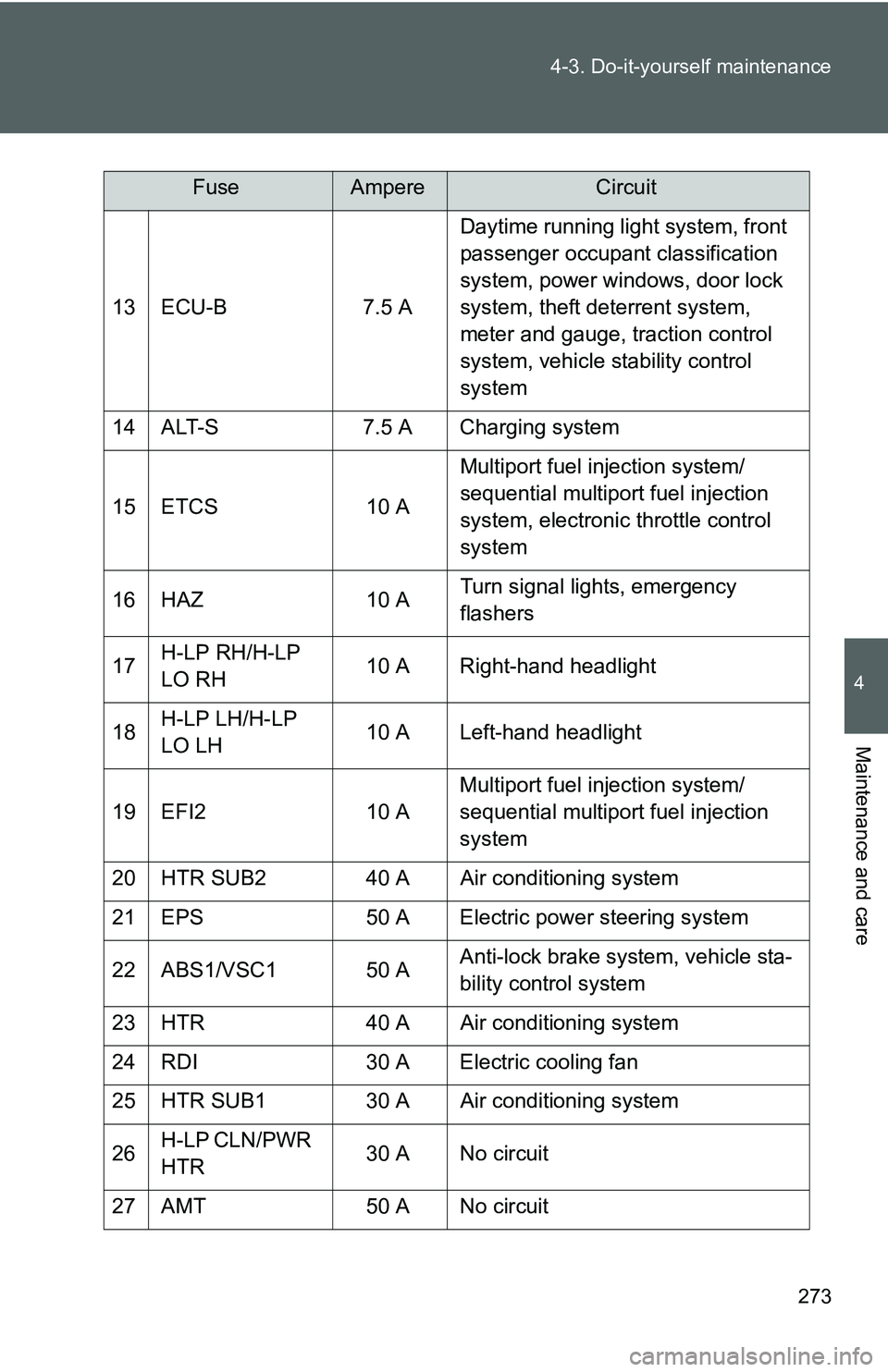
13 ECU-B
7.5 ADaytime running light system, front
passenger occupant classification
system, power windows, door lock
system, theft deterrent system,
meter and gauge, traction control
system, vehicle stability control
system
14 ALT-S 7.5 A Charging system
15 ETCS 10 AMultiport fuel injection system/
sequential multiport fuel injection
system, electronic throttle control
system
16 HAZ 10 ATurn signal lights, emergency
flashers
17 H-LP RH/H-LP
LO RH 10 A Right-hand headlight
18 H-LP LH/H-LP
LO LH 10 A Left-hand headlight
19 EFI2 10 AMultiport fuel injection system/
sequential multiport fuel injection
system
20 HTR SUB2 40 A Air conditioning system
21 EPS 50 A Electric power steering system
22 ABS1/VSC1 50 A Anti-lock brake system, vehicle sta-
bility control system
23 HTR 40 A Air conditioning system
24 RDI 30 A Electric cooling fan
25 HTR SUB1 30 A Air conditioning system
26 H-LP CLN/PWR
HTR 30 A No circuit
27 AMT 50 A No circuit
FuseAmpereCircuit
Page 287 of 406
276 4-3. Do-it-yourself maintenance
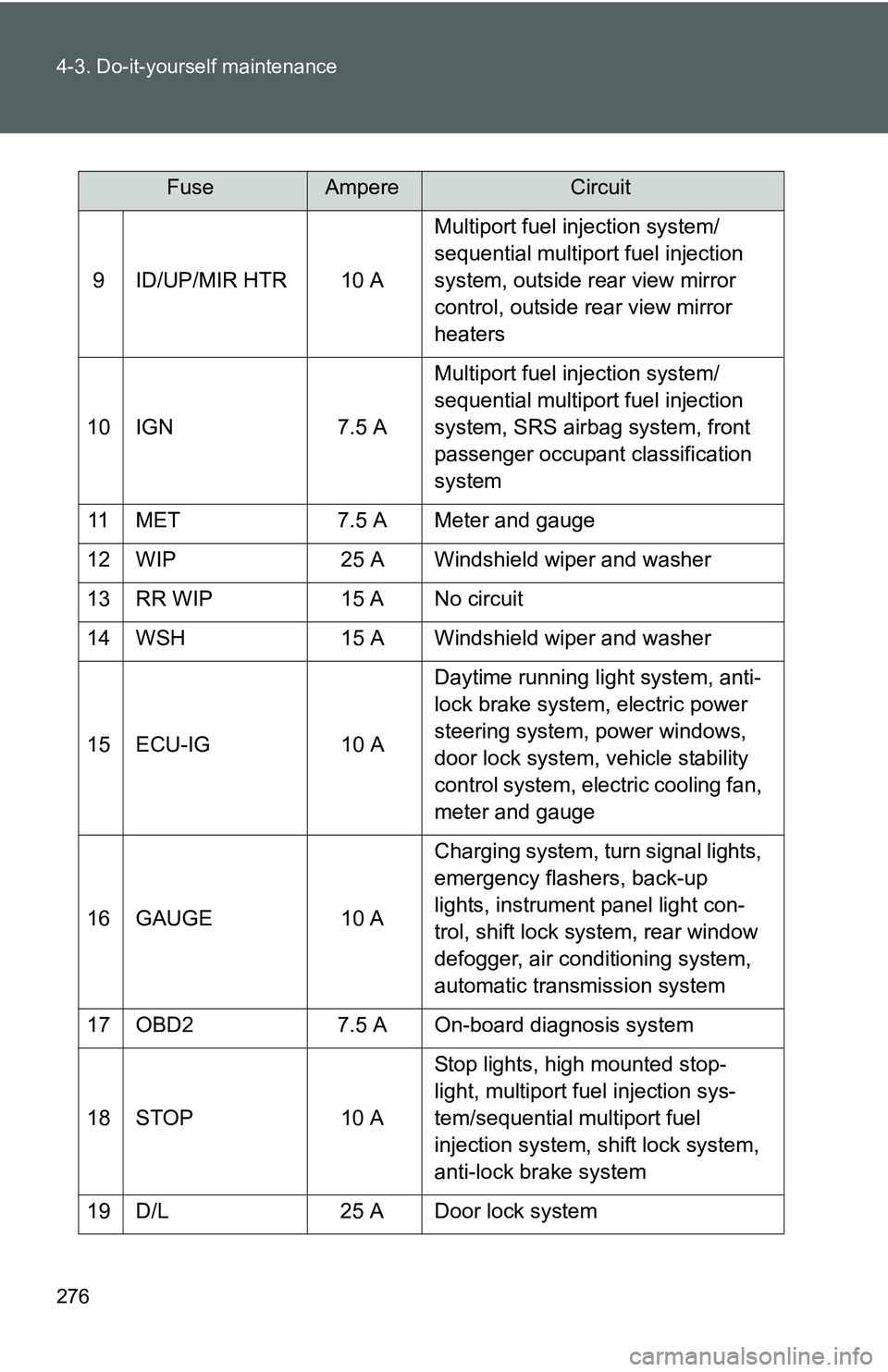
9 ID/UP/MIR HTR 10 AMultiport fuel injection system/
sequential multiport fuel injection
system, outside rear view mirror
control, outside rear view mirror
heaters
10 IGN 7.5 A Multiport fuel injection system/
sequential multiport fuel injection
system, SRS airbag system, front
passenger occupant classification
system
11 MET 7.5 A Meter and gauge
12 WIP 25 A Windshield wiper and washer
13 RR WIP 15 A No circuit
14 WSH 15 A Windshield wiper and washer
15 ECU-IG 10 A Daytime running light system, anti-
lock brake system, electric power
steering system, power windows,
door lock system, vehicle stability
control system, electric cooling fan,
meter and gauge
16 GAUGE 10 A Charging system, turn signal lights,
emergency flashers, back-up
lights, instrument panel light con-
trol, shift lock system, rear window
defogger, air conditioning system,
automatic transmission system
17 OBD2 7.5 A On-board diagnosis system
18 STOP 10 A Stop lights, high mounted stop-
light, multiport fuel injection sys-
tem/sequential multiport fuel
injection system, shift lock system,
anti-lock brake system
19 D/L 25 A Door lock system
FuseAmpereCircuit
Page 289 of 406
278
4-3. Do-it-yourself maintenance
Light bulbs
You may replace the following bulbs yourself. The difficulty level of
replacement varies depending on the bulb. If necessary bulb
replacement seems difficult to perfor m, contact your Toyota dealer.
For more information about replacing other light bulbs, contact your
Toyota dealer.
■ Prepare a replacement light bulb
Check the wattage of the light bulb being replaced. ( →P. 348)
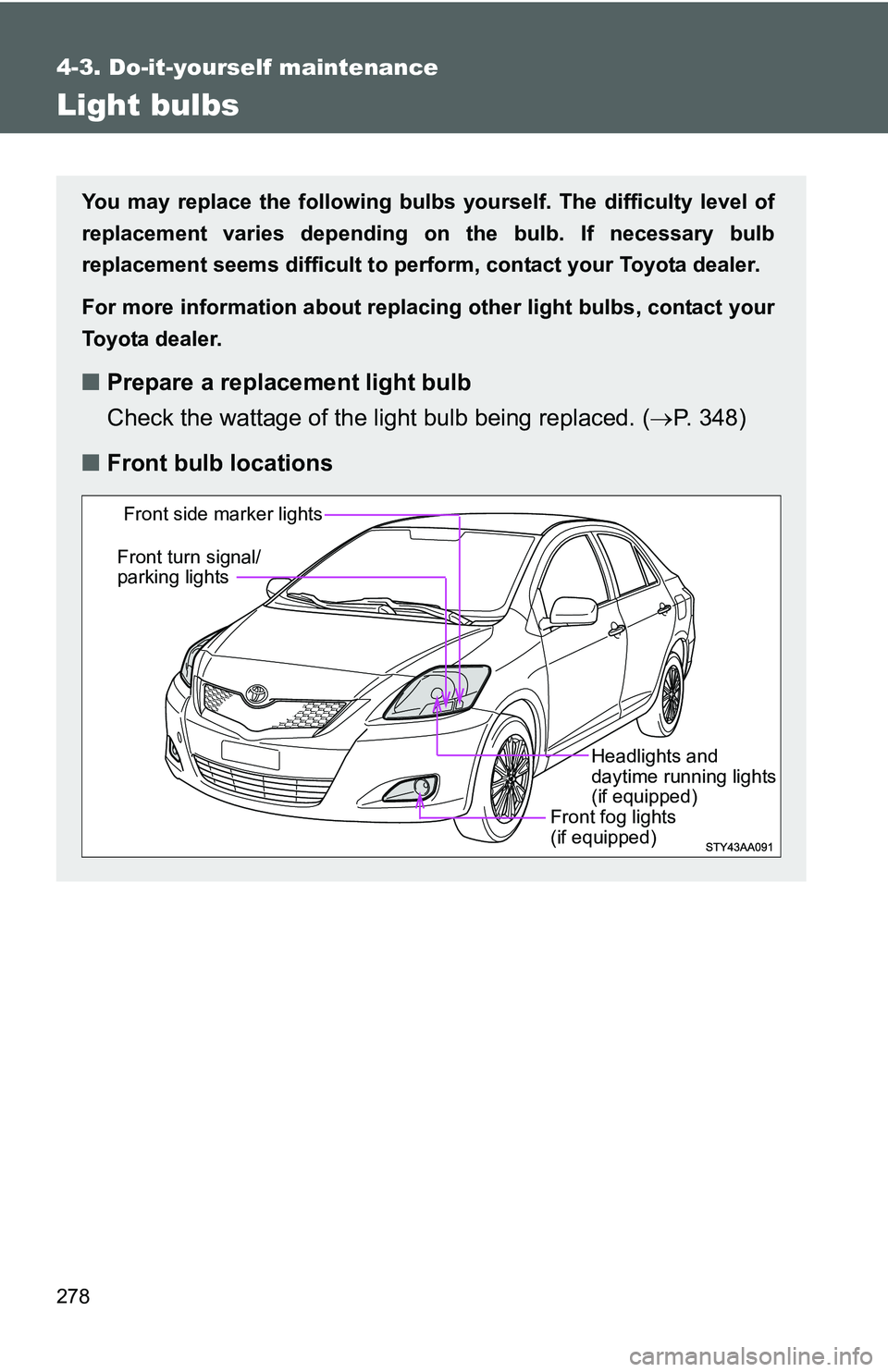
■ Front bulb locations
Front fog lights
(if equipped)
Front side marker lights
Front turn signal/
parking lights
Headlights and
daytime running lights
(if equipped)
Page 290 of 406
279
4-3. Do-it-yourself maintenance
4
Maintenance and care
Replacing light bulbs
■ Headlights and daytime r unning lights (if equipped)
Unplug the connector.
Remove the rubber cover.
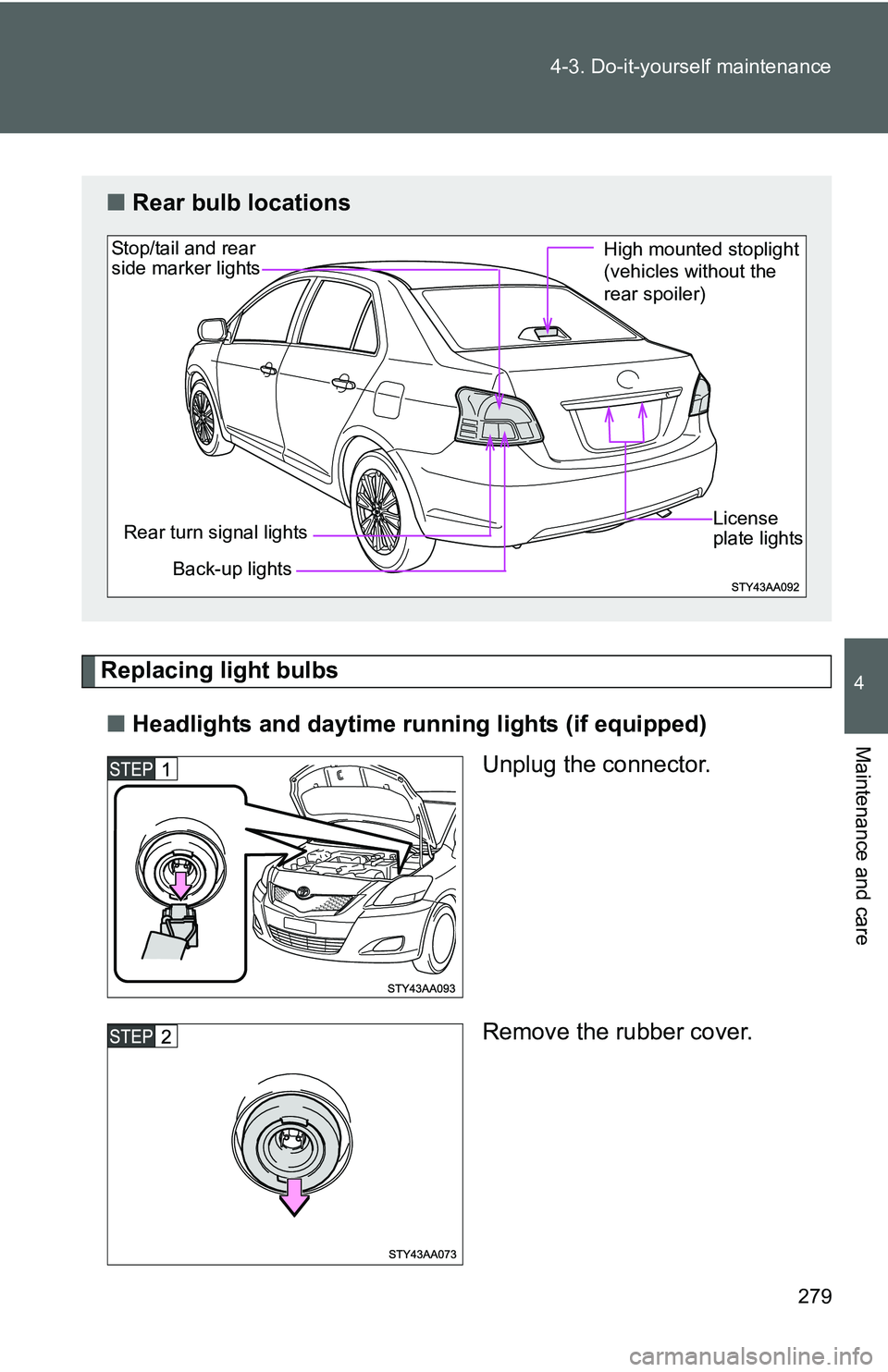
■Rear bulb locations
Back-up lights
Rear turn signal lights
Stop/tail and rear
side marker lights
License
plate lights
High mounted stoplight
(vehicles without the
rear spoiler)
Page 293 of 406
282 4-3. Do-it-yourself maintenance
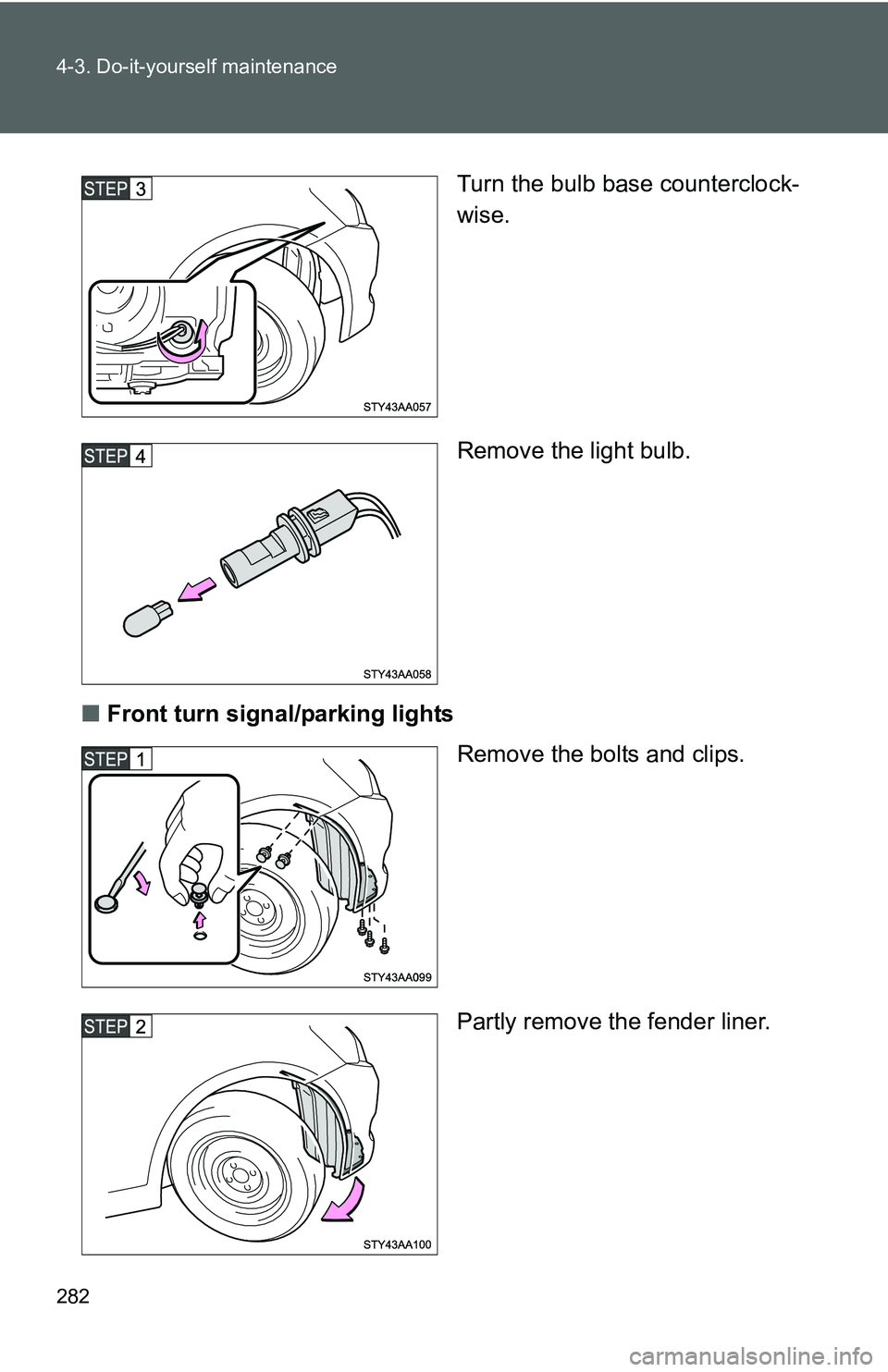
Turn the bulb base counterclock-
wise.
Remove the light bulb.
■ Front turn signal/parking lights
Remove the bolts and clips.
Partly remove the fender liner.
Page 294 of 406
283
4-3. Do-it-yourself maintenance
4
Maintenance and care
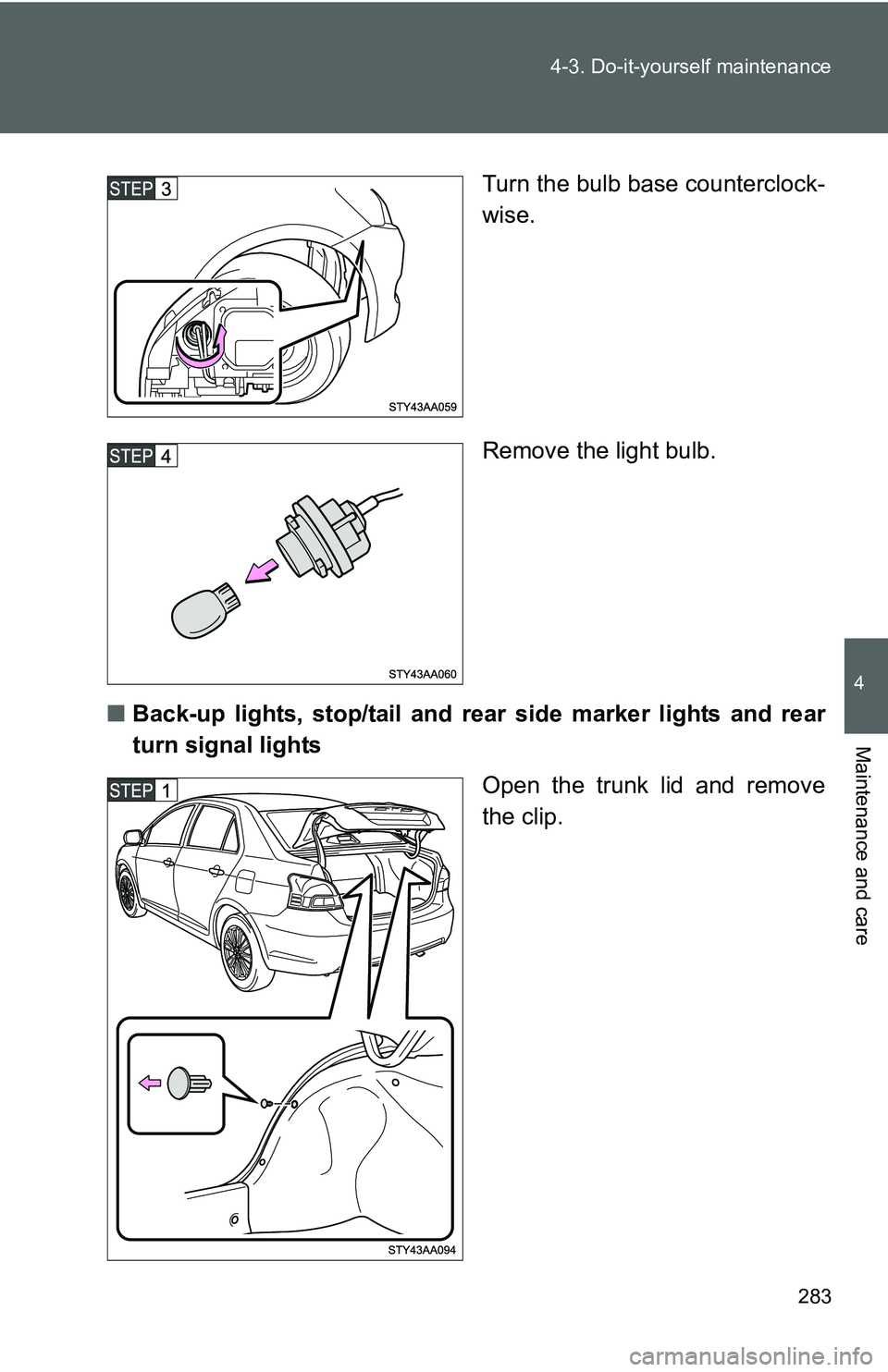
Turn the bulb base counterclock-
wise.
Remove the light bulb.
■ Back-up lights, stop/tail and rear side marker lights and rear
turn signal lights
Open the trunk lid and remove
the clip.
Page 295 of 406
284 4-3. Do-it-yourself maintenance
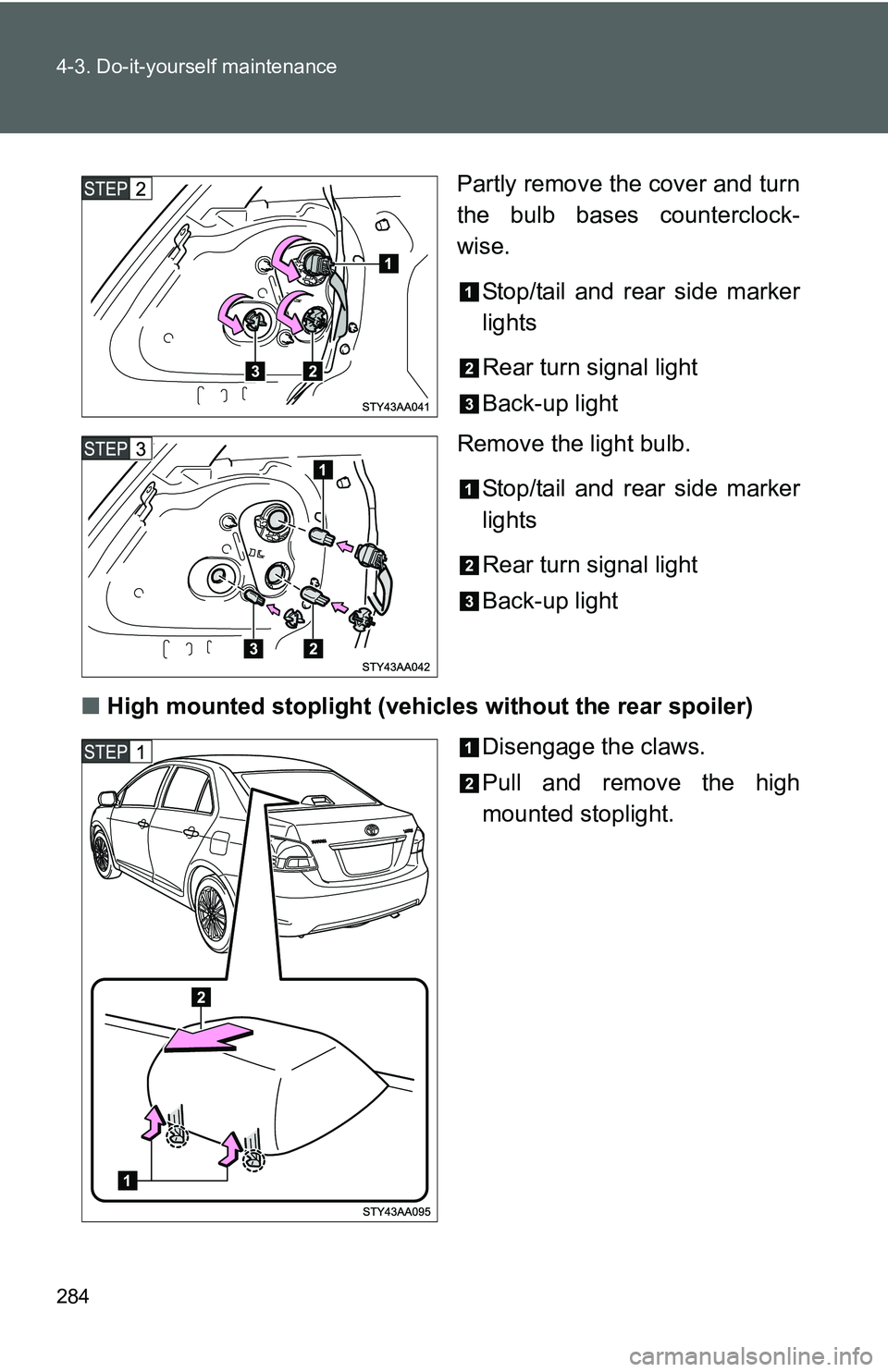
Partly remove the cover and turn
the bulb bases counterclock-
wise.Stop/tail and rear side marker
lights
Rear turn signal light
Back-up light
Remove the light bulb.
Stop/tail and rear side marker
lights
Rear turn signal light
Back-up light
■ High mounted stoplight (vehicle s without the rear spoiler)
Disengage the claws.
Pull and remove the high
mounted stoplight.