Page 1 of 406
384
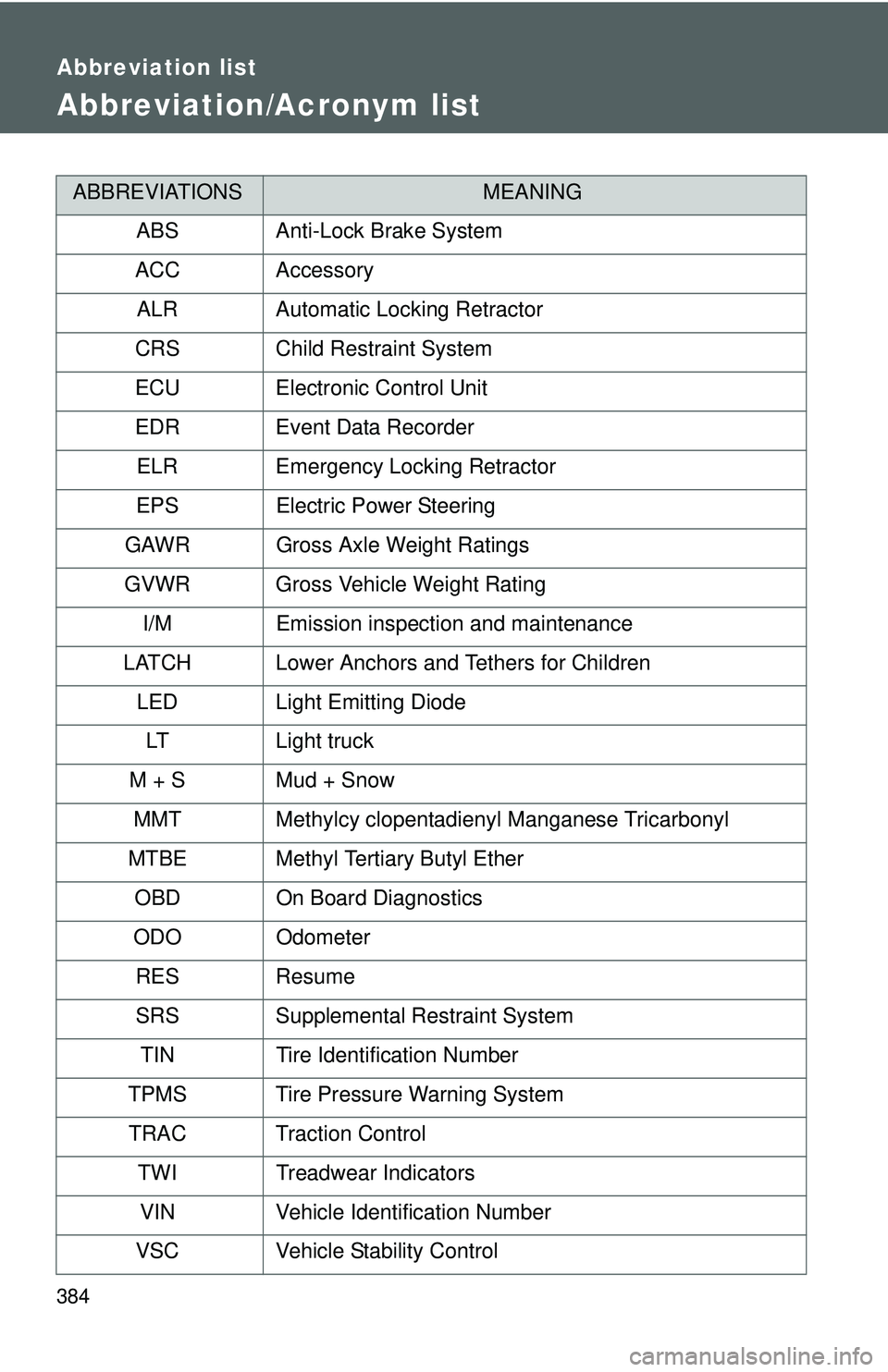
Abbreviation list
Abbreviation/Acronym list
ABBREVIATIONSMEANING
ABS Anti-Lock Brake System
ACC Accessory ALR Automatic Locking Retractor
CRS Child Restraint System
ECU Electronic Control Unit
EDR Event Data Recorder ELR Emergency Locking Retractor
EPS Electric Power Steering
GAWR Gross Axle Weight Ratings
GVWR Gross Vehicle Weight Rating I/M Emission inspection and maintenance
LATCH Lower Anchors and Tethers for Children LED Light Emitting Diode
LT Light truck
M + S Mud + Snow MMT Methylcy clopentadienyl Manganese Tricarbonyl
MTBE Methyl Tertiary Butyl Ether OBD On Board Diagnostics
ODO Odometer
RES Resume
SRS Supplemental Restraint System TIN Tire Identification Number
TPMS Tire Pressure Warning System TRAC Traction Control TWI Treadwear Indicators
VIN Vehicle Identification Number
VSC Vehicle Stability Control
Page 144 of 406
131
2-2. Instrument cluster
2
When driving
CAUTION
n
If a safety system warning light does not come on
Should a safety system light such as ABS and the SRS airbag warning light
not come on when you start the engine, this could mean that these systems
are not available to help protect you in an accident, which could result in
death or serious injury. Have the vehicle inspected by your Toyota dealer
immediately if this occurs.
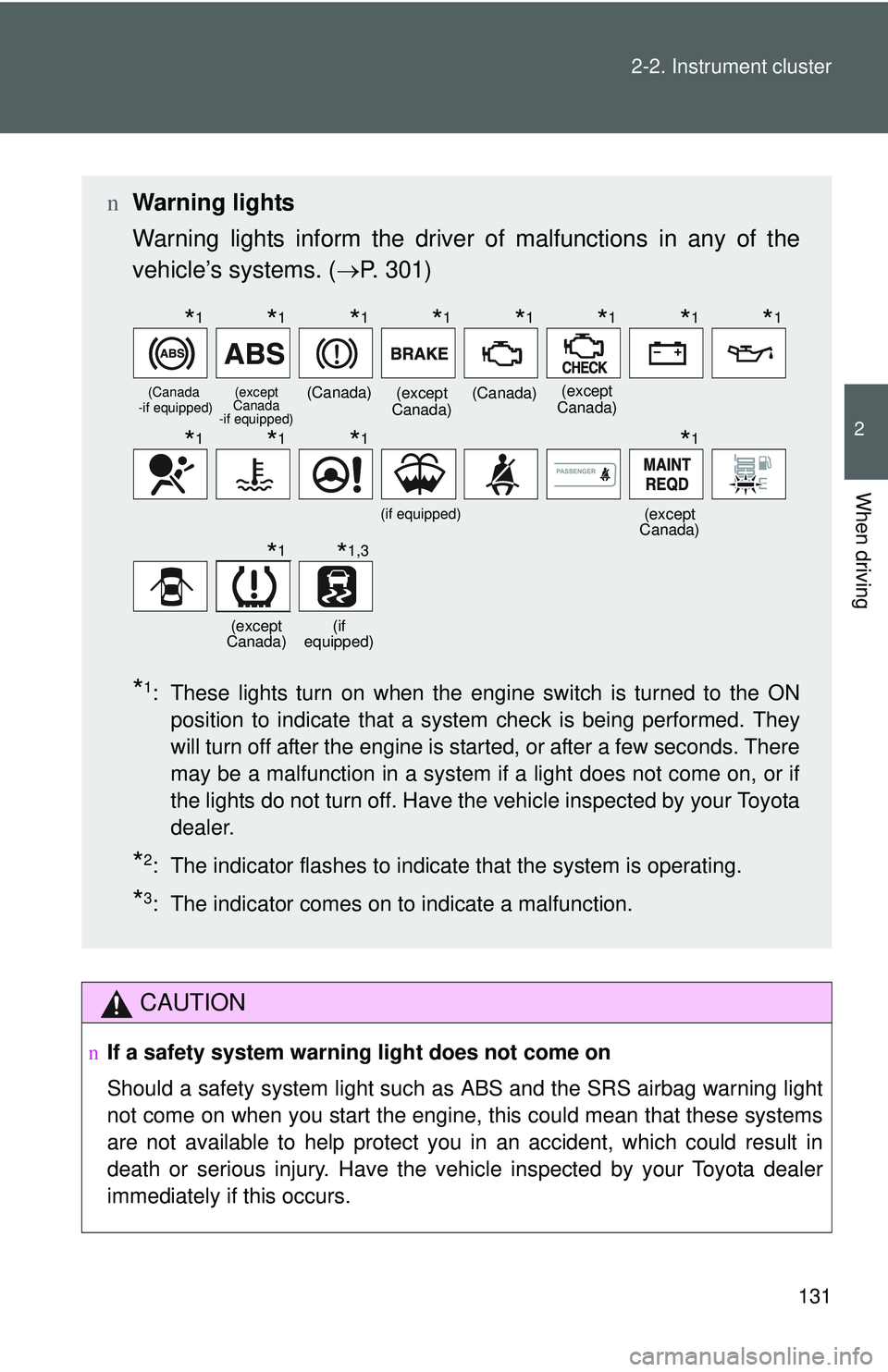
n Warning lights
Warning lights inform the driver of malfunctions in any of the
vehicle’s systems. ( →P. 301)
*1: These lights turn on when the engine switch is turned to the ON
position to indicate that a system check is being performed. They
will turn off after the engine is started, or after a few seconds. There
may be a malfunction in a system if a light does not come on, or if
the lights do not turn off. Have the vehicle inspected by your Toyota
dealer.
*2: The indicator flashes to indicate that the system is operating.
*3: The indicator comes on to indicate a malfunction.
(Canada
-if equipped)(except
Canada
-if equipped)(Canada)(except
Canada)(Canada)(except
Canada)
(if equipped)(except
Canada)
(except
Canada)(if
equipped)
*1*1*1*1*1*1*1*1
*1*1*1*1
*1*1,3
Page 154 of 406
141
2-4. Using other driving systems
2
When driving
Driving assist systems
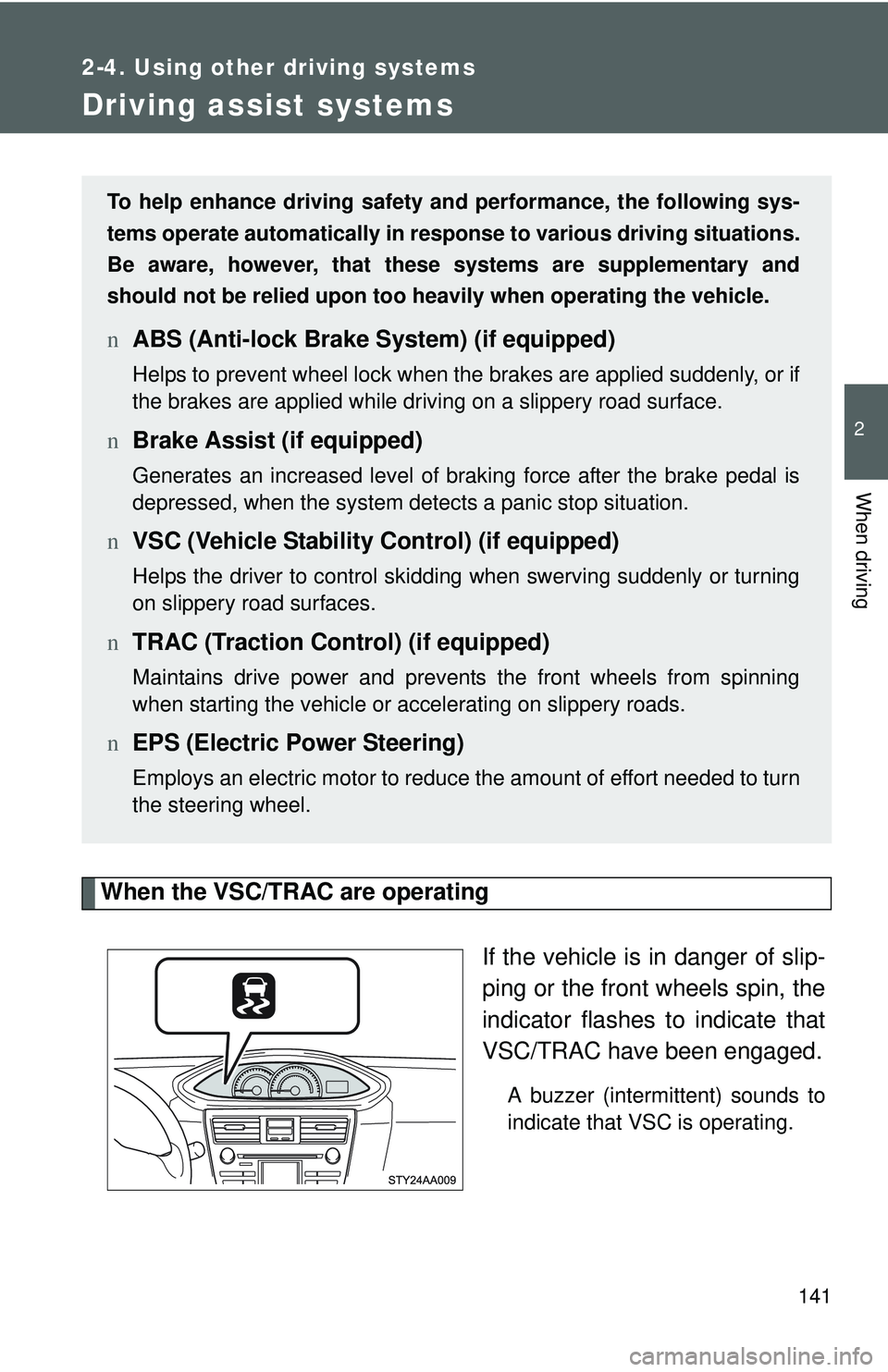
When the VSC/TRAC are operatingIf the vehicle is in danger of slip-
ping or the front wheels spin, the
indicator flashes to indicate that
VSC/TRAC have been engaged.
A buzzer (intermittent) sounds to
indicate that VSC is operating.
To help enhance driving safety and performance, the following sys-
tems operate automatically in res ponse to various driving situations.
Be aware, however, that these systems are supplementary and
should not be relied upon too heavi ly when operating the vehicle.
nABS (Anti-lock Brake System) (if equipped)
Helps to prevent wheel lock when the brakes are applied suddenly, or if
the brakes are applied while driving on a slippery road surface.
nBrake Assist (if equipped)
Generates an increased level of braking force after the brake pedal is
depressed, when the system detects a panic stop situation.
nVSC (Vehicle Stability Control) (if equipped)
Helps the driver to control skidding when swerving suddenly or turning
on slippery road surfaces.
nTRAC (Traction Control) (if equipped)
Maintains drive power and prevents the front wheels from spinning
when starting the vehicle or accelerating on slippery roads.
nEPS (Electric Power Steering)
Employs an electric motor to reduce the amount of effort needed to turn
the steering wheel.
Page 156 of 406
143
2-4. Using other
driving systems
2
When driving
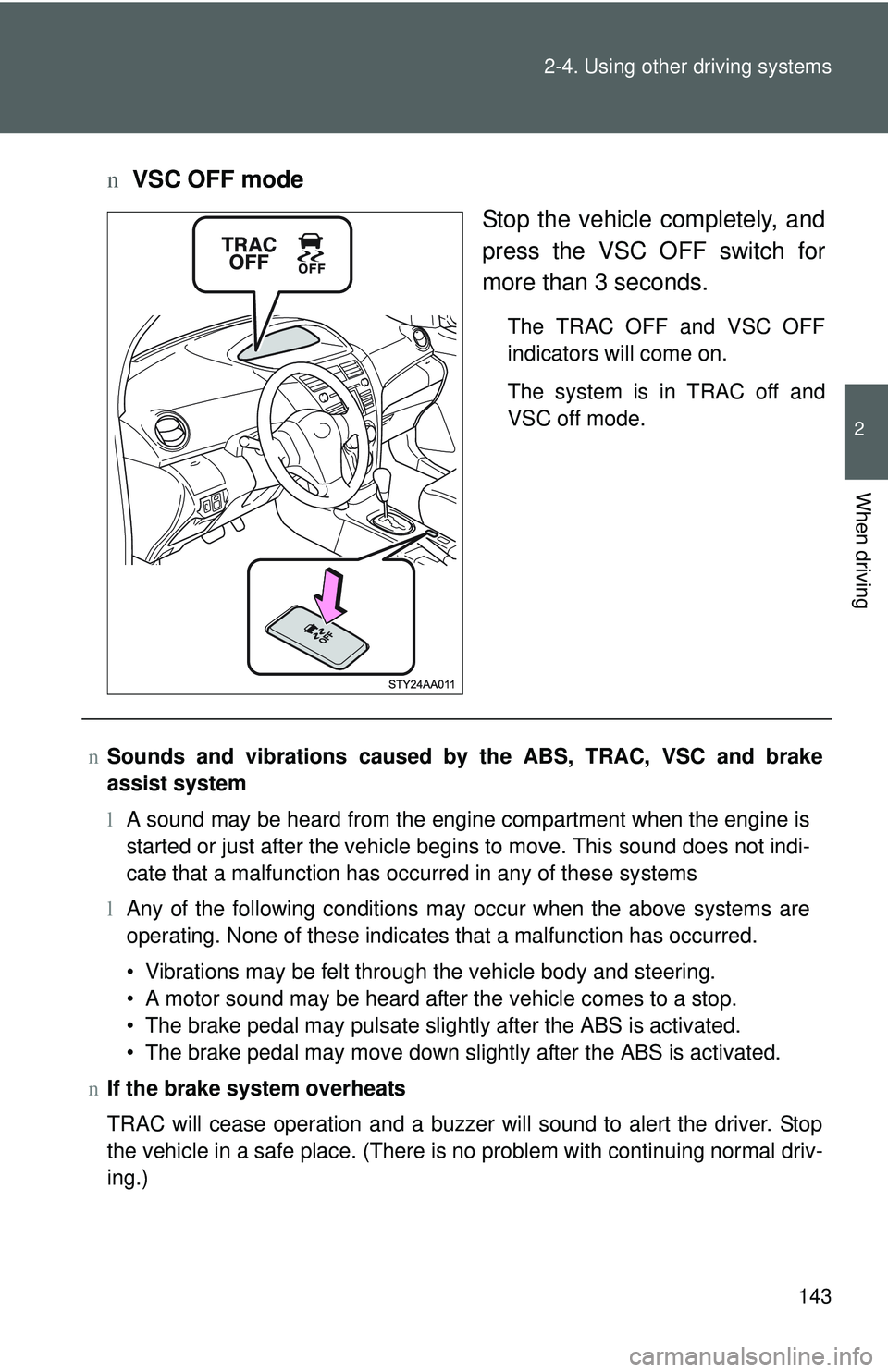
nVSC OFF mode
Stop the vehicle completely, and
press the VSC OFF switch for
more than 3 seconds.
The TRAC OFF and VSC OFF
indicators will come on.
The system is in TRAC off and
VSC off mode.
nSounds and vibrations caused by the ABS, TRAC, VSC and brake
assist system
lA sound may be heard from the engine compartment when the engine is
started or just after the vehicle begins to move. This sound does not indi-
cate that a malfunction has occurred in any of these systems
l Any of the following conditions may occur when the above systems are
operating. None of these indicates that a malfunction has occurred.
• Vibrations may be felt through the vehicle body and steering.
• A motor sound may be heard after the vehicle comes to a stop.
• The brake pedal may pulsate slightly after the ABS is activated.
• The brake pedal may move down slightly after the ABS is activated.
n If the brake system overheats
TRAC will cease operation and a buzzer will sound to alert the driver. Stop
the vehicle in a safe place. (There is no problem with continuing normal driv-
ing.)
Page 158 of 406
145
2-4. Using other
driving systems
2
When driving
CAUTION
nThe ABS does not opera te effectively when
l Tires with inadequate gripping ability are used (such as excessively worn
tires on a snow covered road).
l The vehicle hydroplanes while driving at high speed on the wet or slick
road.
n Stopping distance when the ABS is ope rating on the wet or slick roads
The ABS is not designed to shorten the vehicle’s stopping distance. Always
maintain a safe distance from the vehicle in front of you in the following situ-
ations.
l When driving on dirt, gravel or snow-covered roads
l When driving with tire chains
l When driving over bumps in the road
l When driving over roads with potholes or uneven roads
n When VSC is activated
The slip indicator flashes and a warning buzzer sounds. Always drive care-
fully. Reckless driving may cause an accident. Exercise particular care when
the indicator flashes and a buzzer sounds.
n TRAC may not operate effectively when
Directional control and power may not be achievable while driving on slip-
pery road surfaces, even if TRAC is operating.
Do not drive the vehicle in conditions where stability and power may be lost.
n Replacing tires
Make sure that all tires are of the same size, brand, tread pattern and total
load capacity. In addition, make sure that the tires are inflated to the appro-
priate tire pressure level.
The ABS and VSC will not function correctly if different tires are fitted on the
vehicle.
Contact your Toyota dealer for further information when replacing tires or
wheels.
n Handling of tires and suspension
Using tires with any kind of problem or modifying the suspension will affect
the driving assist systems, and may cause the system to malfunction.
Page 173 of 406
160 2-5. Driving information
lTake care when passing other v ehicles. Passing requires consider-
able distance. After passing a vehi cle, do not forget the length of
your trailer, and be sure you hav e plenty of room before changing
lanes.
l In order to maintain engine braking efficiency, do not use the trans-
mission in D (automatic transmission) or 5 (manual transmission).
l Due to the added load of the trailer, your vehicle’s engine may
overheat on hot days (at temper atures over 85°F [30°C]) when
driving up a long or steep grade. If the engine coolant temperature
gauge indicates overheating, immediately turn off the air condition-
ing (if in use), pull your vehicle off the road and stop in a safe spot.
( → P. 329)
l Always place wheel blocks under both the vehicle and the trailer
wheels when parking. Apply the parking brake firmly, and put the
transmission in P (automatic transmission) or in 1 or R (manual
transmission). Avoid parking on a slope, but if unavoidable, do so
only after performing the following:
Apply the brakes and keep them applied.
Have someone place wheel bloc ks under both the vehicle and
trailer wheels.
When the wheel blocks are in place, release the brakes slowly
until the blocks absorb the load.
Apply the parking brake firmly.
Shift into 1 or R (manual transmission) or P (automatic trans-
mission) and turn off the engine.
Page 211 of 406
199
3-2. Using the audio system
3
Interior features
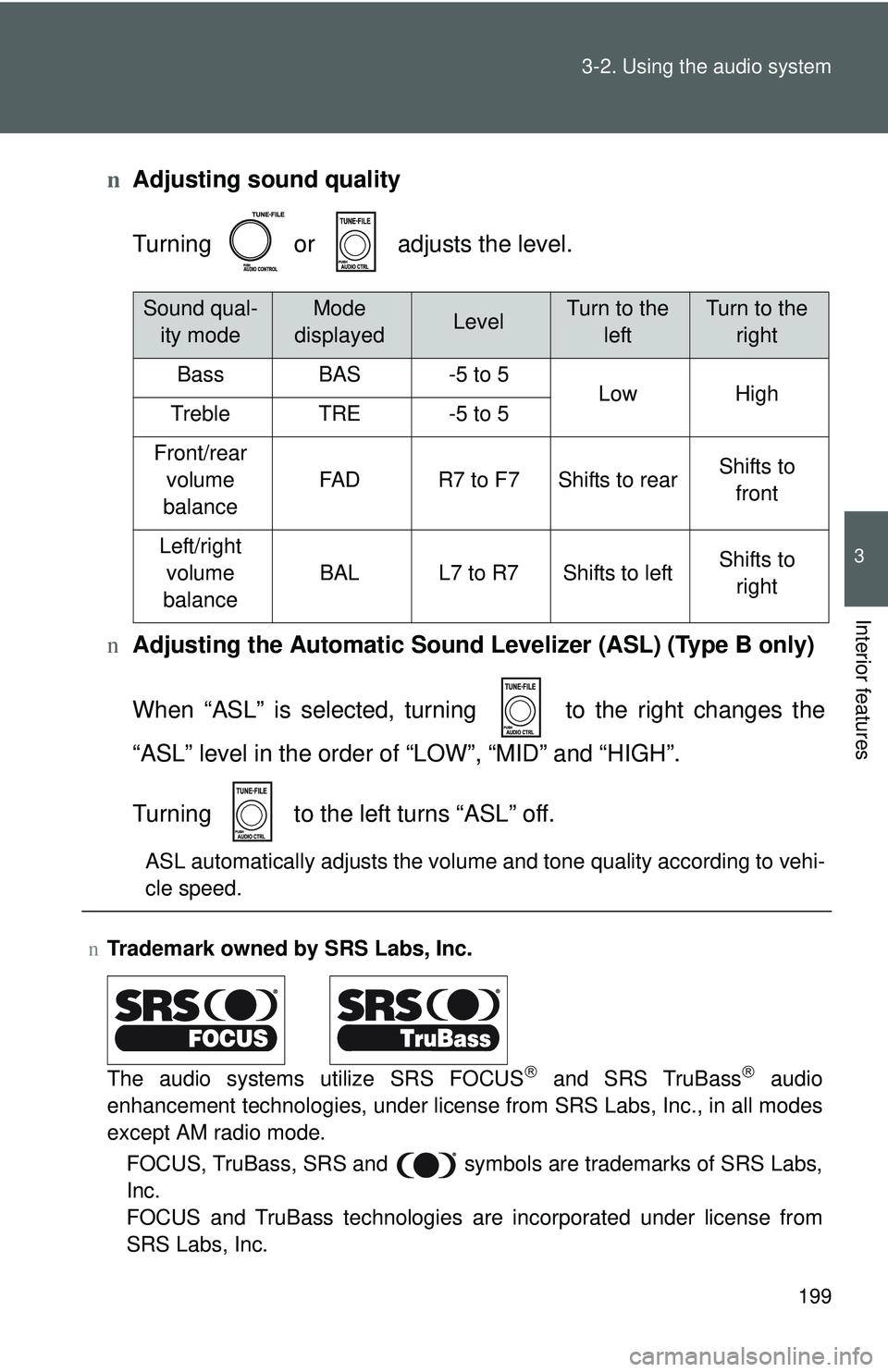
n
Adjusting sound quality
Turning or adjusts the level.
n Adjusting the Automatic Sound Levelizer (ASL) (Type B only)
When “ASL” is selected, turning to the right changes the
“ASL” level in the order of “LOW”, “MID” and “HIGH”.
Turning to the left turns “ASL” off.
ASL automatically adjusts the volume and tone quality according to vehi-
cle speed.
nTrademark owned by SRS Labs, Inc.
The audio systems utilize SRS FOCUS
® and SRS TruBass® audio
enhancement technologies, under license from SRS Labs, Inc., in all modes
except AM radio mode.
FOCUS, TruBass, SRS and
symbols are trademarks of SRS Labs,
Inc.
FOCUS and TruBass technologies are incorporated under license from
SRS Labs, Inc.
Sound qual- ity modeMode
displayedLevelTurn to the leftTurn to the right
BassBAS-5 to 5LowHighTrebleTRE-5 to 5
Front/rear volume
balance
FA DR7 to F7Shifts to rearShifts to front
Left/right volume
balance
BALL7 to R7Shifts to leftShifts to right
Page 256 of 406
245
4-3. Do-it-yourself maintenance
4
Maintenance and care
■
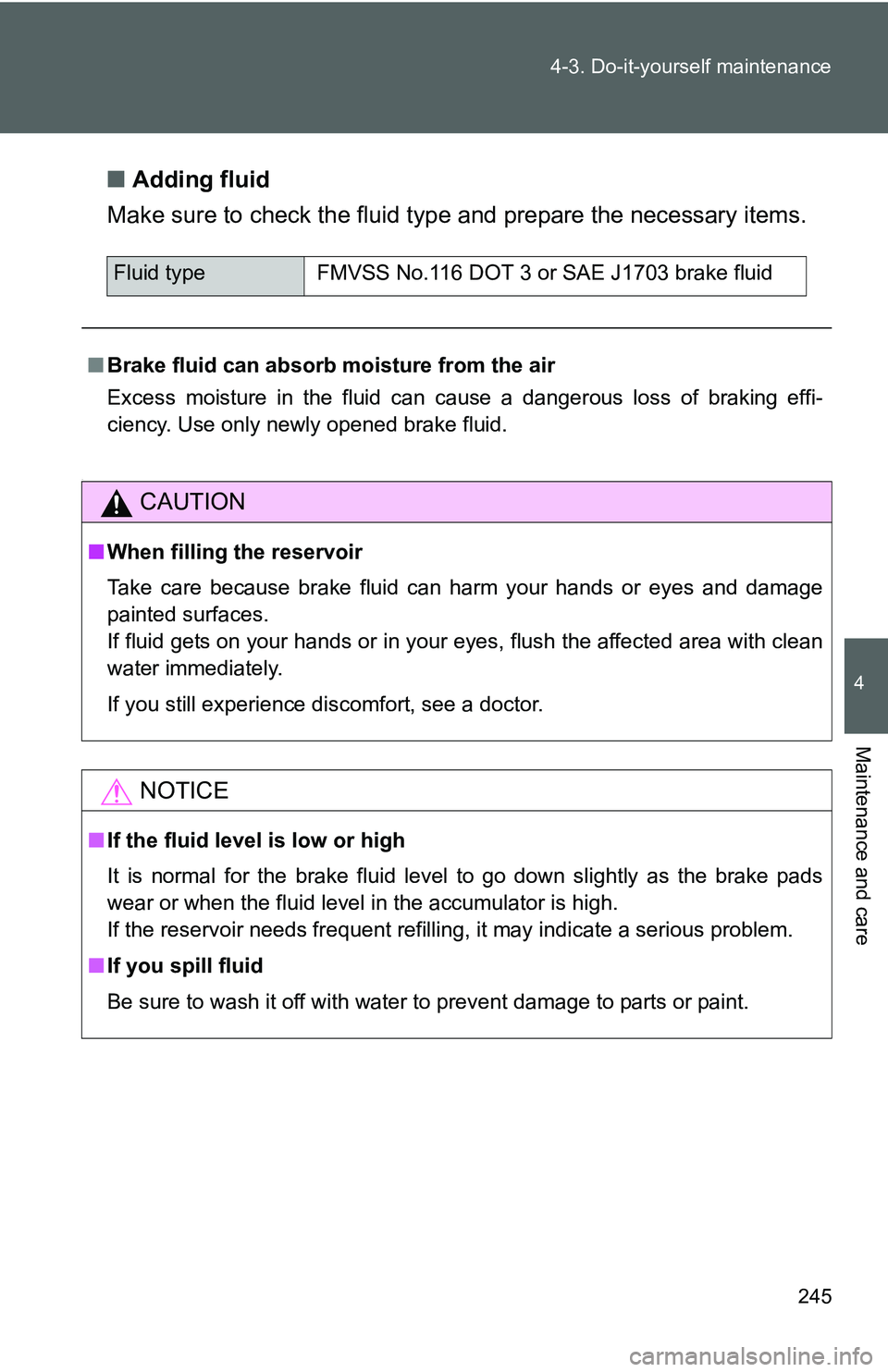
Adding fluid
Make sure to check the fluid type and prepare the necessary items.
.
Fluid type FMVSS No.116 DOT 3 or SAE J1703 brake fluid
■ Brake fluid can absorb moisture from the air
Excess moisture in the fluid can cause a dangerous loss of braking effi-
ciency. Use only newly opened brake fluid.
CAUTION
■When filling the reservoir
Take care because brake fluid can harm your hands or eyes and damage
painted surfaces.
If fluid gets on your hands or in your eyes, flush the affected area with clean
water immediately.
If you still experience discomfort, see a doctor.
NOTICE
■If the fluid level is low or high
It is normal for the brake fluid level to go down slightly as the brake pads
wear or when the fluid level in the accumulator is high.
If the reservoir needs frequent refilling, it may indicate a serious pro\
blem.
■ If you spill fluid
Be sure to wash it off with water to prevent damage to parts or paint.