Page 150 of 416
150
2-3. Operating the lights and wipers
Headlight switch
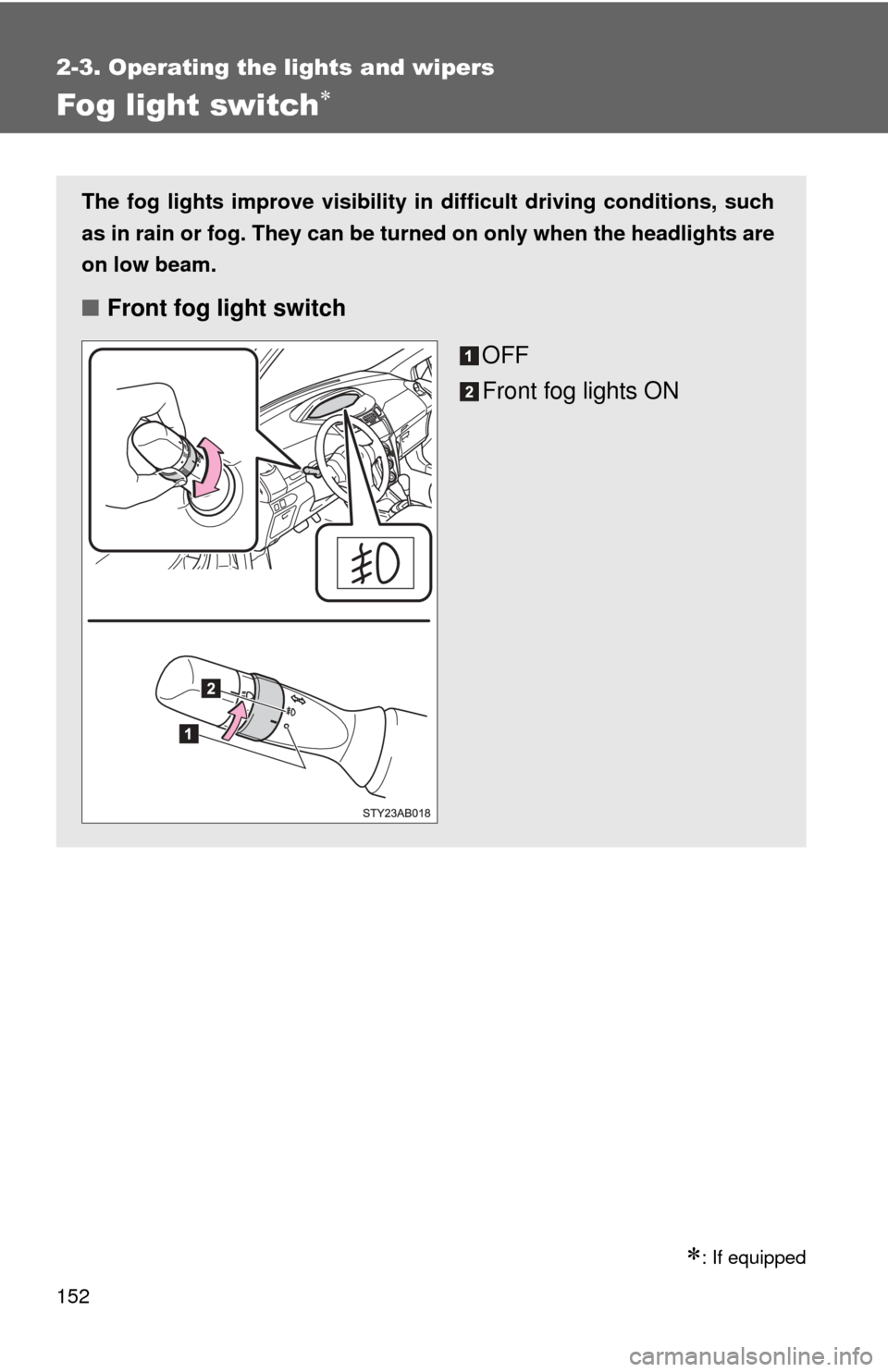
Turning on the high beam headlightsWith the headlights on, push
the lever forward to turn on the
high beams.
Pull the lever back to the center
position to turn the high beams
off.
Pull the lever toward you to
turn on the high beams.
Release the lever to turn them off.
You can flash the high beams
with the headlights on or off.
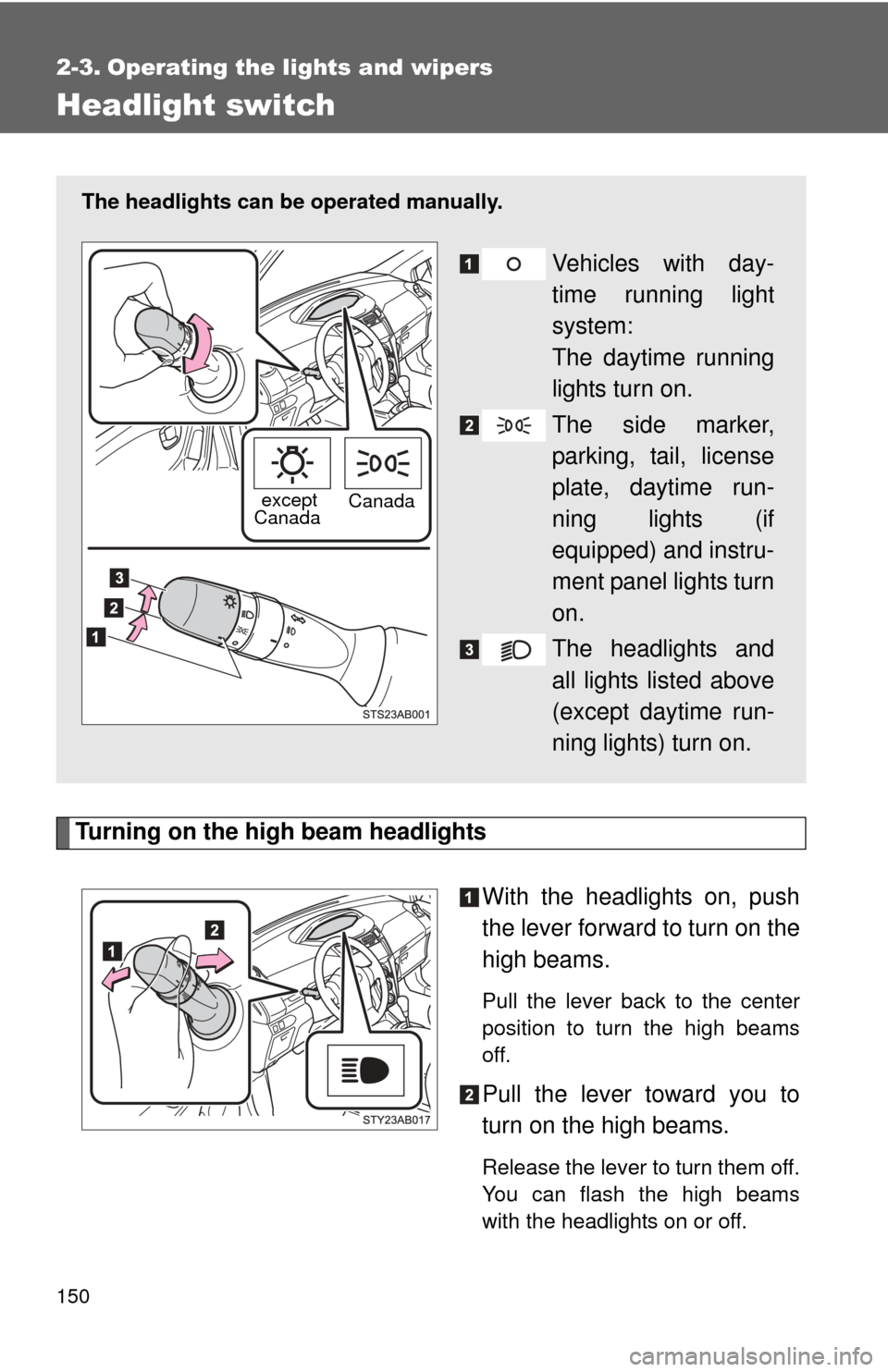
The headlights can be operated manually.
Vehicles with day-
time running light
system:
The daytime running
lights turn on.
The side marker,
parking, tail, license
plate, daytime run-
ning lights (if
equipped) and instru-
ment panel lights turn
on.
The headlights and
all lights listed above
(except daytime run-
ning lights) turn on.
except
Canada Canada
Page 151 of 416
151
2-3. Operating the lights and wipers
2
When driving
■
Daytime running light system (if equipped)
●To make your vehicle more visible to other drivers, the headlights turn on
automatically (at a reduced intensity) whenever the engine is started and
the parking brake is released. Daytime running lights are not designed for
use at night.
● Compared to turning on the headlights, the daytime running light system
offers greater durability and consumes less electricity, so it can help
improve fuel economy.
■ Light reminder buzzer
A buzzer sounds when the key is removed and the driver's door is opened
while the lights are turned on.
NOTICE
■To prevent battery discharge
Do not leave the lights on longer than necessary when the engine is not run-
ning.
Page 152 of 416
152
2-3. Operating the lights and wipers
Fog light switch
: If equipped
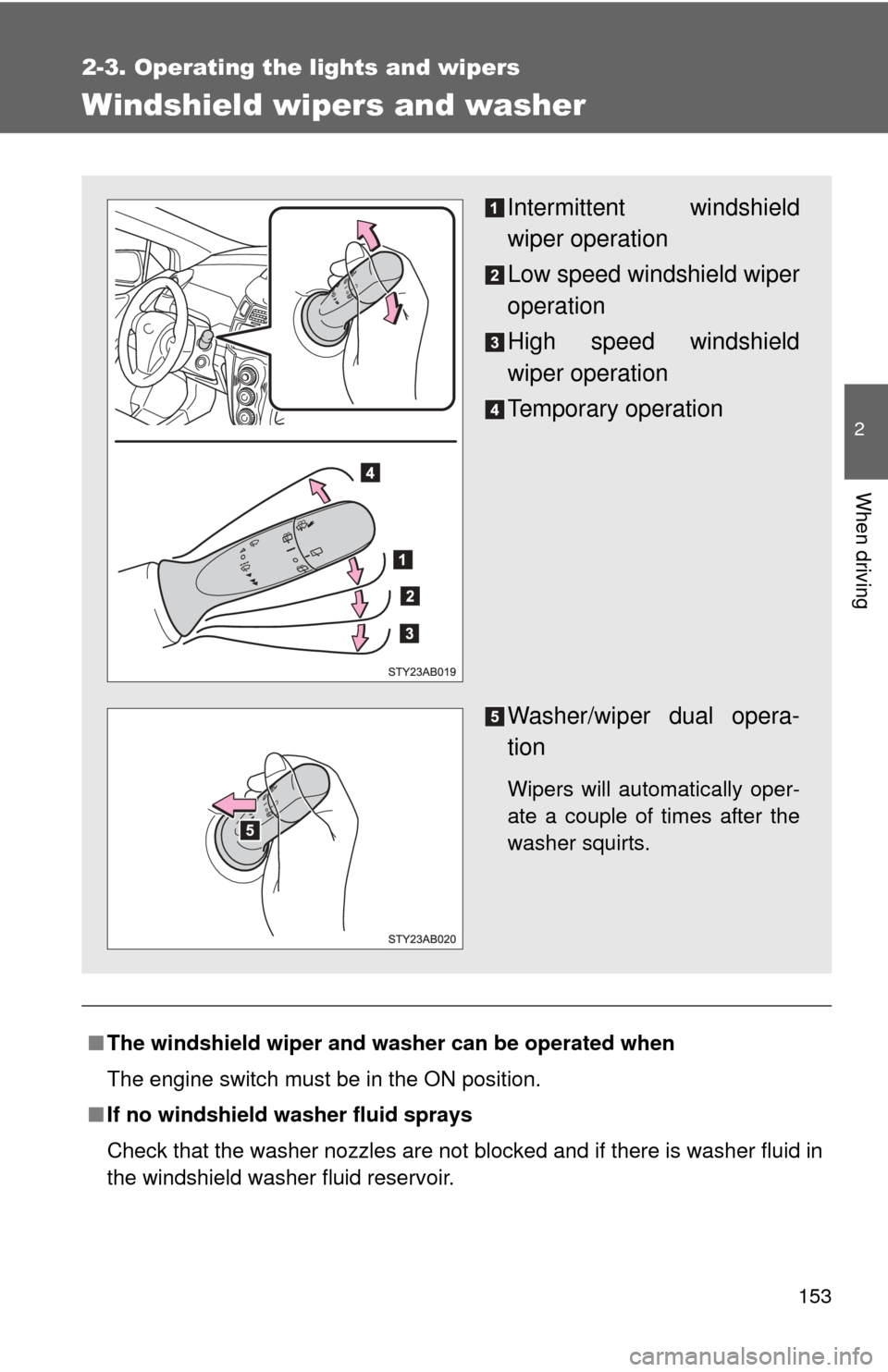
The fog lights improve visibility in difficult driving conditions, such
as in rain or fog. They can be turned on only when the headlights are
on low beam.
■Front fog light switch
OFF
Front fog lights ON
Page 153 of 416
153
2-3. Operating the lights and wipers
2
When driving
Windshield wipers and washer
■The windshield wiper and washer can be operated when
The engine switch must be in the ON position.
■ If no windshield washer fluid sprays
Check that the washer nozzles are not blocked and if there is washer fluid in
the windshield washer fluid reservoir.
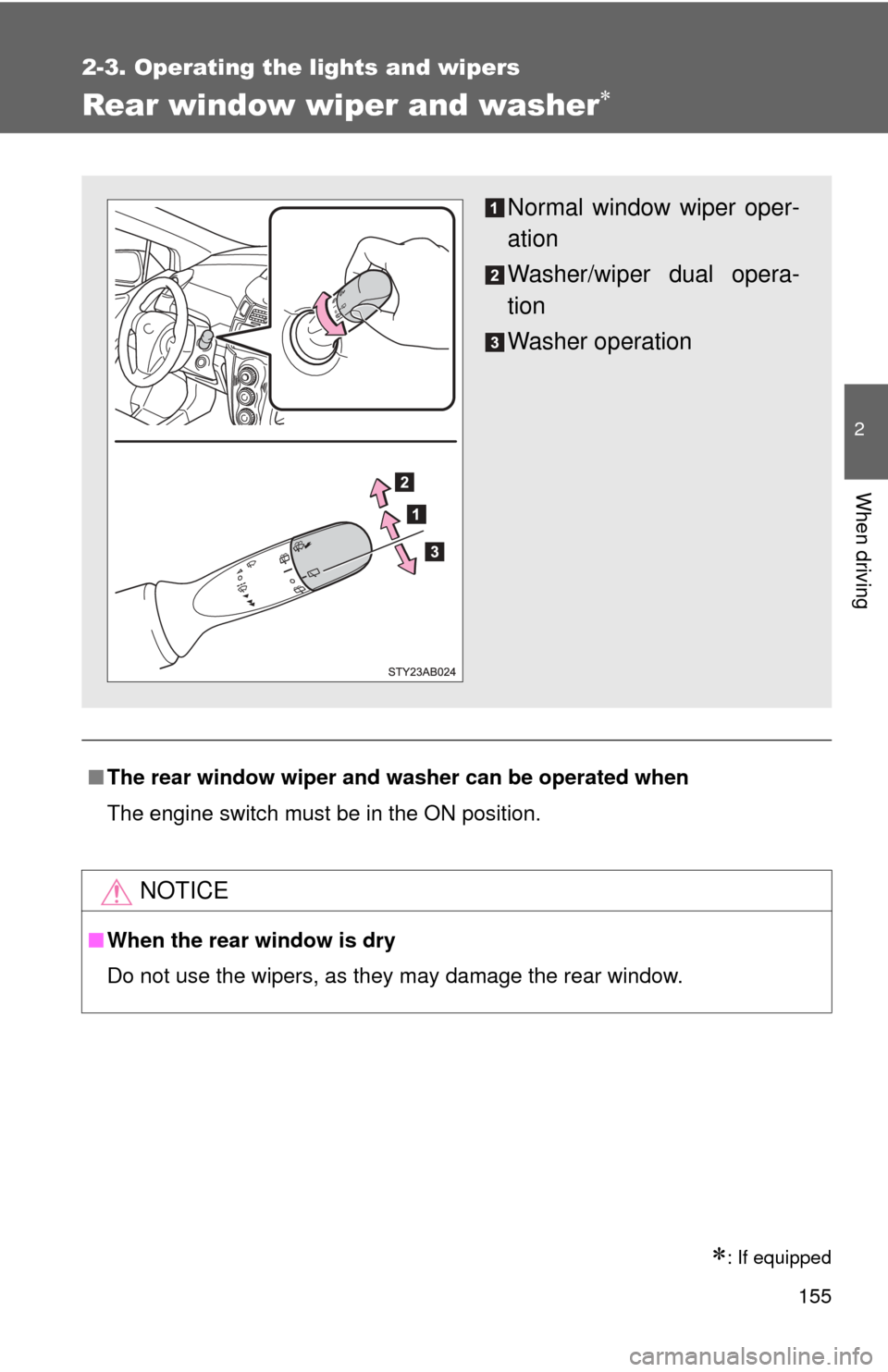
Intermittent windshield
wiper operation
Low speed windshield wiper
operation
High speed windshield
wiper operation
Temporary operation
Washer/wiper dual opera-
tion
Wipers will automatically oper-
ate a couple of times after the
washer squirts.
Page 154 of 416
154 2-3. Operating the lights and wipers
NOTICE
■When the windshield is dry
Do not use the wipers, as they may damage the windshield.
■ When there is no washer fluid spray from the nozzle
Damage to the washer fluid pump may be caused if the lever is pulled
toward you and held continually.
■ When a nozzle becomes block
Do not try to clear it with a pin or other object. The nozzle will be damaged.
Page 155 of 416
155
2-3. Operating the lights and wipers
2
When driving
Rear window wiper and washer
: If equipped
■The rear window wiper and washer can be operated when
The engine switch must be in the ON position.
NOTICE
■When the rear window is dry
Do not use the wipers, as they may damage the rear window.
Normal window wiper oper-
ation
Washer/wiper dual opera-
tion
Washer operation
Page 157 of 416
157
2-4. Using other
driving systems
2
When driving
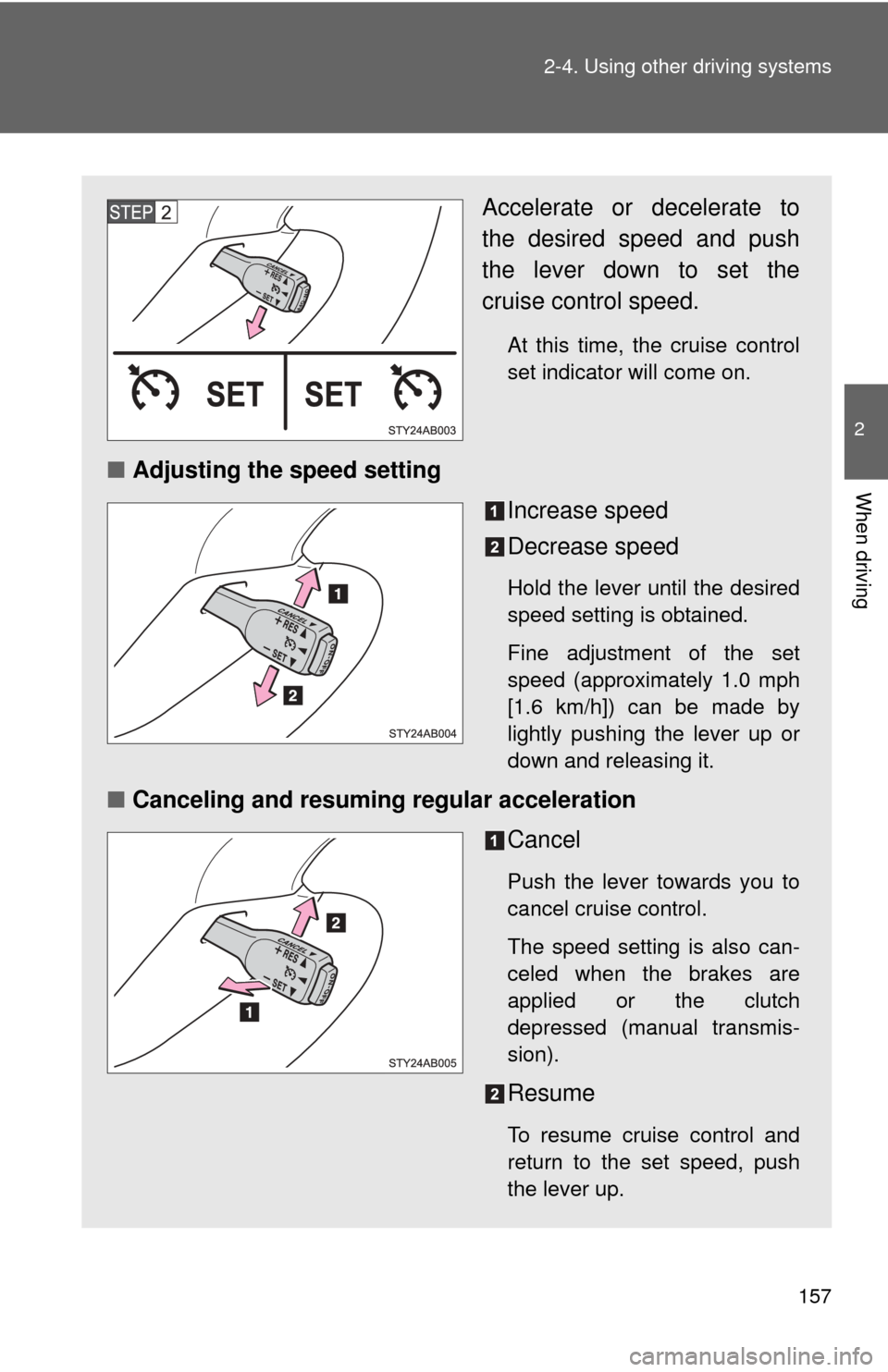
Accelerate or decelerate to
the desired speed and push
the lever down to set the
cruise control speed.
At this time, the cruise control
set indicator will come on.
■Adjusting the speed setting
Increase speed
Decrease speed
Hold the lever until the desired
speed setting is obtained.
Fine adjustment of the set
speed (approximately 1.0 mph
[1.6 km/h]) can be made by
lightly pushing the lever up or
down and releasing it.
■Canceling and resuming regular acceleration
Cancel
Push the lever towards you to
cancel cruise control.
The speed setting is also can-
celed when the brakes are
applied or the clutch
depressed (manual transmis-
sion).
Resume
To resume cruise control and
return to the set speed, push
the lever up.
Page 162 of 416
162 2-4. Using other driving systems
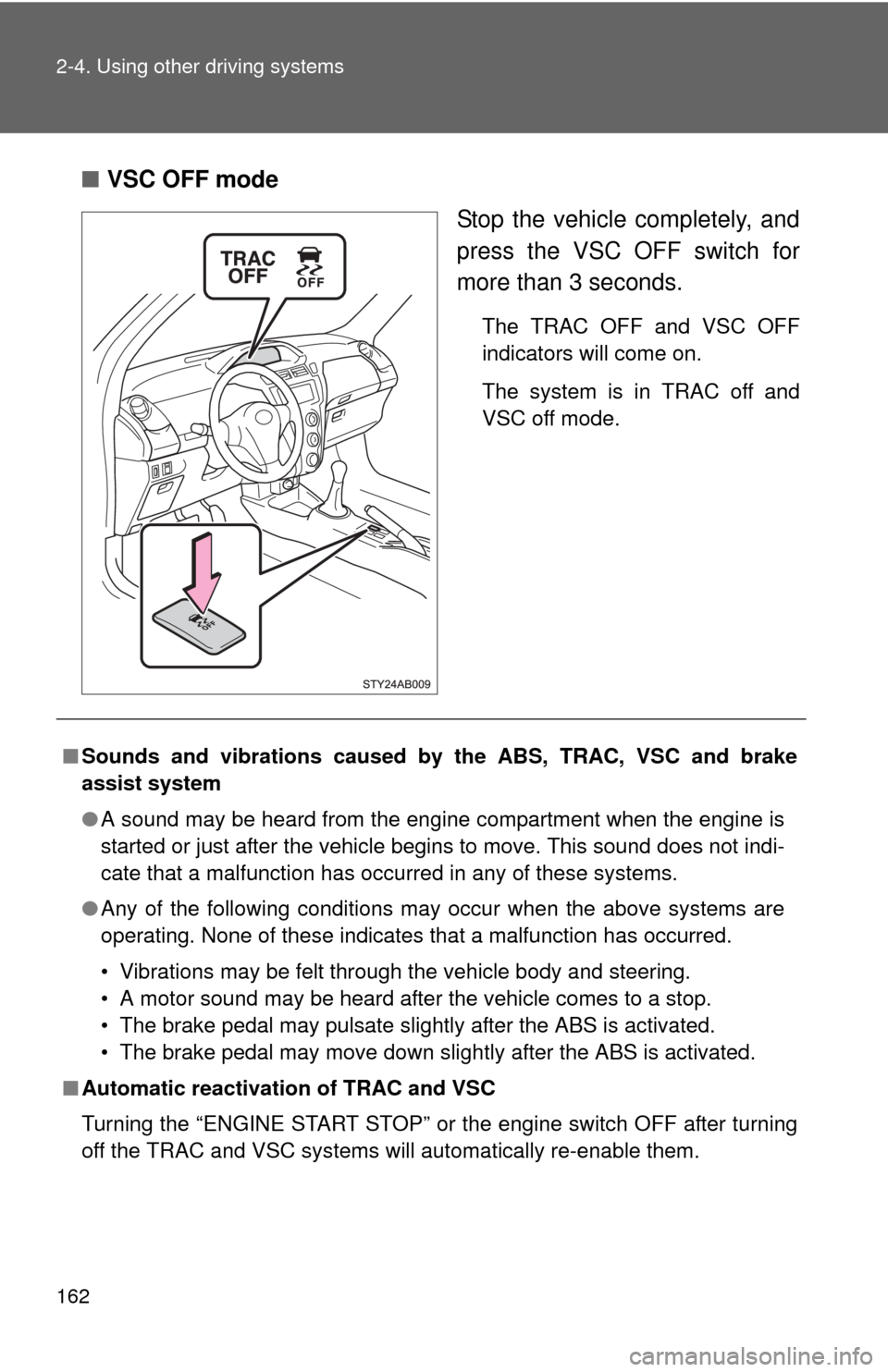
■VSC OFF mode
Stop the vehicle completely, and
press the VSC OFF switch for
more than 3 seconds.
The TRAC OFF and VSC OFF
indicators will come on.
The system is in TRAC off and
VSC off mode.
■Sounds and vibrations caused by the ABS, TRAC, VSC and brake
assist system
●A sound may be heard from the engine compartment when the engine is
started or just after the vehicle begins to move. This sound does not indi-
cate that a malfunction has occurred in any of these systems.
● Any of the following conditions may occur when the above systems are
operating. None of these indicates that a malfunction has occurred.
• Vibrations may be felt through the vehicle body and steering.
• A motor sound may be heard after the vehicle comes to a stop.
• The brake pedal may pulsate slightly after the ABS is activated.
• The brake pedal may move down slightly after the ABS is activated.
■ Automatic reactivation of TRAC and VSC
Turning the “ENGINE START STOP” or the engine switch OFF after turning
off the TRAC and VSC systems will automatically re-enable them.