2011 TOYOTA VERSO S service
[x] Cancel search: servicePage 4 of 664
4TABLE OF CONTENTS
6-1. Using the air conditioning
system and defogger
Automatic air conditioning sys-
tem .................................... 452
Remote Air Conditioning System
.......................................... 460
Heated steering wheel/Front
seat heaters/Front seat heaters
and ventilators/Rear seat heat-
ers..................................... 462
6-2. Using the interior lights
Interior lights list .................. 465
6-3. Using the storage features
List of storage features ....... 468
Luggage compartment features
.......................................... 472
6-4. Using the other interior fea-
tures
Other interior features ......... 476
7-1. Maintenance and care
Cleaning and protecting the
vehicle exterior ................. 488
Cleaning and protecting the
vehicle interior .................. 491
7-2. Maintenance
Maintenance requirements . 494
7-3. Do-it-yourself maintenance
Do-it-yourself service precau-
tions .................................. 496
Hood ................................... 498
Positioning a floor jack ........ 499
Engine compartment........... 501
12-volt battery ..................... 506
Tires .................................... 509
Tire inflation pressure ......... 529
Wheels ................................ 530
Air conditioning filter ........... 532
Cleaning the DC/DC Converter
air intake vent and filter .... 536
Wiper insert replacement .... 539
Electronic key battery ......... 543
Checking and replacing fuses
.......................................... 545
Light bulbs .......................... 548
8-1. Essential information
Emergency flashers ............ 560
If your vehicle has to be stopped
in an emergency ............... 560
If the vehicle is trapped in rising
water ................................. 561
8-2. Steps to take in an emergency
If your vehicle needs to be towed
.......................................... 563
If you think something is wrong
.......................................... 566
If a warning light turns on or a
warning buzzer sounds..... 568
If a warning message is dis-
played ............................... 578
If you have a flat tire (vehicles
without spare tire) ............. 582
If you have a flat tire (vehicles
with spare tire) .................. 593
6Interior features
7Maintenance and care
8When trouble arises
Page 7 of 664
7
at any authorized Toyota retailer or
Toyota authorized repairer, or any
reliable repairer.
High voltage parts and cables on
the hybrid vehicles emit approxi-
mately the same amount of electro-
magnetic waves as the
conventional gasoline powered
vehicles or home electronic appli-
ances despite of their electromag-
netic shielding.
Unwanted noise may occur in the
reception of the radio frequency
transmitter (RF-transmitter).
The vehicle is equipped with
sophisticated computers that will
record certain data, such as:
• Engine speed/Electric motor
speed (traction motor speed)
• Accelerator status
• Brake status
• Vehicle speed
• Operation status of the driving
assist systems
• Hybrid battery (traction battery)
status
The recorded data varies according
to the vehicle grade level, options
and destinations with which it is
equipped.
These computers do not record
conversations or sounds, and only
record images outside of the vehi-
cle in certain situations.
Data usageToyota may use the data recorded in
this computer to diagnose malfunc-
tions, conduct research and develop-
ment, and improve quality.
Toyota will not disclose the recorded
data to a third party except:
• With the consent of the vehicle owner
or with the consent of the lessee if
the vehicle is leased
• In response to an official request by
the police, a court of law or a govern-
ment agency
• For use by Toyota in a lawsuit
• For research purposes where the
data is not tied to a specific vehicle or
vehicle owner
The SRS airbag and seat belt pre-
tensioner devices in your Toyota
contain explosive chemicals. If the
vehicle is scrapped with the airbags
and seat belt pretensioners left as
they are, this may cause an acci-
dent such as fire. Be sure to have
the systems of the SRS airbag and
seat belt pretensioner removed and
disposed of by a qualified service
shop or any authorized Toyota
retailer or Toyota authorized
repairer, or any reliable repairer,
before you scrap your vehicle.
Vehicle data recordingScrapping of your Toyota
Page 65 of 664
65
1
1-3. Emergency assistance
For safety and security
1-3.Emerg ency as sista nce
*: Operates within the eCall coverage.
The system name differs depending
on the country.
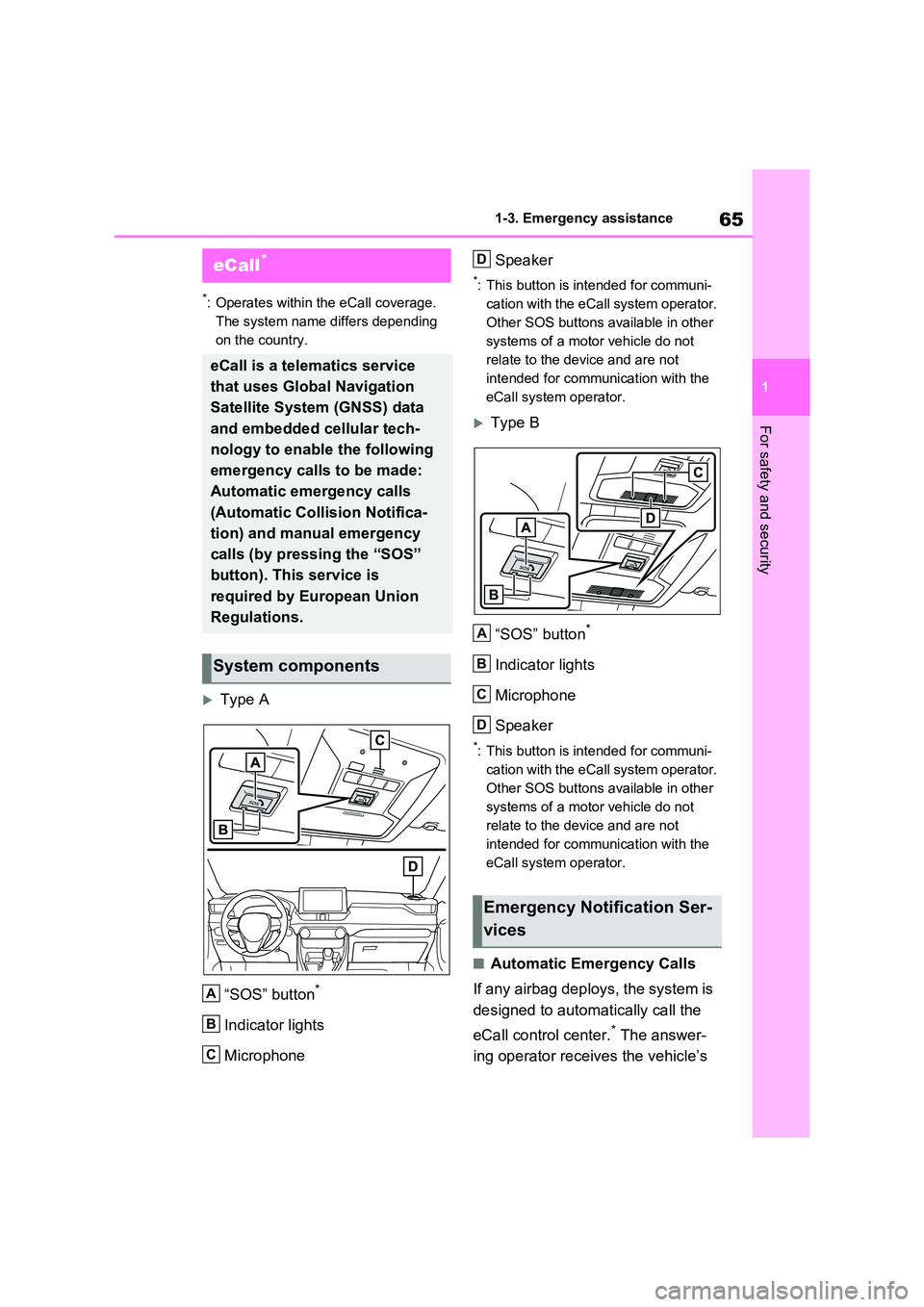
Type A
“SOS” button*
Indicator lights
Microphone
Speaker
*: This button is intended for communi-
cation with the eCall system operator.
Other SOS buttons available in other
systems of a motor vehicle do not
relate to the device and are not
intended for communication with the
eCall system operator.
Type B
“SOS” button*
Indicator lights
Microphone
Speaker
*: This button is intended for communi-
cation with the eCall system operator.
Other SOS buttons available in other
systems of a motor vehicle do not
relate to the device and are not
intended for communication with the
eCall system operator.
■Automatic Emergency Calls
If any airbag deploys, the system is
designed to automatically call the
eCall control center.* The answer-
ing operator receives the vehicle’s
eCall*
eCall is a telematics service
that uses Global Navigation
Satellite System (GNSS) data
and embedded cellular tech-
nology to enable the following
emergency calls to be made:
Automatic emergency calls
(Automatic Collision Notifica-
tion) and manual emergency
calls (by pressing the “SOS”
button). This service is
required by European Union
Regulations.
System components
A
B
C
Emergency Notification Ser-
vices
D
A
B
C
D
Page 66 of 664
661-3. Emergency assistance
location, the time of the incident
and the vehicle VIN, and attempts
to speak with the vehicle occupants
to assess the situation. If the occu-
pants are unable to communicate,
the operator automatically treats
the call as an emergency and con-
tacts the nearest emergency ser-
vices provider (112 system etc.) to
describe the situation and request
that assistance be sent to the loca-
tion.
*: In some cases, the call cannot be
made. ( P.67)
■Manual Emergency Calls
In the event of an emergency,
press the “SOS” button to call the
eCall control center.* The answer-
ing operator will determine your
vehicle’s location, assess the situa-
tion, and dispatch the necessary
assistance required.
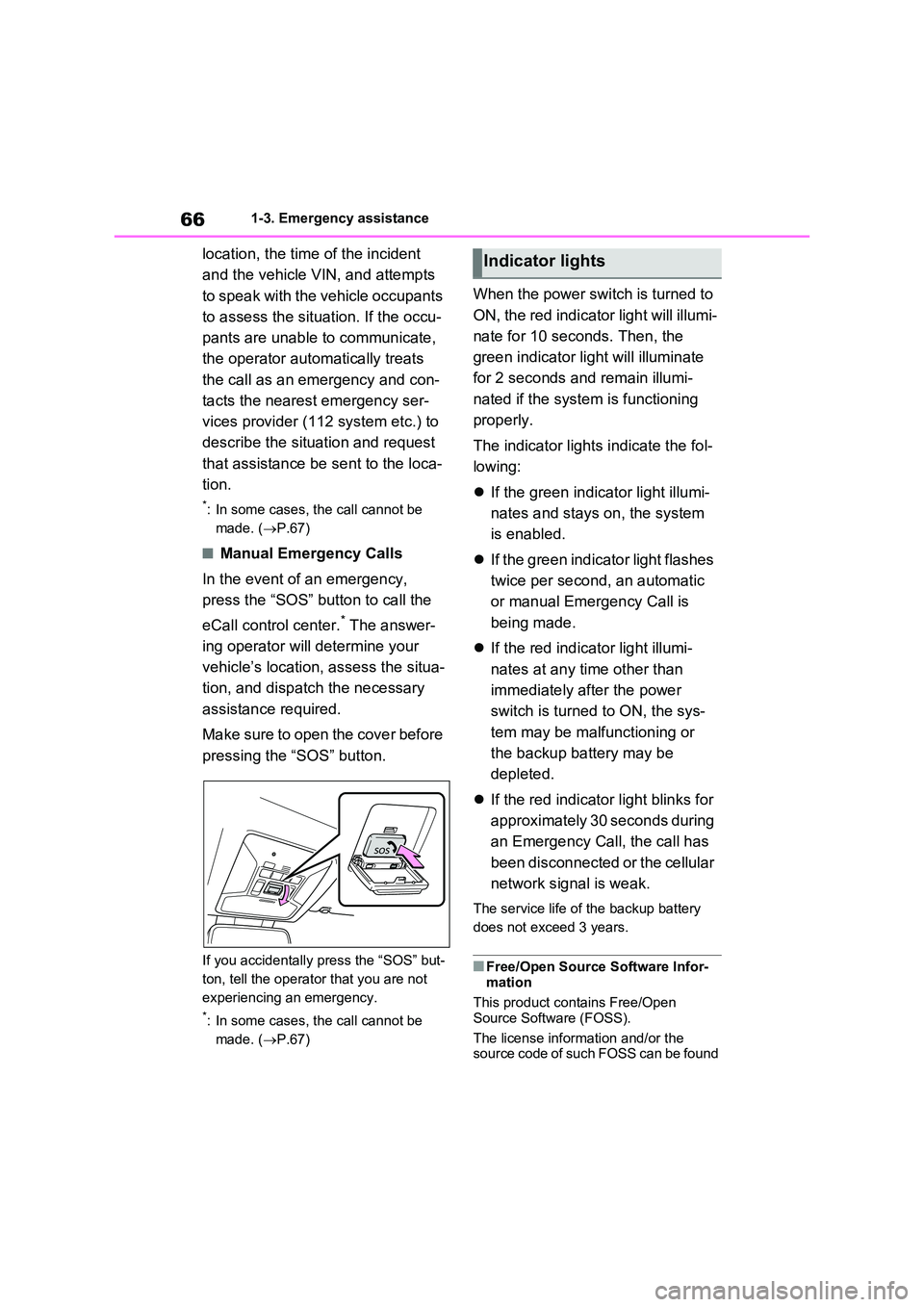
Make sure to open the cover before
pressing the “SOS” button.
If you accidentally press the “SOS” but-
ton, tell the operator that you are not
experiencing an emergency.
*: In some cases, the call cannot be
made. ( P.67)
When the power switch is turned to
ON, the red indicator light will illumi-
nate for 10 seconds. Then, the
green indicator light will illuminate
for 2 seconds and remain illumi-
nated if the system is functioning
properly.
The indicator lights indicate the fol-
lowing:
If the green indicator light illumi-
nates and stays on, the system
is enabled.
If the green indicator light flashes
twice per second, an automatic
or manual Emergency Call is
being made.
If the red indicator light illumi-
nates at any time other than
immediately after the power
switch is turned to ON, the sys-
tem may be malfunctioning or
the backup battery may be
depleted.
If the red indicator light blinks for
approximately 30 seconds during
an Emergency Call, the call has
been disconnected or the cellular
network signal is weak.
The service life of the backup battery
does not exceed 3 years.
■Free/Open Source Software Infor- mation
This product contains Free/Open
Source Software (FOSS).
The license information and/or the source code of such FOSS can be found
Indicator lights
Page 67 of 664
67
1
1-3. Emergency assistance
For safety and security
at the following URL.
http://www.opensourceautomotive.com/dcm/toyota/
WARNING
■When the Emergency Call may
not be made
●It may not be possible to make Emergency Calls in any of the fol-
lowing situations. In such cases, report to emergency services pro-vider (112 system etc.) by other
means such as nearby public phones.
• Even when the vehicle is in the cel-
lular phone service area, it may be difficult to connect to the eCall con-trol center if the reception is poor or
the line is busy. In such cases, even though the system attempts to connect to the eCall control center,
you may not be able to connect to the eCall control center to make Emergency Calls and contact emer-
gency services.
• When the vehicle is out of the cellu-
lar phone service area, the Emer- gency Calls cannot be made.
• When any related equipment (such as the “SOS” button panel, indicator lights, microphone, speaker, DCM,
antenna, or any wires connecting the equipment) is malfunctioning, damaged or broken, the Emer-
gency Call cannot be made.
• During an Emergency Call, the sys-
tem makes repeated attempts to connect to the eCall control center. However, if it cannot connect to the
eCall control center due to poor radio wave reception, the system may not be able to connect to the
cellular network and the call may finish without connecting. The red indicator light will blink for approxi-
mately 30 seconds to indicate this disconnection.
●If the 12-volt battery’s voltage decreases or there is a disconnec-tion, the system may not be able to
connect to the eCall control center.
■When the Emergency Call sys-
tem is replaced with a new one
The Emergency Call system should be registered. Contact any authorized
Toyota retailer or Toyota authorized repairer, or any reliable repairer.
■For your safety
●Please drive safely.The function of this system is to
assist you in making the Emer- gency Call in case of accidents such as traffic accidents or sudden
medical emergencies, and it does not protect the driver or passengers in any way. Please drive safely and
fasten your seatbelts at all times for your safety.
●In case of an emergency, make lives the top priority.
●If you smell anything burning or other unusual smells, leave the vehicle and evacuate to a safe area
immediately.
●If the airbags deploy when the sys-
tem is operating normally, the sys- tem makes emergency call. The system also makes emergency call
when the vehicle is struck from the rear or rolls over, even if the air-bags do not deploy.
●For safety, do not make the Emer-gency Call while driving.
Making calls during driving may cause mishandling of the steering wheel, which may lead to unex-
pected accidents. Stop the vehicle and confirm the safety of your surroundings before
making the Emergency Call.
Page 68 of 664
681-3. Emergency assistance
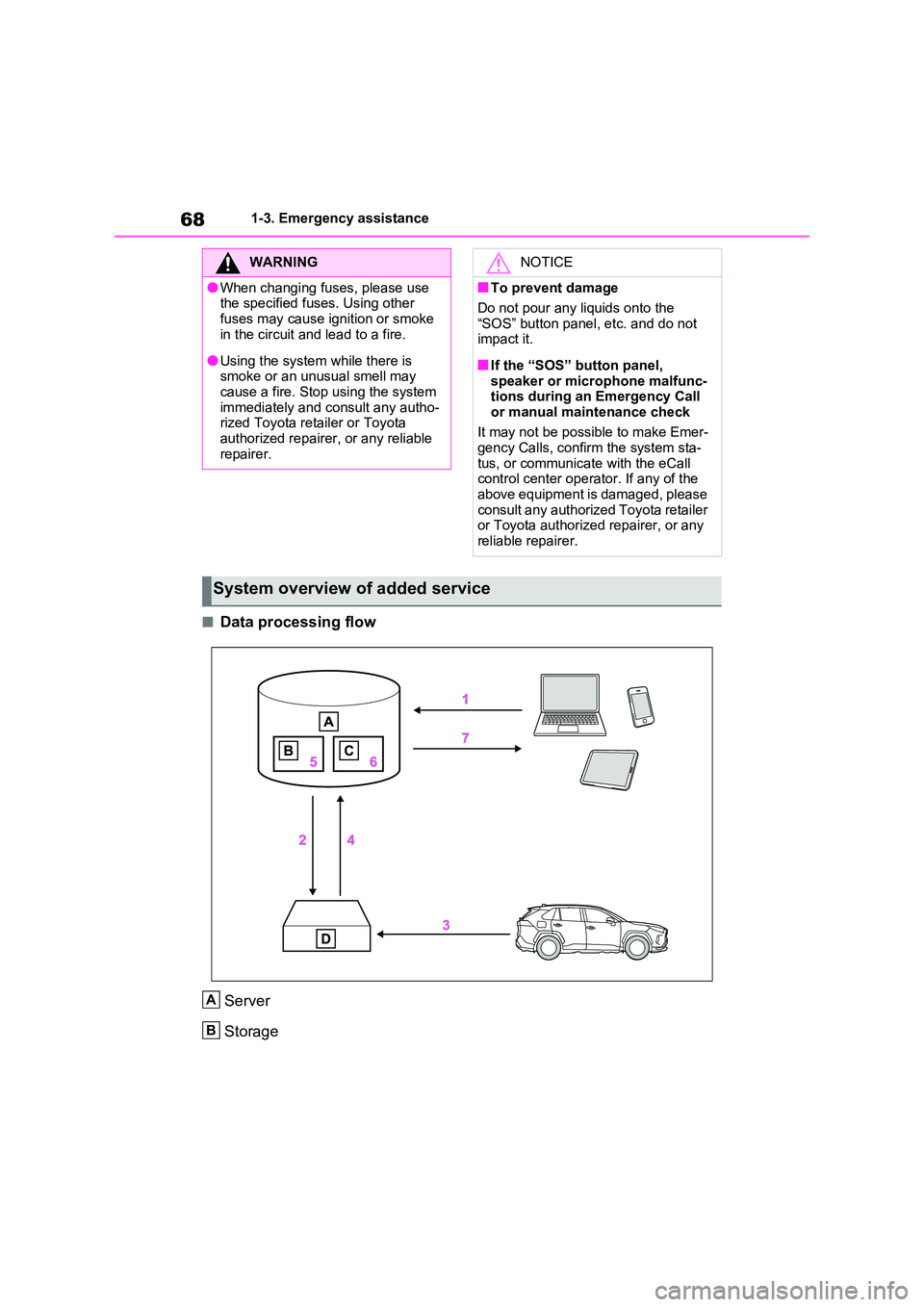
■Data processing flow
Server
Storage
WARNING
●When changing fuses, please use the specified fuses. Using other
fuses may cause ignition or smoke in the circuit and lead to a fire.
●Using the system while there is smoke or an unusual smell may cause a fire. Stop using the system
immediately and consult any autho- rized Toyota retailer or Toyota authorized repairer, or any reliable
repairer.
NOTICE
■To prevent damage
Do not pour any liquids onto the
“SOS” button panel, etc. and do not impact it.
■If the “SOS” button panel, speaker or microphone malfunc-tions during an Emergency Call
or manual maintenance check
It may not be possible to make Emer- gency Calls, confirm the system sta-
tus, or communicate with the eCall control center operator. If any of the above equipment is damaged, please
consult any authorized Toyota retailer or Toyota authorized repairer, or any reliable repairer.
System overview of added service
A
B
Page 69 of 664

69
1
1-3. Emergency assistance
For safety and security
Processing
DCM
1 Customer activates service on Toyota Customer portal & accepts terms
of services according to GDPR.
2 Server activates the service in the DCM and defines which vehicle data
to collect.
3 Defined vehicle data is collected by the DCM.
4 Data is shared with the server.
5 Data is stored in the server.
6 Data is processed in the server for fulfilling the service.
7 Processed data is presented to the customer.
For a list of eligible service please visit the Toyota Customer portal.
Implementing Regulation
Implementing Regulation Annex1 PART3 User InformationConformity
1. DESCRIPTION OF THE ECALL IN-VEHICLE SYSTEM
1.1.Overview of the 112-based eCall in-vehicle sys-
tem, its operation and functionalitiesO
1.2.
The 112-based eCall service is a public service
of general interest and is accessible free of
charge.
O
1.3.
The 112-based eCall in-vehicle system is acti-
vated by default. It is activated automatically by
means of in-vehicle sensors in the event of a
severe accident. It will also be triggered automat-
ically when the vehicle is equipped with a TPS
system which does not function in the event of a
severe accident.
O
1.4.
The 112-based eCall in-vehicle system can also
be triggered manually, if needed. Instructions for
manual activation of the system
O
1.5.
In the event of a critical system failure that would
disable the 112-based eCall in-vehicle system,
the following warning will be given to the occu-
pants of the vehicle
O
C
D
Page 72 of 664
721-3. Emergency assistance
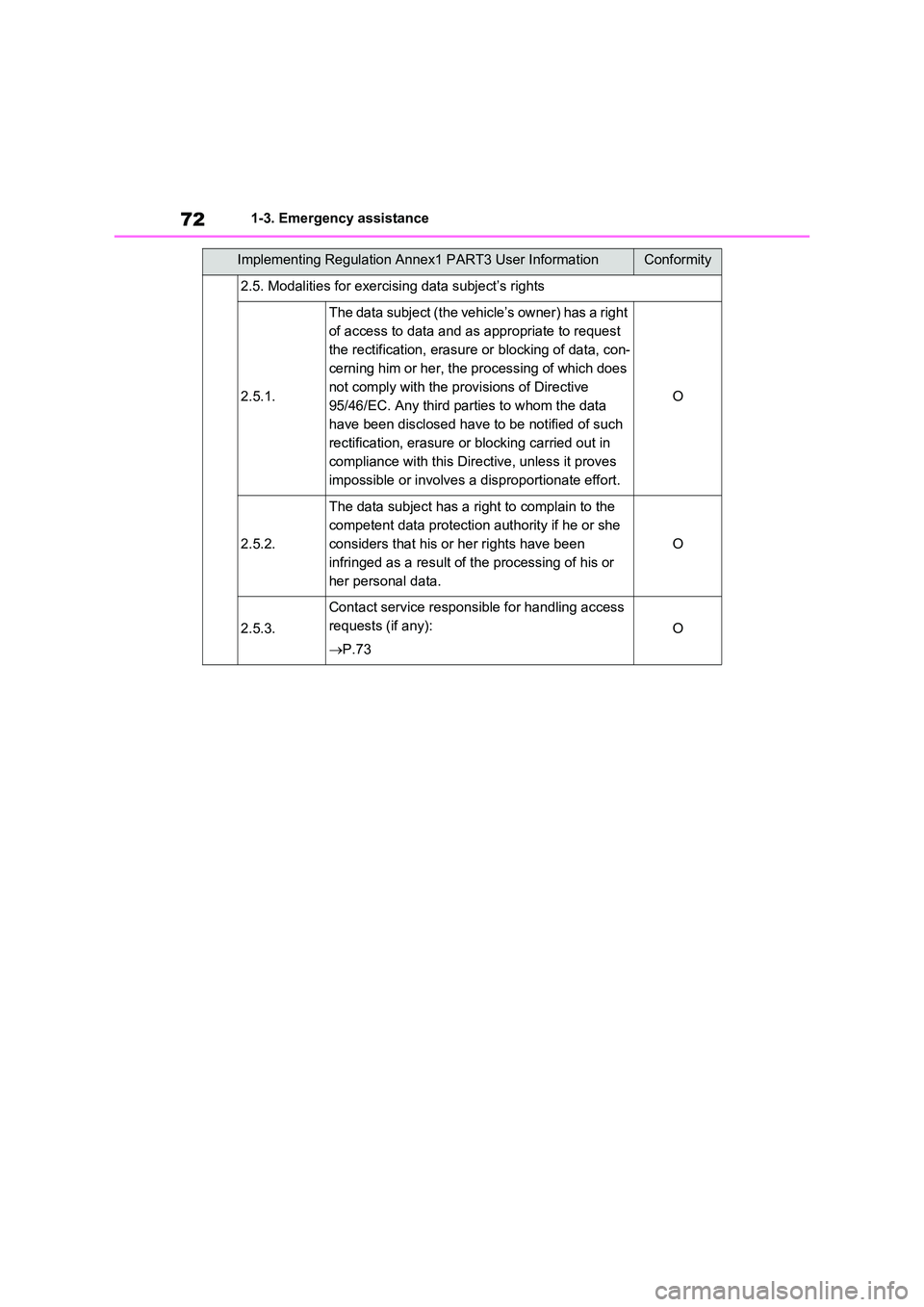
2.5. Modalities for exercising data subject’s rights
2.5.1.
The data subject (the vehicle’s owner) has a right
of access to data and as appropriate to request
the rectification, erasure or blocking of data, con-
cerning him or her, the processing of which does
not comply with the provisions of Directive
95/46/EC. Any third parties to whom the data
have been disclosed have to be notified of such
rectification, erasure or blocking carried out in
compliance with this Directive, unless it proves
impossible or involves a disproportionate effort.
O
2.5.2.
The data subject has a right to complain to the
competent data protection authority if he or she
considers that his or her rights have been
infringed as a result of the processing of his or
her personal data.
O
2.5.3.
Contact service responsible for handling access
requests (if any):
P.73
O
Implementing Regulation Annex1 PART3 User InformationConformity