2011 TOYOTA VERSO S air conditioning
[x] Cancel search: air conditioningPage 315 of 664
315
5 5-1. Before driving
Driving
■Sudden acceleration/steering
input/cornering
Executing sharp turns when towing
may result in the trailer colliding
with your vehicle. Decelerate well in
advance when approaching turns
and take them slowly and carefully
to avoid sudden braking.
■Important points regarding
turning
The wheels of the trailer will travel
closer to the inside of the curve
than the wheels of the vehicle. To
make allowance for this, take the
turns wider than you would nor-
mally do.
■Important points regarding
stability
Vehicle movement resulting from
uneven road surfaces and strong
crosswinds will affect handling. The
vehicle may also be rocked by
passing buses or large trucks. Fre-
quently check behind when moving
alongside such vehicles. As soon
as such vehicle movement occurs,
immediately start to decelerate
smoothly by slowly applying the
brakes. Always steer the vehicle
straight ahead while braking.
■Passing other vehicles
Consider the total combined length
of your vehicle and trailer and
ensure that the vehicle-to-vehicle
distance is sufficient before execut-
ing lane changes.
■Transmission information
To maintain engine braking effi-
ciency, when using engine braking,
do not use the transmission in D.
(P.321)
■If the hybrid system overheats
Towing a loaded trailer up a long,
steep incline in temperatures
exceeding 30°C (85°F) may result
in the hybrid system overheating. If
the high coolant temperature warn-
ing light indicates that the hybrid
system is overheating, turn the air
conditioning off immediately, leave
the road and stop the vehicle in a
safe place. (P.611)
■When parking the vehicle
Always place wheel chocks under
the wheels of both the vehicle and
trailer. Firmly set the parking brake
and shift the shift lever to P.
■Break-in schedule
Toyota recommends that vehicles fitted
with new power train components
should not be used for towing trailers for
the first 800 km (500 miles).
■Maintenance
●Maintenance must be performed more
frequently when using the vehicle for
towing due to the greater weight bur-
den placed on the vehicle compared
to normal driving.
●Retighten all bolts securing the hitch-
ing ball and bracket after towing for
approximately 1000 km (600 miles).
■If trailer sway occurs
One or more factors (crosswinds, pass-
ing vehicles, rough roads, etc.) can
adversely affect handling of your vehicle
and trailer, causing instability.
Page 353 of 664

353
5 5-5. Using the driving support systems
Driving
For vehicles sold in Ukraine
■If a warning message is displayed on the multi-information display
A system may be temporarily unavailable or there may be a malfunction in the sys-
tem.
●In the following situations, perform the actions specified in the table. When the nor-
mal operating conditions are detected, the message will disappear and the system
will become operational.
If the message does not disappear, contact any authorized Toyota retailer or Toyota
authorized repairer, or any reliable repairer.
SituationActions
When the area around a sensor is cov-
ered with dirt, moisture (fogged up, cov-
ered with condensation, ice, etc.), or
other foreign matterTo clean the part of the windshield in
front of the front camera, use the wind-
shield wipers or the windshield defogger
of the air conditioning system (P.453).
Page 354 of 664

3545-5. Using the driving support systems
●In the following situations, if the situation has changed (or the vehicle has been
driven for some time) and the normal operating conditions are detected, the mes-
sage will disappear and the system will become operational.
If the message does not disappear, contact any authorized Toyota retailer or Toyota
authorized repairer, or any reliable repairer.
• When the temperature around the radar sensor is outside of the operational range,
such as when the vehicle is in the sun or in an extremely cold environment
• When the front camera cannot detect objects in front of the vehicle, such as when
driving in the dark, snow, or fog, or when bright lights are shining into the front
camera
When the temperature around the front
camera is outside of the operational
range, such as when the vehicle is in the
sun or in an extremely cold environment
If the front camera is hot, such as after
the vehicle had been parked in the sun,
use the air conditioning system to
decrease the temperature around the
front camera.
If a sunshade was used when the vehicle
was parked, depending on its type, the
sunlight reflected from the surface of the
sunshade may cause the temperature of
the front camera to become excessively
high.
If the front camera is cold, such as after
the vehicle is parked in an extremely cold
environment, use the air conditioning
system to increase the temperature
around the front camera.
The area in front of the front camera is
obstructed, such as when the hood is
open or a sticker is attached to the part of
the windshield in front of the front cam-
era.
Close the hood, remove the sticker, etc.
to clear the obstruction.
SituationActions
Page 417 of 664

417
5 5-5. Using the driving support systems
Driving
■If “Parking Assist Unavailable” is
displayed on the multi-information
display (vehicles with PKSB)
Water may be continuously flowing over
the sensor surface, such as in a heavy
rain. When the system determines that it
is normal, the system will return to nor-
mal.
■Sensor detection information
●The sensor’s detection areas are lim-
ited to the areas around the vehicle’s
front and rear bumpers.
●The following situations may occur
during use.
• Depending on the shape of the object
and other factors, the detection dis-
tance may shorten, or detection may
be impossible.
• Detection may be impossible if static
objects draw too close to the sensor.
• There will be a short delay between
static object detection and display
(warning buzzer sounds). Even at low
speeds, there is a possibility that the
object will come within 25 cm (9.8 in.)
before the display is shown and the
warning buzzer sounds.
• It might be difficult to hear the buzzer
due to the volume of the audio system
or air flow noise of the air conditioning
system.
• It may be difficult to hear the sound of
this system due to the buzzers of
other systems.
■Conditions under which the func-
tion may not function correctly
Certain vehicle conditions and the sur-
rounding environment may affect the
ability of a sensor to correctly detect
objects. Particular instances where this
may occur are listed below.
●There is dirt, snow or ice on a sensor.
(Cleaning the sensors will resolve this
problem.)
●A sensor is frozen. (Thawing the area
will resolve this problem.)
In especially cold weather, if a sensor
is frozen the sensor display may be
displayed abnormally, or objects, such
as a wall, may not be detected.
●A sensor is covered in any way.
●When a sensor or the area around a
sensor is extremely hot or cold.
●On an extremely bumpy road, on an
incline, on gravel, or on grass.
●The vicinity of the vehicle is noisy due
to vehicle horns, motorcycle engines,
air brakes of large vehicles, or other
loud noises producing ultrasonic
waves.
●There is another vehicle equipped
with parking assist sensors in the
vicinity.
●A sensor is coated with a sheet of
spray or heavy rain.
●If a sensor is hit by a large amount of
water, such as when driving on a
flooded road.
●If the vehicle is significantly tilted.
●The vehicle is approaching a tall or
curved curb.
●If objects draw too close to the sensor.
■Objects which may not be properly
detected
The shape of the object may prevent the
sensor from detecting it. Pay particular
attention to the following objects:
●Wires, fences, ropes, etc.
●Cotton, snow and other materials that
absorb sound waves
●Sharply-angled objects
●Low objects
●Tall objects with upper sections pro-
jecting outwards in the direction of
your vehicle
Page 432 of 664
4325-5. Using the driving support systems
approximately 24 km/h (15 mph)
*: Depending on the conditions, detec-
tion of a vehicle and/or object may
occur.
■Situations in which the system may
operate even though there is no
possibility of a collision
In some situations such as the following,
the Parking Support Brake function
(rear-crossing vehicles) may operate
even though there is no possibility of a
collision.
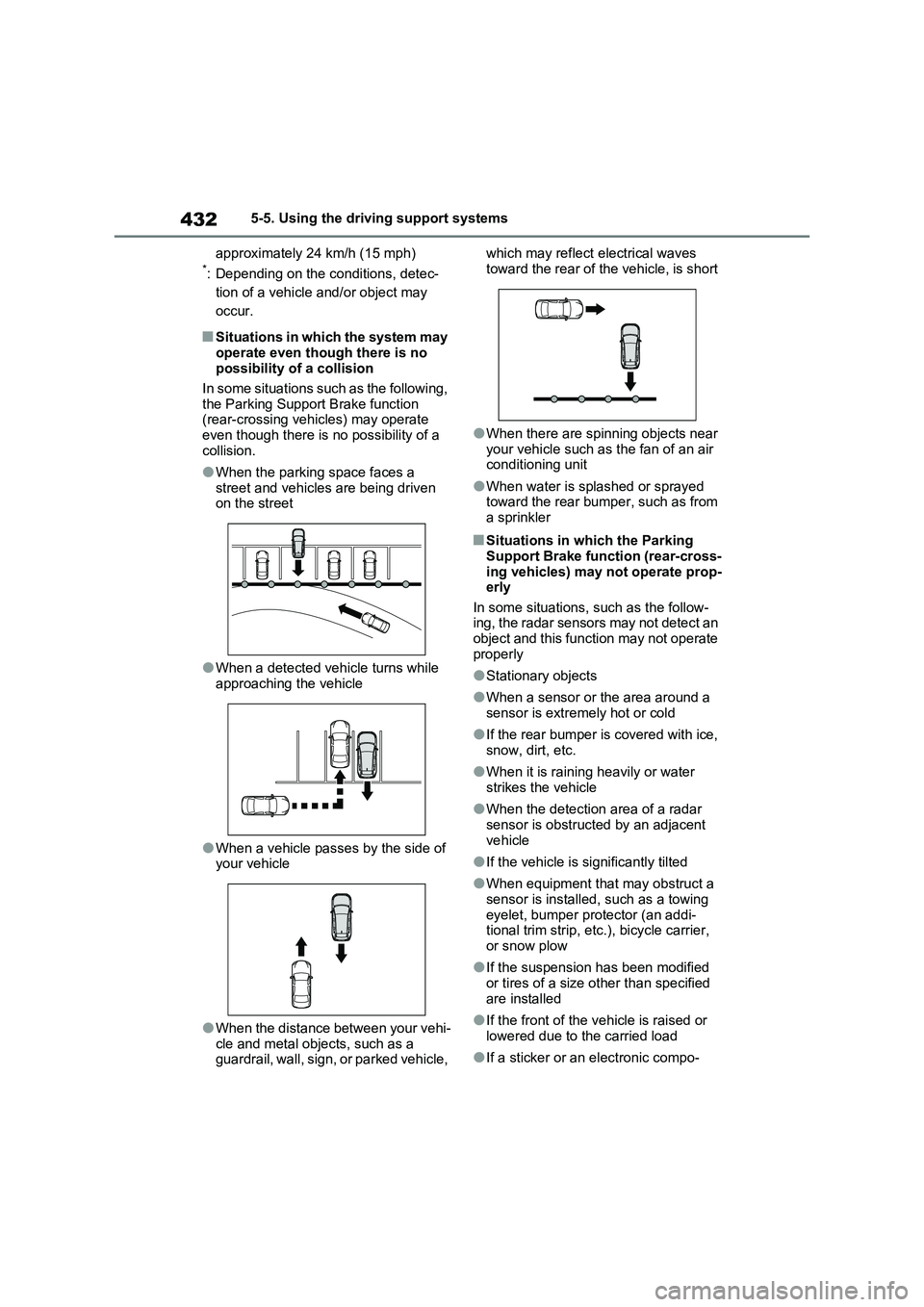
●When the parking space faces a
street and vehicles are being driven
on the street
●When a detected vehicle turns while
approaching the vehicle
●When a vehicle passes by the side of
your vehicle
●When the distance between your vehi-
cle and metal objects, such as a
guardrail, wall, sign, or parked vehicle, which may reflect electrical waves
toward the rear of the vehicle, is short
●When there are spinning objects near
your vehicle such as the fan of an air
conditioning unit
●When water is splashed or sprayed
toward the rear bumper, such as from
a sprinkler
■Situations in which the Parking
Support Brake function (rear-cross-
ing vehicles) may not operate prop-
erly
In some situations, such as the follow-
ing, the radar sensors may not detect an
object and this function may not operate
properly
●Stationary objects
●When a sensor or the area around a
sensor is extremely hot or cold
●If the rear bumper is covered with ice,
snow, dirt, etc.
●When it is raining heavily or water
strikes the vehicle
●When the detection area of a radar
sensor is obstructed by an adjacent
vehicle
●If the vehicle is significantly tilted
●When equipment that may obstruct a
sensor is installed, such as a towing
eyelet, bumper protector (an addi-
tional trim strip, etc.), bicycle carrier,
or snow plow
●If the suspension has been modified
or tires of a size other than specified
are installed
●If the front of the vehicle is raised or
lowered due to the carried load
●If a sticker or an electronic compo-
Page 434 of 664
4345-5. Using the driving support systems
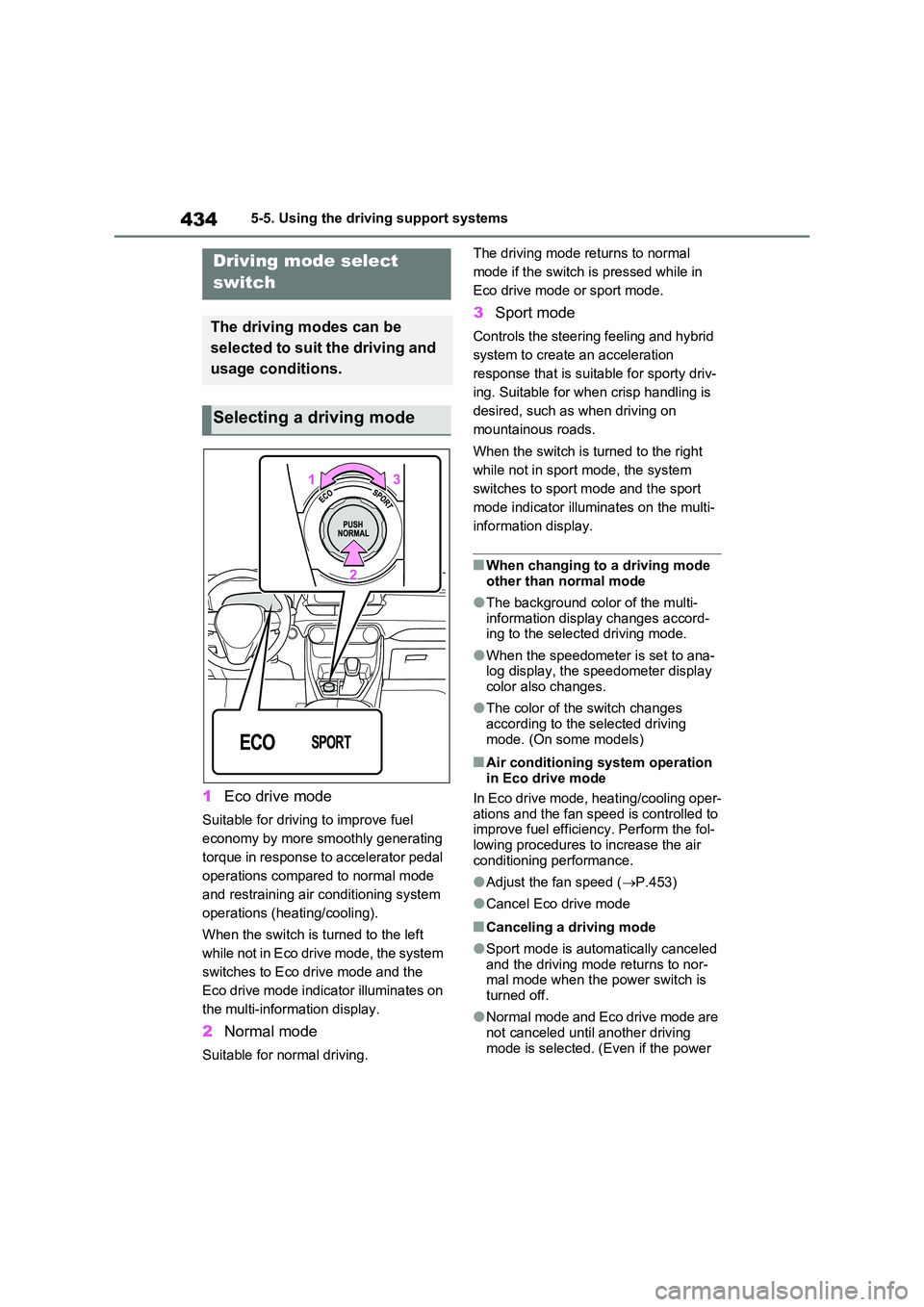
1Eco drive mode
Suitable for driving to improve fuel
economy by more smoothly generating
torque in response to accelerator pedal
operations compared to normal mode
and restraining air conditioning system
operations (heating/cooling).
When the switch is turned to the left
while not in Eco drive mode, the system
switches to Eco drive mode and the
Eco drive mode indicator illuminates on
the multi-information display.
2 Normal mode
Suitable for normal driving.
The driving mode returns to normal
mode if the switch is pressed while in
Eco drive mode or sport mode.
3 Sport mode
Controls the steering feeling and hybrid
system to create an acceleration
response that is suitable for sporty driv-
ing. Suitable for when crisp handling is
desired, such as when driving on
mountainous roads.
When the switch is turned to the right
while not in sport mode, the system
switches to sport mode and the sport
mode indicator illuminates on the multi-
information display.
■When changing to a driving mode
other than normal mode
●The background color of the multi-
information display changes accord- ing to the selected driving mode.
●When the speedometer is set to ana-log display, the speedometer display color also changes.
●The color of the switch changes according to the selected driving
mode. (On some models)
■Air conditioning system operation in Eco drive mode
In Eco drive mode, heating/cooling oper-
ations and the fan speed is controlled to improve fuel efficiency. Perform the fol-lowing procedures to increase the air
conditioning performance.
●Adjust the fan speed ( P.453)
●Cancel Eco drive mode
■Canceling a driving mode
●Sport mode is automatically canceled and the driving mode returns to nor-mal mode when the power switch is
turned off.
●Normal mode and Eco drive mode are
not canceled until another driving mode is selected. (Even if the power
Driving mode select
switch
The driving modes can be
selected to suit the driving and
usage conditions.
Selecting a driving mode
Page 451 of 664
6
451
6
Interior features
Interior features
6-1. Using the air conditioning
system and defogger
Automatic air conditioning sys-
tem ................................. 452
Remote Air Conditioning Sys-
tem ................................. 460
Heated steering wheel/Front
seat heaters/Front seat heat-
ers and ventilators/Rear seat
heaters ........................... 462
6-2. Using the interior lights
Interior lights list................ 465
6-3. Using the storage features
List of storage features ..... 468
Luggage compartment features
....................................... 472
6-4. Using the other interior fea-
tures
Other interior features....... 476
Page 452 of 664
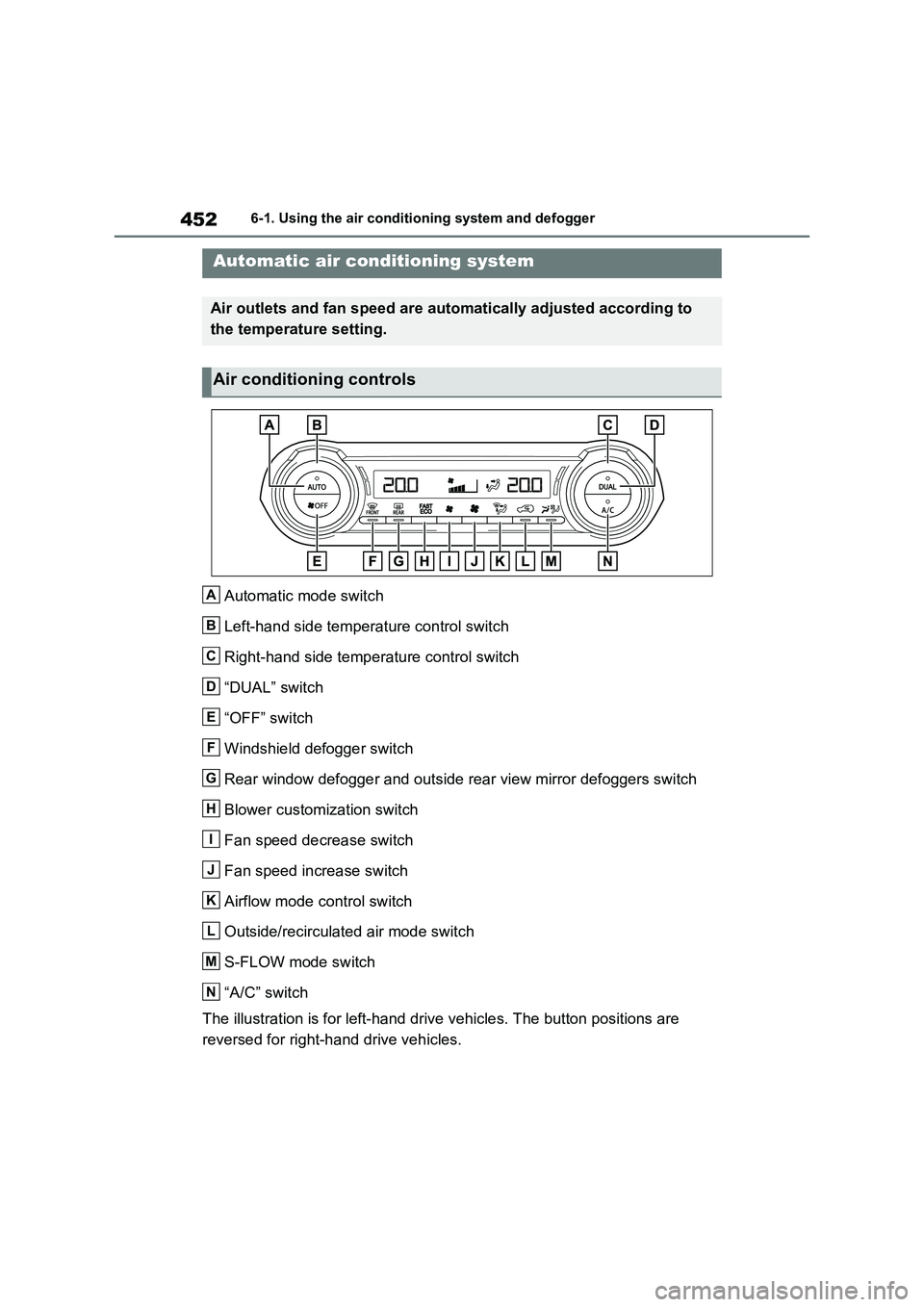
4526-1. Using the air conditioning system and defogger
6-1.Using the a ir c onditioning sys te m and de fog ger
Automatic mode switch
Left-hand side temperature control switch
Right-hand side temperature control switch
“DUAL” switch
“OFF” switch
Windshield defogger switch
Rear window defogger and outside rear view mirror defoggers switch
Blower customization switch
Fan speed decrease switch
Fan speed increase switch
Airflow mode control switch
Outside/recirculated air mode switch
S-FLOW mode switch
“A/C” switch
The illustration is for left-hand drive vehicles. The button positions are
reversed for right-hand drive vehicles.
Automatic air conditioning system
Air outlets and fan speed are automatically adjusted according to
the temperature setting.
Air conditioning controls
A
B
C
D
E
F
G
H
I
J
K
L
M
N