2011 TOYOTA VERSO S ESP
[x] Cancel search: ESPPage 344 of 664

3445-5. Using the driving support systems
5-5.Using the d riving s upport sy ste ms
*: If equipped
■PCS (Pre-Collision System)
P.355
■LTA (Lane Tracing Assist)
P.362
■AHB (Automatic High Beam)
P.334
■RSA (Road Sign Assist) (if
equipped)
P.372
■Dynamic radar cruise control
with full-speed range
P.376
Two types of sensors, located
behind the front grille and wind-
shield, detect information neces-
sary to operate the drive assist
systems.
Radar sensor
Front camera
Toyota Safety Sense*
The Toyota Safety Sense con-
sists of the following drive
assist systems and contrib-
utes to a safe and comfortable
driving experience:
Driving assist system
WARNING
■Toyota Safety Sense
The Toyota Safety Sense is designed
to operate under the assumption that the driver will drive safely, and is designed to help reduce the impact to
the occupants and the vehicle in the case of a collision or assist the driver in normal driving conditions.
As there is a limit to the degree of rec- ognition accuracy and control perfor-mance that this system can provide,
do not overly rely on this system. The driver is always responsible for pay-ing attention to the vehicle’s sur-
roundings and driving safely.
Sensors
A
B
Page 356 of 664
3565-5. Using the driving support systems
WARNING
■Limitations of the pre-collision system
●The driver is solely responsible for safe driving. Always drive safely, taking care to observe your sur-
roundings. Do not use the pre-collision system instead of normal braking opera-
tions under any circumstances. This system will not prevent colli-sions or lessen collision damage or
injury in every situation. Do not overly rely on this system. Failure to do so may lead to an accident,
resulting in death or serious injury.
●Although this system is designed to
help avoid a collision or help reduce the impact of the collision, its effec-tiveness may change according to
various conditions, therefore the system may not always be able to achieve the same level of perfor-
mance. Read the following conditions care-fully. Do not overly rely on this sys-
tem and always drive carefully.
• Conditions under which the system may operate even if there is no pos-
sibility of a collision: P.359
• Conditions under which the system may not operate properly: P.360
●Do not attempt to test the operation of the pre-collision system yourself.
Depending on the objects used for testing (dummies, cardboard objects imitating detectable objects,
etc.), the system may not operate properly, possibly leading to an accident.
■Pre-collision braking
●When the pre-collision braking
function is operating, a large amount of braking force will be applied.
●If the vehicle is stopped by the operation of the pre-collision brak-ing function, the pre-collision brak-
ing function operation will be canceled after approximately 2 sec-onds. Depress the brake pedal as
necessary.
●The pre-collision braking function
may not operate if certain opera- tions are performed by the driver. If the accelerator pedal is being
depressed strongly or the steering wheel is being turned, the system may determine that the driver is tak-
ing evasive action and possibly pre- vent the pre-collision braking function from operating.
●In some situations, while the pre-collision braking function is operat-
ing, operation of the function may be canceled if the accelerator pedal is depressed strongly or the steer-
ing wheel is turned and the system determines that the driver is taking evasive action.
●If the brake pedal is being depressed, the system may deter-
mine that the driver is taking eva- sive action and possibly delay the operation timing of the pre-collision
braking function.
■When to disable the pre-colli-
sion system
In the following situations, disable the system, as it may not operate prop-
erly, possibly leading to an accident resulting in death or serious injury:
●When the vehicle is being towed
●When your vehicle is towing another vehicle
●When transporting the vehicle via truck, boat, train or similar means of
transportation
●When the vehicle is raised on a lift
with the hybrid system on and the tires are allowed to rotate freely
Page 363 of 664
363
5
5-5. Using the driving support systems
Driving
WARNING
■Before using LTA system
●Do not rely solely upon the LTA
system. The LTA system does not automatically drive the vehicle or reduce the amount of attention that
must be paid to the area in front of the vehicle. The driver must always assume full responsibility for driving
safely by paying careful attention to the surrounding conditions and operating the steering wheel to cor-
rect the path of the vehicle. Also, the driver must take adequate breaks when fatigued, such as from
driving for a long period of time.
●Failure to perform appropriate driv-
ing operations and pay careful attention may lead to an accident, resulting in death or serious injury.
●When not using the LTA system, use the LTA switch to turn the sys-
tem off.
■Situations unsuitable for LTA
system
In the following situations, use the LTA switch to turn the system off.
Failure to do so may lead to an acci- dent, resulting in death or serious injury.
●Vehicle is driven on a road surface which is slippery due to rainy
weather, fallen snow, freezing, etc.
●Vehicle is driven on a snow-cov-
ered road.
●White (yellow) lines are difficult to
see due to rain, snow, fog, dust, etc.
●Vehicle is driven in a temporary lane or restricted lane due to con-struction work.
●Vehicle is driven in a construction zone.
●A spare tire, tire chains, etc. are equipped.
●When the tires have been exces-sively worn, or when the tire infla-tion pressure is low.
●When tires of a size other than specified are installed.
●Vehicle is driven in traffic lanes other than that highways and free-
ways.
●When your vehicle is towing a
trailer or during emergency towing
■Preventing LTA system malfunc-
tions and operations performed by mistake
●Do not modify the headlights or
place stickers, etc. on the surface of the lights.
●Do not modify the suspension etc. If the suspension etc. needs to be replaced, contact any authorized
Toyota retailer or Toyota authorized repairer, or any reliable repairer.
●Do not install or place anything on the hood or grille. Also, do not install a grille guard (bull bars, kan-
garoo bar, etc.).
●If your windshield needs repairs,
contact any authorized Toyota retailer or Toyota authorized repairer, or any reliable repairer.
■Conditions in which functions may not operate properly
In the following situations, the func- tions may not operate properly and the vehicle may depart from its lane.
Drive safely by always paying careful attention to your surroundings and operate the steering wheel to correct
the path of the vehicle without relying solely on the functions.
Page 377 of 664

377
5
5-5. Using the driving support systems
Driving
Indicators
■Operation switches
Vehicle-to-vehicle distance
switch
“+RES” switch
Cruise control main switch
Cancel switch
“-SET” switch
WARNING
■Before using dynamic radar
cruise control with full-speed range
●Driving safely is the sole responsi-
bility of the driver. Do not rely solely on the system, and drive safely by always paying careful attention to
your surroundings.
●The dynamic radar cruise control
with full-speed range provides driv- ing assistance to reduce the driver’s burden. However, there are
limitations to the assistance pro- vided.
Read the following conditions care-
fully. Do not overly rely on this system
and always drive carefully.
• When the sensor may not be cor-
rectly detecting the vehicle ahead: P.386
C
A
B
C
D
E
• Conditions under which the vehicle- to-vehicle distance control mode may not function correctly: P.387
●Set the speed appropriately depending on the speed limit, traffic
flow, road conditions, weather con- ditions, etc. The driver is responsi-ble for checking the set speed.
●Even when the system is function-ing normally, the condition of the
preceding vehicle as detected by the system may differ from the con-dition observed by the driver.
Therefore, the driver must always remain alert, assess the danger of each situation and drive safely.
Relying solely on this system or assuming the system ensures safety while driving can lead to an
accident, resulting in death or seri- ous injury.
●Switch the dynamic radar cruise control with full-speed range setting to off, using the cruise control main
switch when not in use.
Page 380 of 664
3805-5. Using the driving support systems
When a vehicle is detected running ahead of you, the system automatically deceler-
ates your vehicle. When a greater reduction in vehicle speed is necessary, the sys-
tem applies the brakes (the stop lights will come on at this time). The system will
respond to changes in the speed of the vehicle ahead in order to maintain the vehi-
cle-to-vehicle distance set by the driver. Approach warning warns you when the sys-
tem cannot decelerate sufficiently to prevent your vehicle from closing in on the
vehicle ahead.
When the vehicle ahead of you stops, your vehicle will also stop (vehicle is stopped
by system control). After the vehicle ahead starts off, pressing the “+RES” switch or
depressing the accelerator pedal (start-off operation) will resume follow-up cruising.
If the start-off operation is not performed, system control continues to keep your
vehicle stopped.
When the turn signal lever is operated and your vehicle moves to an overtaking lane
while driving at 50 mph (80 km/h) or more, the vehicle will accelerate to help to over-
take a passing vehicle.
The system’s identification of what is an overtaking lane may be determined solely
based on the location of the steering wheel in the vehicle (left side driver position
versus right side driver position.) If the vehicle is driven to a region where the over-
taking lane is on a different side from where the vehicle is normally driven, the vehi-
cle may accelerate when the turn signal lever is operated in the opposite direction to
the overtaking lane (e.g., if the driver normally operates the vehicle in a region
where the overtaking lane is to the right but then drives to a region where the over-
taking lane is to the left, the vehicle may accelerate when the right turn signal is acti-
vated).
Example of acceleration
When there are no longer any preceding vehicles driving slower than the
set speed
The system accelerates until the set speed is reached. The system then returns to
constant speed cruising.
1Press the cruise control main
switch to activate the cruise con-
trol.
Dynamic radar cruise control indicator
will come on and a message will be dis-
played on the multi-information display.
Press the switch again to deactivate the
cruise control.If the cruise control main switch is
pressed and held for 1.5 seconds or
more, the system turns on in constant
C
Setting the vehicle speed
(vehicle-to-vehicle distance
control mode)
Page 382 of 664
3825-5. Using the driving support systems
*1: When the set speed is shown in
“km/h”
*2: When the set speed is shown in
“MPH”
Increasing the set speed by the
accelerator pedal
1 Accelerate with accelerator
pedal operation to the desired
vehicle speed
2 Press the “-SET” switch
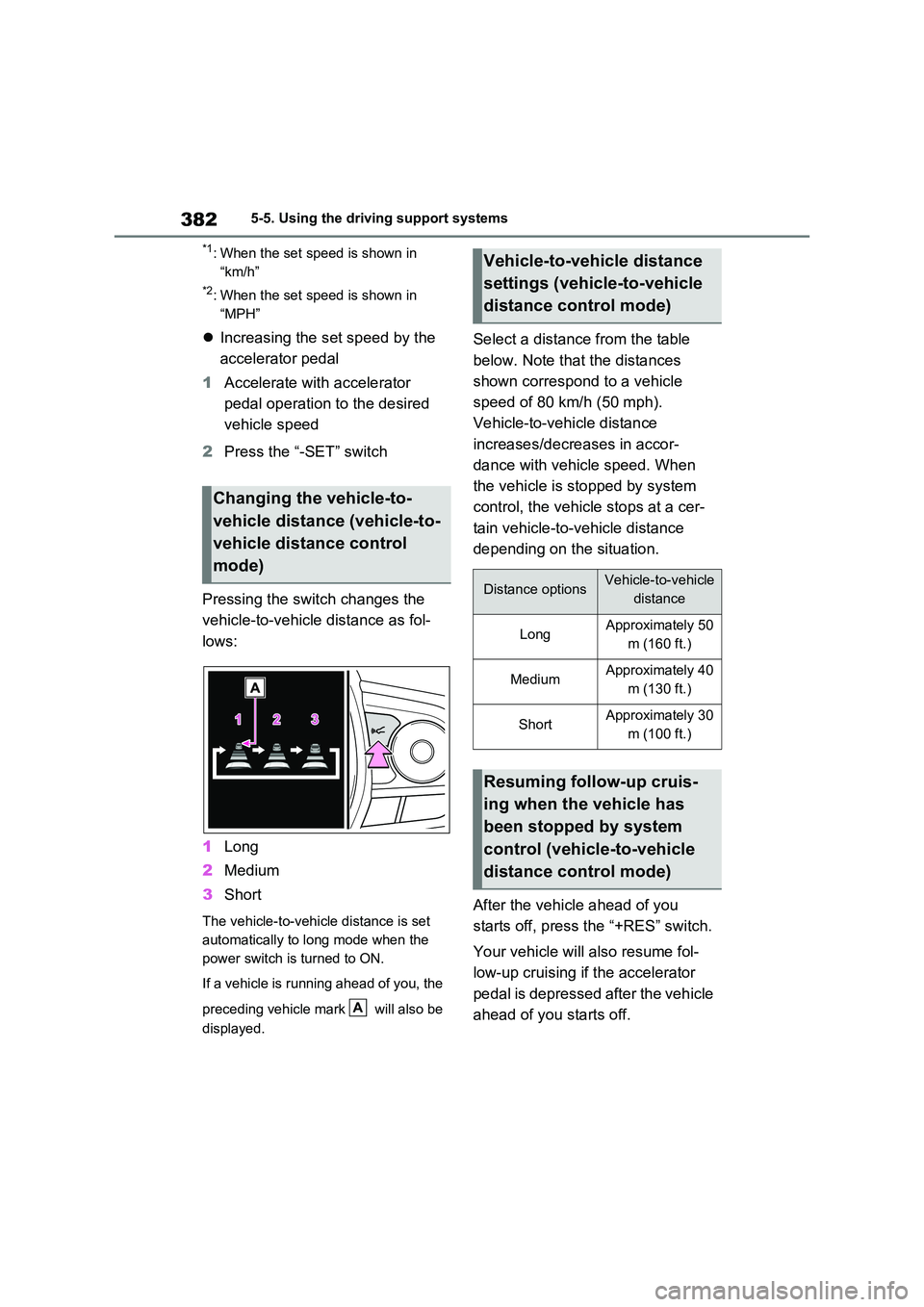
Pressing the switch changes the
vehicle-to-vehicle distance as fol-
lows:
1 Long
2 Medium
3 Short
The vehicle-to-vehicle distance is set
automatically to long mode when the
power switch is turned to ON.
If a vehicle is running ahead of you, the
preceding vehicle mark will also be
displayed.
Select a distance from the table
below. Note that the distances
shown correspond to a vehicle
speed of 80 km/h (50 mph).
Vehicle-to-vehicle distance
increases/decreases in accor-
dance with vehicle speed. When
the vehicle is stopped by system
control, the vehicle stops at a cer-
tain vehicle-to-vehicle distance
depending on the situation.
After the vehicle ahead of you
starts off, press the “+RES” switch.
Your vehicle will also resume fol-
low-up cruising if the accelerator
pedal is depressed after the vehicle
ahead of you starts off.
Changing the vehicle-to-
vehicle distance (vehicle-to-
vehicle distance control
mode)
A
Vehicle-to-vehicle distance
settings (vehicle-to-vehicle
distance control mode)
Distance optionsVehicle-to-vehicle
distance
LongApproximately 50
m (160 ft.)
MediumApproximately 40
m (130 ft.)
ShortApproximately 30
m (100 ft.)
Resuming follow-up cruis-
ing when the vehicle has
been stopped by system
control (vehicle-to-vehicle
distance control mode)
Page 386 of 664

3865-5. Using the driving support systems
●Actual vehicle speed is more than
approximately 16 km/h (10 mph) below the set vehicle speed.
●Actual vehicle speed falls below approximately 30 km/h (20 mph).
●VSC is activated.
●TRC is activated for a period of time.
●When the VSC or TRC system is turned off.
●Pre-collision braking is activated.
●The parking brake is operated.
If constant speed control mode is auto-
matically canceled for any reasons other
than the above, there may be a malfunc-
tion in the system. Contact any autho-
rized Toyota retailer or Toyota
authorized repairer, or any reliable
repairer.
■The Dynamic Radar Cruise Control with Road Sign Assist may not
operate properly when (vehicles with RSA)
As the Dynamic Radar Cruise Control
with Road Sign Assist may not operate properly in conditions in which RSA may not operate or detect correctly
( P.375), when using this function, make sure to check the speed limit sign displayed.
In the following situations, the set speed may not be changed to the recognized speed limit by pressing and holding the
“+RES”/“-SET” switch.
●If speed limit information is not avail-
able
●When the recognized speed limit is
the same as the set speed
●When the recognized speed limit is
outside of the speed range that the dynamic radar cruise control system can operate
■Brake operation
A brake operation sound may be heard and the brake pedal response may change, but these are not malfunctions.
■Warning messages and buzzers for
dynamic radar cruise control with full-speed range
Warning messages and buzzers are
used to indicate a system malfunction or to inform the driver of the need for cau-tion while driving. If a warning message
is shown on the multi-information dis- play, read the message and follow the instructions. ( P.353, 578)
■When the sensor may not be cor-
rectly detecting the vehicle ahead
In the case of the following and depend- ing on the conditions, operate the brake
pedal when deceleration of the system is insufficient or operate the accelerator pedal when acceleration is required.
As the sensor may not be able to cor- rectly detect these types of vehicles, the approach warning ( P.383) may not be
activated.
●Vehicles that cut in suddenly
●Vehicles traveling at low speeds
●Vehicles that are not moving in the same lane
●Vehicles with small rear ends (trailers with no load on board, etc.)
●Motorcycles traveling in the same lane
●When water or snow thrown up by the
surrounding vehicles hinders the detecting of the sensor
●When your vehicle is pointing upwards (caused by a heavy load in the luggage compartment, etc.)
Page 393 of 664

393
5
5-5. Using the driving support systems
Driving
*: If equipped
Multi-information display
Turning the BSM function/RCTA func-
tion on/off.
Outside rear view mirror indica-
tors
BSM (Blind Spot Moni-
tor)*
The Blind Spot Monitor is a
system that has 2 functions:
The BSM (Blind Spot Monitor)
function
Assists the driver in making a
decision when changing lanes
The RCTA (Rear Crossing
Traffic Alert) function (if
equipped)
Assists the driver when backing
up
These functions use the same
sensors.
WARNING
■Cautions regarding the use of
the BSM function
The driver is solely responsible for
safe driving. Always drive safely, tak- ing care to observe your surround-ings.
The BSM function is a supplementary function which alerts the driver that a vehicle is in a blind spot of the outside
rear view mirrors or is approaching rapidly from behind into a blind spot. Do not overly rely on the BSM func-
tion. As the function cannot judge if it is safe to change lanes, over reliance could lead to an accident resulting in
death or serious injury.
As the system may not function cor- rectly under certain conditions, the
driver’s own visual confirmation of safety is necessary.
■Cautions regarding the use of the RCTA function
The driver is solely responsible for
safe driving. Always drive safely, tak- ing care to observe your surround-ings.
The RCTA function is only a supple- mentary function which alerts the driver that a vehicle is approaching
from the right or left at the rear of the vehicle. As the RCTA function may not function correctly under certain
conditions, the driver’s own visual confirmation of safety is necessary.
Over reliance on this function may
lead to an accident resulting death or serious injury.
System components
A
B