2011 TOYOTA VERSO S ESP
[x] Cancel search: ESPPage 280 of 664
2804-4. Adjusting the steering wheel and mirrors
*: If equipped
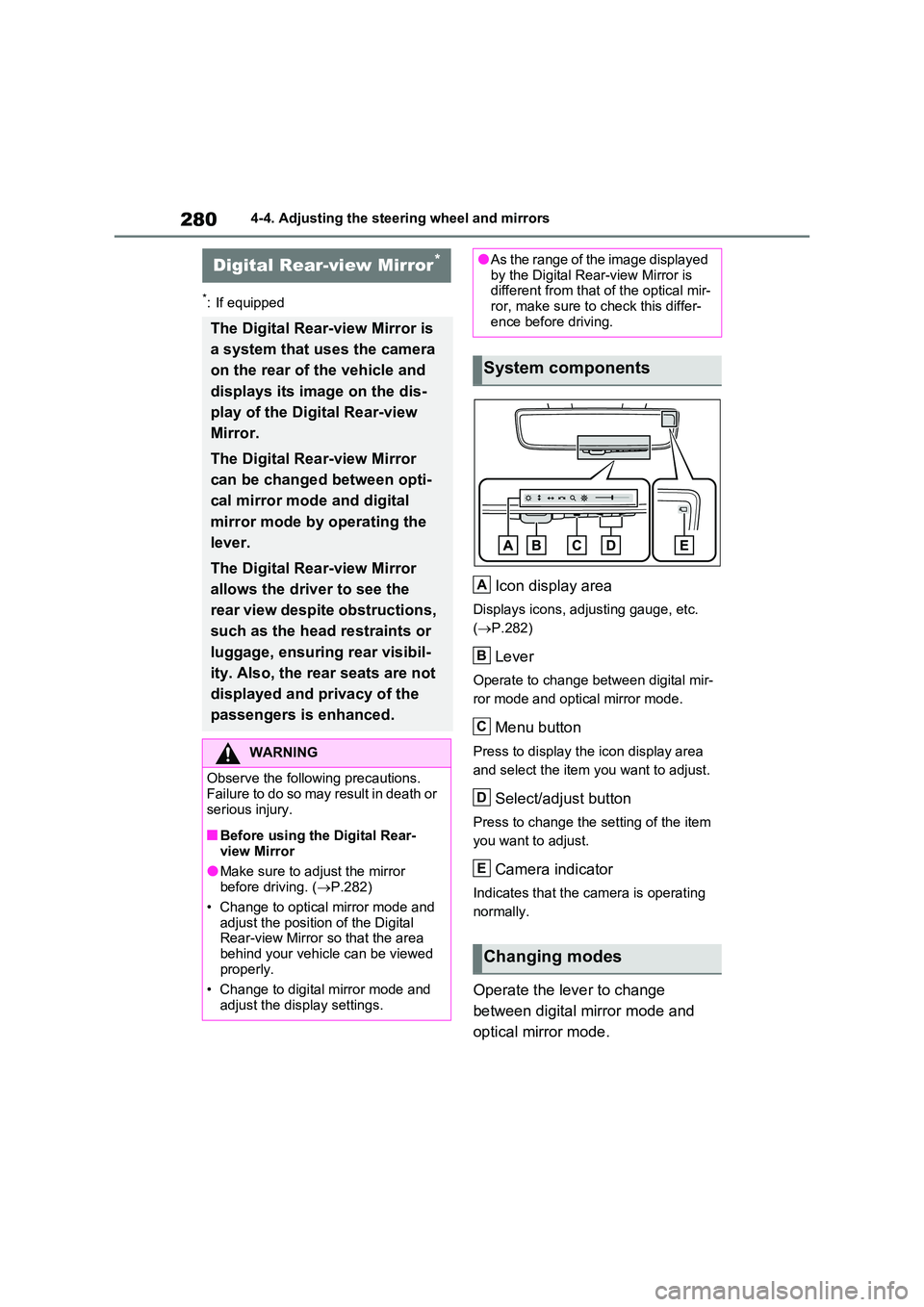
Icon display area
Displays icons, adjusting gauge, etc.
( P.282)
Lever
Operate to change between digital mir-
ror mode and optical mirror mode.
Menu button
Press to display the icon display area
and select the item you want to adjust.
Select/adjust button
Press to change the setting of the item
you want to adjust.
Camera indicator
Indicates that the camera is operating
normally.
Operate the lever to change
between digital mirror mode and
optical mirror mode.
Digital Rear-view Mirror*
The Digital Rear-view Mirror is
a system that uses the camera
on the rear of the vehicle and
displays its image on the dis-
play of the Digital Rear-view
Mirror.
The Digital Rear-view Mirror
can be changed between opti-
cal mirror mode and digital
mirror mode by operating the
lever.
The Digital Rear-view Mirror
allows the driver to see the
rear view despite obstructions,
such as the head restraints or
luggage, ensuring rear visibil-
ity. Also, the rear seats are not
displayed and privacy of the
passengers is enhanced.
WARNING
Observe the following precautions. Failure to do so may result in death or
serious injury.
■Before using the Digital Rear-
view Mirror
●Make sure to adjust the mirror before driving. ( P.282)
• Change to optical mirror mode and adjust the position of the Digital Rear-view Mirror so that the area
behind your vehicle can be viewed properly.
• Change to digital mirror mode and
adjust the display settings.
●As the range of the image displayed by the Digital Rear-view Mirror is different from that of the optical mir-
ror, make sure to check this differ- ence before driving.
System components
Changing modes
A
B
C
D
E
Page 282 of 664
2824-4. Adjusting the steering wheel and mirrors
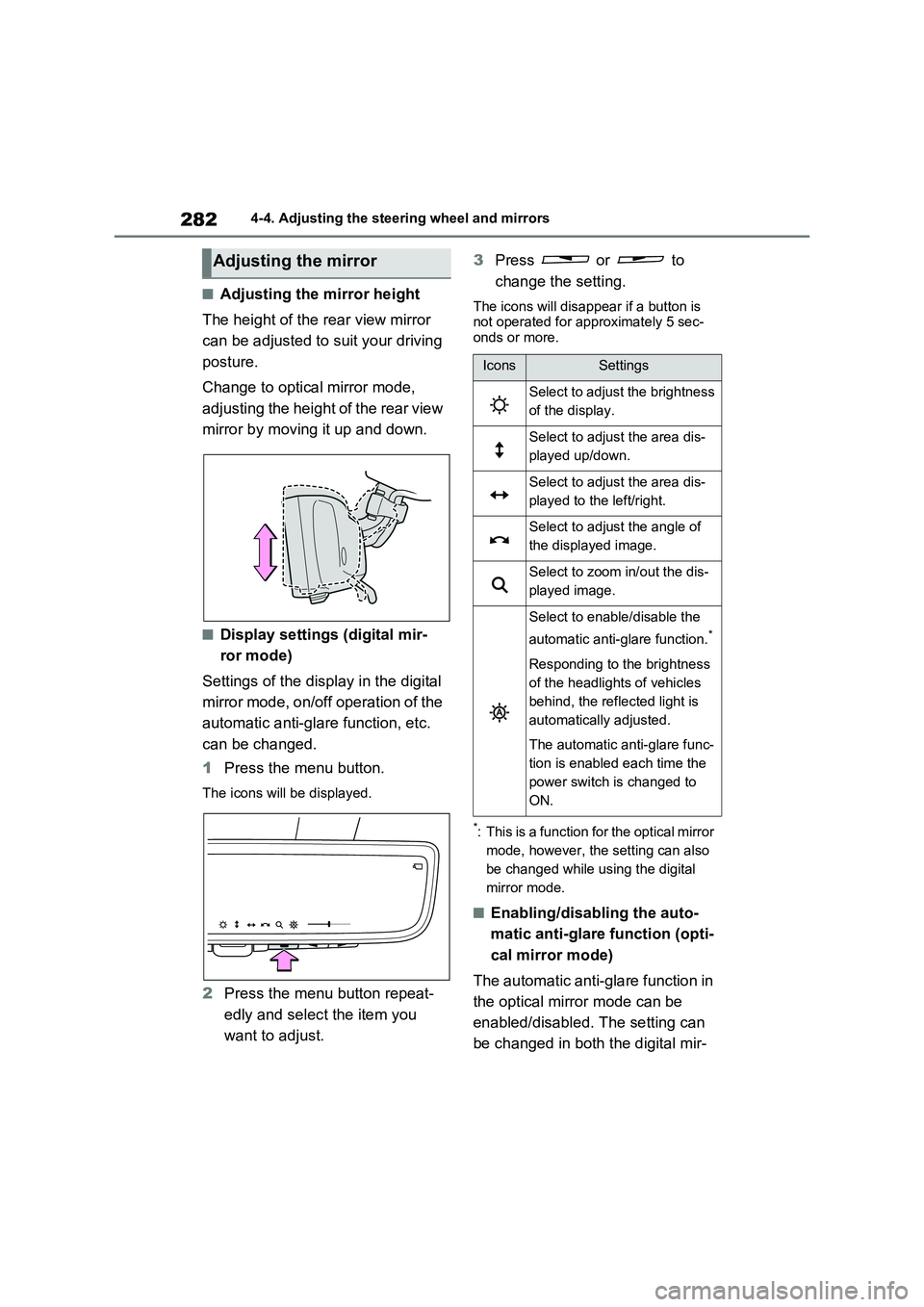
■Adjusting the mirror height
The height of the rear view mirror
can be adjusted to suit your driving
posture.
Change to optical mirror mode,
adjusting the height of the rear view
mirror by moving it up and down.
■Display settings (digital mir-
ror mode)
Settings of the display in the digital
mirror mode, on/off operation of the
automatic anti-glare function, etc.
can be changed.
1Press the menu button.
The icons will be displayed.
2Press the menu button repeat-
edly and select the item you
want to adjust.3Press or to
change the setting.
The icons will disappear if a button is
not operated for approximately 5 sec-
onds or more.
*: This is a function for the optical mirror
mode, however, the setting can also
be changed while using the digital
mirror mode.
■Enabling/disabling the auto-
matic anti-glare function (opti-
cal mirror mode)
The automatic anti-glare function in
the optical mirror mode can be
enabled/disabled. The setting can
be changed in both the digital mir-
Adjusting the mirror
IconsSettings
Select to adjust the brightness
of the display.
Select to adjust the area dis-
played up/down.
Select to adjust the area dis-
played to the left/right.
Select to adjust the angle of
the displayed image.
Select to zoom in/out the dis-
played image.
Select to enable/disable the
automatic anti-glare function.
*
Responding to the brightness
of the headlights of vehicles
behind, the reflected light is
automatically adjusted.
The automatic anti-glare func-
tion is enabled each time the
power switch is changed to
ON.
Page 283 of 664

283
4
4-4. Adjusting the steering wheel and mirrors
Before driving
ror mode and the optical mirror
mode.
When using the digital mirror
mode
P.282
When using the optical mirror
mode
1 Press the menu button.
The icons will be displayed.
2Press or to
enable (ON)/disable (OFF) the
automatic anti-glare function.
The icons will disappear if a button is not operated for approximately 5 sec-onds or more.
■Adjusting the display (digital mirror mode)
●If the displayed image is adjusted, it may appear distorted. This is not a
malfunction.
●If the brightness of the Digital Rear-
view Mirror is set too high, it may cause eye strain. Adjust the Digital Rear-view Mirror to an appropriate
brightness. If your eyes become tired, change to optical mirror mode.
●The brightness of the Digital Rear-view Mirror will change automatically according to the brightness of the
area in front of your vehicle.
■To prevent the light sensors from
malfunctioning
To prevent the light sensors from mal- functioning, do not touch or cover them.
WARNING
Observe the following precautions.Failure to do so may result in death or serious injury.
■While driving
●Do not adjust the position of the
Digital Rear-view Mirror or adjust the display settings while driving.Stop the vehicle and operate the
Digital Rear-view Mirror control switches. Failure to do so may cause a steer-
ing wheel operation error, resulting in an unexpected accident.
●Always pay attention to the vehi-cle’s surroundings.
The size of the vehicles and other
objects may look different when in digital mirror mode and optical mirror mode.
When backing up, make sure to directly check the safety of the area around your vehicle, especially
behind the vehicle. Additionally, if a vehicle approaches from the rear in the dark, such as at
night, the surrounding area may appear dim.
Page 292 of 664
2924-5. Opening, closing the windows and moon roof
direction, and hold it there for
approximately 4 seconds or more.
6 Pull and hold the power window switch in the one-touch closing direction again. After the side win-
dow is completely closed, continue holding the switch for a further 1 sec-ond or more.
If you release the switch while the side window is moving, start again from the beginning.
If the side window reverses and cannot be fully closed or opened, have the vehi-cle inspected by any authorized Toyota
retailer or Toyota authorized repairer, or any reliable repairer.
■Door lock linked power window operation
●The power windows can be opened
and closed using the mechanical key.*
( P.605)
●The power windows can be opened
and closed using the wireless remote
control.* ( P.205)
●Vehicles with alarm: The alarm may be triggered if the alarm is set and the
power window is closed using the door lock linked power window opera-tion function. ( P.78)*: These settings must be customized at
any authorized Toyota retailer or
Toyota authorized repairer, or any reli-
able repairer.
■Power window open reminder func-
tion
The buzzer sounds and a message is shown on the multi-information display
when the power switch is turned to OFF and the driver’s door is opened with the power windows open.
■Customization
Settings (e.g. linked door lock operation) can be changed. (Customizable fea-tures: P.636)
WARNING
Observe the following precautions. Failing to do so may result in death or
serious injury.
■Closing the power windows
●The driver is responsible for all the power window operations, including the operation for the passengers. In
order to prevent accidental opera- tion, especially by a child, do not let a child operate the power windows.
It is possible for children and other passengers to have body parts caught in the power window. Also,
when riding with a child, it is recom- mended to use the window lock switch. ( P.293)
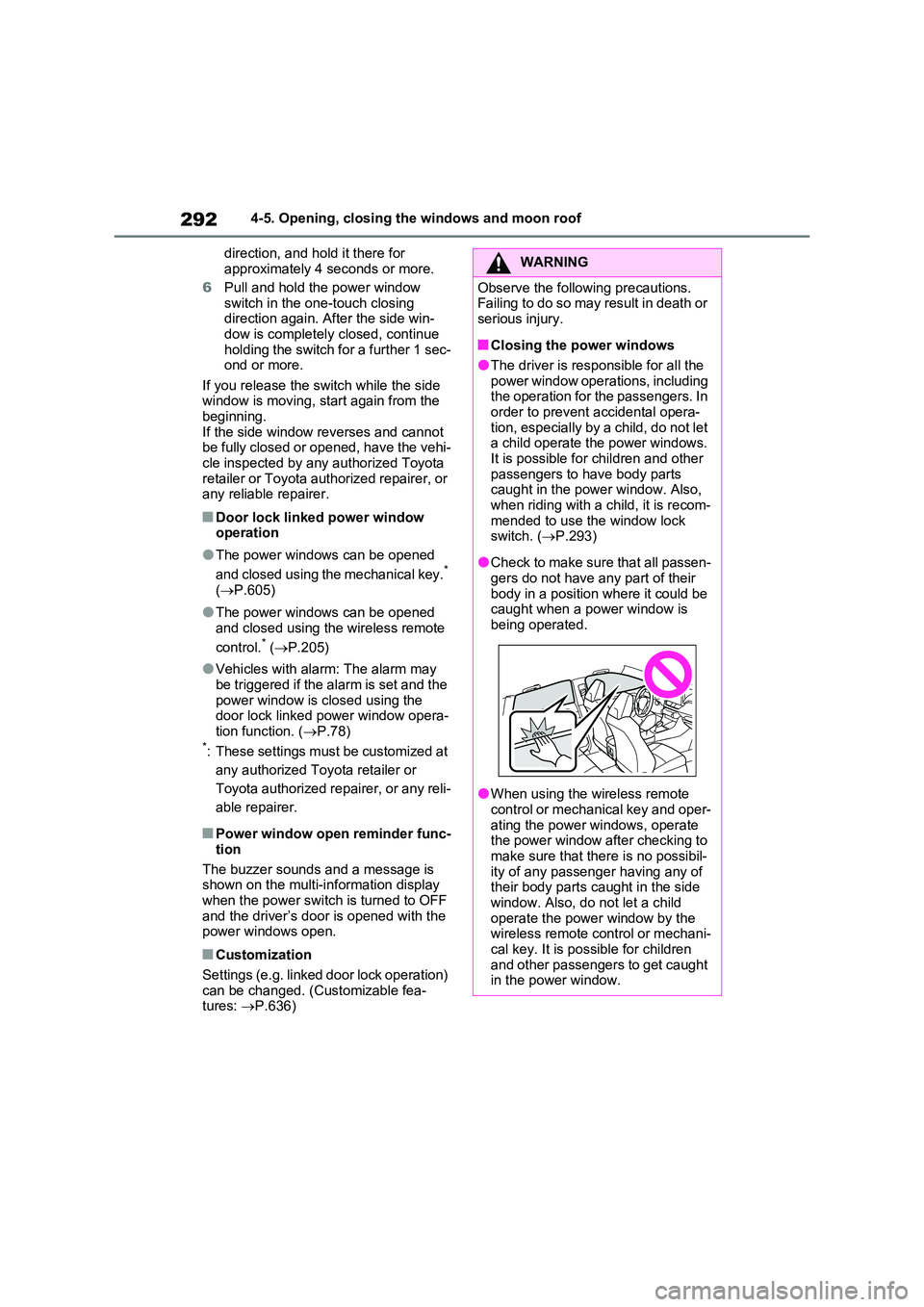
●Check to make sure that all passen- gers do not have any part of their
body in a position where it could be caught when a power window is being operated.
●When using the wireless remote control or mechanical key and oper-
ating the power windows, operate the power window after checking to make sure that there is no possibil-
ity of any passenger having any of their body parts caught in the side window. Also, do not let a child
operate the power window by the wireless remote control or mechani-cal key. It is possible for children
and other passengers to get caught in the power window.
Page 296 of 664
2964-5. Opening, closing the windows and moon roof
panoramic moon roof or electronic
sunshade closes and reopens. The panoramic moon roof and electronic
sunshade will start to close.*
4 Check that the panoramic moon roof
and electronic sunshade are fully closed and release the switch.*: If the switch is released at the incor-
rect time, the procedure will have to
be performed again from the begin-
ning.
If the panoramic moon roof or electronic
sunshade does not fully close even after performing the above procedure cor-rectly, have the vehicle inspected by any
authorized Toyota retailer or Toyota authorized repairer, or any reliable repairer.
■Panoramic moon roof open
reminder function
A buzzer sounds and a message is shown on the multi-information display
when the power switch is turned to OFF and the driver’s door is opened with the panoramic moon roof open.
■Customization
Settings (e.g. linked door lock operation) can be changed. (Customizable fea-tures: P.636)
WARNING
Observe the following precautions. Failure to do so may result in death or serious injury.
■Opening and closing the elec-tronic sunshade
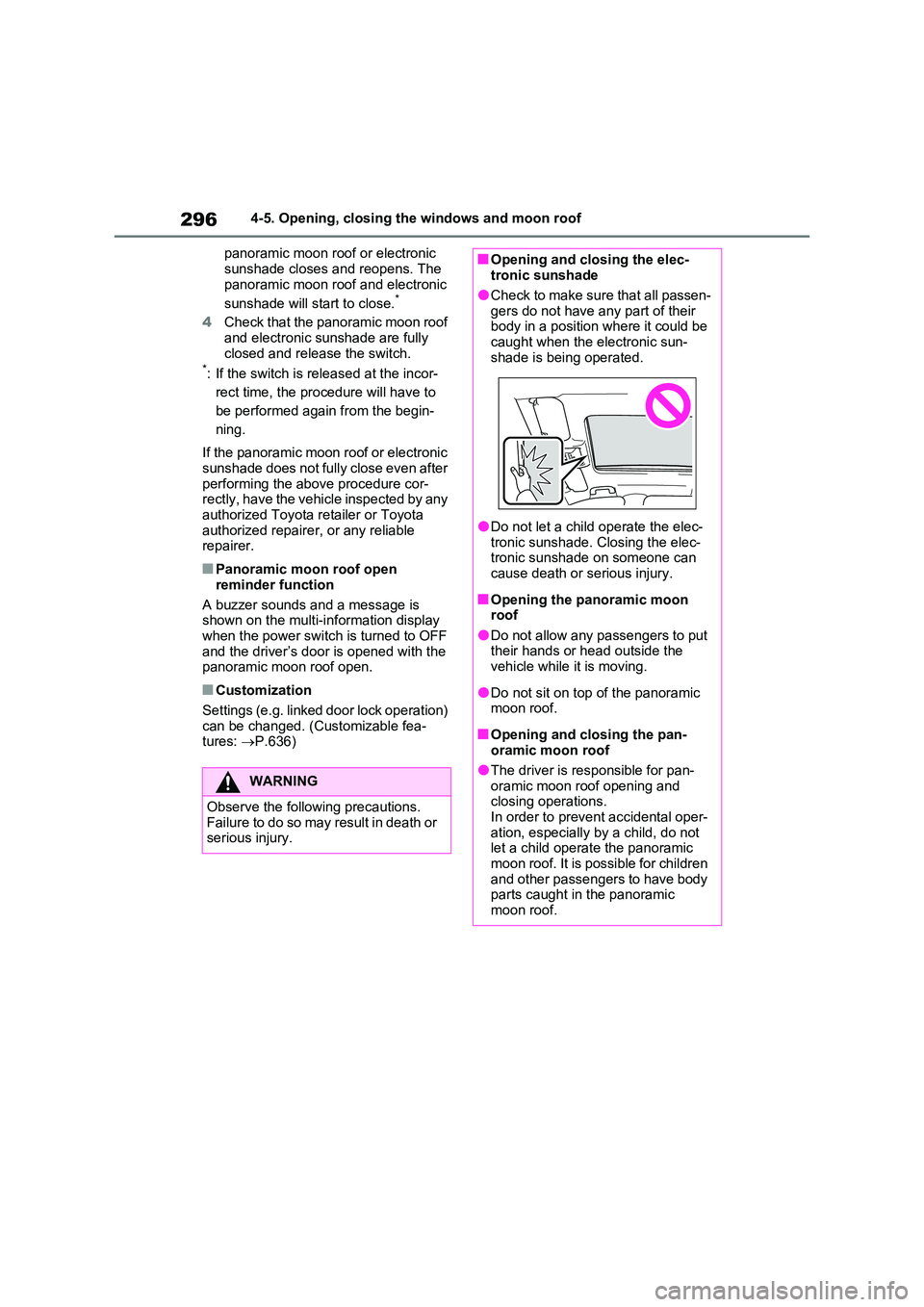
●Check to make sure that all passen-
gers do not have any part of their body in a position where it could be caught when the electronic sun-
shade is being operated.
●Do not let a child operate the elec-
tronic sunshade. Closing the elec- tronic sunshade on someone can cause death or serious injury.
■Opening the panoramic moon roof
●Do not allow any passengers to put their hands or head outside the vehicle while it is moving.
●Do not sit on top of the panoramic moon roof.
■Opening and closing the pan-oramic moon roof
●The driver is responsible for pan-oramic moon roof opening and closing operations.
In order to prevent accidental oper- ation, especially by a child, do not let a child operate the panoramic
moon roof. It is possible for children and other passengers to have body parts caught in the panoramic
moon roof.
Page 301 of 664
301
5 5-1. Before driving
Driving
■Driving in the rain
●Drive carefully when it is raining,
because visibility will be reduced, the
windows may become fogged-up, and
the road could be slippery.
●Drive carefully when it starts to rain,
as the road surface could be espe-
cially slippery.
●Refrain from high speeds when driv-
ing on an expressway in the rain,
because there may be a layer of water
between the tires and the road sur-
face, preventing the steering and
brakes from operating properly.
■ECO Accelerator Guidance
(P.182)
It is easier to drive in an Eco-friendly
manner by driving while referring to the
ECO Accelerator Guidance display.
Also, by using the ECO Accelerator
Guidance it is easier to increase the
“Eco Score” evaluation.
●When starting off: While staying within
the ECO Accelerator Guidance range,
gradually depress the accelerator
pedal and accelerate to the desired
speed. If excessive acceleration is
avoided, the “Start” score will
increase.
●When driving: After accelerating to the
desired speed, release the accelera-
tor pedal and drive at a stable speed
within the ECO Accelerator Guidance
range. By keeping the vehicle within
the ECO Accelerator Guidance range,
the “Cruise” score will increase.
●When stopping: When stopping the
vehicle, early releasing the accelera-
tor pedal will cause the “Stop” score to
increase.
■Restraining the hybrid system out-
put (Brake Override System)
●When the accelerator and brake ped-
als are depressed at the same time,
the hybrid system output may be
restrained.
●A warning message is displayed on
the multi-information display and head-up display (if equipped) while
the system is operating. (P.574)
■Restraining sudden start (Drive-
Start Control)
●When the following unusual operation
is performed, the hybrid system output
may be restrained.
• When the shift lever is shifted from R
to D, D to R, N to R, P to D
*, or P to R*
(D includes S) with the accelerator
pedal depressed, a warning message
appears on the multi-information dis-
play and head-up display (if
equipped). If a warning message is
shown on the multi-information dis-
play, read the message and follow the
instructions.
• When the accelerator pedal is
depressed too much while the vehicle
is in reverse.
*: Depending on the situation, the shift
lever may not be changed.
●While Drive-Start Control is being acti-
vated, your vehicle may have trouble
escaping from the mud or fresh snow.
In such case, deactivate TRC
(P.439) to cancel Drive-Start Con-
trol so that the vehicle may be able to
escape from the mud or fresh snow.
●Drive-Start Control does not work
when Trail Mode is turned on.
■Breaking in your new Toyota
To extend the life of the vehicle, observ-
ing the following precautions is recom-
mended:
●For the first 300 km (200 miles):
Avoid sudden stops.
●For the first 800 km (500 miles):
Do not tow a trailer.
●For the first 1000 km (600 miles):
• Do not drive at extremely high
speeds.
• Avoid sudden acceleration.
• Do not drive continuously in low
gears.
• Do not drive at a constant speed for
extended periods.
Page 302 of 664
3025-1. Before driving
■Operating your vehicle in a foreign
country
Comply with the relevant vehicle regis- tration laws and confirm the availability
of the correct fuel. ( P.620)
WARNING
Observe the following precautions. Failure to do so may result in death or
serious injury.
■When starting the vehicle
Always keep your foot on the brake pedal while stopped with the “READY” indicator is illuminated. This
prevents the vehicle from creeping.
■When driving the vehicle
●Do not drive if you are unfamiliar with the location of the brake and accelerator pedals to avoid
depressing the wrong pedal.
• Accidentally depressing the accel- erator pedal instead of the brake
pedal will result in sudden accelera- tion that may lead to an accident.
• When backing up, you may twist
your body around, leading to a diffi- culty in operating the pedals. Make sure to operate the pedals properly.
• Make sure to keep a correct driving posture even when moving the vehicle only slightly. This allows
you to depress the brake and accel- erator pedals properly.
• Depress the brake pedal using your
right foot. Depressing the brake pedal using your left foot may delay response in an emergency, result-
ing in an accident.
●The driver should pay extra atten- tion to pedestrians when the vehicle is powered only by the electric
motor (traction motor). As there is no engine noise, the pedestrians may misjudge the vehicle’s move-
ment. Even though the vehicle is equipped with the Acoustic Vehicle Alerting System, drive with care as
pedestrians in the vicinity may still not notice the vehicle if the sur-rounding area is noisy.
●Do not drive the vehicle over or stop the vehicle near flammable
materials such as leaves, paper or rags.The exhaust system and exhaust
gases can be extremely hot. These hot parts may cause a fire if there is any flammable material nearby.
●During normal driving, do not turn off the hybrid system. Turning the
hybrid system off while driving will not cause loss of steering or brak-ing control, however, power assist
to the steering will be lost. This will make it more difficult to steer smoothly, so you should pull over
and stop the vehicle as soon as it is safe to do so. In the event of an emergency, such
as if it becomes impossible to stop the vehicle in the normal way: P.560
●Use engine braking (downshift) to maintain a safe speed when driving
down a steep hill. Using the brakes continuously may cause the brakes to overheat and
lose effectiveness. ( P.321)
●Do not adjust the position of the
steering wheel, the seat, or the inside or outside rear view mirrors while driving.
Doing so may result in a loss of vehicle control.
Page 314 of 664
3145-1. Before driving
34 mm (1.3 in.)
412 mm (16.2 in.)
332 mm (13.1 in.)
370 mm (14.6 in.)
570 mm (22.4 in.)
601 mm (23.7 in.)
1073 mm (42.2 in.)
Your vehicle will handle differently
when towing a trailer. In order to
avoid accident, death or serious
injury, keep the following in mind
when towing:
■Checking connections
between trailer and lights
Stop the vehicle and check the
operation of the connection
between the trailer and lights after
driving for a brief period as well as
before starting off.
■Practicing driving with a cou-
pled trailer
Get the feel for turning, stopping
and reversing with the trailer
coupled by practicing in an area
with no or light traffic.
When reversing with a coupled
trailer, hold the section of the
steering wheel nearest to you
and rotate clockwise to turn the
trailer left or counterclockwise to
turn it right. Always rotate a little
at a time to prevent steering
error. Have someone guide you
when reversing to lessen the risk
of an accident.
■Increasing vehicle-to-vehicle
distance
At a speed of 10 km/h (6 mph), the
distance to the vehicle running
ahead of you should be equivalent
to or greater than the combined
length of your vehicle and trailer.
Avoid sudden braking that may
cause skidding. Otherwise, the
vehicle may spin out of control. This
is especially true when driving on
wet or slippery road surfaces.
D
E
F
G
H
I
J
NOTICE
■When the rear bumper strength-
ening material is aluminum
Ensure the steel bracket part does not come directly in contact with that
area.
When steel and aluminum come into contact, there is a reaction similar to
corrosion, which will weaken the sec- tion concerned and may result in damage. Apply a rust inhibitor to parts
that will come in contact when attach- ing a steel bracket.
Guidance