2011 TOYOTA VERSO S towing
[x] Cancel search: towingPage 379 of 664
379
5
5-5. Using the driving support systems
Driving
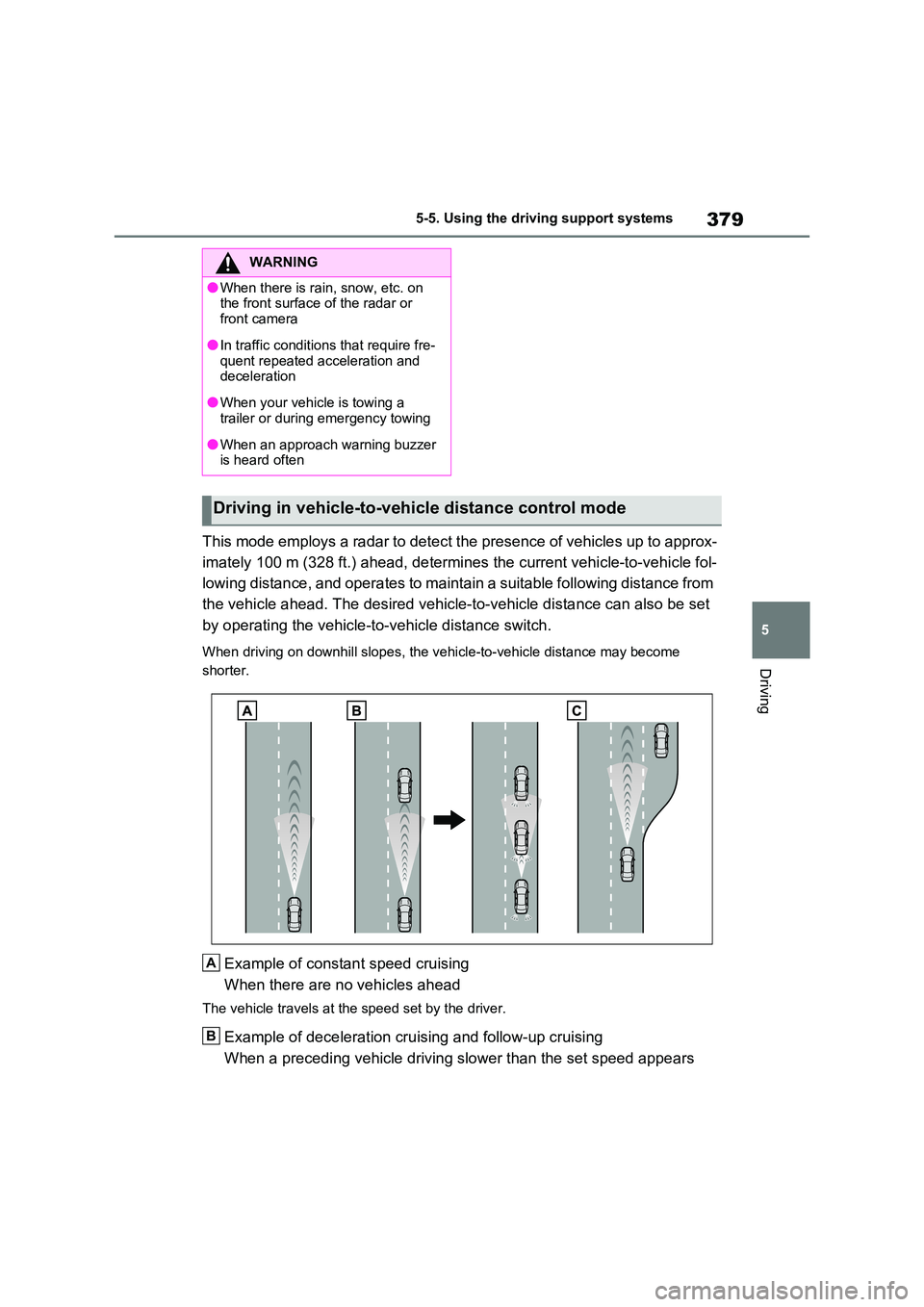
This mode employs a radar to detect the presence of vehicles up to approx-
imately 100 m (328 ft.) ahead, determines the current vehicle-to-vehicle fol-
lowing distance, and operates to maintain a suitable following distance from
the vehicle ahead. The desired vehicle-to-vehicle distance can also be set
by operating the vehicle-to-vehicle distance switch.
When driving on downhill slopes, the vehicle-to-vehicle distance may become
shorter.
Example of constant speed cruising
When there are no vehicles ahead
The vehicle travels at the speed set by the driver.
Example of deceleration cruising and follow-up cruising
When a preceding vehicle driving slower than the set speed appears
WARNING
●When there is rain, snow, etc. on the front surface of the radar or
front camera
●In traffic conditions that require fre-
quent repeated acceleration and deceleration
●When your vehicle is towing a trailer or during emergency towing
●When an approach warning buzzer is heard often
Driving in vehicle-to-vehicle distance control mode
A
B
Page 388 of 664
3885-5. Using the driving support systems
*: If equipped
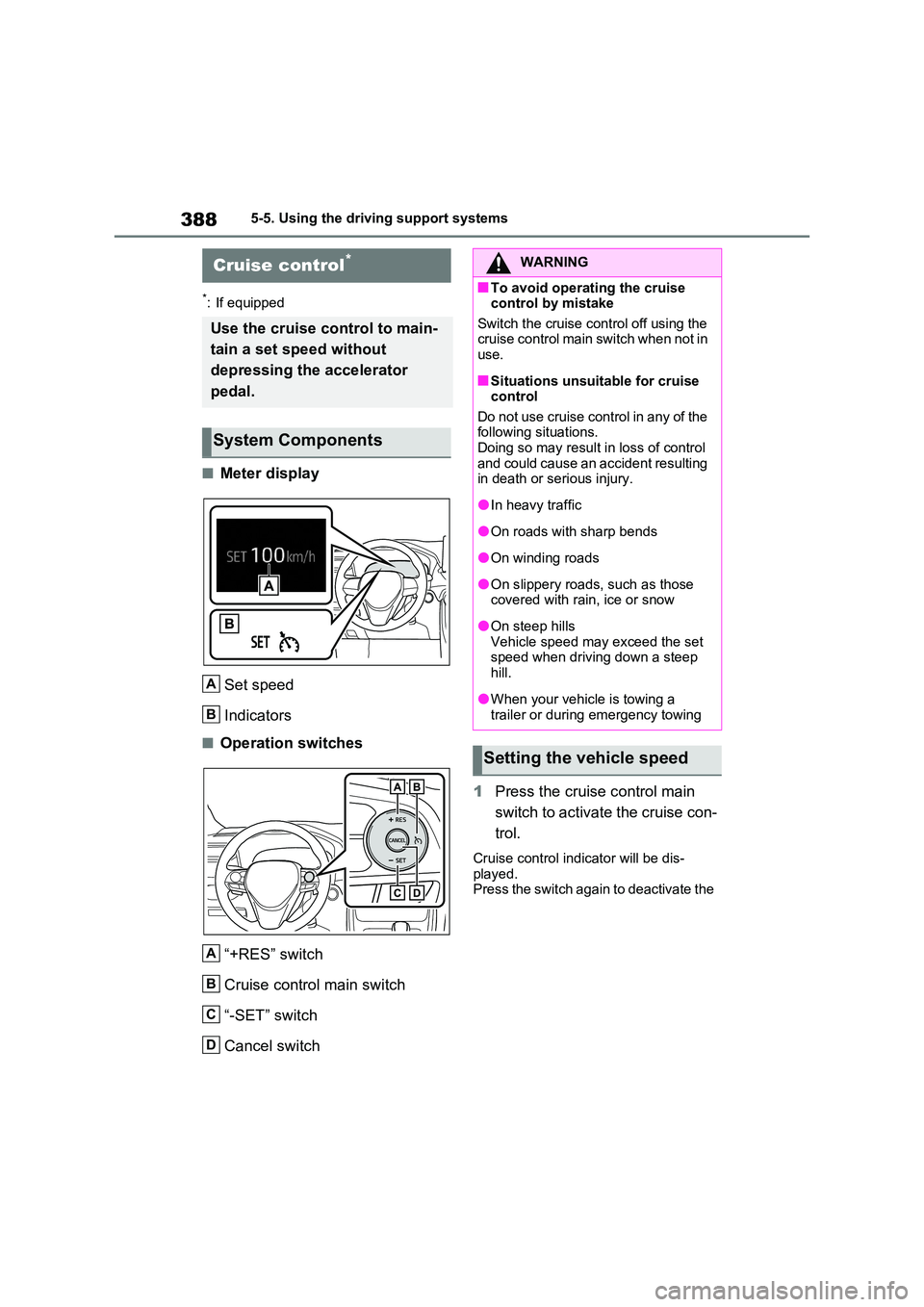
■Meter display
Set speed
Indicators
■Operation switches
“+RES” switch
Cruise control main switch
“-SET” switch
Cancel switch
1 Press the cruise control main
switch to activate the cruise con-
trol.
Cruise control indicator will be dis- played.Press the switch again to deactivate the
Cruise control*
Use the cruise control to main-
tain a set speed without
depressing the accelerator
pedal.
System Components
A
B
A
B
C
D
WARNING
■To avoid operating the cruise control by mistake
Switch the cruise control off using the cruise control main switch when not in use.
■Situations unsuitable for cruise control
Do not use cruise control in any of the following situations.Doing so may result in loss of control
and could cause an accident resulting in death or serious injury.
●In heavy traffic
●On roads with sharp bends
●On winding roads
●On slippery roads, such as those covered with rain, ice or snow
●On steep hillsVehicle speed may exceed the set speed when driving down a steep
hill.
●When your vehicle is towing a
trailer or during emergency towing
Setting the vehicle speed
Page 391 of 664
391
5
5-5. Using the driving support systems
Driving
*: If equipped
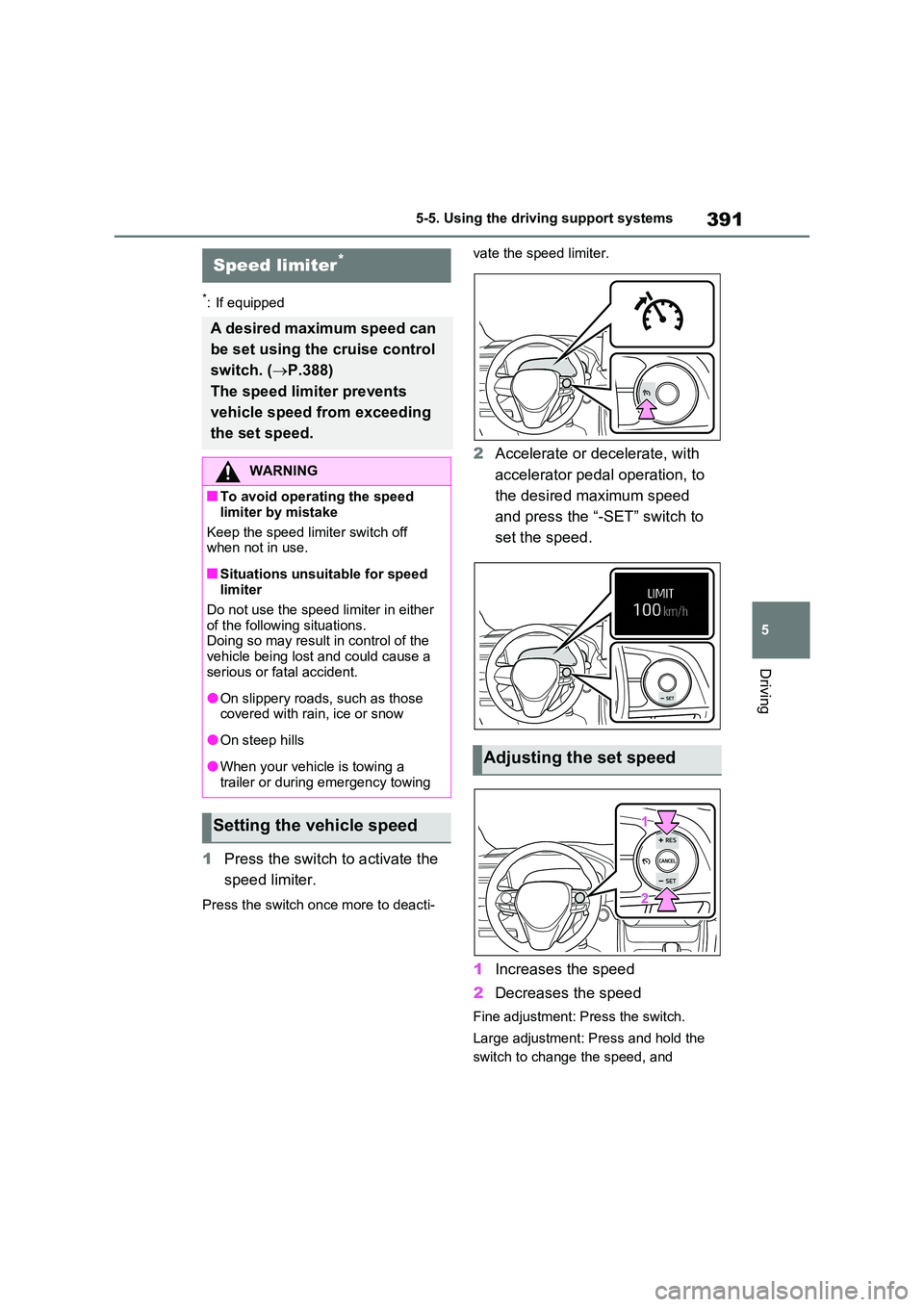
1 Press the switch to activate the
speed limiter.
Press the switch once more to deacti-
vate the speed limiter.
2 Accelerate or decelerate, with
accelerator pedal operation, to
the desired maximum speed
and press the “-SET” switch to
set the speed.
1 Increases the speed
2 Decreases the speed
Fine adjustment: Press the switch.
Large adjustment: Press and hold the
switch to change the speed, and
Speed limiter*
A desired maximum speed can
be set using the cruise control
switch. ( P.388)
The speed limiter prevents
vehicle speed from exceeding
the set speed.
WARNING
■To avoid operating the speed
limiter by mistake
Keep the speed limiter switch off when not in use.
■Situations unsuitable for speed limiter
Do not use the speed limiter in either of the following situations. Doing so may result in control of the
vehicle being lost and could cause a serious or fatal accident.
●On slippery roads, such as those covered with rain, ice or snow
●On steep hills
●When your vehicle is towing a
trailer or during emergency towing
Setting the vehicle speed
Adjusting the set speed
Page 410 of 664

4105-5. Using the driving support systems
■The BSM function is operational
when
The BSM function is operational when
all of the following conditions are met:
●The BSM function is on.
●The shift lever is in a position other
than R.
●The vehicle speed is greater than
approximately 16 km/h (10 mph).
■The BSM function will detect a
vehicle when
The BSM function will detect a vehicle
present in the detection area in the fol-
lowing situations:
●A vehicle in an adjacent lane over-
takes your vehicle.
●You overtake a vehicle in an adjacent
lane slowly.
●Another vehicle enters the detection
area when it changes lanes.
■Conditions under which the BSM
function will not detect a vehicle
The BSM function is not designed to
detect the following types of vehicles
and/or objects:
●Small motorcycles, bicycles, pedestri-
ans, etc.*
●Vehicles traveling in the opposite
direction
●Guardrails, walls, signs, parked vehi-
cles and similar stationary objects*
●Following vehicles that are in the
same lane*
●Vehicles traveling 2 lanes away from
your vehicle*
●Vehicles which are being overtaken
rapidly by your vehicle
*: Depending on the conditions, detec-
tion of a vehicle and/or object may
occur.
■Conditions under which the BSM
function may not function correctly
●The BSM function may not detect
vehicles correctly in the following situ-
ations:
• When the sensor is misaligned due to
a strong impact to the sensor or its
surrounding area
• When mud, snow, ice, a sticker, etc. is
covering the sensor or surrounding
area on the rear bumper
• When driving on a road surface that is
wet with standing water during bad
weather, such as heavy rain, snow, or
fog
• When multiple vehicles are approach-
ing with only a small gap between
each vehicle
• When the distance between your vehi-
cle and a following vehicle is short
• When there is a significant difference
in speed between your vehicle and
the vehicle that enters the detection
area
• When the difference in speed
between your vehicle and another
vehicle is changing
• When a vehicle enters a detection
area traveling at about the same
speed as your vehicle
• As your vehicle starts from a stop, a
vehicle remains in the detection area
• When driving up and down consecu-
tive steep inclines, such as hills, dips
in the road, etc.
• When driving on roads with sharp
bends, consecutive curves, or uneven
surfaces
• When vehicle lanes are wide, or when
driving on the edge of a lane, and the
vehicle in an adjacent lane is far away
from your vehicle
• When an accessory (such as a bicycle
carrier) is installed to the rear of the
vehicle
• When there is a significant difference
in height between your vehicle and
the vehicle that enters the detection
area
• Immediately after the BSM func-
tion/RCTA function are turned on
• When towing a trailer
Page 413 of 664

413
5 5-5. Using the driving support systems
Driving
a strong impact to the sensor or its
surrounding area
• When mud, snow, ice, a sticker, etc. is
covering the sensor or surrounding
area on the rear bumper
• When driving on a road surface that is
wet with standing water during bad
weather, such as heavy rain, snow, or
fog
• When multiple vehicles are approach-
ing with only a small gap between
each vehicle
• When a vehicle is approaching at high
speed
• When parking on a steep incline, such
as hills, a dip in the road, etc.
• When an accessory (such as a bicycle
carrier) is installed to the rear of the
vehicle
• When backing up on a slope with a
sharp change in grade
• When backing out of a shallow angle
parking spot
• Immediately after the RCTA function
is turned on
• Immediately after the hybrid system is started with the RCTA function on
• When towing a trailer
• When the sensors cannot detect a
vehicle due to obstructions
●Instances of the RCTA function
unnecessary detecting a vehicle
and/or object may increase in the fol-
lowing situations:
• When a vehicle passes by the side of
your vehicle
• When the parking space faces a
street and vehicles are being driven
on the street
• When the distance between your vehi-
cle and metal objects, such as a
guardrail, wall, sign, or parked vehicle,
which may reflect electrical waves
toward the rear of the vehicle, is short
• When an accessory (such as a bicycle
carrier) is installed to the rear of the
vehicle
Page 416 of 664

4165-5. Using the driving support systems
■The system can be operated when
●The power switch is in ON.
●Toyota parking assist-sensor function is on.
●The vehicle speed is less than about 10 km/h (6 mph).
●The shift lever is in other than P.
■If “Clean Parking Assist Sensor” is displayed on the multi-information
display
A sensor may be covered with ice,
snow, dirt, etc. Remove the ice, snow, dirt, etc., from the sensor to return the system to normal.
Also, due to ice forming on a sensor at low temperatures, a warning message may be displayed or the sensor may not
be able to detect an object. Once the ice melts, the system will return to normal.
If a warning message is displayed even
if the sensor is clean, there may be a sensor malfunction. Have the vehicle inspected by any authorized Toyota
retailer or Toyota authorized repairer, or any reliable repairer.
WARNING
●The area directly under the bum-pers is not detected.
Thin posts or objects lower than the sensor may not be detected when approached, even if they have been
detected once.
■When to disable the function
In the following situations, disable the function as it may operate even though there is no possibility of a colli-
sion.
●The vehicle is equipped with a com- mercial fender pole, wireless
antenna or fog lights.
●The front or rear bumper or a sen-
sor receives a strong impact.
●A non-genuine Toyota suspension
(lowered suspension, etc.) is installed.
●Towing eyelets are installed.
●A backlit license plate is installed.
●When using an automatic car wash
■When using the Toyota parking assist-sensor
In the following situations, the system
may not function correctly due to a sensor malfunction, etc. Have the vehicle checked by any authorized
Toyota retailer or Toyota authorized repairer, or any reliable repairer.
●The Toyota parking assist-sensor operation display flashes or shows continuously, and a beep sounds
when no objects are detected.
●If the area around a sensor collides
with something, or is subjected to strong impact.
●If the bumper or grille collides with something.
●If the display flashes or is displayed continuously and a buzzer does not sound, except when the mute func-
tion has been turned on.
■Notes when washing the vehicle
Do not apply intensive bursts of water or steam to the sensor area.
Doing so may result in the sensor
malfunctioning.
●When using a high pressure
washer to wash the vehicle, do not spray the sensors directly, as doing so may cause a sensor to malfunc-
tion.
●When using steam to clean the
vehicle, do not direct steam too close to the sensors as doing so may cause a sensor to malfunction.
Page 429 of 664
429
5 5-5. Using the driving support systems
Driving
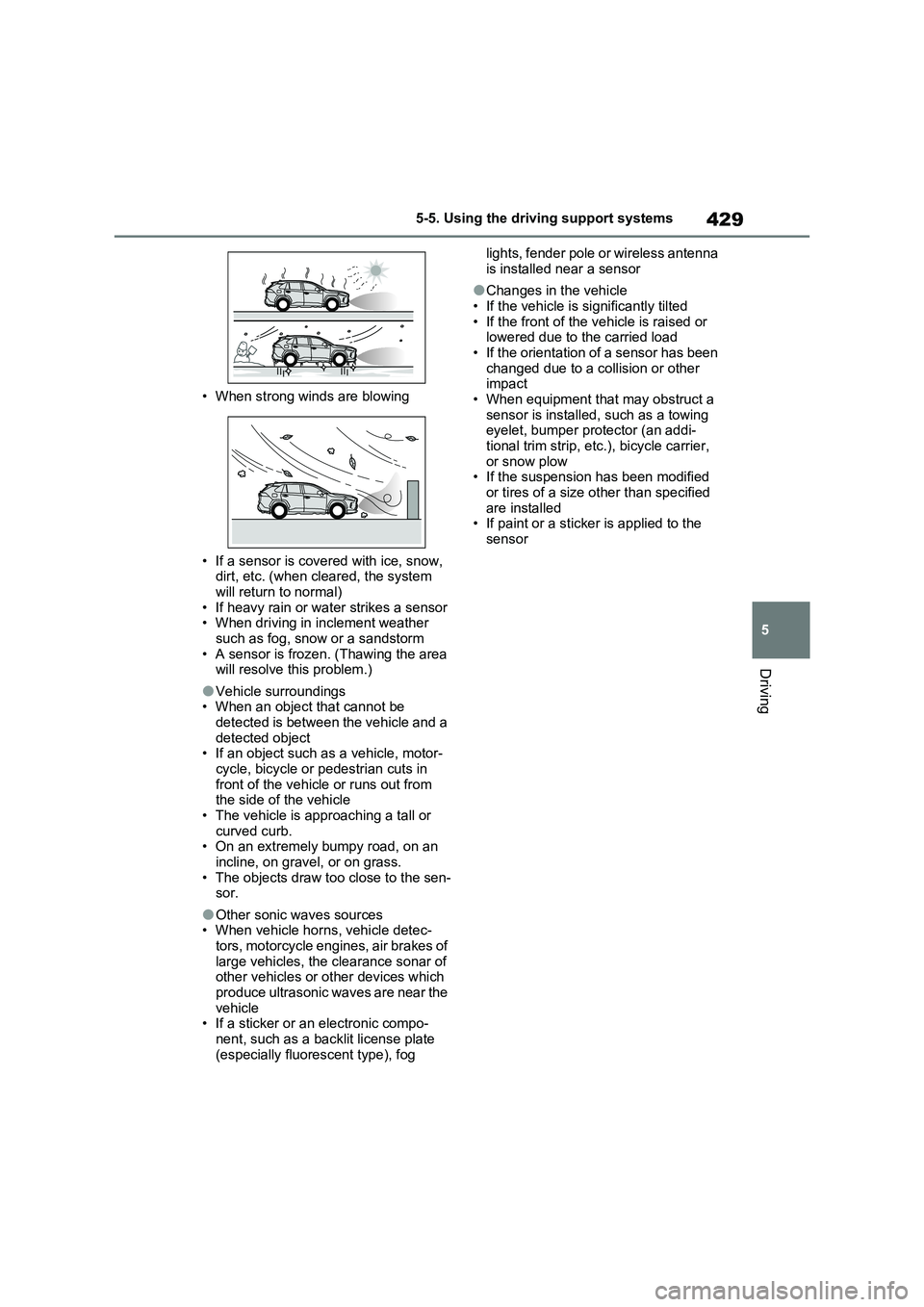
• When strong winds are blowing
• If a sensor is covered with ice, snow,
dirt, etc. (when cleared, the system
will return to normal)
• If heavy rain or water strikes a sensor
• When driving in inclement weather
such as fog, snow or a sandstorm
• A sensor is frozen. (Thawing the area
will resolve this problem.)
●Vehicle surroundings
• When an object that cannot be
detected is between the vehicle and a
detected object
• If an object such as a vehicle, motor-
cycle, bicycle or pedestrian cuts in
front of the vehicle or runs out from
the side of the vehicle
• The vehicle is approaching a tall or
curved curb.
• On an extremely bumpy road, on an
incline, on gravel, or on grass.
• The objects draw too close to the sen-
sor.
●Other sonic waves sources
• When vehicle horns, vehicle detec-
tors, motorcycle engines, air brakes of
large vehicles, the clearance sonar of
other vehicles or other devices which
produce ultrasonic waves are near the
vehicle
• If a sticker or an electronic compo-
nent, such as a backlit license plate
(especially fluorescent type), fog lights, fender pole or wireless antenna
is installed near a sensor
●Changes in the vehicle
• If the vehicle is significantly tilted
• If the front of the vehicle is raised or
lowered due to the carried load
• If the orientation of a sensor has been
changed due to a collision or other
impact
• When equipment that may obstruct a
sensor is installed, such as a towing
eyelet, bumper protector (an addi-
tional trim strip, etc.), bicycle carrier,
or snow plow
• If the suspension has been modified
or tires of a size other than specified
are installed
• If paint or a sticker is applied to the
sensor
Page 432 of 664
4325-5. Using the driving support systems
approximately 24 km/h (15 mph)
*: Depending on the conditions, detec-
tion of a vehicle and/or object may
occur.
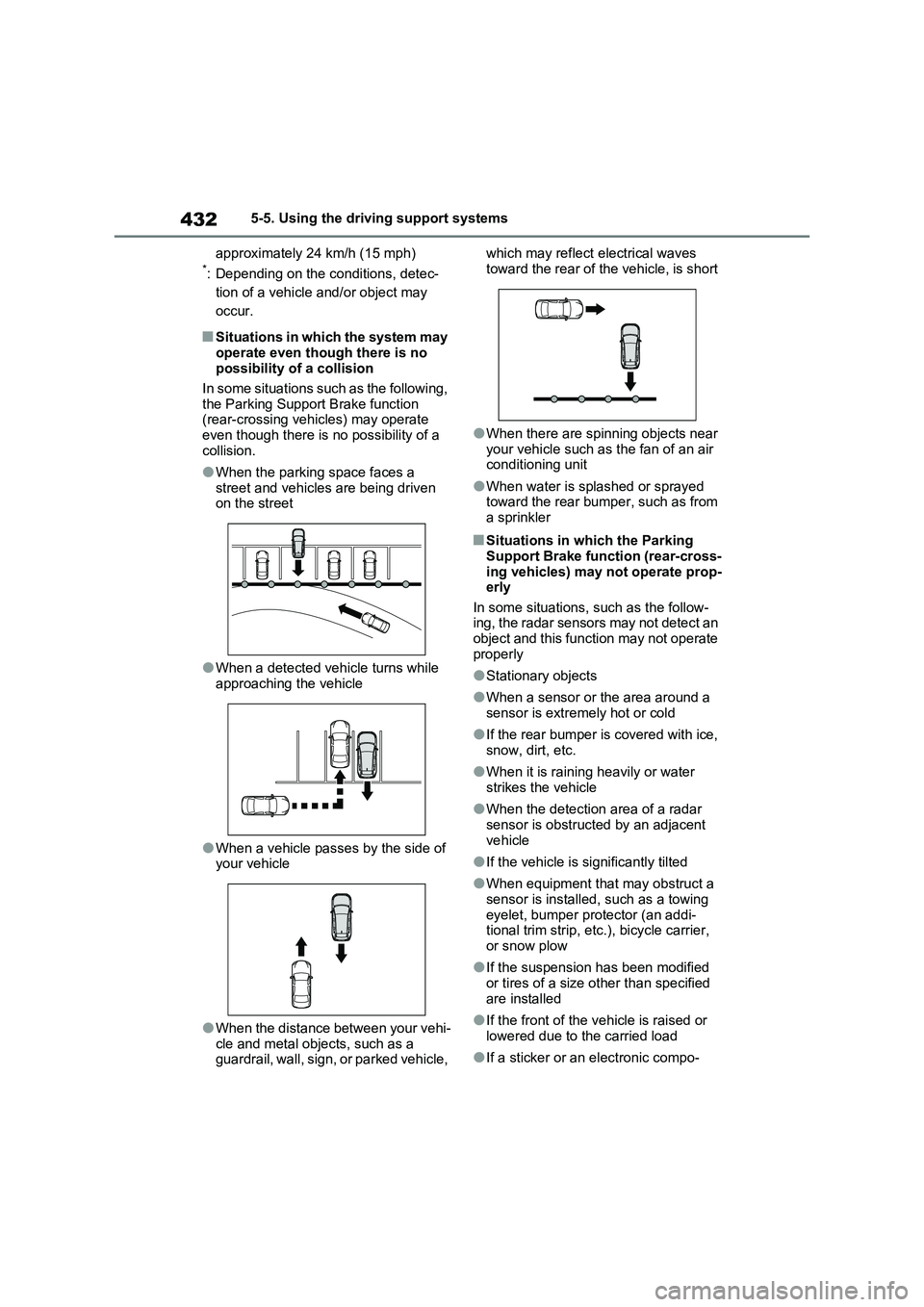
■Situations in which the system may
operate even though there is no
possibility of a collision
In some situations such as the following,
the Parking Support Brake function
(rear-crossing vehicles) may operate
even though there is no possibility of a
collision.
●When the parking space faces a
street and vehicles are being driven
on the street
●When a detected vehicle turns while
approaching the vehicle
●When a vehicle passes by the side of
your vehicle
●When the distance between your vehi-
cle and metal objects, such as a
guardrail, wall, sign, or parked vehicle, which may reflect electrical waves
toward the rear of the vehicle, is short
●When there are spinning objects near
your vehicle such as the fan of an air
conditioning unit
●When water is splashed or sprayed
toward the rear bumper, such as from
a sprinkler
■Situations in which the Parking
Support Brake function (rear-cross-
ing vehicles) may not operate prop-
erly
In some situations, such as the follow-
ing, the radar sensors may not detect an
object and this function may not operate
properly
●Stationary objects
●When a sensor or the area around a
sensor is extremely hot or cold
●If the rear bumper is covered with ice,
snow, dirt, etc.
●When it is raining heavily or water
strikes the vehicle
●When the detection area of a radar
sensor is obstructed by an adjacent
vehicle
●If the vehicle is significantly tilted
●When equipment that may obstruct a
sensor is installed, such as a towing
eyelet, bumper protector (an addi-
tional trim strip, etc.), bicycle carrier,
or snow plow
●If the suspension has been modified
or tires of a size other than specified
are installed
●If the front of the vehicle is raised or
lowered due to the carried load
●If a sticker or an electronic compo-