2011 TOYOTA VERSO S navigation
[x] Cancel search: navigationPage 196 of 664
1963-1. Instrument cluster
and select , and then press
or to select the energy mon-
itor display.
Audio system screen (without
navigation function)
1Press the “MENU” button.
2Select “Info” on the “Menu”
screen.
If a screen other than “Energy monitor”
is displayed, select “Energy”.
Audio system screen (with navi-
gation function)
1Press the “MENU” button.
2Select “Info” on the “Menu”
screen.
3Select “ECO” on the “Informa-
tion” screen.
If a screen other than “Energy monitor”
is displayed, select “Energy”.
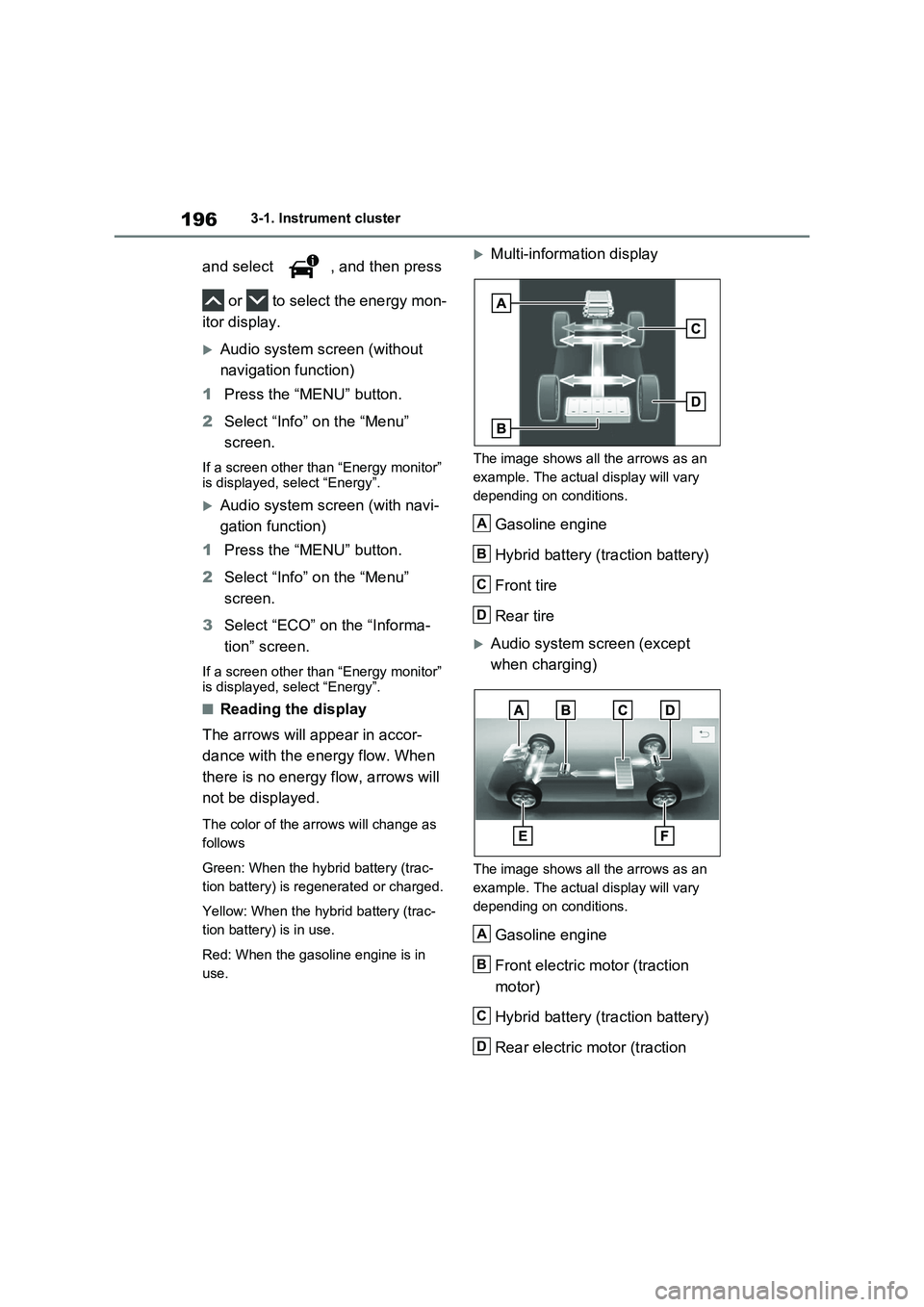
■Reading the display
The arrows will appear in accor-
dance with the energy flow. When
there is no energy flow, arrows will
not be displayed.
The color of the arrows will change as
follows
Green: When the hybrid battery (trac-
tion battery) is regenerated or charged.
Yellow: When the hybrid battery (trac-
tion battery) is in use.
Red: When the gasoline engine is in
use.
Multi-information display
The image shows all the arrows as an
example. The actual display will vary
depending on conditions.
Gasoline engine
Hybrid battery (traction battery)
Front tire
Rear tire
Audio system screen (except
when charging)
The image shows all the arrows as an
example. The actual display will vary
depending on conditions.
Gasoline engine
Front electric motor (traction
motor)
Hybrid battery (traction battery)
Rear electric motor (traction
A
B
C
D
A
B
C
D
Page 198 of 664
1983-1. Instrument cluster
warming up is finished.
Hybrid system output may be restricted
when the gasoline engine is displayed in
blue.
■Display
Audio system without navigation
function
1Press the “MENU” button.
2Select “Info” on the “Menu”
screen.
3Select “Trip information” or “His-
tory”.
Audio system with navigation
function
1Press the “MENU” button.
2Select “Info” on the “Menu”
screen.
3Select “ECO” on the “Informa-
tion” screen.
4Select “Trip information” or “His-
tory”.
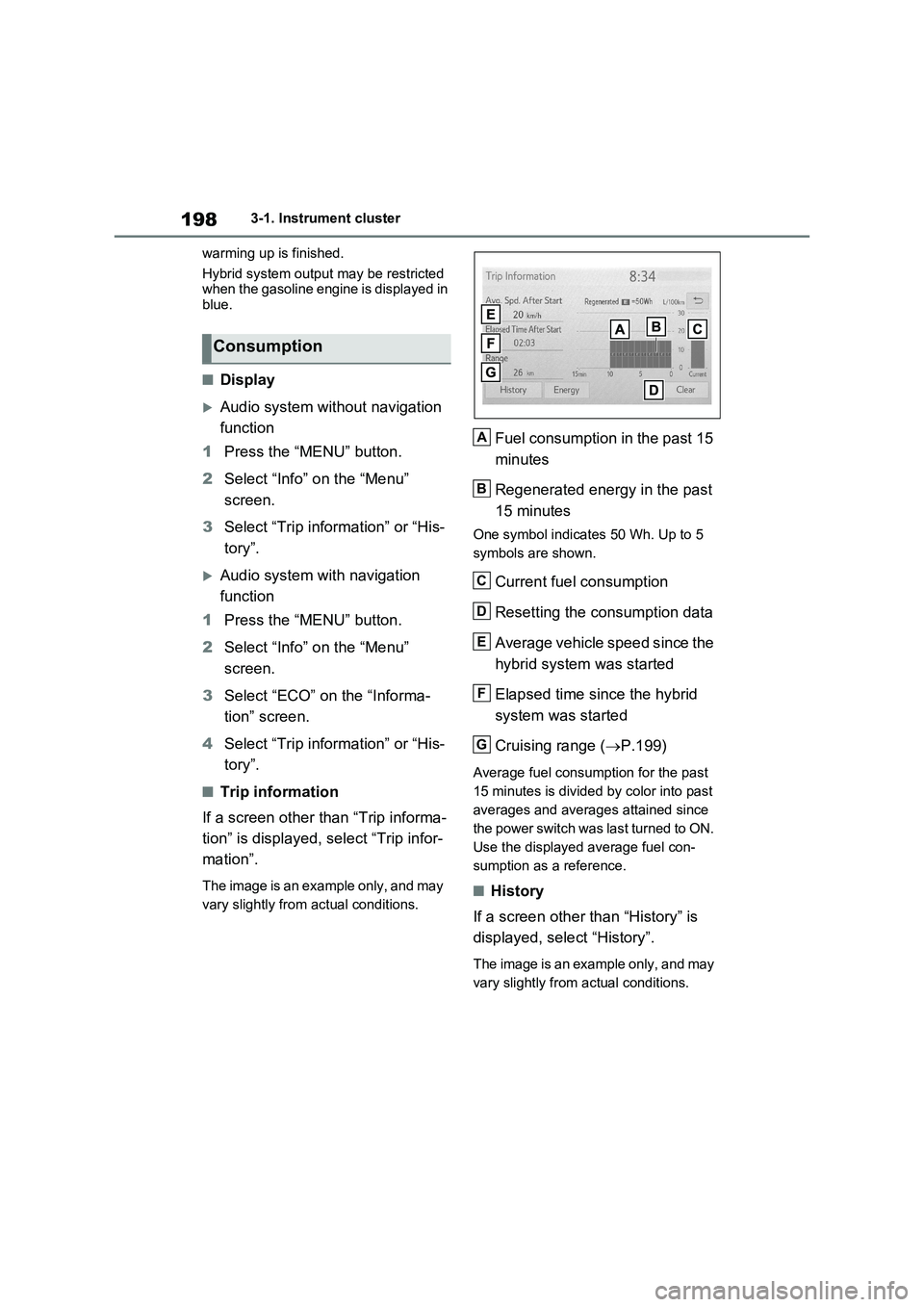
■Trip information
If a screen other than “Trip informa-
tion” is displayed, select “Trip infor-
mation”.
The image is an example only, and may
vary slightly from actual conditions.
Fuel consumption in the past 15
minutes
Regenerated energy in the past
15 minutes
One symbol indicates 50 Wh. Up to 5
symbols are shown.
Current fuel consumption
Resetting the consumption data
Average vehicle speed since the
hybrid system was started
Elapsed time since the hybrid
system was started
Cruising range (P.199)
Average fuel consumption for the past
15 minutes is divided by color into past
averages and averages attained since
the power switch was last turned to ON.
Use the displayed average fuel con-
sumption as a reference.
■History
If a screen other than “History” is
displayed, select “History”.
The image is an example only, and may
vary slightly from actual conditions.
Consumption
A
B
C
D
E
F
G
Page 199 of 664
199
3 3-1. Instrument cluster
Vehicle status information and indicators
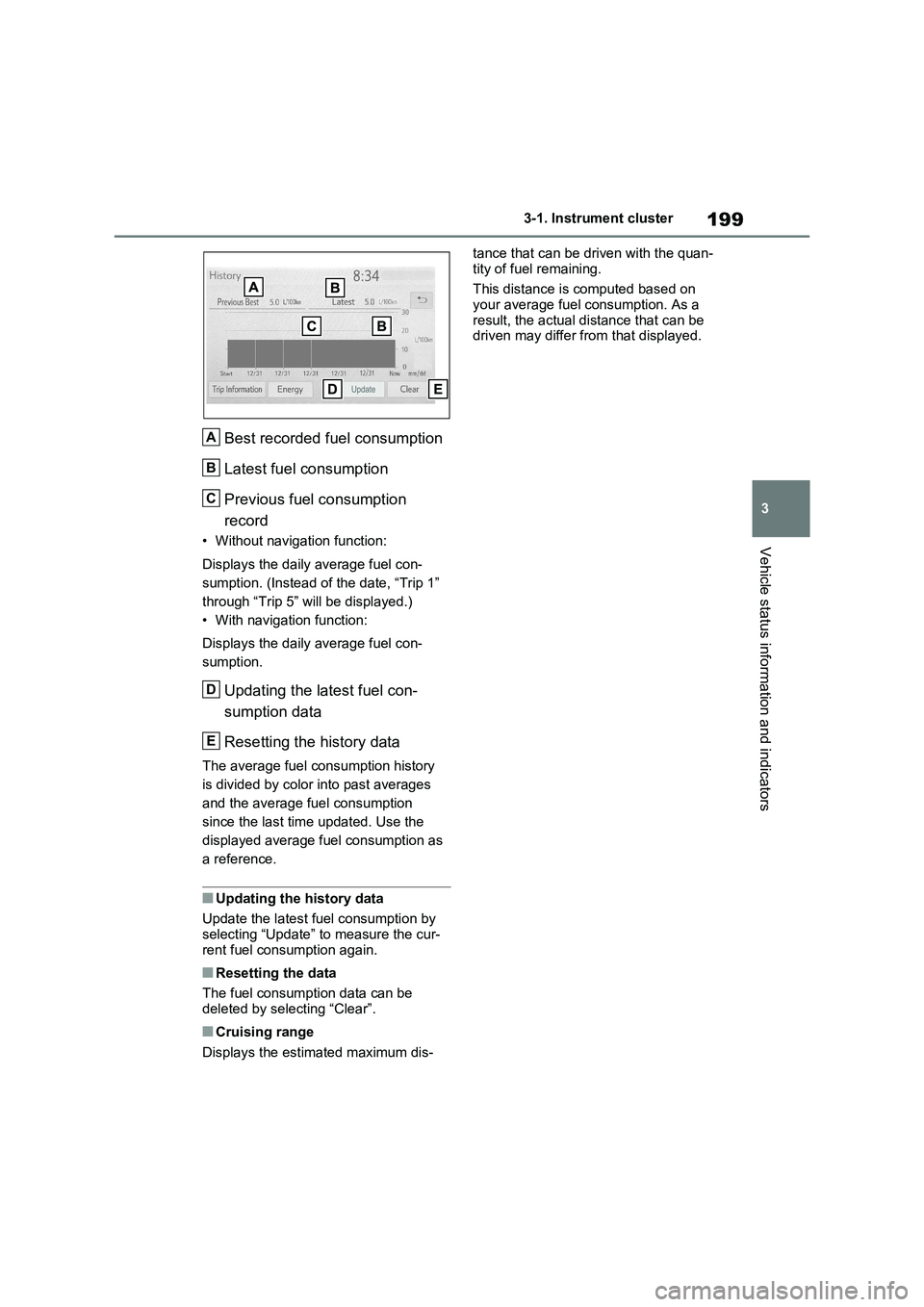
Best recorded fuel consumption
Latest fuel consumption
Previous fuel consumption
record
• Without navigation function:
Displays the daily average fuel con-
sumption. (Instead of the date, “Trip 1”
through “Trip 5” will be displayed.)
• With navigation function:
Displays the daily average fuel con-
sumption.
Updating the latest fuel con-
sumption data
Resetting the history data
The average fuel consumption history
is divided by color into past averages
and the average fuel consumption
since the last time updated. Use the
displayed average fuel consumption as
a reference.
■Updating the history data
Update the latest fuel consumption by
selecting “Update” to measure the cur-
rent fuel consumption again.
■Resetting the data
The fuel consumption data can be
deleted by selecting “Clear”.
■Cruising range
Displays the estimated maximum dis-tance that can be driven with the quan-
tity of fuel remaining.
This distance is computed based on
your average fuel consumption. As a
result, the actual distance that can be
driven may differ from that displayed.
A
B
C
D
E
Page 373 of 664
373
5 5-5. Using the driving support systems
Driving
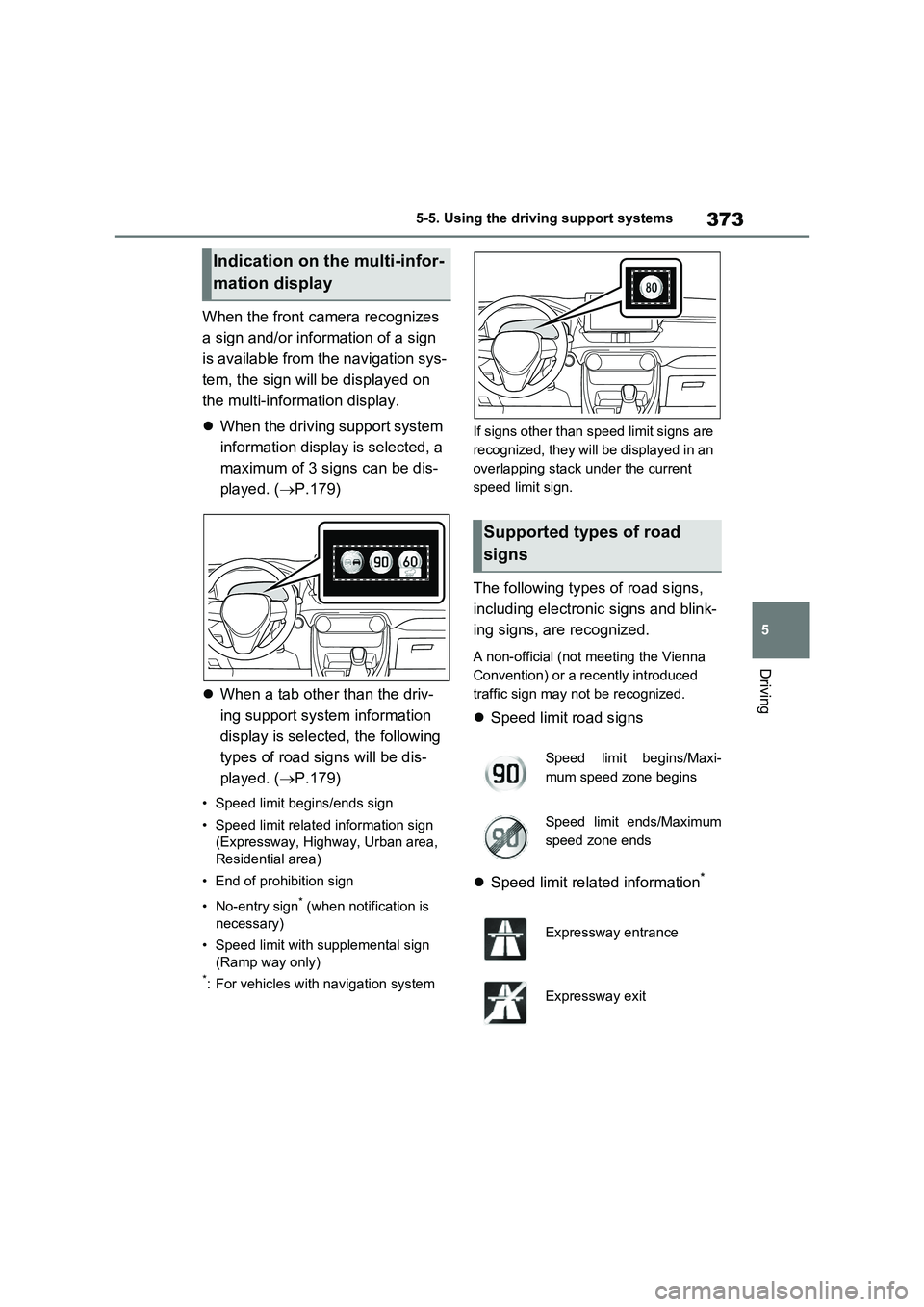
When the front camera recognizes
a sign and/or information of a sign
is available from the navigation sys-
tem, the sign will be displayed on
the multi-information display.
When the driving support system
information display is selected, a
maximum of 3 signs can be dis-
played. (P.179)
When a tab other than the driv-
ing support system information
display is selected, the following
types of road signs will be dis-
played. (P.179)
• Speed limit begins/ends sign
• Speed limit related information sign
(Expressway, Highway, Urban area,
Residential area)
• End of prohibition sign
• No-entry sign
* (when notification is
necessary)
• Speed limit with supplemental sign
(Ramp way only)
*: For vehicles with navigation systemIf signs other than speed limit signs are
recognized, they will be displayed in an
overlapping stack under the current
speed limit sign.
The following types of road signs,
including electronic signs and blink-
ing signs, are recognized.
A non-official (not meeting the Vienna
Convention) or a recently introduced
traffic sign may not be recognized.
Speed limit road signs
Speed limit related information
*
Indication on the multi-infor-
mation display
Supported types of road
signs
Speed limit begins/Maxi-
mum speed zone begins
Speed limit ends/Maximum
speed zone ends
Expressway entrance
Expressway exit
Page 374 of 664
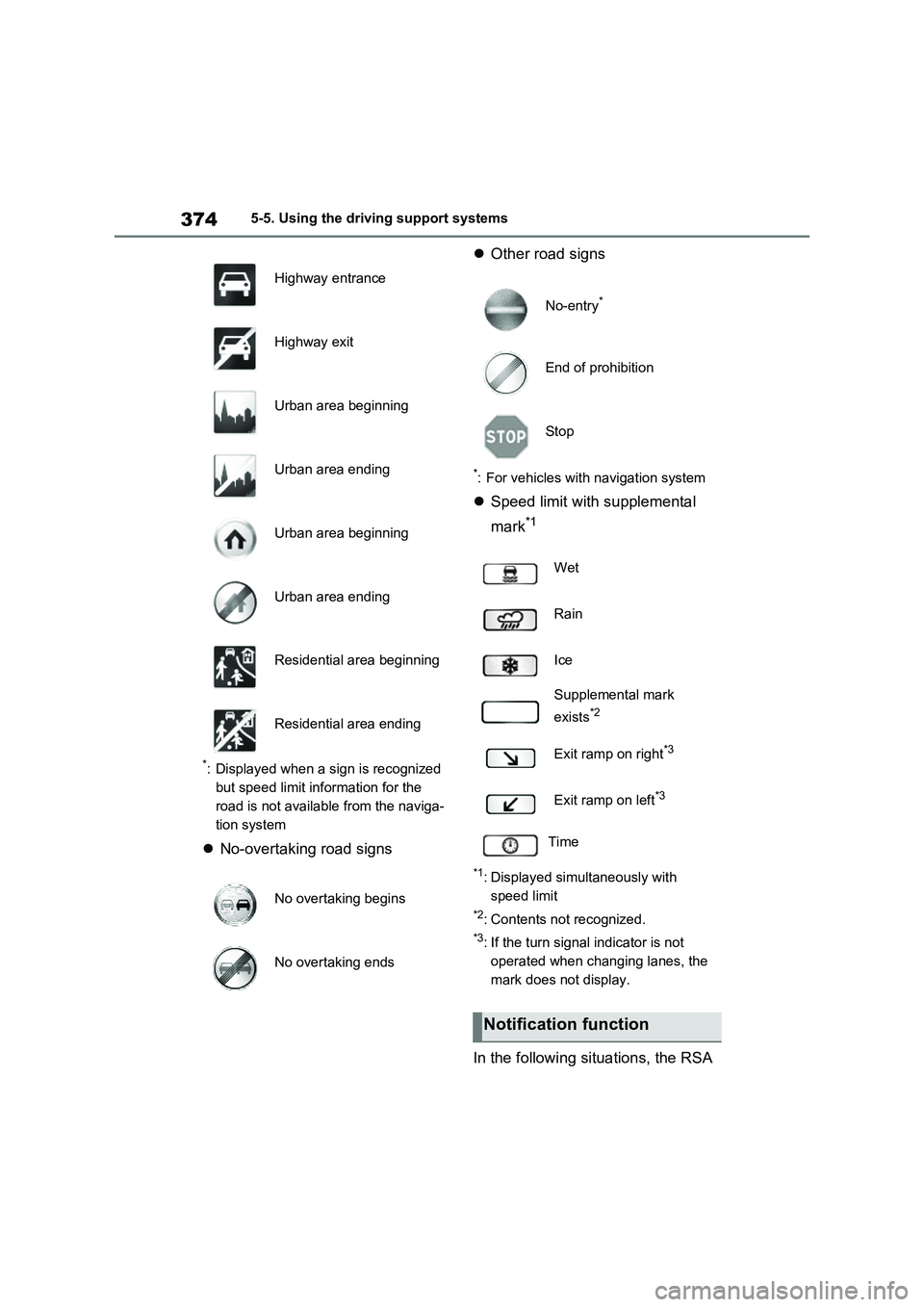
3745-5. Using the driving support systems
*: Displayed when a sign is recognized
but speed limit information for the
road is not available from the naviga-
tion system
No-overtaking road signsOther road signs
*: For vehicles with navigation system
Speed limit with supplemental
mark
*1
*1: Displayed simultaneously with
speed limit
*2: Contents not recognized.
*3: If the turn signal indicator is not
operated when changing lanes, the
mark does not display.
In the following situations, the RSA
Highway entrance
Highway exit
Urban area beginning
Urban area ending
Urban area beginning
Urban area ending
Residential area beginning
Residential area ending
No overtaking begins
No overtaking ends
No-entry*
End of prohibition
Stop
Wet
Rain
Ice
Supplemental mark
exists
*2
Exit ramp on right*3
Exit ramp on left*3
Time
Notification function
Page 375 of 664

375
5 5-5. Using the driving support systems
Driving
system will notify the driver.
When the vehicle speed exceeds
the speed notification threshold
of the speed limit sign displayed,
the sign display will be empha-
sized and a buzzer will sound.
When the RSA system recog-
nizes a no-entry sign and detects
that the vehicle has entered a
no-entry area based on the map
information of the navigation sys-
tem, the no-entry sign flashes
and a buzzer will sound. (For
vehicles with navigation system)
If it is detected that your vehicle
is overtaking when a no overtak-
ing sign is displayed on the multi-
information display, the dis-
played sign will flash and a steer-
ing wheel will vibrate.
Depending on the situation, traffic
environment (traffic direction,
speed unit) may be detected incor-
rectly and a notification function
may not operate properly.
■Setting procedure
P.186
■Automatic turn-off of RSA sign dis-
play
One or more signs automatically turn off
in the following situations.
●No sign has been recognized for a
certain distance.
●The road changes due to a left or right
turn, etc.
■Conditions in which the function
may not operate or detect correctly
In the following situations, RSA does not
operate normally and may not recognize signs, display the incorrect sign, etc.
However, this does not indicate a mal-
function.
●The front camera is misaligned due to
a strong impact being applied to the
sensor, etc.
●Dirt, snow, stickers, etc. are on the
windshield near the front camera.
●In inclement weather such as heavy
rain, fog, snow or sand storms.
●Light from an oncoming vehicle, the
sun, etc. enters the front camera.
●The sign is dirty, faded, tilted or bent.
●The contrast of electronic sign is low.
●All or part of the sign is hidden by the
leaves of a tree, a pole, etc.
●The sign is only visible to the front
camera for a short amount of time.
●The driving scene (turning, lane
change, etc.) is judged incorrectly.
●If a sign not appropriate for the cur-
rently traveled lane, but the sign exists
directly after a freeway branches, or in
an adjacent lane just before merging.
●Stickers are attached to the rear of the
preceding vehicle.
●A sign resembling a system compati-
ble sign is recognized.
●Side road speed signs may be
detected and displayed (if positioned
in sight of the front camera) while the
vehicle is traveling on the main road.
●Roundabout exit road speed signs
may be detected and displayed (if
positioned in sight of the front camera)
while traveling on a roundabout.
●The front of the vehicle is raised or
lowered due to the carried load.
●The surrounding brightness is not suf-
ficient or changes suddenly.
●When a sign intended for trucks, etc.
is recognized.
●The vehicle is driven in a country with
a different direction of traffic.
●The navigation system map data is
Page 376 of 664
3765-5. Using the driving support systems
outdated. (For vehicles with naviga-
tion system)
●The navigation system is not operat-
ing. (For vehicles with navigation sys-
tem)
●The speed information displayed on
the meter and on the navigation sys-
tem may be different due to the navi-
gation system using map data.
■Speed limit sign display
If the power switch was last turned off
while a speed limit sign was displayed
on the multi-information display, the
same sign displays again when the
power switch is turned to ON.
■If “RSA Malfunction Visit Your
Dealer” is shown
The system may be malfunctioning.
Have the vehicle inspected by any
authorized Toyota retailer or Toyota
authorized repairer, or any reliable
repairer.
■Customization
Some functions can be customized.
(Customizable features: P.186)
*: If equipped
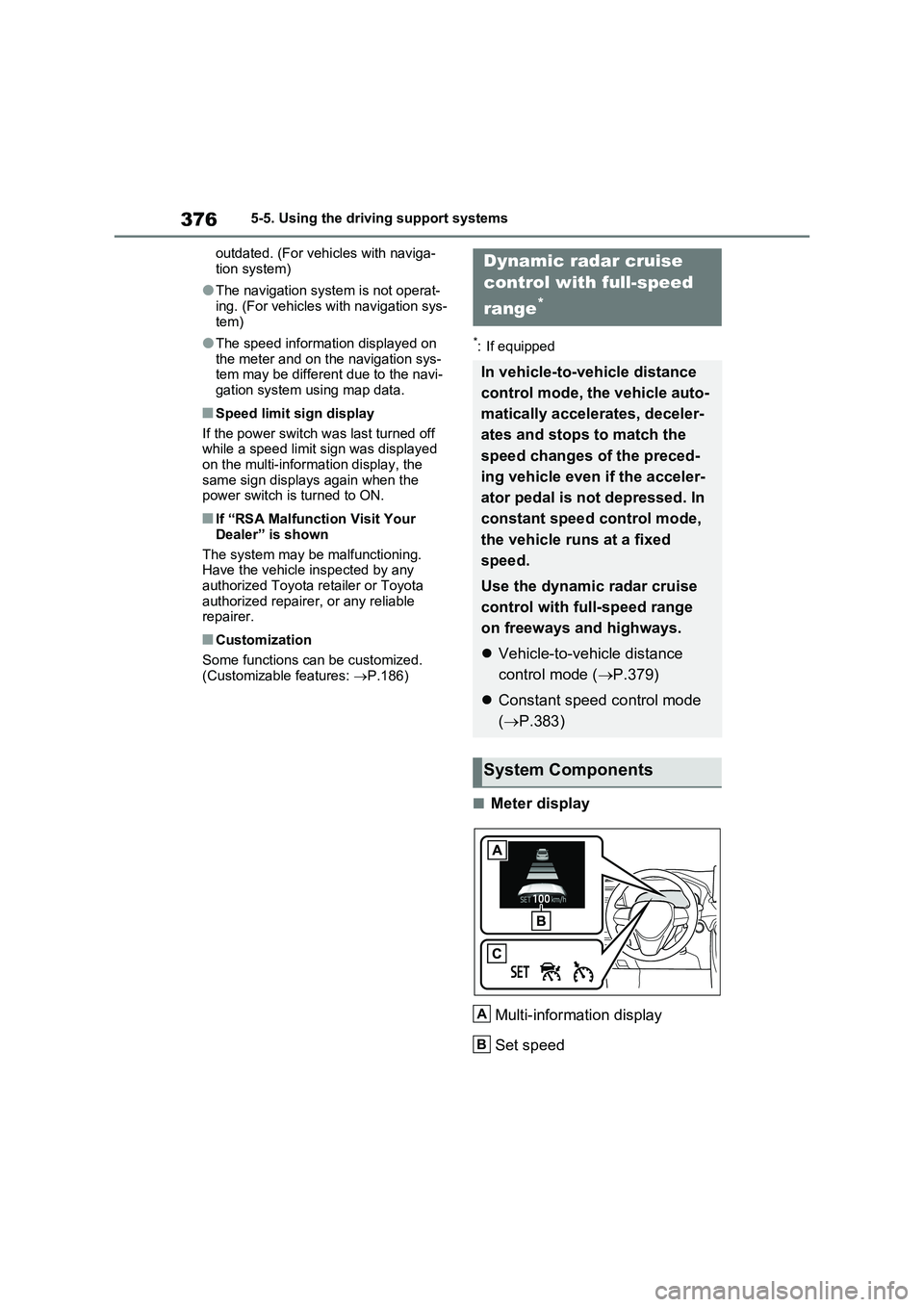
■Meter display
Multi-information display
Set speed
Dynamic radar cruise
control with full-speed
range
*
In vehicle-to-vehicle distance
control mode, the vehicle auto-
matically accelerates, deceler-
ates and stops to match the
speed changes of the preced-
ing vehicle even if the acceler-
ator pedal is not depressed. In
constant speed control mode,
the vehicle runs at a fixed
speed.
Use the dynamic radar cruise
control with full-speed range
on freeways and highways.
Vehicle-to-vehicle distance
control mode (P.379)
Constant speed control mode
(P.383)
System Components
A
B
Page 411 of 664

411
5 5-5. Using the driving support systems
Driving
●Instances of the BSM function unnec-
essarily detecting a vehicle and/or
object may increase in the following
situations:
• When the sensor is misaligned due to
a strong impact to the sensor or its
surrounding area
• When the distance between your vehi-
cle and a guardrail, wall, etc. that
enters the detection area is short
• When driving up and down consecu-
tive steep inclines, such as hills, dips
in the road, etc.
• When vehicle lanes are narrow, or
when driving on the edge of a lane,
and a vehicle traveling in a lane other
than the adjacent lanes enters the
detection area
• When driving on roads with sharp
bends, consecutive curves, or uneven
surfaces
• When the tires are slipping or spinning
• When the distance between your vehi-
cle and a following vehicle is short
• When an accessory (such as a bicycle
carrier) is installed to the rear of the
vehicle
• When the vehicle throws up water or
snow behind.
■Operation of the RCTA func-
tion
The RCTA function uses radar sen-
sors to detect vehicles approaching
from the right or left at the rear of
the vehicle and alerts the driver of
the presence of such vehicles by
flashing the outside rear view mirror
indicators and sounding a buzzer.Approaching vehicles
Detection areas
■RCTA icon display
When a vehicle approaching from
the right or left at the rear of the
vehicle is detected, the following
will be displayed on the navigation
system (if equipped) or multimedia
system (if equipped) screen.
When the Toyota parking assist
monitor (if equipped) is displayed
When the panoramic view moni-
tor (if equipped) is displayed
The Rear Crossing Traffic
Alert function (if equipped)
A
B