Page 605 of 664
605
8
8-2. Steps to take in an emergency
When trouble arises
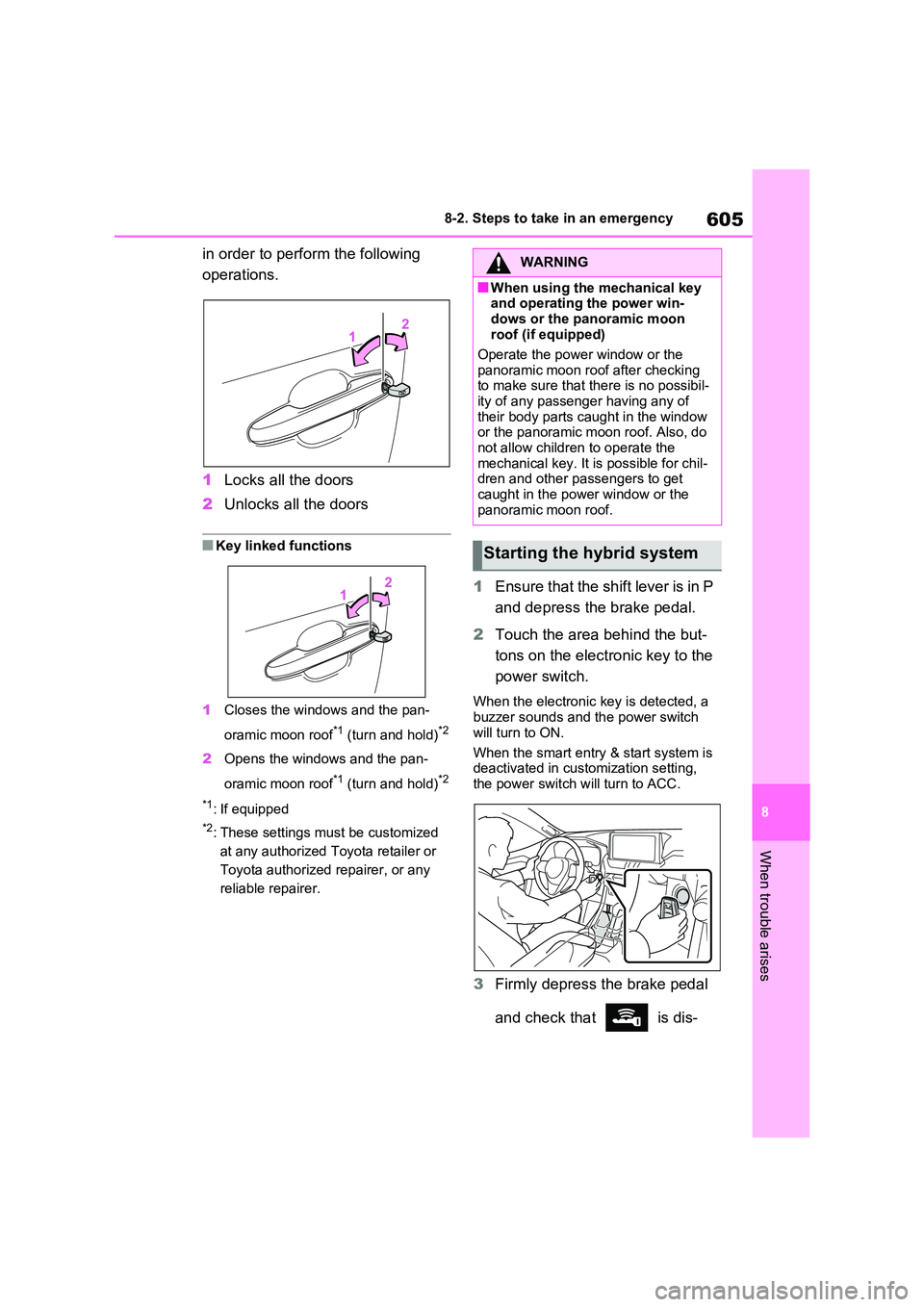
in order to perform the following
operations.
1 Locks all the doors
2 Unlocks all the doors
■Key linked functions
1 Closes the windows and the pan-
oramic moon roof*1 (turn and hold)*2
2 Opens the windows and the pan-
oramic moon roof*1 (turn and hold)*2
*1: If equipped
*2: These settings must be customized
at any authorized Toyota retailer or
Toyota authorized repairer, or any
reliable repairer.
1 Ensure that the shift lever is in P
and depress the brake pedal.
2 Touch the area behind the but-
tons on the electronic key to the
power switch.
When the electronic key is detected, a buzzer sounds and the power switch
will turn to ON.
When the smart entry & start system is deactivated in customization setting,
the power switch will turn to ACC.
3 Firmly depress the brake pedal
and check that is dis-
WARNING
■When using the mechanical key and operating the power win-
dows or the panoramic moon roof (if equipped)
Operate the power window or the
panoramic moon roof after checking to make sure that there is no possibil-ity of any passenger having any of
their body parts caught in the window or the panoramic moon roof. Also, do not allow children to operate the
mechanical key. It is possible for chil- dren and other passengers to get caught in the power window or the
panoramic moon roof.
Starting the hybrid system
Page 606 of 664
6068-2. Steps to take in an emergency
played on the multi-information
display.
4 Press the power switch shortly
and firmly.
In the event that the hybrid system
still cannot be started, contact any
authorized Toyota retailer or Toyota
authorized repairer, or any reliable
repairer.
■Stopping the hybrid system
Shift the shift lever to P, set the parking
brake and press the power switch as you normally do when stopping the hybrid system.
■Replacing the key battery
As the above procedure is a temporary measure, it is recommended that the electronic key battery be replaced
immediately when the battery is depleted. ( P.543)
■Alarm (if equipped)
Using the mechanical key to lock the
doors will not set the alarm system.
If a door is unlocked using the mechani- cal key when the alarm system is set,
the alarm may be triggered. ( P.78)
■Changing power switch modes
Release the brake pedal and press the power switch in step 3 above.
The hybrid system does not start and modes will be changed each time the switch is pressed. ( P.320)
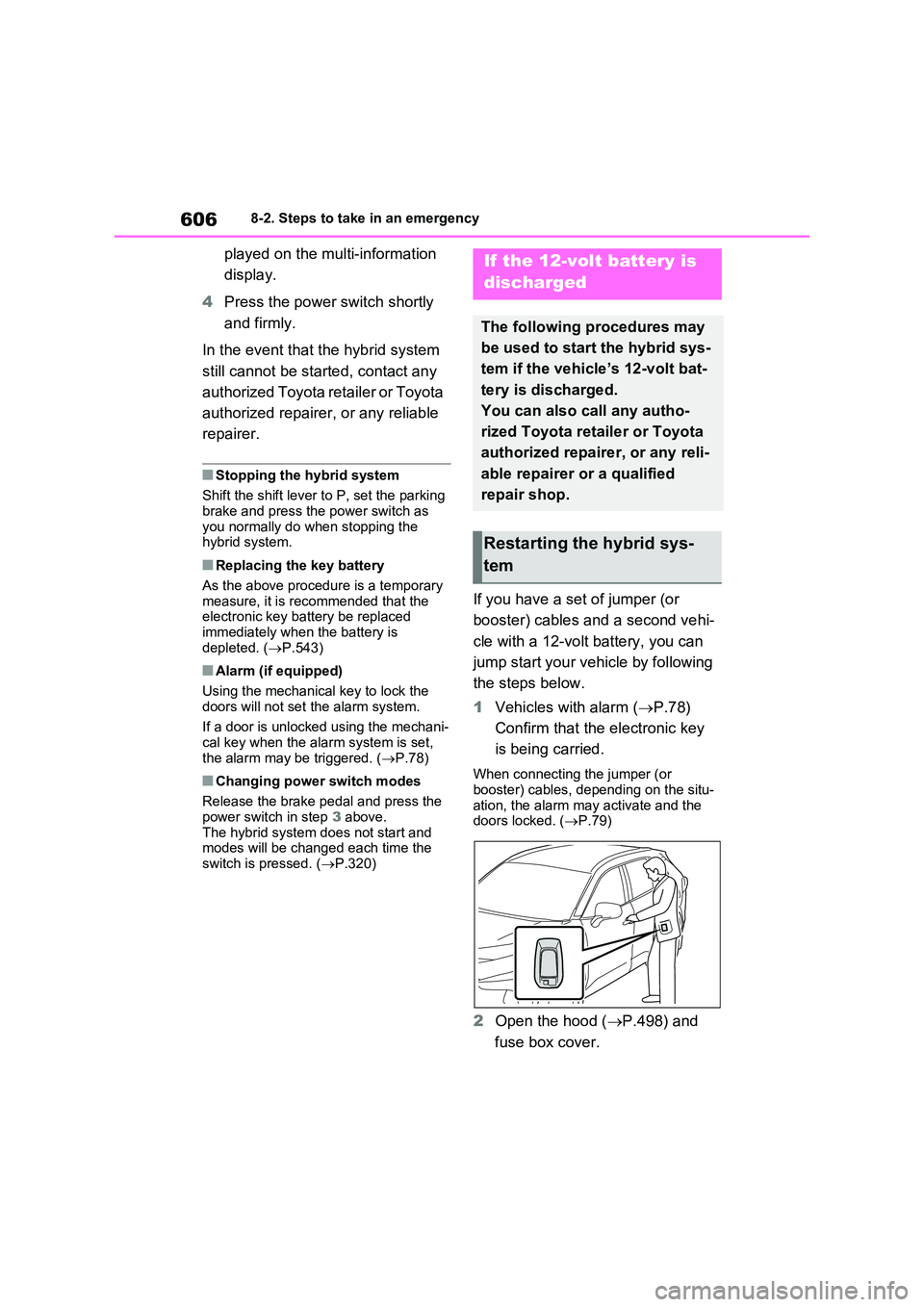
If you have a set of jumper (or
booster) cables and a second vehi-
cle with a 12-volt battery, you can
jump start your vehicle by following
the steps below.
1 Vehicles with alarm (P.78)
Confirm that the electronic key
is being carried.
When connecting the jumper (or booster) cables, depending on the situ-
ation, the alarm may activate and the doors locked. ( P.79)
2Open the hood (P.498) and
fuse box cover.
If the 12-volt battery is
discharged
The following procedures may
be used to start the hybrid sys-
tem if the vehicle’s 12-volt bat-
tery is discharged.
You can also call any autho-
rized Toyota retailer or Toyota
authorized repairer, or any reli-
able repairer or a qualified
repair shop.
Restarting the hybrid sys-
tem
Page 607 of 664
607
8
8-2. Steps to take in an emergency
When trouble arises
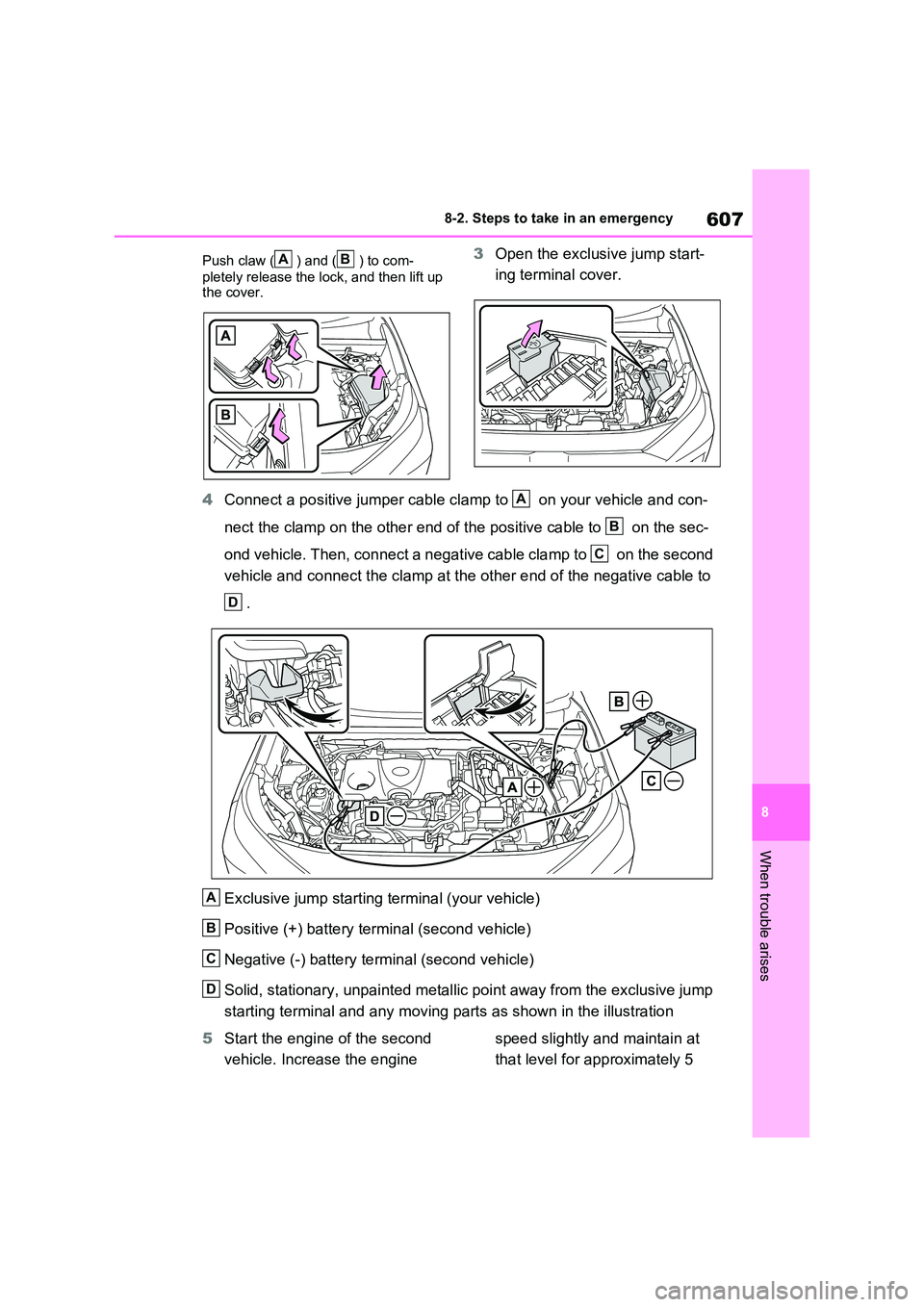
Push claw ( ) and ( ) to com-
pletely release the lock, and then lift up the cover.
3 Open the exclusive jump start-
ing terminal cover.
4 Connect a positive jumper cable clamp to on your vehicle and con-
nect the clamp on the other end of the positive cable to on the sec-
ond vehicle. Then, connect a negative cable clamp to on the second
vehicle and connect the clamp at the other end of the negative cable to
.
Exclusive jump starting terminal (your vehicle)
Positive (+) battery terminal (second vehicle)
Negative (-) battery terminal (second vehicle)
Solid, stationary, unpainted metallic point away from the exclusive jump
starting terminal and any moving parts as shown in the illustration
5 Start the engine of the second
vehicle. Increase the engine
speed slightly and maintain at
that level for approximately 5
AB
A
B
C
D
A
B
C
D
Page 608 of 664
6088-2. Steps to take in an emergency
minutes to recharge the 12-volt
battery of your vehicle.
6 Open and close any of the doors
of your vehicle with the power
switch off.
7 Maintain the engine speed of
the second vehicle and start the
hybrid system of your vehicle by
turning the power switch to ON.
8 Make sure the “READY” indica-
tor comes on. If the indicator
light does not come on, contact
any authorized Toyota retailer or
Toyota authorized repairer, or
any reliable repairer.
9 Once the hybrid system has
started, remove the jumper
cables in the exact reverse
order from which they were con-
nected.
10 Close the exclusive jump start-
ing terminal cover, and reinstall
the fuse box cover to its original
position.
Once the hybrid system starts,
have the vehicle inspected at any
authorized Toyota retailer or Toyota
authorized repairer, or any reliable
repairer as soon as possible.
■Starting the hybrid system when
the 12-volt battery is discharged
The hybrid system cannot be started by push-starting.
■To prevent 12-volt battery dis-
charge
●Turn off the headlights and the audio
system while the hybrid system is off.
●Turn off any unnecessary electrical
components when the vehicle is run- ning at a low speed for an extended period, such as in heavy traffic.
■When the 12-volt battery is
removed or discharged
●Information stored in the ECU is
cleared. When the 12-volt battery is depleted, have the vehicle inspected at any authorized Toyota retailer or
Toyota authorized repairer, or any reli- able repairer.
●Some systems may require initializa-tion. ( P.643)
■When removing the 12-volt battery terminals
When the 12-volt battery terminals are removed, the information stored in the ECU is cleared. Before removing the 12-
volt battery terminals, contact any authorized Toyota retailer or Toyota authorized repairer, or any reliable
repairer.
■Charging the 12-volt battery
The electricity stored in the 12-volt bat- tery will discharge gradually even when
the vehicle is not in use, due to natural discharge and the draining effects of certain electrical appliances. If the vehi-
cle is left for a long time, the 12-volt bat- tery may discharge, and the hybrid system may be unable to start. (The 12-
volt battery recharges automatically while the hybrid system is operating.)
■When recharging or replacing the 12-volt battery
●In some cases, it may not be possible to unlock the doors using the smart
entry & start system when the 12-volt battery is discharged. Use the wire-less remote control or the mechanical
key to lock or unlock the doors.
●The hybrid system may not start on
the first attempt after reinstalling the 12-volt battery. In that case, start the hybrid system in the same manner as
when the electronic key does not operate properly ( P.605). This is not
Page 619 of 664
619
9
9-1. Specifications
Vehicle specifications
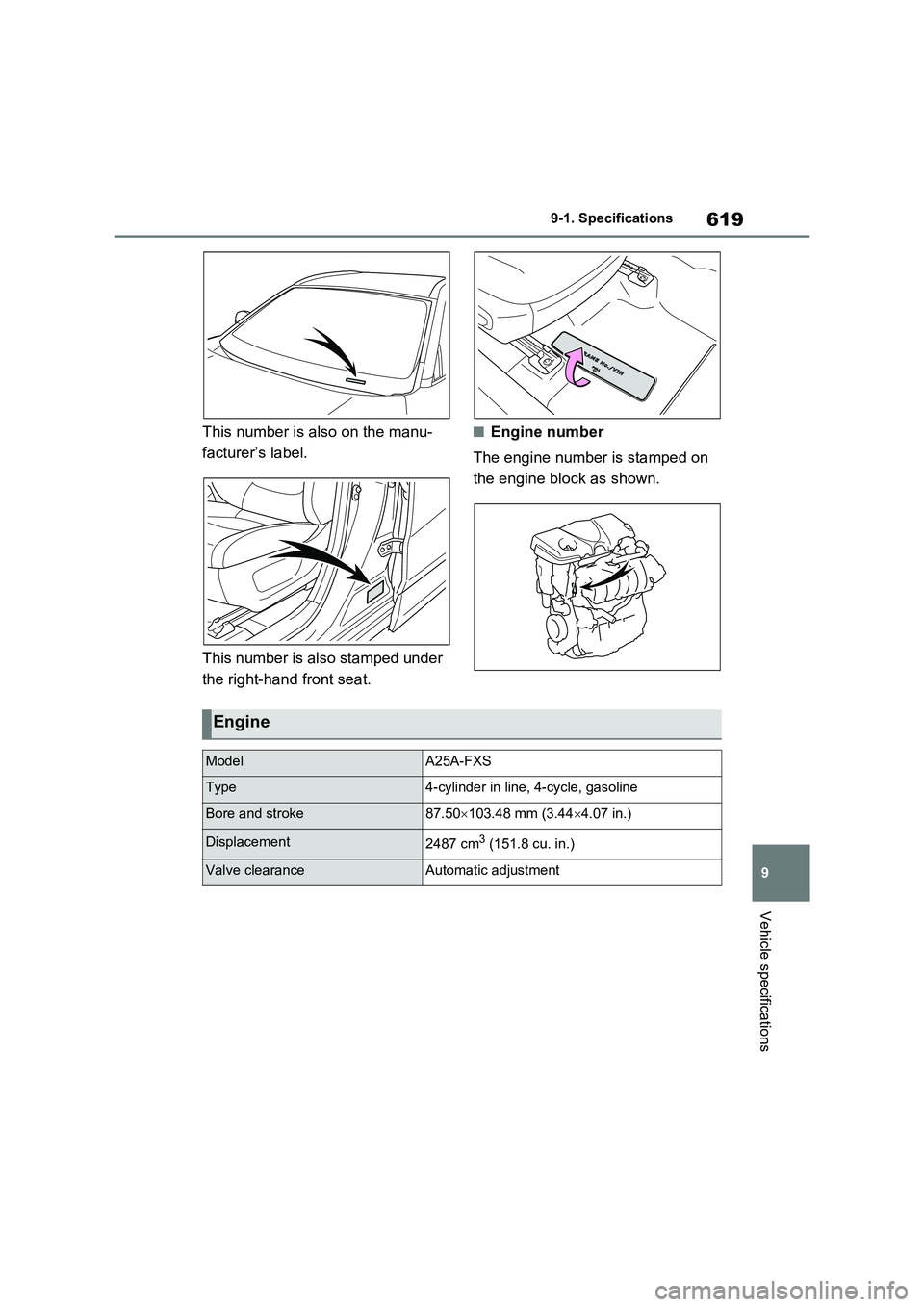
This number is also on the manu-
facturer’s label.
This number is also stamped under
the right-hand front seat.
■Engine number
The engine number is stamped on
the engine block as shown.
Engine
ModelA25A-FXS
Type4-cylinder in line, 4-cycle, gasoline
Bore and stroke87.50 103.48 mm (3.444.07 in.)
Displacement2487 cm3 (151.8 cu. in.)
Valve clearanceAutomatic adjustment
Page 630 of 664
6309-2. Customization
Some function settings are changed simultaneously with other functions
being customized. Contact any authorized Toyota retailer or Toyota autho-
rized repairer, or any reliable repairer for further details.
Vehicles with navigation system or multimedia system: Settings that can
be changed using the navigation system or multimedia system
Settings that can be changed using the multi-information display
Settings that can be changed by any authorized Toyota retailer or
Toyota authorized repairer, or any reliable repairer
Definition of symbols: O = Available, – =Not available
■Alarm* (P.78)
*: If equipped
■Charging system (P.125, 128)
*: Vehicles with 6.6 kW onboard traction battery charger only
Customizable Features
FunctionDefault
settingCustomized
setting
Deactivates the alarm when the
doors are unlocked using the
mechanical key
OffOn––O
FunctionDefault
settingCustomized
setting
“Charging Current”MAX8A–O–16A*
“Battery Heater”OnOff–O–
“Battery Cooler”OnOff–O–
A
B
C
ABC
ABC
Page 632 of 664
6329-2. Customization
*1: For details about each function: P.186
*2: The default setting varies according to country.
*3: Available languages may differ depending on the target region.
*4: If equipped
*5: This can only be set if GPS calibration of clock is turned off in the multimedia sys-
tem settings.
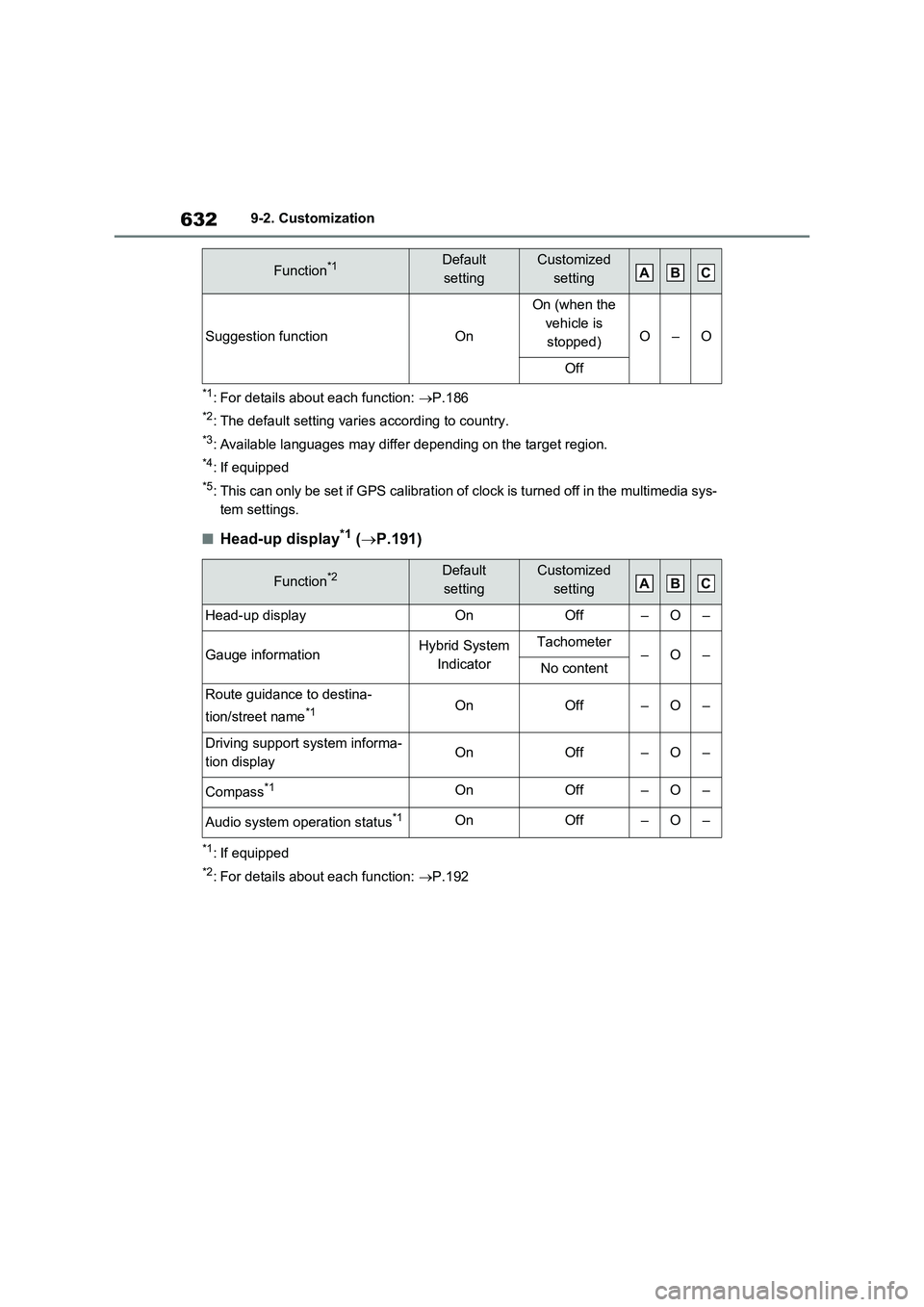
■Head-up display*1 (P.191)
*1: If equipped
*2: For details about each function: P.192
Suggestion functionOn
On (when the
vehicle is
stopped)
O–O
Off
Function*2Default
settingCustomized
setting
Head-up displayOnOff–O–
Gauge informationHybrid System
IndicatorTachometer–O–No content
Route guidance to destina-
tion/street name
*1OnOff–O–
Driving support system informa-
tion displayOnOff–O–
Compass*1OnOff–O–
Audio system operation status*1OnOff–O–
Function*1Default
settingCustomized
settingABC
ABC
Page 633 of 664
633
9 9-2. Customization
Vehicle specifications
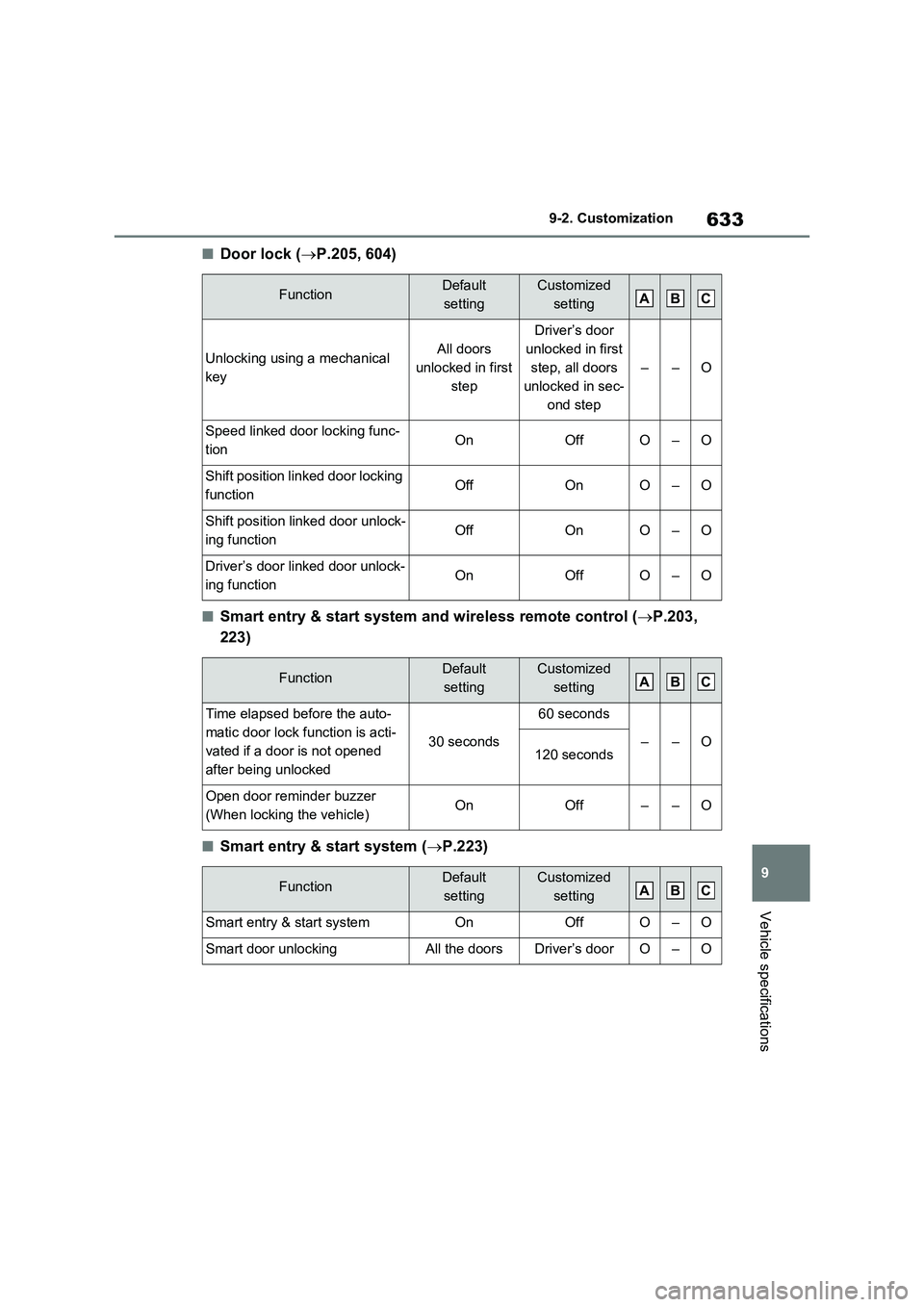
■Door lock (P.205, 604)
■Smart entry & start system and wireless remote control (P.203,
223)
■Smart entry & start system (P.223)
FunctionDefault
settingCustomized
setting
Unlocking using a mechanical
keyAll doors
unlocked in first
step
Driver’s door
unlocked in first
step, all doors
unlocked in sec-
ond step
––O
Speed linked door locking func-
tionOnOffO–O
Shift position linked door locking
functionOffOnO–O
Shift position linked door unlock-
ing functionOffOnO–O
Driver’s door linked door unlock-
ing functionOnOffO–O
FunctionDefault
settingCustomized
setting
Time elapsed before the auto-
matic door lock function is acti-
vated if a door is not opened
after being unlocked
30 seconds
60 seconds
––O120 seconds
Open door reminder buzzer
(When locking the vehicle)OnOff––O
FunctionDefault
settingCustomized
setting
Smart entry & start systemOnOffO–O
Smart door unlockingAll the doorsDriver’s doorO–O
ABC
ABC
ABC