2011 TOYOTA VERSO S warning
[x] Cancel search: warningPage 310 of 664
3105-1. Before driving
Weight of the trailer itself plus the trailer
load should be within the maximum
towing capacity. Exceeding this weight
is dangerous. ( P.618)
When towing a trailer, use a friction
coupler or friction stabilizer (sway con-
trol device).
Permissible drawbar load
Allocate the trailer load so that the
drawbar load is greater than 25 kg
(55.1 lb.) or 4% of the towing capacity.
Do not let the drawbar load exceed the
indicated weight. ( P.618)
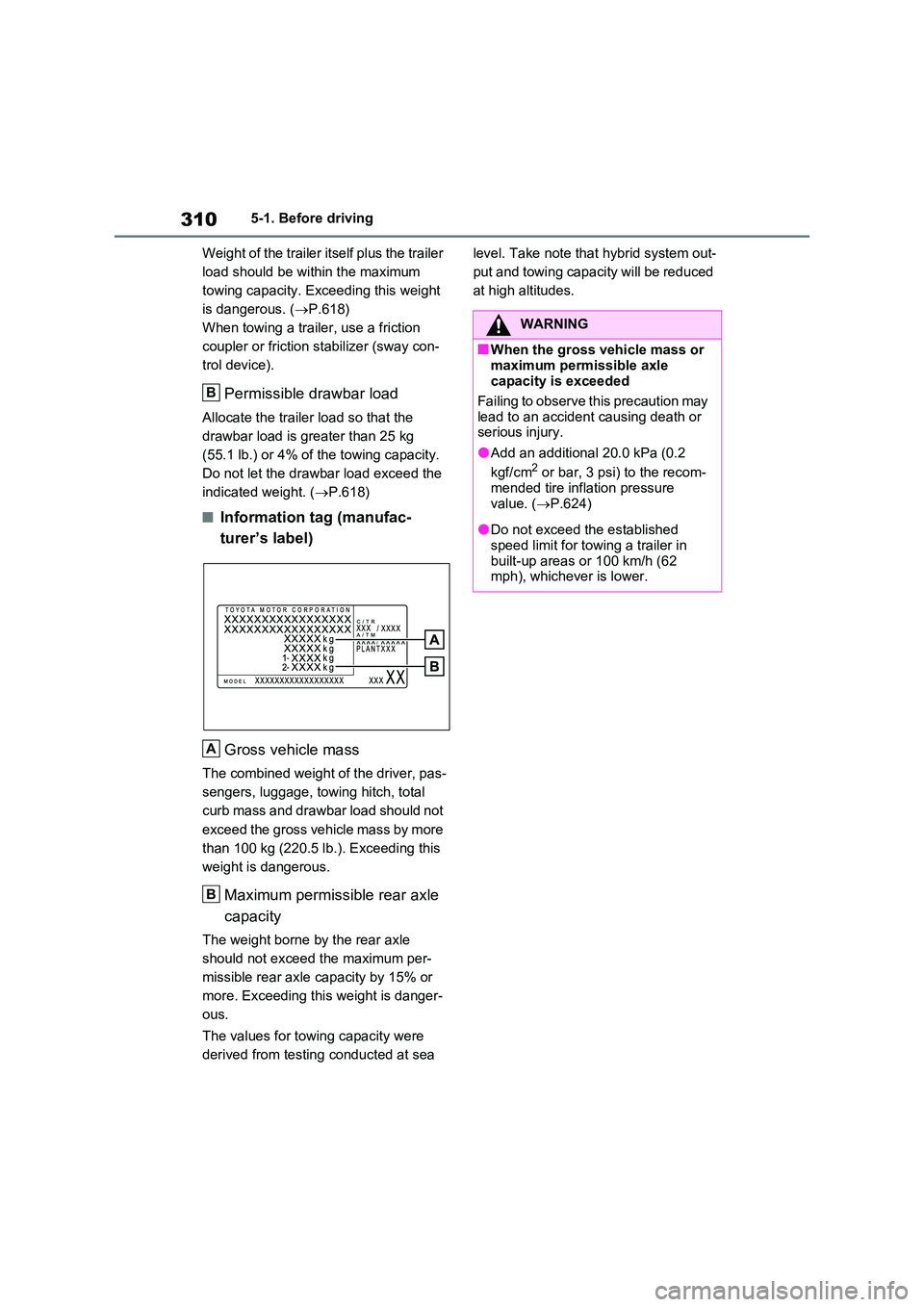
■Information tag (manufac-
turer’s label)
Gross vehicle mass
The combined weight of the driver, pas-
sengers, luggage, towing hitch, total
curb mass and drawbar load should not
exceed the gross vehicle mass by more
than 100 kg (220.5 lb.). Exceeding this
weight is dangerous.
Maximum permissible rear axle
capacity
The weight borne by the rear axle
should not exceed the maximum per-
missible rear axle capacity by 15% or
more. Exceeding this weight is danger-
ous.
The values for towing capacity were
derived from testing conducted at sea
level. Take note that hybrid system out-
put and towing capacity will be reduced
at high altitudes.
B
A
B
WARNING
■When the gross vehicle mass or
maximum permissible axle capacity is exceeded
Failing to observe this precaution may
lead to an accident causing death or serious injury.
●Add an additional 20.0 kPa (0.2
kgf/cm2 or bar, 3 psi) to the recom- mended tire inflation pressure
value. ( P.624)
●Do not exceed the established
speed limit for towing a trailer in built-up areas or 100 km/h (62 mph), whichever is lower.
Page 319 of 664
319
5
5-2. Driving procedures
Driving
power switch to OFF, the hybrid sys-
tem may not start in some cases. After turning the power switch to OFF, please wait a few seconds before
restarting the hybrid system.
■Customization
If the smart entry & start system has been deactivated in a customized set-
ting, refer to P.605.
1 Stop the vehicle completely.
2 If the parking brake is in manual
mode, set the parking brake.
( P.326)
Check the parking brake indicator is
illuminated.
3 Shift the shift lever to P.
4 Press the power switch shortly
and firmly.
The hybrid system will stop, and the meter display will be extinguished.
Release the shift lever when pressing the power switch.
5 Release the brake pedal and
check that “ACCESSORY” or
“IGNITION ON” is not shown on
the multi-information display.
WARNING
■When starting the hybrid system
Always start the hybrid system while
sitting in the driver’s seat. Do not depress the accelerator pedal while starting the hybrid system under any
circumstances. Doing so may cause an accident resulting in death or serious injury.
■Caution while driving
If hybrid system failure occurs while
the vehicle is moving, do not lock or open the doors until the vehicle reaches a safe and complete stop.
Activation of the steering lock in this circumstance may lead to an acci-dent, resulting in death or serious
injury.
NOTICE
■When starting the hybrid system
If the hybrid system becomes difficult to start, have your vehicle checked by
any authorized Toyota retailer or Toyota authorized repairer, or any reliable repairer immediately.
■Symptoms indicating a malfunc-tion with the power switch
If the power switch seems to be oper- ating somewhat differently than usual, such as the switch sticking slightly,
there may be a malfunction. Contact any authorized Toyota retailer or Toyota authorized repairer, or any
reliable repairer immediately.
Stopping the hybrid system
WARNING
■Stopping the hybrid system in an emergency
●If you want to stop the hybrid sys-tem in an emergency while driving the vehicle, press and hold the
power switch for more than 2 sec- onds, or press it briefly 3 times or more in succession. ( P.560)
However, do not touch the power switch while driving except in an emergency. Turning the hybrid sys-
tem off while driving will not cause a loss of steering or braking control. However, power assist for the
steering wheel may be lost making it difficult to steer smoothly before stopping the vehicle depending on
the remaining charge in the 12-volt battery or usage conditions. In this situation, you should pull over and
stop the vehicle as soon as it is safe to do so.
Page 320 of 664
3205-2. Driving procedures
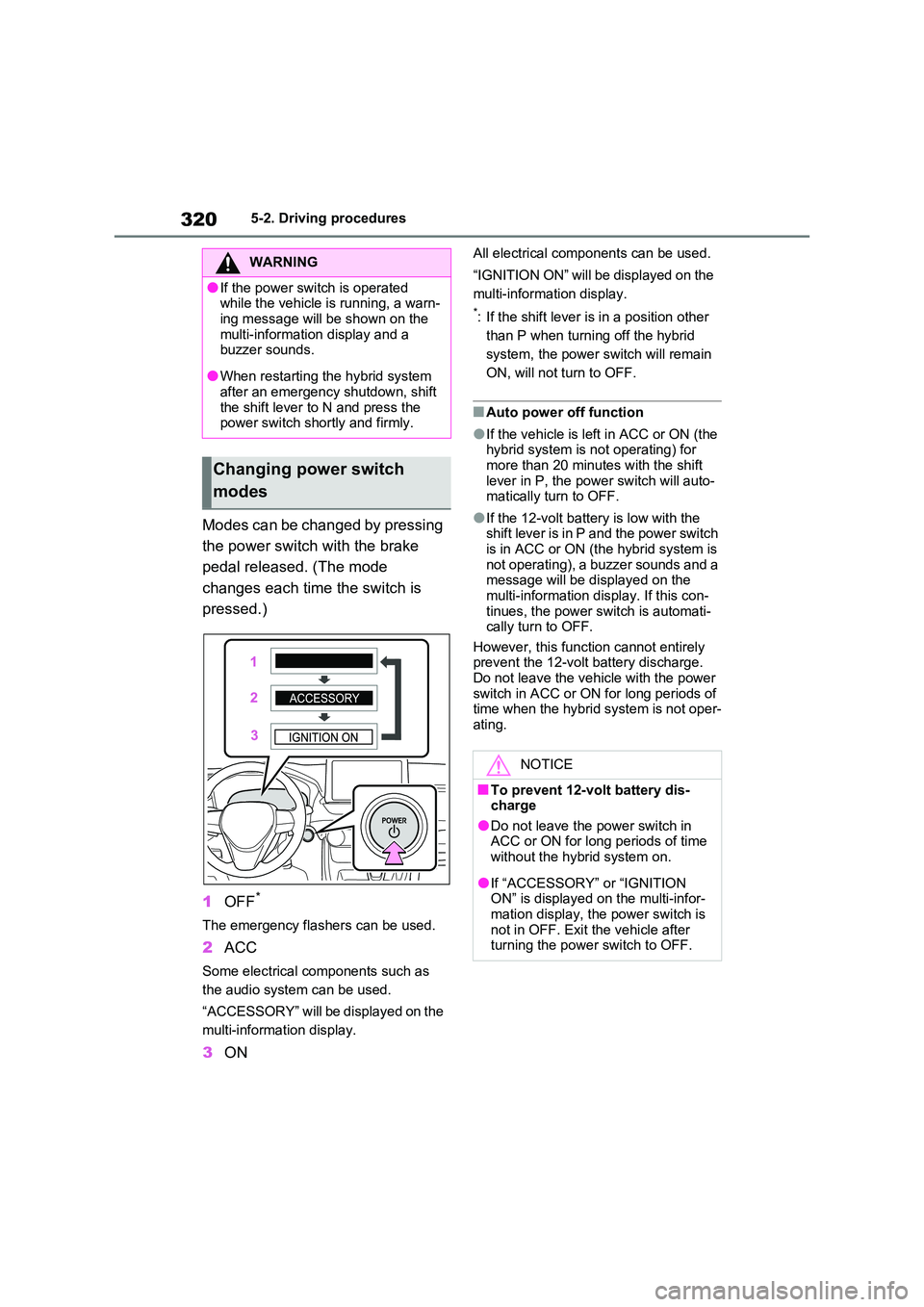
Modes can be changed by pressing
the power switch with the brake
pedal released. (The mode
changes each time the switch is
pressed.)
1 OFF*
The emergency flashers can be used.
2ACC
Some electrical components such as
the audio system can be used.
“ACCESSORY” will be displayed on the
multi-information display.
3 ON
All electrical components can be used.
“IGNITION ON” will be displayed on the
multi-information display.
*: If the shift lever is in a position other
than P when turning off the hybrid
system, the power switch will remain
ON, will not turn to OFF.
■Auto power off function
●If the vehicle is left in ACC or ON (the hybrid system is not operating) for
more than 20 minutes with the shift lever in P, the power switch will auto-matically turn to OFF.
●If the 12-volt battery is low with the shift lever is in P and the power switch
is in ACC or ON (the hybrid system is not operating), a buzzer sounds and a message will be displayed on the
multi-information display. If this con- tinues, the power switch is automati-cally turn to OFF.
However, this function cannot entirely prevent the 12-volt battery discharge. Do not leave the vehicle with the power
switch in ACC or ON for long periods of time when the hybrid system is not oper-ating.
WARNING
●If the power switch is operated while the vehicle is running, a warn-
ing message will be shown on the multi-information display and a buzzer sounds.
●When restarting the hybrid system after an emergency shutdown, shift
the shift lever to N and press the power switch shortly and firmly.
Changing power switch
modes
NOTICE
■To prevent 12-volt battery dis- charge
●Do not leave the power switch in ACC or ON for long periods of time without the hybrid system on.
●If “ACCESSORY” or “IGNITION ON” is displayed on the multi-infor-
mation display, the power switch is not in OFF. Exit the vehicle after turning the power switch to OFF.
Page 322 of 664
3225-2. Driving procedures
shifting to 5 or 4. ( P.323, 324)
●When switching the driving mode to sport mode while driving in D position.
( P.434)
■Restraining sudden start (Drive- Start Control)
P.301
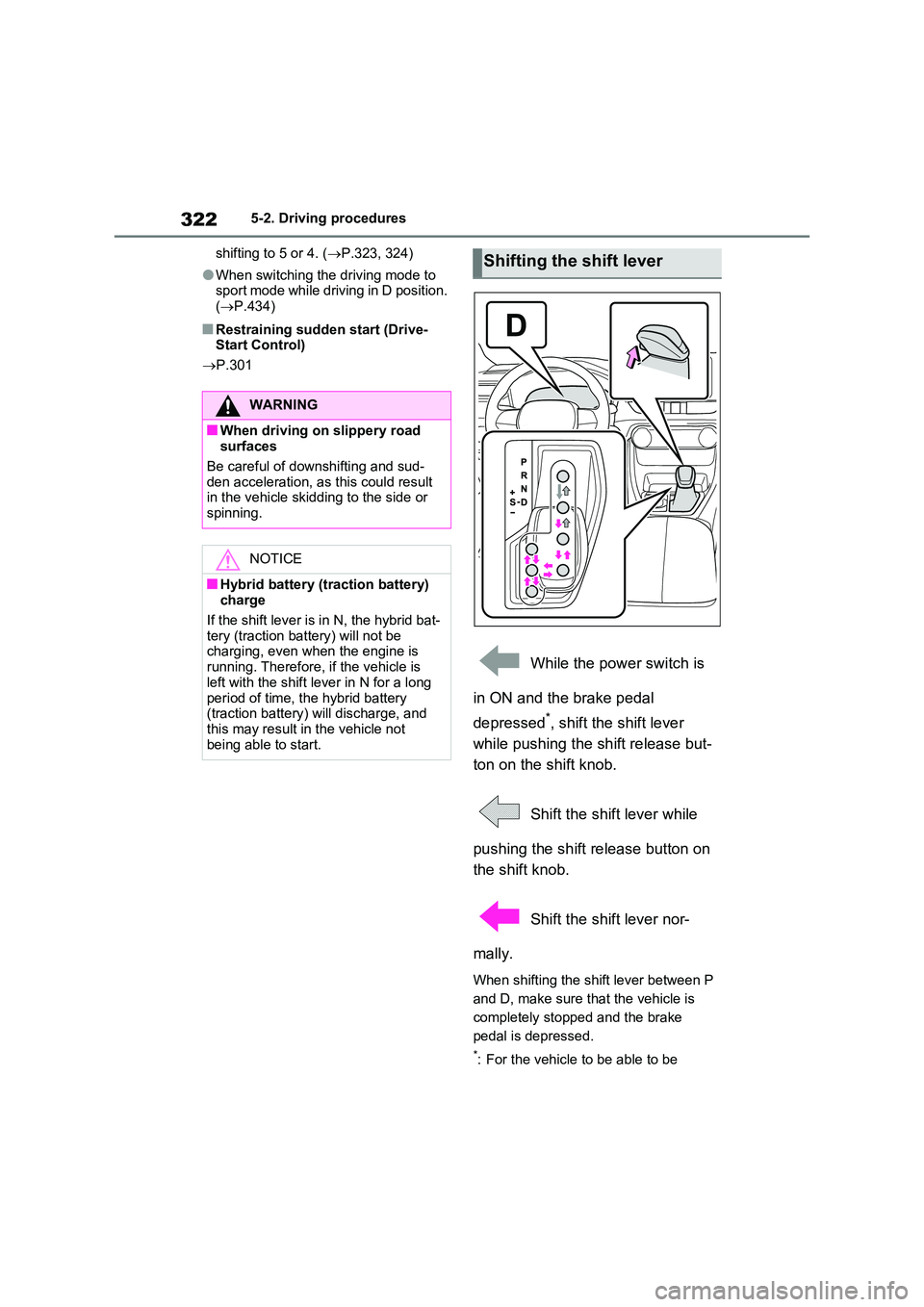
While the power switch is
in ON and the brake pedal
depressed*, shift the shift lever
while pushing the shift release but-
ton on the shift knob.
Shift the shift lever while
pushing the shift release button on
the shift knob.
Shift the shift lever nor-
mally.
When shifting the shift lever between P
and D, make sure that the vehicle is
completely stopped and the brake
pedal is depressed.
*: For the vehicle to be able to be
WARNING
■When driving on slippery road surfaces
Be careful of downshifting and sud-
den acceleration, as this could result in the vehicle skidding to the side or spinning.
NOTICE
■Hybrid battery (traction battery) charge
If the shift lever is in N, the hybrid bat- tery (traction battery) will not be charging, even when the engine is
running. Therefore, if the vehicle is left with the shift lever in N for a long
period of time, the hybrid battery (traction battery) will discharge, and this may result in the vehicle not
being able to start.
Shifting the shift lever
Page 323 of 664
323
5
5-2. Driving procedures
Driving
shifted from P, the brake pedal must
be depressed before the shift release
button is pushed. If the shift release
button is pushed first, the shift lock
will not be released.
■Shift lock system
The shift lock system is a system to pre- vent accidental operation of the shift
lever in starting. The shift lever can be shifted from P only when the power switch is in ON, the
brake pedal is depressed and the shift release button is pushed.
■If the shift lever cannot be shifted from P
First, check whether the brake pedal is being depressed.If the shift lever cannot be shifted even
though the brake pedal is depressed and the shift release button is pushed, there may be a problem with the shift
lock system. Have the vehicle inspected by any authorized Toyota retailer or Toyota authorized repairer, or any reli-
able repairer immediately. The following steps may be used as an emergency measure to ensure that the
shift lever can be shifted.
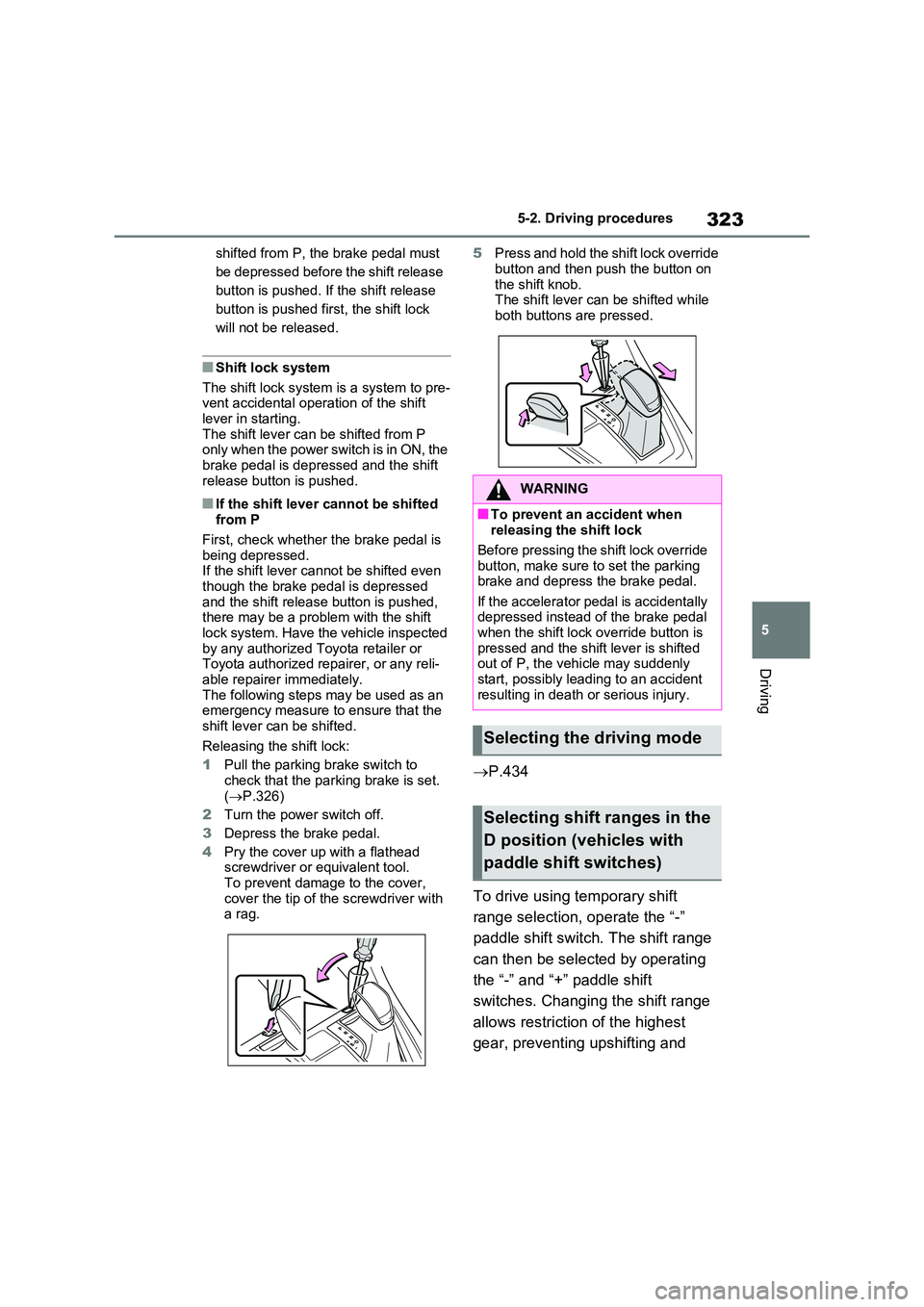
Releasing the shift lock:
1 Pull the parking brake switch to
check that the parking brake is set. ( P.326)
2 Turn the power switch off.
3 Depress the brake pedal.
4 Pry the cover up with a flathead screwdriver or equivalent tool.
To prevent damage to the cover, cover the tip of the screwdriver with a rag.
5 Press and hold the shift lock override
button and then push the button on the shift knob.The shift lever can be shifted while
both buttons are pressed.
P.434
To drive using temporary shift
range selection, operate the “-”
paddle shift switch. The shift range
can then be selected by operating
the “-” and “+” paddle shift
switches. Changing the shift range
allows restriction of the highest
gear, preventing upshifting and
WARNING
■To prevent an accident when releasing the shift lock
Before pressing the shift lock override button, make sure to set the parking brake and depress the brake pedal.
If the accelerator pedal is accidentally depressed instead of the brake pedal when the shift lock override button is
pressed and the shift lever is shifted out of P, the vehicle may suddenly start, possibly leading to an accident
resulting in death or serious injury.
Selecting the driving mode
Selecting shift ranges in the
D position (vehicles with
paddle shift switches)
Page 324 of 664
3245-2. Driving procedures
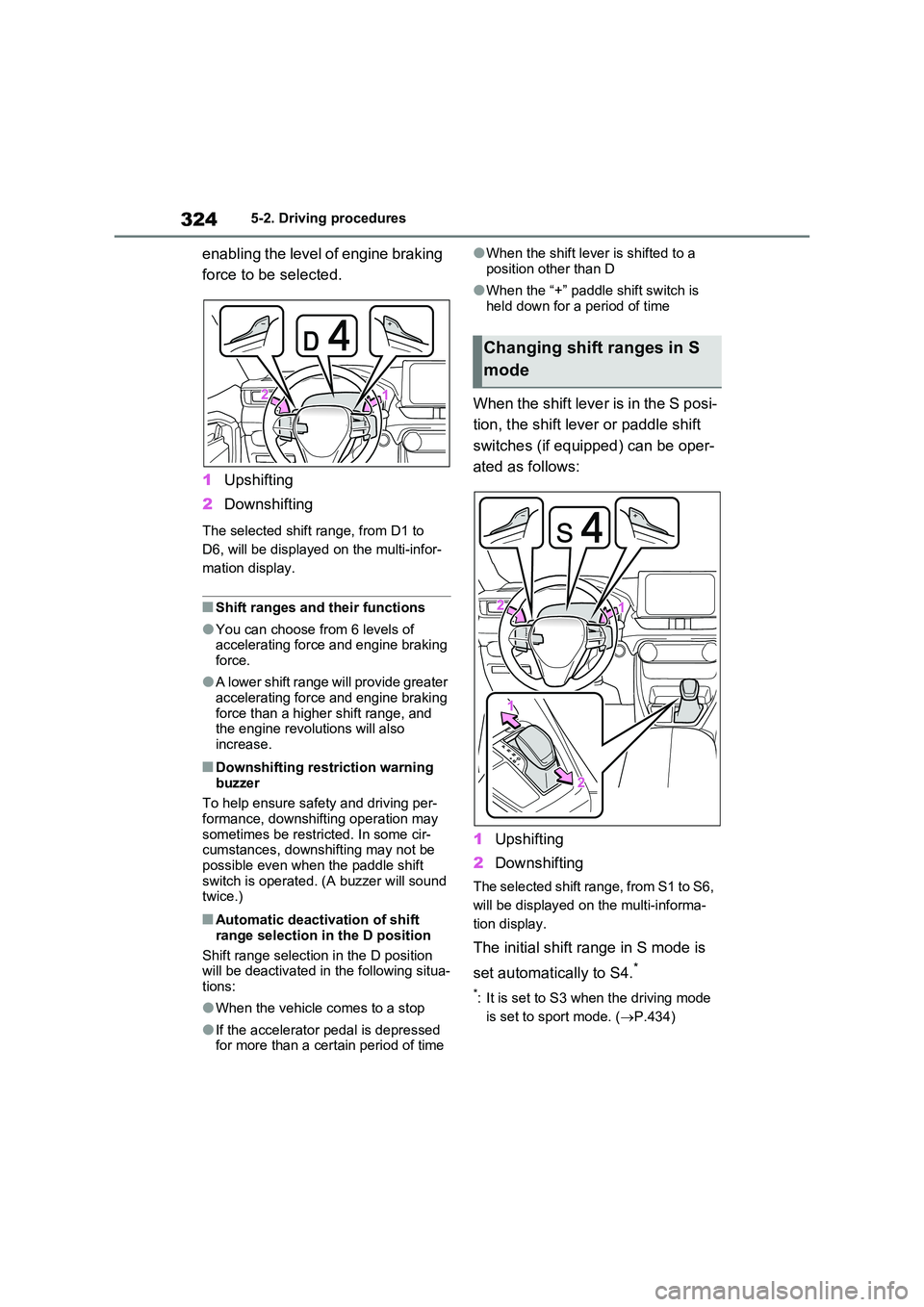
enabling the level of engine braking
force to be selected.
1 Upshifting
2 Downshifting
The selected shift range, from D1 to
D6, will be displayed on the multi-infor-
mation display.
■Shift ranges and their functions
●You can choose from 6 levels of accelerating force and engine braking force.
●A lower shift range will provide greater accelerating force and engine braking
force than a higher shift range, and the engine revolutions will also increase.
■Downshifting restriction warning
buzzer
To help ensure safety and driving per- formance, downshifting operation may
sometimes be restricted. In some cir- cumstances, downshifting may not be possible even when the paddle shift
switch is operated. (A buzzer will sound twice.)
■Automatic deactivation of shift
range selection in the D position
Shift range selection in the D position will be deactivated in the following situa-
tions:
●When the vehicle comes to a stop
●If the accelerator pedal is depressed for more than a certain period of time
●When the shift lever is shifted to a
position other than D
●When the “+” paddle shift switch is
held down for a period of time
When the shift lever is in the S posi-
tion, the shift lever or paddle shift
switches (if equipped) can be oper-
ated as follows:
1 Upshifting
2 Downshifting
The selected shift range, from S1 to S6,
will be displayed on the multi-informa-
tion display.
The initial shift range in S mode is
set automatically to S4.*
*: It is set to S3 when the driving mode
is set to sport mode. ( P.434)
Changing shift ranges in S
mode
Page 325 of 664
325
5
5-2. Driving procedures
Driving
■S mode
●You can choose from 6 levels of accelerating force and engine braking force.
●A lower shift range will provide greater accelerating force and engine braking
force than a higher shift range, and the engine revolutions will also increase.
●To prevent the engine from over-rev-ving, upshifting may automatically
occur when the shift range is 3 or lower.
●When the shift range is 4 or lower, holding the shift lever toward “+” sets the shift range to 6.
■Downshifting restriction warning
buzzer
To help ensure safety and driving per- formance, downshifting operation may
sometimes be restricted. In some cir- cumstances, downshifting may not be possible even when the shift lever or
paddle shift switches (if equipped) is operated. (A buzzer will sound twice.)
■If the “S” indicator does not come on or the “D” indicator is displayed
even after shifting the shift lever to S
This may indicate a malfunction in the
transmission system. Have the vehicle inspected by any authorized Toyota
retailer or Toyota authorized repairer, or any reliable repairer immediately. (In this situation, the transmission will oper-
ate in the same manner as when the shift lever is in D.)
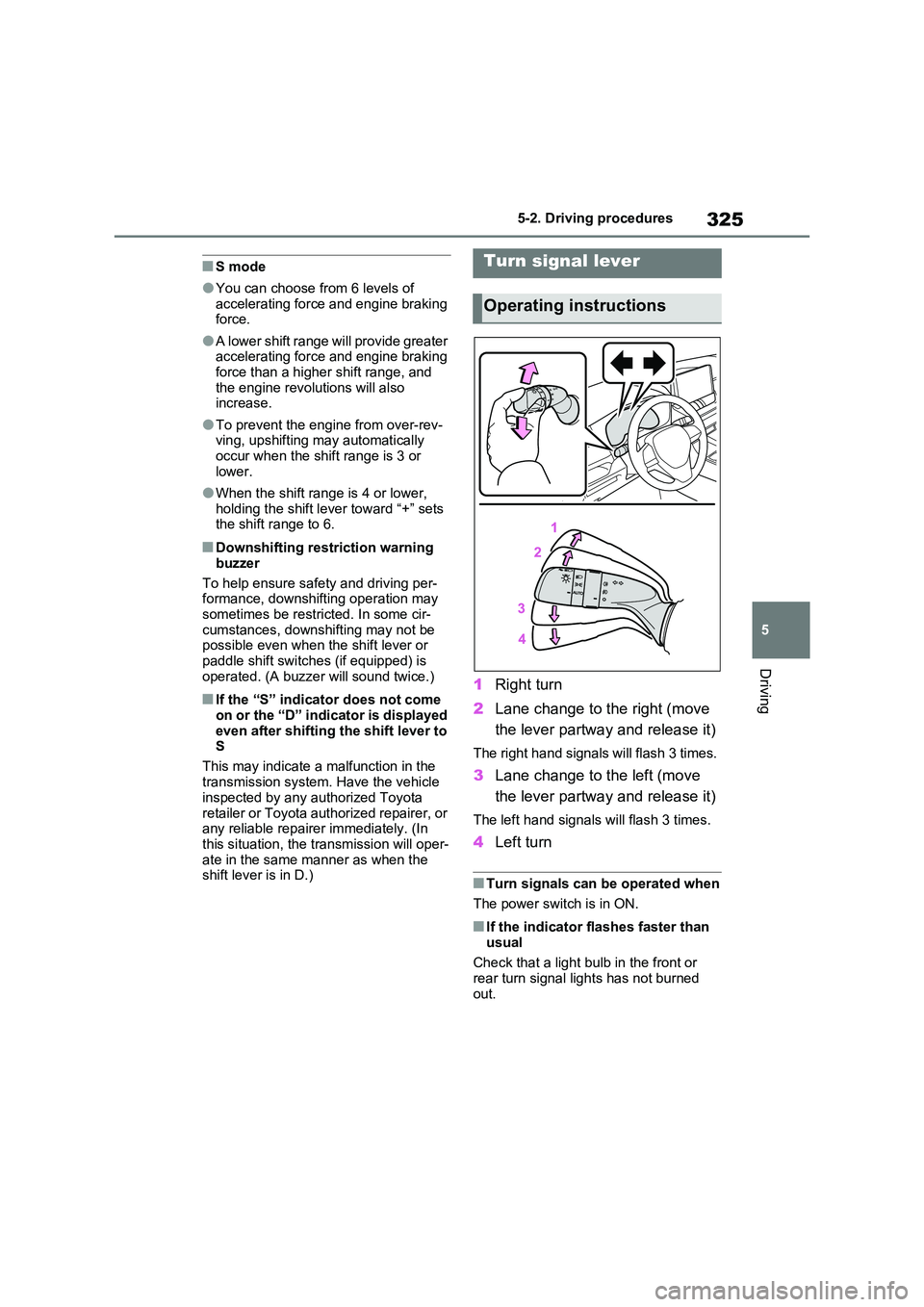
1 Right turn
2 Lane change to the right (move
the lever partway and release it)
The right hand signals will flash 3 times.
3 Lane change to the left (move
the lever partway and release it)
The left hand signals will flash 3 times.
4 Left turn
■Turn signals can be operated when
The power switch is in ON.
■If the indicator flashes faster than
usual
Check that a light bulb in the front or rear turn signal lights has not burned
out.
Turn signal lever
Operating instructions
Page 328 of 664
3285-2. Driving procedures
●The driver is wearing the seat belt
●The shift lever is in a forward or reverse position.
●The malfunction indicator lamp or brake system warning light is not illu-
minated
If the automatic release function does
not operate, release the parking brake
manually.
■If “Parking Brake Temporarily Unavailable” is displayed on the multi-information display
If the parking brake is operated repeat- edly over a short period of time, the sys-tem may restrict operation to prevent
overheating. If this happens, refrain from operating the parking brake. Normal operation will return after about 1 min-
ute.
■If “Parking Brake Unavailable” is displayed on the multi-information display
Operate the parking brake switch. If the message does not disappear after oper-ating the switch several times, the sys-
tem may be malfunctioning. Have the vehicle inspected by any authorized Toyota retailer or Toyota authorized
repairer, or any reliable repairer.
■Parking brake operation sound
When the parking brake operates, a motor sound (whirring sound) may be
heard. This does not indicate a malfunc- tion.
■Parking brake indicator light
●Depending on the power switch mode, the parking brake indicator light will turn on and stay on as described
below: ON: Comes on until the parking brake is released.
Not in ON: Stays on for approximately 15 seconds.
●When the power switch is turned off with the parking brake set, the parking brake indicator light will stay on for
about 15 seconds. This does not indi-
cate a malfunction.
■When the parking brake switch
malfunctions
Automatic mode (automatic brake set- ting and releasing) will be turned on
automatically.
■Parking the vehicle
P.300
■Parking brake engaged warning buzzer
A buzzer will sound if the vehicle is driven with the parking brake engaged. “Parking Brake ON” is displayed on the
multi-information display (with the vehi- cle reaching a speed of 5 km/h [3 mph]).
■If the brake system warning light comes on
P.568
■Usage in winter time
P.446
WARNING
■When parking the vehicle
Do not leave a child in the vehicle alone. The parking brake may be released unintentionally by a child
and there is the danger of the vehicle moving that may lead to an accident resulting in death or serious injury.
■Parking brake switch
Do not set any objects near the park-
ing brake switch. Objects may inter- fere with the switch and may lead the parking brake to unexpectedly oper-
ate.
NOTICE
■When parking the vehicle
Before you leave the vehicle, shift the shift lever to P, set the parking brake
and make sure that the vehicle does not move.