Page 49 of 588

49 1-2. Opening, closing and locking the doors
1
Before driving
VERSO_WE_OM64524E
Alarms and warning indicators
A combination of exterior and interior alarms as well as warnings displayed
on the multi-information display are used to prevent theft of the vehicle and
unforeseeable accidents resulting from erroneous operation. Take appropri-
ate measures in response to any warning indications on the multi-informa-
tion display. (P. 479)
The following table describes circumstances and correction procedures
when only alarms are sounded.
Note for vehicle battery disconnection and reconnection
When the doors are attempted to be unlocked by means of the smart
entry & start system just after the vehicle battery has been reconnected,
it may fail. In this case, use the wireless remote control or mechanical
key to unlock and lock the doors.
The first engine start since the last time the vehicle battery was recon-
nected may fail. The engine will start from the 2nd attempt, so it is not a
malfunction.
AlarmSituationCorrection procedure
Exterior alarm
sounds once for
10 secondsTried to lock the vehicle
using the entry function
while a door is openClose all of the doors
and lock the doors
again.
Interior alarm
pings continuouslyTurned the “ENGINE
START STOP” switch to
ACCESSORY mode
while the driver’s door
is open (Opened the
driver’s door when the
“ENGINE START
STOP” switch is in
ACCESSORY mode.)Turn the “ENGINE
START STOP” switch
OFF and close the
driver’s door.
Turned the “ENGINE
START STOP” switch
OFF while the driver’s
door is openClose the driver’s door.
Page 50 of 588

50 1-2. Opening, closing and locking the doors
VERSO_WE_OM64524E
The status of the “ENGINE START STOP” switch remains stored in the
vehicle memory. Therefore, after the vehicle battery is reconnected, the
vehicle will return to the state before the battery was disconnected. When
the battery needs to be disconnected, turn the “ENGINE START STOP”
switch OFF before disconnecting the battery.
If the “ENGINE START STOP” switch status before the vehicle battery
was disconnected is unknown, pay due attention to the vehicle when the
battery is reconnected.
If the smart entry & start system does not operate properly
Locking and unlocking the doors: Use the mechanical key. (P. 525)
Starting the engine: P. 526
When the electronic key battery is fully depleted
P. 432
Customization that can be configured at any authorized Toyota dealer
or repairer, or another duly qualified and equipped professional
Settings (e.g. smart entry & start system) can be deactivated.
(Customizable features P. 569)
For the information about the door locking/unlocking operations and the
engine start procedure when the smart entry & start system has been dis-
abled, refer to “If the electronic key does not work properly”. (P. 525)
Page 126 of 588
126 1-6. Theft deterrent system
VERSO_WE_OM64524E
When the battery is disconnected
Be sure to cancel the alarm system.
If the battery is discharged before canceling the alarm, the system may be
triggered when the battery is reconnected.
Alarm-operated door lock
When the alarm is operating, the doors are locked automatically to pre-
vent intruders.
Do not leave the key inside the vehicle when the alarm is operating, and
make sure the key is not inside the vehicle when recharging or replacing
the battery.
Intrusion sensor considerations
The sensor may trigger the alarm in the following situations.
The battery is recharged or replaced
when the vehicle is locked.
Persons or pets are in the vehicle.
Unstable items, such as dangling
accessories or clothes hanging on the
coat hooks, are in the vehicle.
Page 317 of 588
317 3-2. Using the audio system
3
Interior features
VERSO_WE_OM64524E
Silencing the sound
Press .
Press the button again to turn the
system back on.
EON (Enhanced Other Network) system (for traffic announcement
function)
If the RDS station (with EON data) you are listening to is not broadcasting a
traffic information program and the audio system is in the TA (traffic
announcement) mode, the radio will be switched automatically to a station
broadcasting a traffic information program in the EON AF list when traffic
information begins.
When the battery is disconnected
Stations presets are erased.
Page 333 of 588

333 3-2. Using the audio system
3
Interior features
VERSO_WE_OM64524E
Repeat play
Press
(RPT).
To cancel, press (RPT) again.
Switching the display
Press .
Each time is pressed, the display changes in the following order:
Elapsed time Album title Track title Artist name
Adjusting sound quality and volume balance
Press to enter iPod menu mode.
Pressing changes sound modes. (P. 343)
About iPod
Apple is not responsible for the operation of this device or its compliance
with safety and regulatory standards.
iPod is a trademark of Apple Inc., registered in the U.S. and other coun-
tries.
iPod functions
When an iPod is connected and the audio source is changed to iPod
mode, the iPod will resume play from the same point in which it was last
used.
Depending on the iPod that is connected to the system, certain functions
may not be available. If a function is unavailable due to a malfunction (as
opposed to a system specification), disconnecting the device and recon-
necting it once again may resolve the problem.
While connected to the system, the iPod cannot be operated with its own
controls. It is necessary to use the controls of the vehicle’s audio system
instead.
Page 334 of 588

334 3-2. Using the audio system
VERSO_WE_OM64524E
iPod problems
To resolve most problems encountered when using your iPod, disconnect
your iPod from the vehicle iPod connection and reset it.
For instructions on how to reset your iPod, refer to your iPod Owner’s Man-
ual.
Display
P. 320
Error messages
“ERROR”: This indicates a problem in the iPod or its connection.
“NO MUSIC”: This indicates that there is no music data in the iPod.
“EMPTY”: This indicates that some available songs are not found in a
selected playlist.
“UPDATE”: This indicates that the version of the iPod is not compatible.
Upgrade your iPod software to the latest version.
Compatible models
Depending on differences between models or software version etc., some
models listed above might be incompatible with this system.
iPod 4th generation and earlier models are not compatible with this system.
iPhone, iPod mini, iPod shuffle and iPod photo are not compatible with this
system.
Items related to standards and limitations are as follows:
Maximum number of lists in device: 9999
Maximum number of songs in device: 65535
Maximum number of songs per list: 65535
ModelGenerationSoftware version
iPod 5th generation Ver. 1.2.0 or higher
iPod nano 1st generation Ver. 1.3.0 or higher
2nd generation Ver. 1.1.2 or higher
3rd generation Ver. 1.0.0 or higher
iPod touch 1st generation Ver. 1.1.0 or higher
iPod classic 1st generation Ver. 1.0.0 or higher
Page 338 of 588

338 3-2. Using the audio system
VERSO_WE_OM64524E
Repeat play
Repeating a file
Press
(RPT).
To cancel, press (RPT) again.
Repeating all the files in a folder
Press and hold
(RPT) until you hear a beep.
To cancel, press (RPT) again.
Switching the display
Press .
Each time is pressed, the display changes in the following order:
Elapsed time Folder name File name Album title (MP3 only)
Track title Artist name
USB memory functions
Depending on the USB memory that is connected to the system, the
device itself may not be operable and certain functions may not be avail-
able. If the device is inoperable or a function is unavailable due to a mal-
function (as opposed to a system specification), disconnecting the device
and reconnecting it once again may resolve the problem.
If the USB memory still does not begin operation after being discon-
nected and reconnected, format the memory.
Display
P. 320
Error messages
“ERROR”: This indicates a problem in the USB memory or its con-
nection.
“NO SUPPORT”: This indicates that no MP3/WMA files are included in the
USB memory.
Page 416 of 588
416 4-3. Do-it-yourself maintenance
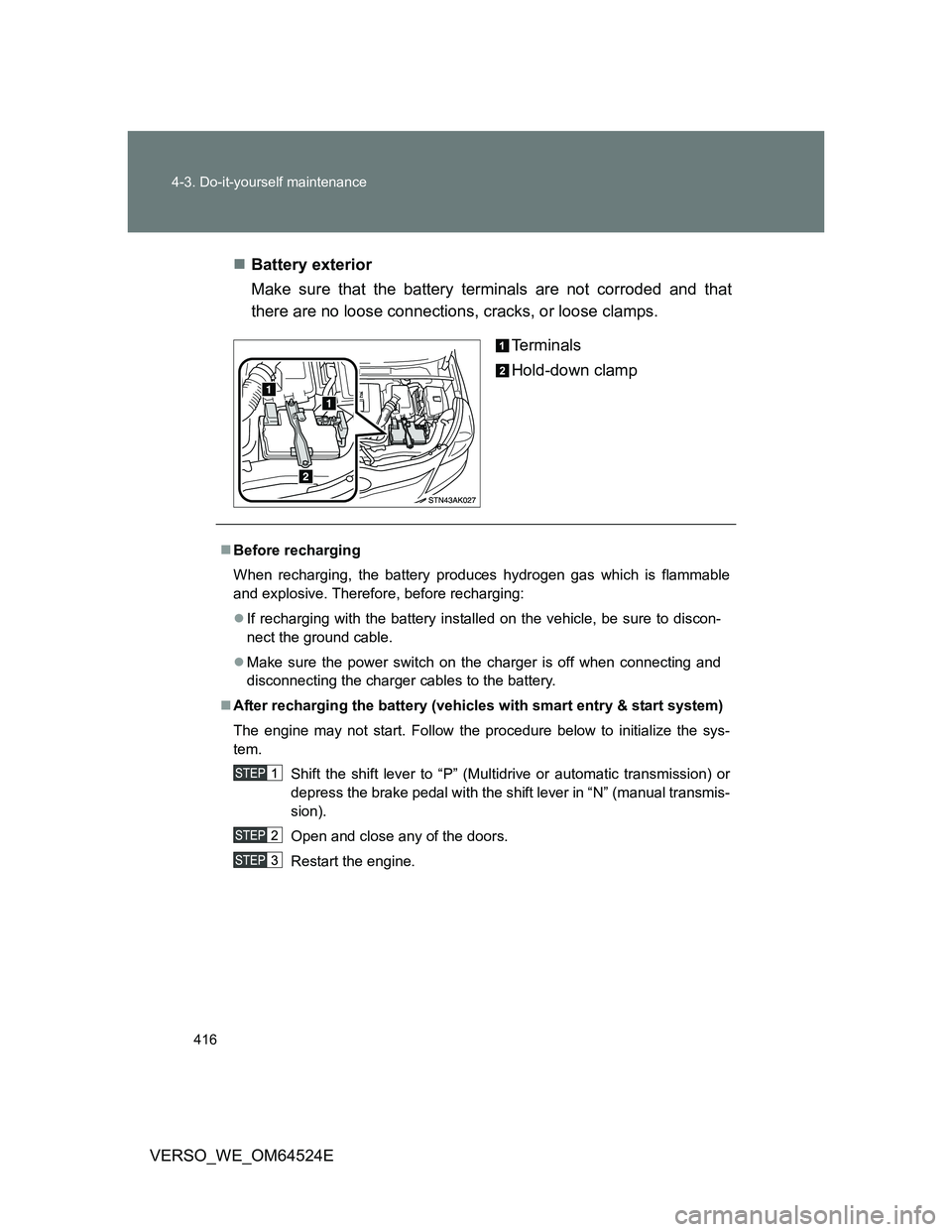
VERSO_WE_OM64524EBattery exterior
Make sure that the battery terminals are not corroded and that
there are no loose connections, cracks, or loose clamps.
Terminals
Hold-down clamp
Before recharging
When recharging, the battery produces hydrogen gas which is flammable
and explosive. Therefore, before recharging:
If recharging with the battery installed on the vehicle, be sure to discon-
nect the ground cable.
Make sure the power switch on the charger is off when connecting and
disconnecting the charger cables to the battery.
After recharging the battery (vehicles with smart entry & start system)
The engine may not start. Follow the procedure below to initialize the sys-
tem.
Shift the shift lever to “P” (Multidrive or automatic transmission) or
depress the brake pedal with the shift lever in “N” (manual transmis-
sion).
Open and close any of the doors.
Restart the engine.