Page 445 of 732
445
3-5. Using the hand
s-free phone system (for cellular phone)
3
Interior and exterior features
Deleting speed dials
Select “Delete Speed Dial” by using a voice command or
.
Press the preset button for wh ich the desired speed dial is
registered, and select “Confirm” by using a voice command or
.
Listing the registered data
Selecting “List names” by using a vo ice command causes a list of the
registered data to be read aloud.
When listing is complete, the system returns to “Phonebook”.
Pressing the talk switch while the desired data is being read aloud
selects the data, and the following functions will be available.
• Dialing: “Dial”
• Changing a registered name: “Change Name”
• Deleting an entry: “Delete Entry”
• Setting a speed dial: “Set Speed Dial (Speed Dial)”
■Limitation of number of digits
A phone number that exceeds 24 digits cannot be registered.
Page 480 of 732
480
3-8. Other interior features
Clock
■For quicker adjustment of the clock (if equipped)
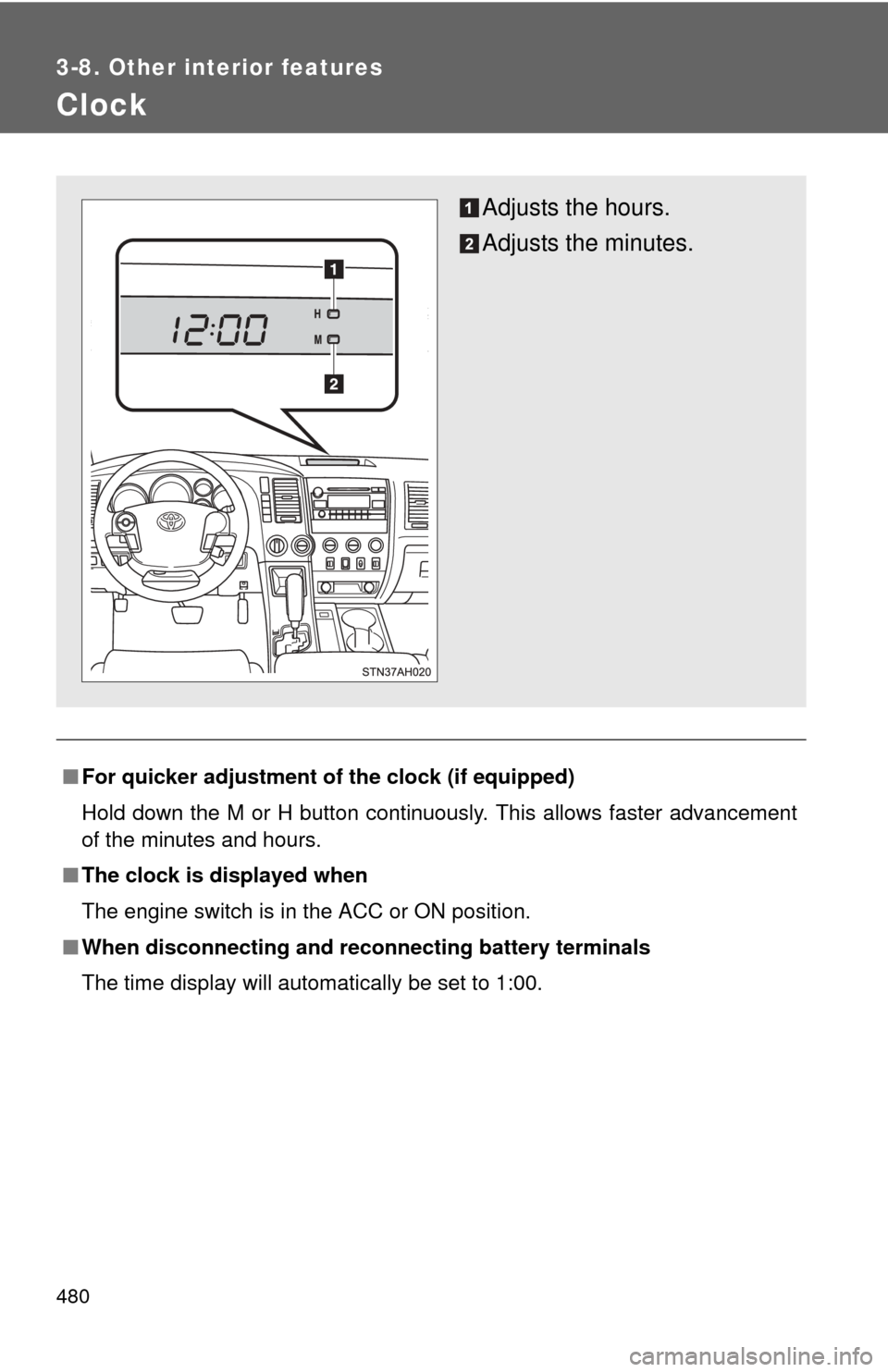
Hold down the M or H button continuously. This allows faster advancement
of the minutes and hours.
■ The clock is displayed when
The engine switch is in the ACC or ON position.
■ When disconnecting and reco nnecting battery terminals
The time display will automatically be set to 1:00.
Adjusts the hours.
Adjusts the minutes.
Page 481 of 732
481
3-8. Other interior features
3
Interior and exterior features
Outside temperature display
: If equipped
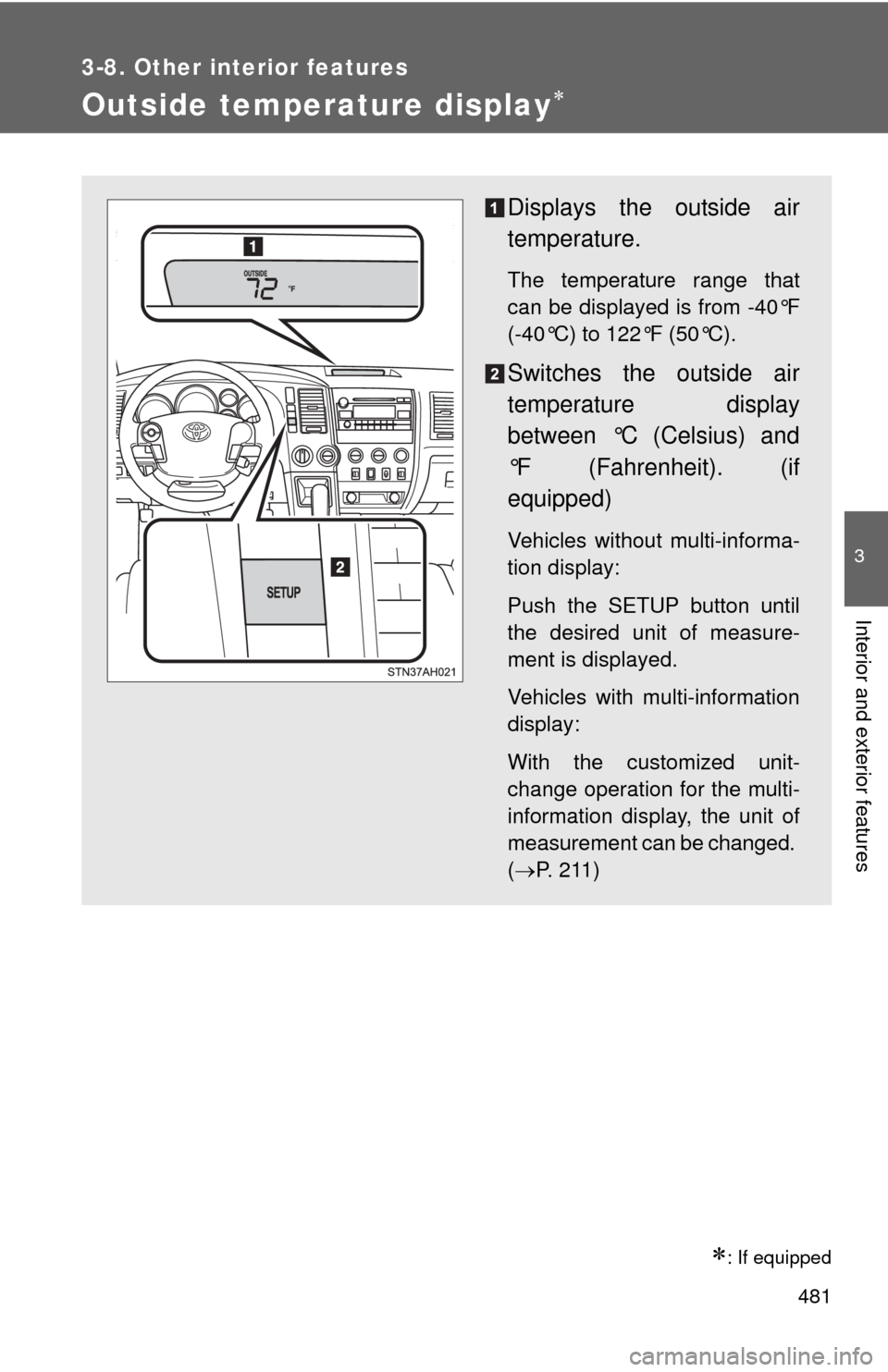
Displays the outside air
temperature.
The temperature range that
can be displayed is from -40°F
(-40°C) to 122°F (50°C).
Switches the outside air
temperature display
between °C (Celsius) and
°F (Fahrenheit). (if
equipped)
Vehicles without multi-informa-
tion display:
Push the SETUP button until
the desired unit of measure-
ment is displayed.
Vehicles with multi-information
display:
With the customized unit-
change operation for the multi-
information display, the unit of
measurement can be changed.
(P. 211)
Page 537 of 732
537
4-3. Do-it-yourself maintenance
4
Maintenance and care
Remove the oil filler cap, turning it counterclockwise.
Add engine oil slowly.
Checking the dipstick.
Reinstall the filler cap, turning it clockwise.
The approximate quantity of oil needed to raise the level between low and
full on the dipstick is indicated as follows:
1.6 qt. (1.5 L,
1.3 lmp. qt.)
■Engine oil consumption
●The amount of engine oil consumed depends on the oil viscosity, the
quality of the oil and the way the vehicle is driven.
● More oil is consumed under driving conditions such as high speeds and
frequent acceleration and deceleration.
● A new engine consumes more oil.
● When judging the amount of oil consumption, keep in mind that the oil
may have become diluted, making it difficult to judge the true level accu-
rately.
■ After changing the engine oil (U.S.A. only)
The oil change system should be reset. Perform the following procedures:
Turn the engine switch off with the trip meter A reading shown.
While pressing the trip meter reset button ( P. 192, 194), turn the
engine switch on.
Without multi-information display
Continue to press and hold the button until the trip meter displays
000000.
With multi-information display Continue to press and hold the button until “MAINT REQD RESET
MODE COMPLETE” appears on the multi-information display.