Page 503 of 732
503
3-8. Other interior features
3
Interior and exterior features
Garage door opener
The garage door opener (HomeLink® Universal Transceiver) is manufac-
tured under license from HomeLink®.
Programming the HomeLink® (for U.S.A. owners)
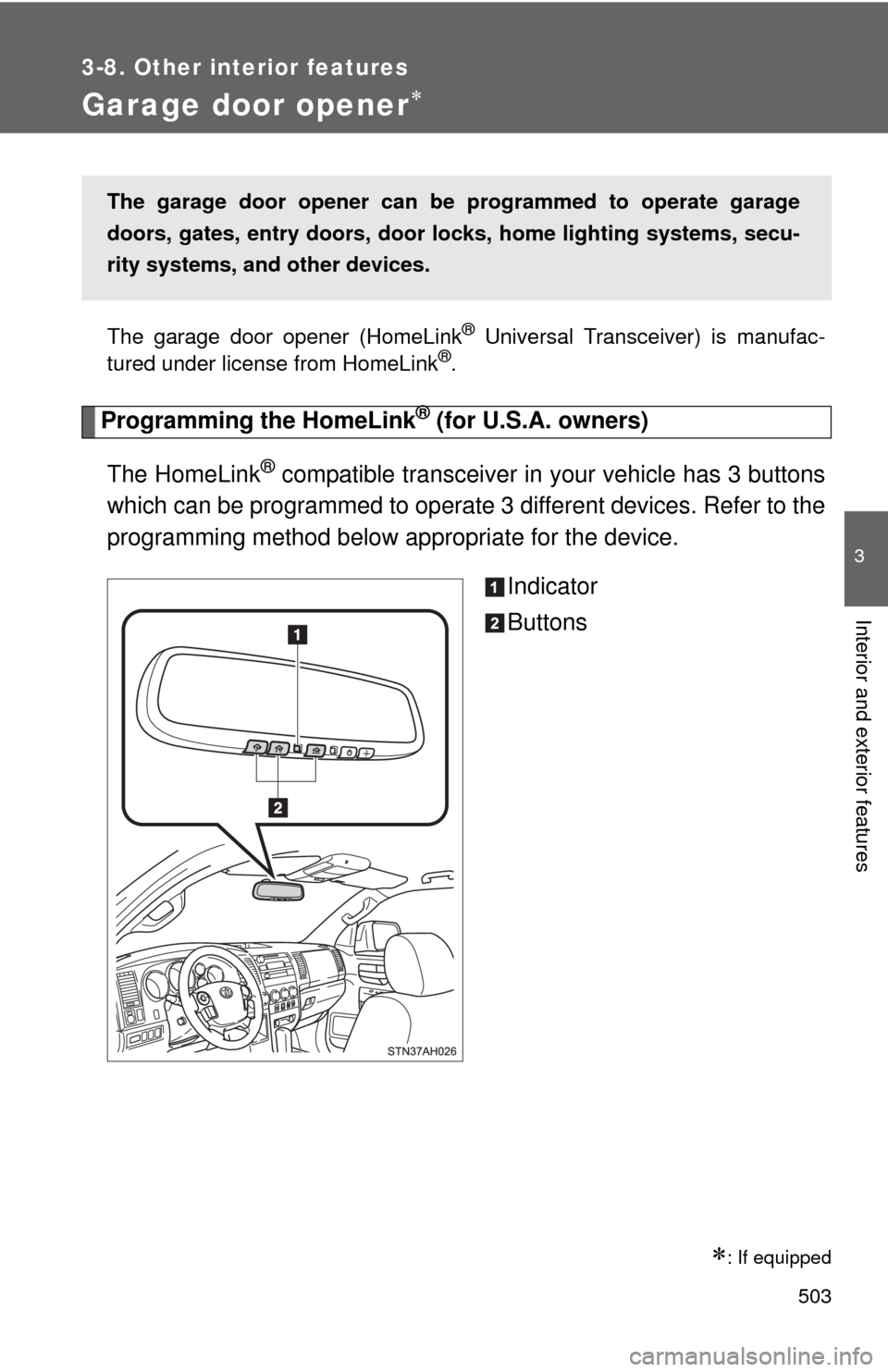
The HomeLink
® compatible transceiver in your vehicle has 3 buttons
which can be programmed to operate 3 different devices. Refer to the
programming method below appropriate for the device.
Indicator
Buttons
: If equipped
The garage door opener can be programmed to operate garage
doors, gates, entry doors, door locks, home lighting systems, secu-
rity systems, and other devices.
Page 506 of 732
506 3-8. Other interior features
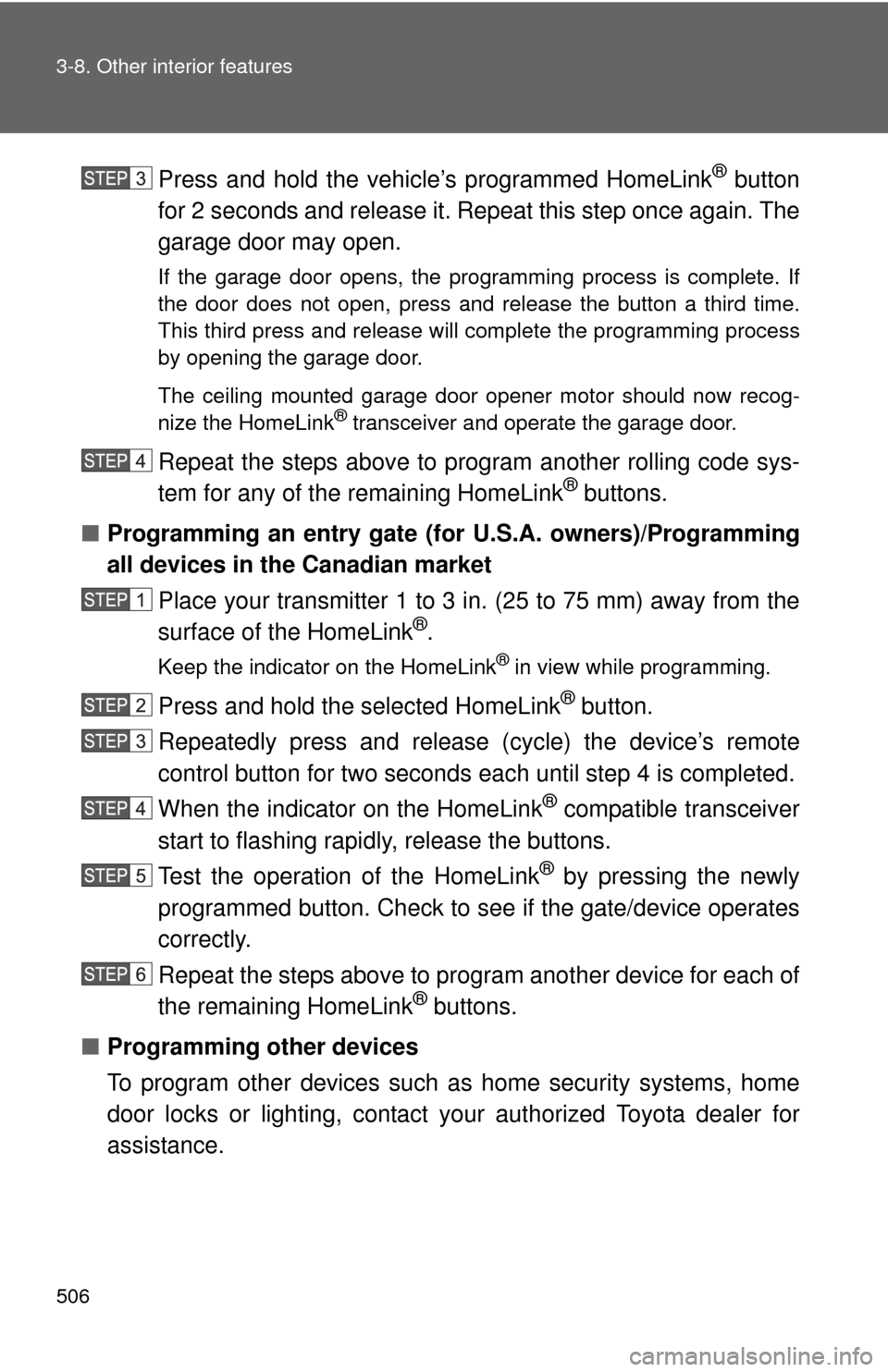
Press and hold the vehicle’s programmed HomeLink® button
for 2 seconds and release it. Repeat this step once again. The
garage door may open.
If the garage door opens, the programming process is complete. If
the door does not open, press and release the button a third time.
This third press and release will complete the programming process
by opening the garage door.
The ceiling mounted garage door opener motor should now recog-
nize the HomeLink
® transceiver and operate the garage door.
Repeat the steps above to prog ram another rolling code sys-
tem for any of the remaining HomeLink® buttons.
■ Programming an entry gate (f or U.S.A. owners)/Programming
all devices in the Canadian market
Place your transmitter 1 to 3 in. (25 to 75 mm) away from the
surface of the HomeLink
®.
Keep the indicator on the HomeLink® in view while programming.
Press and hold the selected HomeLink® button.
Repeatedly press and release (cycle) the device’s remote
control button for two seconds each until step 4 is completed.
When the indicator on the HomeLink
® compatible transceiver
start to flashing rapidly, release the buttons.
Test the operation of the HomeLink
® by pressing the newly
programmed button. Check to se e if the gate/device operates
correctly.
Repeat the steps above to program another device for each of
the remaining HomeLink
® buttons.
■ Programming other devices
To program other devices such as home security systems, home
door locks or lighting, contact your authorized Toyota dealer for
assistance.
Page 507 of 732
507
3-8. Other interior features
3
Interior and exterior features
■
Reprogramming a button
The individual HomeLink
® buttons cannot be erased but can be
reprogrammed. To reprogram a button, follow the programming
instructions.
Operating the HomeLink®
Press the appropriate HomeLink® button. The HomeLink® indicator
on the HomeLink® transceiver should turn on.
The HomeLink® continues to send a signal for a maximum of 20 seconds
as long as the button is pressed.
Reprogramming a HomeLink® button
Press and hold the desired HomeLink
® button. After 20 seconds, the
HomeLink® indicator light will start flas hing slowly. Keep pressing the
HomeLink® button and then follow the “Programming HomeLink® (for
U.S.A. owners)” instructions. ( P. 503)
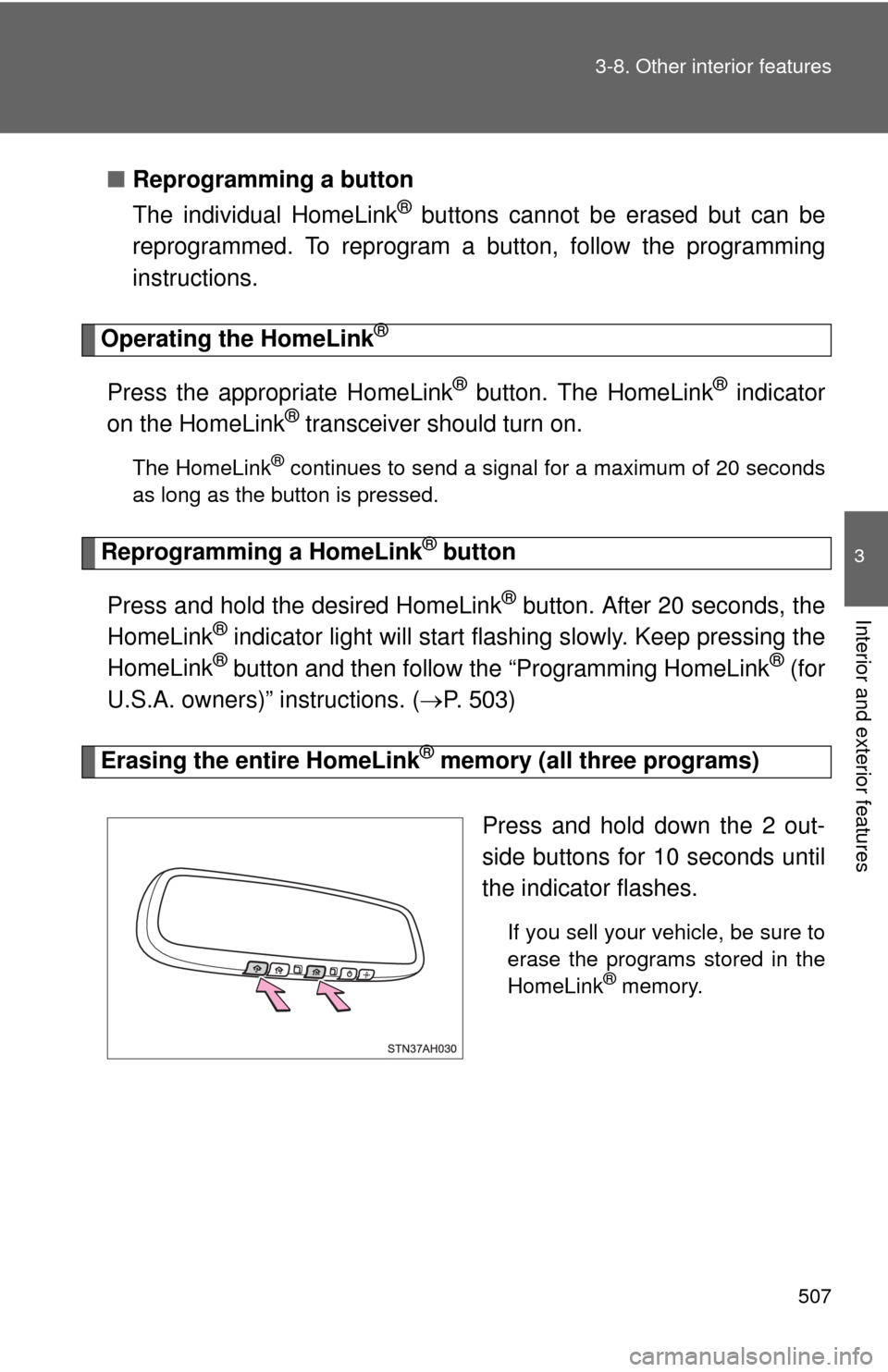
Erasing the entire HomeLink® memory (all three programs)
Press and hold down the 2 out-
side buttons for 10 seconds until
the indicator flashes.
If you sell your vehicle, be sure to
erase the programs stored in the
HomeLink
® memory.
Page 515 of 732
Maintenance and care4
515
4-1. Maintenance and careCleaning and protecting the vehicle exterior ......... 516
Cleaning and protecting the vehicle interior .......... 519
4-2. Maintenance Maintenance requirements .................. 522
General maintenance....... 524
Emission inspection and maintenance (I/M)
programs........................ 527
4-3. Do-it-yourself maintenance Do-it-yourself service precautions .................... 528
Hood ................................ 532
Engine compartment ........ 533
Tires ................................. 547
Tire inflation pressure ...... 554
Wheels ............................. 558
Air conditioning filter......... 560
Wireless remote control battery ............................ 563
Checking and replacing fuses .............................. 565
Light bulbs........................ 576
Page 518 of 732
518 4-1. Maintenance and care
NOTICE
■Cleaning the exterior lights
●Wash carefully. Do not use organic substances or scrub with a hard brush.
This may damage the surfaces of the lights.
● Do not apply wax on the surfaces of the lights.
Wax may cause damage to the lenses.
■ Antenna installation and removal precautions
●Before driving, ensure that the antenna is installed.
● When the antenna is removed, such as before entering an automatic car
wash, make sure to store it in a suitable place so as not to lose it. Also,
before driving, make sure to reinstall the antenna in its original position.
Page 521 of 732
521
4-1. Maintenance and care
4
Maintenance and care
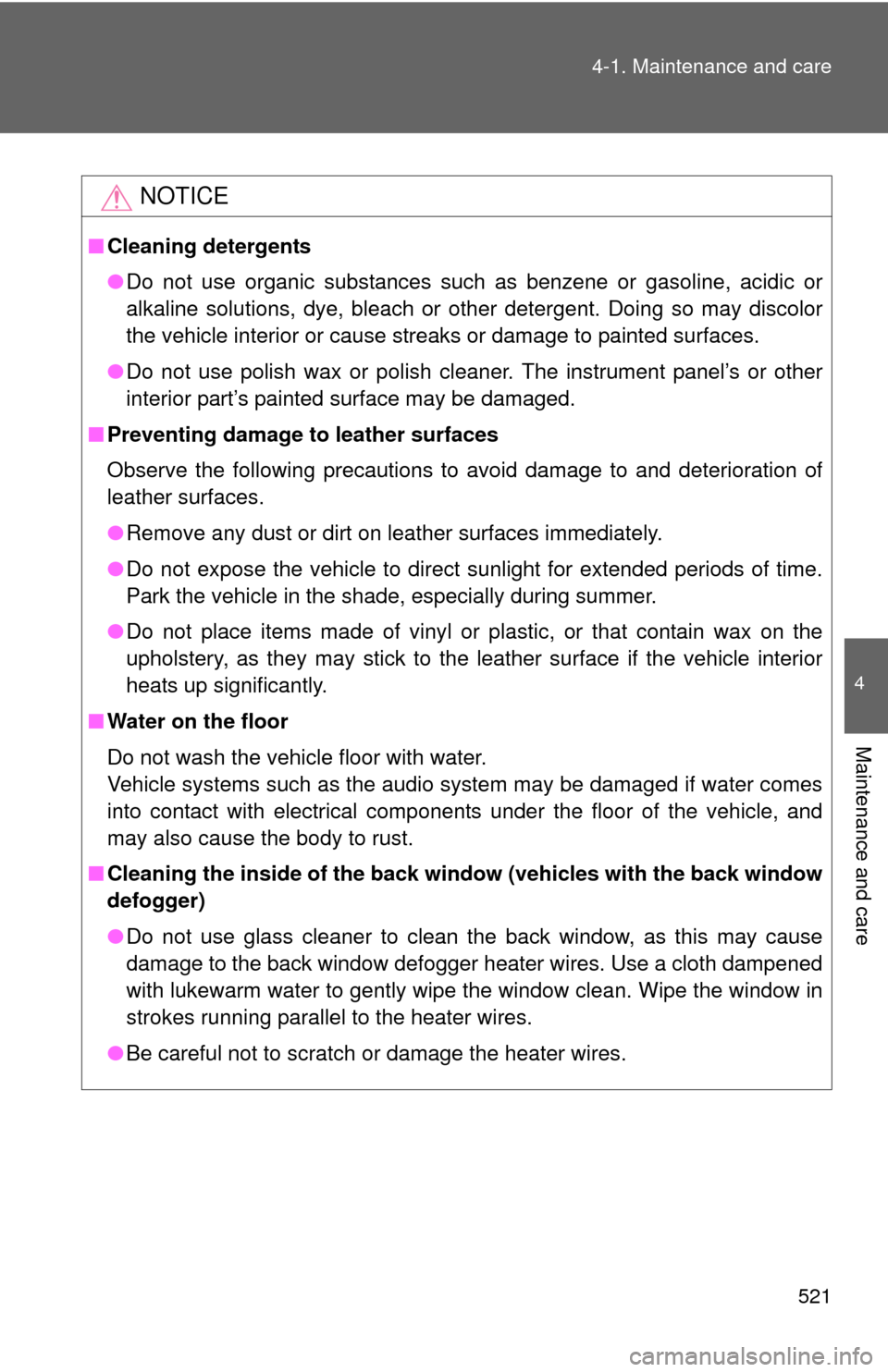
NOTICE
■
Cleaning detergents
●Do not use organic substances such as benzene or gasoline, acidic or
alkaline solutions, dye, bleach or other detergent. Doing so may discolor
the vehicle interior or cause streaks or damage to painted surfaces.
● Do not use polish wax or polish cleaner. The instrument panel’s or other
interior part’s painted surface may be damaged.
■ Preventing damage to leather surfaces
Observe the following precautions to avoid damage to and deterioration o\
f
leather surfaces.
●Remove any dust or dirt on leather surfaces immediately.
● Do not expose the vehicle to direct sunlight for extended periods of time.
Park the vehicle in the shade, especially during summer.
● Do not place items made of vinyl or plastic, or that contain wax on the
upholstery, as they may stick to the leather surface if the vehicle interior
heats up significantly.
■ Water on the floor
Do not wash the vehicle floor with water.
Vehicle systems such as the audio system may be damaged if water comes
into contact with electrical components under the floor of the vehicle, and
may also cause the body to rust.
■ Cleaning the inside of the back win dow (vehicles with the back window
defogger)
● Do not use glass cleaner to clean the back window, as this may cause
damage to the back window defogger heater wires. Use a cloth dampened
with lukewarm water to gently wipe the window clean. Wipe the window in
strokes running parallel to the heater wires.
● Be careful not to scratch or damage the heater wires.
Page 525 of 732
525
4-2. Maintenance
4
Maintenance and care
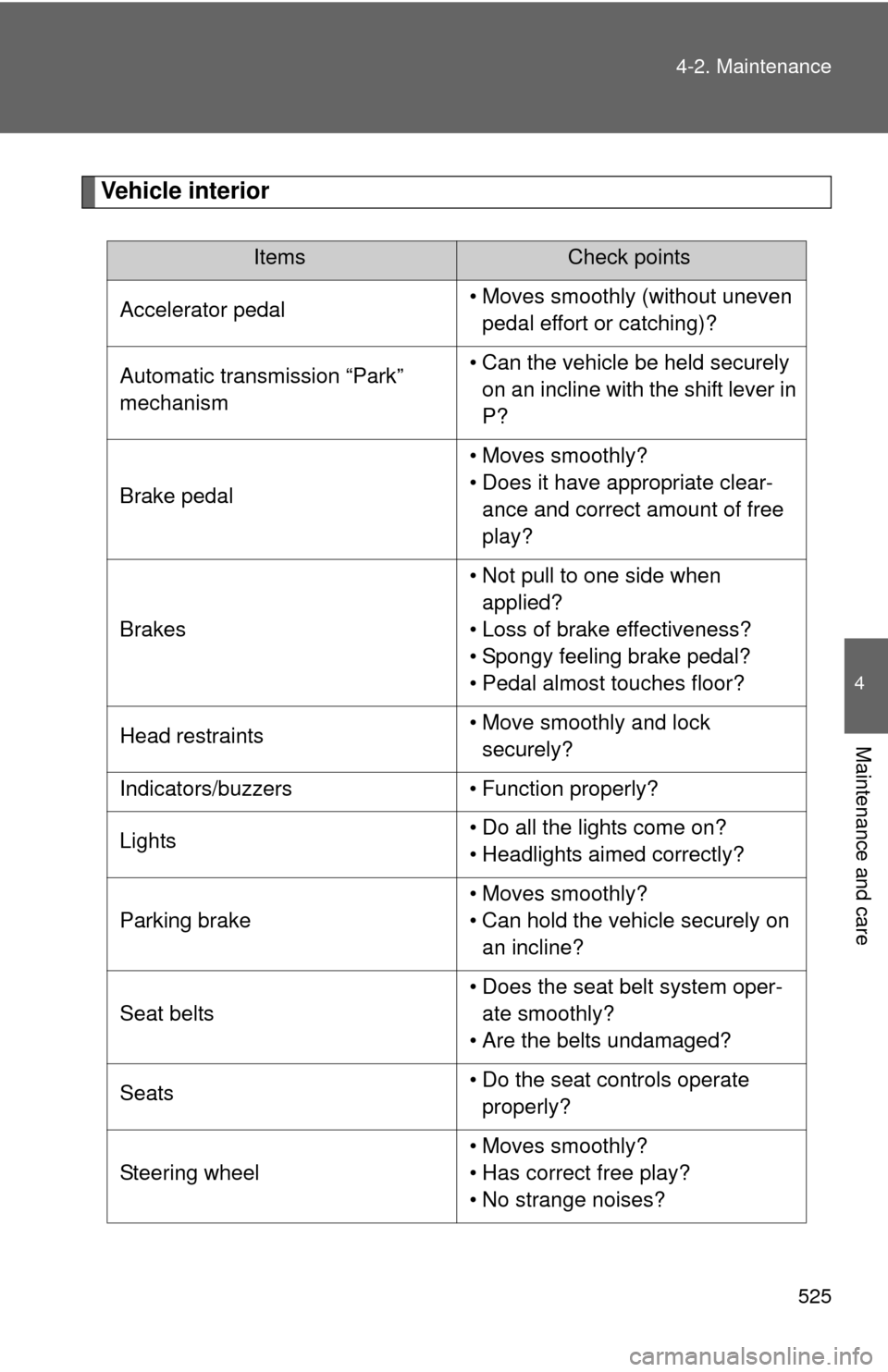
Vehicle interior
ItemsCheck points
Accelerator pedal • Moves smoothly (without uneven
pedal effort or catching)?
Automatic transmission “Park”
mechanism • Can the vehicle be held securely
on an incline with the shift lever in
P?
Brake pedal • Moves smoothly?
• Does it have appropriate clear-
ance and correct amount of free
play?
Brakes • Not pull to one side when
applied?
• Loss of brake effectiveness?
• Spongy feeling brake pedal?
• Pedal almost touches floor?
Head restraints • Move smoothly and lock
securely?
Indicators/buzzers • Function properly?
Lights • Do all the lights come on?
• Headlights aimed correctly?
Parking brake • Moves smoothly?
• Can hold the vehicle securely on
an incline?
Seat belts • Does the seat belt system oper-
ate smoothly?
• Are the belts undamaged?
Seats • Do the seat controls operate
properly?
Steering wheel • Moves smoothly?
• Has correct free play?
• No strange noises?
Page 529 of 732
529
4-3. Do-it-yourself maintenance
4
Maintenance and care
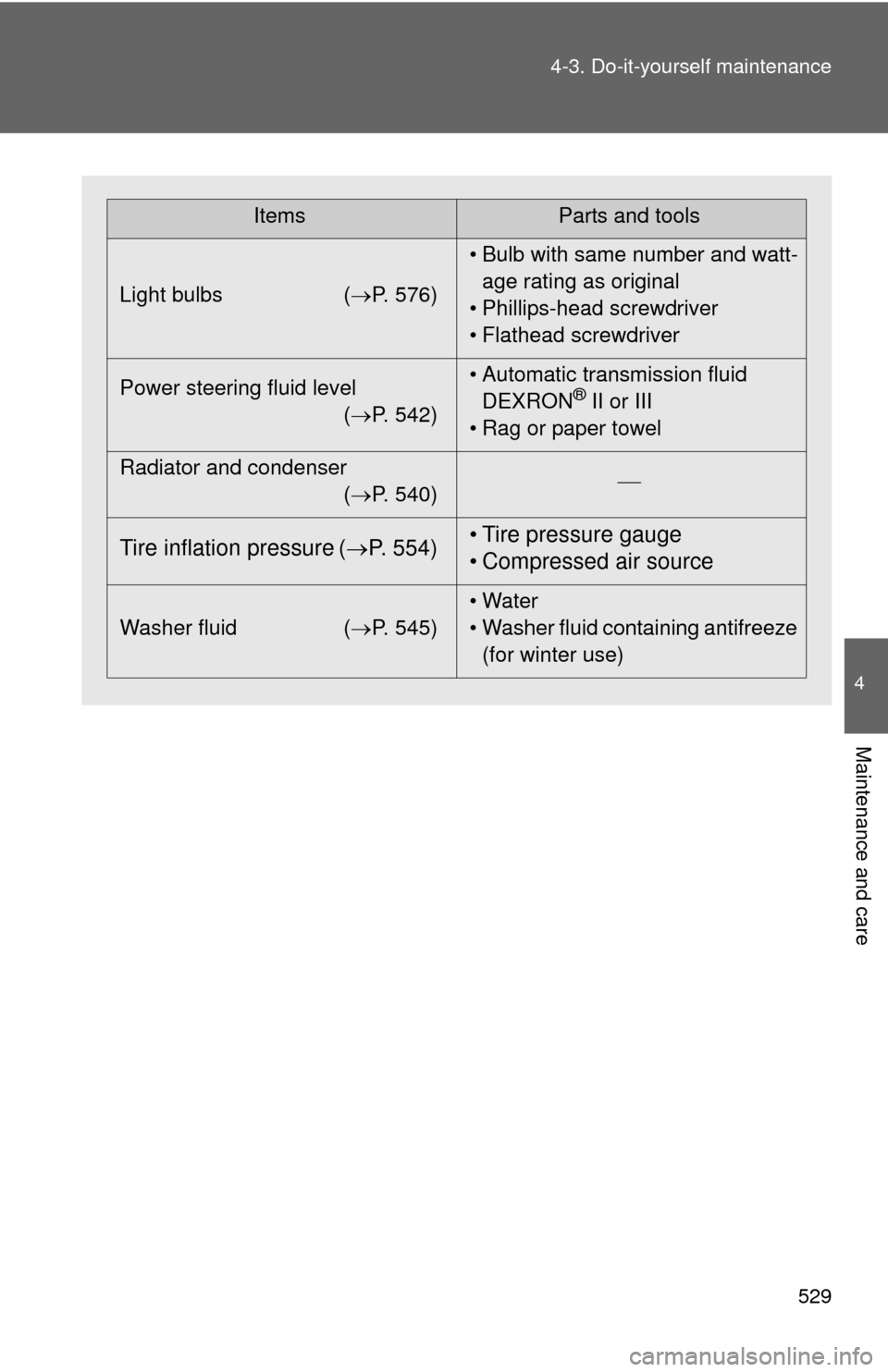
ItemsParts and tools
Light bulbs ( P. 576)• Bulb with same number and watt-
age rating as original
• Phillips-head screwdriver
• Flathead screwdriver
Power steering fluid level (P. 542) • Automatic transmission fluid
DEXRON
® II or III
• Rag or paper towel
Radiator and condenser (P. 540)
Tire inflation pressure (
P. 554) • Tire pressure gauge
• Compressed air source
Washer fluid
(P. 545) • Water
• Washer fluid containing antifreeze
(for winter use)