Page 172 of 688
172
2-2. Instrument cluster
Indicators and warning lights
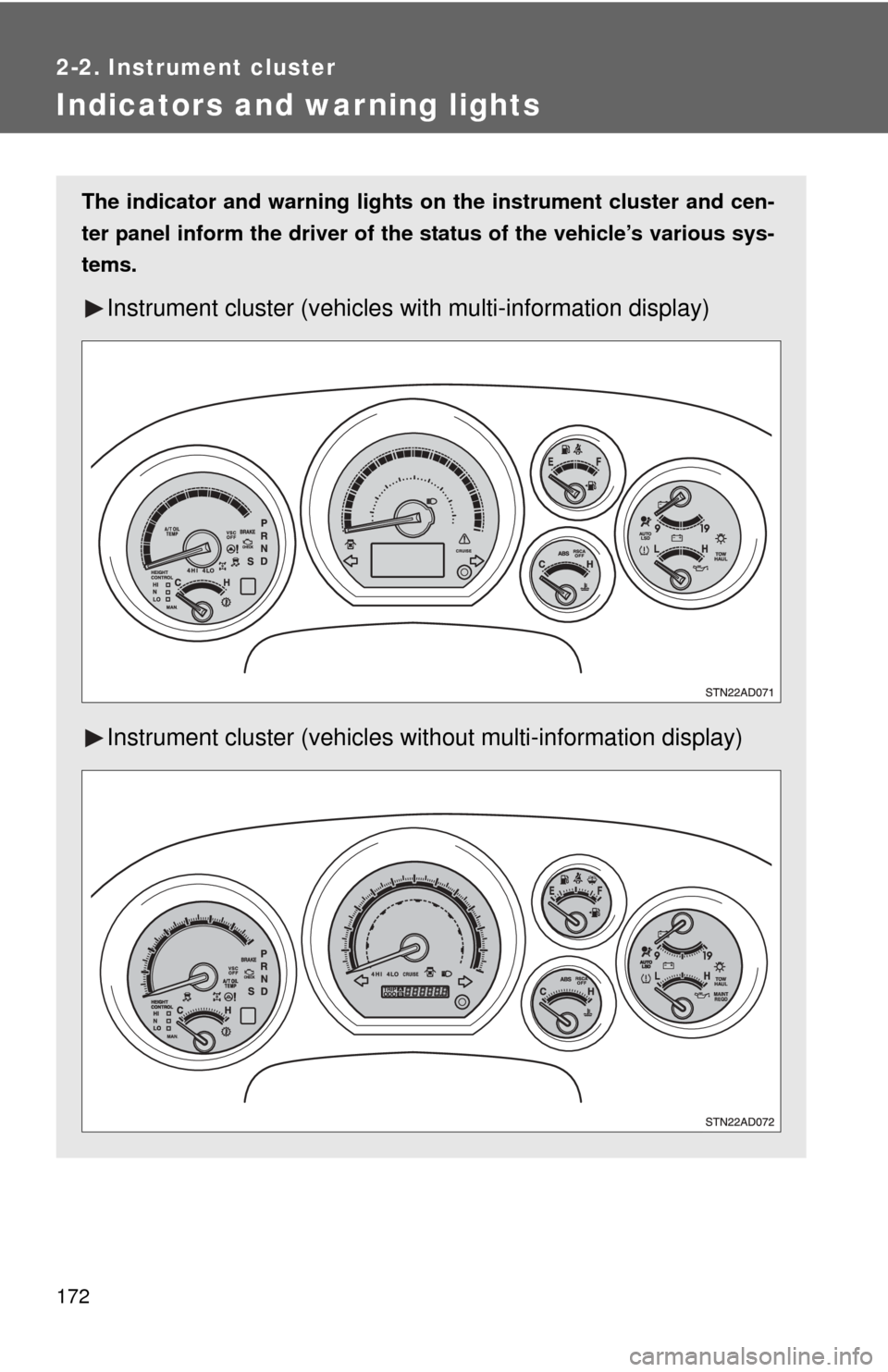
The indicator and warning lights on the instrument cluster and cen-
ter panel inform the driver of the status of the vehicle’s various sys-
tems.
Instrument cluster (vehicles with multi-information display)
Instrument cluster (vehicles without multi-information display)
Page 175 of 688

175
2-2. Instrument cluster
2
When driving
■
Warning lights
Warning lights inform the driver of malfunctions in any of the
vehicle’s systems. ( P. 583)
*1: These lights turn on when the engine switch is turned to the ON
position to indicate that a system check is being performed. They
will turn off after the engine is started, or after a few seconds. There
may be a malfunction in a system if a light does not come on, or if
the lights do not turn off. Have the vehicle inspected by your Toyota
dealer for details.
*2: Vehicles with multi-information display
*3: Vehicles without multi-information display
*4: The indicator flashes to indicate that the system is operating.
*5: The indicator comes on to indicate a malfunction.
*6: For 2WD models, even though there is no function of deactivatingthe curtain shield airbags in a vehicle rollover, the RSCA OFF indi-
cator turns on briefly when the engine switch is turned to the ON
position. But this is not a malfunction.
*7: The indicator flashes to indicate a malfunction.
*1Height control N indi-
cator (P. 224)*1Height control LO indi-
cator (P. 224)
*1Height control MAN.
indicator ( P. 224)
(Canada)(U.S.A.)(Canada)(U.S.A.)
(U.S.A.)
(Flashing)
*2*1*1*1*1*1*1*1
*1*3*3*1,7*1
*1,5*1
Page 176 of 688
176 2-2. Instrument cluster
CAUTION
■If a safety system warning light does not come on
Should a safety system light such as ABS and the SRS airbag warning light
not come on when you start the engine, this could mean that these systems
are not available to help protect you in an accident, which could result in
death or serious injury. Have the vehicle inspected by your Toyota dealer
immediately if this occurs.
Page 177 of 688
177
2-2. Instrument cluster
2
When driving
Multi-information display
Trip informationDisplay items can be switched by pushing the INFO button.
: If equipped
The multi-information display presen ts the driver with a variety of
driving-related data.
● Trip information
( P. 177)
Displays driving range, fuel
consumption and other cruis-
ing-related information.
● Warning messages
( P. 592)
Automatically displayed when
a malfunction occurs in one of
the vehicle’s systems.
● Odometer and trip meter
display ( P. 170)
Page 180 of 688

180 2-2. Instrument cluster
Press the SELECT RESET button to customize the items.
*: Default setting
ItemsScreen textSelect in this order
To select Unit A
or Unit B
(P. 185)
UNITS
Door lock/
unlock warning
functionKEYLESS ENTRY
FEEDBACK
Time for auto-
matic door lock
functionKEYLESS ENTRY
RELOCK TIMER
Double switch
operation to
unlock all the
doorsKEYLESS ENTRY
ALL DOORS
UNLOCK
Automatic door
locking functionDOOR AUTO
LOCKING
Automatic door
unlocking func-
tionDOOR AUTO
UNLOCKING
Time period
before lights
turn off (if a door
is opened and
closed, and
engine switch is
in ACC or
LOCK)
HEADLAMPS AUTO
OFF TIMER
Time period
before lights
turn offCOURTESY LAMPS
OFF TIMER
Reset to default
settingHOLD RESET
TO RESTORE
DEFAULT SETTINGS
Unit B
Unit A
LAMPS + TONE*LAMPS
TONE
OFF
60 SECONDS*120 SECONDS
30 SECONDS OFF
2 PRESSES*1 PRESS
SHIFT OUT
OF PARKABOVE 12 MPH*
(20 km/h)
OFF
SHIFT TO PARK*DRIVER DOOR
OPEN
OFF
30 SECONDS*60 SECONDS
90 SECONDS
0 SECONDS
15 SECONDS*30 SECONDS
8 SECONDS
Page 202 of 688

202 2-4. Using other driving systems
Driving in vehicle-to-vehicle distance control modeThis mode employs a laser radar sensor to detect the presence of
vehicles within 400 ft. (120 m) ahead and to judge the distance
between your vehicle and those vehicles.
Note that vehicle-to-vehicle distance will close when traveling on long
downhill slopes.
Example of constant speed cruising (when there are no vehicles
ahead):
When set to 62 mph (100 km/h)
The vehicle travels at the speed set by the driver. The desired vehicle-to-
vehicle distance can also be set by operating the vehicle-to-vehicle dis-
tance switch.
Example of deceleration cruising (when the vehicle ahead is driv-
ing slower than the set speed):
When fixed speed cruising is set at 62 mph (100 km/h) and the
vehicle ahead is driving at 50 mph (80 km/h)
When a vehicle is detected running ahead of you, in the same lane, the
system automatically decelerates your vehicle. When a greater reduction
in vehicle speed is necessary, the system applies the brakes. A warning
tone warns you when the system cannot decelerate sufficiently to prevent
your vehicle from closing on the vehicle ahead.
Page 203 of 688

203
2-4. Using other
driving systems
2
When driving
Example of follow-up cruising (when following a vehicle driving
slower than the set speed):
When the speed is set to 62 mph (100 km/h) and the vehicle ahead
is driving at 50 mph (80 km/h)
The system continues follow-up cruising while adjusting for changes in the
speed of the vehicle ahead in order to maintain the vehicle-to-vehicle dis-
tance set by the driver.
Example of acceleration (when there are no longer vehicles driving
slower than the set speed in the lane ahead):
When the speed is set to 62 mph (100 km/h) and the vehicle ahead
driving at 50 mph (80 km/h) is out of the lane
When the vehicle ahead of you executes a lane change, the system
slowly accelerates until the set vehicle speed is reached. The system then
returns to fixed speed cruising.
■Fine adjustment of the set speed
Adjustment of the set speed by the following speed can be made by lightly
pressing the lever up or down and releasing it.
In the constant speed control mode: Approximately 1.0 mph (1.6 km/h)
In the vehicle-to-vehicle distance control mode:U.S.A.: Approximately 5 mph (8 km/h)
Canada: Approximately 3 mph (5 km/h)
■ Dynamic laser cruise control warning lights, display and buzzers
Warning lights, display and buzzers are used to indicate a system malfunc-
tion or to alert you to the need for caution while driving. ( P. 595)
■ The dynamic laser cruise can be set when
●The shift lever is in D or the shift range position must be in between 4 and
6 in S mode.
● Vehicle speed is above approximately 30 mph (50 km/h).
■ Accelerating
The vehicle can be accelerated normally.
Page 218 of 688

218 2-4. Using other driving systems
■The rear view monitor system can be operated when
The shift lever is in R and the engine switch is ON.
■ Display mode
The rear view monitor display mode can be adjusted when the engine switc\
h
is in the ON position and the shift lever is in R.
●To temporarily turn off the monitor when it is on.
Press the button. The indicator should turn orange.
The monitor will automatically turn on again after the engine switch is
turned off and on.
● To manually turn on the monitor when it is turned off.
Press the button. The indicator should turn green.
● To select a display language (English, French, or Spanish).
Press and hold the button for 6 seconds.
The monitor should turn on and the indicator should turn green.
Press the button.
Each time the button is pressed and released, the language
will change. The warning message should flash once after about 5
seconds, indicating that the change has been completed.
● To permanently disable the monitor.
Press and hold the button for 12 to 15 seconds.
The monitor will turn off and on after 6 seconds. Continue holding the
button down until the display turns back off.
The indicator should flash orange.
The monitor will not automatically turn on again after the engine switch is
turned off and on.
Press the button.