Page 171 of 501

Interior features3
171
3-4. Using the hands-free
phone system
(for cellular phone)
Hands-free phone system
(for cellular phone)
features .......................... 247
Using the hands-free
phone system
(for cellular phone) ......... 252
Making a phone call ......... 262
Setting a cellular phone ... 266
Security and system
setup .............................. 271
Using the phone book ...... 275
3-5. Using the interior lights
Interior lights list ............... 282
• Interior light .................... 283
• Personal/interior lights ... 284
• Personal lights ............... 2853-6. Using the storage features
List of storage features .... 286
• Glove box....................... 287
• Console box ................... 287
• Cup holders ................... 288
• Bottle holders ................. 290
• Auxiliary boxes ............... 291
3-7. Other interior features
Sun visors ........................ 293
Vanity mirrors ................... 294
Clock ................................ 295
Ashtrays ........................... 296
Cigarette lighter................ 297
Power outlet ..................... 298
Grocery bag hook ............ 300
Seatback table ................. 302
Floor mat .......................... 303
Luggage compartment
feature............................ 304
Compass .......................... 311
Page 179 of 501
179
3-1. Using the air conditioning system and defogger
3
Interior features
Rear window and outside rear view mirror defoggers
■Outside rear view mirror defogger (if equipped)
Turning the rear window defogger on will turn the outside rear view mirror
defoggers on.
CAUTION
■Outside rear view mirror defogger (if equipped)
The surfaces of the outside rear view mirrors become hot. Do not touch
them to prevent from burning yourself.
NOTICE
■To prevent battery discharge
Do not leave the rear window defogger on longer than necessary when the
engine is not running.
Clear the rear window using the defogger.
On/off
The defoggers will automati-
cally turn off after approxi-
mately 15 minutes.
Page 294 of 501
294
3-7. Other interior features
Vanity mirrors
Slide the cover.
Page 311 of 501
311
3-7. Other interior features
3
Interior features
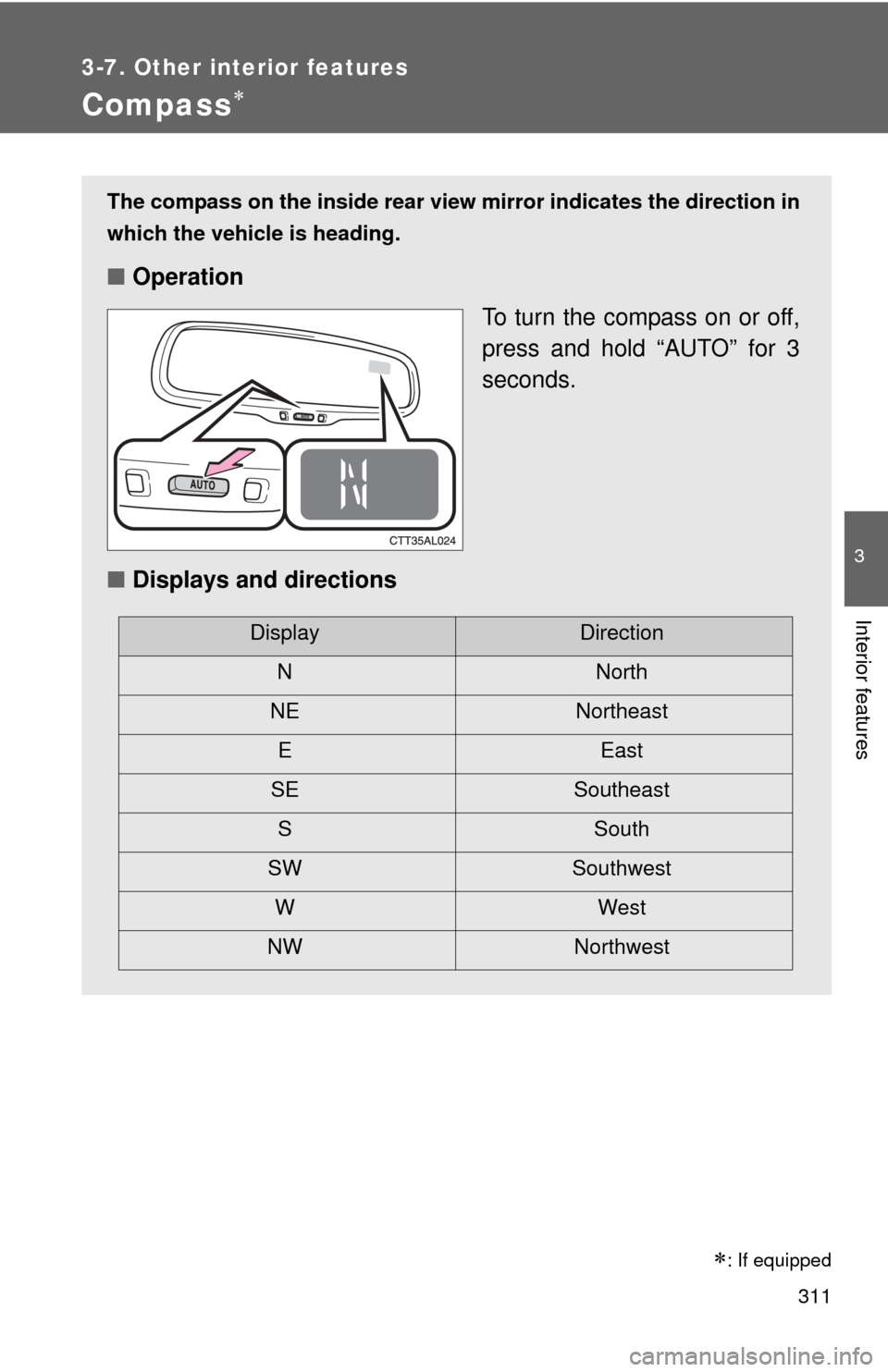
Compass
The compass on the inside rear view mirror indicates the direction in
which the vehicle is heading.
■Operation
To turn the compass on or off,
press and hold “AUTO” for 3
seconds.
■Displays and directions
DisplayDirection
NNorth
NE Northeast
EEast
SE Southeast
S South
SW Southwest
WWest
NW Northwest
: If equipped
Page 313 of 501

313 3-7. Other interior features
3
Interior features
■Circling calibration
Stop the vehicle in a place where it is safe to drive in a circle.
Press and hold “AUTO” for 9
seconds.
C appears on the compass dis-
play.
Drive the vehicle at 5 mph (8
km/h) or less in a circle until a
direction is displayed.
If there is not enough space to
drive in a circle, drive around the
block until the direction is dis-
played.
STEP1
STEP2
STEP3
■Conditions unfavorable for correct operation
The compass may not show the correct direction in the following situations:
●The vehicle is stopped immediately after turning.
●The vehicle is on an inclined surface.
●The vehicle is in a place where the earth's magnetic field is subject to
interference by artificial magnetic fields (underground car park/parking
lot, under a steel tower, between buildings, roof car park/parking lot, near
an intersection, near a large vehicle, etc.).
●The vehicle has become magnetized.
(There is a magnet or metal object near the anti-glare inside rear view
mirror.)
●The battery has been disconnected.
●A door is open.
Page 314 of 501
314 3-7. Other interior features
CAUTION
■While driving the vehicle
Do not adjust the display. Be sure to adjust the display only when the vehicle
is stopped.
■When doing the circling calibration
Be sure to secure a wide space, and watch out for people and vehicles in the
neighborhood. Do not violate any local traffic rules while performing circling
calibration.
NOTICE
■To avoid compass malfunctions
Do not place magnets or any metal objects near the anti-glare inside rear
view mirror.
Doing this may cause a malfunction of the compass sensor.
■To ensure normal operation of the compass
●Do not perform circling calibration of the compass in a place where the
earth's magnetic field is subject to interference by artificial magnetic fields.
●During calibration, do not operate electric systems (moon roof, power win-
dows, etc.) as they may interfere with the calibration.
Page 316 of 501

316
4-1. Maintenance and care
Cleaning and protecting the vehicle exterior
■Automatic car washes
●Before washing the vehicle, do the following.
• Fold the mirrors back.
• Remove the antenna.
●Brushes used in automatic car washes may scratch the vehicle surface
and harm your vehicle's paint.
■High pressure car washes
●Do not allow the nozzles of the car wash to come within close proximity
of the windows.
●Before car wash, check that the fuel filler door on your vehicle is closed
properly.
Perform the following to protect the vehicle and maintain it in prime
condition.
●Working from top to bottom, liberally apply water to the vehicle
body, wheel wells and underside of the vehicle to remove any
dirt and dust.
Wash the vehicle body using a sponge or soft cloth, such as a
chamois.
●For hard-to-remove marks, use car wash soap and rinse thor-
oughly with water.
●Wipe away any water.
●Wax the vehicle when the waterproof coating deteriorates.
If water does not bead on a clean surface, apply wax when the vehicle
body is cool.
Page 378 of 501
377 4-3. Do-it-yourself maintenance
4
Maintenance and care
■Under the driver’s side instrument panel
FuseAmpereCircuit
1 TAIL 10 AParking lights, tail lights, license
plate lights, multiport fuel injection
system/sequential multiport fuel
injection system, instrument cluster
lights
2 PANEL 7.5 A Switch illumination
3 FR DOOR 20 A Power windows, electric moon roof
4 RL DOOR 20 A Power windows
5 RR DOOR 20 A Power windows
6 SUNROOF 20 A Electric moon roof
7 CIG 15 A Cigarette lighter, power outlet
8 ACC 7.5 AOutside rear view mirrors, audio
system, main body ECU, clock,
shift lock control system
9 MIR HTR 10 AMultiport fuel injection system/
sequential multiport fuel injection
system, outside rear view mirror
heaters
10 PWR OUTLET 15 A No circuit