Page 197 of 608
197
2-4. Using other
driving systems
2
When driving
L/C200_U (OM60F74U)■
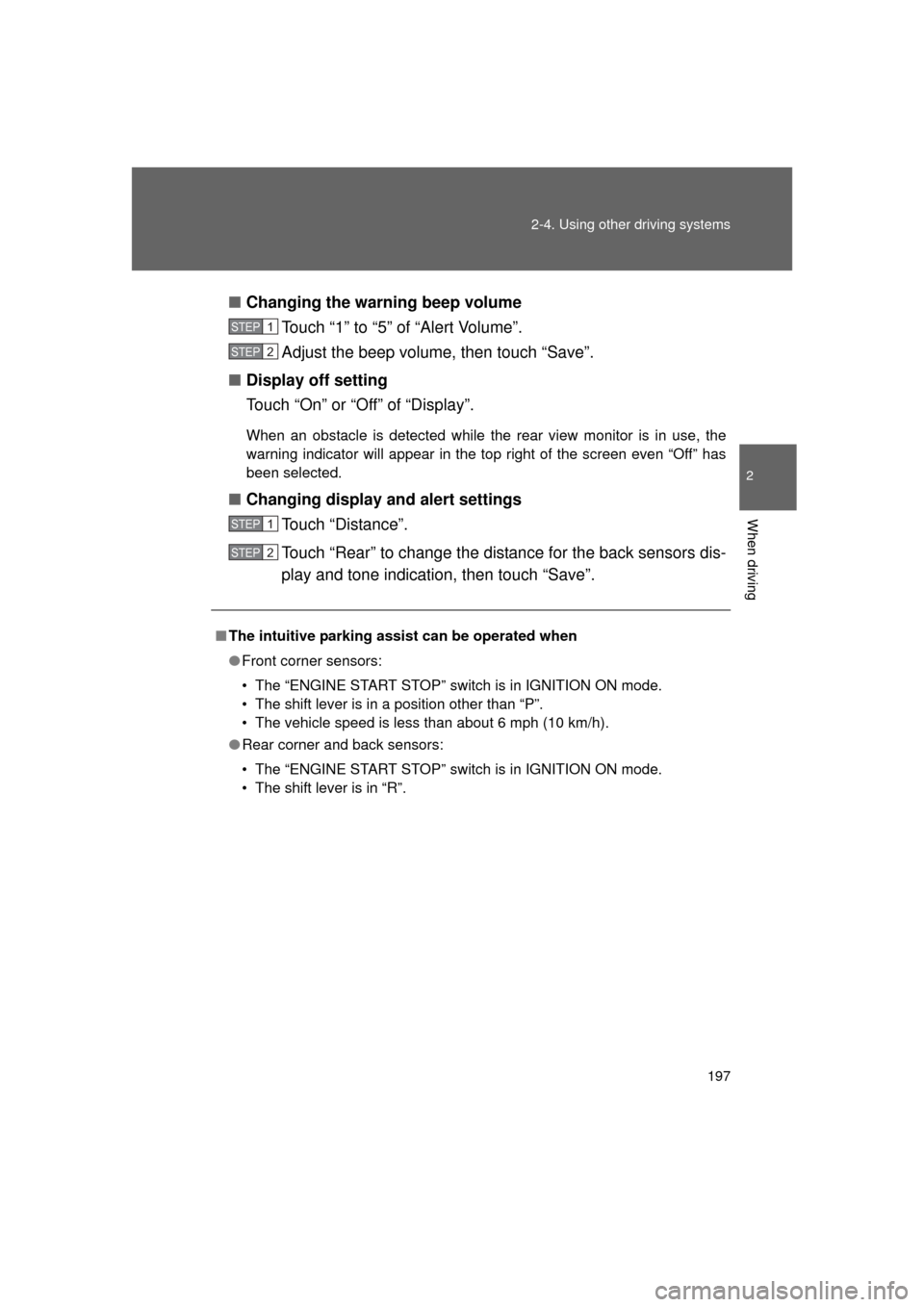
Changing the warning beep volume
Touch “1” to “5” of “Alert Volume”.
Adjust the beep volume, then touch “Save”.
■ Display off setting
Touch “On” or “Off” of “Display”.
When an obstacle is detected while the rear view monitor is in use, the
warning indicator will appear in the top right of the screen even “Of\
f” has
been selected.
■Changing display and alert settings
Touch “Distance”.
Touch “Rear” to change the distance for the back sensors dis-
play and tone indication, then touch “Save”.
■The intuitive parking assist can be operated when
● Front corner sensors:
• The “ENGINE START STOP” switch is in IGNITION ON mode.
• The shift lever is in a position other than “P”.
• The vehicle speed is less than about 6 mph (10 km/h).
● Rear corner and back sensors:
• The “ENGINE START STOP” switch is in IGNITION ON mode.
• The shift lever is in “R”.
STEP1
STEP2
STEP1
STEP2
Page 199 of 608
199
2-4. Using other
driving systems
2
When driving
L/C200_U (OM60F74U)
■If a message is displayed on the multi-information display
P. 523
■ When there is a malfunction
In the following cases, have the vehicle inspected by your Toyota dealer.
● If the bumper is damaged
● If the intuitive parking assist indicator light remains on without a beep
sounds.
CAUTION
■When using the intuitive parking assist
Observe the following precautions.
Failing to do so may result in the vehicle being unable to be driven safely
and possibly cause an accident.
● Do not use the sensor at speeds in excess of 6 mph (10 km/h).
● When moving forward or reversing, always check your surroundings for
safety and drive carefully.
● Do not install accessories within the sensors’ detection areas.
NOTICE
■When washing the vehicle
Do not apply intensive bursts of water or steam to the sensor area.
Doing so may result in the sensor malfunctioning.
Page 207 of 608
207
2-4. Using other
driving systems
2
When driving
L/C200_U (OM60F74U)
■Function limitations
● In the following situations, brake control can be used to drive downhill at
a constant speed. However, engine control is not available when driving
uphill at a constant speed.
• When switched to second start mode
• When the vehicle speed exceeds approximately 6 mph (10 km/h).
● In the following situation, engine control and brake control will be tempo-
rarily canceled.
• When the vehicle speed exceeds approximately 15 mph (25 km/h).
■ If the brake system overheats
The system will cease operation and a buzzer will sound to alert the driver.
Stop the vehicle in a safe place. (Ther e is no problem with continuing normal
driving.)
■ If the automatic transmission system overheats
The system will cease operation, a buzzer will sound and a warning mes-
sage will be displayed, or the automat ic transmission fluid temperature warn-
ing light will come on to alert the driver. Stop the vehicle in a safe place until
the warning message or the warning light turns off.
■ Sounds and vibrations caused by the Crawl Control system
● A sound may be heard from the engine compartment when the engine is
started or just after the vehicle begins to move. This sound does not indi-
cate that a malfunction has occurred in Crawl Control system.
● Either of the following conditions may occur when the Crawl Control sys-
tem is operating. None of these are indicators that a malfunction has
occurred.
• Vibrations may be felt through the vehicle body and steering.
• A motor sound may be heard after the vehicle comes to a stop.
Page 211 of 608
211
2-4. Using other
driving systems
2
When driving
L/C200_U (OM60F74U)
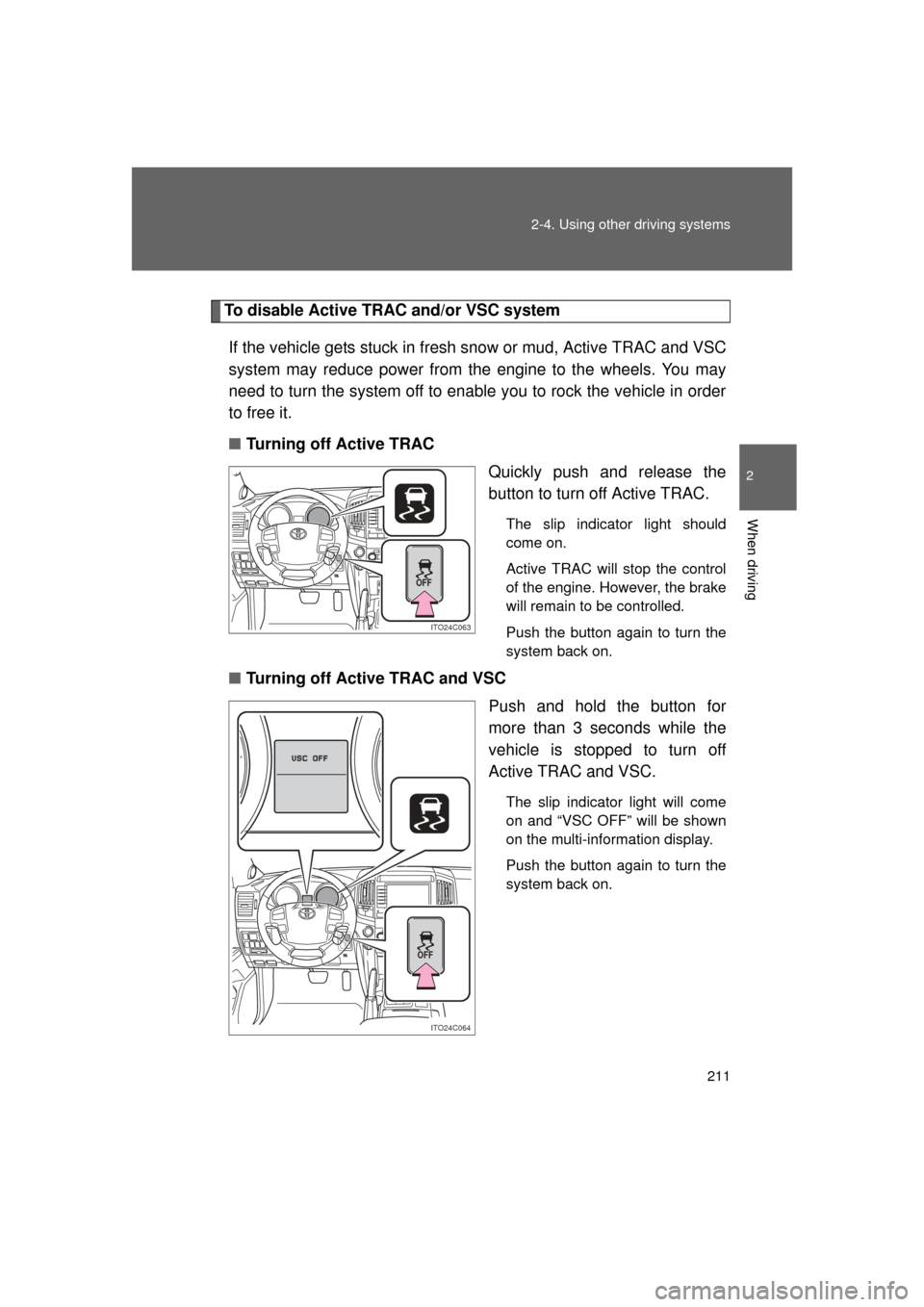
To disable Active TRAC and/or VSC system
If the vehicle gets stuck in fresh snow or mud, Active TRAC and VSC
system may reduce power from the engine to the wheels. You may
need to turn the system off to enable you to rock the vehicle in order
to free it.
■ Turning off Active TRAC
Quickly push and release the
button to turn off Active TRAC.
The slip indicator light should
come on.
Active TRAC will stop the control
of the engine. However, the brake
will remain to be controlled.
Push the button again to turn the
system back on.
■Turning off Active TRAC and VSC
Push and hold the button for
more than 3 seconds while the
vehicle is stopped to turn off
Active TRAC and VSC.
The slip indicator light will come
on and “VSC OFF” will be shown
on the multi-information display.
Push the button again to turn the
system back on.
ITO24C063
OFF
ITO24C064
OFF
Page 215 of 608
215
2-4. Using other driving systems
2
When driving
L/C200_U (OM60F74U)
Pre-Collision System
: If equipped
■The pre-collision system is operational when
● Vehicle speed exceeds 19 mph (30 km/h).
● The system detects sudden braking or skidding.
● The front occupants are wearing a seat belt.
■ When there is a malfunction in the system
Warning message will be displayed on the multi-information display.
(
P. 523)
CAUTION
■Limitations of the pre-collision system
Do not rely on the pre-collision system. Always drive safely, taking care to
observe your surroundings and checki ng for any obstacles or other road
hazards.
The system detects emergency braking from the speed and force
with which the driver presses the brake pedal, and quickly tightens
the seat belt to improve the effectiveness of the seat belt pretension-
ers ( P. 73). This system also oper ates in the same manner when
the vehicle slips sideways.
Page 255 of 608
Interior features3
255
L/C200_U (OM60F74U)
3-3. Using the Bluetooth® audio
system
Bluetooth
® audio
system ........................... 321
Using the Bluetooth
® audio
system ........................... 324
Operating a Bluetooth
®
enabled portable
player ............................. 330
Setting up a Bluetooth
®
enabled portable
player ............................. 333
Bluetooth
® audio system
setup .............................. 340
3-4. Using the hands-free system (for cellular phone)
Hands-free system (for cellular phone) ......... 341
Using the hands-free system ........................... 345
Making a phone call ......... 353
Setting a cellular phone ... 358
Security and system setup .............................. 364
Using the phone book ...... 370
3-5. Using the interior lights Interior lights list ............... 379
• Interior lights .................. 380
• Personal lights ............... 381 3-6. Using the storage features
List of storage features .... 382
• Glove box....................... 383
• Console box ................... 384
• Overhead console .......... 385
• Cup holders ................... 386
• Bottle holders ................. 387
• Card holders .................. 389
• Auxiliary box .................. 389
3-7. Other interior features Cool box ........................... 390
Sun visors ........................ 392
Vanity mirror..................... 393
Clock ................................ 394
Outside temperature display............................ 395
Ashtrays ........................... 396
Cigarette lighter................ 398
Power outlets ................... 399
Seat heaters..................... 401
Armrest ............................ 403
Floor mats ........................ 404
Luggage compartment features .......................... 406
Garage door opener......... 408
Safety Connect ................ 415
Page 256 of 608
256
L/C200_U (OM60F74U)
3-1. Using the air conditioning system and defogger
Front air conditioning system
: If equipped
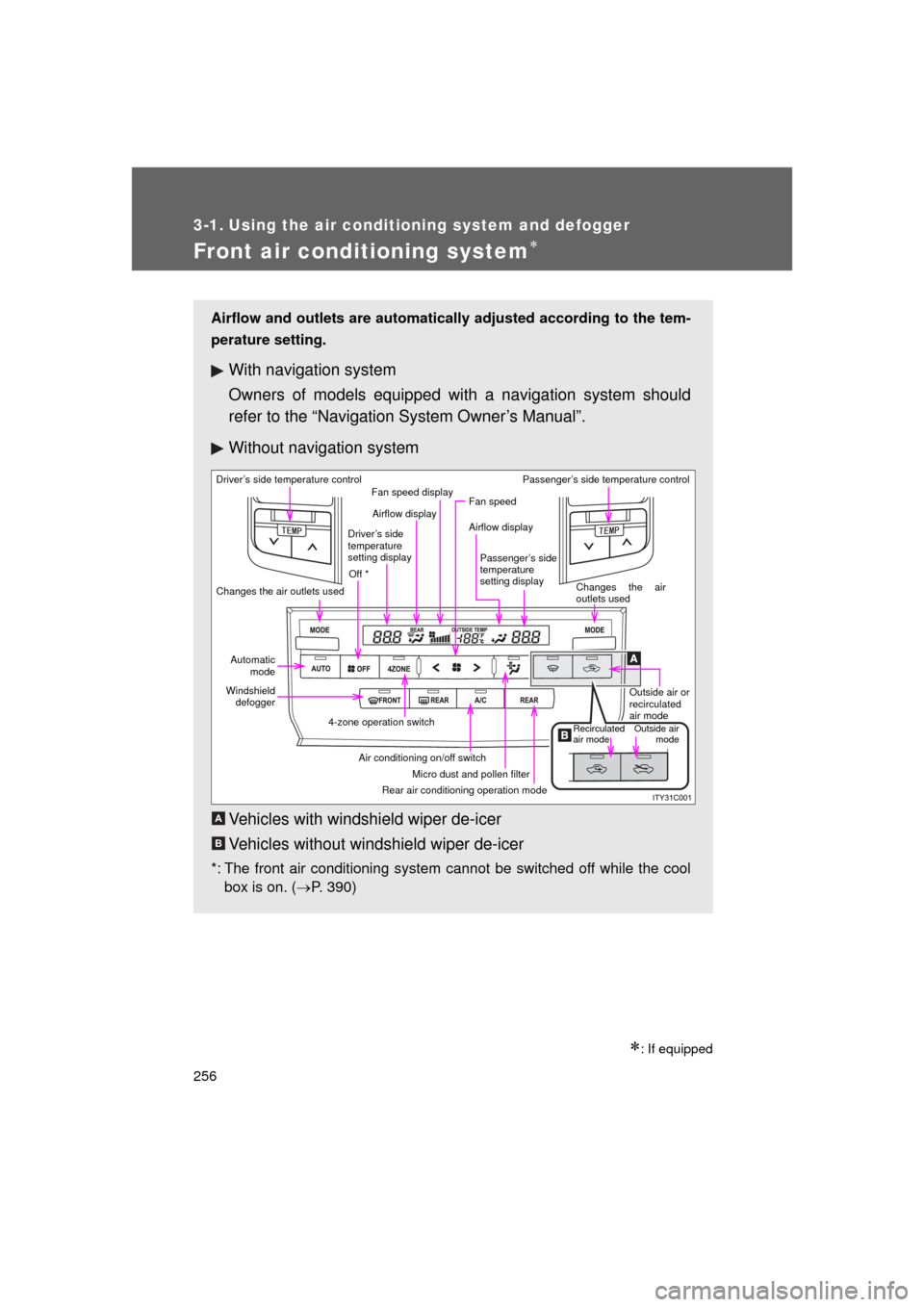
Airflow and outlets are automatically adjusted according to the tem-
perature setting.
With navigation system
Owners of models equipped with a navigation system should
refer to the “Navigation System Owner’s Manual”.
Without navig ation system
Vehicles with windshield wiper de-icer
Vehicles without windshield wiper de-icer
*: The front air conditioning system cannot be switched off while the cool box is on. ( P. 390)
Driver’s side temperature control
Changes the air outlets used Off *Airflow display
Fan speed display
Fan speed
Airflow display
Passenger’s side
temperature
setting display Passenger’s side temperature control
Changes the air
outlets usedOutside air or
recirculated
air mode
Outside airmode
Recirculated
air mode
Rear air conditioning operation mode Micro dust and pollen filter
Air conditioning on/off switch
4-zone operation switch
Windshield
defogger
Automatic
mode
Driver’s side
temperature
setting display
A
B
Page 258 of 608
258 3-1. Using the air conditioning system and defogger
L/C200_U (OM60F74U)
Adjusting the settings
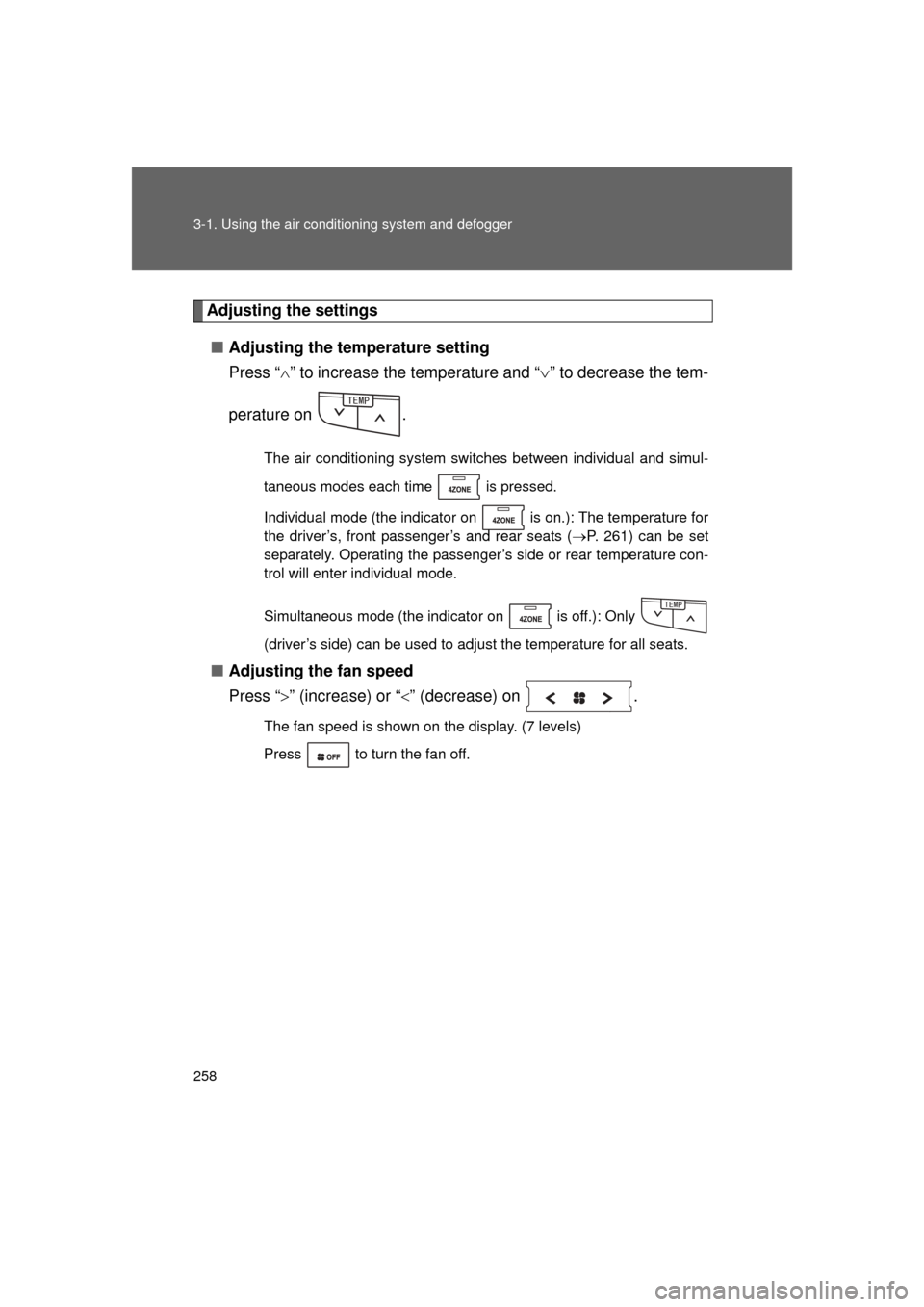
■ Adjusting the temperature setting
Press “ ” to increase the temperature and “ ” to decrease the tem-
perature on .
The air conditioning system switches between individual and simul-
taneous modes each time is pressed.
Individual mode (the indicator on is on.): The temperature for
the driver’s, front passenger’s and rear seats ( P. 261) can be set
separately. Operating the passenger’s side or rear temperature con-
trol will enter individual mode.
Simultaneous mode (the indicator on is off.): Only
(driver’s side) can be used to adjust the temperature for all seats.
■ Adjusting the fan speed
Press “ ” (increase) or “ ” (decrease) on .
The fan speed is shown on the display. (7 levels)
Press to turn the fan off.
6'/2
6'/2