Page 195 of 608
195
2-4. Using other
driving systems
2
When driving
L/C200_U (OM60F74U)
Beeps and obstacle distance
A beep sounds when the corner sensors and back sensors are oper-
ating.
● The beep sounds faster as the vehicle approaches an obstacle.
When the vehicle comes within the following distance of the obsta-
cle, the beep sounds continuously.
• Front corner and back sensors: Approximately 1.1 ft. (35 cm)
• Rear corner sensors: Approximately 1.0 ft. (30 cm)
● When two or more obstacles are detected simultaneously, the
beep system responds to the nearest obstacle. If one or both come
within the above distances, the bee p will repeat a long tone, fol-
lowed by fast beeps.
● You can change the volume of the warning beeps. ( P. 197)
Page 196 of 608
196 2-4. Using other driving systems
L/C200_U (OM60F74U)
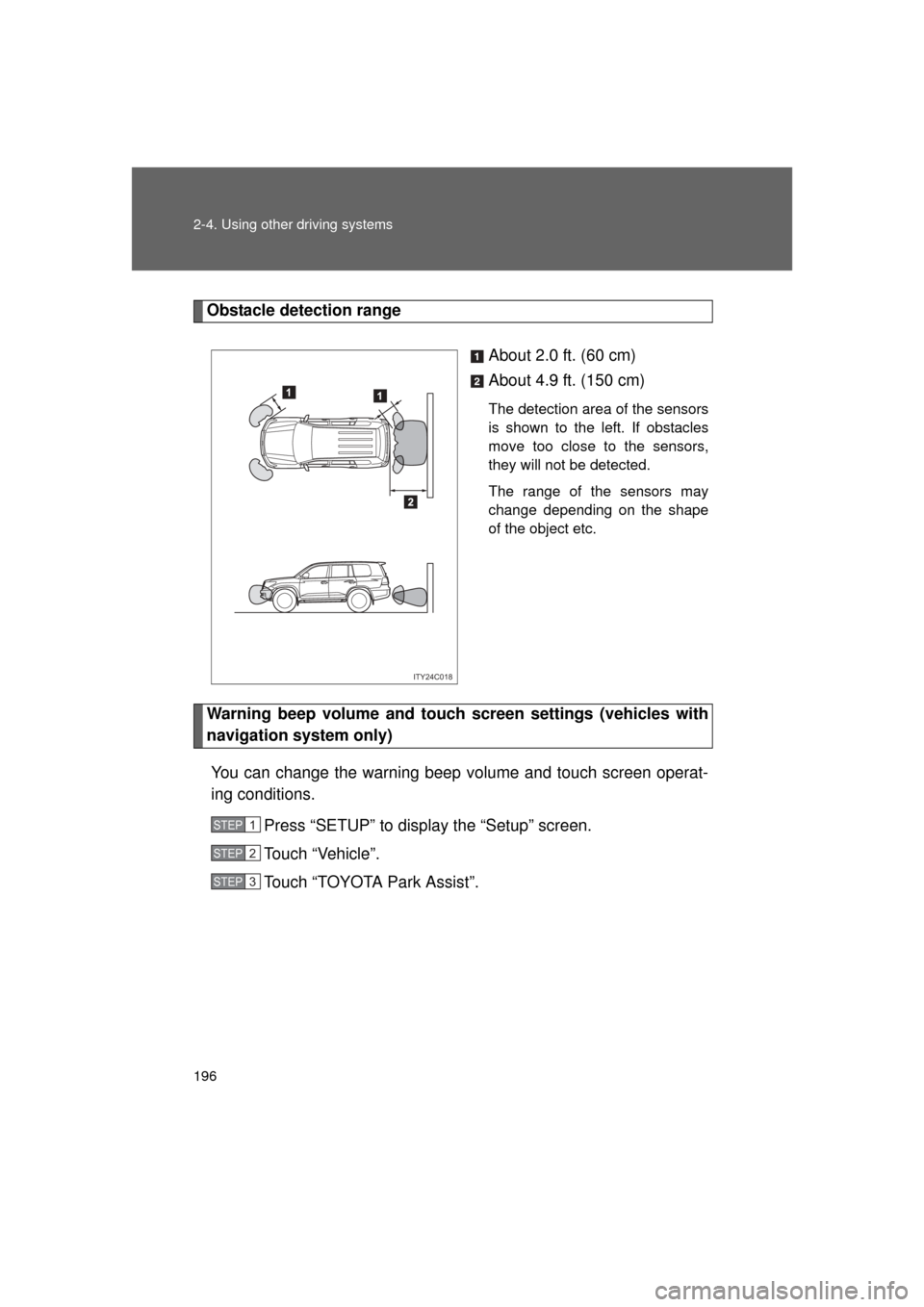
Obstacle detection rangeAbout 2.0 ft. (60 cm)
About 4.9 ft. (150 cm)
The detection area of the sensors
is shown to the left. If obstacles
move too close to the sensors,
they will not be detected.
The range of the sensors may
change depending on the shape
of the object etc.
Warning beep volume and touch screen settings (vehicles with
navigation system only)
You can change the warning beep volume and touch screen operat-
ing conditions. Press “SETUP” to display the “Setup” screen.
Touch “Vehicle”.
Touch “TOYOTA Park Assist”.
ITY24C018
STEP1
STEP2
STEP3
Page 197 of 608
197
2-4. Using other
driving systems
2
When driving
L/C200_U (OM60F74U)■
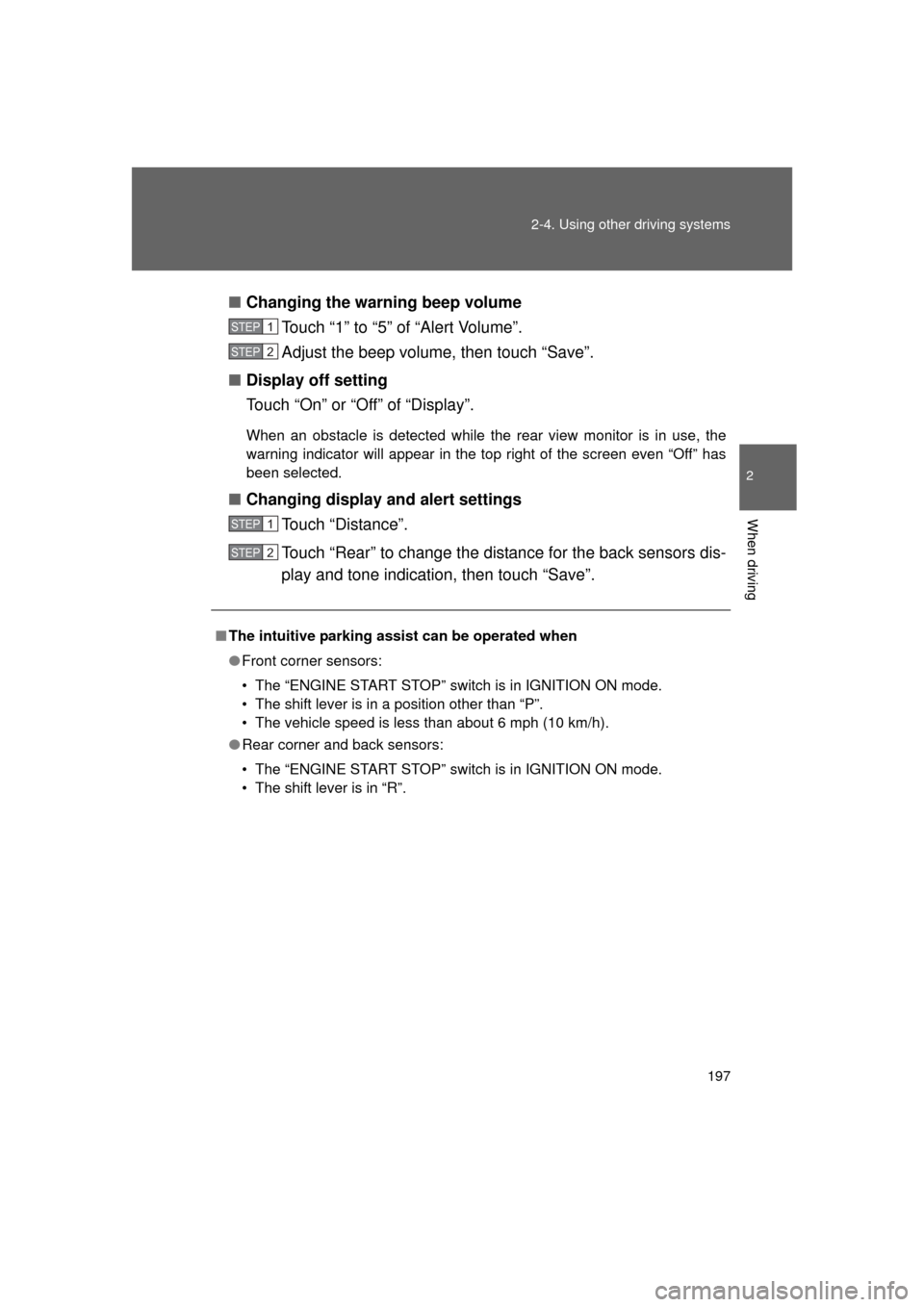
Changing the warning beep volume
Touch “1” to “5” of “Alert Volume”.
Adjust the beep volume, then touch “Save”.
■ Display off setting
Touch “On” or “Off” of “Display”.
When an obstacle is detected while the rear view monitor is in use, the
warning indicator will appear in the top right of the screen even “Of\
f” has
been selected.
■Changing display and alert settings
Touch “Distance”.
Touch “Rear” to change the distance for the back sensors dis-
play and tone indication, then touch “Save”.
■The intuitive parking assist can be operated when
● Front corner sensors:
• The “ENGINE START STOP” switch is in IGNITION ON mode.
• The shift lever is in a position other than “P”.
• The vehicle speed is less than about 6 mph (10 km/h).
● Rear corner and back sensors:
• The “ENGINE START STOP” switch is in IGNITION ON mode.
• The shift lever is in “R”.
STEP1
STEP2
STEP1
STEP2
Page 198 of 608

198 2-4. Using other driving systems
L/C200_U (OM60F74U)
■Sensor detection information
● Certain vehicle conditions and the surrounding environment may affect
the ability of the sensor to correctly detect obstacles. Particular instances
where this may occur are listed below.
• There is dirt, snow or ice on the sensor. (Wiping the sensor will resolve
this problem.)
• The sensor is frozen. (Thawing the sensor will resolve this problem.)
• The sensor is covered in any way.
• In harsh sunlight or intense cold weather.
• When driving on bumpy, sloped or gravel roads, or over grass.
• If there is something producing ultrasonic waves nearby, such as another vehicle’s horn, motorcycle engine noise, air braking sound
from heavy-duty vehicles, or another vehicle using the park assist sys-
tem.
• In heavy rain, or if water is splashed on the sensors.
• The vehicle is leaning considerably to one side.
• If a commercial fender pole or radio antenna is installed.
• If moving towards a high curb or a curb corner.
• If towing eyelet is installed on your vehicle.
• The bumper or sensor receives a strong impact.
• A non-genuine Toyota suspension (lowered suspension etc.) is installed.
In addition to the examples above, there are instances in which, because of
their shapes, signs and other objects may be judged by the sensor to be
closer than they are.
● The shape of the obstacle may prevent the sensor from detecting it. Pay
particular attention to the following obstacles.
• Thin objects such as wire, fencing or rope.
• Objects that absorb sound waves, such as cotton or snow.
• Objects with sharp corners.
• Low objects.
• Objects where the upper section projects out over the lower section.
Page 199 of 608
199
2-4. Using other
driving systems
2
When driving
L/C200_U (OM60F74U)
■If a message is displayed on the multi-information display
P. 523
■ When there is a malfunction
In the following cases, have the vehicle inspected by your Toyota dealer.
● If the bumper is damaged
● If the intuitive parking assist indicator light remains on without a beep
sounds.
CAUTION
■When using the intuitive parking assist
Observe the following precautions.
Failing to do so may result in the vehicle being unable to be driven safely
and possibly cause an accident.
● Do not use the sensor at speeds in excess of 6 mph (10 km/h).
● When moving forward or reversing, always check your surroundings for
safety and drive carefully.
● Do not install accessories within the sensors’ detection areas.
NOTICE
■When washing the vehicle
Do not apply intensive bursts of water or steam to the sensor area.
Doing so may result in the sensor malfunctioning.
Page 482 of 608
482 4-3. Do-it-yourself maintenance
L/C200_U (OM60F74U)
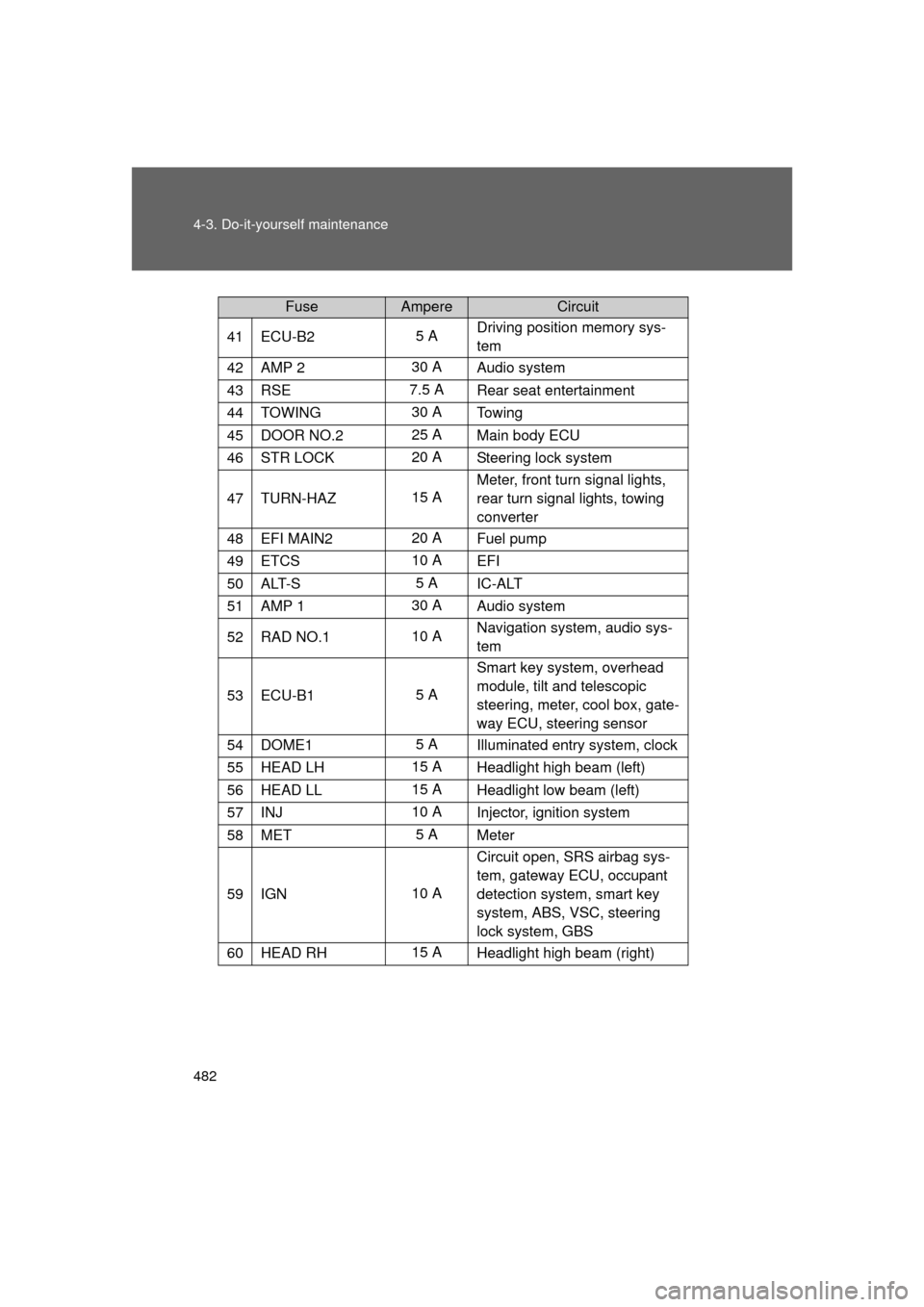
41ECU-B25 ADriving position memory sys-
tem
42AMP 230 A
Audio system
43RSE7.5 A Rear seat entertainment
44TOWING30 ATo w i n g
45DOOR NO.225 A
Main body ECU
46STR LOCK20 ASteering lock system
47TURN-HAZ15 AMeter, front turn signal lights,
rear turn signal lights, towing
converter
48EFI MAIN220 A
Fuel pump
49ETCS10 A
EFI
50ALT-S5 AIC-ALT
51AMP 130 A Audio system
52RAD NO.110 ANavigation system, audio sys-
tem
53ECU-B15 ASmart key system, overhead
module, tilt and telescopic
steering, meter, cool box, gate-
way ECU, steering sensor
54DOME15 A
Illuminated entry system, clock
55HEAD LH15 A Headlight high beam (left)
56HEAD LL15 AHeadlight low beam (left)
57INJ10 A
Injector, ignition system
58MET5 AMeter
59IGN10 A Circuit open, SRS airbag sys-
tem, gateway ECU, occupant
detection system, smart key
system, ABS, VSC, steering
lock system, GBS
60HEAD RH15 A
Headlight high beam (right)
FuseAmpereCircuit
Page 485 of 608
485
4-3. Do-it-yourself maintenance
4
Maintenance and care
L/C200_U (OM60F74U)
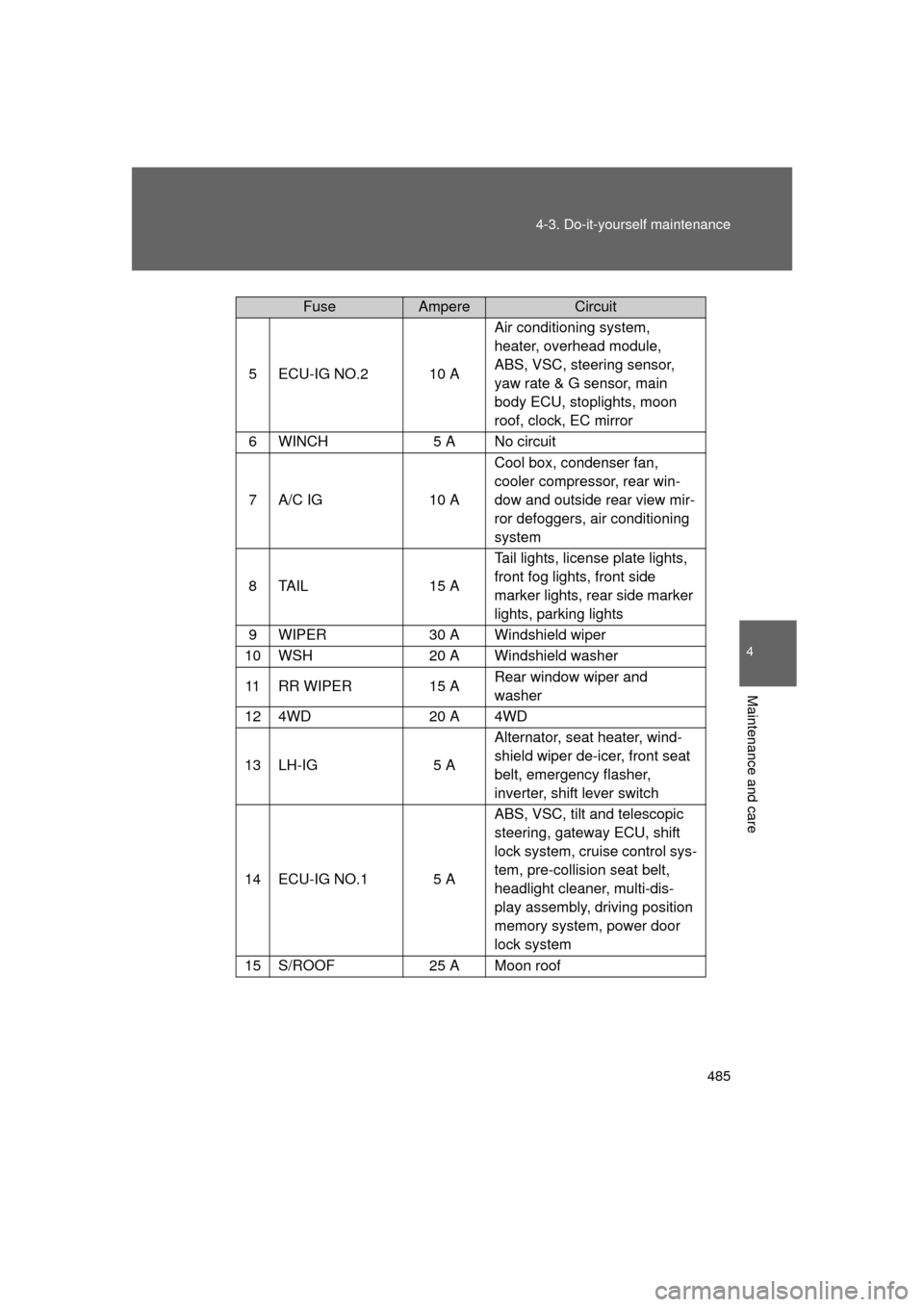
5ECU-IG NO.210 A
Air conditioning system,
heater, overhead module,
ABS, VSC, steering sensor,
yaw rate & G sensor, main
body ECU, stoplights, moon
roof, clock, EC mirror
6WINCH5 A No circuit
7A/C IG10 A
Cool box, condenser fan,
cooler compressor, rear win-
dow and outside rear view mir-
ror defoggers, air conditioning
system
8TA I L15 A
Tail lights, license plate lights,
front fog lights, front side
marker lights, rear side marker
lights, parking lights
9WIPER30 A Windshield wiper
10WSH20 A Windshield washer
11RR WIPER15 A
Rear window wiper and
washer
124WD20 A 4WD
13LH-IG5 AAlternator, seat heater, wind-
shield wiper de-icer, front seat
belt, emergency flasher,
inverter, shift lever switch
14ECU-IG NO.15 AABS, VSC, tilt and telescopic
steering, gateway ECU, shift
lock system, cruise control sys-
tem, pre-collision seat belt,
headlight cleaner, multi-dis-
play assembly, driving position
memory system, power door
lock system
15S/ROOF25 A Moon roof
FuseAmpereCircuit
Page 510 of 608
510
5-1. Essential information
L/C200_U (OM60F74U)
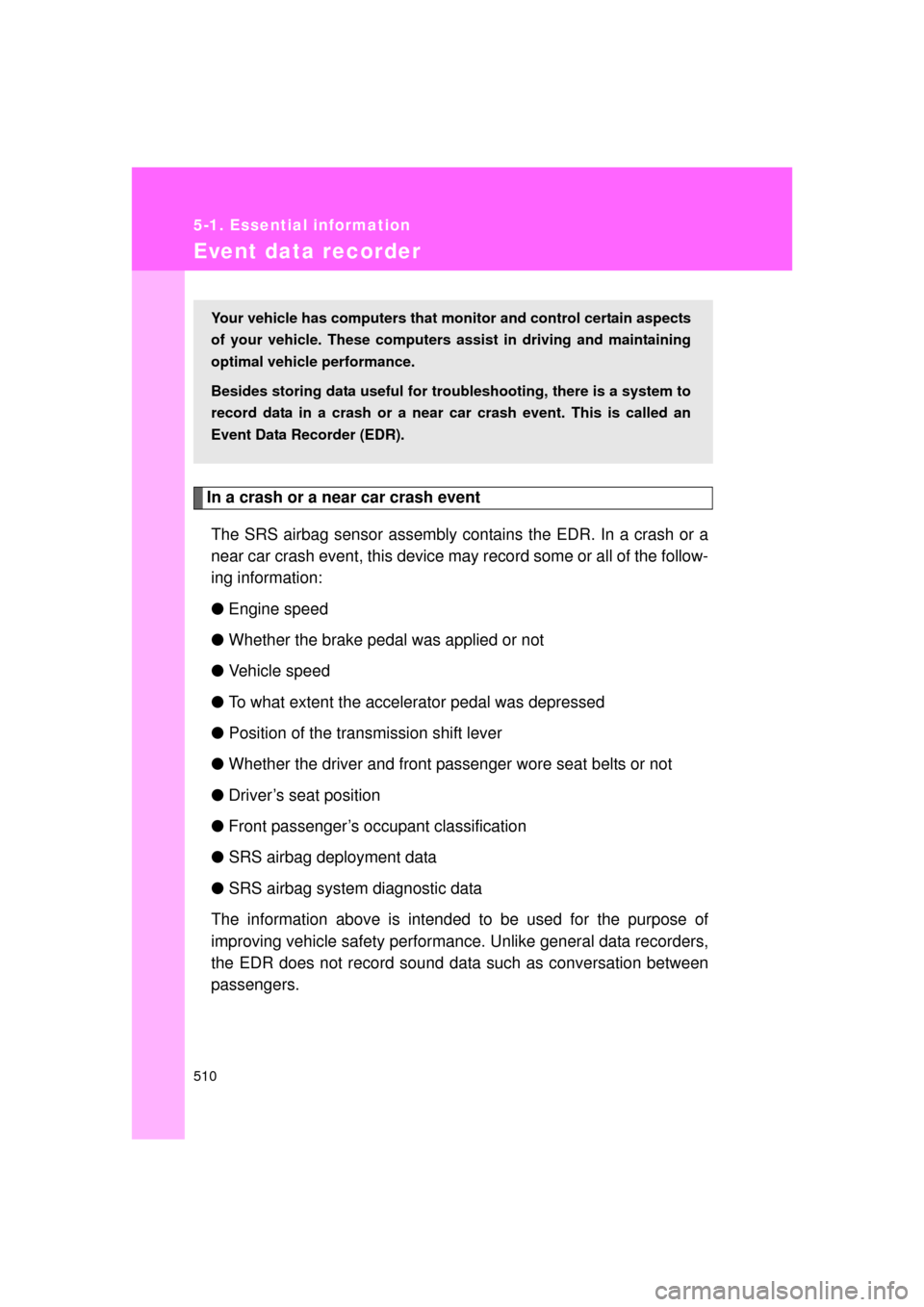
Event data recorder
In a crash or a near car crash eventThe SRS airbag sensor assembly contains the EDR. In a crash or a
near car crash event, this device may record some or all of the follow-
ing information:
● Engine speed
● Whether the brake pedal was applied or not
● Vehicle speed
● To what extent the accelerator pedal was depressed
● Position of the transmission shift lever
● Whether the driver and front passenger wore seat belts or not
● Driver’s seat position
● Front passenger’s occupant classification
● SRS airbag deployment data
● SRS airbag system diagnostic data
The information above is intended to be used for the purpose of
improving vehicle safety performan ce. Unlike general data recorders,
the EDR does not record sound data such as conversation between
passengers.
Your vehicle has computers that monitor and control certain aspects
of your vehicle. These computers assi st in driving and maintaining
optimal vehicle performance.
Besides storing data useful for tr oubleshooting, there is a system to
record data in a crash or a near car crash event. This is called an
Event Data Recorder (EDR).