Page 181 of 608
181
2-3. Operating the lights and wipers
2
When driving
L/C200_U (OM60F74U)
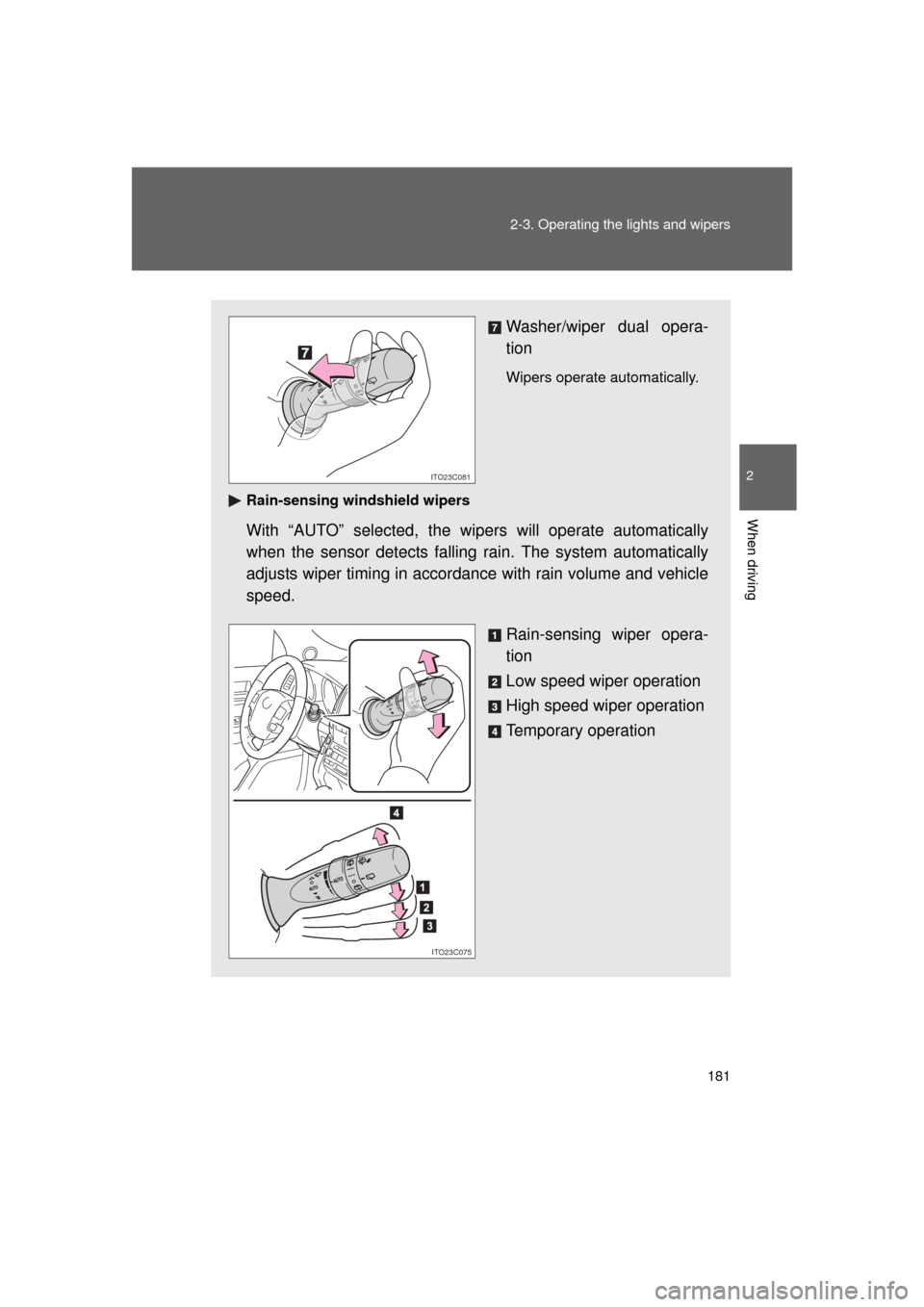
Washer/wiper dual opera-
tion
Wipers operate automatically.
Rain-sensing windshield wipers
With “AUTO” selected, the wi pers will operate automatically
when the sensor detects falling rain. The system automatically
adjusts wiper timing in accordance with rain volume and vehicle
speed.
Rain-sensing wiper opera-
tion
Low speed wiper operation
High speed wiper operation
Temporary operation
ITO23C081
ITO23C075
Page 182 of 608
182 2-3. Operating the lights and wipers
L/C200_U (OM60F74U)
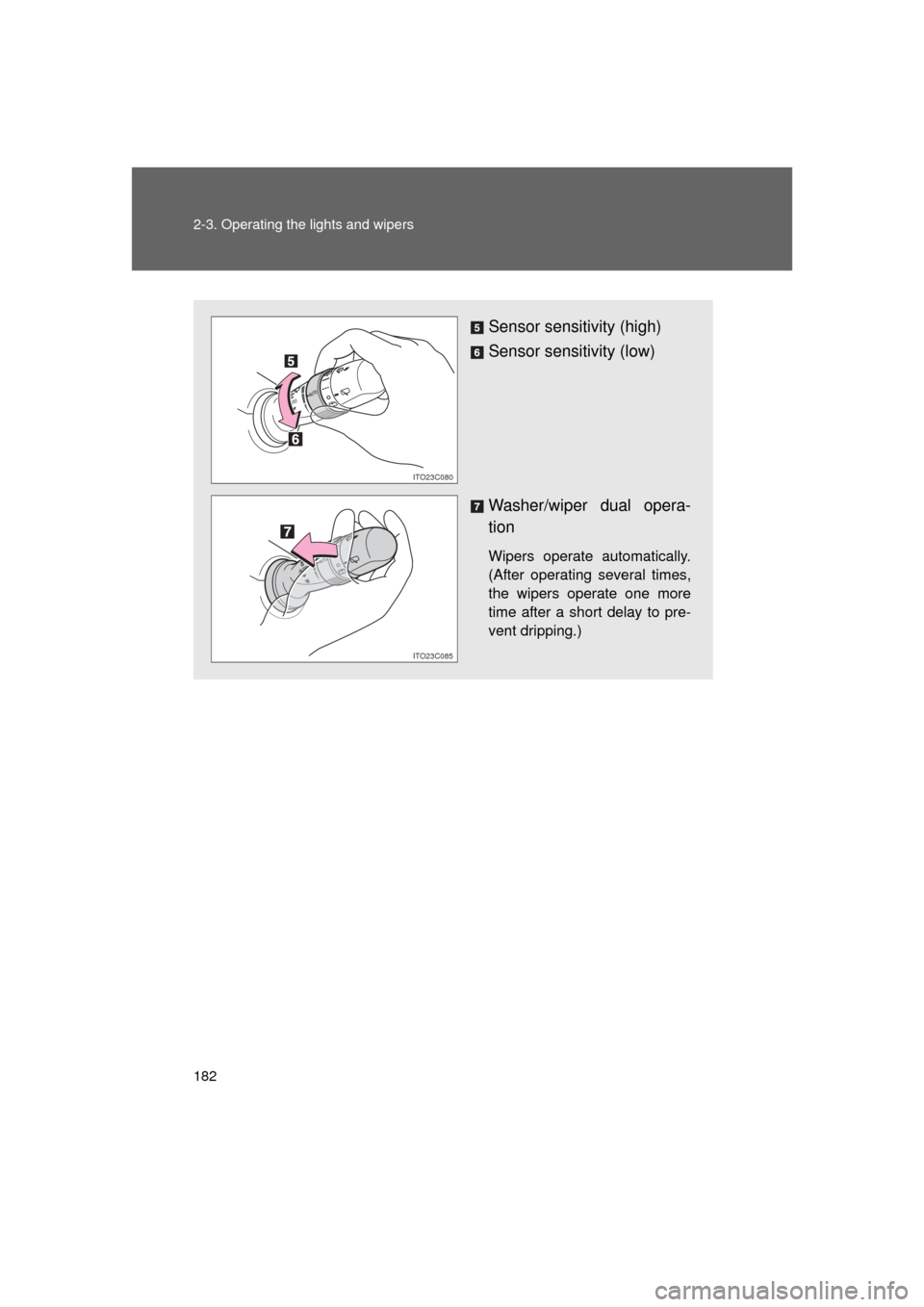
Sensor sensitivity (high)
Sensor sensitivity (low)
Washer/wiper dual opera-
tion
Wipers operate automatically.
(After operating several times,
the wipers operate one more
time after a short delay to pre-
vent dripping.)
ITO23C080
ITO23C085
Page 183 of 608
183
2-3. Operating the lights and wipers
2
When driving
L/C200_U (OM60F74U)
■
The windshield wiper and washer can be operated when
The “ENGINE START STOP” switch is in IGNITION ON mode.
■ Effects of vehicle speed on wiper operation (vehicles equipped with
rain-sensing windshield wipers)
Vehicle speed affects the wiper operation when the washer is being used
(delay until drip prevention wiper sweep occurs) even when the wipers are
not in “AUTO” mode.
With “ ” selected, wiper operation will be switched from low speed to inter-
mittent wiper operation only when the vehicle is stationary.
(However, when the sensor sensitivity is adjusted to the highest level, the
mode cannot be switched.)
■ Rain drop sensor (vehicles with rain-sensing windshield wipers)
● If the wiper switch is turned to “AUTO” position while the “ENGINE
START STOP” switch is in IGNITION ON mode, the wiper will operate
once to show that “AUTO” mode is activated.
● If the temperature of the rain drop sensor is 176 F (80 C) or higher, or
14 F (-10 C) or lower, automatic operation may not occur. In this case,
operate the wipers in any mode other than “AUTO”.
■ If no windshield washer fluid sprays
Check that the washer nozzles are not blocked if there is washer fluid in the
windshield washer fluid reservoir.
●The sensor judges the amount of rain-
drops.
Page 184 of 608
184 2-3. Operating the lights and wipers
L/C200_U (OM60F74U)
■Windshield wiper features
The rear window and outside rear view mirror defoggers automatically turn
on when you operate the wipers.
CAUTION
■Caution regarding the use of windshield wipers in “AUTO” mode
The windshield wipers may operate unexpec tedly if the sensor is touched or
the windshield is subject to vibration in “AUTO” mode. Take care that your
fingers or anything else do not become caught in the windshield wipers.
NOTICE
■ When the windshield is dry
Do not use the wipers, as they may damage the windshield.
■ When there is no washer fluid spray from the nozzle
Damage to the washer fluid pump may be caused if the lever is pulled
toward you and held continually.
■ When a nozzle becomes blocked
Do not try to clear it with a pin or other object. The nozzle will be damaged.
Page 191 of 608
191
2-4. Using other driving systems
2
When driving
L/C200_U (OM60F74U)
Intuitive parking assist
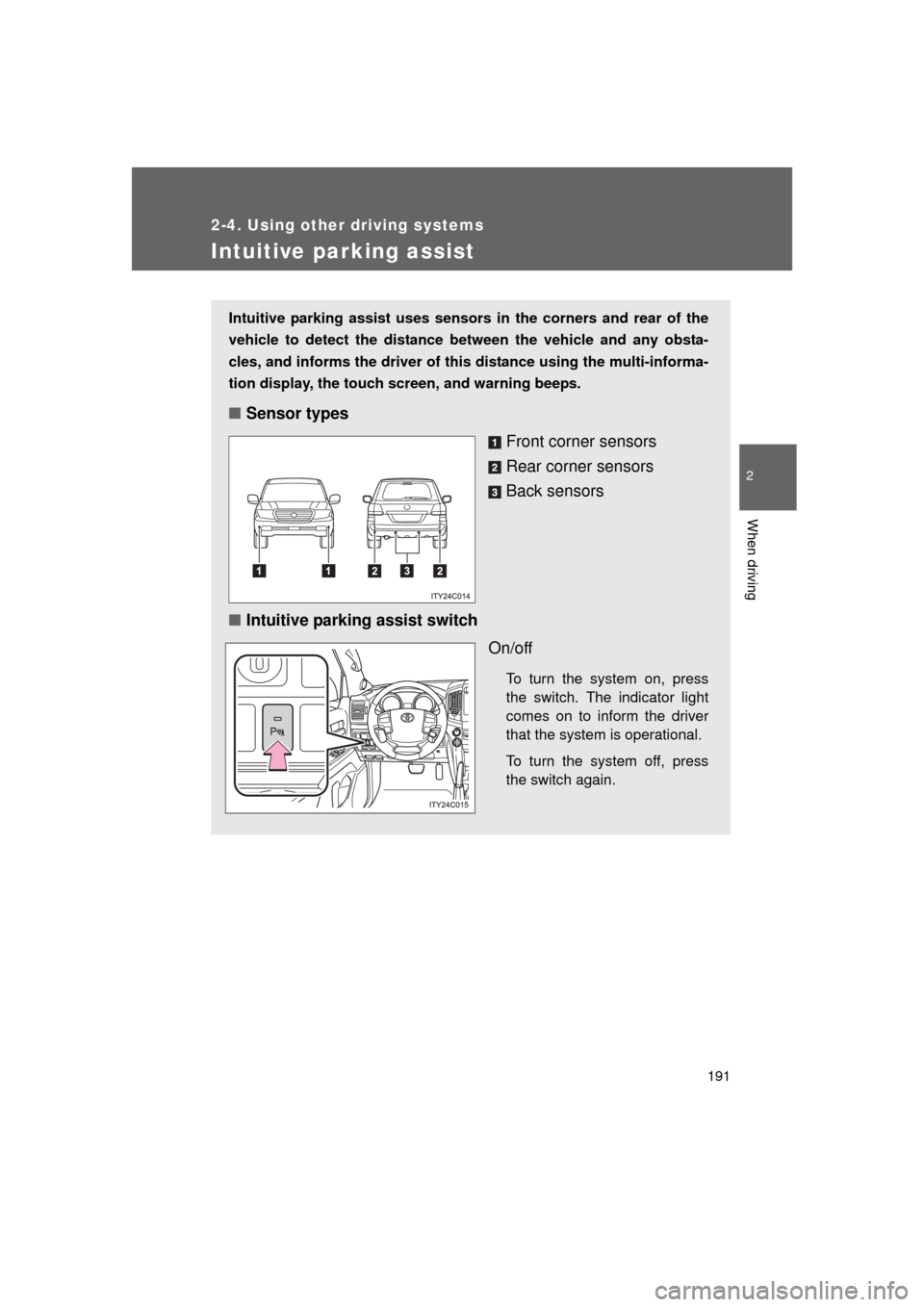
Intuitive parking assist uses sensors in the corners and rear of the
vehicle to detect the distance between the vehicle and any obsta-
cles, and informs the driver of th is distance using the multi-informa-
tion display, the touch screen, and warning beeps.
■Sensor types
Front corner sensors
Rear corner sensors
Back sensors
■ Intuitive parking assist switch
On/off
To turn the system on, press
the switch. The indicator light
comes on to inform the driver
that the system is operational.
To turn the system off, press
the switch again.
Page 192 of 608
192 2-4. Using other driving systems
L/C200_U (OM60F74U)
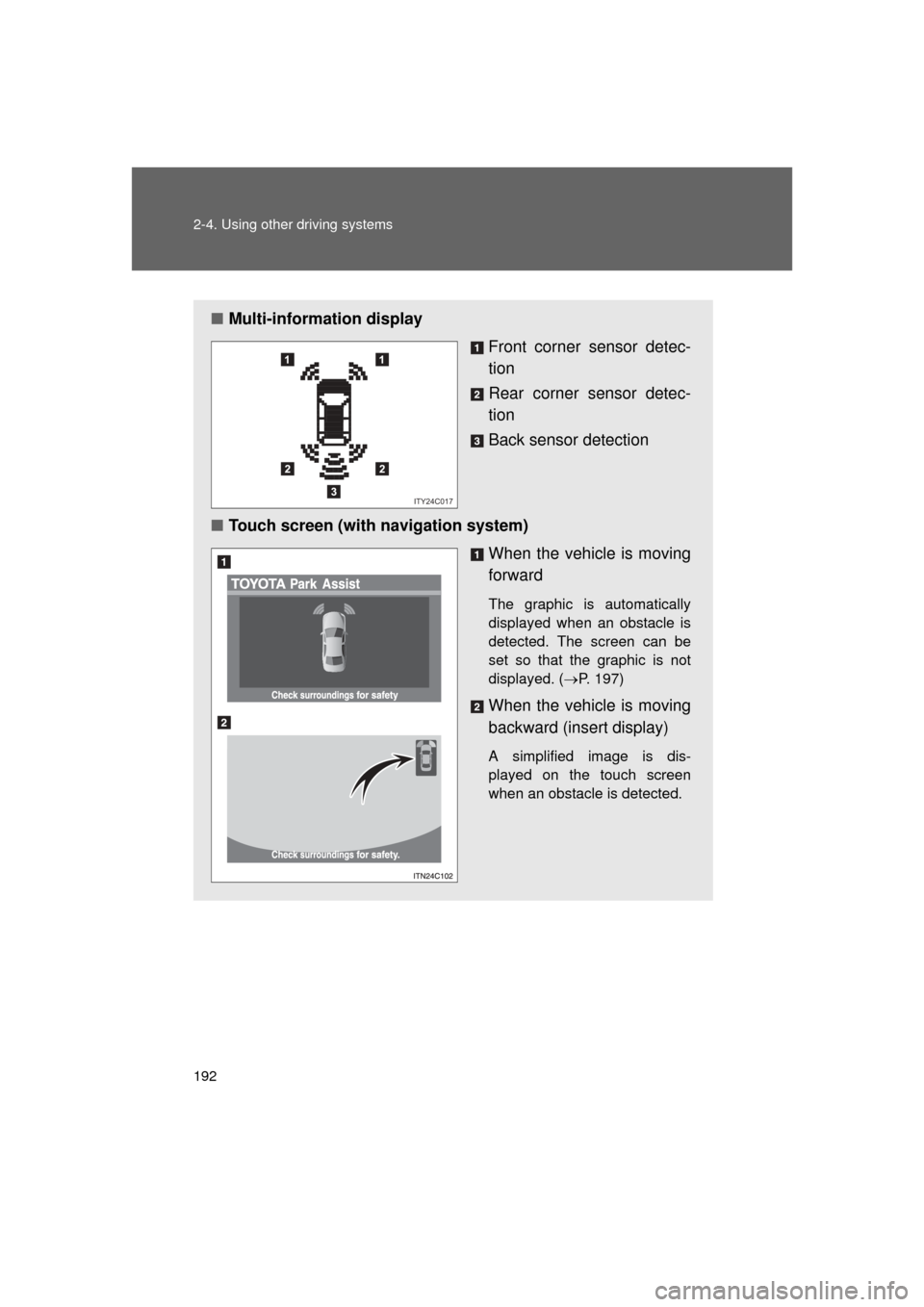
■Multi-information display
Front corner sensor detec-
tion
Rear corner sensor detec-
tion
Back sensor detection
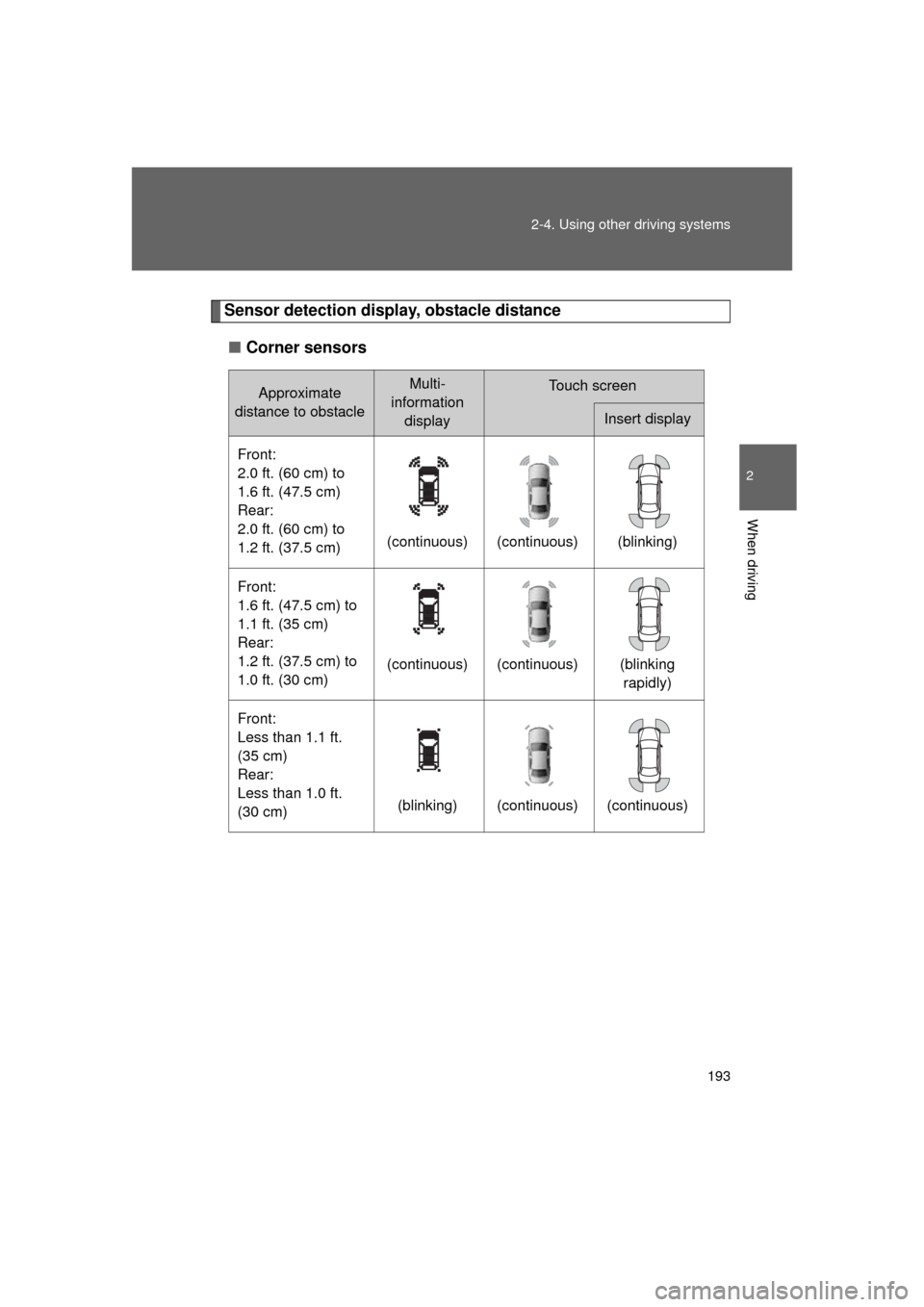
■ Touch screen (with navigation system)
When the vehicle is moving
forward
The graphic is automatically
displayed when an obstacle is
detected. The screen can be
set so that the graphic is not
displayed. (P. 197)
When the vehicle is moving
backward (insert display)
A simplified image is dis-
played on the touch screen
when an obstacle is detected.
ITY24C017
Page 193 of 608
193
2-4. Using other
driving systems
2
When driving
L/C200_U (OM60F74U)
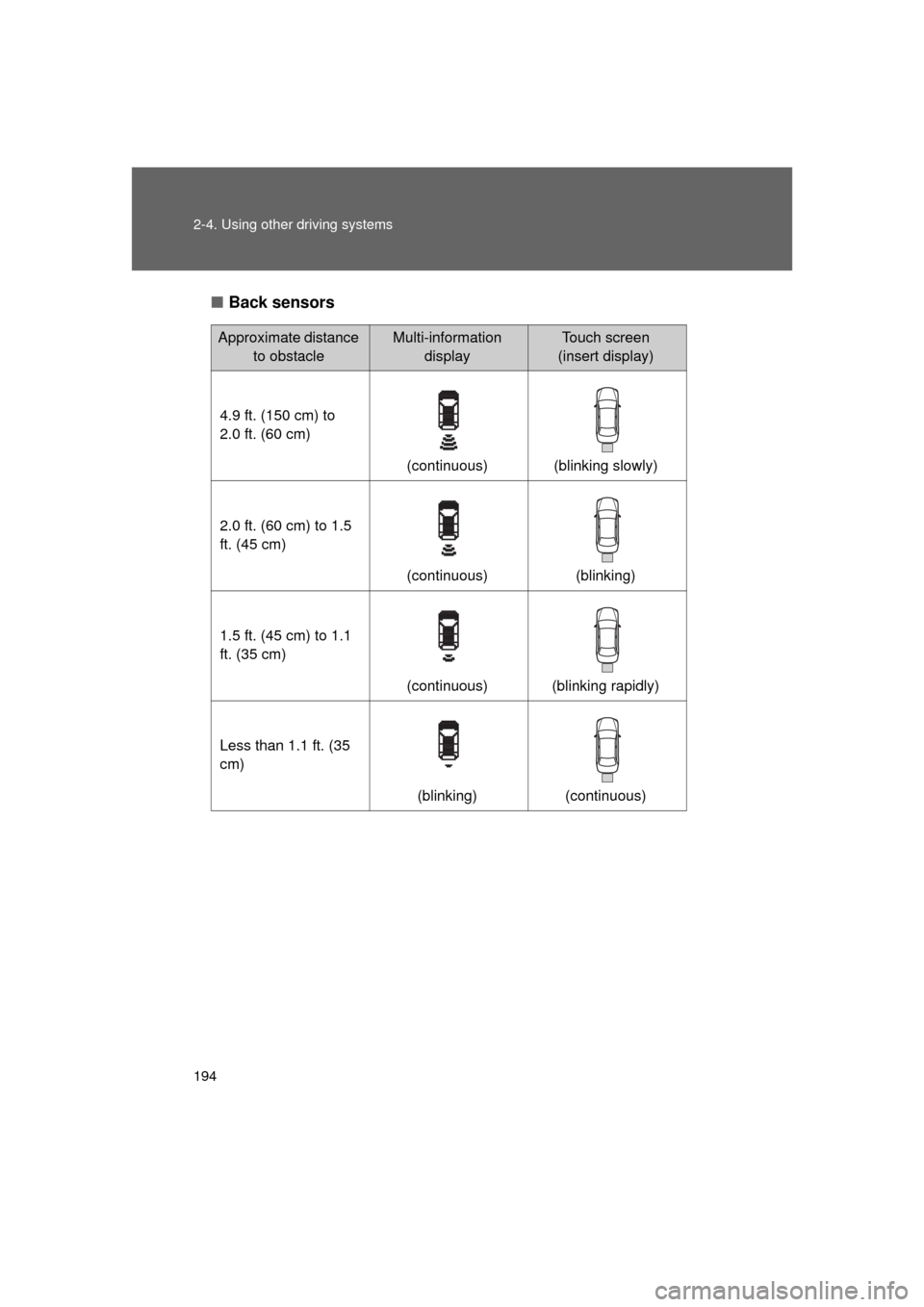
Sensor detection display, obstacle distance
■ Corner sensors
Approximate
distance to obstacleMulti-
information displayTouch screen
Insert display
Front:
2.0 ft. (60 cm) to
1.6 ft. (47.5 cm)
Rear:
2.0 ft. (60 cm) to
1.2 ft. (37.5 cm) (continuous) (continuous) (blinking)
Front:
1.6 ft. (47.5 cm) to
1.1 ft. (35 cm)
Rear:
1.2 ft. (37.5 cm) to
1.0 ft. (30 cm) (continuous) (continuous) (blinking
rapidly)
Front:
Less than 1.1 ft.
(35 cm)
Rear:
Less than 1.0 ft.
(30 cm) (blinking) (continuous) (continuous)
Page 194 of 608
194 2-4. Using other driving systems
L/C200_U (OM60F74U)■
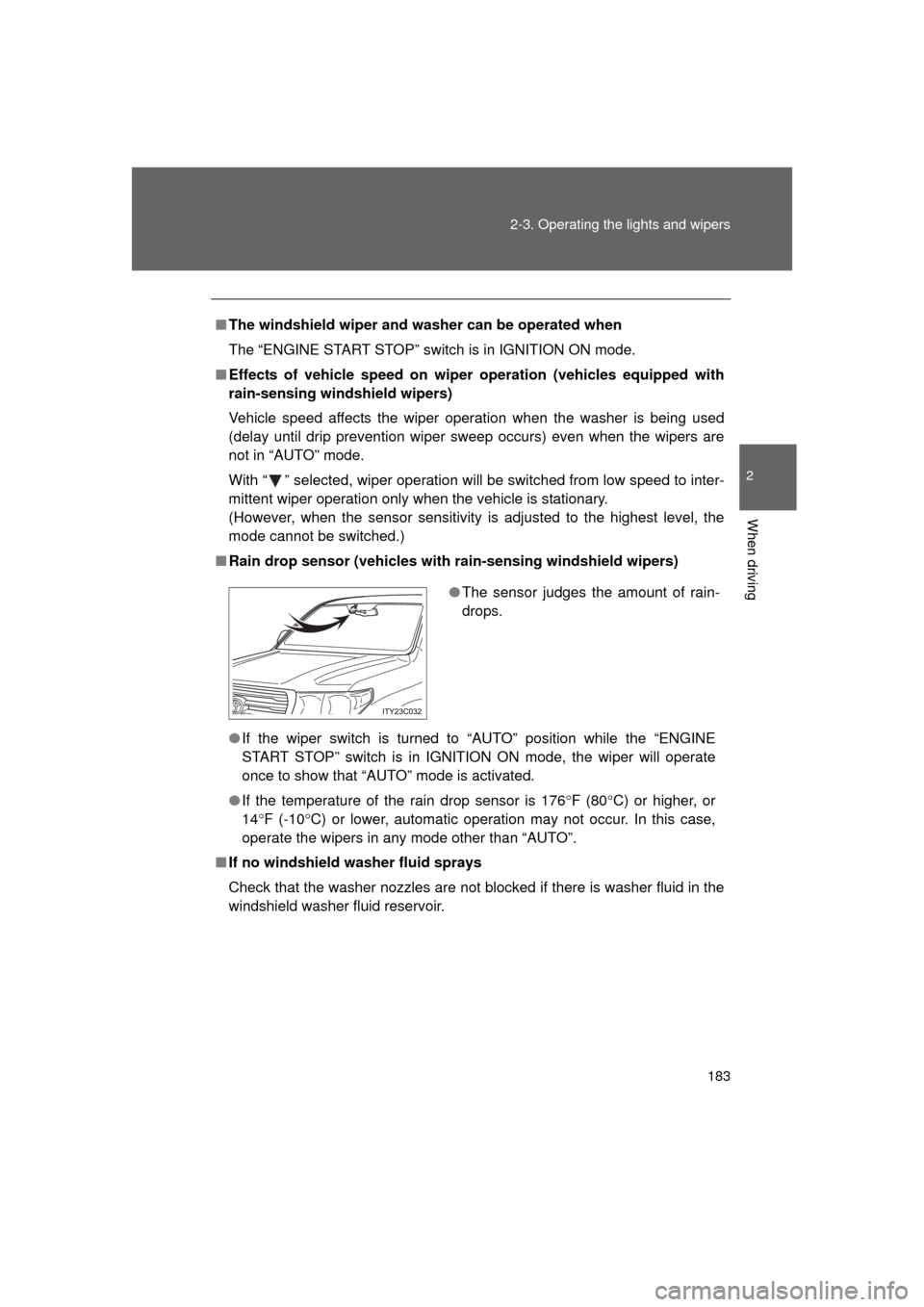
Back sensors
Approximate distance
to obstacleMulti-information displayTouch screen
(insert display)
4.9 ft. (150 cm) to
2.0 ft. (60 cm) (continuous) (blinking slowly)
2.0 ft. (60 cm) to 1.5
ft. (45 cm) (continuous) (blinking)
1.5 ft. (45 cm) to 1.1
ft. (35 cm) (continuous) (blinking rapidly)
Less than 1.1 ft. (35
cm) (blinking) (continuous)