Page 335 of 528

335
3-7. Other interior features
3
Interior features
NOTICE
■
Appliances that may not ope rate properly (115V AC)
The following 115V AC appliances may not operate even if their power con-
sumption is under maximum capacity.
● Appliances with high initial peak wattage
● Measuring devices that process precise data
● Other appliances that require an extremely stable power supply
■ To prevent the battery from being discharged
Turn off all the vehicle’s electronic equipment and accessories, such as the
headlights and air conditioning, when electrical appliances that consume in
excess of 100W are used continuously for long periods of time.
■ To prevent any damage caused by heat
Do not use any electrical appliances that give off intense heat such as toast-
ers, in any locations including the internal or external trim, seats and deck.
●Do not use any electrical appliances, which are easily affected by vibration
or heat, inside the vehicle.
Vibration while driving, or the heat of the sun while parking, may result in
damage to those electrical appliances.
■ If any electrical appliances ar e to be used while driving
Securely fasten both the appliances and their cables to prevent them from
falling or getting caught any of the power train components.
■ If the power outlet is loose when an electrical appliance plug is con-
nected
Replace the outlet.
Contact a Toyota dealer for any necessary replacements.
■ If the power outlet gets dirty
Turn the main switch off and use a soft, clean cloth to wipe it gently.
Do not use any cleansing materials, such as organic solvents, wax, or com-
pound cleaners, as these may damage the power outlet or cause it to mal-
function.
Page 337 of 528
337
3-7. Other interior features
3
Interior features
Floor mat
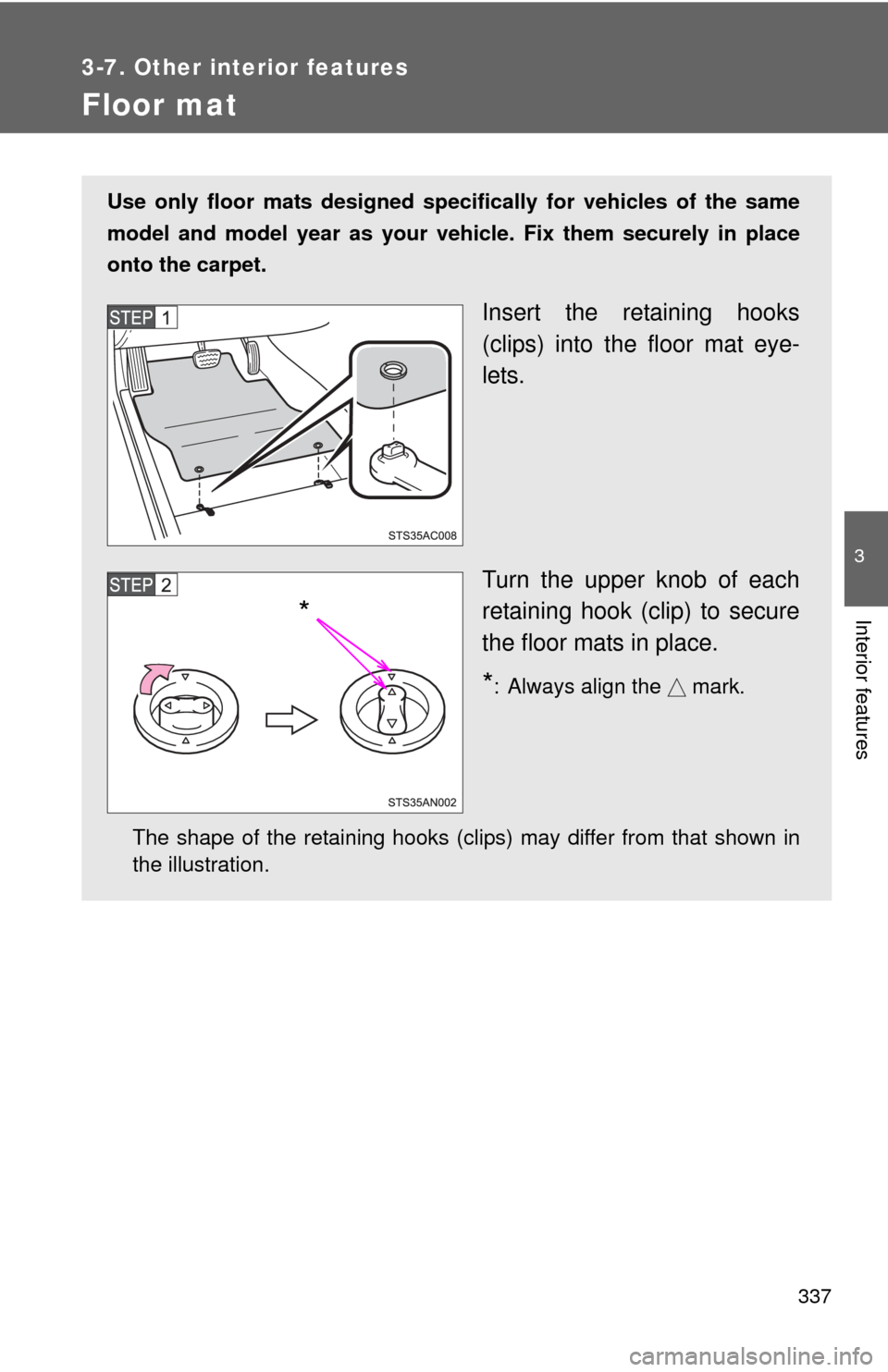
Use only floor mats designed specifically for vehicles of the same
model and model year as your vehicle. Fix them securely in place
onto the carpet.
Insert the retaining hooks
(clips) into the floor mat eye-
lets.
Turn the upper knob of each
retaining hook (clip) to secure
the floor mats in place.
*: Always align the mark.
The shape of the retaining hooks (clips) may differ from that shown in
the illustration.
*
Page 338 of 528
338 3-7. Other interior features
CAUTION
Observe the following precautions.
Failure to do so may cause the driver’s floor mat to slip, possibly interfering
with the pedals while driving. An unexpectedly high speed may result or it may
become difficult to stop the vehicle, leading to a serious accident.
■When installing the driver’s floor mat
●Do not use floor mats designed for other models or different model year
vehicles, even if they are Toyota Genuine floor mats.
● Only use floor mats designed for the driver’s seat.
● Always install the floor mat securely using the retaining hooks (clips) pro-
vided.
● Do not use two or more floor mats on top of each other.
● Do not place the floor mat bottom-side up or upside-down.
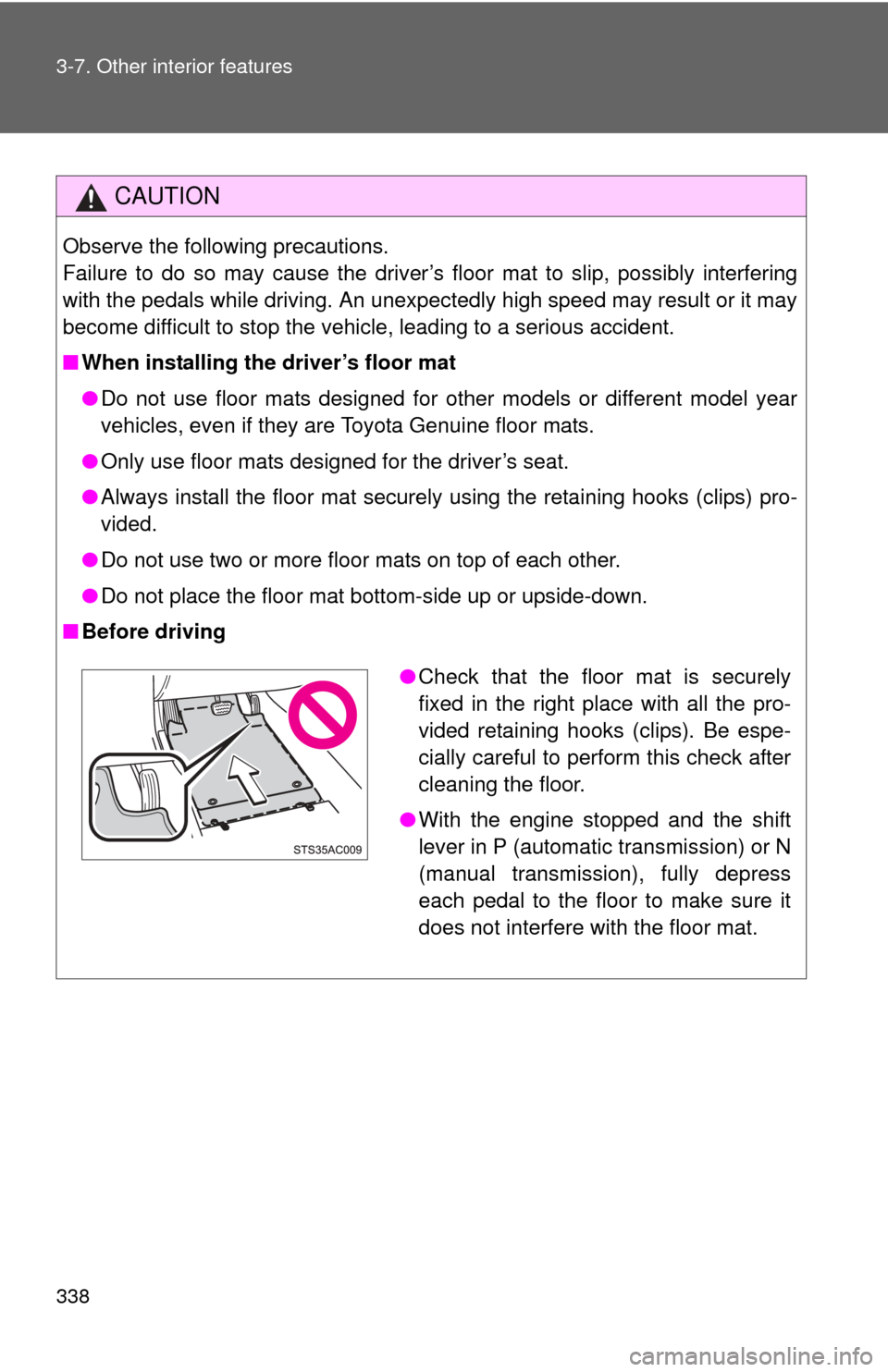
■ Before driving
●Check that the floor mat is securely
fixed in the right place with all the pro-
vided retaining hooks (clips). Be espe-
cially careful to perform this check after
cleaning the floor.
● With the engine stopped and the shift
lever in P (automatic transmission) or N
(manual transmission), fully depress
each pedal to the floor to make sure it
does not interfere with the floor mat.
Page 340 of 528
340
3-7. Other interior features
Luggage compartment features
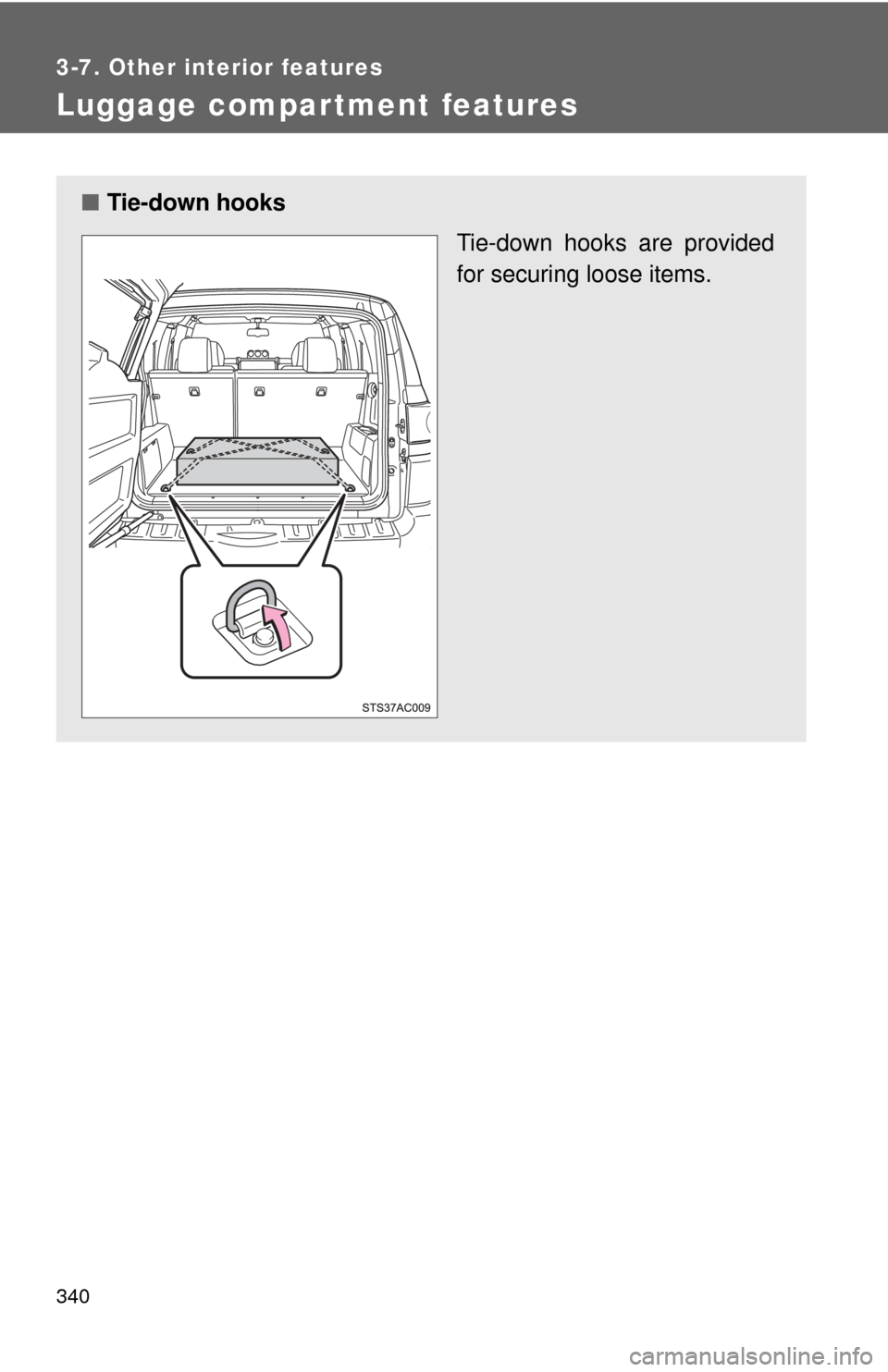
■Tie-down hooks
Tie-down hooks are provided
for securing loose items.
Page 346 of 528

346 3-7. Other interior features
■Conditions unfavorable to correct operation
The compass may not show the correct direction in the following conditions:
●The vehicle is stopped immediately after turning.
The compass does not adjust while the vehicle is stopped.
● The engine switch is turned off immediately after turning.
● The vehicle is on an inclined surface.
● The vehicle is in a place where the earth’s magnetic field is subject to
interference by artificial magnetic fields (underground car park/parking
lot, under a steel tower, between buildings, roof car park/parking lot, near
an intersection, near a large vehicle, etc.).
● The vehicle has become magnetized.
(There is a magnet or metal object on or near the accessory meter.)
● The battery has been disconnected.
■ When disconnecting and reco nnecting battery terminals
COMPASS flashes and the compass is reset to its initial mode.
CAUTION
■ While driving the vehicle
Do not adjust the display. Be sure to adjust the display only when the vehicle
is stopped.
■ When doing the circling calibration
Be sure to secure a wide space, and watch out for people and vehicles in the
neighborhood. Do not violate any local traffic rules while performing circling
calibration.
Page 359 of 528
359
4-2. Maintenance
4
Maintenance and care
Vehicle interior
ItemsCheck points
Accelerator pedal • Moves smoothly (without uneven
pedal effort or catching)?
Automatic transmission “Park”
mechanism • Can the vehicle be hold securely
on an incline with the shift lever in
P?
Brake pedal • Moves smoothly?
• Does it have appropriate clear-
ance and correct amount of free
play?
Brakes • Not pull to one side when
applied?
• Loss of brake effectiveness?
• Spongy feeling brake pedal?
• Pedal almost touches floor?
Clutch pedal • Moves smoothly?
• Does it have correct amount of
free play?
Head restraints • Move smoothly and lock
securely?
Indicators/buzzers • Function properly?
Lights • Do all the lights come on?
• Headlights aimed correctly?
Parking brake • Moves smoothly?
• Can hold the vehicle securely on
an incline?
Seat belts • Does the seat belt system oper-
ate smoothly?
• Are the belts undamaged?
Seats • Do the seat controls operate
properly?
Page 377 of 528
377
4-3. Do-it-yourself maintenance
4
Maintenance and care
■
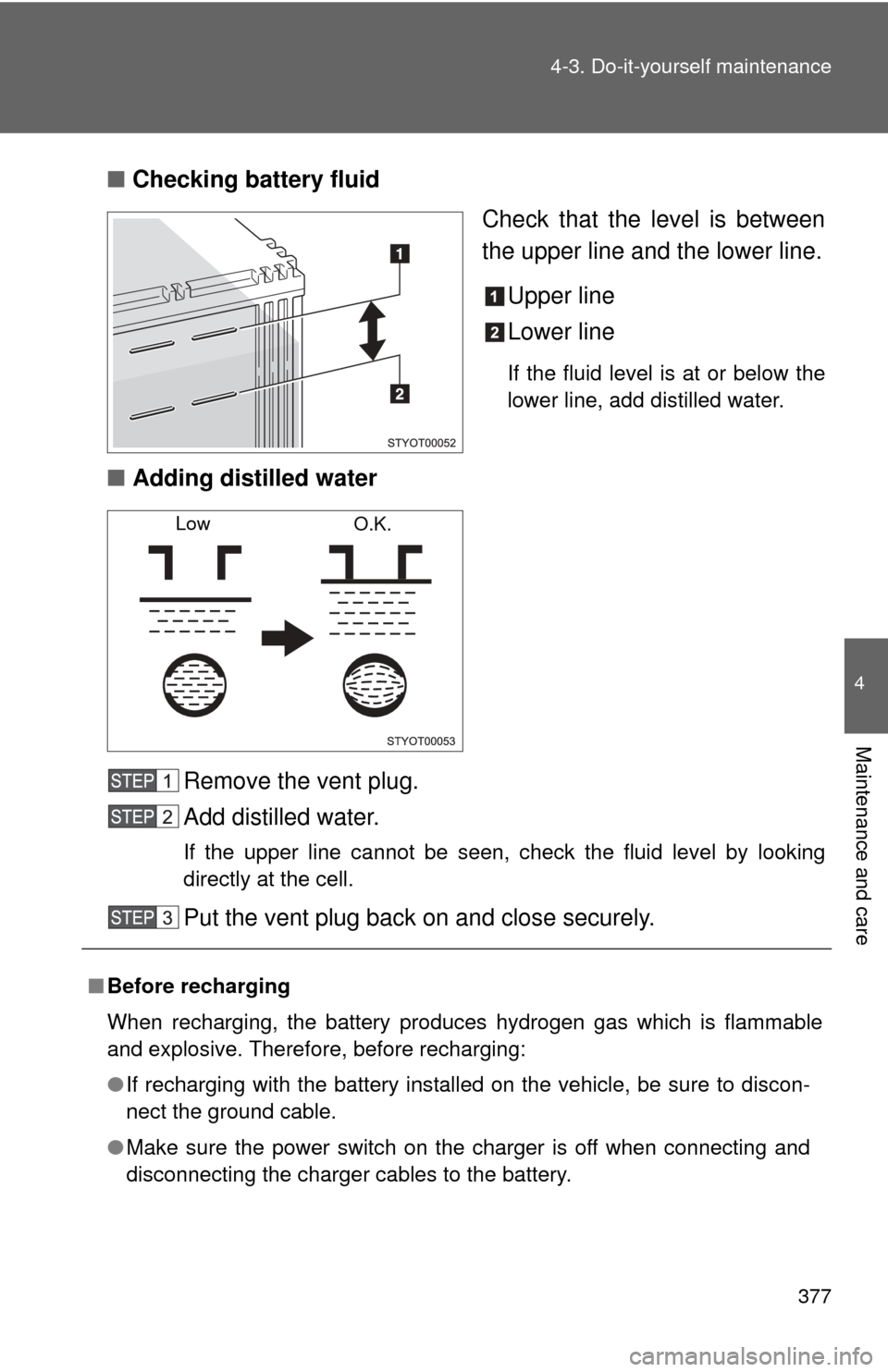
Checking battery fluid
Check that the level is between
the upper line and the lower line.
Upper line
Lower line
If the fluid level is at or below the
lower line, add distilled water.
■Adding distilled water
Remove the vent plug.
Add distilled water.
If the upper line cannot be seen, check the fluid level by looking
directly at the cell.
Put the vent plug back on and close securely.
Low O.K.
■Before recharging
When recharging, the battery produces hydrogen gas which is flammable
and explosive. Therefore, before recharging:
●If recharging with the battery installed on the vehicle, be sure to discon-
nect the ground cable.
● Make sure the power switch on the charger is off when connecting and
disconnecting the charger cables to the battery.
Page 405 of 528
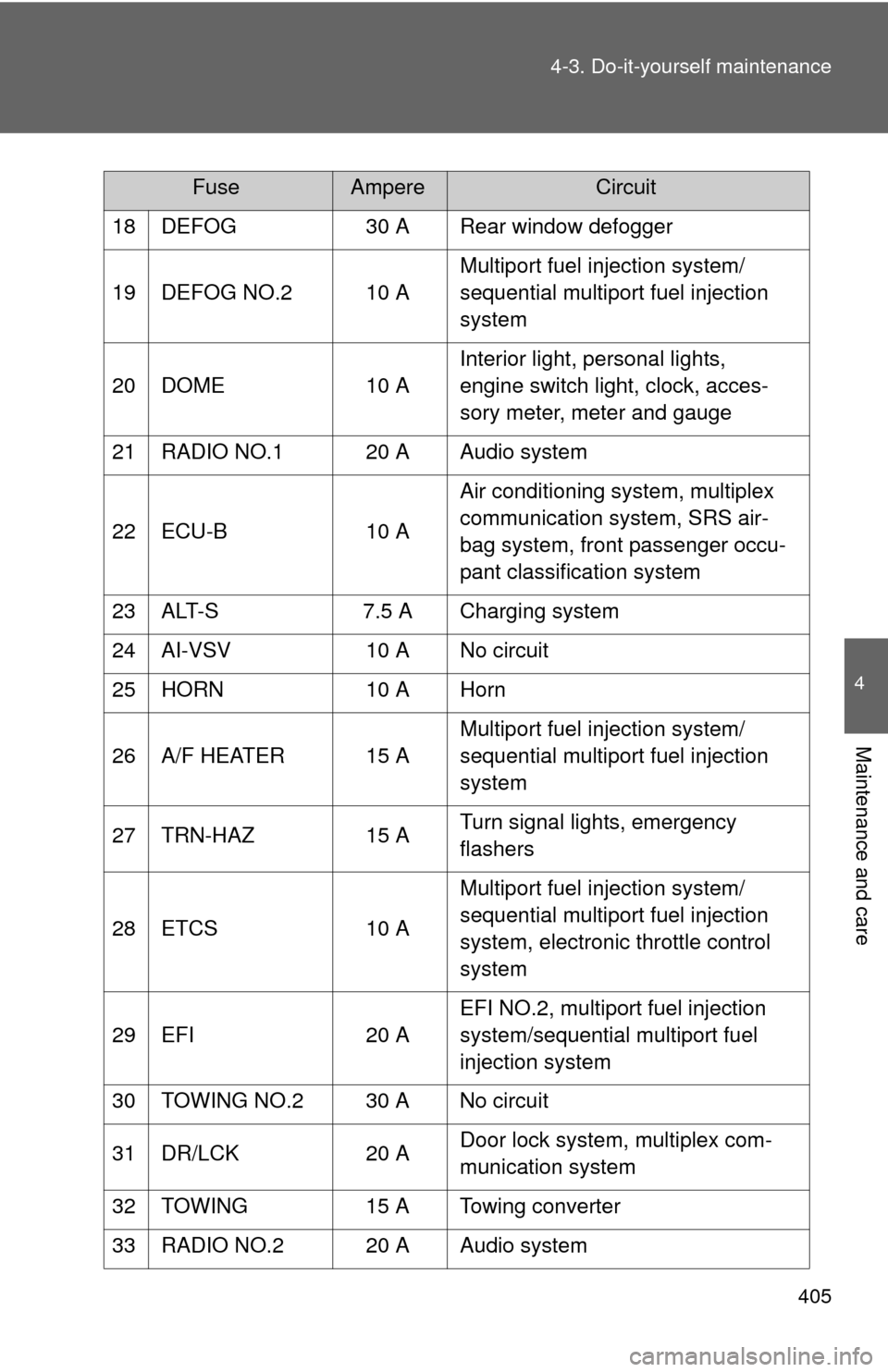
405
4-3. Do-it-yourself maintenance
4
Maintenance and care
18 DEFOG
30 A Rear window defogger
19 DEFOG NO.2 10 A Multiport fuel injection system/
sequential multiport fuel injection
system
20 DOME 10 AInterior light, personal lights,
engine switch light, clock, acces-
sory meter, meter and gauge
21 RADIO NO.1 20 A Audio system
22 ECU-B 10 AAir conditioning system, multiplex
communication system, SRS air-
bag system, front passenger occu-
pant classification system
23 ALT-S 7.5 A Charging system
24 AI-VSV 10 A No circuit
25 HORN 10 A Horn
26 A/F HEATER 15 A Multiport fuel injection system/
sequential multiport fuel injection
system
27 TRN-HAZ 15 ATurn signal lights, emergency
flashers
28 ETCS 10 AMultiport fuel injection system/
sequential multiport fuel injection
system, electronic throttle control
system
29 EFI 20 AEFI NO.2, multiport fuel injection
system/sequential multiport fuel
injection system
30 TOWING NO.2 30 A No circuit
31 DR/LCK 20 ADoor lock system, multiplex com-
munication system
32 TOWING 15 A Towing converter
33 RADIO NO.2 20 A Audio system
FuseAmpereCircuit