Page 267 of 528
267
3-3. Using the Bluetooth
® audio system
3
Interior features
Register a portable player nam
e by either of the following
methods:
a. Select “Record Name” using , and say the name
to be registered.
b. Press the talk switch and say the name to be registered.
A voice guidance instruction to confirm the input is heard.
Select “Confirm” using a voice command or .
A passkey is displayed and heard, and a voice guidance instruction
for inputting the passkey into the portable player is heard. Input the passkey into the portable player.
Refer to the manual that comes with the portable player for the oper-
ation of the portable player.
Guidance for registration completion is heard.
If the portable player has a Bluetooth
® phone, the phone can be reg-
istered at the same time. ( P. 285)
Page 269 of 528
269
3-3. Using the Bluetooth
® audio system
3
Interior features
■
When using a voice command
For numbers, say a combination of single digits from zero to nine.
Say the command correctly and clearly.
■ Situations that the system ma y not recognize your voice
● When driving on rough roads
● When driving at high speeds
● When air is blowing out of the vents onto the microphone
● When the air conditioning fan emits a loud noise
■ Operations that cannot be performed while driving
●Operating the system with
● Registering a portable player to the system
■ Changing the passkey
P. 275
Page 276 of 528
276 3-3. Using the Bluetooth
® audio system
Deleting a registered portable playerSelect “Delete Audio Player” using a voice command or
.
Select the portable player to be deleted by either of the follow-
ing methods and select “Confirm” using a voice command or
:
a. Press the talk switch and say the name of the desired por- table player.
b. Press the talk switch and say “List Audio Players”. When
the name of the desired portable player is read aloud, press
the talk switch.
If the portable player to be deleted is paired as a Bluetooth
® phone,
the registration of the cellular phone can be deleted at the same time.
A voice guidance instruction to delete a cellular phone is heard.
Select “Confirm” using a voice command or .
■The number of portable pl ayers that can be registered
Up to 2 portable players can be registered in the system.
Page 278 of 528
278
3-4. Using the hands-free phone system (for cellular phone)
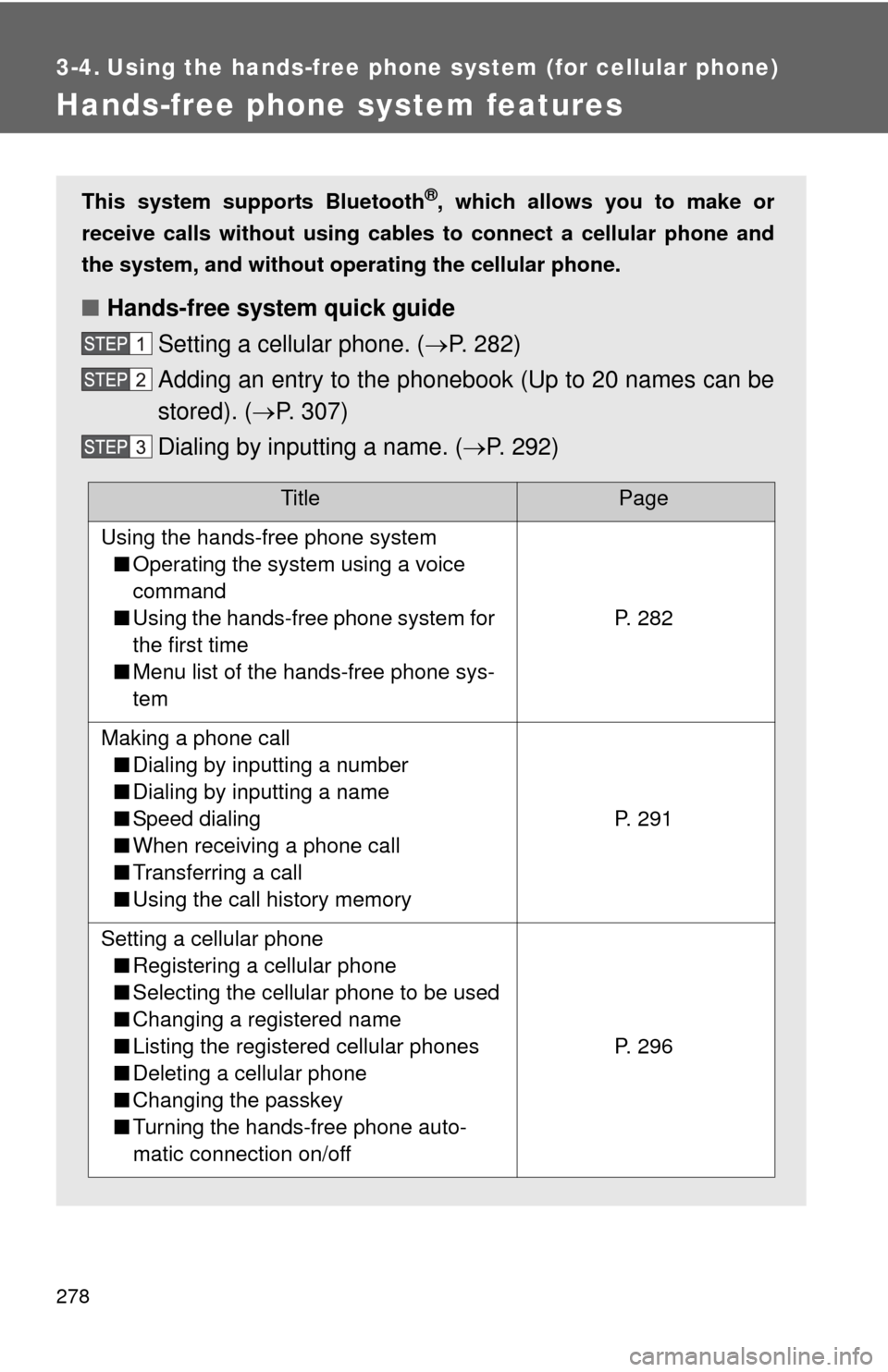
Hands-free phone system features
This system supports Bluetooth®, which allows you to make or
receive calls without using cables to connect a cellular phone and
the system, and without oper ating the cellular phone.
■Hands-free system quick guide
Setting a cellular phone. ( P. 282)
Adding an entry to the phonebook (Up to 20 names can be
stored). ( P. 307)
Dialing by inputting a name. ( P. 292)
TitlePage
Using the hands-free phone system
■ Operating the system using a voice
command
■ Using the hands-free phone system for
the first time
■ Menu list of the hands-free phone sys-
tem
P. 282
Making a phone call
■ Dialing by inputting a number
■ Dialing by inputting a name
■ Speed dialing
■ When receiving a phone call
■ Transferring a call
■ Using the call history memory
P. 291
Setting a cellular phone
■ Registering a cellular phone
■ Selecting the cellular phone to be used
■ Changing a registered name
■ Listing the registered cellular phones
■ Deleting a cellular phone
■ Changing the passkey
■ Turning the hands-free phone auto-
matic connection on/off
P. 296
Page 279 of 528
279
3-4. Using the hand
s-free phone system (for cellular phone)
3
Interior features
■Conditions under which th e system will not operate
● If using a cellular phone that does not support Bluetooth
®
●If the cellular phone is switched off
● If you are outside service range
● If the cellular phone is not connected
● If the cellular phone’s battery is low
● If the cellular phone is behind the seat or in the glove box or console box
● If metal is covering or touching the cellular phone
■ When transferring ownership of the vehicle
Be sure to initialize the system to prevent personal data from being improp-
erly accessed.
■ Required profiles for the cellular phone
●HFP (Hands Free Profile) Ver. 1.0
● OPP (Object Push Profile) Ver. 1.1
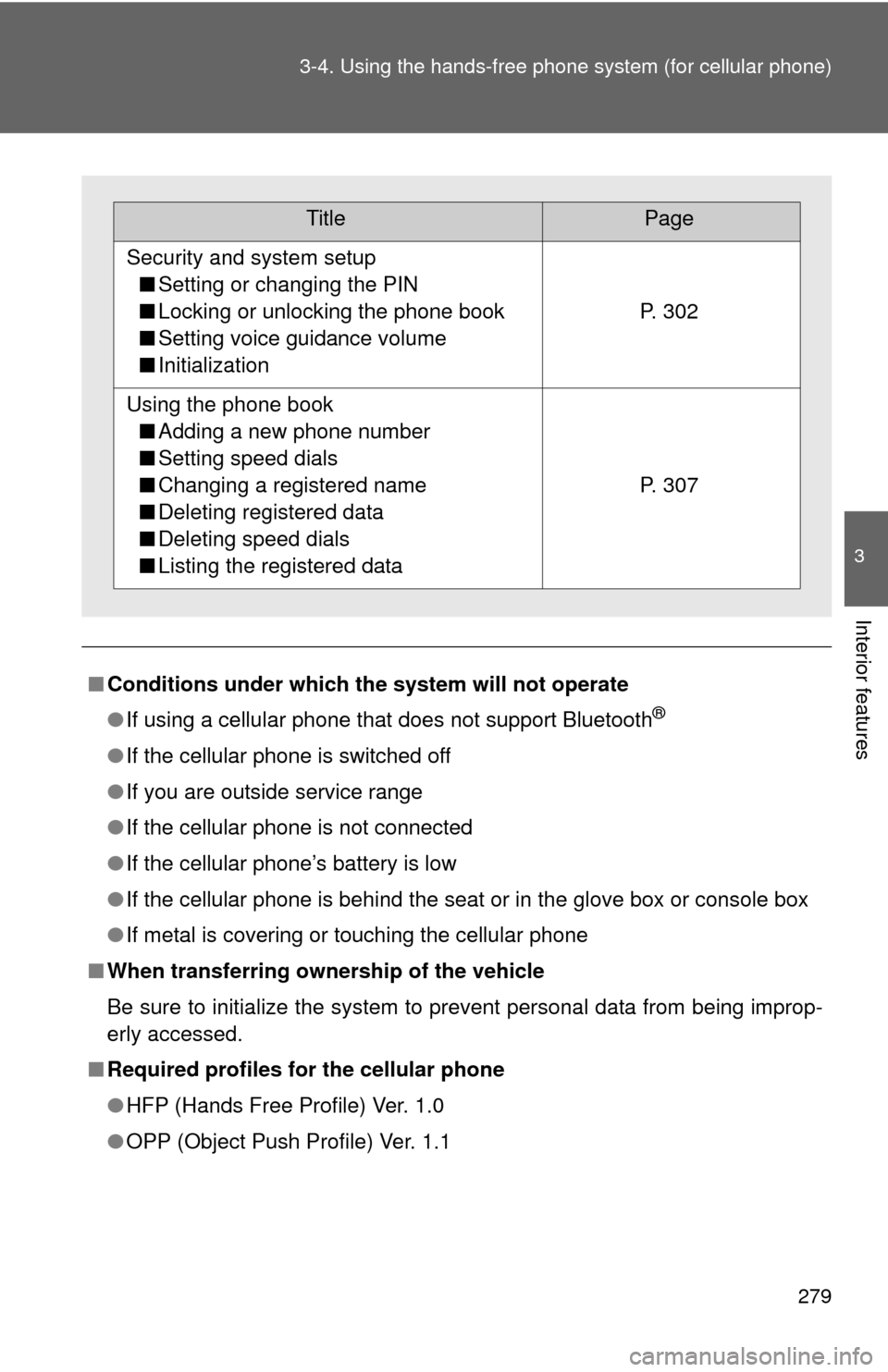
TitlePage
Security and system setup
■ Setting or changing the PIN
■ Locking or unlocking the phone book
■ Setting voice guidance volume
■ Initialization
P. 302
Using the phone book
■ Adding a new phone number
■ Setting speed dials
■ Changing a registered name
■ Deleting registered data
■ Deleting speed dials
■ Listing the registered data
P. 307
Page 280 of 528
280 3-4. Using the hands-free phone system (for cellular phone)
■About Bluetooth®
■Certification for the hands-free phone system
For vehicles sold in U.S.A.
• Vehicles with CD changer FCC ID: BABFT0001A
MADE IN JAPAN
• Vehicles without CD changer FCC ID: AJDK025
MADE IN JAPAN
This device complies with part 15 of the FCC Rules. Operation is subject to
the following two conditions: (1) This device may not cause harmful interfer-
ence, and (2) this device must accept any interference received, including
interference that may cause undesired operation. For vehicles sold in Canada
• Vehicles with CD changer IC ID: 2024B-FT0001A
MADE IN JAPAN
• Vehicles without CD changer IC ID: 775E-K025
MADE IN JAPAN
Operation is subject to the following two conditions: (1) this device may not
cause interference, and (2) this device must accept any interference, includ-
ing interference that may cause undesired operation of the device.
Bluetooth is a registered trademark of
Bluetooth SIG. Inc.
Page 281 of 528
281
3-4. Using the hand
s-free phone system (for cellular phone)
3
Interior features
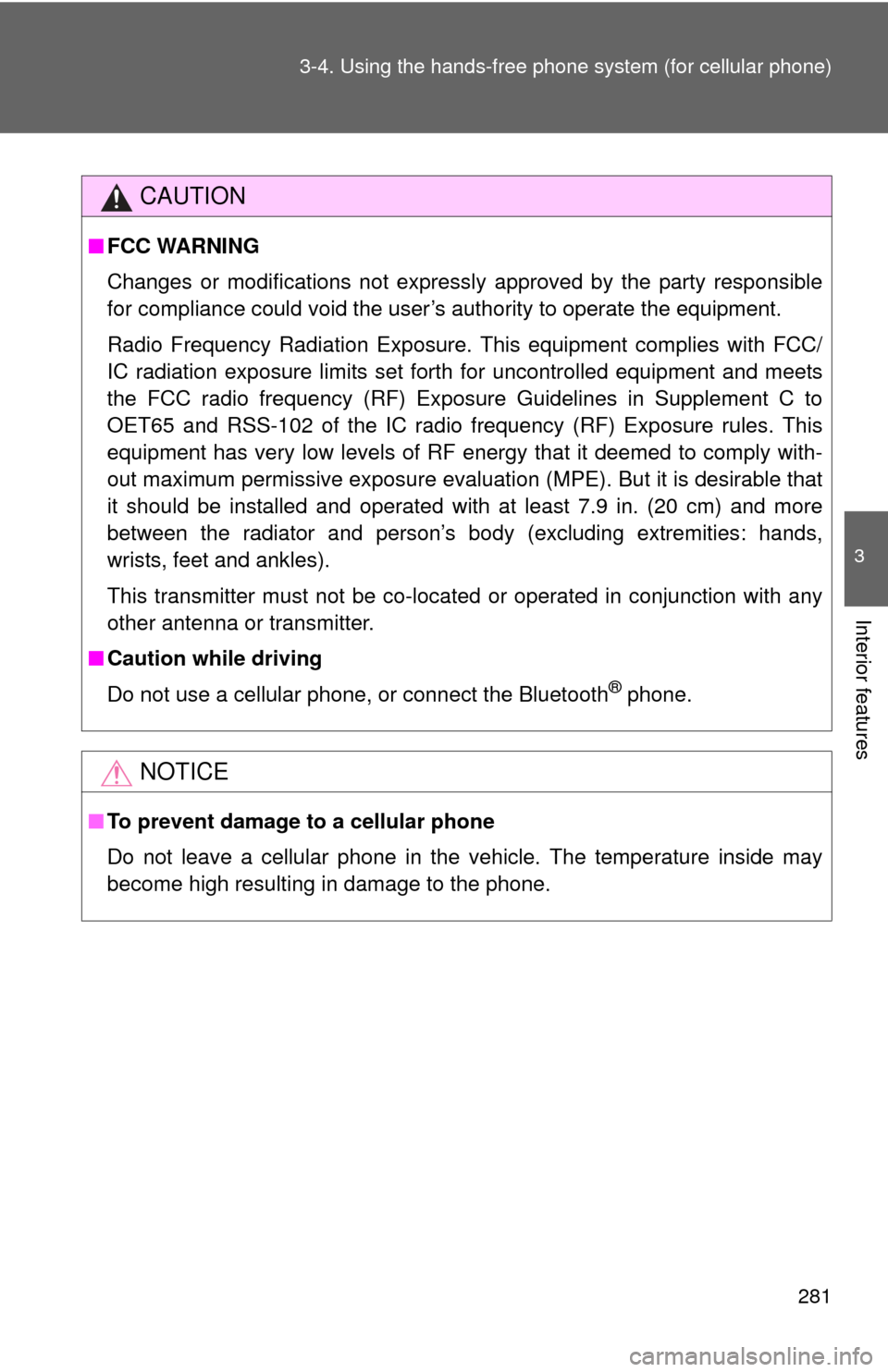
CAUTION
■FCC WARNING
Changes or modifications not expressly approved by the party responsible
for compliance could void the user’s authority to operate the equipment.
Radio Frequency Radiation Exposure. This equipment complies with FCC/
IC radiation exposure limits set forth for uncontrolled equipment and meets
the FCC radio frequency (RF) Exposure Guidelines in Supplement C to
OET65 and RSS-102 of the IC radio frequency (RF) Exposure rules. This
equipment has very low levels of RF energy that it deemed to comply with-
out maximum permissive exposure evaluation (MPE). But it is desirable that
it should be installed and operated with at least 7.9 in. (20 cm) and more
between the radiator and person’s body (excluding extremities: hands,
wrists, feet and ankles).
This transmitter must not be co-located or operated in conjunction with any
other antenna or transmitter.
■ Caution while driving
Do not use a cellular phone, or connect the Bluetooth
® phone.
NOTICE
■To prevent damage to a cellular phone
Do not leave a cellular phone in the vehicle. The temperature inside may
become high resulting in damage to the phone.
Page 282 of 528
282
3-4. Using the hands-free phone system (for cellular phone)
Using the hands-free phone system
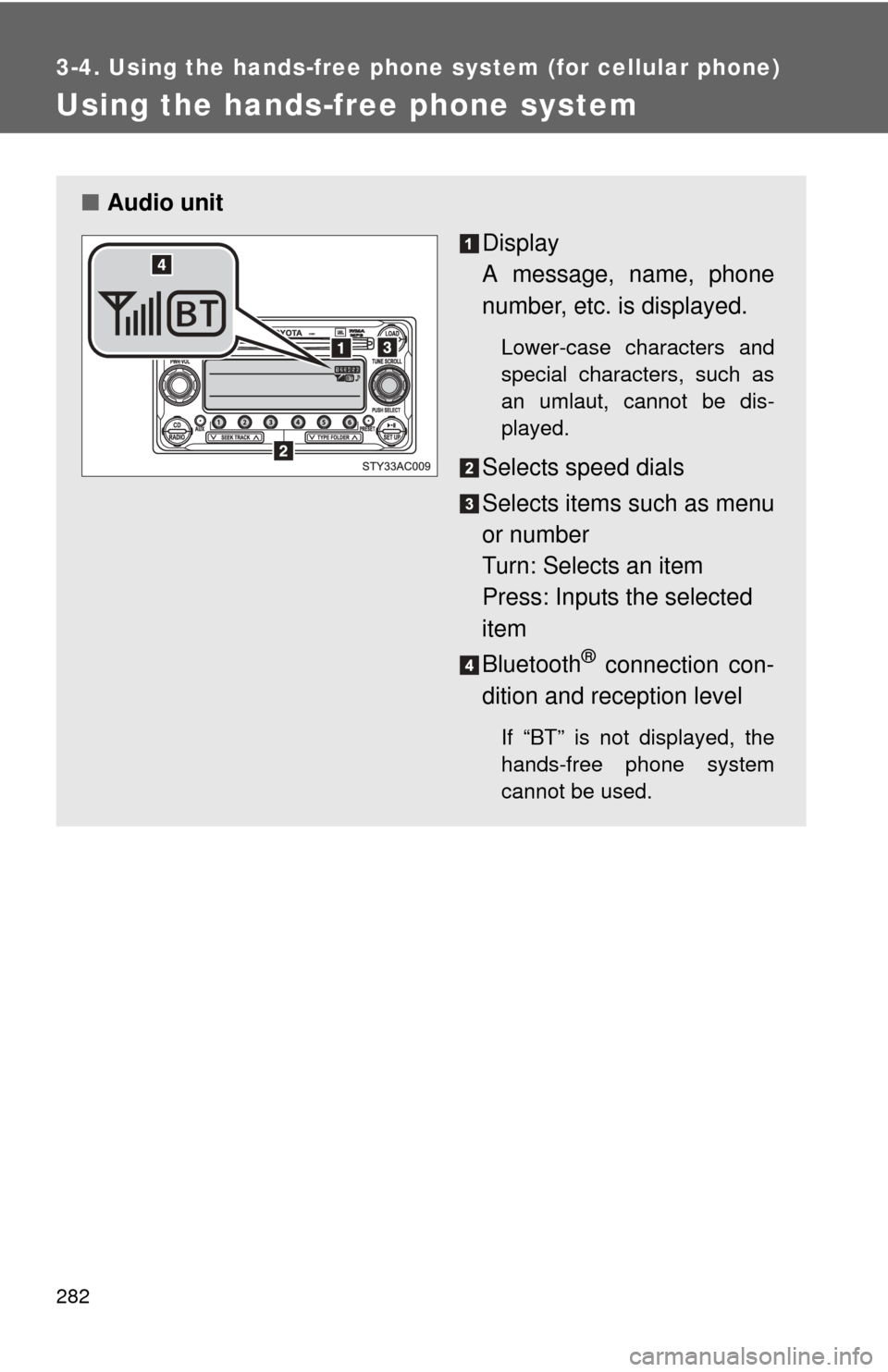
■Audio unit
Display
A message, name, phone
number, etc. is displayed.
Lower-case characters and
special characters, such as
an umlaut, cannot be dis-
played.
Selects speed dials
Selects items such as menu
or number
Turn: Selects an item
Press: Inputs the selected
item
Bluetooth
® connection con-
dition and reception level
If “BT” is not displayed, the
hands-free phone system
cannot be used.