2011 SKODA YETI warning lights
[x] Cancel search: warning lightsPage 104 of 252

Note
● The radiator fan may continue running for a further 10 minutes or so after the
engine and the ignition have been switched off. The coolant fan may, however, al-
so switch on again after some time if the coolant temperature rises because of an
accumulation of heat in the engine or if the engine is warm and the engine com-
partment is additionally heated by strong sunlight.
● This is why particular care is required when carrying out any work in the en-
gine compartment ⇒
page 190, Working in the engine compartment.
Shifting (manual gearbox) Fig. 97 The shift pattern: 5-speed or 6-
speed manual gearbox
Shift into reverse only when the car is stationary. Depress the clutch pedal and
hold it fully depressed. Wait a moment before engaging reverse gear in order to
avoid any shift noises.
The reversing lights will come on once reverse gear is engaged, provided the igni-
tion is on. WARNING
Never engage the reverse gear when driving - risk of accident! Note
● One should not lay the hand on the shift lever while driving the vehicle. The
pressure of the hand will be transferred to the gearshift forks in the gearbox. This
can, over a period of time, lead to early wear of the gearshift forks.
● Depress the clutch pedal fully when changing gears, in order to avoid unneces-
sary wear and damage. Pedals Operation of the pedals must not be hindered!
WARNING
● In the driver's footwell, only a footmat, which is attached to the two corre-
sponding attachment points, may be used.
● No objects are allowed in the driver's footwell – risk of obstruction or limi-
tation in operating the pedal! Note
● Greater brake pedal distances may be needed when there is a fault in the
brake system.
● Use only footmats from the range of ŠKODA Original Accessories, which are at-
tached at two attachment points.
Handbrake Fig. 98 Centre console: Handbrake
Applying the handbrake
– Pull the handbrake lever up fully.
Releasing the handbrake
– Pull the handbrake lever up slightly and at the same time press in the locking
button ⇒
fig. 98 .
– Hold the button pressed and push the handbrake lever down fully ⇒ .
£102
Starting-off and Driving
Page 105 of 252

The handbrake warning light
lights up when the handbrake is applied, provided
the ignition is on.
A warning signal sounds and the following text appears in the Information display
if you have inadvertently driven off with the handbrake applied:
Release parking brake!
The handbrake warning is activated if you drive at a speed of more than 6 km/h
for more than 3 seconds. WARNING
● Please note that the handbrake must be fully released. A handbrake which
is only partially released can result in the rear brakes overheating which will
have a negative effect on the operation of the brake system - risk of accident!
In addition this can result in premature wear of the rear brake pads.
● Never leave children unattended in the vehicle. The children might, for ex-
ample, release the handbrake or take the vehicle out of gear. The vehicle
might then move off - risk of accident! CAUTION
After the car has come to a stop, always first of all apply the handbrake firmly be-
fore then additionally engaging a gear (manual gearbox) or moving the selector
lever into position P (automatic gearbox).
Rear parking aid The parking aid provides a warning of obstacles behind the vehicle.
Fig. 99 Parking aid: Detection range of
rear sensorsThe audible parking aid determines the distance from the rear bumper to an ob-
stacle behind the car with the aid of ultrasound sensors. The tones of the parking
aid can be adapted in the menu of the Information display
⇒
page 20. The sensors
are integrated in the rear bumper.
Range of sensors
The clearance warning begins at a distance of about 160 cm from the obstacle
(area A ⇒
fig. 99 ). The interval between the warning signals becomes shorter as
the clearance is reduced.
A continuous tone sounds from a distance of approx. 30 cm (area B ) - danger
area. You should not reverse any further after this signal sounds! If the vehicle is
equipped with a factory-fitted towing device, the indication threshold of the dan-
ger area starts -
continuous tone - 5 cm further behind the vehicle. The vehicle
can be extended through an installed detachable towing device.
On factory-fitted radio navigation systems and car stereos, the distance to the ob-
struction can also be shown graphically in the display. On vehicles with a factory-
fitted towing device, the rear sensors are deactivated when towing a trailer. The
driver is informed about this by a graphic display (vehicle towing a trailer) in the
radio or the radio navigation display. The factory-fitted radio or navigation system
can be set so that the play function volume decreases when activating the park-
ing aid, see Owner's Manual radio or radio navigation system. As a result, the sig-
nal tones from the parking aid can be better recognised.
Activating
The parking aid is activated automatically when reverse gear is engaged and the
ignition is turned on. This is confirmed by a brief audible signal.
Deactivating
The parking aid is deactivated by removing the reverse gear. £ 103
Starting-off and Driving Using the system Safety Driving Tips General Maintenance Breakdown assistance Technical data
Page 106 of 252
WARNING
● The parking aid is not a substitute for the driver paying proper attention
and it is always the driver's responsibility to take care when parking the vehi-
cle or carrying out similar manoeuvres.
● You should therefore satisfy yourself, before reversing, that there is no
small obstacle, such as a rock, thin post, trailer drawbar etc., behind your vehi-
cle. Such an obstacle might not be within the range detected by the sensors.
● Under certain circumstances, surfaces of certain objects and types of
clothing cannot reflect the signal of the parking aid. Thus, these objects or
people who wear such clothing are not recognised by the sensors of the park-
ing aid. Note
● The parking aid does not operate if you are towing a trailer (applies to models
which feature a factory-fitted towing device).
● If a warning signal sounds for about 3 seconds after switching the ignition on
and engaging reverse gear, and there is no obstacle close to your car, this indi-
cates a system fault. Have the fault rectified by a specialist workshop.
● The sensors must be kept clean and free of ice to enable the parking aid to
operate properly.
Front and rear parking aid The parking aid provides a warning of obstacles in front and behind
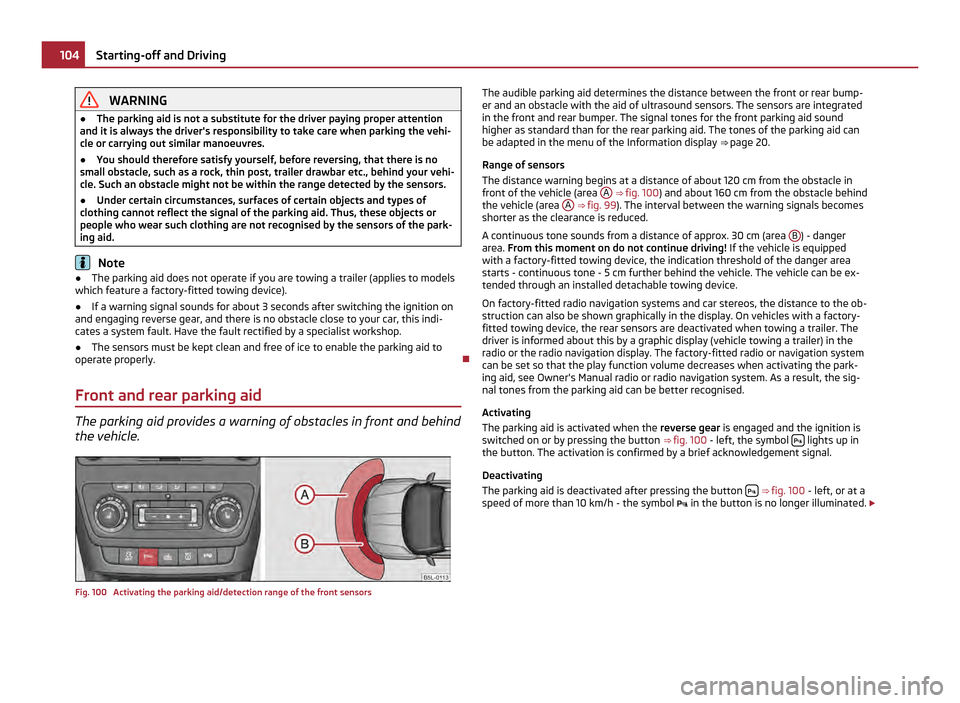
the vehicle. Fig. 100 Activating the parking aid/detection range of the front sensors The audible parking aid determines the distance between the front or rear bump-
er and an obstacle with the aid of ultrasound sensors. The sensors are integrated
in the front and rear bumper. The signal tones for the front parking aid sound
higher as standard than for the rear parking aid. The tones of the parking aid can
be adapted in the menu of the Information display ⇒ page 20.
Range of sensors
The distance warning begins at a distance of about 120 cm from the obstacle in
front of the vehicle (area A ⇒
fig. 100 ) and about 160 cm from the obstacle behind
the vehicle (area A ⇒ fig. 99
). The interval between the warning signals becomes
shorter as the clearance is reduced.
A continuous tone sounds from a distance of approx. 30 cm (area B ) - danger
area. From this moment on do not continue driving! If the vehicle is equipped
with a factory-fitted towing device, the indication threshold of the danger area
starts -
continuous tone - 5 cm further behind the vehicle. The vehicle can be ex-
tended through an installed detachable towing device.
On factory-fitted radio navigation systems and car stereos, the distance to the ob-
struction can also be shown graphically in the display. On vehicles with a factory-
fitted towing device, the rear sensors are deactivated when towing a trailer. The
driver is informed about this by a graphic display (vehicle towing a trailer) in the
radio or the radio navigation display. The factory-fitted radio or navigation system
can be set so that the play function volume decreases when activating the park-
ing aid, see Owner's Manual radio or radio navigation system. As a result, the sig-
nal tones from the parking aid can be better recognised.
Activating
The parking aid is activated when the reverse gear is engaged and the ignition is
switched on or by pressing the button ⇒ fig. 100 - left, the symbol lights up in
the button. The activation is confirmed by a brief acknowledgement signal.
Deactivating
The parking aid is deactivated after pressing the button
⇒
fig. 100 - left, or at a
speed of more than 10 km/h - the symbol in the button is no longer illuminated. £104
Starting-off and Driving
Page 108 of 252

●
The accuracy of the evaluation for the parking space can be influenced by the
incorrectly determined outside temperature if the later is influenced by the ther-
mal radiation of the engine i.e for stop and go in a traffic jam.
● In order to avoid damaging the sensors while cleaning with high-pressure
cleaners or steam jets, the sensors must only be directly sprayed for short periods
while a minimum distance of 10 cm must be observed. Note
● A component of the park assist is the front and rear parking aid.
● The electronic stability programme (ESP) must always be switched on for the
parking procedure.
● Only the front parking aid operates if you are towing a trailer (applies only to
models which feature a factory-fitted towing device). This is why it is not possible
to park backwards with the help of the park assist when towing a trailer.
● The sensors must be kept clean and free of ice to enable the parking aid to
operate properly.
Switch on display of the park assist in the information display Fig. 101 Switching on the park assist/information display: Finding a suitable parking space
Switch on display of the park assist in the information display
–
Press the button ⇒ fig. 101 .
– Drive past the parking row up to maximum 30 km/h and with a distance of
0.5 m to 1.5 m ⇒ fig. 101 .
Operate the turn signal for the driver's side if you wish to park on this side of the
road. In the information display the search area for the parking space is indicated
on the driver's side. If you press the button at a speed greater than 30 km/h and less than 50 km/h,
the message indicating that the speed for detecting the space is exceeded will be
displayed in the information display of the instrument cluster. If the speed drops
below 30 km/h, the condition of the parking assistant is automatically displayed in
the information display of the instrument cluster. When exceeding the speed of
50 km/h, it is required to activate the display again by pressing the button
⇒ fig. 101 . Note
● If the park assist is switched on, a yellow warning light lights up in the button.
● The search for suitable parking spaces is automatic after switching on the ig-
nition at speeds of more than 30
km/h. Searching for a parking space is performed
at the same time on the driver and front passenger side.
● If the sensors find a suitable parking space, they store its parameters until an-
other suitable parking space has been found or until a distance of 10 m had been
driven after finding the parking space. This is why it is possible to switch on the
park assist after driving past the parking space and the information on whether
this parking space is suitable for parking appears in the information display. 106
Starting-off and Driving
Page 112 of 252

Switching off the cruise control system temporarily
–
You can switch off the cruise control system temporarily by depressing the
brake pedal or clutch pedal, on vehicles fitted with an automatic gearbox only
with the brake pedal.
– You can switch off temporarily the cruise control system, if you press the
switch A in the middle position.
The set speed remains stored in the memory.
The Resumption of the stored speed is achieved by releasing the brake or clutch
pedal, on vehicles fitted with automatic gearbox only after releasing the brake
pedal and after shortly pressing the rocker button B
⇒ fig. 104 into the position
RES. WARNING
First ensure that it is not too high for the traffic conditions which exist at that
moment before resuming the stored speed.
Switching off the cruise control system completely –
Press the switch A
⇒ fig. 104
to the right into position OFF.
“(START-STOP)” Fig. 105 Dash panel: START-STOP Sys-
tem button
The “START-STOP” system helps you to save fuel while at the same time reducing
harmful exhaust emissions and CO 2 emissions.
The function is automatically activated each time the ignition is switched on. In the start-stop mode, the engine automatically switches to the vehicle's idle
phase, e.g. when stopped at traffic lights.
Information regarding the current state of the
“START-STOP” system is indicated
in the display of the instrument cluster.
Automatic engine shut down (stop phase)
– Stop the vehicle (where necessary, apply the handbrake).
– Take the vehicle out of gear.
– Take your foot off the clutch.
Automatic engine restart (start phase).
– Push down on the clutch.
Switching the
“START-STOP” system on and off
You can switch the “START STOP” system on/off by pressing the button ⇒ fig. 105 .
When start-stop mode is deactivated, the warning light in the button lights up.
If the vehicle is in the stop phase when manually switching off the system, the en-
gine starts immediately.
The “START-STOP” system is very complex. Some of the procedures are hard to
check without servicing. The general conditions for the proper functioning of the
“START-STOP” system are listed in the following overview.
Conditions for the automatic engine shut down (stop phase) The gearshift lever is in Neutral.
The clutch pedal is not pressed!
The driver has fastened the seat belt.
The driver's door is closed.
The bonnet is closed.
The vehicle is at a standstill.
The factory-fitted towing device is not electrically connected to a trailer.
The engine is at operating temperature.
The charge state of the vehicle battery is sufficient.
The stationary vehicle is not on a steep slope or a steep downhill section.
The engine speed is less than 1200 1/min.
The temperature of the vehicle battery is not too low or too high.
£110
Starting-off and Driving
Page 115 of 252

CAUTION
● The double clutch on the automatic gearbox DSG is equipped with an overload
protection. If you make use of the uphill function on a vehicle which is stationary
or driving slowly uphill, it will result in an increase of thermal stress of the clutch-
es.
● In the event that they overheat, the warning light and a warning text ap-
pears in the information display ⇒ page 30. In such a case bring the vehicle to a
stop, switch off the engine and wait until the warning light and the warning go
out - risk of gearbox damage! You can continue the trip as soon as the warning
light and the warning go out.
Selector lever positions Fig. 106 Selector lever/information display: Selector lever positions
The current selector lever position is indicated in the information display of the in-
strument cluster
⇒ fig. 106 - right. In the positions D and S the gear you have al-
ready engaged will be additionally displayed on the display.
P - Parklock
The driven wheels are locked mechanically in this position.
The Parklock must only be engaged when the vehicle is stationary ⇒ .
If you wish to move the selector lever into or out of this position, you must press
the Shiftlock button in the handle of the selector lever and at the same time de-
press the brake pedal.
If the battery is used, the selector lever cannot be moved out of the position P.R - Reverse gear
Reverse gear must only be engaged when the vehicle is stationary and the engine
idling ⇒ .
The brake pedal must be depressed and at the same time the Shiftlock must be
pressed, if you wish to obtain the selector lever positions R, P or N.
When the ignition is switched on and the selector lever is in position R, the re-
verse lights will come on.
N - Neutral
The transmission is in Neutral in this position.
The brake pedal must be depressed (if the lever is in its position for longer than 2
seconds) in order to move the selector lever out of the position N into the position
D or R, with the ignition switched on, on a vehicle travelling at less than 5 km/
hour or on a stationary vehicle.
D - Position for driving forward
When the selector lever is in this position, the forward gears are shifted up and
down automatically in line with engine load, vehicle speed and the dynamic shift
programme.
You must depress the brake pedal if you wish to move into position D from N
when the vehicle is travelling at less than 5
km/hour or is stationary ⇒ .
Under certain circumstances (e.g. when driving in mountainous regions or when
towing a trailer) it may be beneficial to select the manual shift programme
⇒ page 115 for a short time in order to adapt the gearbox ratios manually to the
driving situations.
S - Position for sporty style of driving
Shifting up later into a higher gear makes it possible to fully exploit the power po-
tential of the engine. The gearbox also then shifts down at higher engine speeds
as in the position D .
The Shiftlock on the selector lever grip must be pressed when moving the selec-
tor lever out of the position D into the position S. £ 113
Automatic gearbox DSG Using the system Safety Driving Tips General Maintenance Breakdown assistance Technical data
Page 116 of 252

WARNING
● Never move the selector lever into position R or P when driving - risk of an
accident!
● When the engine is running and the vehicle is stationary, it is necessary to
hold the car with the brake pedal in all the positions of the selector lever (ex-
cept P and N) since the power transmission is never completely interrupted,
also not when the engine is idling - the vehicle creeps.
● You must on no account unintentionally operate the throttle (e.g. by hand
from the engine compartment) if a drive position is engaged when the car is
stationary. The vehicle would otherwise immediately start off - also when the
handbrake is firmly applied - risk of an accident!
● You must move the selector lever into position P and firmly apply the
handbrake first before you or any other person opens the bonnet and starts
working on the engine when it is running - risk of accident! It is also essential
to observe all warnings ⇒
page 190, Working in the engine compartment.
Selector lever lock Automatic selector lever lock
With the ignition on, the selector lever is locked when it is in the positions P and
N. You must first of all depress the brake pedal in order to move the selector lever
out of this position. The warning light
⇒
page 27 lights up in the instrument
cluster as a reminder for the driver when the selector lever is in the positions P
and N.
A time delay element ensures that the selector lever is not blocked when rapidly
switching over the position N (e.g. from R to D). This does, for example, allow one
to seesaw out a stuck vehicle. The selector lever lock will click into place if the lev-
er is in the N position for more than 2 seconds without the brake pedal being
pressed.
The selector lever lock is only active if the vehicle is stationary or moving at speed
of less than 5 km/hour. The lock is switched off automatically into position N
when the car is travelling at a higher speed.
Shiftlock button
The Shiftlock button in the handle of selector lever prevents certain selector lever
positions being engaged inadvertently. The selector lever lock is cancelled when
you press the Shiftlock button. Keylock - Ignition key withdrawal lock
You can only withdraw the ignition key after switching off the ignition if the selec-
tor lever is in position
P. If the ignition key is withdrawn, the selector lever is
blocked in position P .
Kickdown function The kickdown function provides you with maximum acceleration
power.
Fully depressing the accelerator pedal allows the kickdown function to be activa-
ted in the desired driving program. This function has precedence over the driving
programme and serves for maximum acceleration of the vehicle when exploiting
the maximum power potential of the engine without taking into account the cur-
rent selector lever position ( D, S or Tiptronic ). The gearbox shifts down to one or
several gears in line with the driving state and the vehicle accelerates. The gear-
box does not shift up into the highest gear until the engine has reached its maxi-
mum revolutions for this gear range. WARNING
Please note that using the kickdown function can result in the driven wheels
spinning on a smooth or slippery road surface - risk of skidding!
Dynamic shift programme The automatic gearbox of your vehicle is controlled electronically. Shifting up and
down through the gears is performed automatically on the basis of pre-defined
driving programmes.
Adopting a moderate style of driving
will cause the gearbox to select the most
economical driving programme. Shifting up into a higher gear as soon as possible
and shifting down as late as possible will have a favourable effect on your fuel
consumption.
Adopting a sporty style of driving with rapid movements of the accelerator pedal
combined with sharp acceleration and frequent changes in speed, exploiting the
top speed of the car or depressing the accelerator pedal (kickdown function), will
cause the gearbox to switch over to this style of driving and shift down earlier
with frequent changes in gears in comparison to the moderate style of driving. £114
Automatic gearbox DSG
Page 147 of 252

If the airbag was switched off using diagnostic equipment:
●
The warning light for the airbag system lights up for 4 seconds after switching
on the ignition and then flashes for 12 seconds afterwards in 2 second intervals.
The following situation applies if the airbag has been switched off using the
switch for the airbag in the storage compartment:
● the airbag indicator light in the instrument cluster comes on for about 4 sec-
onds each time the ignition is switched on;
● switching off the airbag is indicated in the middle of the dash panel by the
lighting up of the yellow indicator light in display
⇒ fig. 129 . Note
Your authorised ŠKODA Service Partner will be able to advise you whether nation-
al legislation in your country allows airbags in your vehicle to be deactivated, and
which ones.
Switch for the front passenger front airbag Fig. 129 Storage compartment: Switch for the front passenger front airbag/warning light for
a switched off front seat passenger airbag
Only the front passenger front airbag is deactivated with the switch.
Deactivating an airbag
– Switch off the ignition.
– Turn the slot of the airbag switch using the key in the position 2 (
OFF)
⇒ fig. 129 .
– Check whether the airbag indicator light in the display
in
the middle of the dash panel lights up when the ignition is switched on
⇒ fig. 129 - right. Switching on an airbag
–
Switch off the ignition.
– Turn the slot of the airbag switch using the key in the position 1 (
ON)
⇒ fig. 129 .
– Check whether the airbag indicator light in the display
in
the middle of the dash panel lights up when the ignition is switched on
⇒ fig. 129 - right. The warning light goes out 65 seconds after the ignition
is switched on.
The airbag should only be switched off under exceptional circumstances
⇒ page 144.
Indicator light in display (airbag switched off)
The airbag indicator light is located in the middle of the dash panel ⇒ fig. 129 -
right.
If the front passenger front airbag is switched off, the warning light comes on
about 4 seconds after the ignition is switched on.
There is a system fault present in the airbag switch off ⇒ if the indicator light
flashes. Please have the car inspected immediately by a specialist garage. WARNING
● The driver is responsible for whether the airbag is switched on or switched
off.
● Only switch off the airbag when the ignition is switched off! Otherwise a
fault can occur in the system for the airbag deactivation.
● If the yellow indicator light in display
(airbag switched
off) flashes:
–Front passenger airbag is not deployed in the event of an accident!
– It is also important to have the system inspected without delay by a
specialist garage. 145
Airbag system Using the system Safety Driving Tips General Maintenance Breakdown assistance Technical data