2011 SKODA YETI radio
[x] Cancel search: radioPage 43 of 252

Closing a window
–
Lightly press the appropriate button up and hold it until the window has
moved into the desired position.
– Additionally you can close the window automatically (fully closed) by pressing
the button up up to the stop. Renewed pressing of the button causes the win-
dow to stop immediately. WARNING
The system is fitted with a force limiter ⇒ page 41 . If there is an obstacle, the
closing process is stopped and the window goes down by several centimetres.
You should then take particular care when closing the windows! You may oth-
erwise suffer severe injuries as a result of getting an arm, for example, jam-
med in the window! Note
● After switching the ignition off, it is still possible to open or close the windows
for a further 10 minutes. The automatic closing and opening functions will not op-
erate during this time. The power windows are switched off completely once you
open the driver or front passenger door.
Force limiter of the power windows The electrically operated power windows are fitted with a force limiter. It reduces
the risk of bruises or injuries when closing the windows.
If there is an obstacle, the closing process is stopped and the window goes down
by several centimetres.
If an obstacle prevents the window from being closed during the next 10 seconds,
the closing process is interrupted once again and the window goes down several
centimetres.
If you try to close the window once again within 10 seconds after the window has
gone down twice, although the obstacle was not yet removed, the closing process
is stopped only. During this time it is not possible to automatically close the win-
dow. The force limiter is still switched on.
The force limiter is switched off only, if you attempt within the next 10 seconds to
close the window again - now the window will close with full force.
If you wait longer than 10 seconds, the force limiter is switched on again. WARNING
You should take particular care when closing the windows! You may otherwise
suffer severe injuries as a result of getting an arm, for example, jammed in the
window!
Window convenience operation You can open and close the electrically powered windows as follows when un-
locking and locking the vehicle (only close the panoramic sliding roof):
Opening a window
–
Hold the key in the locking cylinder of the driver's door in the unlock position
or press the unlock button of the radio remote control until all the windows
are opened.
Closing a window
– Hold the key in the locking cylinder of the driver's door in the lock position or
press the lock button of the radio remote control until all the windows are
closed.
You can interrupt the opening or closing operation of the windows immediately by
releasing the key or the lock button. WARNING
The system is fitted with a force limiter ⇒ page 41
. If there is an obstacle, the
closing process is stopped and the window goes down by several centimetres.
You should then take particular care when closing the windows! You may oth-
erwise suffer severe injuries as a result of getting an arm, for example, jam-
med in the window! Note
On vehicles fitted with anti-theft alarm system the convenience window opening
is possible by means of the key in the locking cylinder only 45 seconds after deac-
tivating the warning system or after activating the anti-theft alarm system. 41
Locking and Unlocking Using the system Safety Driving Tips General Maintenance Breakdown assistance Technical data
Page 50 of 252

Leaving Home Function
This function makes it possible to switch on the lights when approaching the ve-
hicle.
Switching on Leaving Home Function
– The light switch is in the position automatic driving lamp control .
– Unlock the vehicle with the radio remote control - the lights come on.
Depending on equipment fitted the function Leaving Home switches on the fol-
lowing lights:
● Parking lights,
● Low beam,
● Entry lighting in the exterior mirrors,
● Licence plate light.
Leaving Home Function
The function Leaving Home is controlled with the light sensor in the mount of the
interior rear mirror. If the light intensity is higher than the set value of the light
sensor, the Leaving Home Function is not switched on after unlocking the vehicle
with the radio remote control.
After unlocking the vehicle with the radio remote control, the lights come on for
10 seconds. The Leaving Home Function is also switched off after the ignition is
switched on and after locking the vehicle.
If no door is opened within 30 seconds, the lights go out and the vehicle is locked
automatically. Note
● If the Leaving Home Function is switched on constantly, the battery will be
heavily discharged particularly in short-haul traffic.
● The switching on of the described lights should only be undertaken in accord-
ance with the legal requirements.
● You can change the illumination period for the Leaving Home Function by
means of the Information display. Tourist light Xenon headlight
This mode makes it possible to drive in countries with opposing traffic system,
driving on the left/right, without dazzling the oncoming vehicles. When the mode
“tourist light
” is active, the side to side swivel of the headlights is deactivated.
The mode “tourist light” is activated/deactivated via the Information display in the
menu:
■ Settings
■ Lights & Vision
■ Travel mode
■ Off
■ Switched on
Halogen headlight
When using Halogen headlights, it is necessary to stick a sticker over a certain
part of the headlights in order to prevent the dazzling of oncoming traffic.
You can purchase headlight stickers from the range of the ŠKODA Original Acces-
sories.
Fog lights Fig. 26 Dash panel: Light switch
Switch on the front fog lamp
– First of all turn the light switch into position or ⇒
fig. 26 .
– Pull the light switch into position 1 .
£48
Lights and Visibility
Page 61 of 252

The exterior mirror heater only operates when the engine is running and up to an
outside temperature of +20 °C.
Adjusting left and right exterior mirrors simultaneously
– Turn the rotary knob to position . The movement of the mirror surface is iden-
tical to the movement of the rotary knob.
The adjustment of both mirrors simultaneously or each individual mirror is possi-
ble in the Information display ⇒
table on page 20 in the menu point Mirror adjust.
(Mirror adjust.).
Adjusting the right-hand exterior mirror
– Turn the rotary knob to position . The movement of the mirror surface is iden-
tical to the movement of the rotary knob.
Switching off operating control
– Turn the rotary knob to position .
Folding in both exterior mirrors
– Turn the rotary knob to position .
Fold in the exterior mirrors using the remote control key
– If all the windows are closed, press the unlock button 3 on the radio remote
control ⇒ fig. 17 for approx. 2 seconds.
Tilting surface of front passenger exterior mirror
On vehicles fitted with a memory for the driver seat, the surface of the mirror tilts
down slightly when the rear gear is engaged and the rotary knob is in the posi-
tion ⇒ fig. 41 . This provides an aid in seeing the kerb of the pavement when park-
ing the car.
The mirror returns into its initial position, after the rotary knob is moved out of the
position and put into another position or if the speed is more than 15 km/h.
Memory for exterior mirrors
On vehicles fitted with a memory for the driver seat, the relevant setting of the
exterior mirror is also stored automatically when the seat position is stored
⇒ page 63. WARNING
● Convex (curved outward) or a spherical exterior mirrors increase the vision
field. They do, however, make objects appear smaller in the mirror. These mir-
rors are only of limited use, therefore, for estimating distances to the follow-
ing vehicles.
● Use whenever possible the interior rear mirror, for estimating the distan-
ces to the following vehicles. Note
● If the exterior mirrors are folded in using the remote control of the vehicle key,
these are folded back into the driving position after opening the door or switching
on the ignition.
● If the exterior mirrors are folded in using the rotary knob ⇒
fig. 41, they can on-
ly be folded back into the driving position using the rotary knob.
● If the exterior mirrors were folded in using the remote control of the vehicle
key and if the rotary knob was in the fold-in position before switching on the igni-
tion, the mirrors remain in the fold-in position the next time the ignition is switch-
ed on. Folding back into the driving position is performed by actuating the rotary
knob in a different position from the fold-in position.
● Do not touch the surfaces of the exterior mirrors if the exterior mirror heater is
switched on.
● You can set the exterior mirrors by hand, if the power setting function fails at
any time, by pressing on the edge of the mirror surface.
● Contact your specialist garage if a fault exists with the power setting of the
exterior mirrors.
Automatic dimming exterior mirror on the driver's side The exterior mirror on the driver's side is dimmed together with the interior mirror.
If the automatic dimming is switched on, the mirror dims automatically depending
on the light striking the mirror from the rear.
When the interior lights are switched on or the reverse gear is engaged, the mirror
always moves back into the basic position (not dimmed). £ 59
Lights and Visibility Using the system Safety Driving Tips General Maintenance Breakdown assistance Technical data
Page 67 of 252

●
The assignment of the radio remote control to a memory button is retained,
however, after reassigning the seats and exterior mirrors.
● After the successful assignment, the turn signal lights flash and an audible
signal will sound as a confirmation. The setting is stored with the memory button
which you have selected.
Retrieving settings of the seat and mirrors You can retrieve the stored settings either with the memory but-
tons or with the remote control.
Retrieving settings with memory buttons
– In order to retrieve the stored setting, you have two possibilities:
– By briefly pressing:Briefly press the desired memory button B
⇒ fig. 46 . The
seat and exterior mirror are moved automatically into the stored positions (this
applies only if the ignition is switched on and the speed is less than 5 km/h).
– By pressing for a long period of time: press and hold the desired memory but-
ton B pressed long enough until the seat and the exterior mirrors are moved
into the stored positions.
Retrieving settings with remote control
– If the driver door is closed and the ignition is switched off, briefly press the un-
lock button of the remote control ⇒ page 37 and then open the driver door.
– The seat and exterior mirrors now move automatically into the stored posi-
tions.
Retrieving setting of exterior mirror for reversing
– Turn the rotary knob for the exterior mirror setting into the position
⇒ page 58
before engaging the reverse gear.
The mirror returns into its initial position, after the rotary knob is moved out of the
position and put into another position or if the speed is more than 15 km/h.
Emergency Off
You can interrupt the setting operation at any time, if you operate any button of
the driver seat. Head restraints
Fig. 47 Head restraint: Adjusting/pulling out
Best protection is achieved if the top edge of the head restraint is at the same
level as the upper part of your head.
Adjusting the height of a head restraint
–
Grasp the side of the head restraint with both hands and push it in upward di-
rection as desired ⇒ fig. 47 - left.
– Move the head restraint downwards if required by pressing and holding the
safety button with one hand ⇒ fig. 47 - right and by pressing with the other
hand the head restraint downwards.
Removing and installing a head restraint
– Pull the head restraint out of the seat backrest as far as the stop.
– Press the locking button in the direction of arrow ⇒
fig. 47 - right and pull the
head restraint out.
– To re-insert the head restraint, push it down into the seat backrest far enough
until you hear the locking button engage.
The position of the front and rear outer head restraints is adjustable in height.
The middle rear head restraint is adjustable in two positions.
The head restraints must be adjusted to match the size of the seat occupant. Cor-
rectly adjusted head restraints together with the seat belts offer effective protec-
tion for the occupants ⇒ page 129, Correct seated position
.£ 65
Seats and Stowage Using the system Safety Driving Tips General Maintenance Breakdown assistance Technical data
Page 94 of 252

WARNING
You should not leave recirculated air mode on over a longer period of time, as
“stale ” air may result in fatigue in the driver and occupants, divert your atten-
tion and also cause the windows to mist up. The risk of having an accident in-
creases. Switch recirculated air mode off as soon as the windows begin mist-
ing up.
Climatronic (automatic air conditioning) Description The Climatronic system is an automatic heating, fresh air and cool-
ing system which provides optimal comfort for the occupants of the
car.
The Climatronic maintains fully automatically a convenience temperature. This is
achieved by automatically varying the temperature of the out-flowing air, the
blower stages and the air distribution. The system also takes into account sun-
light which eliminates the need to alter the settings manually. The automatic
mode
⇒
page 93 ensures maximum well-being of the occupants at all times of
the year.
Description of Climatronic system
The cooling operates only if the following conditions are met:
● engine running,
● outside temperature above approx. +2 °C,
● AC switched on.
The AC compressor is switched off at a high coolant temperature in order to en-
sure cooling of the engine at high loads.
Recommended setting for all periods of the year:
● Set the desired temperature, we recommend 22 °C.
● Press the button AUTO
⇒ fig. 92 .
● Move the air outlet vents 3 and 4 ⇒
fig. 88 so that the air flow is directed
slightly upwards. Note
● We recommend that you have Climatronic cleaned by a specialist garage once
every year.
● On vehicles equipped with a factory-fitted radio or radio navigation system,
the information of the Climatronic is also shown on the display. This function can
be switched off, see operating instructions of the radio or the radio navigation
system.
Overview of the control elements The controls enable a separate setting of the temperature for the
left and right side.
Fig. 92 Climatronic: Control elements
The buttons
Defrost windscreen intensively Air flow to the windows
Air flow to head
Air flow in the footwell
Recirculated air mode
with air quality sensor
Rear window heater £
1 2
3
4
5
692
Heating and air conditioning system
Page 99 of 252

If the system is running, a warning light in the button for direct switching on/off
of the auxiliary heating
lights up.
The running system deactivates after expiration of the operating period or is de-
activated earlier by pressing the button for direct switching on/off of the auxiliary
heating ⇒
page 96.
A random pre-set time can be deactivated by selecting the menu point Deactivate
in the menu Activate.
After selecting the menu Factory setting in the menu Aux. heating, it is possible
to return to the factory setting.
Radio remote control The auxiliary heating (auxiliary heating and ventilation) can be
switched on or off with the remote control. Fig. 94 Auxiliary heating: Radio remote control/bottom of the radio remote control with the
battery cover
–
For switching on, press the button ON .
– For switching off, press the button OFF .
The transmitter and the battery are housed in the housing of the remote control.
The receiver is located in the interior of the car.
If the battery is properly charged, the effective range is up to 600
m. For switching
on or off the auxiliary heating, hold the remote control vertically with the antenna A
⇒ fig. 94 towards the top. You must not cover over the antenna with the fin-
gers or the palm of the hand. Obstacles between the radio remote control and the
vehicle, bad weather conditions and a weaker battery can clearly reduce the
range. The auxiliary heating can only be switched on or off with the radio remote control,
if the distance between the radio remote control and the vehicle is at least 2 m.
Warning light in the radio remote control
The warning light in the radio remote control ⇒ fig. 94 indicates after a keystroke
if the remote control signal was received by the auxiliary heating and if the bat-
tery is adequately charged. Display warning light Importance
Lights up green for 2 seconds. The auxiliary heating was switched on.
Lights up red for 2 seconds. The auxiliary heating was switched off.
Slowly flashes green for 2 seconds. The ignition signal was not received.
Quickly flashes green for 2 seconds. The auxiliary heating is blocked, e. g
because the tank is nearly empty or
there is a fault in the auxiliary heating.
Flashes red for 2 seconds. The switch off signal was not received.
Lights up orange for 2 seconds, then
green or red. The battery is weak, however the
switching on or off signal was received.
Lights up orange for 2 seconds, then
flashes green or red. The battery is weak, however the
switching on or off signal was not re-
ceived.
Flashes orange for 5 seconds. The battery is discharged, however the
switching on or off signal was not re-
ceived. CAUTION
There are electronic components in the radio remote control, protect the remote
control against water, severe shocks and direct sun rays.
Changing the battery of the radio remote control If the warning light of the radio remote control indicates a weak or discharged
battery,
⇒ fig. 94 , it must be replaced. The battery is located under a cover on the
back of the radio remote control.
– Insert a flat, blunt object, such as a coin, into the gap of the battery cover, turn
it against the direction of the arrow up to the mark, and unlock the cover
⇒ fig. 94 - right.
– Change the battery, replace the battery cover and lock it by moving it in the
direction of the arrow. £ 97
Heating and air conditioning system Using the system Safety Driving Tips General Maintenance Breakdown assistance Technical data
Page 105 of 252

The handbrake warning light
lights up when the handbrake is applied, provided
the ignition is on.
A warning signal sounds and the following text appears in the Information display
if you have inadvertently driven off with the handbrake applied:
Release parking brake!
The handbrake warning is activated if you drive at a speed of more than 6 km/h
for more than 3 seconds. WARNING
● Please note that the handbrake must be fully released. A handbrake which
is only partially released can result in the rear brakes overheating which will
have a negative effect on the operation of the brake system - risk of accident!
In addition this can result in premature wear of the rear brake pads.
● Never leave children unattended in the vehicle. The children might, for ex-
ample, release the handbrake or take the vehicle out of gear. The vehicle
might then move off - risk of accident! CAUTION
After the car has come to a stop, always first of all apply the handbrake firmly be-
fore then additionally engaging a gear (manual gearbox) or moving the selector
lever into position P (automatic gearbox).
Rear parking aid The parking aid provides a warning of obstacles behind the vehicle.
Fig. 99 Parking aid: Detection range of
rear sensorsThe audible parking aid determines the distance from the rear bumper to an ob-
stacle behind the car with the aid of ultrasound sensors. The tones of the parking
aid can be adapted in the menu of the Information display
⇒
page 20. The sensors
are integrated in the rear bumper.
Range of sensors
The clearance warning begins at a distance of about 160 cm from the obstacle
(area A ⇒
fig. 99 ). The interval between the warning signals becomes shorter as
the clearance is reduced.
A continuous tone sounds from a distance of approx. 30 cm (area B ) - danger
area. You should not reverse any further after this signal sounds! If the vehicle is
equipped with a factory-fitted towing device, the indication threshold of the dan-
ger area starts -
continuous tone - 5 cm further behind the vehicle. The vehicle
can be extended through an installed detachable towing device.
On factory-fitted radio navigation systems and car stereos, the distance to the ob-
struction can also be shown graphically in the display. On vehicles with a factory-
fitted towing device, the rear sensors are deactivated when towing a trailer. The
driver is informed about this by a graphic display (vehicle towing a trailer) in the
radio or the radio navigation display. The factory-fitted radio or navigation system
can be set so that the play function volume decreases when activating the park-
ing aid, see Owner's Manual radio or radio navigation system. As a result, the sig-
nal tones from the parking aid can be better recognised.
Activating
The parking aid is activated automatically when reverse gear is engaged and the
ignition is turned on. This is confirmed by a brief audible signal.
Deactivating
The parking aid is deactivated by removing the reverse gear. £ 103
Starting-off and Driving Using the system Safety Driving Tips General Maintenance Breakdown assistance Technical data
Page 106 of 252
WARNING
● The parking aid is not a substitute for the driver paying proper attention
and it is always the driver's responsibility to take care when parking the vehi-
cle or carrying out similar manoeuvres.
● You should therefore satisfy yourself, before reversing, that there is no
small obstacle, such as a rock, thin post, trailer drawbar etc., behind your vehi-
cle. Such an obstacle might not be within the range detected by the sensors.
● Under certain circumstances, surfaces of certain objects and types of
clothing cannot reflect the signal of the parking aid. Thus, these objects or
people who wear such clothing are not recognised by the sensors of the park-
ing aid. Note
● The parking aid does not operate if you are towing a trailer (applies to models
which feature a factory-fitted towing device).
● If a warning signal sounds for about 3 seconds after switching the ignition on
and engaging reverse gear, and there is no obstacle close to your car, this indi-
cates a system fault. Have the fault rectified by a specialist workshop.
● The sensors must be kept clean and free of ice to enable the parking aid to
operate properly.
Front and rear parking aid The parking aid provides a warning of obstacles in front and behind
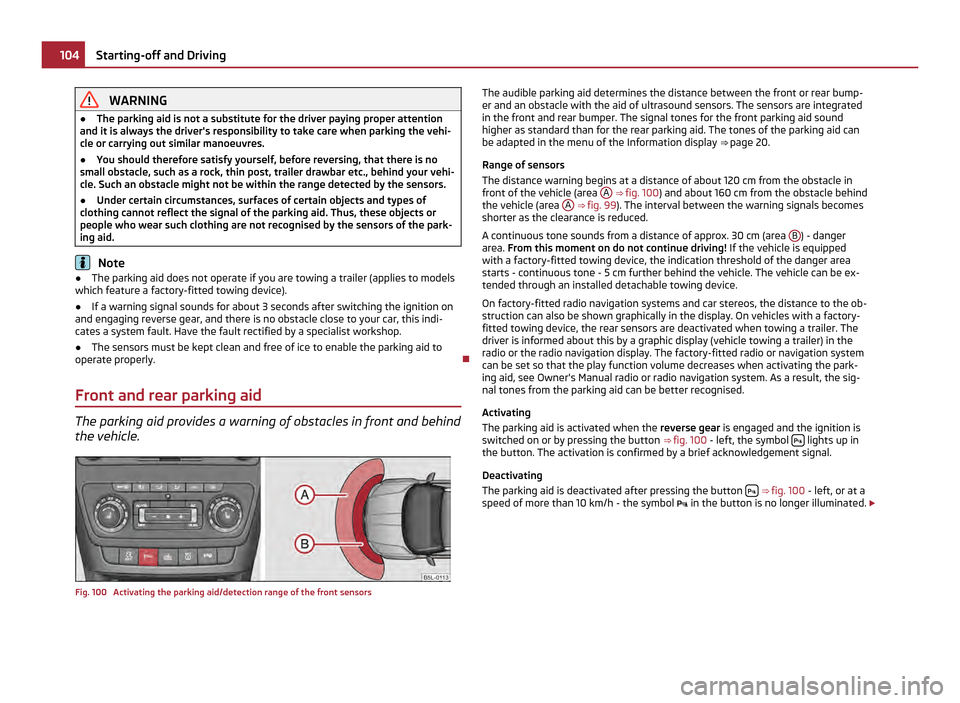
the vehicle. Fig. 100 Activating the parking aid/detection range of the front sensors The audible parking aid determines the distance between the front or rear bump-
er and an obstacle with the aid of ultrasound sensors. The sensors are integrated
in the front and rear bumper. The signal tones for the front parking aid sound
higher as standard than for the rear parking aid. The tones of the parking aid can
be adapted in the menu of the Information display ⇒ page 20.
Range of sensors
The distance warning begins at a distance of about 120 cm from the obstacle in
front of the vehicle (area A ⇒
fig. 100 ) and about 160 cm from the obstacle behind
the vehicle (area A ⇒ fig. 99
). The interval between the warning signals becomes
shorter as the clearance is reduced.
A continuous tone sounds from a distance of approx. 30 cm (area B ) - danger
area. From this moment on do not continue driving! If the vehicle is equipped
with a factory-fitted towing device, the indication threshold of the danger area
starts -
continuous tone - 5 cm further behind the vehicle. The vehicle can be ex-
tended through an installed detachable towing device.
On factory-fitted radio navigation systems and car stereos, the distance to the ob-
struction can also be shown graphically in the display. On vehicles with a factory-
fitted towing device, the rear sensors are deactivated when towing a trailer. The
driver is informed about this by a graphic display (vehicle towing a trailer) in the
radio or the radio navigation display. The factory-fitted radio or navigation system
can be set so that the play function volume decreases when activating the park-
ing aid, see Owner's Manual radio or radio navigation system. As a result, the sig-
nal tones from the parking aid can be better recognised.
Activating
The parking aid is activated when the reverse gear is engaged and the ignition is
switched on or by pressing the button ⇒ fig. 100 - left, the symbol lights up in
the button. The activation is confirmed by a brief acknowledgement signal.
Deactivating
The parking aid is deactivated after pressing the button
⇒
fig. 100 - left, or at a
speed of more than 10 km/h - the symbol in the button is no longer illuminated. £104
Starting-off and Driving