2011 SKODA OCTAVIA radio
[x] Cancel search: radioPage 124 of 248

Voice command Action
MUSIC
a) Play music from the mobile phone or another paired
device.
FURTHER OPTIONS After this command the system offers additional con-
text-dependent commands. SETTINGS Selection for setting Bluetooth
®
, dialogue etc. CANCEL The dialogue is ended.
a)
On vehicles fitted with the radio navigation system Amundsen+, this function can be accessed via
the menu of the radio navigation system, see the operating instructions for the Amundsen+.
After giving the command DIAL NUMBER, the system requests the entry of a tele-
phone number. You can enter the telephone number as a continuous row, as indi-
vidually spoken digits (the whole number at once) or in the form of digital blocks
(separated by short pauses). After each order of digits (separation through brief
voice pause) all of the digits detected up to now are repeated by the system.
The digits 0 - 9 , symbols +, , # are permitted. The system detects no continuous
digit combinations such as twenty-three, but only individually spoken digits (two,
three).
Call name –
Switch on the voice operation ⇒ page 121, Voice control.
– Give the command CALL XYZ after the signal tone.
Example for calling the name from the phone book Voice command Announcement
CALL XYZ “Say home, work, mobile
”e.g.
WORK “XYZ work is dialed.
”CALL XYZ WORK “XYZ work is dialed.
”Store voice recording of a contact
If automatic name recognition does not work reliably for some contacts, you will
can choose to save your own voice entry for the contact in the menu point
Phone
book - Voice Tag - Record.
You can also store your own voice entry using voice control in the menu FURTHER
OPTIONS . Music playback via Bluetooth
® The universal telephone preinstallation GSM IIl makes it possible to play back mu-
sic via Bluetooth ®
from the devices such as MP3 player, mobile phone or note-
book.
In order to enable the music playback via Bluetooth ®
, it is necessary to connect
the terminal device with the hands-free system in the menu Phone
- Bluetooth -
Media player .
The operation of the music playback from the connected device can be performed
via the hands-free system with the voice control ⇒ page 121, Voice commands or
directly via the connected device. Note
● The device to be connected must support the Bluetooth ®
profile A2DP, see
Owner's manual of the device to be coupled.
● This function is not available in vehicles fitted with the car radio Blues.
Universal telephone preinstallation GSM IIl Introduction The universal telephone preinstallation GSM III is a built-in “hands-free system”, it
provides a voice operated convenience mode via the multifunction steering wheel or the radio navigation system.
The following functions are included in the universal telephone preinstallation
GSM III:
● Phone Phonebook ⇒
page 123.
● Convenience mode with the multifunction steering wheel ⇒ page 125 and dis-
play in the information display ⇒ page 126.
● Voice control of the telephone, including the language selection of the tele-
phone contacts ⇒ page 128.
● Internet connection ⇒ page 129.
● Music playback from the telephone or other multimedia units ⇒
page 129.
● Display of SMS ⇒ page 126.
All communication between a telephone and the hands-free system of your vehi-
cle can only be established with the help of the following profiles of Bluetooth ®
technology. £122
Communication
Page 125 of 248

rSAP - Remote SIM access profile
After connecting the telephone with the hands-free system via the
rSAP profile,
the telephone deregisters from the GSM network, the control unit ensures the
communication with the network via the internal antenna. In the telephone only
the interface for Bluetooth ®
remains active. In this case, you can only separate
from the control unit, switch off the Bluetooth ®
connection or select the number
of the emergency call 112 (only valid for some countries).
HFP - Hands Free Profile
After connecting the telephone with the hands-free system via the HFP profile,
the telephone continues to use its GMS module and internal antenna to communi-
cate with the GSM network. WARNING
Concentrate fully at all times on your steering! As the driver you are fully re-
sponsible for road safety. Use the telephone system only to such an extent, so
that you are in full control of your vehicle at any time. Note
● The volume can be changed individually during the call at any time with the
button for setting the radio or radio navigation system or with the buttons on the
multifunction steering wheel.
● Please refer to the following guidelines ⇒ page 115, Mobile phones and two-
way radio systems.
● Should you have any questions, please contact an authorised ŠKODA Service
Partner.
Phone Phonebook A phone phonebook is part of the mobile phone preinstallation with voice control.
In the phone phonebook there are 2000 free memory locations available. Each
contact can contain up to 5 numbers. This phone phonebook can be used in line
with the mobile telephone.
On vehicles fitted with the radio navigation system Columbus, a maximum of 1000
telephone contacts are shown in the display of this appliance.
After the first connection of the telephone, the system begins to load the phone
book from the phone and the SIM card into the memory of the control unit. If the telephone book of the mobile phone contains more than 2 000 entries, the
system announces Phone book not fully loaded .
Each time the telephone has established a new connection with the hands-free
system, an update of the relevant phone book is performed. The updating can
take a few minutes. During this time the phone book, which was stored after the
last update was completed, is available. Newly stored telephone numbers are only
shown after the updating has ended.
If a telephone event (e.g. incoming or outgoing call, dialogue of the voice control)
occurs during the updating procedure, the updating is interrupted. After the tele-
phone event has ended, the updating starts anew.
Connection of the telephone with the hands-free system In order to connect a mobile phone with the hands-free system, it is necessary to
connect the telephone to the hands-free system. Detailed information on this is
provided in the operating instructions of your mobile phone. The following steps
must be carried out for the connection.
Connecting the telephone with the hands-free system via the HFP profile
–
Activate the Bluetooth ®
in your telephone and the visibility of the mobile
phone.
– Switch on the ignition.
– Select the menu Phone - Phone search in the information display and wait un-
til the control unit has ended the search.
– Select your mobile phone in the menu of the units found.
– Within 30 seconds enter the 16 digit PIN of your control unit as indicated in the
information display and confirm it according to the instructions on the display
of your telephone.
– To store a new user or to download the telephone book and the identification
data of the SIM card into the control unit, follow the instructions in the infor-
mation display and on the mobile phone.
Connecting the telephone with the hands-free system via the rSAP profile
– Activate the Bluetooth ®
in your telephone and the visibility of the mobile
phone. For certain mobile phones it is necessary to switch on first the rSAP
function.
– Switch on the ignition. £ 123
Communication Using the system Safety Driving Tips General Maintenance Breakdown assistance Technical data
Page 126 of 248

–
Select the menu Phone - Phone search in the information display and wait un-
til the control unit has ended the search.
– Select your mobile phone in the menu of the units found.
– Within 30 seconds enter the 16 digit PIN of your control unit as indicated in the
information display and confirm it according to the instructions on the display
of your telephone.
– If your SIM card is blocked by a PIN code, enter the PIN of the SIM card of your
telephone. The telephone connects to the control unit (during the first con-
nection you can only enter it in the information display and when the vehicle is
stationary, since you can only choose whether the PIN should be stored in this
situation).
– For the first storage of a new user follow the instructions in the information
display.
– To download the telephone book and the indentification data of the SIM card
into the new control unit, confirm again the command rSAP in your mobile
phone.
The telephone connects preferentially via the rSAP profile.
If the PIN was stored, the telephone is automatically detected and connected with
the hands-free system when the ignition is switched on the next time. Check on
your mobile phone if it was automatically connected.
Disconnecting the connection
The connection to the hands-free system is disconnected:
● When removing the key from the ignition lock (during a telephone call, the
connection is disconnected).
● After disconnecting the connection in the telephone.
● After disconnecting the connection in the information display in the Bluetooth
- User - Select user - Disconnect menu. On vehicles which are fitted out with radio or radio navigation system at the fac-
tory, it is possible to terminate the telephone call after removing the key from the
ignition lock by pressing the icon on the touch-screen of the radio
1)
or the radio
navigation system, see operating instructions for radio or radio navigation system. WARNING
● Concentrate fully at all times on your steering! As the driver you are fully
responsible for road safety. Only use the system so that you are in full control
of your vehicle in every traffic situation - risk of accident!
● In the event of air transport, the Bluetooth ®
function of the hands-free
system must be switched off by a specialist garage! Note
● In the memory of the control unit, up to three users can be stored, whereby
the hands-free system can only communicate actively with one user. In the case
of mutual connection with a fourth mobile phone, you must erase one user.
● Not valid for all mobile phones which enable a communication via Bluetooth ®
.
You can ask at an authorised ŠKODA Service Partner if your telephone is compati-
ble with the universal telephone preinstallation GSM IIl.
● When connecting to the control unit, follow the instructions on your mobile
phone.
● The range of the Bluetooth ®
connection to the hands-free system is intended
for the vehicle interior. The range is dependent on local factors, e.g. obstacles be-
tween the devices and interferences with other devices. 1)
Does not apply for Radios Swing and Blues. 124
Communication
Page 131 of 248
Internet connection
An Internet connection can be established via a PC or PDA.
The control unit on the hands-free system supports the GPRS, EDGE and UMTS/3G
technologies.
An Internet is only possible via a telephone which is connected via the rSAP pro-
file.
The procedure for connecting to the Internet can vary depending on the type and
version of the operating system as well as the type of the device to be connected.
Successfully connecting to the internet requires appropriate knowledge of the op-
erating system for connecting the device .
Process of connection
– Connect the mobile phone with the hands-free system.
– Set the access point (depending on the operator, usually the “Internet”) in the
menu Phone - Settings - Data .
– Switch on the visibility of the hands-free system for the other devices in the
menu Phone - Bluetooth
- Visibility.
– Have the device to be connected search for available Bluetooth ®
devices.
– From the list of found devices, choose the hands-free system (“SKODA_BT” by
default).
– On the device to be connected, enter the password and follow any instructions
given on this device or in the information display.
– Enter the required Internet address in the browser. The operating system re-
quests the entry of the telephone number for the internet access (depending
on the operator, usually
“*99#”).
Music playback via Bluetooth ®The universal telephone preinstallation GSM IIl makes it possible to play back mu-
sic via Bluetooth ®
from the devices such as MP3 player, mobile phone or note-
book.
In order to enable the music playback via Bluetooth ®
, it is necessary to first con-
nect the device to be connected with the hands-free system in the menu Phone -
Bluetooth - Media player . The music playback process is performed on the connected device. Note
● The device to be connected must support the Bluetooth ®
profile A2DP, see
Owner's manual of the device to be coupled.
● This function is not available in vehicles fitted with the car radio Blues.
Multimedia AUX-IN and MDI inputs The input AUX-IN is located below the armrest of the front seats and is marked
with .
The input MDI is located in the glove box.
The inputs AUX-IN and MDI are used to connect external audio sources (e.g. iPod
or MP3 player) and play back music from these devices via your factory-fitted radio
or radio navigation system.
The description of the operation can be found in the relevant Owner's Manual of
your radio or your radio navigation system. Note
● The loudspeakers in the vehicle are matched to a power output of the radio
and radio navigation system of 4x 20 W.
● For the equipment sound system, the loudspeakers are matched to a power
output of the amplifier of 4x40°W + 6x20
W. 129
Communication Using the system Safety Driving Tips General Maintenance Breakdown assistance Technical data
Page 132 of 248
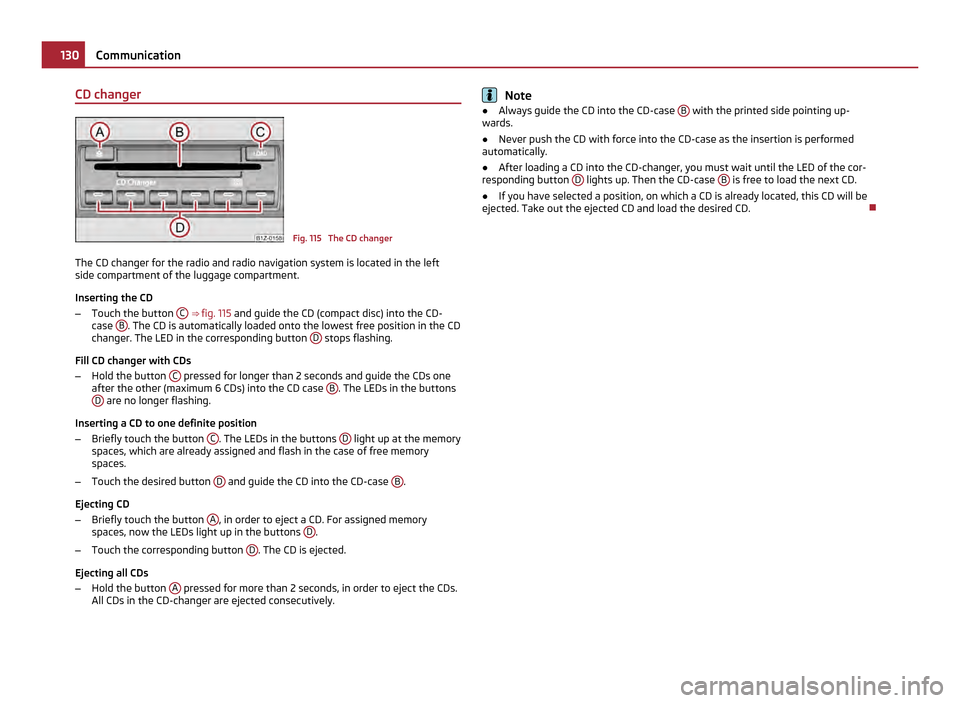
CD changer
Fig. 115 The CD changer
The CD changer for the radio and radio navigation system is located in the left
side compartment of the luggage compartment.
Inserting the CD
– Touch the button C
⇒ fig. 115 and guide the CD (compact disc) into the CD-
case B . The CD is automatically loaded onto the lowest free position in the CD
changer. The LED in the corresponding button D stops flashing.
Fill CD changer with CDs
– Hold the button C pressed for longer than 2 seconds and guide the CDs one
after the other (maximum 6
CDs) into the CD case B . The LEDs in the buttons
D are no longer flashing.
Inserting a CD to one definite position
– Briefly touch the button C . The LEDs in the buttons
D light up at the memory
spaces, which are already assigned and flash in the case of free memory
spaces.
– Touch the desired button D and guide the CD into the CD-case
B .
Ejecting CD
– Briefly touch the button A , in order to eject a CD. For assigned memory
spaces, now the LEDs light up in the buttons D .
– Touch the corresponding button D . The CD is ejected.
Ejecting all CDs
– Hold the button A pressed for more than 2 seconds, in order to eject the CDs.
All CDs in the CD-changer are ejected consecutively. Note
● Always guide the CD into the CD-case B with the printed side pointing up-
wards.
● Never push the CD with force into the CD-case as the insertion is performed
automatically.
● After loading a CD into the CD-changer, you must wait until the LED of the cor-
responding button D lights up. Then the CD-case
B is free to load the next CD.
● If you have selected a position, on which a CD is already located, this CD will be
ejected. Take out the ejected CD and load the desired CD. 130
Communication
Page 173 of 248

There are no particular points to note before washing your vehicle in an automatic
vehicle wash system other than the usual precautionary measures (closing the
windows including the sliding/tilting roof, removing the external antenna, etc.).
If you have any particular attached parts fitted to your car - such as spoiler, roof
rack system, two-way radio aerial - it is best to first of all consult the operator of
the car wash plant.
It is important to degrease the lips of the windshield wiper rubbers after passing
through the automatic vehicle wash system.
Washing vehicle by hand It is important to first soften the dirt with plenty of water and rinse it off as thor-
oughly as possible before washing your vehicle by hand.
One should then clean the vehicle using a soft
washing sponge, washing glove or
a washing brush and only slight pressure. Work from the top to the bottom - be-
ginning with the roof. Only place slight pressure on the vehicle paintwork during
cleaning Only use a car shampoo for stubborn dirt.
Wash out the sponge or washing glove thoroughly at short intervals.
Clean wheels, door sills and similar parts last. Use a second sponge for such areas.
Rinse off the vehicle well after giving it a wash and dry it off using a chamois
leather. WARNING
● The ignition should always be switched off when you wash your vehicle -
risk of accident!
● Protect your hands and arms from sharp-edged metal parts when you are
cleaning the underfloor, the inside of the wheel housings or the wheel trims -
risk of cuts. CAUTION
● Do not wash your vehicle in bright sunlight - risk of paint damage.
● Ensure that the jet of water is not aimed directly at the locking cylinders or at
the door and panel joints if you spray your vehicle in winter down with a hose -
risk of freezing.
● Do not use any insect sponges, rough kitchen sponges or similar cleaning
products - risk of damage to the surface of paintwork. For the sake of the environment
Only wash your vehicle at washing bays specifically reserved for this purpose. This
ensures that no water which may be contaminated by oil flows into the sewage
system. It is not even permitted to wash your vehicle in certain areas except at
such specific washing bays.
Washing with a high-pressure cleaner When you wash your vehicle with a high-pressure cleaner, it is essential to comply
with the instructions for use of the cleaning equipment. This applies in particular
to the pressure
used and to the spraying distance. Maintain a sufficiently large
distance to soft materials such as rubber hoses or insulation material.
On no account use circular spray nozzles or so-called dirt cutters! WARNING
It is particularly important that you do not clean tyres with circular spray jets.
Visible but also invisible damage to tyres may occur even at a relatively large
spraying distance and if sprayed only for a short time - risk of accident! CAUTION
The water containing wax must be no hotter than 60 °C, otherwise the vehicle
can be damaged.
Wax treatment Good wax treatment is an effective way of protecting the paintwork from harmful
environmental influences and minor mechanical damage.
The vehicle must be treated with a high-quality hard wax polish at the latest,
when no more drops form on the clean paintwork.
A new layer of a high-quality hard wax polish can be applied to the clean body-
work after it has dried thoroughly. Even if you use a wax preserver regularly we
still recommend that you treat the paintwork of the vehicle at least twice a year
with hard wax. CAUTION
Never apply wax to the windows. 171
Taking care of your vehicle and cleaning the vehicle Using the system Safety Driving Tips General Maintenance Breakdown assistance Technical data
Page 192 of 248

WARNING
● Never charge a frozen or thawed battery - risk of explosion and caustic
burns. Replace a frozen battery.
● Never charge a battery which has a too low electrolyte level - risk of explo-
sion and caustic burns. CAUTION
On vehicles with the “START/STOP” system, the pole terminal of the charger must
not be connected directly to the negative terminal of the vehicle battery, but only
to the engine earth ⇒ fig. 172.
Disconnecting and reconnecting the battery On disconnecting and reconnecting the battery the following functions are initially
deactivated or are no longer able to operate fault-free.
Operation Operating measure
Electrical power window (operational faults) ⇒ page 41
Enter the car stereo/radio navigation system
code number see operating instructions for the
car stereo/radio navigation sys-
tem
Setting the clock ⇒ page 13
Data in the multi-functional indicator are de-
leted. ⇒ page 14
We recommend having the vehicle checked by an authorised ŠKODA Service Part-
ner to ensure full functionality of all electrical systems.
Replacing the battery When replacing a battery, the new new battery must have the same capacity,
voltage (12
V), amperage and be the same size. Suitable types of vehicle battery
are available from an authorised ŠKODA Service Partner.
We recommend you have a battery change carried out by an authorised ŠKODA
Service Partner, who will properly install the new battery and dispose of the origi-
nal one. CAUTION
Vehicles with a “START-STOP” system are fitted with a special battery type which
allows the battery control unit to check the energy level for recurring engine start.
This battery must only be replaced by a battery of the same type. For the sake of the environment
Batteries contain poisonous substances such as sulphuric acid and lead. For this
reason, it must be disposed of properly. Under no circumstances must it be dis-
posed of in the communal rubbish.
Automatic consumer shut-off Under heavy load on the vehicle battery, the vehicle electrical system manage-
ment automatically takes various measures to avoid draining the vehicle battery.
●
The idling speed is raised to allow the generator to deliver more electricity to
the electrical system.
● If necessary, some electrical consumers are limited in their performance or are
temporarily switched off completely. Note
Despite such intervention by the vehicle electric system management, the vehicle
battery may be drained. For example, when the ignition is switched on a long time
with the engine turned off or the side or parking lights are turned on during lon-
ger parking.
Windshield washer system Fig. 156 Engine compartment: Wind-
shield washer fluid reservoir
£190
Inspecting and Replenishing
Page 214 of 248

Removing fuse cover
–
Move the circlips A ⇒
fig. 177 as far as the stop, the symbol appears behind
the circlip and remove the cover.
Installing fuse cover
– Position the fuse cover on the fuse box and push the circlips A as far as the
stop - the symbol is visible behind the circlip. CAUTION
● When unlocking and locking the fuse cover, it must be pressed on the sides to
the box, otherwise damage can occur to the locking mechanism.
● Carefully position the fuse cover in the engine compartment. If the cover was
not correctly positioned, water can get into the fuses and this results in a damage
to the vehicle!
Fuse assignment in engine compartment Fig. 178 Schematic representation of
fuse carrier in engine compartment
Certain electrical components are only standard on certain vehicle model versions
or only available as optional equipment for certain models. No. Power consumer
F1 Not assigned
F2 Control unit for automatic gearbox DQ 200
F3 Measuring circuit
F4 Valves for ABS
F5 Control unit for automatic gearbox
F6 Instrument cluster, windshield wiper lever and turn signal light lever
F7 Power supply terminal 15, Starter No. Power consumer
F8 Radio
F9 Not assigned
F10 Engine control unit, Main relay
F11 Control unit for auxiliary heating
F12 Control unit for CAN databus
F13 Engine control unit
F14 Ignition
F15 Lambda probe
glow plug system relay
F16 Central control unit, right main headlight, right rear light unit
F17 Horn
F18 Amplifier for digital sound processor
F19 Front window wiper
F20 Water pump
valve for fuel dosing
F21 Lambda probe
F22 Clutch pedal switch, brake pedal switch
F23 Secondary air pump
Air mass meter
Fuel high pressure pump
F24 Activated charcoal filter, exhaust gas recirculation valve
F25 Pump for ABS
F26 Central control unit, left main headlight, left rear light unit
F27 Secondary air pump
Glow plug system
F28 Not assigned
F29 Power supply terminal 30
F30 Terminal X
a) a)
In order not to drain the battery unnecessarily when starting the engine, the electrical components
of this terminal are automatically switched off. 212
Fuses and light bulbs