2011 SKODA OCTAVIA lock
[x] Cancel search: lockPage 29 of 248

Selector lever lock
If the
green warning light lights up, operate the brake pedal. This is necessary,
in order to be able to move the selector lever out of the position P or N.
Further information about the selector lever lock ⇒ page 111.
Tyre inflation pressure The warning light
lights up, if there is a substantial drop in inflation pressure in
one of the tyres. Reduce the speed and check or correct as soon as possible the
inflation pressure in the tyres ⇒
page 192.
If the warning light flashes, there is a system fault. Visit the nearest specialist ga-
rage and have the fault rectified.
Further information about the tyre pressure monitoring system ⇒ page 159. WARNING
● When the warning light lights up, immediately reduce the speed and
avoid sudden steering and brake manoeuvres. Please stop the vehicle without
delay at the nearest possible stop and inspect the tyres and their inflation
pressures.
● Under certain circumstances (e.g. sporty style of driving, wintry or unpaved
roads) the warning light can be delayed or does not light up at all.Note
If the battery has been disconnected, the warning light comes on after switch-
ing on the ignition. The warning light must go out after driving a short distance.
Antilock brake system (ABS) The warning light
shows the functionality of the ABS.
The warning light comes on for a few seconds after the ignition has been switch-
ed on or when starting the engine. The warning light goes out after an automatic
check sequence has been completed. A fault in the ABS
The system is not functioning properly if the ABS warning light
does not go out
within a few seconds after switching on the ignition, does not light up at all or
lights up while driving. The vehicle will only be braked by the normal brake sys-
tem. Visit a specialist garage immediately and adjust your style of driving appropri-
ately as you will not know how great the damage is.
Further information about ABS ⇒ page 158
, Antilock brake system (ABS).
A fault in the entire brake system
If the ABS warning light comes on together with the brake system warning
light (handbrake must be released), there is a fault not only in the ABS but also
in another part of the brake system ⇒ .
WARNING
● If the brake system warning light comes on together with the ABS
warning light stop the vehicle immediately and check the brake fluid level
in the reservoir ⇒ page 186, Brake fluid
. If the fluid level has dropped below
the MIN marking, do not drive any further - risk of accident! Contact a Škoda
dealer to obtain professional assistance.
● Pay attention to the following instructions ⇒
page 181, Working in the en-
gine compartment before checking the brake fluid level and opening the bon-
net.
● If the brake fluid is at the correct level, the ABS control function has failed.
The rear wheels may then block very rapidly when braking. In certain circum-
stances, this can result in the rear end of the car breaking away - risk of skid-
ding! Drive carefully to the nearest specialist garage and have the fault recti-
fied.
Bonnet The warning light
comes on if the bonnet is unlocked. If the engine bonnet un-
locks while driving , the warning light lights up and an audible signal sounds.
The warning light comes on even when the ignition is switched off. The warning
light lights up for a maximum of 5 minutes.
In vehicles with an information display, this warning light is replaced by a vehicle
symbol ⇒ page 18 27
Instruments and warning lights Using the system Safety Driving Tips General Maintenance Breakdown assistance Technical data
Page 32 of 248

Unlocking and locking
Vehicle key
Description Fig. 9 Set of keys without remote control/Keys with remote control key
Two keys are provided with the vehicle. Depending on the equipment, your vehi-
cle can be equipped with keys without radio remote control ⇒
fig. 9 - left, or with
radio remote control ⇒ fig. 9 - right. WARNING
● Always withdraw the key whenever you leave the vehicle - even if it is only
for a short time. This is particularly important if children are left in the vehicle.
The children might otherwise start the engine or operate electrical equipment
(e.g. power windows) - risk of injury!
● Do not withdraw the ignition key from the ignition lock until the vehicle
has come to a stop. The steering lock might otherwise engage unintentionally
- risk of accident! CAUTION
● Each key contains electronic components; therefore protect them against
moisture and severe shocks.
● Keep the groove of the keys absolutely clean as impurities (textile fibres, dust
etc.) have a negative effect on the proper operation of the locking cylinder and the
ignition lock. Note
Please approach an authorised ŠKODA Service Partner if you lose a key since he
can obtain a new one for you.
Changing the battery in the remote control key Fig. 10 Remote control key - remove cover/remove battery
Each remote control key contains a battery which is housed under the cover
B ⇒
fig. 10 . If the battery is discharged, the red warning light A does not flash after
you press a button on the remote control key ⇒
fig. 9 . We recommend that you
have the batteries of the key replaced by an authorised ŠKODA Service Partner.
You should, however, proceed as follows if you wish to replace the discharged
battery yourself:
– Fold open the key.
– Press off the battery cover with your thumb or using a flat screwdriver at the
points of the arrows 1 from
⇒
fig. 10.
– Remove the discharged battery from the key by pressing the battery down-
wards at the point of the arrow 2
⇒
fig. 10.
– Insert the new battery. Ensure that the “+” symbol on the battery is facing up-
wards. The correct polarity is shown on the battery cover.
– Position the battery cover on the key and press on it until it is heard to lock in
place. £30
Unlocking and locking
Page 33 of 248

For the sake of the environment
Dispose of a used battery in accordance with environmental regulations. Note
● Pay attention to the correct polarity when changing the battery.
● The replacement battery must have the same specification as the original bat-
tery.
● If it is still not be possible to unlock or lock the vehicle with the remote control
key even after replacing the battery, this means that the system has to be
synchronised ⇒ page 37.
Electronic immobiliser The electronic immobiliser prevents the vehicle being operated by
an unauthorised person.
An electronic chip is integrated in the head of the key. The immobiliser is deactiva-
ted with the aid of this chip when the key is inserted in the ignition lock. The elec-
tronic immobiliser is automatically activated when you withdraw the ignition key
from the lock. Note
It is only possible to start the engine of your car with a Genuine ŠKODA key with
the matching code. Child safety lock The child safety lock prevents the rear door from being opened
from the inside.
Fig. 11 Child safety locks on the rear
doors
The rear doors are equipped with a child safety lock. You can switch the child
safety lock on and off using the vehicle key.
Switching child safety lock on
– Use the vehicle key to turn the slit in the rear door to the left in the direction
of the arrow ⇒
fig. 11.
Switching child safety lock off
– Use the vehicle key to turn the slit to the right against the direction of the ar-
row.
So long as the child safety lock is switched on it is not possible to open the door
from the inside with the door opening lever. In this case the door can be opened
only from the outside. 31
Unlocking and locking Using the system Safety Driving Tips General Maintenance Breakdown assistance Technical data
Page 34 of 248

Central locking system
Description When using the central locking and unlocking system,
all the doors and the fuel
filler flap are locked or unlocked at the same time (if it was not set differently in
the menu point Settings - Convenience of the information display). The boot lid is
unlocked when opening. It can be opened by pressing the hand grip above the li-
cence plate ⇒ page 35.
Operation of the central locking system is possible:
● from the outside using the vehicle key ⇒ page 33,
● using the buttons for the central locking system ⇒ page 34,
● with a remote control key ⇒
page 36,
Indicator light in the driver's door
After locking the vehicle, the warning light flashes for around 2 seconds in quick
succession, afterwards it begins to flash evenly at longer intervals.
If the vehicle is locked and the safe securing system ⇒ page 32 is not operating,
the indicator light in the driver door flashes for about 2 seconds fast, goes out and
starts to flash evenly at longer intervals after about 30 seconds.
If the indicator light first of all flashes fast for about 2 seconds, afterwards lights
up for about 30 seconds and then flashes slowly, there is a fault in the system of
the central locking or the interior monitor ⇒ page 38. Visit a specialist garage to
obtain assistance.
Convenience operation of windows
One can open and close the electrically powered windows when unlocking and
locking the vehicle ⇒ page 40.
Opening a single door
This function makes it possible to only unlock the driver's door. The other doors
and the fuel filler flap remain locked and are only unlocked after repetitive unlock-
ing.
This function can be activated/deactivated by a specialist garage.
On vehicles with an information display, this function can be switched on in the
menu Settings Convenience - Door open. Automatic locking and unlocking
All the doors and the boot lid are locked automatically once the car reaches a
speed of about 15 km/h.
If the ignition key is withdrawn, the car is then automatically unlocked again. In
addition, it is possible for the driver to unlock the car by pressing the central lock-
ing button or by pulling the door opening lever.
This function can be activated/deactivated by a specialist garage.
On vehicles with an information display, this function can be switched on in the
menu Settings Convenience - Door open. WARNING
Locking the doors prevents involuntary opening in an exceptional situation
(an accident). Locked doors prevent unwanted entry into the vehicle from out-
side, for example at road crossings. Locked doors do, however, make it more
difficult for rescuers to get into the vehicle in an emergency - danger to life! Note
● In the event of an accident in which the airbags are deployed, the locked doors
are automatically unlocked in order to enable rescuers to gain access to the vehi-
cle.
● Only the front door which is fitted with a locking cylinder can be unlocked and
locked using the key if the central locking system fails. You can lock or unlock
manually the other doors and the boot lid.
–Emergency locking of the door ⇒
page 34.
– Emergency unlocking of the boot lid ⇒ page 35.
Safe securing The central locking system is equipped with a
safe securing system. Locking the
vehicle from the outside causes the door locks to be automatically blocked. The
warning light flashes for around 2 seconds in quick succession, afterwards it be-
gins to flash evenly at longer intervals. It is not possible to open the doors with
the door handle either from the inside or from the outside. This acts as an effec-
tive deterrent for attempts to break into your vehicle.
You can deactivate the safe securing system by locking twice within 2
seconds.£32
Unlocking and locking
Page 35 of 248

If the safe securing system is not operating, the warning light in the driver door
flashes for about 2
seconds fast, goes out and starts to flash evenly at longer in-
tervals after about 30°seconds.
The safe securing system is again activated the next time the vehicle is unlocked
and locked again.
The doors can be opened from the inside if the vehicle is locked and the safe se-
curing system is deactivated:
● The door is unlocked by actuating the door-opening lever.
● The door opens upon actuating the door-opening lever again. WARNING
If the vehicle is locked from the outside and the safe securing system is acti-
vated, there must not be any person and animals in the vehicle as it is then
not possible to open either a door or a window from the inside. The locked
doors make it more difficult for rescuers to get into the vehicle in an emergen-
cy - hazard! Note
● The anti-theft alarm system is also activated with the deactivated safe secur-
ing system when locking the vehicle. The interior monitor is however not activa-
ted.
● When activating the Safelock function after you lock the vehicle, the message
CHECK DEADLOCK will appear to inform you about this. In vehicles equipped with
an information display, the message Check deadlock! appears Owner's manual!
(CHECK DEADLOCK appears.
Unlocking the vehicle using the key Fig. 12 Turning the key for unlocking
and locking the vehicle–
Turn the key in the locking cylinder of the driver's door in the direction of trav-
el (unlock position) A ⇒ fig. 12
.
– Pull on the door handle and open the door.
● All the doors (only the driver's door on vehicles with anti-theft alarm system)
and the fuel filler flap are unlocked.
● The boot lid is then unlocked.
● The switched on interior lights come on over the door contact.
● The safe securing system is deactivated.
● The windows open provided the key is held in the unlock position.
● The indicator light in the driver door stops flashing if the car is not fitted with
an anti-theft alarm system ⇒
page 37. Note
If the vehicle is equipped with an anti-theft alarm system, you must insert the key
into the ignition lock and switch the ignition on within 15 seconds after unlocking
the door in order to deactivate the anti-theft alarm system. The alarm will be trig-
gered
if you do not switch on the ignition within 15 seconds.
Locking the vehicle with the key –
Turn the key in the locking cylinder of the driver's door in the opposite direc-
tion of travel (lock position) B
⇒
fig. 12.
● The doors, the boot lid and the fuel filler flap are locked.
● The switched on interior lights will switch off over the door contact.
● The windows and the electric sliding/tilting roof close provided the key is held
in the lock position.
● The safe securing system is activated immediately.
● The indicator light in the driver door begins flashing. Note
If the driver's door has been opened, the vehicle cannot be locked. 33
Unlocking and locking Using the system Safety Driving Tips General Maintenance Breakdown assistance Technical data
Page 36 of 248
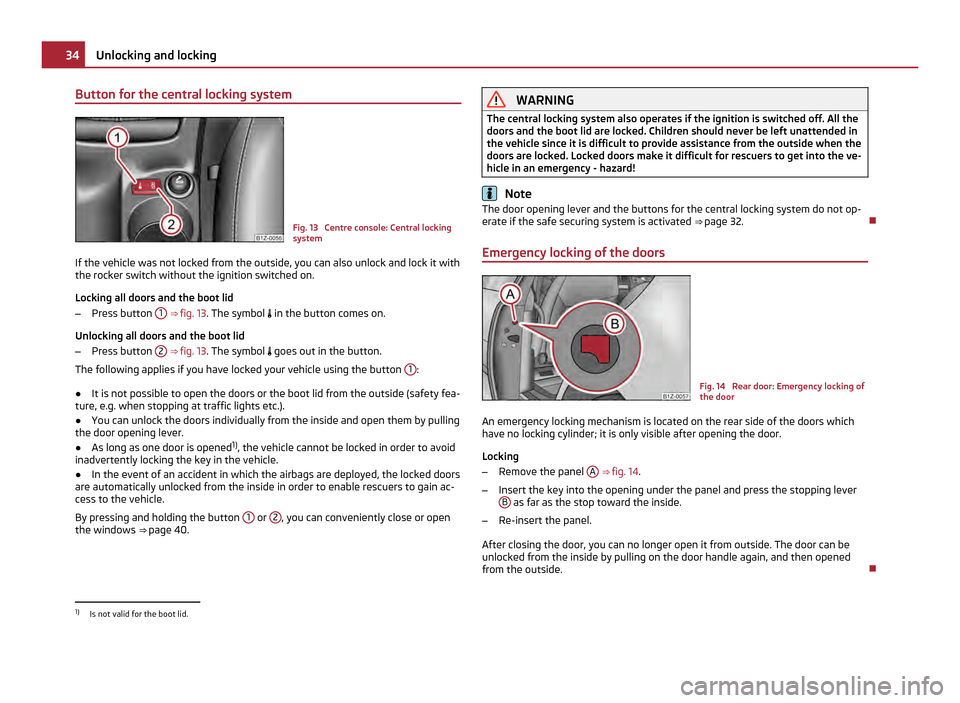
Button for the central locking system
Fig. 13 Centre console: Central locking
system
If the vehicle was not locked from the outside, you can also unlock and lock it with
the rocker switch without the ignition switched on.
Locking all doors and the boot lid
– Press button 1
⇒ fig. 13 . The symbol in the button comes on.
Unlocking all doors and the boot lid
– Press button 2
⇒
fig. 13 . The symbol goes out in the button.
The following applies if you have locked your vehicle using the button 1 :
● It is not possible to open the doors or the boot lid from the outside (safety fea-
ture, e.g. when stopping at traffic lights etc.).
● You can unlock the doors individually from the inside and open them by pulling
the door opening lever.
● As long as one door is opened 1)
, the vehicle cannot be locked in order to avoid
inadvertently locking the key in the vehicle.
● In the event of an accident in which the airbags are deployed, the locked doors
are automatically unlocked from the inside in order to enable rescuers to gain ac-
cess to the vehicle.
By pressing and holding the button 1 or
2 , you can conveniently close or open
the windows ⇒ page 40. WARNING
The central locking system also operates if the ignition is switched off. All the
doors and the boot lid are locked. Children should never be left unattended in
the vehicle since it is difficult to provide assistance from the outside when the
doors are locked. Locked doors make it difficult for rescuers to get into the ve-
hicle in an emergency - hazard! Note
The door opening lever and the buttons for the central locking system do not op-
erate if the safe securing system is activated ⇒ page 32.
Emergency locking of the doors Fig. 14 Rear door: Emergency locking of
the door
An emergency locking mechanism is located on the rear side of the doors which
have no locking cylinder; it is only visible after opening the door.
Locking
– Remove the panel A
⇒ fig. 14 .
– Insert the key into the opening under the panel and press the stopping lever
B as far as the stop toward the inside.
– Re-insert the panel.
After closing the door, you can no longer open it from outside. The door can be
unlocked from the inside by pulling on the door handle again, and then opened
from the outside. 1)
Is not valid for the boot lid. 34
Unlocking and locking
Page 37 of 248

Boot lid
Fig. 15 Handle of boot lid
Open the boot lid by pressing the hand grip above the licence plate after unlock-
ing the vehicle using the key or the radio remote control.
Opening the boot lid
– Press on the handle ⇒ fig. 15 and at the same time raise the boot lid.
Closing the boot lid
– Pull the boot lid down and close it with a slight swing ⇒ .
A handle which makes the closing easier is located on the inner panelling of the
boot lid. WARNING
● Ensure that the lock is properly engaged after closing the boot lid. Other-
wise, the boot lid might open suddenly when driving even if the boot lid lock is
closed - risk of accident!
● Never drive with the boot lid fully opened or slightly ajar otherwise ex-
haust gases may get into the interior of the vehicle - risk of poisoning!
● Do not press on the rear window when closing the boot lid, it could crack -
risk of injury! Note
● After closing the boot lid, it is automatically locked within 1
second and the
anti-theft alarm system is activated. This applies only if the vehicle was locked
before closing the boot lid.
● The function of the hand grip above the licence plate is deactivated when
starting off or as of a speed of more than 5 km/hour for vehicles with central lock-
ing. The function of the hand grip is activated again when the vehicle has stopped
and a door is opened.
Emergency unlocking of the boot lid (Octavia) Fig. 16 Emergency unlocking of the boot
lid
If there is a fault in the central locking, you can open the boot lid as follows:
– Fold the backrest of the rear seat forwards ⇒ page 64.
– Take out the warning triangle A
⇒
fig. 16.
– Press the operating lever in the direction of arrow in order to unlock the boot
lid. The operating lever is located under the panel B .
– Open the boot lid/luggage compartment door. 35
Unlocking and locking Using the system Safety Driving Tips General Maintenance Breakdown assistance Technical data
Page 38 of 248

Emergency unlocking of the boot lid (Estate car)
Fig. 17 Emergency unlocking of the boot
lid
If there is a fault in the central locking, you can open the boot lid as follows:
– Fold the backrest of the rear seat forwards ⇒ page 64.
– Open up the cover of the lock upwards ⇒ fig. 17.
– Move the operating lever A with the aid of a narrow object e.g. screwdriver up
to the stop in the direction of arrow; the boot lid is then unlocked.
– Open the boot lid/luggage compartment door.
Remote control Description You can use the remote control key:
●
to unlock and lock the car,
● unlocking boot lid,
● electrically open and close the windows.
The transmitter with the battery is housed in the handle of the remote control
key. The receiver is located in the interior of the car. The operating range of the
remote control key is approx. 10 m. But this range of the remote control can be
reduced if the batteries are weak.
The key has a fold-open key bit which can be used for unlocking and locking the
car manually and also for starting the engine. If a lost key is replaced or if the receiver unit has been repaired or a new unit in-
stalled, it is then necessary for an authorised
ŠKODA Service Partner to initialise
the system. Only after this is it possible to again use the remote control key. Note
● The remote control is automatically deactivated when the ignition is switched
on.
● The operation of the remote control may temporarily be affected by interfer-
ence from transmitters close to the car and which operate in the same frequency
range (e.g. mobile phone, TV transmitter).
● The battery must be replaced if the central locking or anti-theft alarm system
does react to the remote control at less than 3
metres away ⇒ page 30.
● If the driver door is opened, the vehicle cannot be locked using the remote
control.
Unlocking and locking car Fig. 18 Remote control key
Unlocking the vehicle
– Press the button 1
⇒ fig. 18 for about 1 second.
Locking the vehicle
– Press button 3 for about 1 second.
Deactivating safe securing system
– Press button 3 twice in 2 seconds. Further information
⇒
page 32.
Boot lid remote release
– Press button 2 for about 1 second. Further information
⇒
page 35. £36
Unlocking and locking