2011 SKODA FABIA lock
[x] Cancel search: lockPage 38 of 220

Interior monitor and towing protection monitoring
The interior monitor and the towing protection monitoring detect
movements inside the vehicle interior and then trigger the alarm.
Fig. 18 Button for interior monitor and
towing protection monitoring
The interior monitor and the towing protection monitoring are operated with the
button . You can switch the interior monitor and the towing protection moni-
toring off if there is a possibility that movements from (e.g. children or animals) in-
side the vehicle interior or if the vehicle must be transported (e.g. by train or ship)
or towed, might trigger the alarm.
Switch off the interior monitor and towing protection monitoring
– Switch off the ignition.
– Open the driver door.
– Press the button
on the driver door ⇒ fig. 18.
– Lock the vehicle within 30 seconds. The interior monitor and the towing pro-
tection monitoring are switched off.
The interior monitor and the towing protection monitoring are switched on again
automatically the next time the car is locked. Note
● You can switch the interior monitor and the towing protection monitoring off if
there is a possibility that movements from (e.g. children or animals) inside the ve-
hicle interior or if the vehicle must be transported (e.g. by train or ship) or towed,
might trigger the alarm.
● You can also switch off the interior monitor and the towing protection moni-
toring, by deactivating the safe securing system ⇒
page 30.●
When the ignition key is removed or a door is opened, the symbol in the but-
ton lights up red.
● Lighting up of the symbol in the button does not confirm that the interior
monitor and the towing protection monitoring are switched on.
Electrical power windows Buttons for electrical power windows Fig. 19 Buttons on the driver's door/Buttons on the rear doors
The power windows operate only when ignition is switched on.
Opening a window
– A window is opened by pressing lightly on the respective button in the door.
The process stops when one releases the button.
– Additionally you can open the window automatically (fully opened) by pressing
the button up to the stop. Renewed pressing of the button causes the window
to stop immediately.
Closing a window
– A window is closed through pulling lightly on the respective button in the
door. The closing process stops when one releases the button.
– Additionally you can close the window automatically (fully closed) by pulling
the button up to the stop. Renewed pulling of the button causes the window
to stop immediately.
The buttons for the individual windows are located in the operating part of the
armrest of the driver's door ⇒
fig. 19
, front passenger door and on the rear doors. £36
Unlocking and locking
Page 39 of 220

Buttons for the power windows in the armrest for the driver
A Button for the power window in the driver's door
B Button for the power window in the front passenger's door
C Button for the power window at the rear right door
D Button for the power window at the rear left door
S Safety switch
Safety pushbutton
You can deactivate the buttons for power windows at rear doors by pressing the
safety pushbutton S ⇒ fig. 19
. The buttons for power windows at rear doors are
activated again by pressing the safety pushbutton S again.
If the buttons for the rear doors are deactivated, the indicator light in the safe-
ty switch S lights up.
WARNING
● If you lock the vehicle from the outside, do not leave any person in the ve-
hicle since it is no longer possible to open the windows from the inside in an
emergency.
● The system is fitted with a force limiter ⇒ page 37. If there is an obstacle,
the closing process is stopped and the window goes down by several centime-
tres. You should then take particular care when closing the windows! You may
otherwise suffer severe injuries as a result of getting an arm, for example,
jammed in the window!
● It is recommended to deactivate the electrically operated power windows
in the rear doors (safety pushbutton) S ⇒
fig. 19 when children are being
transported on the rear seats. CAUTION
● Keep the window glass clean to ensure correct function of the electric win-
dows.
● In the event of a freezing up of the windscreen, first of all eliminate the ice
⇒ page 146 and then operate the power windows otherwise the power window
mechanism could be damaged. Note
● After switching the ignition off, it is still possible to open or close the windows
for a further 10 minutes. The power windows are switched off completely once
you open the driver or front passenger door.
● When driving always use the existing heating, air conditioning and ventilation
system for ventilating the interior of the vehicle. If the windows are opened, dust
as well as other dirt can get into the vehicle and in addition the wind noise is more
at certain speeds.
Force limiter of the power windows The electrically operated power windows are fitted with a force limiter. It reduces
the risk of bruises or injuries when closing the windows.
If there is an obstacle, the closing process is stopped and the window goes down
by several centimetres.
If an obstacle prevents the window from being closed during the next 10 seconds,
the closing process is interrupted once again and the window goes down several
centimetres.
If you try to close the window once again within 10 seconds after the window has
gone down twice, although the obstacle was not yet removed, the closing process
is stopped only. During this time it is not possible to automatically close the win-
dow. The force limiter is still switched on.
The force limiter is switched off only, if you attempt within the next 10 seconds to
close the window again -
now the window will close with full force .
If you wait longer than 10 seconds, the force limiter is switched on again. WARNING
You should take particular care when closing the windows! You may otherwise
suffer severe injuries as a result of getting an arm, for example, jammed in the
window!
Window convenience operation You can open and close the electrically powered windows as follows when un-
locking and locking the vehicle (only close the sliding/tilting roof):
£ 37
Unlocking and locking Using the system Safety Driving Tips General Maintenance Breakdown assistance Technical data
Page 40 of 220

Opening a window
–
Hold the key in the locking cylinder of the driver's door in the unlock position
or press the unlock button of the radio remote control until all the windows
are opened.
Closing a window
– Hold the key in the locking cylinder of the driver's door in the lock position or
press the lock button of the radio remote control until all the windows are
closed.
You can interrupt the opening or closing operation of the windows immediately by
releasing the key or the lock button. WARNING
The system is fitted with a force limiter ⇒ page 37. If there is an obstacle, the
closing process is stopped and the window goes down by several centimetres.
You should then take particular care when closing the windows! You may oth-
erwise suffer severe injuries as a result of getting an arm, for example, jam-
med in the window!
Operational faults Automatically operated power windows do not operate
If the battery of the car has been disconnected and then reconnected, the auto-
matically operated power windows do not operate. The system must be activated.
Proceed as follows in order to re-establish the function:
●
switch on the ignition,
● slightly pull on the upper edge of the relevant button and hold it until the win-
dow is closed,
● release the switch,
● you must pull the respective switch again in upward direction for approx. 3
seconds.
Operation in winter
Ice accumulating on the surface of the windows during the winter may result in a
greater resistance when closing the windows and the window may stop and move
back several centimetres
It is necessary to put the force limiter out of operation in order to close the win-
dow ⇒ page 37 , Force limiter of the power windows
. WARNING
The system is fitted with a force limiter ⇒ page 37. If there is an obstacle, the
closing process is stopped and the window goes down by several centimetres.
You should then take particular care when closing the windows! You may oth-
erwise suffer severe injuries as a result of getting an arm, for example, jam-
med in the window! CAUTION
● Keep the window glass clean to ensure correct function of the electric win-
dows.
● In the event of a freezing up of the windscreen, first of all eliminate the ice
⇒ page 146 and then operate the power windows otherwise the power window
mechanism could be damaged.
Electric sliding/tilting roof Description Fig. 20 Detail of the headliner: Control
dial for the power sliding/tilting roof
The sliding/tilting roof is operated by means of the control dial ⇒ fig. 20 and only
functions when the ignition is switched on. The control dial has several positions.
After switching the ignition off, it is still possible to open, close and tilt the sliding/
tilting roof for approx. 10 minutes. It is no longer possible to operate the sliding/
tilting roof after opening one of the front doors, however. £38
Unlocking and locking
Page 41 of 220
Note
If the battery has been disconnected and reconnected, it is possible that the slid-
ing/tilting roof does not close fully. Here you have to set the control dial to the
switch position A and press it forward for about 10 seconds.
Opening and tilting Comfort position
–
Turn the switch to position C ⇒ fig. 20
.
Opening fully
– Turn the switch to position B and hold it in this position (spring-tensioned
position).
Tilting roof
– Turn the switch to position D .
When the sliding/tilting roof is in the comfort position, the intensity of the wind
noise is much less.
The sun screen is also opened automatically when the roof slides open. You can
slide the sun screen into the opened or closed position by hand when the sliding/
tilting roof is closed. CAUTION
It may be necessary during winter to remove any ice and snow in the area of the
sliding/tilting roof before opening it in order to prevent damaging the opening
mechanism and the seal.
Closing Sliding closed/closing the sliding/tilting roof
–
Turn the switch to position A ⇒ fig. 20
.
Safety closing
The sliding/tilting roof is fitted with a force limiter. If an obstacle (e.g. ice) pre-
vents closing, the sliding/tilting roof stops and opens completely. You can close
the sliding/tilting roof completely without force limiter by pressing the switch to
the A position
⇒ fig. 20 at the front for as long as it takes for the sliding/tilting
roof to close completely ⇒
. WARNING
Close the sliding/tilting roof carefully - risk of injury!
Convenience operation You can also close an open sliding/tilting roof from the outside.
–
Hold the key in the locking cylinder of the driver's door in the lock position or
press the lock button of the remote control until the sliding/tilting roof is
closed ⇒ .
The closing operation stops when one releases the key or the lock button. WARNING
Close the sliding/tilting roof carefully - risk of injury! The force limiter does not
operate with the convenience closing.
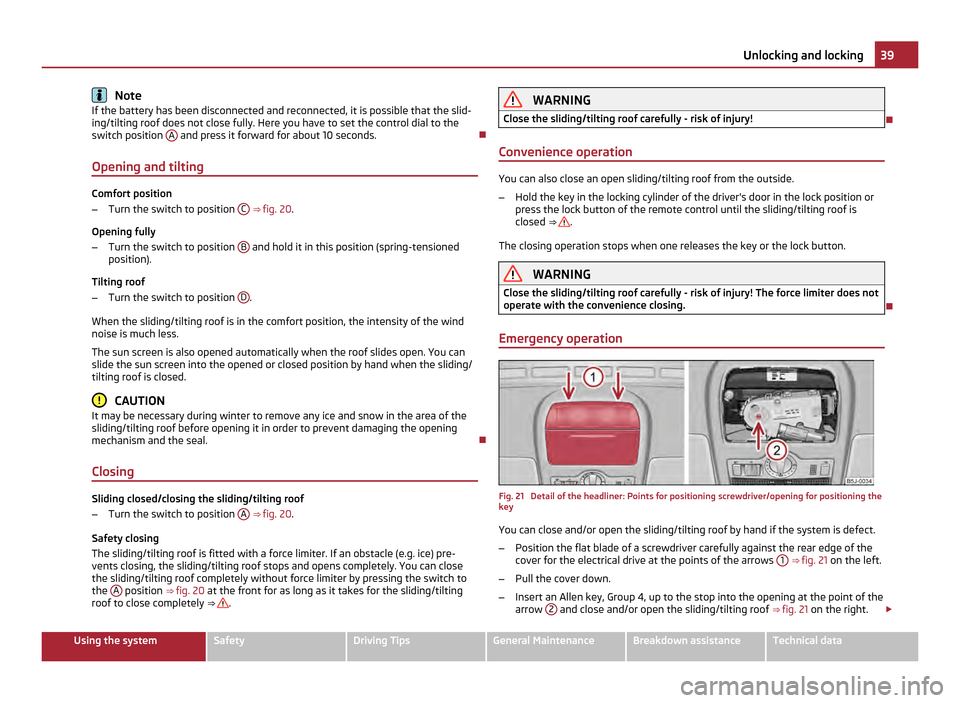
Emergency operation Fig. 21 Detail of the headliner: Points for positioning screwdriver/opening for positioning the
key
You can close and/or open the sliding/tilting roof by hand if the system is defect.
– Position the flat blade of a screwdriver carefully against the rear edge of the
cover for the electrical drive at the points of the arrows 1 ⇒ fig. 21 on the left.
– Pull the cover down.
– Insert an Allen key, Group 4, up to the stop into the opening at the point of the
arrow 2 and close and/or open the sliding/tilting roof
⇒ fig. 21 on the right. £ 39
Unlocking and locking Using the system Safety Driving Tips General Maintenance Breakdown assistance Technical data
Page 42 of 220

–
Press on the cover again by first of all inserting the plastic lugs and then push-
ing the cover up.
– Have the fault rectified by a specialist workshop. Note
It is necessary after each emergency operation (using Allen key) to move the slid-
ing/tilting roof into the basic position. Here you have to turn the control dial for-
ward to the switch position A ⇒
fig. 20 and press for about 10 seconds. 40
Unlocking and locking
Page 47 of 220

The turn signal
and main beam lever The parking lights and headlight flasher are also switched on and
off using the turn signal and main beam lever.
Fig. 26 Turn signal and main beam lever
The turn signal and main beam lever perform the following functions:
Right and left turn signal light
– Push the lever upwards A or downwards
B ⇒
fig. 26 .
– If you only wish to flash three times (the so-called convenience turn signal),
push the lever briefly up to the upper or lower pressure point and release it.
– Turn signal for changing lanes - in order to only flash briefly, move the lever up
or down to the pressure point and hold it in this position.
Main beam
– Switch on the low beam.
– Push the lever forwards in direction of arrow C .
– If you push the lever into the initial position in the direction of arrow D the
main beam is switched off.
Headlight flasher
– Pull the lever towards the steering wheel (spring-tensioned position) - the
main beam and warning light in the instrument cluster come on.
Parking light
– Switch off the ignition.
– Push the lever up or down - the right-hand or left-hand parking light is switch-
ed on. Information concerning the function of the lights.
●
The turn signal system only operates when the ignition is switched on. The
corresponding warning light or in the instrument cluster also flashes.
● The turn signal is automatically cancelled after negotiating a curve.
● The side light and rear light on the appropriate side of the vehicle are switched
on when the parking light is selected. The parking light function only operates if
the ignition is switched off.
● An acoustic warning signal will sound when the driver's door is opened if the
lever is not in the middle position after removing the ignition key from the ignition
lock. The acoustic warning signal will stop just as soon as the driver's door is
closed. CAUTION
Use main beam or the headlight flasher only if this does not risk dazzling other
road users. Note
● If you have switched on the right or left turn signal light and you switch off the
ignition, the parking light is not automatically switched on.
● Use only in accordance with the legal requirements the described lighting and
signal systems.
Interior lighting Interior vehicle lighting - version 1 Fig. 27 Interior lighting - version 1
£ 45
Lights and Visibility Using the system Safety Driving Tips General Maintenance Breakdown assistance Technical data
Page 48 of 220

Door contact switching mechanism (front and rear doors)
–
Press the switch A in the direction of the centre of the light, the symbol
⇒ fig. 27 appears.
Switching the interior light on
– Press the switch A in the direction of the edge of the light, the symbol
appears.
Switching the interior light off
– Press the switch A into the middle position
O.
Reading lights
– Press on one of the switches B ⇒
fig. 27 in order to switch the right or left
reading light on or off.
On vehicles with central locking, the interior light is switched on for about 30 sec-
onds when the vehicle is unlocked, when a door is opened or after withdrawing
the ignition key (if the relevant switch is in the door contact position). The inner
light goes out out immediately after the ignition is switched on.
A time delay switch causes the inner lighting on vehicles without a central locking
system stays on for a few seconds after the doors have been closed. The inner
light goes out out immediately after the ignition is switched on.
The interior lighting is switched off after about 10 minutes when a door has been
left open in order to avoid discharging the battery of the vehicle. Note
We recommend having the bulb replaced by a specialist garage.
Interior vehicle lighting - version 2 Fig. 28 Interior lighting - version 2The rear interior lighting
⇒ fig. 28 is actuated by moving the switch to the symbol
, O or to the middle position .
The same principles apply for interior lighting version 2 as for Interior lighting -
version 1 ⇒
page 45.
Rear interior lighting Fig. 29 Rear interior lighting
The rear interior lighting is operated by pressing the button ⇒
fig. 29 .
The button has two positions for the interior lighting at the rear. In the first posi-
tion, the interior lighting is switched on permanently, in the second position (after
pressing) it is switched via the door contacts. Note
We recommend having the bulb replaced by a specialist garage.
Lighting of the storage compartment on front passenger side –
When opening the flap of the storage compartment on the front passenger
side the lighting in the storage compartment comes on.
– The light switches on automatically when the parking light is switched on and
goes out when the flap is closed.
Luggage compartment light The lighting comes on automatically when the boot lid is opened. If the lid remains
open for more than about 10 minutes, the luggage compartment lighting switches
off automatically.
46
Lights and Visibility
Page 51 of 220

CAUTION
● In cold temperatures and in winter, check before the trip or before switching
on the ignition that the wiper blades are not frozen. Switching on windscreen
wipers when the blades are frozen to the windscreen may result in damage both
to the blades and the motor of the windscreen wipers!
● If you switch off the ignition while the windscreen wipers are on, the wipers
will sweep in the same mode the next time the ignition is switched on. At low
temperatures, the wipers may freeze to the window between switching off the ig-
nition and the next time you switch the ignition on again.
● Carefully detach frozen wiper blades from the front or rear window.
● Remove snow and ice from the window wipers before driving. Note
The content of the windscreen wiper reservoir is 3.5 litres. On vehicles which are
equipped with a headlight cleaning system, the content of the reservoir is 5.4 li-
tres.
Headlight cleaning system The headlights are being cleaned after the windscreen washer system has been
operated for the fifth time, the low beam or main beam are switched on as well as
the windscreen wiper lever is held in the position
5 ⇒
fig. 32 for about 1 second.
You should remove stubborn dirt (such as insect residues) from the headlight len-
ses at regular intervals, for example when refuelling. Please refer to the following
guidelines ⇒
page 147, The headlight lenses.
You should remove any snow from the fixtures of the washer nozzles and clear ice
in winter with a de-icing spray in order to ensure proper operation of the cleaning
system. CAUTION
Never remove the nozzles from the headlamp cleaning system by hand - risk of
damage! Replacing wiper blades for the windscreen wipers Fig. 33 Wiper blade for the windscreen
wiper
Removing the wiper blade
– Fold windscreen wiper arm away from the windscreen.
– Press the locking button, in order to unlock the wiper blade and pull off in the
direction of arrow.
Attaching the wiper blade
– Push the wiper blade until it locks up to the stop.
– Check whether the wiper blade is correctly attached.
– Fold the windscreen wiper arm back onto the windscreen.
Windscreen wiper blades in proper condition are essential to obtain good visibility.
Wiper blades should not be allowed to become dirtied by dust, insect remains and
preserving wax.
Juddering or smearing of the wiper blades could then be due to wax residues left
on the windscreen by vehicle washing in automatic vehicle wash systems. It is
therefore important to degrease the lips of the winscreen wiper blades after ev-
ery pass through an automatic vehicle wash system .£ 49
Lights and Visibility Using the system Safety Driving Tips General Maintenance Breakdown assistance Technical data