2011 SKODA FABIA interior lights
[x] Cancel search: interior lightsPage 43 of 220
Lights and Visibility
Lights
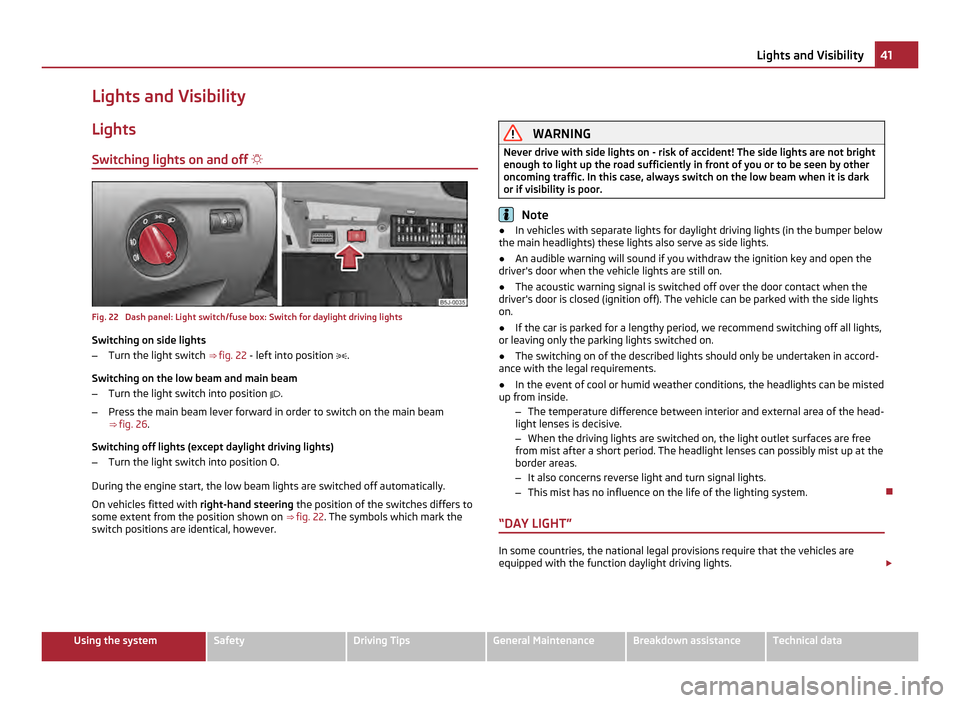
Switching lights on and off Fig. 22 Dash panel: Light switch/fuse box: Switch for daylight driving lights
Switching on side lights
– Turn the light switch ⇒ fig. 22 - left into position
.
Switching on the low beam and main beam
– Turn the light switch into position .
– Press the main beam lever forward in order to switch on the main beam
⇒ fig. 26 .
Switching off lights (except daylight driving lights)
– Turn the light switch into position O.
During the engine start, the low beam lights are switched off automatically.
On vehicles fitted with right-hand steering the position of the switches differs to
some extent from the position shown on ⇒ fig. 22. The symbols which mark the
switch positions are identical, however. WARNING
Never drive with side lights on - risk of accident! The side lights are not bright
enough to light up the road sufficiently in front of you or to be seen by other
oncoming traffic. In this case, always switch on the low beam when it is dark
or if visibility is poor. Note
● In vehicles with separate lights for daylight driving lights (in the bumper below
the main headlights) these lights also serve as side lights.
● An audible warning will sound if you withdraw the ignition key and open the
driver's door when the vehicle lights are still on.
● The acoustic warning signal is switched off over the door contact when the
driver's door is closed (ignition off). The vehicle can be parked with the side lights
on.
● If the car is parked for a lengthy period, we recommend switching off all lights,
or leaving only the parking lights switched on.
● The switching on of the described lights should only be undertaken in accord-
ance with the legal requirements.
● In the event of cool or humid weather conditions, the headlights can be misted
up from inside.
–The temperature difference between interior and external area of the head-
light lenses is decisive.
– When the driving lights are switched on, the light outlet surfaces are free
from mist after a short period. The headlight lenses can possibly mist up at the
border areas.
– It also concerns reverse light and turn signal lights.
– This mist has no influence on the life of the lighting system.
“DAY LIGHT” In some countries, the national legal provisions require that the vehicles are
equipped with the function daylight driving lights.
£ 41
Lights and Visibility Using the system Safety Driving Tips General Maintenance Breakdown assistance Technical data
Page 47 of 220

The turn signal
and main beam lever The parking lights and headlight flasher are also switched on and
off using the turn signal and main beam lever.
Fig. 26 Turn signal and main beam lever
The turn signal and main beam lever perform the following functions:
Right and left turn signal light
– Push the lever upwards A or downwards
B ⇒
fig. 26 .
– If you only wish to flash three times (the so-called convenience turn signal),
push the lever briefly up to the upper or lower pressure point and release it.
– Turn signal for changing lanes - in order to only flash briefly, move the lever up
or down to the pressure point and hold it in this position.
Main beam
– Switch on the low beam.
– Push the lever forwards in direction of arrow C .
– If you push the lever into the initial position in the direction of arrow D the
main beam is switched off.
Headlight flasher
– Pull the lever towards the steering wheel (spring-tensioned position) - the
main beam and warning light in the instrument cluster come on.
Parking light
– Switch off the ignition.
– Push the lever up or down - the right-hand or left-hand parking light is switch-
ed on. Information concerning the function of the lights.
●
The turn signal system only operates when the ignition is switched on. The
corresponding warning light or in the instrument cluster also flashes.
● The turn signal is automatically cancelled after negotiating a curve.
● The side light and rear light on the appropriate side of the vehicle are switched
on when the parking light is selected. The parking light function only operates if
the ignition is switched off.
● An acoustic warning signal will sound when the driver's door is opened if the
lever is not in the middle position after removing the ignition key from the ignition
lock. The acoustic warning signal will stop just as soon as the driver's door is
closed. CAUTION
Use main beam or the headlight flasher only if this does not risk dazzling other
road users. Note
● If you have switched on the right or left turn signal light and you switch off the
ignition, the parking light is not automatically switched on.
● Use only in accordance with the legal requirements the described lighting and
signal systems.
Interior lighting Interior vehicle lighting - version 1 Fig. 27 Interior lighting - version 1
£ 45
Lights and Visibility Using the system Safety Driving Tips General Maintenance Breakdown assistance Technical data
Page 48 of 220

Door contact switching mechanism (front and rear doors)
–
Press the switch A in the direction of the centre of the light, the symbol
⇒ fig. 27 appears.
Switching the interior light on
– Press the switch A in the direction of the edge of the light, the symbol
appears.
Switching the interior light off
– Press the switch A into the middle position
O.
Reading lights
– Press on one of the switches B ⇒
fig. 27 in order to switch the right or left
reading light on or off.
On vehicles with central locking, the interior light is switched on for about 30 sec-
onds when the vehicle is unlocked, when a door is opened or after withdrawing
the ignition key (if the relevant switch is in the door contact position). The inner
light goes out out immediately after the ignition is switched on.
A time delay switch causes the inner lighting on vehicles without a central locking
system stays on for a few seconds after the doors have been closed. The inner
light goes out out immediately after the ignition is switched on.
The interior lighting is switched off after about 10 minutes when a door has been
left open in order to avoid discharging the battery of the vehicle. Note
We recommend having the bulb replaced by a specialist garage.
Interior vehicle lighting - version 2 Fig. 28 Interior lighting - version 2The rear interior lighting
⇒ fig. 28 is actuated by moving the switch to the symbol
, O or to the middle position .
The same principles apply for interior lighting version 2 as for Interior lighting -
version 1 ⇒
page 45.
Rear interior lighting Fig. 29 Rear interior lighting
The rear interior lighting is operated by pressing the button ⇒
fig. 29 .
The button has two positions for the interior lighting at the rear. In the first posi-
tion, the interior lighting is switched on permanently, in the second position (after
pressing) it is switched via the door contacts. Note
We recommend having the bulb replaced by a specialist garage.
Lighting of the storage compartment on front passenger side –
When opening the flap of the storage compartment on the front passenger
side the lighting in the storage compartment comes on.
– The light switches on automatically when the parking light is switched on and
goes out when the flap is closed.
Luggage compartment light The lighting comes on automatically when the boot lid is opened. If the lid remains
open for more than about 10 minutes, the luggage compartment lighting switches
off automatically.
46
Lights and Visibility
Page 52 of 220

WARNING
● If the windscreen wipers are handled carelessly, there is a risk of damage
to the windscreen.
● You should clean the wiper blades regularly with a windscreen cleaner in
order to avoid any smears. Clean a wiper blade with a sponge or cloth if it is
very dirty, for example from insect residues.
● Replace the windscreen wiper blades once or twice a year for safety rea-
sons. Windscreen wiper blades are available at specialist garages.
Replacing the rear window wiper blade- version 1 Fig. 34 Wiper blade for the rear window
Removing the wiper blade
– Fold windscreen wiper arm out from the windscreen and position the wiper
blade at right angles to the wiper arm ⇒
fig. 34
.
– Hold the window wiper arm at the top end with one hand.
– With the other hand unlock the locking button A in the direction of arrow and
remove the wiper blade.
Attaching the wiper blade
– Position the wiper blade onto the wiper arm and lock the locking button A .
– Check whether the wiper blade is correctly attached.
The same remarks apply here as for ⇒ page 49. Replacing the rear window wiper blade- version 2
Fig. 35 Wiper blade for the rear window
Removing the wiper blade
– Fold windscreen wiper arm out from the windscreen and position the wiper
blade at right angles to the wiper arm ⇒
fig. 35
.
– Hold the window wiper arm at the top end with one hand.
– With the other hand unlock the locking button 1 and remove the wiper blade
in the direction of arrow 2 .
Attaching the wiper blade
– Push the wiper blade until it locks up to the stop.
– Check whether the wiper blade is correctly attached.
– Fold the windscreen wiper arm back onto the windscreen.
The same remarks apply here as for ⇒ page 49.
Rear-view mirror Manual dimming interior rear-view mirror Basic setting
–
Pull the lever on the bottom edge of the mirror forward.
Dimming mirror
– Pull the lever on the bottom edge of the mirror back. 50
Lights and Visibility
Page 53 of 220

Rear mirror
You can adjust the exterior mirrors electrically.
Fig. 36 Inner part of door: Rotary knob
Adjust the rear mirror before commencing to drive so that there is a clear view to
the rear.
Dimming the interior mirror
– Pull the lever on the bottom edge of the mirror toward rear (the lever on the
interior mirror must point forwards in it home position).
Heating of the external mirror
– Turn the rotary knob to position ⇒
fig. 36 .
Adjusting the left-hand exterior mirror
– Turn the rotary knob to position . The movement of the mirror surface is iden-
tical to the movement of the rotary knob.
Adjusting the right-hand exterior mirror
– Turn the rotary knob to position . The movement of the mirror surface is iden-
tical to the movement of the rotary knob. WARNING
● Convex (curved outward) exterior mirrors increase the field of vision. They
do, however, make objects appear smaller in the mirror. These mirrors are only
of limited use, therefore, for estimating distances to the following vehicles.
● Use whenever possible the interior rear mirror, for estimating the distan-
ces to the following vehicles. Note
● The exterior mirror heater only operates when the engine is running.
● Do not touch the surfaces of the exterior mirrors if the exterior mirror heater is
switched on.
● You can set the exterior mirrors by hand, if the power setting function fails at
any time, by pressing on the edge of the mirror surface.
● Contact your specialist garage if a fault exists with the power setting of the
exterior mirrors. 51
Lights and Visibility Using the system Safety Driving Tips General Maintenance Breakdown assistance Technical data
Page 77 of 220

The blower should aways be on to prevent the windows from misting up.
Note
If the air distribution is positioned towards the windows, the total amount of air is
used to defrost the windows and thus no air will be fed to the footwell. This can
lead to restriction of the heating comfort.
Set heating Recommended basic settings of heating controls for:
Set-up Setting of the control dial
Button
1 Air outlet vents 4
A B C
Defrosting the windscreen and side
windows To the right up to the
stop 3
Do not switch on Open and align with the side win-
dowFree windscreen and side windows
from mist
Desired temperature 2 or 3
Do not switch on Open and align with the side win-
dowThe fastest heating To the right up to the
stop 3
Briefly switched on Opening
Comfortable heating Desired temperature 2 or 3
Do not switch on Opening
Fresh air mode - ventilation To the left up to the
stop Desired position
Do not switch on Opening
Note
● Controls A ,
B ,
C and the button
1 ⇒ fig. 78
.
● Air outlet vents 4 ⇒ fig. 77 .
● We recommend that you leave the air outlet vents 3 ⇒ fig. 77 in the opened
position.
Recirculated air mode In recirculated air mode air is sucked out of the interior of the vehi-
cle and then fed back into the interior.
Recirculated air mode prevents polluted air outside the vehicle from getting into
the vehicle, for example when driving through a tunnel or when standing in a traf-
fic jam. Switching recirculated air mode on
–
Press the button
1 ⇒ fig. 78
the warning light lights up in the button.
Switching recirculated air mode off
– Press again the button
1 , the warning light in the button goes out.
The recirculated air mode is switched off automatically if the air distribution con-
trol C is in position ⇒
fig. 78
. You can also switch recirculated air mode on
again from this setting by repeatedly pressing pushbutton .
£ 75
Heating and air conditioning system Using the system Safety Driving Tips General Maintenance Breakdown assistance Technical data
Page 80 of 220
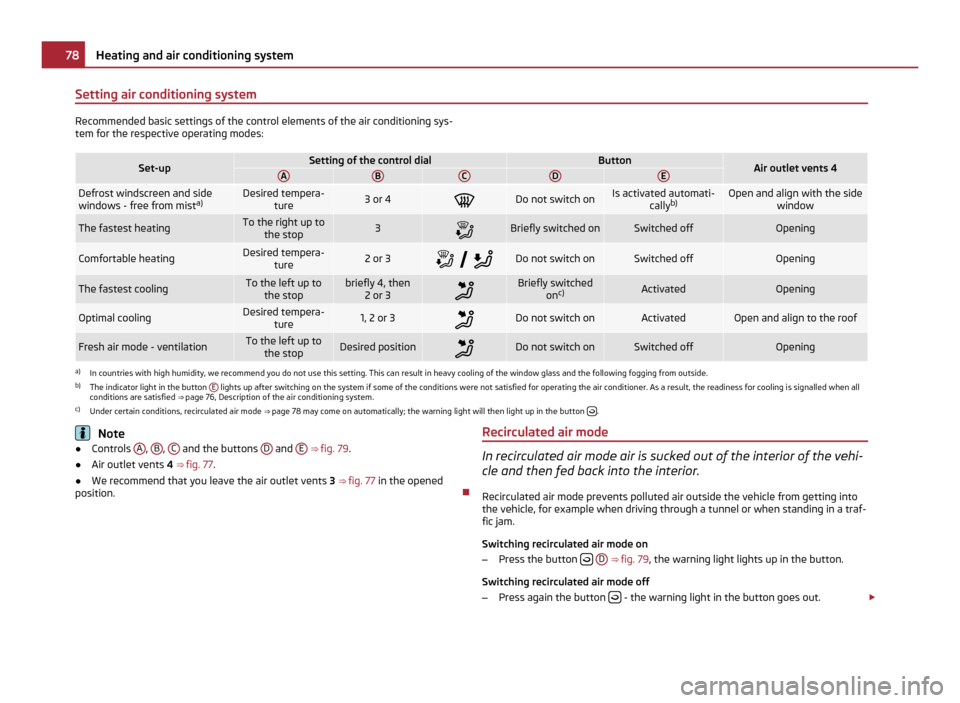
Setting air conditioning system
Recommended basic settings of the control elements of the air conditioning sys-
tem for the respective operating modes:
Set-up Setting of the control dial Button
Air outlet vents 4
A B C D E
Defrost windscreen and side
windows - free from mist
a) Desired tempera-
ture 3 or 4
Do not switch on Is activated automati-
callyb) Open and align with the side
windowThe fastest heating To the right up to
the stop 3
Briefly switched on Switched off Opening
Comfortable heating Desired tempera-
ture 2 or 3
Do not switch on Switched off Opening
The fastest cooling To the left up to
the stop briefly 4, then
2 or 3 Briefly switched
onc) Activated Opening
Optimal cooling Desired tempera-
ture 1, 2 or 3
Do not switch on Activated Open and align to the roof
Fresh air mode - ventilation To the left up to
the stop Desired position
Do not switch on Switched off Opening
a)
In countries with high humidity, we recommend you do not use this setting. This can result in heavy cooling of the window glass and the following fogging from outside.
b) The indicator light in the button E lights up after switching on the system if some of the conditions were not satisfied for operating the air conditioner. As a result, the readiness for cooling is signalled when all
conditions are satisfied ⇒ page 76,
Description of the air conditioning system.
c) Under certain conditions, recirculated air mode ⇒ page 78 may come on automatically; the warning light will then light up in the button .
Note
● Controls A ,
B ,
C and the buttons
D and
E ⇒
fig. 79 .
● Air outlet vents 4
⇒ fig. 77
.
● We recommend that you leave the air outlet vents 3 ⇒ fig. 77 in the opened
position. Recirculated air mode In recirculated air mode air is sucked out of the interior of the vehi-
cle and then fed back into the interior.
Recirculated air mode prevents polluted air outside the vehicle from getting into
the vehicle, for example when driving through a tunnel or when standing in a traf-
fic jam.
Switching recirculated air mode on
– Press the button
D ⇒ fig. 79
, the warning light lights up in the button.
Switching recirculated air mode off
– Press again the button - the warning light in the button goes out.
£78
Heating and air conditioning system
Page 91 of 220

WARNING
First ensure that it is not too high for the traffic conditions which exist at that
moment before resuming the stored speed.
Switching off the cruise control system completely –
Press the switch A ⇒
fig. 86 to the right into position OFF .
“START-STOP” Fig. 87 Centre console: START-STOP
System button
The “START-STOP” system helps you to save fuel while at the same time reducing
harmful exhaust emissions and CO 2 emissions.
The function is automatically activated each time the ignition is switched on.
In the start-stop mode, the engine automatically switches to the vehicle's idle
phase, e.g. when stopped at traffic lights.
Information regarding the current state of the “START-STOP
” system is indicated
in the display of the instrument cluster.
Automatic engine shut down (stop phase)
– Stop the vehicle (where necessary, apply the handbrake).
– Take the vehicle out of gear.
– Take your foot off the clutch.
Automatic engine restart (start phase).
– Push down on the clutch. Switching the “START-STOP” system on and off
You can switch the “START STOP
” system on/off by pressing the button ⇒ fig. 87.
When start-stop mode is deactivated, the warning light in the button lights up.
If the vehicle is in the stop phase when manually switching off the system, the en-
gine starts immediately.
The START-STOP system involves complicated switching conditions, some of
them cannot be correctly determined without servicing. The general conditions
for the proper functioning of the START-STOP system are listed in the following
overview.
Conditions for the automatic engine shut down (stop phase) The gearshift lever is in Neutral.
The clutch pedal is not pressed!
The driver has fastened the seat belt.
The driver's door is closed.
The bonnet is closed.
The vehicle is at a standstill.
The factory-fitted towing device is not electrically connected to a trailer.
The engine is at operating temperature.
The charge state of the vehicle battery is sufficient.
The stationary vehicle is not on a steep slope or a steep downhill section.
The engine speed is less than 1200 1/min.
The temperature of the vehicle battery is not too low or too high.
The pressure in the brake system is sufficient.
The difference between the outdoor- and the set temperature in the interior is
not too great.
The vehicle speed since the last time the engine was switched off was greater
than 3 km/h.
No cleaning of the diesel particle filter takes place
⇒ page 27 The front wheels are not turned excessively (the steering angle is less than 3/4
of a steering wheel revolution).
Conditions for an automatic restart (start phase)
The clutch is pressed.
The max./min. temperature is set.
£ 89
Starting-off and Driving Using the system Safety Driving Tips General Maintenance Breakdown assistance Technical data