Page 161 of 476

POWER INVERTER — IF EQUIPPED
A 115 Volt (150 Watts Maximum) outlet is located on the
center stack of the instrument panel, to the right of the
radio. This outlet can power cellular phones, electronics
and other low power devices requiring power up to 150
Watts. Certain high-end video games, such as Playsta-
tion3 and XBox360 will exceed this power limit, as will
most power tools.
The power inverter is designed with built-in overload
protection. If the power rating of 150 Watts is exceeded,
the power inverter will automatically shut down. Once
the electrical device has been removed from the outlet the
inverter should automatically reset. If the power rating
exceeds approximately 170 Watts, the power inverter
may have to be reset manually. To reset the inverter
manually press the power inverter button OFF and ON.
To avoid overloading the circuit, check the power ratings
on electrical devices prior to using the inverter.The power inverter switch is located
on the switch bank below the Climate
Controls. To turn on the power outlet,
press the switch once. Press the switch
a second time to turn the power outlet
off.
Power Inverter Outlet
160 UNDERSTANDING THE FEATURES OF YOUR VEHICLE
Page 162 of 476
NOTE:
•When the power inverter switch is pressed, there will
be a delay of approximately one second before the
power inverter status indicator turns on. The status
indicator of the AC power inverter indicates whether
the inverter is producing AC power.
•Due to built-in overload protection, the power inverter
will shut down if the power rating is exceeded.
WARNING!
To avoid serious injury or death:
•Do not use a three-prong adapter.
•Do not insert any objects into the receptacles.
•Do not touch with wet hands.
•Close the lid when not in use.
•If this outlet is mishandled it may cause an electric
shock and failure.
CUPHOLDERS
Front Instrument Panel Cupholders — (40–20–40
Seats)
The cupholders are located in the pull-out tray on the
center stack of the instrument panel.
Front Cupholders
3
UNDERSTANDING THE FEATURES OF YOUR VEHICLE 161
Page 163 of 476
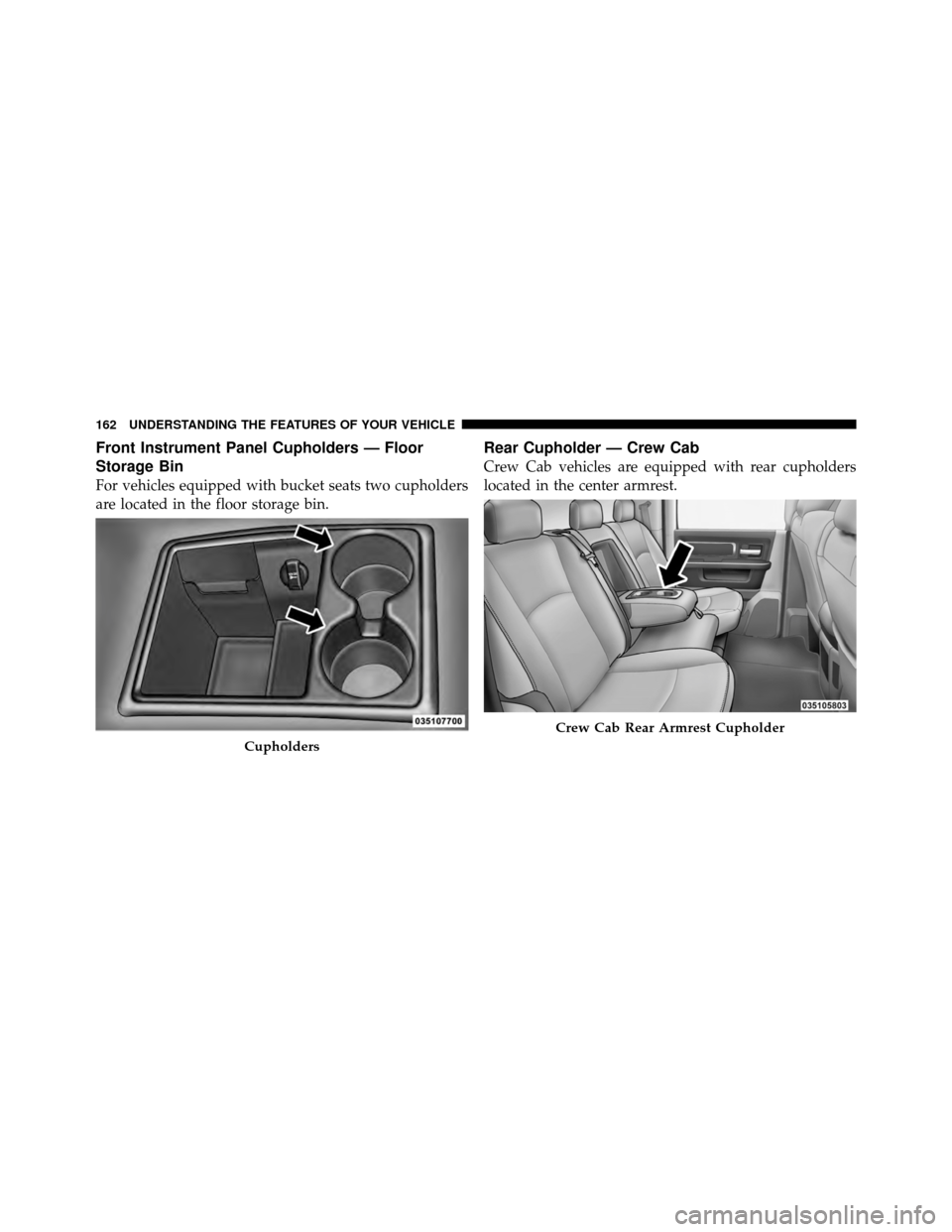
Front Instrument Panel Cupholders — Floor
Storage Bin
For vehicles equipped with bucket seats two cupholders
are located in the floor storage bin.
Rear Cupholder — Crew Cab
Crew Cab vehicles are equipped with rear cupholders
located in the center armrest.
Cupholders
Crew Cab Rear Armrest Cupholder
162 UNDERSTANDING THE FEATURES OF YOUR VEHICLE
Page 164 of 476
STORAGE
Glove Box Storage
The glove box is located on the passenger side of the
instrument panel and features both an upper (if
equipped) and lower storage area.
Glove Box
1 — Upper Glove Box (If Equipped)
2 — Lower Glove Box
3
UNDERSTANDING THE FEATURES OF YOUR VEHICLE 163
Page 174 of 476
UNDERSTANDING YOUR INSTRUMENT PANEL
CONTENTS
�Instrument Panel Features ............... 177
� Instrument Cluster — Base ............... 178
� Instrument Cluster — Premium ........... 179
� Instrument Cluster Descriptions ........... 180
� Electronic Vehicle Information Center (EVIC) —
If Equipped .......................... 194
▫ Electronic Vehicle Information Center (EVIC)
Displays ........................... 196
▫ Distance To Empty (DTE) .............. 200 ▫
EVIC Average Fuel Economy ............ 201
▫ Trip Functions ...................... 201
▫ Vehicle Info
(Customer Information Features) ......... 202
▫ Units ............................. 202
▫ Compass / Temperature Display ......... 202
▫ Customer-Programmable Features
(System Setup) ...................... 205
4
Page 175 of 476

�Media Center 730N/430 (RER/RBZ) —
AM/FM Stereo Radio And CD/DVD/HDD/
NAV — If Equipped .................... 210
▫ Operating Instructions — Voice Command
System — If Equipped ................. 211
▫ Operating Instructions — Uconnect™ Phone
— If Equipped ...................... 211
▫ Clock Setting Procedure — RBZ Radio ..... 211
▫ Clock Setting Procedure — RER Radio ..... 212
� Media Center 130 (RES) — AM/FM Stereo
Radio With CD Player (MP3 AUX Jack) ....... 215
▫ Operating Instructions — Radio Mode ..... 215
▫ Operation Instructions — CD Mode For CD
And MP3 Audio Play ................. 218
▫ Notes On Playing MP3 Files ............ 220▫
Operation Instructions - Auxiliary Mode .... 223
� Media Center 130 (RES/RSC) — AM/FM
Stereo Radio With CD Player (MP3 AUX Jack)
And Sirius Radio ...................... 224
▫ Operating Instructions — Radio Mode ..... 224
▫ Operation Instructions — CD Mode For CD
And MP3 Audio Play ................. 230
▫ Notes On Playing MP3 Files ............ 232
▫ List Button (CD Mode For MP3 Play) ...... 235
▫ Info Button (CD Mode For MP3 Play) ...... 235
� Universal Consumer Interface (UCI) — If
Equipped ............................ 236
▫ Connecting The iPod� ................. 237
▫ Using This Feature ................... 238
174 UNDERSTANDING YOUR INSTRUMENT PANEL
Page 176 of 476

▫Controlling The iPod� Using
Radio Buttons ....................... 238
▫ Play Mode ......................... 238
▫ List Or Browse Mode ................. 240
� Uconnect™ Multimedia (Satellite Radio) — If
Equipped (REN/RER/RES Radios Only) ...... 242
▫ System Activation .................... 242
▫ Electronic Serial Number/Sirius
Identification Number (ESN/SID) ......... 242
▫ Selecting Uconnect™ Multimedia (Satellite)
Mode ............................. 243
▫ Satellite Antenna ..................... 243
▫ Reception Quality .................... 243
▫ Operating Instructions - Uconnect™
Multimedia (Satellite) Mode ............. 244▫
Operating Instructions - Uconnect™ Phone
(If Equipped) ....................... 246
� Remote Sound System Controls —
If Equipped .......................... 246
▫ Radio Operation ..................... 247
▫ CD Player ......................... 247
� CD/DVD Disc Maintenance .............. 247
� Radio Operation And Cellular Phones ....... 248
� Climate Controls ...................... 248
▫ Manual Heating And Air Conditioning
System ............................ 249
▫ Automatic Temperature Control (ATC) — If
Equipped .......................... 253
▫ Summer Operation ................... 258
4
UNDERSTANDING YOUR INSTRUMENT PANEL 175
Page 177 of 476
▫Winter Operation .................... 258
▫ Vacation/Storage .................... 259
▫ Window Fogging And Frosting .......... 259▫
Outside Air Intake ................... 259
▫ Operating Tips ...................... 260
176 UNDERSTANDING YOUR INSTRUMENT PANEL