Page 133 of 476
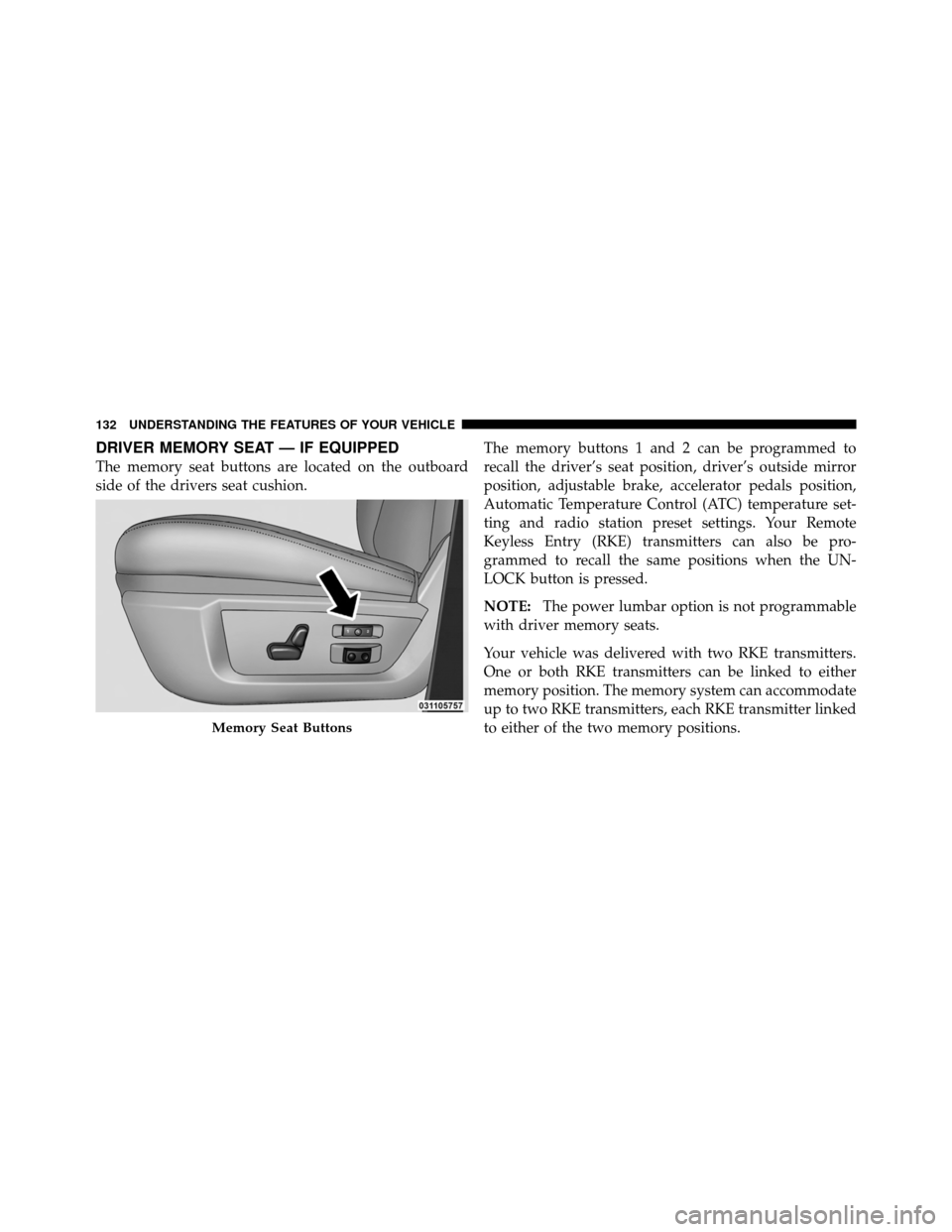
DRIVER MEMORY SEAT — IF EQUIPPED
The memory seat buttons are located on the outboard
side of the drivers seat cushion.The memory buttons 1 and 2 can be programmed to
recall the driver’s seat position, driver’s outside mirror
position, adjustable brake, accelerator pedals position,
Automatic Temperature Control (ATC) temperature set-
ting and radio station preset settings. Your Remote
Keyless Entry (RKE) transmitters can also be pro-
grammed to recall the same positions when the UN-
LOCK button is pressed.
NOTE:
The power lumbar option is not programmable
with driver memory seats.
Your vehicle was delivered with two RKE transmitters.
One or both RKE transmitters can be linked to either
memory position. The memory system can accommodate
up to two RKE transmitters, each RKE transmitter linked
to either of the two memory positions.
Memory Seat Buttons
132 UNDERSTANDING THE FEATURES OF YOUR VEHICLE
Page 134 of 476

Setting Memory Positions and Linking RKE
Transmitter to Memory
NOTE:Each time the S (SET) button and a numbered
button (1 or 2) are pressed, you erase the memory settings
for that button and store new settings.
1. Turn the vehicle key to the ON/RUN position.
2. Adjust the driver’s seat, recliner, and both sideview
mirrors to the desired positions.
NOTE: Not all motors may be moved at one time. Refer
to “Seats/Eight-Way Power Seat” in this section for
further information.
3. Adjust the brake and accelerator pedals to the desired
positions.
4. Turn on the radio and set the radio station presets (up
to 10 AM and 10 FM stations can be set). 5. Adjust the Automatic Temperature Control (ATC)
while the ATC is in Auto mode.
6. Press and release the SET button located on the
driver’s seat.
7. Within five seconds, press and release MEMORY
button 1 or 2 on the driver’s seat. The next steps must be
performed within 10 seconds if you desire to also use a
RKE transmitter to recall memory positions.
8. Turn the ignition OFF and remove the key.
9. Press and release the LOCK button on one of the RKE
transmitters.
10. Repeat the above steps to set the next memory
position using the other numbered memory button or to
link another RKE transmitter to memory.
NOTE:
A chime sound may be heard if Setting Memory
was inhibited for any reason.
3
UNDERSTANDING THE FEATURES OF YOUR VEHICLE 133
Page 143 of 476
The brightness of the instrument panel lighting can be
regulated by rotating the dimmer control right (brighter)
or left (dimmer). When the headlights are on you can
supplement the brightness of the odometer, trip odom-
eter, radio and overhead console by rotating the control
to the right until you hear a click. This feature is termed
the “Parade” mode and is useful when headlights are
required during the day.Cargo Light
The cargo lights are turned on by pressing on the cargo
button.
The cargo lights will also turn on for approximately
30 seconds when a RKE transmitter UNLOCK button is
pressed, as part of the Illuminated Entry feature.
Dimmer Control
Cargo Light Switch
142 UNDERSTANDING THE FEATURES OF YOUR VEHICLE
Page 161 of 476

POWER INVERTER — IF EQUIPPED
A 115 Volt (150 Watts Maximum) outlet is located on the
center stack of the instrument panel, to the right of the
radio. This outlet can power cellular phones, electronics
and other low power devices requiring power up to 150
Watts. Certain high-end video games, such as Playsta-
tion3 and XBox360 will exceed this power limit, as will
most power tools.
The power inverter is designed with built-in overload
protection. If the power rating of 150 Watts is exceeded,
the power inverter will automatically shut down. Once
the electrical device has been removed from the outlet the
inverter should automatically reset. If the power rating
exceeds approximately 170 Watts, the power inverter
may have to be reset manually. To reset the inverter
manually press the power inverter button OFF and ON.
To avoid overloading the circuit, check the power ratings
on electrical devices prior to using the inverter.The power inverter switch is located
on the switch bank below the Climate
Controls. To turn on the power outlet,
press the switch once. Press the switch
a second time to turn the power outlet
off.
Power Inverter Outlet
160 UNDERSTANDING THE FEATURES OF YOUR VEHICLE
Page 175 of 476

�Media Center 730N/430 (RER/RBZ) —
AM/FM Stereo Radio And CD/DVD/HDD/
NAV — If Equipped .................... 210
▫ Operating Instructions — Voice Command
System — If Equipped ................. 211
▫ Operating Instructions — Uconnect™ Phone
— If Equipped ...................... 211
▫ Clock Setting Procedure — RBZ Radio ..... 211
▫ Clock Setting Procedure — RER Radio ..... 212
� Media Center 130 (RES) — AM/FM Stereo
Radio With CD Player (MP3 AUX Jack) ....... 215
▫ Operating Instructions — Radio Mode ..... 215
▫ Operation Instructions — CD Mode For CD
And MP3 Audio Play ................. 218
▫ Notes On Playing MP3 Files ............ 220▫
Operation Instructions - Auxiliary Mode .... 223
� Media Center 130 (RES/RSC) — AM/FM
Stereo Radio With CD Player (MP3 AUX Jack)
And Sirius Radio ...................... 224
▫ Operating Instructions — Radio Mode ..... 224
▫ Operation Instructions — CD Mode For CD
And MP3 Audio Play ................. 230
▫ Notes On Playing MP3 Files ............ 232
▫ List Button (CD Mode For MP3 Play) ...... 235
▫ Info Button (CD Mode For MP3 Play) ...... 235
� Universal Consumer Interface (UCI) — If
Equipped ............................ 236
▫ Connecting The iPod� ................. 237
▫ Using This Feature ................... 238
174 UNDERSTANDING YOUR INSTRUMENT PANEL
Page 176 of 476

▫Controlling The iPod� Using
Radio Buttons ....................... 238
▫ Play Mode ......................... 238
▫ List Or Browse Mode ................. 240
� Uconnect™ Multimedia (Satellite Radio) — If
Equipped (REN/RER/RES Radios Only) ...... 242
▫ System Activation .................... 242
▫ Electronic Serial Number/Sirius
Identification Number (ESN/SID) ......... 242
▫ Selecting Uconnect™ Multimedia (Satellite)
Mode ............................. 243
▫ Satellite Antenna ..................... 243
▫ Reception Quality .................... 243
▫ Operating Instructions - Uconnect™
Multimedia (Satellite) Mode ............. 244▫
Operating Instructions - Uconnect™ Phone
(If Equipped) ....................... 246
� Remote Sound System Controls —
If Equipped .......................... 246
▫ Radio Operation ..................... 247
▫ CD Player ......................... 247
� CD/DVD Disc Maintenance .............. 247
� Radio Operation And Cellular Phones ....... 248
� Climate Controls ...................... 248
▫ Manual Heating And Air Conditioning
System ............................ 249
▫ Automatic Temperature Control (ATC) — If
Equipped .......................... 253
▫ Summer Operation ................... 258
4
UNDERSTANDING YOUR INSTRUMENT PANEL 175
Page 178 of 476
INSTRUMENT PANEL FEATURES
1 — Headlight Switch7 — 115v Power Inverter Outlet13 — Transfer Case Position Switch
2 — Instrument Cluster 8 — Power Outlet14 — Ignition Switch
3 — Radio 9 — Lower Switch Bank15 — Hood Release
4 — Upper Switch Bank 10 — Cup Holders16 — Parking Brake Release
5 — Upper Glove Compartment 11 — Climate Controls
6 — Lower Glove Compartment 12 — Power Outlet/Cigar Lighter
4
UNDERSTANDING YOUR INSTRUMENT PANEL 177
Page 208 of 476

feature showing the system has been activated, or the
check-mark is removed showing the system has been
deactivated.
Remote Unlock Sequence
WhenDriver Door 1st Press is selected, only the driver’s
door will unlock on the first press of the RKE transmitter
UNLOCK button. When Driver Door 1st Press is selected,
you must press the RKE transmitter UNLOCK button
twice to unlock the passenger’s doors. When All Doors
1st Press is selected, all of the doors will unlock on the
first press of the RKE transmitter UNLOCK button. To
make your selection, press and release the SELECT
button until “Driver Door 1st Press” or “All Doors 1st
Press” appears.
RKE Linked To Memory
When this feature is selected the memory seat, mirror,
and radio settings will return to the memory set position when the Remote Keyless Entry (RKE) transmitter UN-
LOCK button is pressed. If this feature is not selected
then the memory seat, mirror, and radio settings can only
return to the memory set position using the seat mounted
switch. To make your selection, press and release the
SELECT button until a check-mark appears next to the
feature showing the system has been activated or the
check-mark is removed, showing the system has been
deactivated.
Horn With Remote Start
When this feature is selected, a short horn sound will
occur when the RKE transmitter REMOTE START button
is pressed. To make your selection, press and release the
SELECT button until a check-mark appears next to the
feature showing the system has been activated or the
check-mark is removed, showing the system has been
deactivated.
4
UNDERSTANDING YOUR INSTRUMENT PANEL 207