Page 109 of 636

indicator lights in each switch indicate the level of heat in
use. Two indicator lights will illuminate for HIGH, one
for LOW and none for OFF.Press the switch once to select HIGH-
level heating. Press the switch a sec-
ond time to select LOW-level heating.
Press the switch a third time to shut
the heating elements OFF.
NOTE:
•Once a heat setting is selected, heat will be felt within
two to five minutes.
•The engine must be running for the heated seats to
operate.
When the HIGH-level setting is selected, the heater will
provide a boosted heat level during the first four minutes
of operation. Then, the heat output will drop to the normal HIGH-level. If the HIGH-level setting is selected,
the system will automatically switch to LOW-level after a
maximum of 60 minutes of continuous operation. At that
time, the number of illuminated LEDs changes from two
to one, indicating the change. The LOW-level setting will
turn OFF automatically after a maximum of 45 minutes.
Ventilated Seats — If Equipped
On some models, both the driver and passenger seats are
ventilated. Located in the seat cushion and seatback are
small fans that draw the air from the passenger compart-
ment and blow air through fine perforations in the seat
cover to help keep the driver and front passenger cooler
in higher ambient temperatures.
The ventilated seat switches are located in the switch
bank in the center stack of the instrument panel, just
below the climate controls. The fans operate at two
speeds, HIGH and LOW.
3
UNDERSTANDING THE FEATURES OF YOUR VEHICLE 107
Page 111 of 636
have reached the desired position. Then, using body
pressure, move forward and rearward on the seat to be
sure that the seat adjusters have latched.
WARNING!
•Adjusting a seat while driving may be dangerous.
Moving a seat while driving could result in loss of
control which could cause a collision and serious
injury or death.
•Seats should be adjusted before fastening the
seatbelts and while the vehicle is parked. Serious
injury or death could result from a poorly adjusted
seatbelt.
Manual Reclining Seats — If Equipped
The recliner handle is used to adjust the seatback position
and is located on the outside of the seat cushion.To adjust the seatback, lift upward on the handle, lean
back on the seatback and when you reach the desired
position, release the handle. To return the seatback, lift
upward on the handle, lean forward and release the
handle at the desired position.
Recline Handle
3
UNDERSTANDING THE FEATURES OF YOUR VEHICLE 109
Page 118 of 636
•The head restraints should only be removed by quali-
fied technicians, for service purposes only. If either of
the head restraints require removal, see your autho-
rized dealer.
DRIVER MEMORY SEAT — IF EQUIPPED
Driver memory seats allow the driver to recall settings
for the adjustable pedals, mirrors, seats and the radio
presets using the key fob.
The memory seat buttons are located on the outboard
side of the drivers seat cushion.The memory buttons 1 and 2 can be programmed to
recall the driver’s seat position, driver’s outside mirror
position, adjustable brake, accelerator pedals position,
Automatic Temperature Control (ATC) temperature set-
ting and radio station preset settings. Your Remote
Memory Seat Buttons
116 UNDERSTANDING THE FEATURES OF YOUR VEHICLE
Page 119 of 636

Keyless Entry (RKE) transmitters can also be pro-
grammed to recall the same positions when the UN-
LOCK button is pressed.
NOTE:The power lumbar option is not programmable
with driver memory seats.
Your vehicle was delivered with two RKE transmitters.
One or both RKE transmitters can be linked to either
memory position. The memory system can accommodate
up to two RKE transmitters, each RKE transmitter linked
to either of the two memory positions.
Setting Memory Positions And Linking RKE
Transmitter To Memory
NOTE: Each time the S (SET) button and a numbered
button (1 or 2) are pressed, you erase the memory settings
for that button and store new settings.
1. Turn the vehicle key to the ON/RUN position. 2. Adjust the driver’s seat, recliner, and both sideview
mirrors to the desired positions.
NOTE:
Not all motors may be moved at one time. Refer
to “Power Seats — If Equipped” in this section for further
information.
3. Adjust the brake and accelerator pedals to the desired
positions.
4. Turn on the radio and set the radio station presets (up
to 10 AM and 10 FM stations can be set).
5. Adjust the Automatic Temperature Control (ATC)
while the ATC is in Auto mode.
6. Press and release the SET button located on the
driver’s seat.
7. Within five seconds, press and release MEMORY
button 1 or 2 on the driver’s seat. The next steps must be
performed within 10 seconds if you desire to also use a
RKE transmitter to recall memory positions.
3
UNDERSTANDING THE FEATURES OF YOUR VEHICLE 117
Page 121 of 636

To Disable A RKE Transmitter Linked To Memory
1. Turn the ignition switch to the OFF position and
remove the key.
2. Press and release the memory SET button located on
the driver’s seat.
3. Within 10 seconds, press and release the UNLOCK
button on the RKE transmitter.
To disable another RKE transmitter linked to either
memory position, repeat Steps 1-3 for each RKE trans-
mitter.
NOTE:The capability to link RKE transmitters to
memory is enabled when delivered from the factory. The
capability to link RKE transmitters to memory can be
disabled (or later re-enabled) by an authorized dealer. For vehicles equipped with the Electronic vehicle Informa-
tion Center (EVIC), refer to “Electronic Vehicle Informa-
tion Center (EVIC)/Customer-Programmable Features”
in “Understanding Your Instrument Panel” for further
information.
Self-Limiting Control
The memory system includes a self-limiting control for
full travel positioning of power seat and adjustable pedal
movement (all directions). This self-limiting control may,
however, develop an unintended movement limitation if
an obstruction is encountered sometime during usage.
One example of such an occurrence may include a box or
package obstructing the full rearward movement of the
driver’s seat. Once the obstruction is removed, the self-
limiting control may store a new maximum position. the
self-limiting control may be reset by reaching the new
stored position, then press and release MEMORY button 1
or 2. Continued seat travel beyond the new stored posi-
tion will indicate the self-limiting control has been reset.
3
UNDERSTANDING THE FEATURES OF YOUR VEHICLE 119
Page 122 of 636
Driver Easy Exit And Easy Entry Control
This additional feature provides automatic driver’s seat
positioning which will enhance driver mobility into and
out of the vehicle. The seat cushion will move rearward
approximately 2.5 in (60 mm) when the key is removed
from the ignition switch. The seat will move forward
approximately 2.5 in (60 mm) when the key is placed into
the ignition and turned out of the LOCK position. Each
stored memory setting will have an associated Easy Exit
and Easy Entry position. The Easy Exit and Easy Entry
feature may be automatically disabled if the seat is
positioned rearward enough and there is no benefit in
moving the seat any farther rearward.
NOTE:The Easy Entry/Easy Exit feature can be en-
abled or disabled through the programmable features in
the Electronic Vehicle Information Center (EVIC). Refer
to “Electronic Vehicle Information Center (EVIC)/
Customer-Programmable Features” in “Understanding
Your Instrument Panel” for further information.
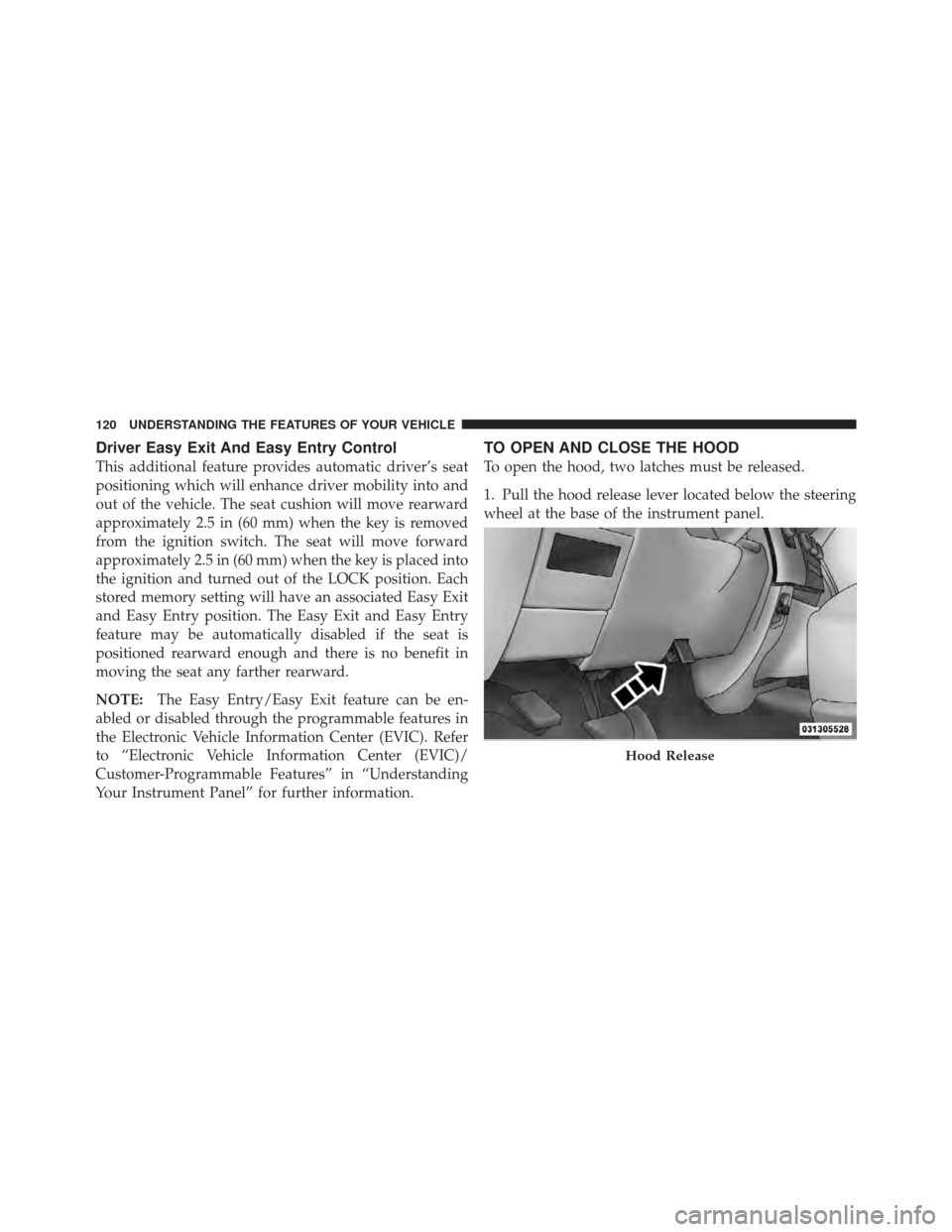
TO OPEN AND CLOSE THE HOOD
To open the hood, two latches must be released.
1. Pull the hood release lever located below the steering
wheel at the base of the instrument panel.
Hood Release
120 UNDERSTANDING THE FEATURES OF YOUR VEHICLE
Page 134 of 636

WARNING!
Do not adjust the steering column while driving.
Adjusting the steering column while driving or driv-
ing with the steering column unlocked, could cause
the driver to lose control of the vehicle. Be sure the
steering column is locked before driving your ve-
hicle. Failure to follow this warning may result in
serious injury or death.
HEATED STEERING WHEEL — IF EQUIPPED
The steering wheel contains a heating element that helps
warm your hands in cold weather. The heated steering
wheel has only one temperature setting. Once the heated
steering wheel has been turned on it will operate for
approximately 58 to 70 minutes before automatically
shutting off. The heated steering wheel can shut off early
or may not turn on when the steering wheel is already
warm.The heated steering wheel switch is located on the switch
bank below the climate controls.
Press the switch to turn on the heated
steering wheel. The light on the switch
will illuminate to indicate the steering
wheel heater is on. Pressing the switch
a second time will turn off the heated
steering wheel and light indicator.
NOTE: The engine must be running for the heated
steering wheel to operate.
Vehicles Equipped With Remote Start
On models that are equipped with remote start, the
heated steering wheel seat can be programmed to come
on during a remote start. Refer to “Remote Starting
System — If Equipped” in “Things to Know Before
Starting Your Vehicle” for further information.
132 UNDERSTANDING THE FEATURES OF YOUR VEHICLE
Page 161 of 636

WARNING!
•Never leave children alone in a vehicle. Leaving
unattended children in a vehicle is dangerous for a
number of reasons. A child or others could be
seriously or fatally injured. do not leave the key in
the ignition. A child could operate power win-
dows, other controls, or move the vehicle.
•In a collision, there is a greater risk of being
thrown from a vehicle with an open sunroof. You
could also be seriously injured or killed. Always
fasten your seat belt properly and make sure all
passengers are properly secured too.
•Do not allow small children to operate the sun-
roof. Never allow your fingers, other body parts, or
any object to project through the sunroof opening.
Injury may result.
Open Sunroof — Express Mode
Press the switch rearward and release it within one-half
second and the sunroof will open automatically from any
position. The sunroof will open fully and stop automati-
cally. This is called “Express Open”. During Express
Open operation, any movement of the sunroof switch
will stop the sunroof.
Opening Sunroof — Manual Mode
To open the sunroof, press and hold the switch rearward
to full open. Any release of the switch will stop the
movement and the sunroof will remain in a partially
opened condition until the switch is pushed and held
rearward again.
Closing Sunroof — Express
Press the switch forward and release it within one-half
second and the sunroof will close automatically from any
3
UNDERSTANDING THE FEATURES OF YOUR VEHICLE 159

