Page 262 of 340
260
1
2
06
1
USING THE TELEPHONE
CALLING A RECENTLY DIALLED NUMBER
Press PHONE
or make a long press on
TEL
, select " Call list
" and confi rm,
Select the desired number and confi rm.
To erase the calls log, press PHONE
, select " Phone functions
"
and confi rm then select " Delete calls log
" and confi rm.
ENDING A CALL
Press HANG UP
or
Or make a long press on the steering
mounted TEL
button.
It is still possible to make a call directly from the telephone; park
the vehicle fi rst as a safety measure.
Page 264 of 340
262
1
2a
2b
2c
2d
06 USING THE TELEPHONE
OPTIONS DURING A CALL *
During a call, press the MODE
button
several times to select display of the
telephone screen, then press " OK
" to
open the contextual menu.
Select " Private mode
" and confi rm to
take the call on the handset.
Or select " Hands-free mode
" and
confi rm to take the call via the vehicle's
speakers.
Select " Put call on hold
" and confi rm to
put the current call on hold.
Or select " Resume the call
" and
confi rm to resume the call on hold.
Select " DTMF ring tones
" to use the
numerical keypad, so as to navigate
through the menu of an interactive vocal
server.
Select " Hang up
" to end the call.
* Depending on the compatibility of the phone and your service plan.
it is possible to hold a 3-way conference call by making 2 calls
in succession. Select " Conference
mode call
" in the contextual
menu accessible using the TEL
button at the steering mounted
controls.
Page 269 of 340
267
08 RADIO
Access to the "RADIO" menu
" FM/AM band
"
" Following waveband
" (" AM/FM
")
" Guidance options
" (" TA, RDS
")
" Audio settings
" (see this
section)
" Update radio list
"
Aphabetical list of stations
received.
Press �
or �
or use the rotary control to select the
previous or next station in the list.
This list can also be displayed by pressing LIST
on the
steering mounted controls.
Go from the list to the menu (left/right).
or
A long press on LIST
refreshes
the list of stations received.
Press RADIO
.
Page 270 of 340
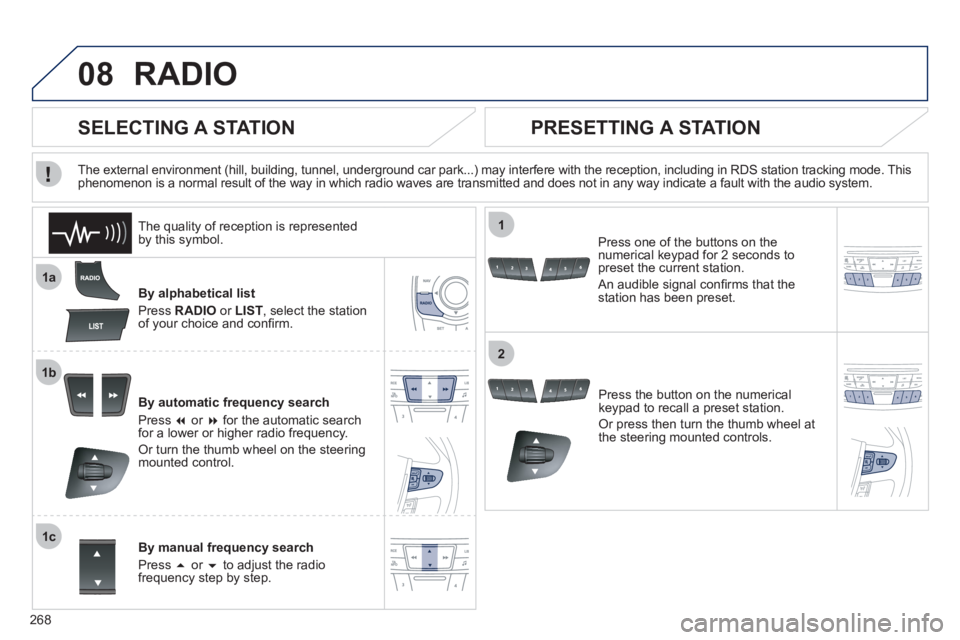
268
08
1a
1b
1c
1
2
RADIO
By alphabetical list
Press RADIO
or LIST
, select the station
of your choice and confi rm.
By automatic frequency search
Press �
or �
for the automatic search
for a lower or higher radio frequency.
Or turn the thumb wheel on the steering
mounted control.
By manual frequency search
Press �
or �
to adjust the radio
frequency step by step.
Press the button on the numerical
keypad to recall a preset station.
Or press then turn the thumb wheel at
the steering mounted controls.
SELECTING A STATION
The external environment (hill, building, tunnel, underground car park...) may interfere with the reception, including in RDS station tracking mode. This
phenomenon is a normal result of the way in which radio waves are transmitted and does not in any way indicate a fault with the audio system.
PRESETTING A STATION
Press one of the buttons on the
numerical keypad for 2 seconds to
preset the current station.
An audible signal confi rms that the
station has been preset.
The quality of reception is represented
by this symbol.
Page 272 of 340
270
09 MUSIC MEDIA PLAYERS
Access to the "MUSIC MEDIA PLAYER" menu
" MEDIA
"
" Following media source
"
" Eject USB device
" (if USB
connected)
" Play mode
" (" Normal
",
" Random
", " Random on all
media
", " Repetition
")
" Audio settings
" (see this section)
" Activate/Deactivate AUX input
" List of the current media
tracks.
This list can also be displayed by pressing LIST
at the steering mounted controls.
Go from the list to the menu (left/right).
or
Press MEDIA
.
Page 274 of 340

272
09
1
2
3
MUSIC MEDIA PLAYERS
CD, MP3 CD, USB PLAYER
Insert the CD in the player, insert the USB memory
stick in the USB player or connect the USB
peripheral to the USB port using a suitable cable
(not supplied).
The system builds playlists (in temporary memory),
an operation which can take from a few seconds to
several minutes.
Reduce the number of non-music fi les and the
number of folders to reduce the waiting time.
The playlists are updated every time the ignition is
switched off or connection of a USB memory stick.
Play starts automatically after a period which
depends on the capacity of the USB memory stick.
SELECTION OF SOURCE
The SOURCE
button on the steering mounted controls allows a
direct change to the next media source.
" CD/CD MP3
"
" USB, IPod
"
" AUX
"
" STREAMING
" " RADIO
"
Press MEDIA
to display the " MEDIA
"
menu.
Select " Following media source
" and
confi rm.
Repeat the operation as many times as necessary to obtain the
desired media source (except for radio which is accessible either
with SOURCE
or RADIO
).
Page 289 of 340
287
The system is coded in such a way that it will only
operate in your vehicle. If it is to be installed in another
vehicle, contact your PEUGEOT dealer for confi guration
of the system.
AUDIO SYSTEM/BLUETOOTH
01 First steps
For safety reasons, the driver must only carry out
operations which require prolonged attention while the
vehicle is stationary.
When the engine is switched off and to prevent
discharging of the battery, the audio system may switch
off after a few minutes.
CONTENTS
02 Steering mounted controls
03 Main menu
04 Audio
05 Using the telephone
06 Audio settings
07 Configuration
08 Trip computer
09 Screen menu maps
Frequently asked questions p.
p.
p.
p.
p.
p.
p.
p.
p.
p.
288
289
290
291
301
309
310
311
312
314
Page 291 of 340
02
289
STEERING MOUNTED CONTROLS
- Press: access to the instrument
panel screen menu.
- Rotation: navigation in the
instrument panel screen menu.
- Increase volume.
- Mute/restore sound.
- Decrease volume.
- Rotation:
Radio: search for previous/next
station.
Media: previous/next track.
Press: confi rmation.
-
Change the audio source.
Long press: mute.
- Accept an incoming call.
- Access to the Telephone menu if a
call is in progress.
- Long press: reject an incoming call or
end a call in progress.
- Long press: access to the "Telephone"
menu if no call in progress.
- Select the type of permanent display
on the screen between window and
full screen modes.
- Long press: black screen (DARK).
- Radio: display the list of stations.
Media: display the list of tracks.
Long press: update the list of
stations received.


