2011 Peugeot 308 SW BL ECO mode
[x] Cancel search: ECO modePage 317 of 356

315
FREQUENTLY ASKED QUESTIONS
QUESTION
ANSWER
SOLUTION
There is a difference in
sound quality between
the different audio
sources (radio, CD...). For optimum sound quality, the audio settings (Volume, Bass, Treble,
Ambience, Loudness) can be adapted to the different sound sources, which
may result in audible differences when changing source (radio, CD...). Check that the audio settings (Volume, Bass,
Treble, Ambience, Loudness) are adapted to
the sources listened to. It is advisable to set
the AUDIO functions (Bass, Treble, Front-Rear
Balance, Left-Right Balance) to the middle
position, select the Linear musical ambience and
set the loudness correction to the "Active" position
in CD mode or to the "Inactive" position in radio
mode.
The CD is ejected
automatically or is not
played by the player. The CD is inserted upside down, is unplayable, does not contain any
audio data or contains an audio format which the player cannot play.
The CD is protected by an anti-pirating protection system which is not
recognised by the audio equipment.
- Check that the CD is inserted in the player the
right way up.
- Check the condition of the CD: the CD cannot
be played if it is too damaged.
- Check the content in the case of a recorded
CD: consult the advice in the Audio section.
- The audio equipment's CD player does not
play DVDs.
- Because of their quality level, certain writeable
CDs will not be played by the audio system.
The CD player sound is
poor. The CD used is scratched or of poor quality. Insert good quality CDs and store them in suitable
conditions.
The audio equipment settings (bass, treble, ambiences) are unsuitable. Set the treble or bass level to 0, without selecting
an ambience.
Page 318 of 356
316
QUESTION
ANSWER
SOLUTION
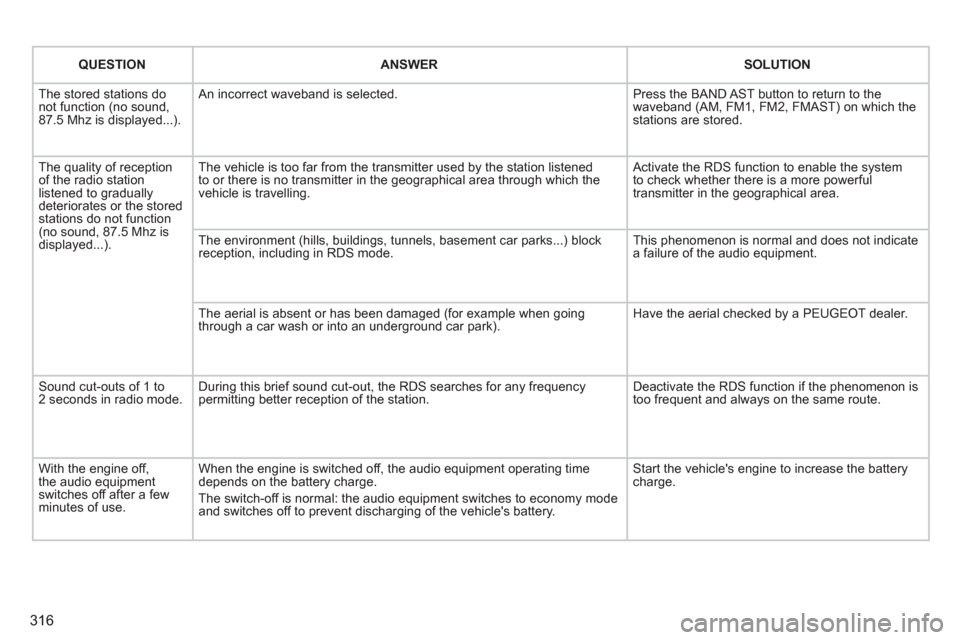
The stored stations do
not function (no sound,
87.5 Mhz is displayed...). An incorrect waveband is selected. Press the BAND AST button to return to the
waveband (AM, FM1, FM2, FMAST) on which the
stations are stored.
The quality of reception
of the radio station
listened to gradually
deteriorates or the stored
stations do not function
(no sound, 87.5 Mhz is
displayed...). The vehicle is too far from the transmitter used by the station listened
to or there is no transmitter in the geographical area through which the
vehicle is travelling. Activate the RDS function to enable the system
to check whether there is a more powerful
transmitter in the geographical area.
The environment (hills, buildings, tunnels, basement car parks...) block
reception, including in RDS mode. This phenomenon is normal and does not indicate
a failure of the audio equipment.
The aerial is absent or has been damaged (for example when going
through a car wash or into an underground car park). Have the aerial checked by a PEUGEOT dealer.
Sound cut-outs of 1 to
2 seconds in radio mode. During this brief sound cut-out, the RDS searches for any frequency
permitting better reception of the station. Deactivate the RDS function if the phenomenon is
too frequent and always on the same route.
With the engine off,
the audio equipment
switches off after a few
minutes of use. When the engine is switched off, the audio equipment operating time
depends on the battery charge.
The switch-off is normal: the audio equipment switches to economy mode
and switches off to prevent discharging of the vehicle's battery. Start the vehicle's engine to increase the battery
charge.
Page 325 of 356
323
04
1
2
3
4
1
2
3
4
AUDIO
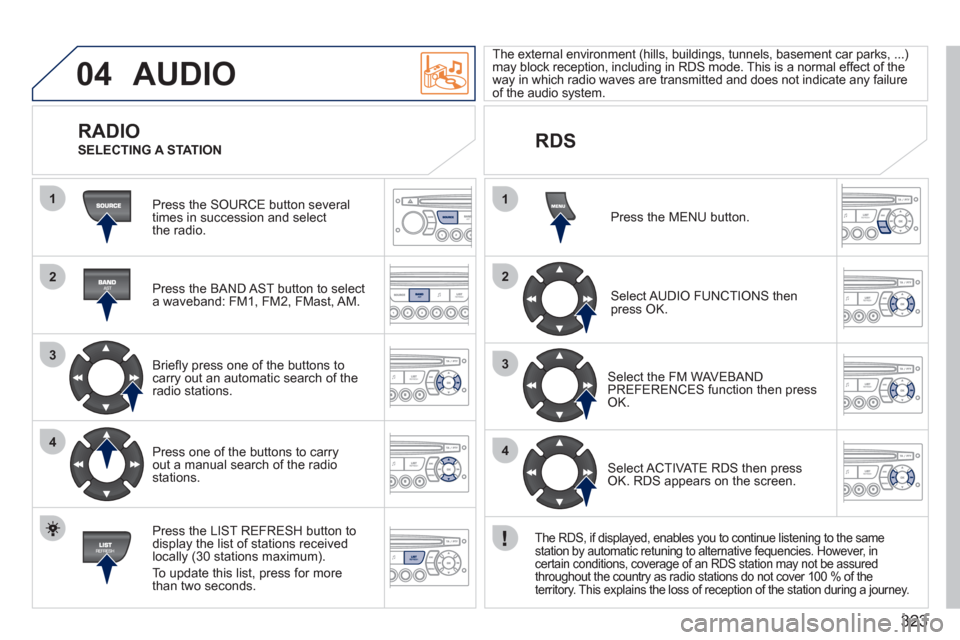
Press the SOURCE button several
times in succession and select
the radio.
Press the BAND AST button to select
a waveband: FM1, FM2, FMast, AM.
Briefl y press one of the buttons to
carry out an automatic search of the
radio stations.
Press one of the buttons to carry
out a manual search of the radio
stations.
Press the LIST REFRESH button to
display the list of stations received
locally (30 stations maximum).
To update this list, press for more
than two seconds.
The external environment (hills, buildings, tunnels, basement car parks, ...)
may block reception, including in RDS mode. This is a normal effect of the
way in which radio waves are transmitted and does not indicate any failure
of the audio system.
RDS
RADIO
SELECTING A STATION
Press the MENU button.
Select AUDIO FUNCTIONS then
press OK.
Select the FM WAVEBAND
PREFERENCES function then press
OK.
Select ACTIVATE RDS then press
OK. RDS appears on the screen.
The RDS, if displayed, enables you to continue listening to the same
station by automatic retuning to alternative fequencies. However, in
certain conditions, coverage of an RDS station may not be assured
throughout the country as radio stations do not cover 100 % of the
territory. This explains the loss of reception of the station during a journey.
Page 331 of 356
329
06
1
2
3
4
5
6
7
8
9
10
BLUETOOTH
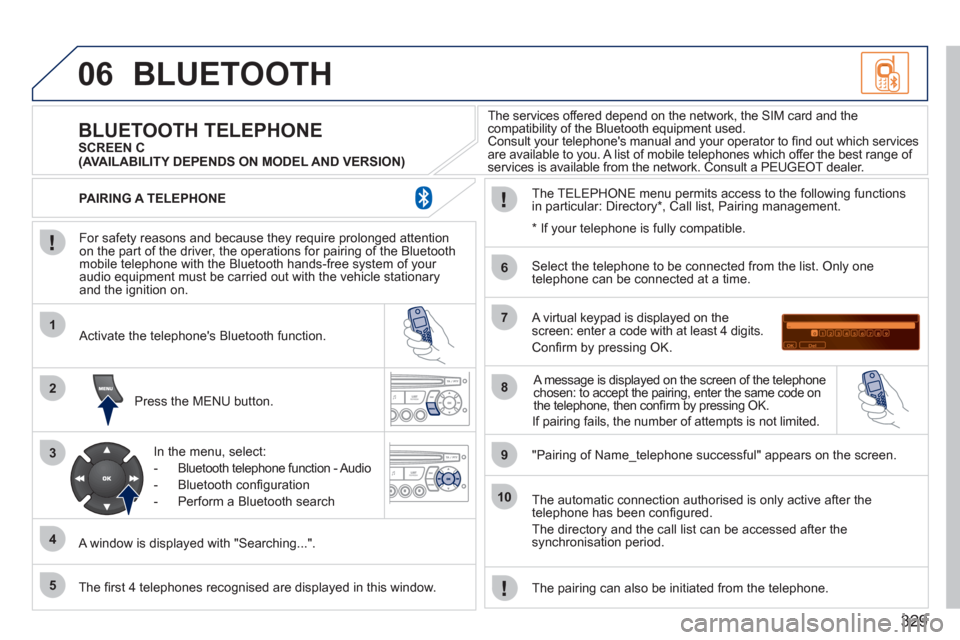
For safety reasons and because they require prolonged attention
on the part of the driver, the operations for pairing of the Bluetooth
mobile telephone with the Bluetooth hands-free system of your
audio equipment must be carried out with the vehicle stationary
and the ignition on.
Press the MENU button.
A window is displayed with "Searching...".
Activate the telephone's Bluetooth function.
In the menu, select:
- Bluetooth telephone function - Audio
- Bluetooth confi guration
- Perform a Bluetooth search
The services offered depend on the network, the SIM card and the
compatibility of the Bluetooth equipment used.
Consult your telephone's manual and your operator to fi nd out which services
are available to you. A list of mobile telephones which offer the best range of
services is available from the network. Consult a PEUGEOT dealer.
BLUETOOTH TELEPHONE
SCREEN C
The TELEPHONE menu permits access to the following functions
in particular: Directory * , Call list, Pairing management.
The fi rst 4 telephones recognised are displayed in this window.
A virtual keypad is displayed on the
screen: enter a code with at least 4 digits.
Confi rm by pressing OK.
"Pairing of Name_telephone successful" appears on the screen.
Select the telephone to be connected from the list. Only one
telephone can be connected at a time.
A message is displayed on the screen of the telephone
chosen: to accept the pairing, enter the same code on
the telephone, then confi rm by pressing OK.
The automatic connection authorised is only active after the
telephone has been confi gured.
The directory and the call list can be accessed after the
synchronisation period.
PAIRING A TELEPHONE
The pairing can also be initiated from the telephone.
(AVAILABILITY DEPENDS ON MODEL AND VERSION)
*
If your telephone is fully compatible.
If pairing fails, the number of attempts is not limited.
Page 339 of 356
337
FREQUENTLY ASKED QUESTIONS
QUESTION
ANSWER
SOLUTION
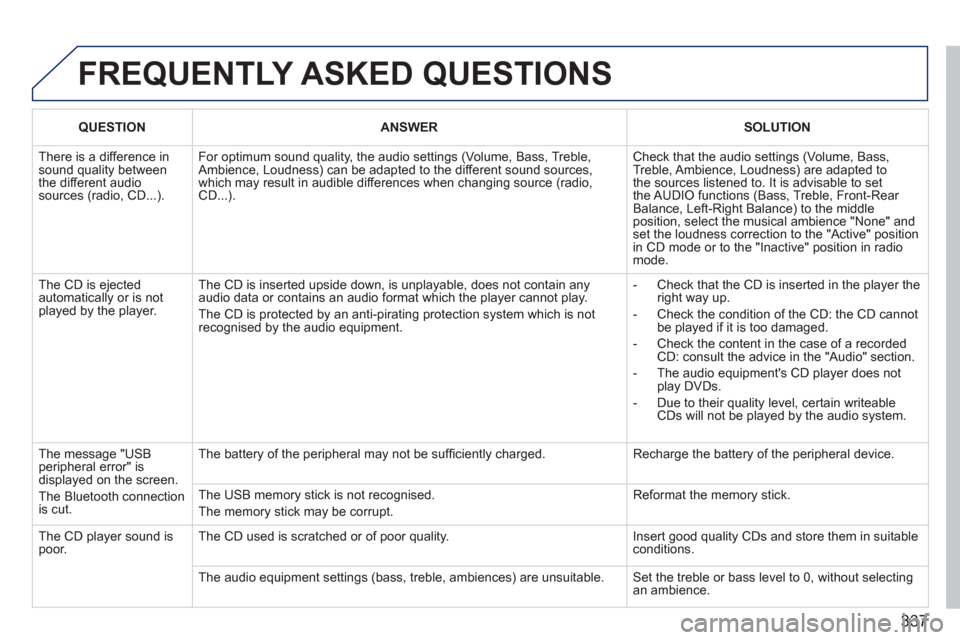
There is a difference in
sound quality between
the different audio
sources (radio, CD...). For optimum sound quality, the audio settings (Volume, Bass, Treble,
Ambience, Loudness) can be adapted to the different sound sources,
which may result in audible differences when changing source (radio,
CD...). Check that the audio settings (Volume, Bass,
Treble, Ambience, Loudness) are adapted to
the sources listened to. It is advisable to set
the AUDIO functions (Bass, Treble, Front-Rear
Balance, Left-Right Balance) to the middle
position, select the musical ambience "None" and
set the loudness correction to the "Active" position
in CD mode or to the "Inactive" position in radio
mode.
The CD is ejected
automatically or is not
played by the player. The CD is inserted upside down, is unplayable, does not contain any
audio data or contains an audio format which the player cannot play.
The CD is protected by an anti-pirating protection system which is not
recognised by the audio equipment.
- Check that the CD is inserted in the player the
right way up.
- Check the condition of the CD: the CD cannot
be played if it is too damaged.
- Check the content in the case of a recorded
CD: consult the advice in the "Audio" section.
- The audio equipment's CD player does not
play DVDs.
- Due to their quality level, certain writeable
CDs will not be played by the audio system.
The message "USB
peripheral error" is
displayed on the screen.
The Bluetooth connection
is cut. The battery of the peripheral may not be suffi ciently charged. Recharge the battery of the peripheral device.
The USB memory stick is not recognised.
The memory stick may be corrupt. Reformat the memory stick.
The CD player sound is
poor. The CD used is scratched or of poor quality. Insert good quality CDs and store them in suitable
conditions.
The audio equipment settings (bass, treble, ambiences) are unsuitable. Set the treble or bass level to 0, without selecting
an ambience.
Page 340 of 356
338
QUESTION
ANSWER
SOLUTION
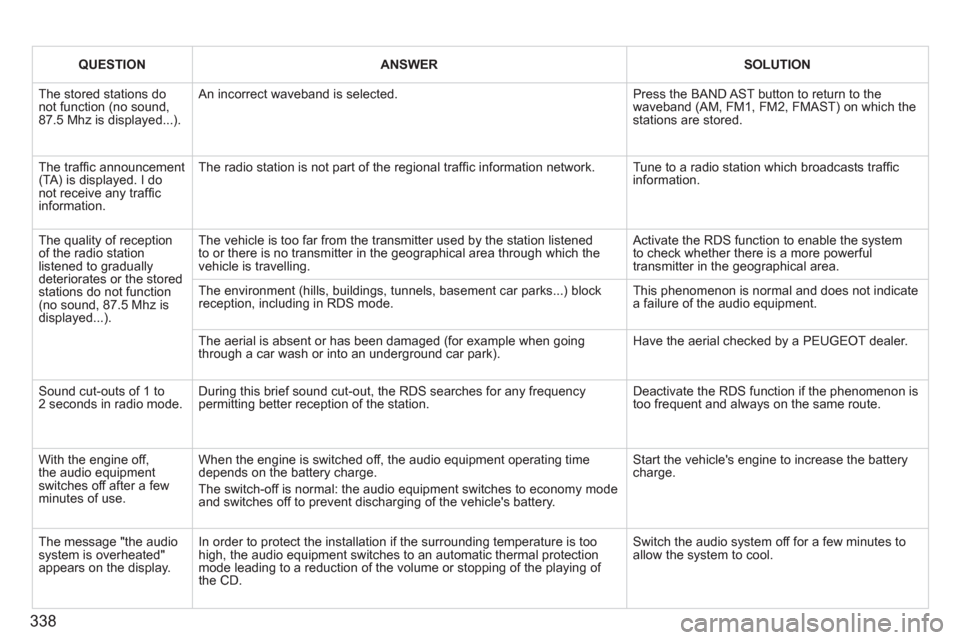
The stored stations do
not function (no sound,
87.5 Mhz is displayed...). An incorrect waveband is selected. Press the BAND AST button to return to the
waveband (AM, FM1, FM2, FMAST) on which the
stations are stored.
The traffi c announcement
(TA) is displayed. I do
not receive any traffi c
information. The radio station is not part of the regional traffi c information network. Tune to a radio station which broadcasts traffi c
information.
The quality of reception
of the radio station
listened to gradually
deteriorates or the stored
stations do not function
(no sound, 87.5 Mhz is
displayed...). The vehicle is too far from the transmitter used by the station listened
to or there is no transmitter in the geographical area through which the
vehicle is travelling. Activate the RDS function to enable the system
to check whether there is a more powerful
transmitter in the geographical area.
The environment (hills, buildings, tunnels, basement car parks...) block
reception, including in RDS mode. This phenomenon is normal and does not indicate
a failure of the audio equipment.
The aerial is absent or has been damaged (for example when going
through a car wash or into an underground car park). Have the aerial checked by a PEUGEOT dealer.
Sound cut-outs of 1 to
2 seconds in radio mode. During this brief sound cut-out, the RDS searches for any frequency
permitting better reception of the station. Deactivate the RDS function if the phenomenon is
too frequent and always on the same route.
With the engine off,
the audio equipment
switches off after a few
minutes of use. When the engine is switched off, the audio equipment operating time
depends on the battery charge.
The switch-off is normal: the audio equipment switches to economy mode
and switches off to prevent discharging of the vehicle's battery. Start the vehicle's engine to increase the battery
charge.
The message "the audio
system is overheated"
appears on the display. In order to protect the installation if the surrounding temperature is too
high, the audio equipment switches to an automatic thermal protection
mode leading to a reduction of the volume or stopping of the playing of
the CD. Switch the audio system off for a few minutes to
allow the system to cool.
Page 347 of 356
345
VISUAL SEARCH
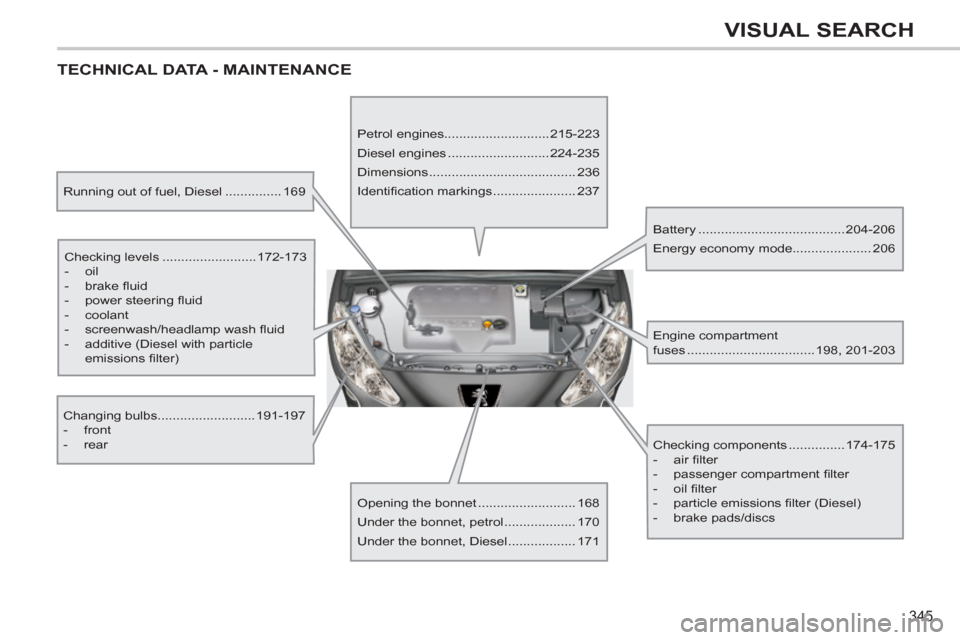
TECHNICAL DATA - MAINTENANCE
Running out of fuel, Diesel ............... 169
Checking levels .........................172-173
- oil
- brake fl uid
- power steering fl uid
- coolant
- screenwash/headlamp wash fl uid
- additive (Diesel with particle
emissions fi lter)
Changing bulbs..........................191-197
- front
- rear
Opening the bonnet .......................... 168
Under the bonnet, petrol ................... 170
Under the bonnet, Diesel .................. 171
Petrol engines............................215-223
Diesel engines ...........................224-235
Dimensions ....................................... 236
Identifi cation markings ...................... 237
Battery .......................................204-206
Energy economy mode..................... 206
Checking components ...............174-175
- air fi lter
- passenger compartment fi lter
- oil fi lter
- particle emissions fi lter (Diesel)
- brake pads/discs
Engine compartment
fuses ..................................198, 201-203
Page 349 of 356
347
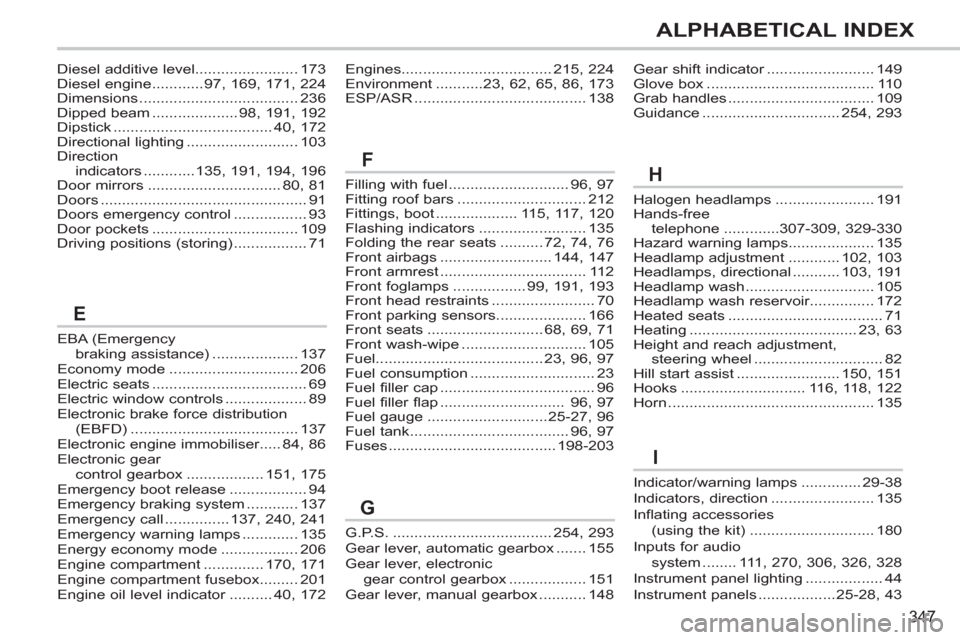
ALPHABETICAL INDEX
EBA (Emergency
braking assistance) .................... 137
Economy mode .............................. 206
Electric seats .................................... 69
Electric window controls ................... 89
Electronic brake force distribution
(EBFD) ....................................... 137
Electronic engine immobiliser..... 84, 86
Electronic gear
control gearbox .................. 151, 175
Emergency boot release .................. 94
Emergency braking system ............ 137
Emergency call ............... 137, 240, 241
Emergency warning lamps ............. 135
Energy economy mode .................. 206
Engine compartment .............. 170, 171
Engine compartment fusebox......... 201
Engine oil level indicator .......... 40, 172Filling with fuel ............................ 96, 97
Fitting roof bars .............................. 212
Fittings, boot ................... 115, 117, 120
Flashing indicators ......................... 135
Folding the rear seats .......... 72, 74, 76
Front airbags .......................... 144, 147
Front armrest .................................. 112
Front foglamps ................. 99, 191, 193
Front head restraints ........................ 70
Front parking sensors..................... 166
Front seats ........................... 68, 69, 71
Front wash-wipe ............................. 105
Fuel....................................... 23, 96, 97
Fuel consumption ............................. 23
Fuel filler cap .................................... 96
Fuel filler flap ............................. 96, 97
Fuel gauge ............................ 25-27, 96
Fuel tank ..................................... 96, 97
Fuses ....................................... 198-203Halogen headlamps ....................... 191
Hands-free
telephone .............307-309, 329-330
Hazard warning lamps.................... 135
Headlamp adjustment ............ 102, 103
Headlamps, directional ........... 103, 191
Headlamp wash .............................. 105
Headlamp wash reservoir............... 172
Heated seats .................................... 71
Heating ....................................... 23, 63
Height and reach adjustment,
steering wheel .............................. 82
Hill start assist ........................ 150, 151
Hooks ............................. 116, 118, 122
Horn ................................................ 135 Diesel additive level........................ 173
Diesel engine ............97, 169, 171, 224
Dimensions ..................................... 236
Dipped beam .................... 98, 191, 192
Dipstick ..................................... 40, 172
Directional lighting .......................... 103
Direction
indicators ............135, 191, 194, 196
Door mirrors ............................... 80, 81
Doors ................................................ 91
Doors emergency control ................. 93
Door pockets .................................. 109
Driving positions (storing) ................. 71Engines................................... 215, 224
Environment ...........23, 62, 65, 86, 173
ESP/ASR ........................................ 138
E
FH
Gear shift indicator ......................... 149
Glove box ....................................... 110
Grab handles .................................. 109
Guidance ................................ 254, 293
G.P.S. ..................................... 254, 293
Gear lever, automatic gearbox ....... 155
Gear lever, electronic
gear control gearbox .................. 151
Gear lever, manual gearbox ........... 148
G
Indicator/warning lamps .............. 29-38
Indicators, direction ........................ 135
Inflating accessories
(using the kit) ............................. 180
Inputs for audio
system ........ 111, 270, 306, 326, 328
Instrument panel lighting .................. 44
Instrument panels .................. 25-28, 43
I